1. 安装 Git
2. 告诉 Git 你是谁
在 VS Code 里打开终端
git config --global user.name "your name"
git config --global user.email "你的邮箱"
验证是否设置成功
git config --global --list
3、链接SSH Key(连接 GitHub 必需)
ssh-keygen -t ed25519 -C "你的GitHub注册邮箱"(一直按enter就好)
检查是否已有密钥: ls ~/.ssh/
出现下方内容则成功 :id_ed25519 id_ed25519.pub
显示SSH公钥: cat ~/.ssh/id_ed25519.pub
测试ssh连接: ssh -T git@github.com
弹出以下内容则成功:
Hi CheEdward! You've successfully authenticated, but GitHub does not provide shell access.
4、分支操作(常用)
4.0 拉取
第一次使用 git clone
往后拉取最新的的代码 git pull origin main #每天工作前拉取一个最新的代码
4.1 切换到本地分支
第一次解绝lidar-bug,创立新分支 git checkout -b fix/lidar-bug
没有解决完,第二天切换到自己的老分支 git checkout fix/lidar-bug
第三天解决新bug git checkout -b fix/gps-bug
常用切换分支命令:
切换道指定分支 git switch 分支名
建立并转到新分支 git switch -c 分支名
git checkout (老版本就有的功能) 切换分支、恢复文件、创建分支
git checkout main # 切到 main 分支
git checkout -- file.txt # 丢弃 file.txt 的改动 ← 这是checkout完全不同的操作!
git checkout -b feature/xxx
4.2 查看分支 git branch
4.3 修改后
保存文件 ctrl +s
手动添加并提交使用命令
git add . //全部暂存
或
git add src/main.cpp # 只暂存这个文件
把暂存区的内容提交到仓库
git commit -m "描述你的改动"
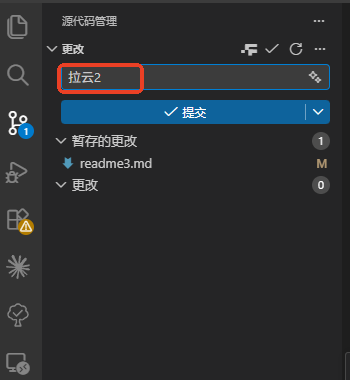
暂存与提交图形界面 (提交取一个名字拉云2,如上图,点击)提交
4.4、提交远程
1、git checkout main # 切到 main 分支
2、(重要:在push前先pull最新代码)git pull origin main
3、合并到main分支 git merge fix/lidar-bug
4、推送到远程
git push origin main
↑ ↑ ↑
命令 远程别名 要推送的分支
git remote -v // 可以查看origin指向远程仓库,origin是指向远程仓库的默认别名
git status //查看有哪些操作
4.5 回退(发现有问题,想回到老板本)
一、本地回退(没 push)
git log --oneline # 先看历史,找到要回退的版本
方式1:撤销 commit,但改动保留在工作区(改错了想重改)
git reset HEAD~1 # 撤销最近1个commit,改动回到工作区
git reset HEAD~3 # 撤销最近3个commit
方式2:撤销 commit,改动保留在暂存区
git reset --soft HEAD~1
方式3:直接丢弃,啥都不要了 ⚠️ 谨慎
git reset --hard HEAD~1 # 代码和 commit 全部丢掉
二、远程回退(已 push)
安全方式:revert 会生成一个新 commit,把旧的"反向抵消"
git revert HEAD # 撤销最近一个 commit
git revert abc123 # 撤销指定 commit
git push origin main # 把 revert 推上去
▎ push 之后不要用 reset,否则同事拉代码会炸。
三、回到某个特定版本
git log --oneline # 找到目标版本的 hash
git revert abc123..HEAD # 撤销从 abc123 之后的所有 commit
四、实用:回退单个文件
git checkout abc123 -- 文件名 # 把某个文件恢复到 abc123 版本
git checkout HEAD~1 -- 文件名 # 把某个文件恢复到上一个 commit 的版本
4.6 其他
更改分支名称
1. 删除远程旧分支
git push origin --delete feature/wsw
2. 推送新分支
git push origin feature/slam-init
┌────────────────┬─────────────────────────────────┐
│ 场景 │ 命令 │
├────────────────┼─────────────────────────────────┤
│ 改当前分支名 │ git branch -m 新名字 │
├────────────────┼─────────────────────────────────┤
│ 改别的分支名 │ git branch -m 旧名字 新名字 │
├────────────────┼─────────────────────────────────┤
│ 删除远程旧分支 │ git push origin --delete 旧名字 │
└────────────────┴─────────────────────────────────┘
-m 是 --move 的缩写,记住 m = move(移动/改名) 就行。