Flux:就是流的意思,Stream也表示流,但是我们通常用来表示同步的流式输出,而Flux则用来表示异步
Pom依赖
cpp
<dependency>
    <groupId>org.springframework.boot</groupId>
    <artifactId>spring-boot-starter-webflux</artifactId>
</dependency>
测试代码示例1(直观显示)
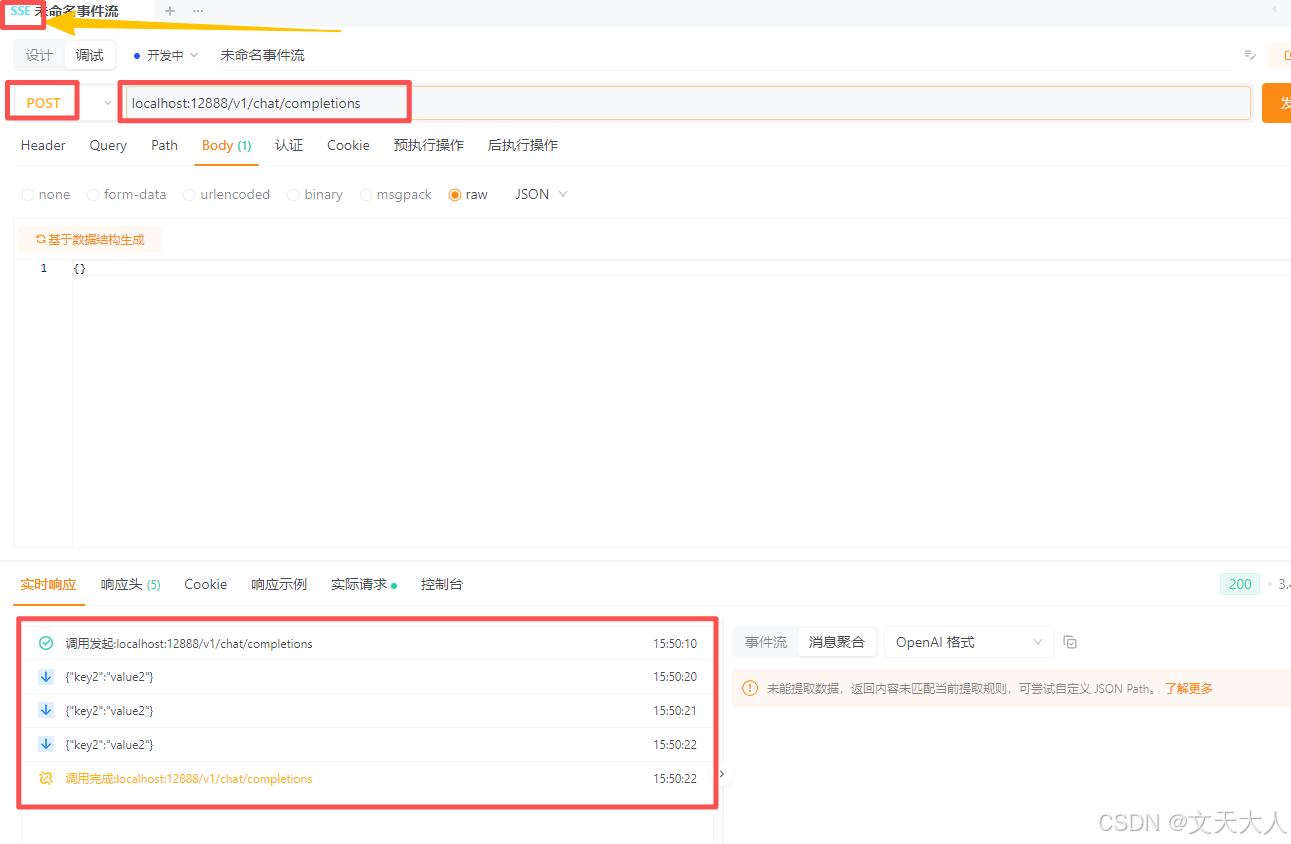
下面的代码演示每间隔1秒,往前端推送1条消息,一共推送3条,方便直观看到流的输出
cpp
package 你的包名

import com.fasterxml.jackson.databind.ObjectMapper;
import org.springframework.http.MediaType;
import org.springframework.web.bind.annotation.PostMapping;
import org.springframework.web.bind.annotation.RequestBody;
import org.springframework.web.bind.annotation.RequestMapping;
import org.springframework.web.bind.annotation.RestController;
import reactor.core.publisher.Flux;

import java.util.HashMap;
import java.util.Map;

@RestController
@RequestMapping("/v1/chat")
public class ShiWenTianTestController2 {

    @PostMapping(path = "/completions", produces = MediaType.TEXT_EVENT_STREAM_VALUE)
    public Flux<String> completions(@RequestBody String param) {
        Map<String, String> streamData = new HashMap<>();
        streamData.put("key2", "value2");

        ObjectMapper objectMapper = new ObjectMapper();
        String jsonString;
        try {
            jsonString = objectMapper.writeValueAsString(streamData);
        } catch (Exception e) {
            return Flux.error(e);
        }

        return Flux.interval(java.time.Duration.ofSeconds(1))
                .take(3) // 发送三次
                .map(tick -> jsonString);
    }
}
启动服务,使用HTTP测试工具发送一个SSE请求
测试代码示例2(绝大多数实际需求)
下面的代码模拟了从一个地方一直取数据,取到就推送给前端,当取不到了,我们就自动断开和前端的连接
根据经验和约定,SSE输出,我们通常都使用一个事件,来告诉前端当前这条消息是哪个事件,方便处理业务,所以这个方法不再返回Flux<String>,而是返回Flux<ServerSentEvent<String>>
cpp
import com.fasterxml.jackson.databind.ObjectMapper;
import org.springframework.http.MediaType;
import org.springframework.http.codec.ServerSentEvent;
import org.springframework.web.bind.annotation.*;
import reactor.core.publisher.Flux;
import reactor.core.publisher.Sinks;

import java.util.HashMap;
import java.util.Map;

@RestController
@RequestMapping("/v1/chat")
public class ShiWenTianTestController {

    private volatile Sinks.Many<ServerSentEvent<String>> sink;

    @PostMapping(path = "/completions", produces = MediaType.TEXT_EVENT_STREAM_VALUE)
    public Flux<ServerSentEvent<String>> completions(@RequestBody String param) throws Exception {

        Sinks.Many<ServerSentEvent<String>> sink = Sinks.many().unicast().onBackpressureBuffer();
        this.sink = sink;

        Map<String, String> streamData = new HashMap<>();
        streamData.put("key2", "value2");
        ObjectMapper objectMapper = new ObjectMapper();
        String jsonString = objectMapper.writeValueAsString(streamData);

        new Thread(() -> {
            try {
                while(true){
                    Thread.sleep(1000);
                    sink.tryEmitNext(ServerSentEvent.builder(jsonString).event("EVENT_1").build());
                }
                //sink.tryEmitComplete();
            } catch (Exception e) {
                sink.tryEmitError(e);
            }
        }).start();
        return sink.asFlux();
    }

    @GetMapping(path = "/end")
    public String end() throws Exception {
        this.sink.tryEmitComplete();
        return "OK";
    }

    @GetMapping(path = "/error")
    public String error() throws Exception {
        this.sink.tryEmitError(new IllegalStateException("手动报错"));
        return "OK";
    }

}
请求/completions接口会一直推送数据
请求/end或者/error接口则停止推送数据