⒈目的
在YOLO模型训练及转换为ONNX格式之后,通过Winform部署ONNX模型,掌握ONNX模型在Winform下部署的应用方法,拉通YOLO从模型训练到部署的全过程技术。
⒉界面设计
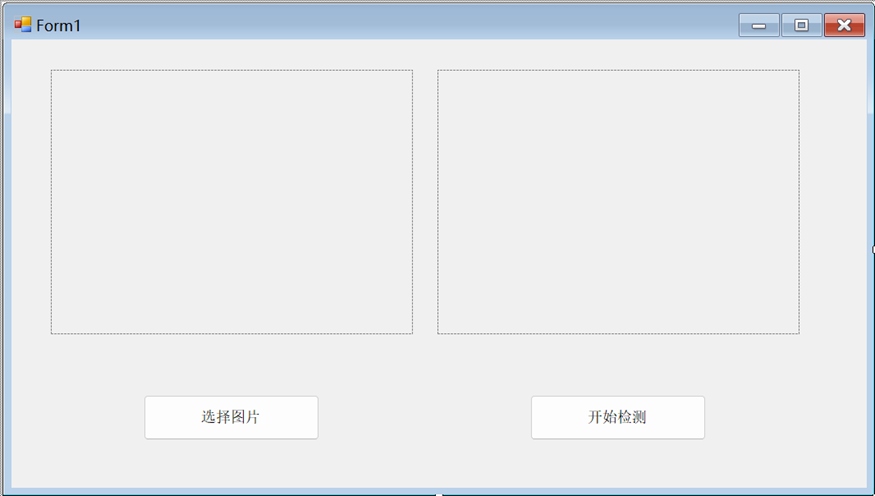
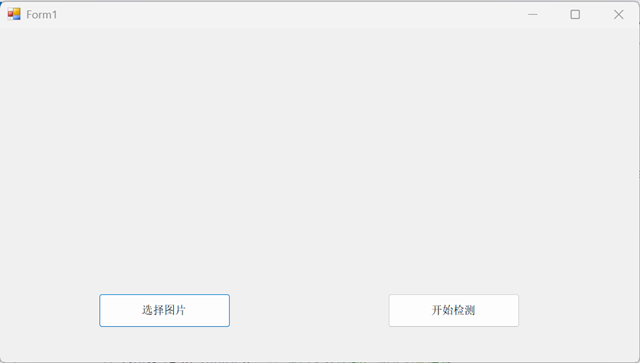
如下图设计ONNX模型部署界面,所用控件及功能如下:
pictureBox1:下图左,用于显示被预测的模型;
pictureBox2:下图右,用于显示预测后的模型;
"选择图片":button1,用于选择被预测的图片并在pictureBox1中显示;
"开始检测":button2,用于启动模型预测并将模型预测结果显示在pictureBox2中。
⒊NuGet程序包安装
本应用使用ONNX Runtimebu部署YOLO模型,需要安装的NuGet程序包如下:
Microsoft.ML.OnnxRuntime;
System.Drawing.Common(用于图像处理)。
⒋代码编写
using System;
using System.Collections.Generic;
using System.ComponentModel;
using System.Data;
using System.Drawing;
using System.Drawing.Imaging;
using System.IO;
using System.Linq;
using System.Text;
using System.Threading.Tasks;
using System.Windows.Forms;
using Microsoft.ML.OnnxRuntime;
using Microsoft.ML.OnnxRuntime.Tensors;
namespace 基于ONNX模型Winform应用测试
{
public partial class Form1 : Form
{
private string currentImagePath = "";
public Form1()
{
InitializeComponent();
}
private void Form1_Load(object sender, EventArgs e)
{
}
// 检测类别名称
private static readonly string\[\] classNames = new\[\] {
"person", "bicycle", "car", "motorcycle", "airplane", "bus", "train", "truck", "boat", "traffic light",
"fire hydrant", "stop sign", "parking meter", "bench", "bird", "cat", "dog", "horse", "sheep", "cow",
"elephant", "bear", "zebra", "giraffe", "backpack", "umbrella", "handbag", "tie", "suitcase", "frisbee",
"skis", "snowboard", "sports ball", "kite", "baseball bat", "baseball glove", "skateboard", "surfboard",
"tennis racket", "bottle", "wine glass", "cup", "fork", "knife", "spoon", "bowl", "banana", "apple",
"sandwich", "orange", "broccoli", "carrot", "hot dog", "pizza", "donut", "cake", "chair", "couch",
"potted plant", "bed", "dining table", "toilet", "tv", "laptop", "mouse", "remote", "keyboard", "cell phone",
"microwave", "oven", "toaster", "sink", "refrigerator", "book", "clock", "vase", "scissors", "teddy bear",
"hair drier", "toothbrush"
};
// 运行目标检测
public List<Prediction> RunDetection(string modelPath, string imagePath)
{
// 加载模型
using var session = new InferenceSession(modelPath);
// 加载并预处理图像
var (inputTensor, originalWidth, originalHeight) = LoadImage(imagePath);
// 准备输入参数
var inputs = new List<NamedOnnxValue> { NamedOnnxValue.CreateFromTensor("images", inputTensor) };
// 运行模型推理
using var results = session.Run(inputs);
// 处理输出结果
var outputTensor = results.First().AsTensor<float>();
var predictions = ProcessOutput(outputTensor, originalWidth, originalHeight);
return predictions;
}
// 加载并预处理图像
private static (DenseTensor<float> tensor, int width, int height) LoadImage(string imagePath)
{
using var image = Image.FromFile(imagePath);
int originalWidth = image.Width;
int originalHeight = image.Height;
// 调整图像大小为模型输入尺寸(通常为640x640)
var resizedImage = ResizeImage(image, 640, 640);
// 图像转张量
var tensor = new DenseTensor<float>(new\[\] { 1, 3, 640, 640 });
var mean = new\[\] { 0.0f, 0.0f, 0.0f }; // 均值
var std = new\[\] { 1.0f, 1.0f, 1.0f }; // 标准差
using (var bitmap = new Bitmap(resizedImage))//加载已缩放为640*640的图片
{
for (int y = 0; y < bitmap.Height; y++)
{
//双重循环遍历每个像素(y行,x列)
for (int x = 0; x < bitmap.Width; x++)
{
var pixel = bitmap.GetPixel(x, y);//获取当前像素的RGB值
// 将像素值归一化并填充到张量的三个通道
tensor0, 0, y, x = (pixel.R / 255.0f - mean0) / std0;//通道1:红色
tensor0, 1, y, x = (pixel.G / 255.0f - mean1) / std1;//通道2:绿色
tensor0, 2, y, x = (pixel.B / 255.0f - mean2) / std2;//通道3:蓝色
}
}
}
return (tensor, originalWidth, originalHeight);
}
/// <summary>
/// 高质量地将图片缩放到指定尺寸
/// </summary>
/// <param name="image">原始图片</param>
/// <param name="width">目标宽度(通常为640)</param>
/// <param name="height">目标高度(通常为640)</param>
/// <returns>缩放后的Bitmap图片</returns>
private static Image ResizeImage(Image image, int width, int height)
{
// 1. 创建目标矩形区域:定义新图片的尺寸范围
var destRect = new Rectangle(0, 0, width, height);
// 2. 创建目标Bitmap:用于存储缩放后的图片
var destImage = new Bitmap(width, height);
// 3. 设置分辨率:保持与原图相同的 DPI,确保打印质量
destImage.SetResolution(image.HorizontalResolution, image.VerticalResolution);
// 4. 从目标Bitmap创建Graphics对象:用于执行绘制操作
using (var graphics = Graphics.FromImage(destImage))
{
// ===== 绘制质量设置 =====
// CompositingMode: SourceCopy表示直接覆盖,不混合透明通道
graphics.CompositingMode = System.Drawing.Drawing2D.CompositingMode.SourceCopy;
// CompositingQuality: 高质量合成,避免色带和伪影
graphics.CompositingQuality = System.Drawing.Drawing2D.CompositingQuality.HighQuality;
// InterpolationMode: HighQualityBicubic 使用双三次插值
// - 优点:缩放质量最高,边缘平滑
// - 缺点:计算较慢
graphics.InterpolationMode = System.Drawing.Drawing2D.InterpolationMode.HighQualityBicubic;
// SmoothingMode: 高质量模式,抗锯齿
graphics.SmoothingMode = System.Drawing.Drawing2D.SmoothingMode.HighQuality;
// PixelOffsetMode: HighQuality 减少缩放时的锯齿和模糊
graphics.PixelOffsetMode = System.Drawing.Drawing2D.PixelOffsetMode.HighQuality;
// ===== 执行图片缩放 =====
// 设置图像属性:TileFlipXY 防止边缘出现黑色条纹
using (var wrapMode = new System.Drawing.Imaging.ImageAttributes())
{
// WrapMode.TileFlipXY: 当像素超出范围时,使用镜像翻转填充
// 作用:防止缩放时边缘出现黑边或杂色
wrapMode.SetWrapMode(System.Drawing.Drawing2D.WrapMode.TileFlipXY);
// DrawImage 参数说明:
// - image: 源图片
// - destRect: 目标矩形(新图片的尺寸和位置)
// - 0, 0, image.Width, image.Height: 源图片的哪一部分被绘制(整个图片)
// - GraphicsUnit.Pixel: 使用像素单位
// - wrapMode: 边缘处理模式
graphics.DrawImage(
image,
destRect, // 目标区域:左上角(0,0),大小(width,height)
0, 0, // 源图左上角坐标
image.Width, image.Height, // 源图宽高(完整绘制)
GraphicsUnit.Pixel, // 坐标单位:像素
wrapMode // 边缘处理
);
}
}
return destImage; // 返回缩放后的图片
}
// 处理模型输出
private static List<Prediction> ProcessOutput(Tensor<float> output, int originalWidth, int originalHeight)
{
const float confidenceThreshold = 0.5f;//置信度阈值,只保留>550%的检测
const float nmsThreshold = 0.4f;//NMS阈值,IoU>40%认为是重复框
var predictions = new List<Prediction>();//存储所有有效预测
// YOLOv8 输出格式: 1, 84, 8400 或 1, 8400, 84
// 84 = 4 (bbox) + 80 (classes)
int numClasses = 80;//COCO数据集80个类别
int numPredictions;//预测框数量
// 根据维度判断输出格式(YOLOV8可能有两种输出格式)
//情况1:1,84,8400-通道优先格式
if (output.Dimensions.Length == 3)//确认是3维张量
{
// batch, 84, num_predictions 或 batch, num_predictions, 84
if (output.Dimensions1 == 84)
{
// 1, 84, 8400 格式
numPredictions = output.Dimensions2;//=8400
for (int i = 0; i < numPredictions; i++)
{
//提取第i个预测框的参数
float cx = output0, 0, i;//中心X(第0通道)
float cy = output0, 1, i;//中心Y(第1通道)
float w = output0, 2, i;//宽度(第2通道)
float h = output0, 3, i;//高度(第3通道)
// 找到概率最高的类别
int classId = 0;
float maxClassProbs = 0;
for (int c = 0; c < numClasses; c++)
{
float classProbs = output0, 4 + c, i;
if (classProbs > maxClassProbs)
{
maxClassProbs = classProbs;
classId = c;
}
}
float confidence = maxClassProbs;
if (confidence >= confidenceThreshold)
{
// 转换为像素坐标
float x1 = (cx - w / 2) / 640.0f * originalWidth;
float y1 = (cy - h / 2) / 640.0f * originalHeight;
float x2 = (cx + w / 2) / 640.0f * originalWidth;
float y2 = (cy + h / 2) / 640.0f * originalHeight;
predictions.Add(new Prediction
{
ClassId = classId,
Score = confidence,
BBox = new RectangleF(x1, y1, x2 - x1, y2 - y1)
});
}
}
}
//情况2:1,8400,84-预测优先格式
else if (output.Dimensions2 == 84)
{
// 1, 8400, 84 格式
numPredictions = output.Dimensions1;
for (int i = 0; i < numPredictions; i++)
{
float cx = output0, i, 0;//中心X
float cy = output0, i, 1;//中心Y
float w = output0, i, 2;//宽度
float h = output0, i, 3;//高度
// 找到概率最高的类别
int classId = 0;//存储类别ID
float maxClassProbs = 0;//存储最大概率
for (int c = 0; c < numClasses; c++)
{
float classProbs = output0, i, 4 + c;//索引4-83是的类别概率
if (classProbs > maxClassProbs)//比之前最大值大?
{
maxClassProbs = classProbs;//更新最大值
classId = c;//更新类别ID
}
}
//置信度过滤:只有超过阈值的预测才保留
float confidence = maxClassProbs;
if (confidence >= confidenceThreshold)//>0.5
{
// 转换为像素坐标
float x1 = (cx - w / 2) / 640.0f * originalWidth;//左上角X
float y1 = (cy - h / 2) / 640.0f * originalHeight;//左上角Y
float x2 = (cx + w / 2) / 640.0f * originalWidth;//右下角X
float y2 = (cy + h / 2) / 640.0f * originalHeight;//右下角Y
//添加预测列表
predictions.Add(new Prediction
{
ClassId = classId,//类别ID(0-79)
Score = confidence,//置信度
BBox = new RectangleF(x1, y1, x2 - x1, y2 - y1)//边界框
});
}
}
}
}
// 非极大值抑制
return NonMaxSuppression(predictions, nmsThreshold);
}
// 非极大值抑制:目标检测中的后处理步骤,用于去除重叠的重复检测框
private static List<Prediction> NonMaxSuppression(List<Prediction> predictions, float threshold)
{
// 第1步:创建结果列表
var result = new List<Prediction>();
// 第2步:按置信度降序排序
// OrderByDescending: 从高到低排序
// 例如: 0.95, 0.88, 0.85, 0.72, 0.65, ...
predictions = predictions.OrderByDescending(p => p.Score).ToList();
// 第3步:主循环 - 贪心算法
while (predictions.Count > 0)
{
// 3.1 取出最高置信度的框(排在最前面的)
var best = predictions0;
// 3.2 将最佳框加入最终结果
result.Add(best);
// 3.3 从待处理列表中移除最佳框
predictions.RemoveAt(0);
// 3.4 过滤:移除与best重叠度高的框
// Lambda表达式解释:
// p => IoU(best.BBox, p.BBox) < threshold
// IoU < threshold → 重叠少 → 保留(可能是另一个物体)
// IoU >= threshold → 重叠多 → 删除(重复检测)
predictions = predictions
.Where(p => IoU(best.BBox, p.BBox) < threshold)//点在这里表示续接的意思(链式调用)
.ToList();//把结果转为List
}
// 第4步:返回去重后的结果
return result;
}
// 计算交并比
private static float IoU(RectangleF a, RectangleF b)
{
// ===== 第1步:计算框A的面积 =====
float areaA = a.Width * a.Height;
if (areaA <= 0) return 0; // 宽高无效返回0,防止后续除零
// ===== 第2步:计算框B的面积 =====
float areaB = b.Width * b.Height;
if (areaB <= 0) return 0;
// ===== 第3步:计算交集边界 =====
float minX = Math.Max(a.Left, b.Left); // 交集左边 = max(框A左, 框B左)
float minY = Math.Max(a.Top, b.Top); // 交集中间 = max(框A上, 框B上)
float maxX = Math.Min(a.Right, b.Right); // 交集右边 = min(框A右, 框B右)
float maxY = Math.Min(a.Bottom, b.Bottom); // 交集下边 = min(框A下, 框B下)
// ===== 第4步:计算交集宽高 =====
float intersectionWidth = maxX - minX; // 交集宽度
float intersectionHeight = maxY - minY; // 交集高度
// ===== 第5步:判断是否有交集 =====
// 宽或高<=0 说明两个框要么分离要么只有边角接触
if (intersectionWidth <= 0 || intersectionHeight <= 0)
return 0;
// ===== 第6步:计算IoU =====
float intersectionArea = intersectionWidth * intersectionHeight; // 交集面积
return intersectionArea / (areaA + areaB - intersectionArea); // 交集/并集
}
private void button1_Click(object sender, EventArgs e)
{
// 选择图片
using (OpenFileDialog dlg = new OpenFileDialog())
{
dlg.Filter = "图片文件|*.jpg;*.jpeg;*.png;*.bmp";
if (dlg.ShowDialog() != DialogResult.OK) return;
currentImagePath = dlg.FileName;
// 在 pictureBox1 中显示图片
pictureBox1.Image = Image.FromFile(currentImagePath);
pictureBox1.SizeMode = PictureBoxSizeMode.Zoom;
}
}
private void button2_Click(object sender, EventArgs e)
{
if (string.IsNullOrEmpty(currentImagePath))
{
MessageBox.Show("请先选择图片", "提示");
return;
}
if (!File.Exists("yolov8n.onnx"))
{
MessageBox.Show("模型文件不存在", "错误");
return;
}
// 禁用按钮防止重复点击
button2.Enabled = false;
button2.Text = "检测中...";
// 异步运行检测
Task.Run(() =>
{
try
{
var predictions = RunDetection("yolov8n.onnx", currentImagePath);
// 生成结果图片路径
string outputPath = Path.Combine(
Path.GetDirectoryName(currentImagePath),
Path.GetFileNameWithoutExtension(currentImagePath) + "_result.jpg"
);
// 在原图上绘制检测结果并保存
DrawPredictionsToFile(currentImagePath, predictions, outputPath);
// 在 UI 线程更新界面
this.Invoke(new Action(() =>
{
// 在 pictureBox2 中显示结果图片
pictureBox2.Image = Image.FromFile(outputPath);
pictureBox2.SizeMode = PictureBoxSizeMode.Zoom;
button2.Text = $"检测完成 ({predictions.Count}个)";
button2.Enabled = true;
}));
}
catch (Exception ex)
{
this.Invoke(new Action(() =>
{
MessageBox.Show($"检测失败: {ex.Message}", "错误");
button2.Text = "开始检测";
button2.Enabled = true;
}));
}
});
}
// 绘制预测结果并保存到文件
private void DrawPredictionsToFile(string inputImagePath, List<Prediction> predictions, string outputImagePath)
{
// ===== 第1步:加载原始图片 =====
using var image = Image.FromFile(inputImagePath); // 从文件加载图片到内存
// ===== 第2步:创建Graphics对象 =====
using var graphics = Graphics.FromImage(image); // 创建Graphics用于绘图
// ===== 第3步:设置绘图质量 =====
graphics.SmoothingMode = System.Drawing.Drawing2D.SmoothingMode.AntiAlias; // 抗锯齿
graphics.InterpolationMode = System.Drawing.Drawing2D.InterpolationMode.HighQualityBicubic; // 高质量缩放
// ===== 第4步:遍历每个检测结果绘制 =====
foreach (var prediction in predictions)
{
var bbox = prediction.BBox; // 获取边界框
var label = $"{classNamesprediction.ClassId}: {prediction.Score:F2}"; // 组合标签文本
// ----- 绘制边界框 -----
using (var pen = new Pen(Color.Lime, 2)) // Lime=亮绿色, 2=线宽2像素
{
// DrawRectangle 需要4个参数:pen, X, Y, Width, Height
graphics.DrawRectangle(pen, bbox.X, bbox.Y, bbox.Width, bbox.Height);
}
// ----- 绘制标签(文字+背景) -----
using (var font = new Font("Arial", 10, FontStyle.Bold)) // Arial字体, 10号, 粗体
using (var brush = new SolidBrush(Color.Lime)) // 亮绿色文字
{
// 1. 测量文字尺寸(用于确定背景框大小)
var textSize = graphics.MeasureString(label, font);
// 2. 绘制标签背景(半透明黑色矩形)
// 参数:颜色(180透明度, 0,0,0=黑色), X, Y, 宽, 高
// bbox.Y - textSize.Height: 背景放在框的上方
graphics.FillRectangle(
new SolidBrush(Color.FromArgb(180, 0, 0, 0)), // 半透明黑色
bbox.X, bbox.Y - textSize.Height, // 左上角位置
textSize.Width, textSize.Height // 宽高与文字匹配
);
// 3. 绘制文字
// 参数:文字, 字体, 颜色, X, Y坐标
graphics.DrawString(label, font, brush, bbox.X, bbox.Y - textSize.Height);
}
}
// ===== 第5步:保存结果图片 =====
image.Save(outputImagePath, ImageFormat.Jpeg); // 保存为JPEG格式
}
}
// 预测结果类
public class Prediction
{
public int ClassId { get; set; }
public float Score { get; set; }
public RectangleF BBox { get; set; }
}
}
⒌设置
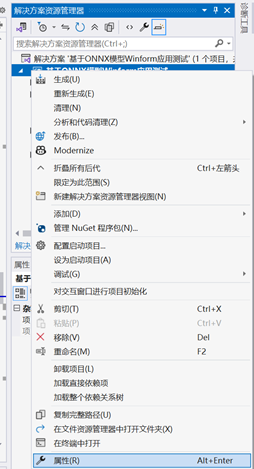
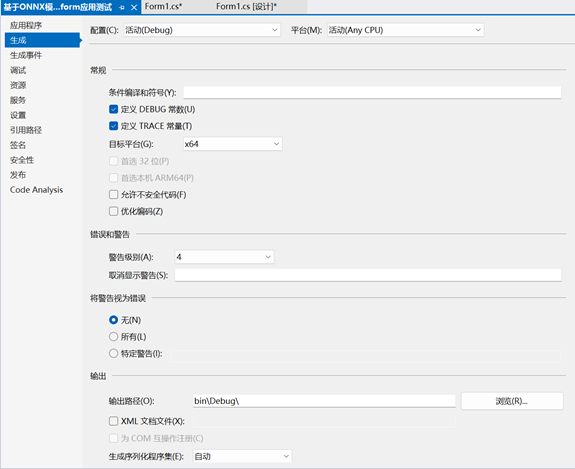
右键解决方案下项目选择"属性",在弹出界面"生成-目标平台"选择"x64":
⒍测试
运行软件,如下图点击"选择图片"选择预测的图片,点击"开始检测"开始预测:
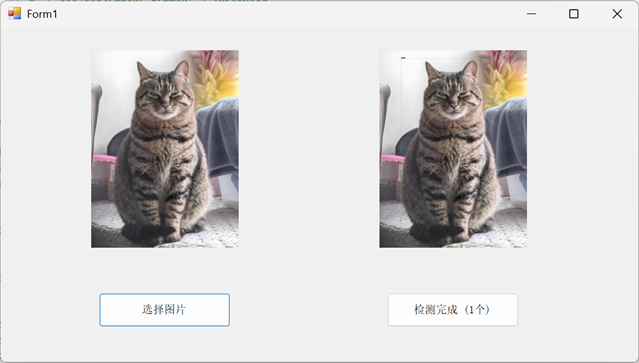
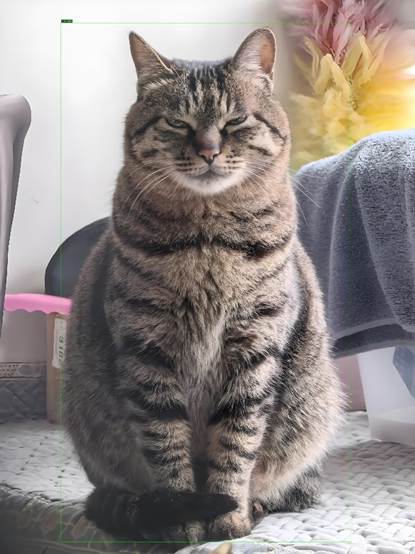
预测原图及预测结果如下: