前言:
Agency 与 Agent:
Agency 指模型所表现出的感知环境、推理目标、规划行为并采取行动的能力;该能力主要来源于模型训练过程中形成的参数化行为模式,而不是外部代码流程或规则编排
Agent 则是 Agency 在具体运行环境中的工程化实现;一个 Agent 通常由两部分构成:模型与 Harness;模型是决策主体,Harness 是承载模型行动的运行环境;可以理解为:模型是驾驶者,Harness 是载具与道路系统
Agent 的核心并不是外部工作流,而是经过训练的神经网络;模型通过行动序列数据学习如何感知环境、理解任务、推理目标,并在连续交互中选择行动
开发 Agent 的本质:
从本质上看,开发 Agent 只有两类工作:训练模构和建 Harness
训练模型,是通过预训练、微调、强化学习、RLHF 等方法调整模型权重,使其在真实或模拟任务中的 "感知 - 推理 - 行动" 序列中形成稳定的行为能力
构建 Harness,则是为模型提供一个可观察、可操作、可约束的外部世界,使模型能力能够被有效表达
可以将 Harness 表示为:
Harness = Tools + Knowledge + Observation + Action Interfaces + Permissions
其中:
- Tools:文件读写、Shell、网络、数据库、浏览器等可执行工具
- Knowledge:产品文档、领域资料、API 规范、架构说明、风格指南等知识资源
- Observation:git diff、错误日志、浏览器状态、系统状态、传感器数据等环境反馈
- Action Interfaces:CLI 命令、API 调用、UI 操作等行动接口
- Permissions:沙箱隔离、审批流程、信任边界、访问控制等安全约束
模型负责决策,Harness 负责执行;模型负责推理,Harness 提供上下文与反馈;Harness 会随领域和任务变化,而具备 Agency 的模型则具有跨领域泛化的潜力
Harness 工程师:
Harness 工程师并不是 "编写智能" 的人,而是构建智能得以栖居、行动和被约束的世界;Harness 的质量直接影响模型能力的表达上限
其核心工作包括:
实现工具:
为 Agent 提供可执行动作;工具应当原子化、可组合,并具备清晰的语义描述,使模型能够准确理解其用途与边界
策划知识:
组织产品文档、架构决策、领域知识、API 规范、合规要求与风格指南;知识应按需加载,而不是一次性塞入上下文,避免噪声淹没关键信息
管理上下文:
通过子 Agent 隔离任务噪声,通过上下文压缩降低历史信息负担,通过任务系统使目标能够跨对话、跨会话持续存在
控制权限:
通过沙箱、审批机制、访问控制和信任边界约束 Agent 的行动范围;这是 Harness 工程与安全工程的交汇点
收集任务过程数据:
Agent 在 Harness 中产生的完整行动轨迹,可以成为后续模型训练的重要信号;真实任务中的感知、推理、行动序列,有助于改进下一代模型的行为能力
Agent 的智能主要来自模型训练,而不是外部流程编排;Harness 不创造 Agency,但决定 Agency 能否被安全、稳定、有效地表达
因此,Agent 工程的关键不是用代码模拟智能,而是同时推进两件事:一方面训练更具 Agency 的模型,另一方面构建更高质量的 Harness,使模型能够在真实环境中观察、推理、行动并持续改进
Agent Loop:
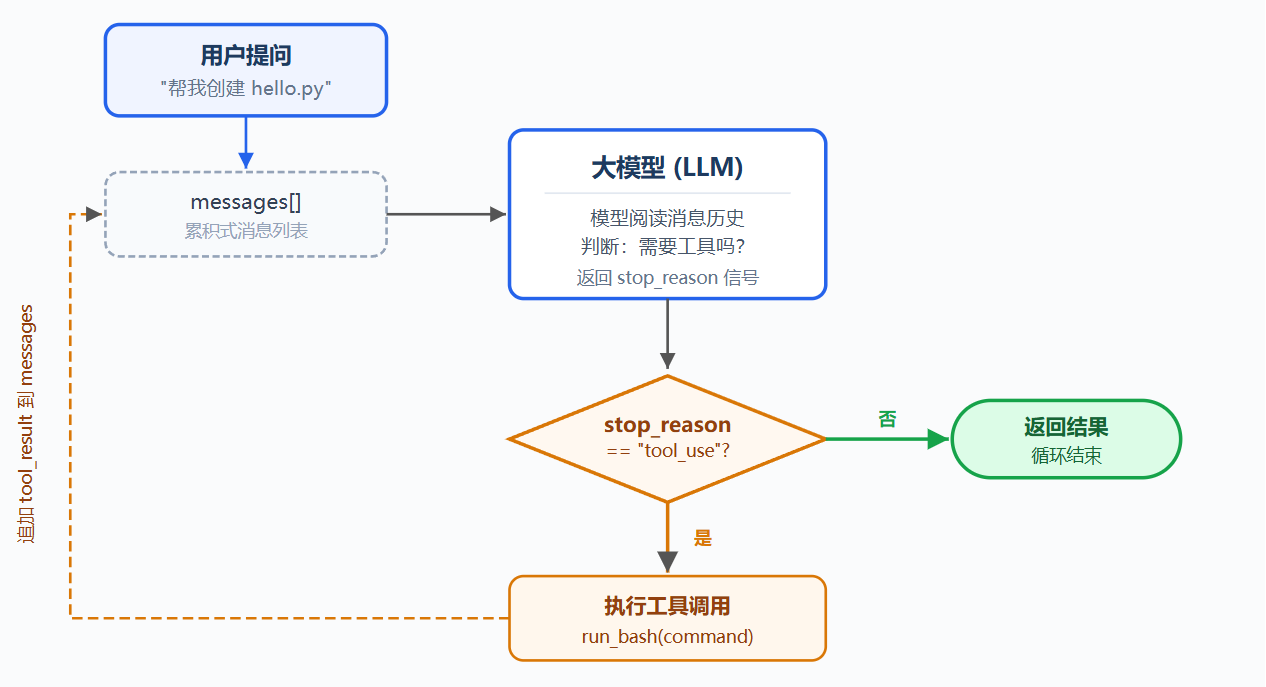
问题:
用户要求模型读取目录、执行代码;模型能生成 bash 命令,但不会自动执行,也不会读取执行结果后继续推理
人工流程是:复制命令、手动运行、粘贴结果、等待下一步,但这相当于人类在充当中间层
解决方案:
最小方案是一个 while True 循环:模型调用工具就继续,不调用工具就停止
| 信号 | 含义 | 循环动作 |
|---|---|---|
| stop_reason == "tool_use" | 模型请求使用工具 | 执行工具 → 回传结果 → 继续 |
| stop_reason != "tool_use" | 模型表示完成 | 退出循环 |
工作原理:
第一步:把用户问题作为第一条消息
python
messages = [{"role": "user", "content": query}]第二步:把消息和工具定义一起发给 LLM
python
response = client.messages.create(
    model=MODEL,
    system=SYSTEM,
    messages=messages,
    tools=TOOLS,
    max_tokens=8000,
)
第三步:追加模型回复,检查是否调用工具;没调用就结束
python
messages.append({"role": "assistant", "content": response.content})
if response.stop_reason != "tool_use":
    return
第四步:执行模型请求的工具,收集工具结果
python
results = []
for block in response.content:
    if block.type == "tool_use":
        output = run_bash(block.input["command"])
        results.append({
            "type": "tool_result",
            "tool_use_id": block.id,
            "content": output,
        })
第五步:把工具结果作为用户消息追加,回到第二步
python
messages.append({"role": "user", "content": results})完整函数核心:循环请求模型,追加 assistant 消息,如果没有 tool_use 则返回;如果有 tool_use,则执行工具并把 tool_result 追加回 messages
这个循环就是最小可运行 agent harness 内核,它不是智能本身,而是让模型能持续行动的运行框架;模型负责决策,harness 负责执行与回传结果;后续都在这个循环上叠加机制,循环本身不变
Tool Use:
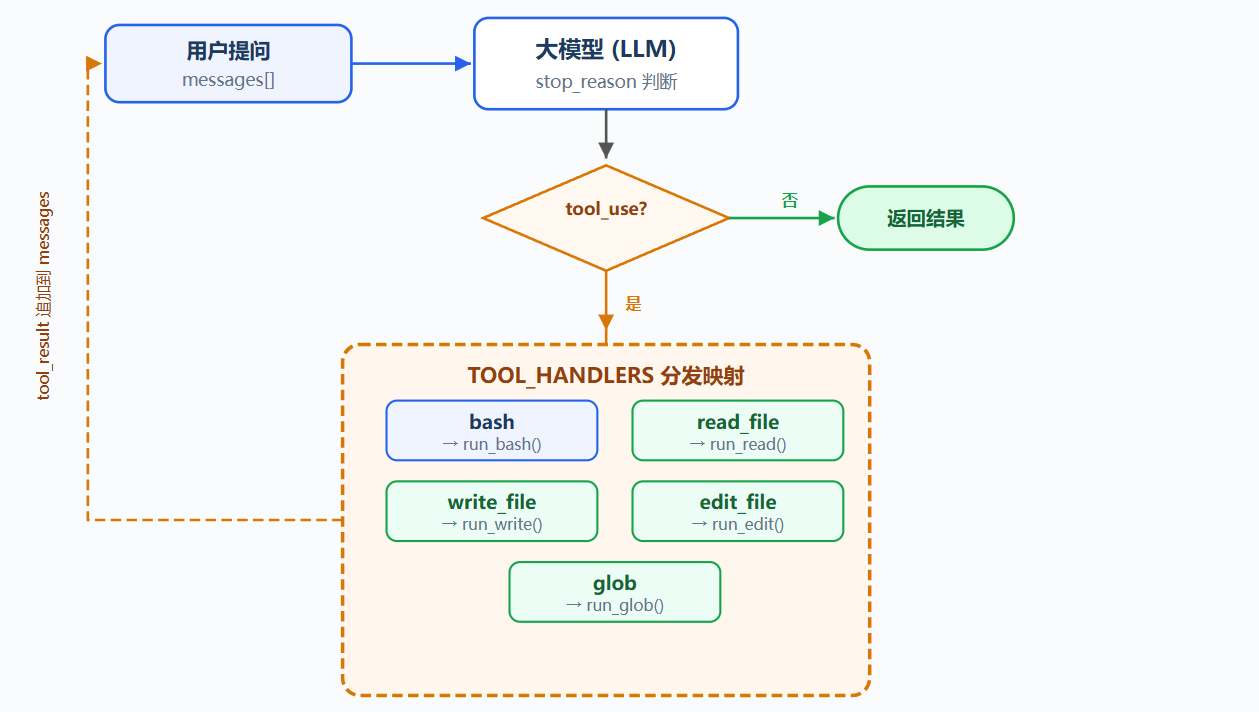
工具注册:
在 TOOLS 数组中添加工具描述:
python
TOOLS = [
    {"name": "bash",       "description": "Run a shell command.", ...},
    {"name": "read_file",  "description": "Read file contents.",  ...},
    {"name": "write_file", "description": "Write content to file.", ...},
    {"name": "edit_file",  "description": "Replace text in file once.", ...},
    {"name": "glob",       "description": "Find files by pattern.", ...},
]
每个工具有独立实现函数:
python
def run_read(path, limit=None): ...
def run_write(path, content): ...
def run_edit(path, old_text, new_text): ...
def run_glob(pattern): ...
read_file 读取文件内容,write_file 写入内容,edit_file 替换一次指定文本,glob 按模式查找文件
工具分发:
工具名映射到处理函数:
python
TOOL_HANDLERS = {
    "bash":       run_bash,
    "read_file":  run_read,
    "write_file": run_write,
    "edit_file":  run_edit,
    "glob":       run_glob,
}
循环中只改一行:
python
handler = TOOL_HANDLERS[block.name] # 查表
output = handler(**block.input) # 调用
加一个工具 = TOOLS 加一条 + TOOL_HANDLERS 加一行,核心循环不变
Permission:
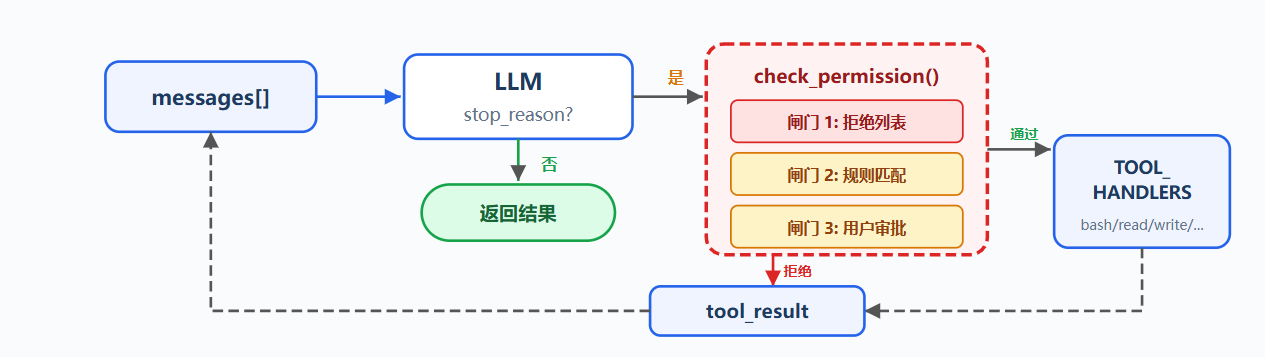
问题:
工具列表中 file tools 受 safe_path 保护,但 bash 不受限制;让 Agent 清理项目时,可能执行危险命令,安全不能依赖模型自觉,必须在工具执行前由代码判断
解决方案:
在工具执行前插入 check_permission(),每个工具调用经过三道闸门,硬拒绝优先,规则询问次之,都没命中则放行
| 闸门 | 作用 | 命中后 |
|---|---|---|
| 拒绝列表 | 永远禁止的操作,如 rm -rf /、sudo | 直接拒绝,不执行 |
| 规则匹配 | 取决于上下文的操作,如写工作区外、rm 文件 | 交给用户审批 |
| 用户审批 | 规则命中后暂停等待确认 | 用户决定允许或拒绝 |
工作原理:
闸门 1:硬拒绝表
先查硬拒绝表:命中则返回阻止信息(使用简单字符串匹配,仅用于示意,不能覆盖命令变体和 shell 展开)
python
DENY_LIST = [
    "rm -rf /",
    "sudo",
    "shutdown",
    "reboot",
    "mkfs",
    "dd if=",
    "> /dev/sda",
]

def check_deny_list(command: str) -> str | None:
    """
    命令黑名单校验:检测高危破坏性指令,命中则返回拦截提示,无风险返回None
    """
    # 遍历所有禁止执行的高危命令片段
    for pattern in DENY_LIST:
        # 命令字符串包含黑名单关键词,直接拦截
        if pattern in command:
            return f"Blocked: '{pattern}' is on the deny list"
    # 未匹配任何禁止规则,命令放行
    return None
闸门 2:规则匹配
规则描述什么时候需要问用户,每条规则指定工具和检查条件
python
PERMISSION_RULES = [
    {
        "tools": ["write_file", "edit_file"],
        # 校验:目标文件真实路径不在工作目录内(越权写外部文件)
        "check": lambda args: not (WORKDIR / args.get("path", "")).resolve().is_relative_to(WORKDIR),
        "message": "Writing outside workspace",
    },
    {
        "tools": ["bash"],
        # 校验:bash命令包含删除、篡改系统配置、全局放开权限等高风险关键字
        "check": lambda args: any(kw in args.get("command", "") for kw in ["rm ", "> /etc/", "chmod 777"]),
        "message": "Potentially destructive command",
    },
]

def check_rules(tool_name: str, args: dict) -> str | None:
    """
    统一权限规则校验入口,匹配工具并执行对应安全检查,违规返回提示,合规返回None
    """
    # 遍历全部权限规则
    for rule in PERMISSION_RULES:
        # 当前工具属于该规则管控范围,且校验函数命中风险
        if tool_name in rule["tools"] and rule["check"](args):
            return rule["message"]
    # 全部规则均未触发,权限校验通过
    return None
闸门 3:用户审批
规则命中后暂停,展示原因、工具名和参数,用户输入决定允许或拒绝
python
def ask_user(tool_name: str, args: dict, reason: str) -> str:
    """
    高危操作弹窗询问用户,由人工决定放行/拒绝工具执行
    """
    # 打印风险提示、工具信息
    print(f"\n {reason}")
    print(f"  Tool: {tool_name}({args})")
    # 接收用户输入确认
    choice = input("Allow? [y/N] ").strip().lower()
    # y/yes 放行,其余全部拒绝
    return "allow" if choice in ("y", "yes") else "deny"
串联三道闸门
check_permission() 插在工具执行之前,拒绝时追加 Permission denied 作为工具结果,允许时继续调用原有 handler
python
def check_permission(block) -> bool:
    """
    工具调用统一权限校验总入口,分两层安全拦截:bash黑名单前置拦截 + 通用权限规则人工确认
    返回True代表允许执行工具,False代表禁止
    """
    # 第一层:bash专用黑名单检测,命中直接拒绝,不询问用户
    if block.name == "bash":
        reason = check_deny_list(block.input.get("command", ""))
        if reason:
            print(f"\n {reason}")
            return False

    # 第二层:通用权限规则检测,命中则弹窗让用户手动确认
    reason = check_rules(block.name, block.input)
    if reason:
        decision = ask_user(block.name, block.input, reason)
        if decision == "deny":
            return False

    # 全部安全校验通过,放行工具
    return True


# 模型返回内容遍历,处理所有工具调用
for block in response.content:
    if block.type == "tool_use":
        # 执行全套权限校验
        if not check_permission(block):
            # 权限拒绝,写入失败结果
            results.append({... "content": "Permission denied."})
            continue
        # 校验通过,执行对应工具处理器,收集输出结果
        output = TOOL_HANDLERS[block.name](**block.input)
        results.append(...)
Hooks:
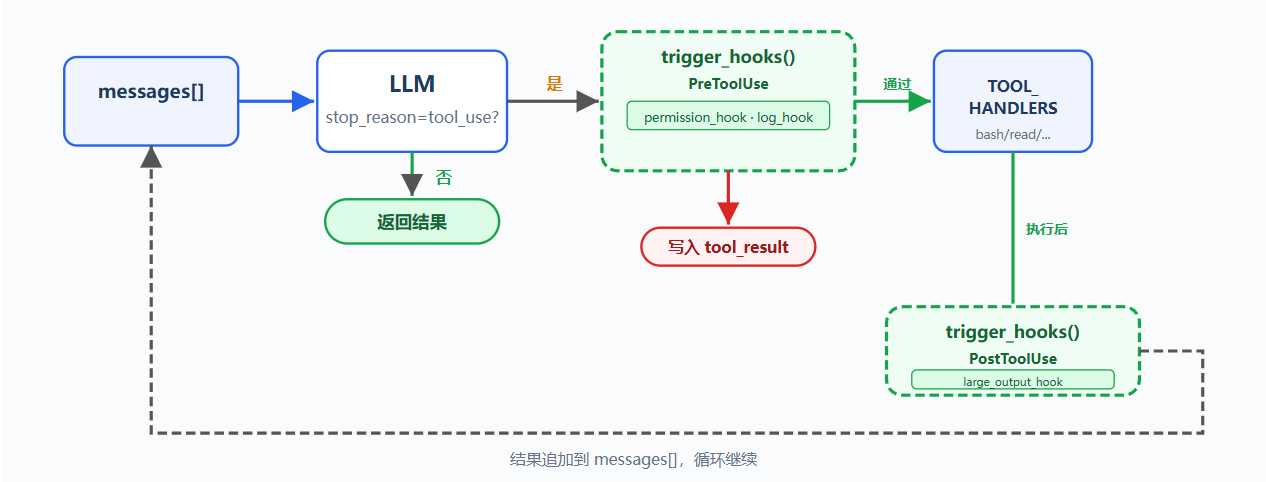
问题:
新增日志、通知、自动 git add 等扩展时都要改 agent_loop,循环会被扩展逻辑污染
解决方案:
之前的循环和权限逻辑保留,把 check_permission() 从循环体移到 hook,循环只调用 trigger_hooks("PreToolUse", block)
四个核心事件覆盖 agent cycle:
| 事件 | 触发时机 | 典型用途 |
|---|---|---|
| UserPromptSubmit | 用户输入提交后、进入 LLM 前 | 输入验证、注入上下文 |
| PreToolUse | 工具执行前 | 权限检查、日志 |
| PostToolUse | 工具执行后 | 副作用、输出检查 |
| Stop | 循环即将退出时 | 收尾清理、强制续跑 |
扩展通过 register_hook() 添加,循环只负责 trigger_hooks()
工作原理:
Hook 注册表:事件名映射回调列表,触发时按顺序执行,回调返回非 None 表示中断或特殊处理
python
# 全局钩子注册表:不同生命周期节点注册自定义回调函数列表
HOOKS = {
    "UserPromptSubmit": [],  # 用户提交提问时触发
    "PreToolUse": [],        # 工具权限校验通过、执行工具之前触发
    "PostToolUse": [],       # 工具执行完成、拿到输出结果后触发
    "Stop": [],              # Agent会话终止退出时触发
}
PreToolUse 返回非 None 阻止本次工具执行,Stop 返回非 None 强制续跑,UserPromptSubmit 和 PostToolUse 的返回值不使用
UserPromptSubmit,用户输入提交后、进入 LLM 前触发
python
def context_inject_hook(query: str) -> str | None:
    """
    UserPromptSubmit 钩子回调:用户提交提问时打印当前工作目录日志,不修改用户输入
    """
    # 灰色控制台打印钩子日志,输出当前工作目录
    print(f"\033[90m[HOOK] UserPromptSubmit: working in {WORKDIR}\033[0m")
    return None   # return None = no modification, let prompt through

# 将该钩子函数注册到用户提交提问的生命周期节点
register_hook("UserPromptSubmit", context_inject_hook)
在主循环中,用户输入后立即触发:
python
# 接收用户控制台输入
query = input("s04 >> ")
# 触发所有注册在 UserPromptSubmit 节点的钩子,传入用户提问文本
trigger_hooks("UserPromptSubmit", query)
# 将用户提问存入对话历史
history.append({"role": "user", "content": query})
# 启动Agent主循环,开始调用模型、执行工具
agent_loop(history)
PreToolUse / PostToolUse,工具执行前后的 hook
python
# PreToolUse 钩子1:权限安全校验(把原本循环里的权限判断迁移到钩子中统一管理)
def permission_hook(block):
    # bash 命令黑名单强制拦截
    if block.name == "bash":
        cmd = block.input.get("command", "")
        for pattern in DENY_LIST:
            if pattern in cmd:
                # 返回非None字符串代表拦截工具,返回值作为拒绝提示
                return "Permission denied by deny list"
    # 文件写入工具:校验是否越出工作目录
    if block.name in ("write_file", "edit_file"):
        path = block.input.get("path", "")
        full_path = (WORKDIR / path).resolve()
        if not full_path.is_relative_to(WORKDIR):
            # 越界则弹窗让用户确认
            choice = input("   Allow? [y/N] ").strip().lower()
            if choice not in ("y", "yes"):
                return "Permission denied by user"
    # 无违规,返回None代表放行工具
    return None

# PreToolUse 钩子2:打印工具执行日志
def log_hook(block):
    print(f"[HOOK] {block.name}(...)")

# PostToolUse 钩子:工具执行完成后检测超大输出并告警
def large_output_hook(block, output):
    # 输出文本超过100000字符时控制台警告
    if len(str(output)) > 100000:
        print(f"[HOOK] ⚠ Large output from {block.name}")

# 注册钩子到对应生命周期节点
register_hook("PreToolUse", permission_hook)
register_hook("PreToolUse", log_hook)
register_hook("PostToolUse", large_output_hook)
Stop,循环即将退出时触发(stop_reason != "tool_use")
python
def summary_hook(messages: list) -> str | None:
    """
    Stop 生命周期钩子:会话即将结束时统计并打印本次会话工具调用总次数
    """
    # 遍历所有对话消息,统计全部tool_result工具结果块,得到工具调用总次数
    tool_count = sum(
        1 for m in messages
        # 兼容content为列表/普通文本两种格式
        for b in (m.get("content") if isinstance(m.get("content"), list) else [])
        if isinstance(b, dict) and b.get("type") == "tool_result"
    )
    # 灰色打印会话统计日志
    print(f"\033[90m[HOOK] Stop: session used {tool_count} tool calls\033[0m")
    return None   # return None = allow stop, return string = force continuation

# 注册到会话终止节点
register_hook("Stop", summary_hook)
在 agent_loop 中,退出前触发:
python
# 如果模型本轮没有发起工具调用,代表会话正常结束
if response.stop_reason != "tool_use":
    # 执行所有 Stop 生命周期钩子,传入完整对话历史 messages
    force = trigger_hooks("Stop", messages)   # 退出之前执行收尾钩子
    if force:
        # 钩子返回了文本,不退出:把文本作为新用户消息注入对话,循环继续
        messages.append({"role": "user", "content": force})
        continue
    # 无强制续跑信号,直接退出 agent_loop 主循环
    return
四个 hook 覆盖了 agent cycle 的关键节点:输入→ 执行前 → 执行后 → 退出;循环只负责调用 trigger_hooks(),具体逻辑全在 hook 回调里
TodoWrite:
问题:
复杂任务容易让 Agent 偏离目标,例如重构 Python 文件命名、运行测试、修复失败时,测试失败会吸走注意力,原始目标可能被遗忘
对话越长,工具结果越多;上下文被填满后,系统提示影响力下降;长任务后半段容易被挤出注意力范围
解决方案:
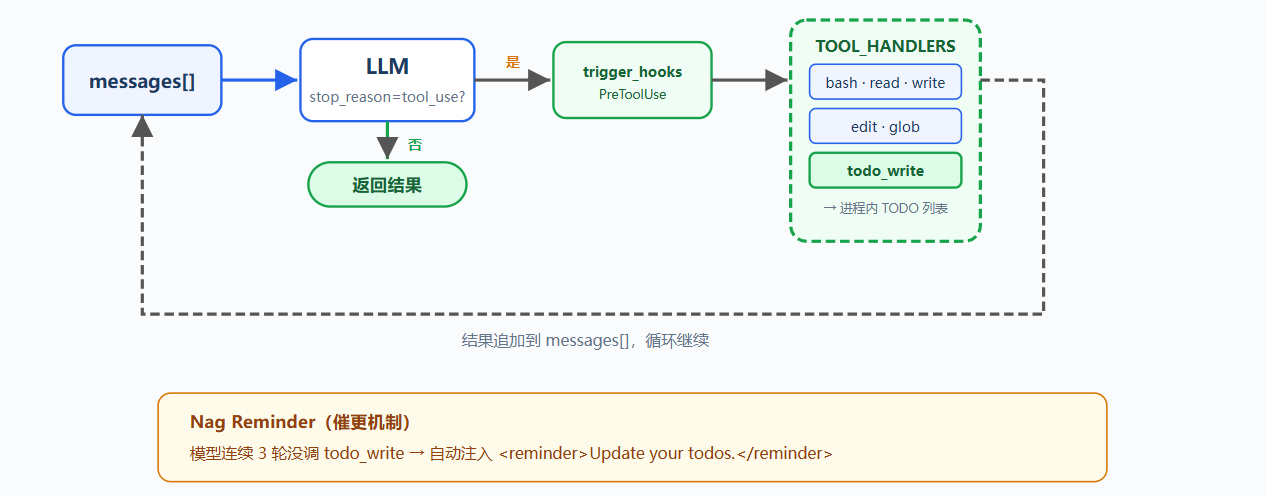
新增 todo_write 工具和 reminder 机制
todo_write 不读文件、不执行命令、不修改代码;它只让 agent 在动手前列出计划,并在执行中维护任务状态;dispatch 机制不变;新工具仍通过 TOOL_HANDLERSblock.name 分发(为了演示 todo reminder,循环里加了一个计数器:连续三轮没调 todo_write 就注入一条提醒)
工作原理:
todo_write 接收带状态的任务列表,状态包括 pending、in_progress、completed;列表保存在当前进程内存中,并在终端显示进度
python
# 全局内存存储当前待办任务列表
CURRENT_TODOS: list[dict] = []

def run_todo_write(todos: list) -> str:
    """
    todo_write 工具执行函数:更新内存待办列表并打印格式化任务清单
    """
    global CURRENT_TODOS
    # 用传入的新任务覆盖全局待办列表
    CURRENT_TODOS = todos

    # 构建待办展示文本
    lines = ["\n## Current Tasks"]
    for t in CURRENT_TODOS:
        # 根据任务状态匹配对应图标
        icon = {"pending": " ", "in_progress": "▸", "completed": "✓"}[t["status"]]
        lines.append(f"  [{icon}] {t['content']}")
    # 控制台打印格式化后的任务清单
    print("\n".join(lines))
    # 返回操作摘要给模型
    return f"Updated {len(CURRENT_TODOS)} tasks"
工具定义加入原有工具列表,工具处理函数加入 TOOL_HANDLERS
python
TOOLS = [
    {"name": "bash",       ...},
    {"name": "read_file",  ...},
    {"name": "write_file", ...},
    {"name": "edit_file",  ...},
    {"name": "glob",       ...},
    {"name": "todo_write", "description": "Create and manage a task list ...",
     "input_schema": {
         "type": "object",
         "properties": {
             "todos": {
                 "type": "array",
                 "items": {
                     "type": "object",
                     "properties": {
                         "content": {"type": "string"},
                         "status": {"type": "string", "enum": ["pending", "in_progress", "completed"]},
                     },
                 },
             },
         },
     },
    },
]

TOOL_HANDLERS["todo_write"] = run_todo_write
连续三轮未调用 todo_write 时,循环会在下一次 LLM 调用前追加 reminder(只做演示)
python
# 距离上一次更新待办已满3轮对话,自动插入提醒让模型刷新任务清单
if rounds_since_todo >= 3 and messages:
    messages.append({
        "role": "user",
        "content": "<reminder>Update your todos.</reminder>",
    })
    # 重置计数器,重新开始计数
    rounds_since_todo = 0
Agent 的典型流程:先调用 todo_write 列出全部步骤;开始某一步时改为 in_progress;完成后改为 completed;再选择下一个 pending;todo_write 不增加执行能力,它增加的是 agent 的规划能力
Subagent:
问题:
Agent 修 bug 时,追踪调用链会读大量文件并产生多轮中间对话;这些内容进入主 messages 列表后,占用上下文空间,削弱 Agent 对最终目标的记忆
解决思路类似新开终端追踪调用链,追踪完成后只把结果带回主流程;Agent 也需要独立子进程和独立消息列表,专注完成单一任务
解决方案:
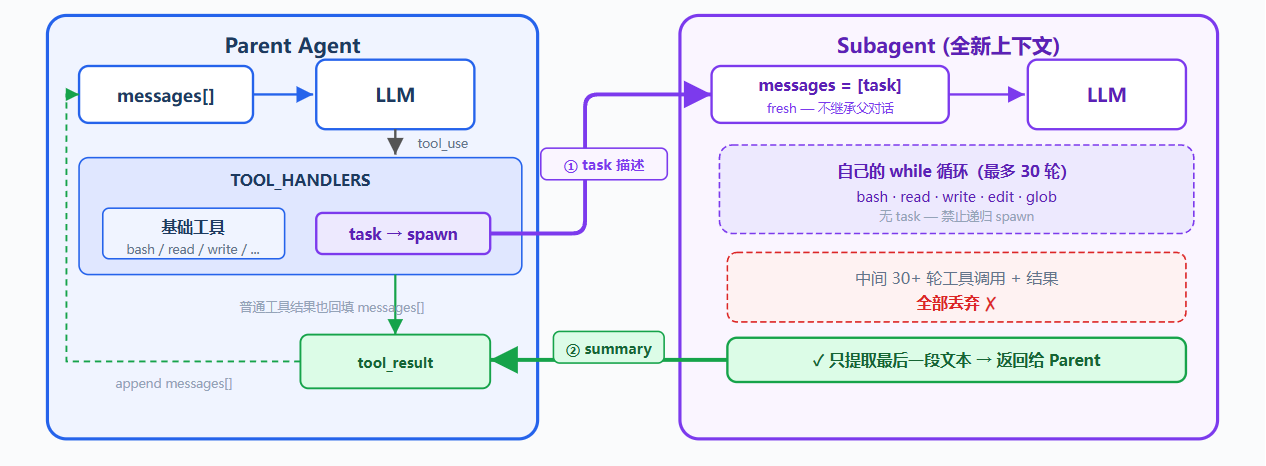
新增 task 工具,调用时 spawn 子 Agent;子 Agent 拥有全新 messages ,独立运行循环,结束后只把摘要文本返回主 Agent
子 Agent 的对话上下文会被丢弃,文件系统副作用会保留在工作目录中
子 Agent 工具有 bash、read、write、edit、glob,没有 task,避免递归 spawn;工具调用仍经过权限 hook,安全策略不会因上下文隔离而跳过
工作原理:
spawn_subagent(description) 创建子 Agent,为子 Agent 配置基础工具,但不包含 task,最后只返回最后消息中的文本结论
python
def spawn_subagent(description: str) -> str:
    """
    生成独立子Agent执行专项任务,隔离环境、禁止递归todo,最多运行30轮,仅返回最终文字结论
    """
    # 子Agent可用工具集:基础文件/终端工具,移除todo_write,禁止递归创建任务
    sub_tools = [
        {"name": "bash", ...}, {"name": "read_file", ...},
        {"name": "write_file", ...}, {"name": "edit_file", ...},
        {"name": "glob", ...},
    ]
    # 子Agent拥有完全独立对话上下文,不污染主Agent messages
    messages = [{"role": "user", "content": description}]

    # 安全轮次上限:最多循环30轮,防止无限工具死循环
    for _ in range(30):
        # 调用模型,使用子Agent专属system提示、受限工具列表
        response = client.messages.create(
            model=MODEL, system=SUB_SYSTEM,
            messages=messages, tools=sub_tools, max_tokens=8000,
        )
        # 保存本轮模型回复到子对话历史
        messages.append({"role": "assistant", "content": response.content})

        # 模型无工具调用,任务完成,退出循环
        if response.stop_reason != "tool_use":
            break

        results = []
        # 遍历所有工具调用块执行工具
        for block in response.content:
            if block.type == "tool_use":
                # 执行前置钩子(权限/日志拦截逻辑同主Agent)
                blocked = trigger_hooks("PreToolUse", block)
                if blocked:
                    # 钩子拦截工具,写入拒绝结果
                    results.append({... "content": str(blocked)})
                    continue
                # 执行子Agent专属工具处理器
                handler = SUB_HANDLERS.get(block.name)
                output = handler(**block.input) if handler else f"Unknown"
                # 执行后置观测钩子
                trigger_hooks("PostToolUse", block, output)
                results.append({... "content": output})
        # 将本轮所有工具执行结果作为用户消息塞入子对话
        messages.append({"role": "user", "content": results})

    # 只提取最后一轮助手纯文本结论,丢弃所有中间工具交互记录,返回给主Agent
    return extract_text(messages[-1]["content"])
主 Agent 将 task 注册为普通工具,TOOL_HANDLERS"task" = spawn_subagent,dispatch 机制保持不变
python
TOOLS = [
    {"name": "bash", ...},
    {"name": "read_file", ...},
    {"name": "write_file", ...},
    {"name": "edit_file", ...},
    {"name": "glob", ...},
    {"name": "todo_write", ...},
    # 新增 task 工具
    {"name": "task",
     "description": "Launch a subagent to handle a complex subtask. Returns only the final conclusion.",
     "input_schema": {"type": "object", "properties": {"description": {"type": "string"}}, "required": ["description"]}},
]

TOOL_HANDLERS["task"] = spawn_subagent
关键设计决策:
| 决策 | 选择 | 原因 |
|---|---|---|
| 上下文隔离 | 全新 messages | 子 Agent 中间过程不污染主上下文 |
| 只回传结论 | extract_text(last_message) | 不返回完整 messages 列表 |
| 禁止递归 | 子 Agent 无 task 工具 | 防止子 Agent 再 spawn 子 Agent |
| 安全策略不跳过 | 子 Agent 工具调用也走 PreToolUse hook | 上下文隔离不等于权限隔离 |
且子 Agent 有独立 SUB_SYSTEM 提示,要求直接完成任务,不再委派
Skill Loading:
问题:
项目可能有 React 组件规范、SQL 风格指南、API 设计文档,希望 Agent 自动遵守这些规范,但直接塞进 system prompt 会形成超长提示,每次调用 LLM 都携带所有文档;即使当前任务只改 CSS 或 SQL 也会带上大量无关内容,结果是 token 浪费和上下文膨胀
解决方案:
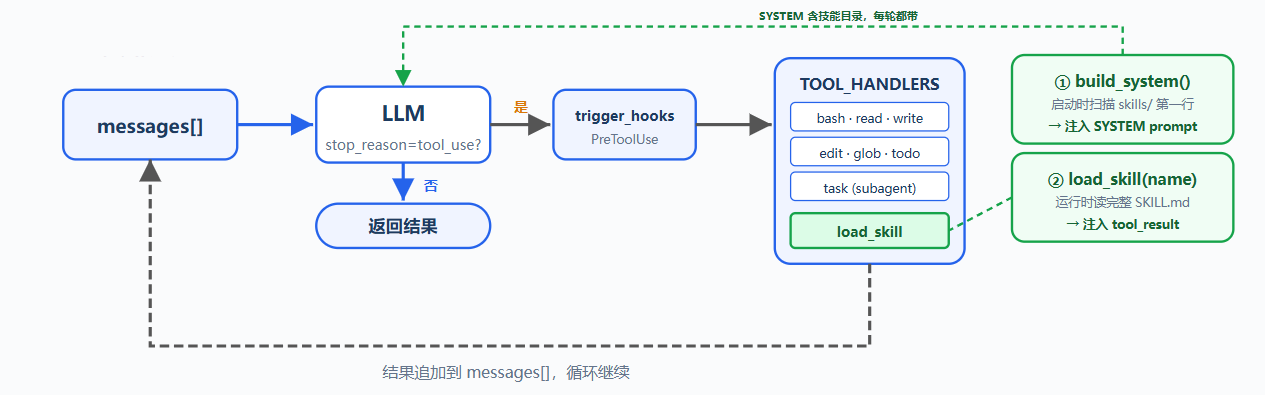
新增 load_skill 工具,启动时只把技能目录注入 SYSTEM prompt,运行时按需加载完整技能内容
两层设计:
| 层 | 位置 | 时机 | 代价 |
|---|---|---|---|
| 目录 | system prompt | 启动时由 harness 扫描 skills/ 注入 | 每个 skill 约 100 tokens,每轮都带 |
| 内容 | tool_result | Agent 调用 load_skill 时加载;SKILL.md 可继续指引读取 references、scripts、assets | 每个 skill 约 2000 tokens,按需 |
dispatch 机制不变,load_skill 仍通过 TOOL_HANDLERSblock.name 分发
工作原理:
每个技能是 skills/ 下的一个子目录,每个子目录包含 SKILL.md
python
skills/
  agent-builder/SKILL.md
  code-review/SKILL.md
  mcp-builder/SKILL.md
  pdf/SKILL.md
第一级:启动时注入目录
Harness 调用 _scan_skills() 扫描 skills/,解析每个 SKILL.md 的 YAML frontmatter,包括 name 和 description,存入 SKILL_REGISTRY;list_skills() 生成技能目录并注入 SYSTEM prompt,Agent 每轮都知道可用技能,不需要额外 API 调用
python
# 全局技能注册表,key=技能名称,value=技能元数据与完整文档
SKILL_REGISTRY: dict[str, dict] = {}

def _scan_skills():
    """
    程序启动时一次性扫描技能目录,读取每个技能文件夹内 SKILL.md 注册到全局注册表
    """
    # 技能根目录不存在则直接跳过
    if not SKILLS_DIR.exists():
        return
    # 按文件夹名称排序遍历所有子目录
    for d in sorted(SKILLS_DIR.iterdir()):
        if not d.is_dir():
            continue
        # 每个技能目录必须包含 SKILL.md 作为配置文档
        manifest = d / "SKILL.md"
        if manifest.exists():
            raw = manifest.read_text()
            # 解析文件头部 frontmatter 元数据 + 正文
            meta, body = _parse_frontmatter(raw)
            # 优先取元数据内的name,无则用文件夹名作为技能标识
            name = meta.get("name", d.name)
            # 优先取元数据description,无则取文档第一行标题作为简介
            desc = meta.get("description", raw.split("\n")[0].lstrip("#").strip())
            # 存入全局技能注册表
            SKILL_REGISTRY[name] = {
                "name": name,
                "description": desc,
                "content": raw
            }

# 程序启动自动执行一次扫描,加载全部本地技能
_scan_skills()

def list_skills() -> str:
    """生成格式化的全部技能目录文本,用于注入系统提示词"""
    lines = []
    for skill_info in SKILL_REGISTRY.values():
        lines.append(f"- **{skill_info['name']}**: {skill_info['description']}")
    return "\n".join(lines)

def build_system() -> str:
    """拼接包含技能目录的基础系统提示文本"""
    catalog = list_skills()
    return (
        f"You are a coding agent at {WORKDIR}. "
        f"Skills available:\n{catalog}\n"
        "Use load_skill to get full details when needed."
    )

# 全局基础系统提示,启动时一次性构建完成
SYSTEM = build_system()
第二级:load_skill
Agent 判断需要某个技能后调用 load_skill("skill-name"),通过注册表查找技能,不直接使用文件路径,避免路径遍历风险,返回完整 SKILL.md 内容;技能内容进入当前 messages,后续调用会随历史携带,直到上下文压缩、截断或会话结束
python
def load_skill(name: str) -> str:
    """
    load_skill 工具执行函数:根据技能名称读取完整SKILL.md文档内容
    """
    # 从全局技能注册表查找对应技能
    skill = SKILL_REGISTRY.get(name)
    if not skill:
        # 注册表无该技能,返回报错信息
        return f"Skill not found: {name}"
    # 返回SKILL.md完整原文,给模型查看完整技能规则
    return skill["content"]
关键区别:技能内容不是 system prompt 的一部分,它作为工具结果进入对话历史
Context Compact:
问题:
Agent 读大文件、跑命令、处理多轮工具结果后,所有内容都会堆进 messages;上下文窗口有限,满了会触发 prompt_too_long,如果不压缩,agent 无法在大项目里持续工作
解决方案:
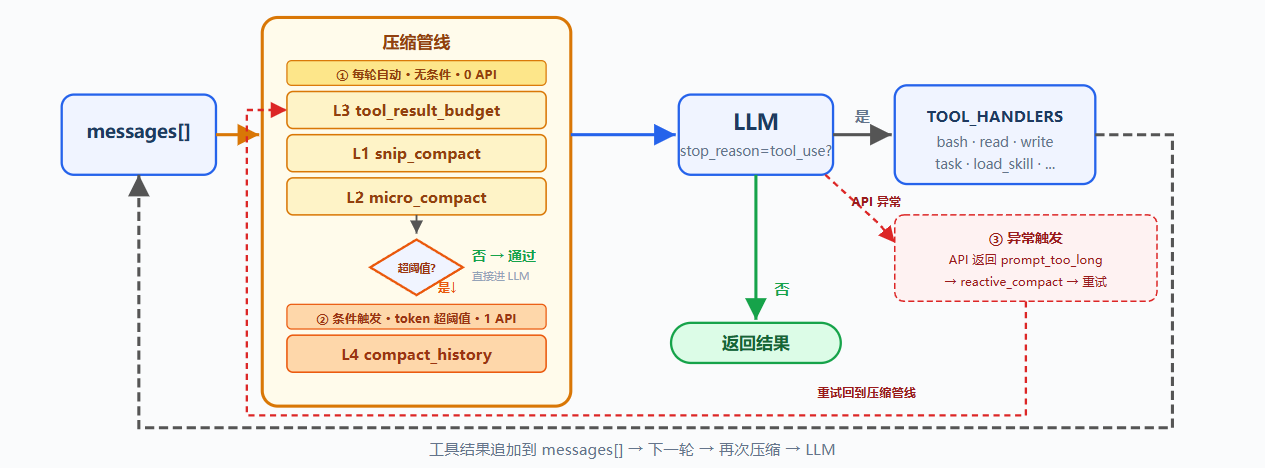
保留 hook、技能加载、子 agent 骨架;每轮 LLM 调用前加入三层预处理器,token 仍超阈值时触发 LLM 摘要,API 报错时执行应急裁剪
工作原理:
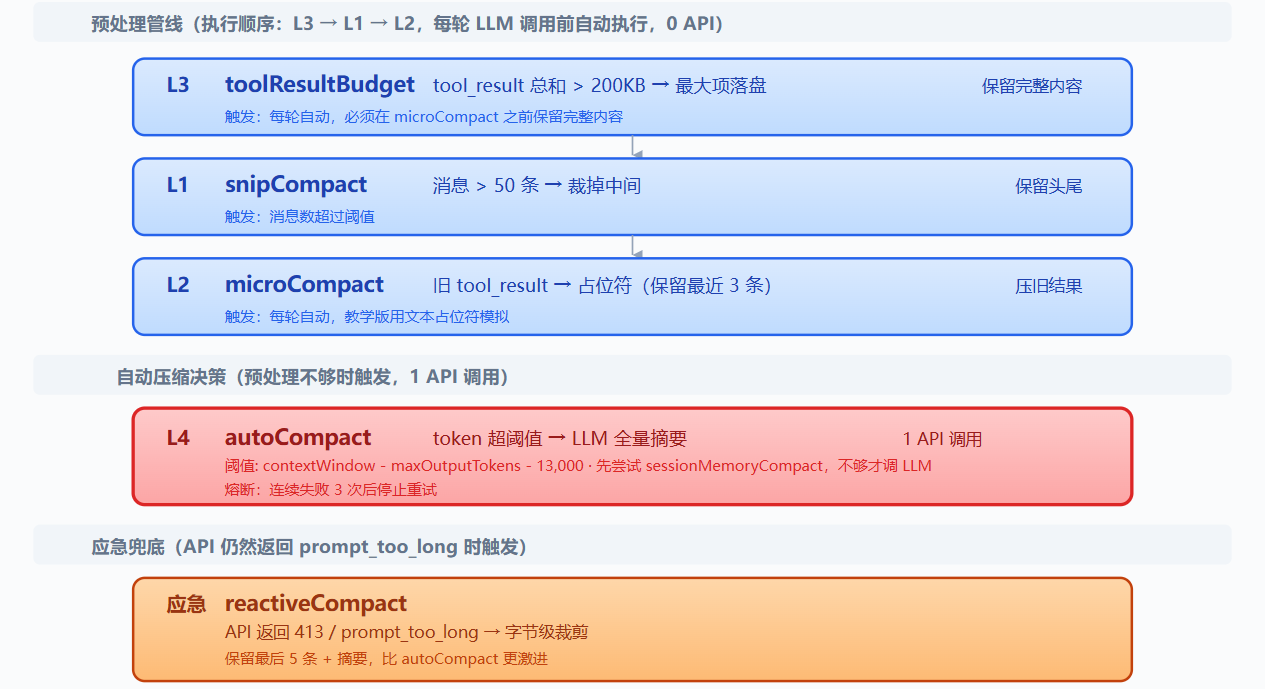
L1: snip_compact
用于裁掉旧的无关对话;消息数超过 50 条时,保留头部 3 条和尾部 47 条,中间替换为占位符
python
def snip_compact(messages, max_messages=50):
    """
    对话消息截断压缩:消息条数超上限时,保留头部、尾部原文,中间替换为占位消息
    自动保护工具调用与工具返回成对完整,不割裂工具上下文
    """
    # 消息数量未超过阈值,直接返回原对话
    if len(messages) <= max_messages:
        return messages
    # 初始化分割点位:头部保留前3条,尾部预留 max_messages-3 条消息
    head_end, tail_start = 3, len(messages) - (max_messages - 3)
    # 头部工具消息补全:末尾是工具调用则连带后续全部工具结果划入头部
    if _message_has_tool_use(messages[head_end - 1]):
        while head_end < len(messages) and _is_tool_result_message(messages[head_end]):
            head_end += 1
    # 尾部工具消息补全:分割点切到工具结果时前移下标,保全整套工具交互
    if _is_tool_result_message(messages[tail_start]) and _message_has_tool_use(messages[tail_start - 1]):
        tail_start -= 1
    # 统计被截断的中间消息条数
    snipped = tail_start - head_end
    # 生成中间截断占位消息
    placeholder = {"role": "user", "content": f"[snipped {snipped} messages from conversation middle]"}
    # 拼接压缩后对话:头部原文 + 占位符 + 尾部原文
    return messages[:head_end] + [placeholder] + messages[tail_start:]
边界条件:不能拆开 assistant(tool_use) 与后续 user(tool_result);裁掉的是消息本身,剩余消息中的旧 tool_result 内容仍会累积,因此需要 L2:
L2: micro_compact
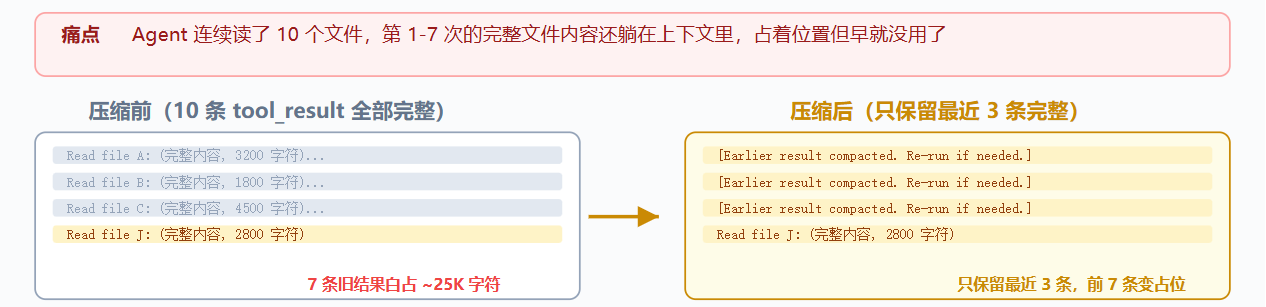
用于压缩旧工具结果;只保留最近 3 条 tool_result 的完整内容,更旧且较长的结果替换为占位符,提示需要时重新运行
python
KEEP_RECENT_TOOL_RESULTS = 3  # 保留最近3组完整工具返回结果

def micro_compact(messages):
    """
    轻量化压缩旧工具输出:仅精简超文本长度的历史工具结果,不删除消息条目
    """
    # 提取对话中所有工具返回块
    tool_results = collect_tool_result_blocks(messages)
    # 工具结果总数不超保留阈值,无需压缩
    if len(tool_results) <= KEEP_RECENT_TOOL_RESULTS:
        return messages
    # 遍历除最新3组外的全部老旧工具结果
    for _, _, block in tool_results[:-KEEP_RECENT_TOOL_RESULTS]:
        # 工具输出文本长度超过120字符则替换为精简占位文案
        if len(block.get("content", "")) > 120:
            block["content"] = "[Earlier tool result compacted. Re-run if needed.]"
    return messages
作用:清理旧结果;限制:无法处理单条超大新结果,因此需要 L3:
L3: tool_result_budget
用于处理单条或单轮超大工具结果;统计最后一条 user 消息中的 tool_result 总大小;超过 200KB 时,从最大结果开始落盘到 .task_outputs/tool-results/,上下文只保留标记和前 2000 字符预览
python
def tool_result_budget(messages, max_bytes=200_000):
    """
    单轮工具返回字节限流:控制最后一条消息内所有工具结果总大小,超限则外置超大输出内容
    """
    # 获取对话最新一条消息
    last = messages[-1]
    # 筛选出本条消息内全部工具返回块,记录下标与对象
    blocks = [(i, b) for i, b in enumerate(last["content"])
              if b.get("type") == "tool_result"]
    # 统计所有工具返回内容总字节长度
    total = sum(len(str(b.get("content", ""))) for _, b in blocks)
    # 总字节未超出上限,无需处理
    if total <= max_bytes:
        return messages
    # 按工具结果文本长度从大到小排序,优先压缩体积最大的块
    ranked = sorted(blocks, key=lambda p: len(str(p[1].get("content", ""))), reverse=True)
    # 循环外置超大输出,直到总字节达标
    for idx, block in ranked:
        if total <= max_bytes:
            break
        # 将超长内容持久化存储,替换为简短引用占位
        block["content"] = persist_large_output(block["tool_use_id"], str(block["content"]))
        # 重新计算压缩后的总字节
        total = recalculate_total(blocks)
    return messages
模型看到标记后,知道完整内容在磁盘上,需要时可重新读取
L4: compact_history
前三层仍不足时,触发 LLM 全量摘要:
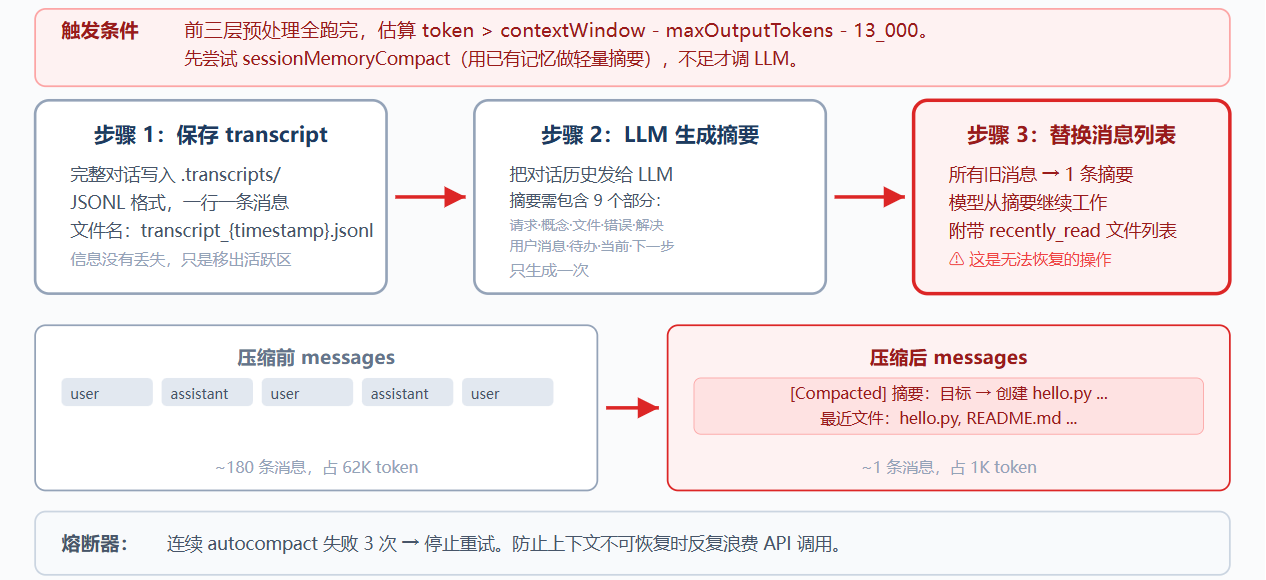
三步流程:
保存 transcript:完整对话写入 .transcripts/,JSONL 格式;
LLM 生成摘要:保留当前目标、重要发现、已改文件、剩余工作、用户约束等关键信息;
替换消息列表:(演示)只保留摘要
python
def compact_history(messages):
    transcript_path = write_transcript(messages)  # 先保存完整对话
    summary = summarize_history(messages)          # LLM 生成摘要
    return [{"role": "user",
             "content": f"[Compacted]\n\n{summary}"}]
熔断器:连续失败 3 次后停止重试,避免死循环消耗 API
reactive_compact
当 API 仍返回 prompt_too_long 时触发;比 compact_history 更激进,保存 transcript,生成摘要,并从尾部保留少量最近消息,仍需避免留下孤立 tool_result
python
def reactive_compact(messages):
    """
    重度兜底压缩:前置对话全部生成摘要,仅保留末尾少量原始消息,大幅减少上下文token
    """
    # 保存完整对话
    transcript = write_transcript(messages)
    # 基于完整对话生成历史精简摘要
    summary = summarize_history(messages)
    # 默认保留最后5条原始消息,防止下标越界
    tail_start = max(0, len(messages) - 5)
    # 若分割点切断工具调用与返回配对,前移下标保全整套工具交互
    if _is_tool_result_message(messages[tail_start]) and _message_has_tool_use(messages[tail_start - 1]):
        tail_start -= 1
    # 重组对话:摘要占位消息 + 尾部未压缩原始对话
    return [{"role": "user",
             "content": f"[Reactive compact]\n\n{summary}"}, *messages[tail_start:]]
默认只重试 1 次,再次失败则抛出异常
综合流程:
python
def agent_loop(messages):
    reactive_retries = 0
    while True:
        # 三个预处理器
        # 顺序:budget 先跑,确保大内容落盘后再做占位和裁剪
        messages[:] = tool_result_budget(messages)    # L3: 大结果落盘
        messages[:] = snip_compact(messages)          # L1: 裁中间
        messages[:] = micro_compact(messages)         # L2: 旧结果占位

        # LLM 摘要
        if estimate_token_count(messages) > THRESHOLD:
            messages[:] = compact_history(messages)

        try:
            response = client.messages.create(...)
        except PromptTooLongError:
            if reactive_retries < MAX_REACTIVE_RETRIES:
                messages[:] = reactive_compact(messages)  # 应急
                reactive_retries += 1
                continue
            raise  # 超过重试上限,抛出异常
        # ... 工具执行 ...

        # compact 工具:模型主动调用时触发 compact_history
        if block.name == "compact":
            messages[:] = compact_history(messages)
            results.append({..., "content": "[Compacted. History summarized.]"})
            messages.append({"role": "user", "content": results})
            break  # 结束当前 turn,用压缩后的上下文开始新一轮
顺序不能换,L3 必须在 L2 前运行,因为旧的大 tool_result 被 L2 替换后,L3 就无法再把完整内容落盘
compact 工具允许模型主动触发 compact_history,压缩后结束当前 turn,用新上下文进入下一轮
Memory:
问题:
AutoCompact 会把当前目标、剩余工作、用户约束写进摘要,但细节会丢失;例如具体偏好可能被简化成泛化描述,新会话连摘要也不存在
LLM 没有持久状态,信息都在上下文窗口里;上下文满了要压缩,压缩有损;因此需要一层不参与压缩、跨会话保留的存储
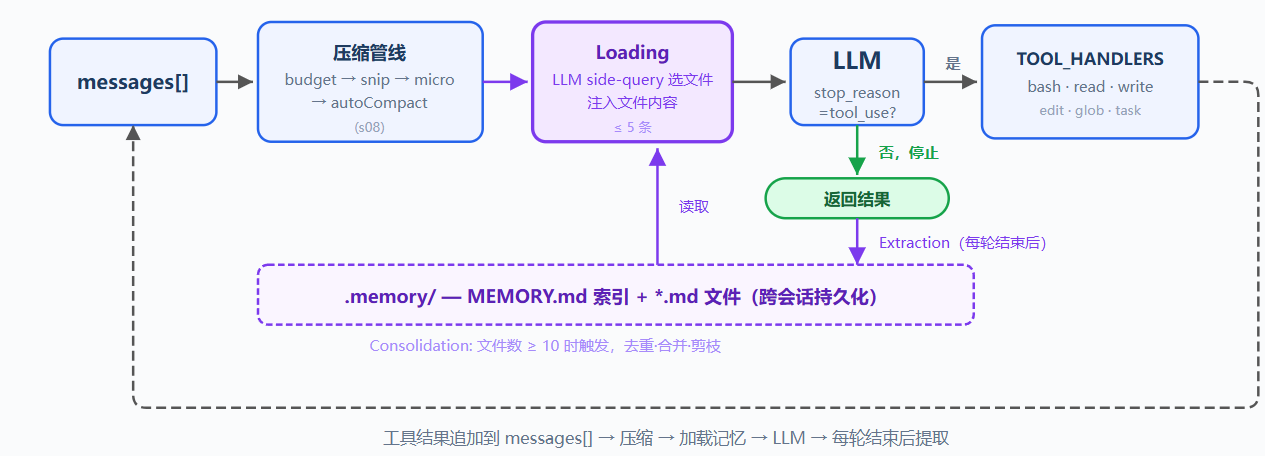
解决方案:
保留压缩管线,新增记忆层;存储选文件系统:.memory/ 下每条记忆一个 .md 文件;文件带 YAML frontmatter,包括 name、description、type
文件多后需要索引,MEMORY.md 一行一个链接,并注入 SYSTEM
关键设计:索引常驻 SYSTEM prompt,可被 prompt cache 缓存;文件内容按需注入当前 user turn;按 filename 和 description 匹配当前对话,避免破坏 cache
写入由每轮结束后的提取器完成;用户显式说记住,或表达稳定偏好时,提取器保存为记忆;文件积累后定期整理去重
四类记忆:
| 类型 | 回答什么 | 示例 |
|---|---|---|
| user | 你是谁 | 用 tab 不用空格 |
| feedback | 怎么做事 | 别 mock 数据库 |
| project | 正在发生什么 | auth 重写是合规驱动 |
| reference | 东西在哪找 | pipeline bug 在 Linear INGEST |
工作原理:
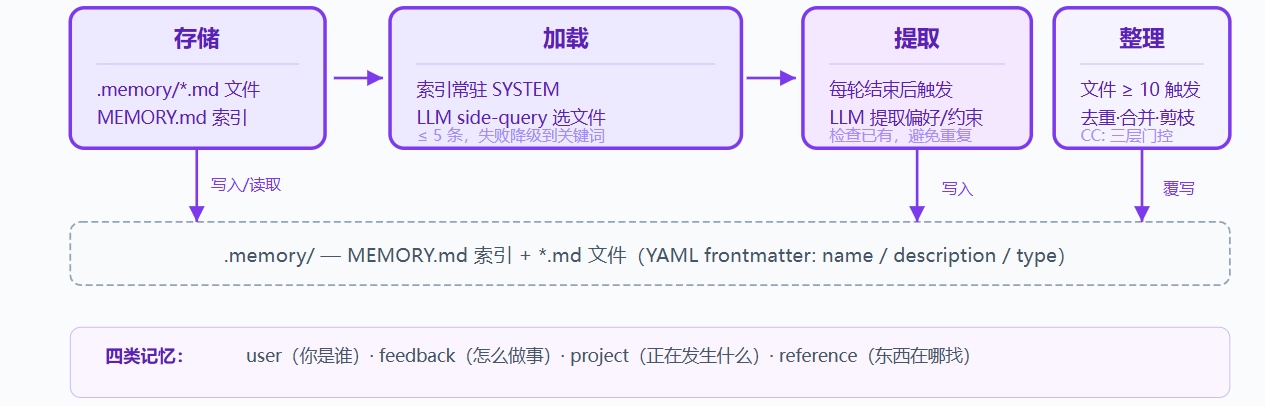
存储:Markdown 文件和索引
每条记忆是一个 .md 文件,YAML frontmatter 存元数据,正文存偏好、原因、应用方式等内容
python
---
name: user-preference-tabs
description: User prefers tabs for indentation
type: user
---

User prefers using tabs, not spaces, for indentation.
**Why:** Consistency with existing codebase conventions.
**How to apply:** Always use tabs when writing or editing files.
MEMORY.md 是索引,一行一个链接,写入新记忆时自动重建索引
python
- [user-preference-tabs](user-preference-tabs.md) --- User prefers tabs for indentationwrite_memory_file() 负责生成 slug、写入 frontmatter 和 body,并调用 _rebuild_index()
python
def write_memory_file(name, mem_type, description, body):
    """
    写入一条记忆为独立md文件,自动生成文件名并更新全局索引
    """
    # 将记忆名称转成小写、空格替换为横杠,生成安全文件名(slug)
    slug = name.lower().replace(" ", "-")
    # 拼接完整文件路径:.memory/xxx.md
    filepath = MEMORY_DIR / f"{slug}.md"
    # 写入文件:头部YAML元数据frontmatter + 记忆正文body
    filepath.write_text(
        f"---\nname: {name}\ndescription: {description}\ntype: {mem_type}\n---\n\n{body}\n"
    )
    # 写入完成后重建MEMORY.md全局索引文件
    _rebuild_index()
加载:两条路径
路径一:索引常驻 SYSTEM,build_system() 在每次用户请求开始时读取 MEMORY.md,把记忆清单注入;记忆提取和整理在本轮结束后触发,因此同一轮不需要重复重建 SYSTEM
路径二:相关记忆按需注入;每次用户请求开始时,load_memories() 把最近对话和记忆目录发给 LLM 做轻量 side-query;LLM 选择相关文件名,系统读取文件内容并临时注入当前 user turn;最多 5 条,控制开销
python
def select_relevant_memories(messages, max_items=5):
    """
    根据当前对话匹配相关记忆,返回匹配到的记忆文件路径列表
    """
    # 获取全部记忆文件元数据列表
    files = list_memory_files()
    # 无记忆文件直接返回空列表
    if not files:
        return []

    # 拼接记忆目录清单:序号: 记忆名 --- 简短描述,给模型识别
    catalog = "\n".join(f"{i}: {f['name']} --- {f['description']}" for i, f in enumerate(files))

    # 调用大模型,传入近期对话+全部记忆目录,让模型挑选相关记忆下标
    response = client.messages.create(model=MODEL, messages=[{"role": "user",
        "content": f"Select relevant memory indices. Return JSON array.\n\n"
                   f"Recent conversation:\n{recent}\n\nMemory catalog:\n{catalog}"}],
        max_tokens=200)
    # 提取模型返回的纯文本
    text = extract_text(response.content).strip()
    # 正则截取数组格式字符串,解析为数字下标数组
    indices = json.loads(re.search(r'\[.*?\]', text).group())
    # 根据下标过滤合法记忆文件路径并返回
    return [files[i]["filename"] for i in indices if 0 <= i < len(files)]
如果 side-query 失败,例如 API 错误或 JSON 解析失败,则降级到关键词匹配 name 和 description
写入:每轮结束后提取
用户不会总是显式说记住,偏好通常散落在自然对话中;extract_memories() 在每轮结束时运行,触发条件是模型停止且没有 tool_use,表示对话告一段落
python
# In agent_loop:
if response.stop_reason != "tool_use":
    extract_memories(pre_compress)   # 从压缩前快照提取新记忆
    consolidate_memories()       # 检查是否需要整理
    return
提取使用压缩前快照,先检查已有记忆,避免重复;prompt 要求返回 {name,type,description,body} 的 JSON 数组,只有确实有新信息时才写文件
python
def extract_memories(messages):
    """
    从最近对话里提取新记忆,区分用户偏好/项目规则等,返回结构化记忆数据
    会对比已有记忆,重复内容不生成
    """
    # 取最后10条对话,格式化为纯文本对话片段
    dialogue = format_recent_messages(messages[-10:])
    # 拼接所有已存在记忆清单,给模型用于去重判断
    existing = "\n".join(f"- {m['name']}: {m['description']}" for m in list_memory_files())

    # 构造提取记忆提示词
    prompt = (
        "Extract user preferences, constraints, or project facts.\n"
        "Return JSON array: [{name, type, description, body}].\n"
        "If nothing new or already covered, return [].\n\n"
        f"Existing memories:\n{existing}\n\nDialogue:\n{dialogue[:4000]}"
    )
    # ... 调用大模型、解析返回的JSON数组、调用write_memory_file写入md文件 ...
整理:低频合并去重
记忆文件会持续积累,consolidate_memories() 在文件数达到阈值时触发,默认阈值为 10;整理由 LLM 完成,目标是去重、合并矛盾、淘汰过时记忆,演示用文件数阈值简化
python
CONSOLIDATE_THRESHOLD = 10

def consolidate_memories():
    """
    记忆合并整理:记忆文件数量超过阈值时,交给大模型去重、合并冗余记忆,重新生成精简记忆文件
    """
    # 读取全部记忆元数据与内容
    files = list_memory_files()
    # 记忆总数不足10条,无需合并,直接退出
    if len(files) < CONSOLIDATE_THRESHOLD:
        return
    # 将所有记忆完整传给大模型,让AI完成去重、合并、归纳
    # 1. 删除旧的全部记忆md文件
    # 2. 根据模型返回的精简记忆列表批量重新写入新md文件
    # 3. 自动调用 _rebuild_index() 更新 MEMORY.md 索引
    # Replace all files with consolidated results
Memory 保存跨会话仍然有用的信息:包括用户偏好、反复出现的反馈、项目背景、常用入口和排查线索
Memory 关注以后还会用到什么,它通过索引和按需加载,把长期信息带回当前对话
Session memory 关注同一会话内的连续性,compact 后保留当前会话仍需要的上下文;两者配合:Memory 管长期知识,session memory 管当前会话的压缩续接
System Prompt:
问题:
之前的 system prompt 都是硬编码字符串,硬编码带来三个问题:
第一,换项目要重写整个 prompt,难判断哪些该改、哪些该保留
第二,修改一处可能影响全局,新增工具描述可能与旧指令冲突
第三,每次请求都带全部内容,当前对话用不到的段落也消耗 token
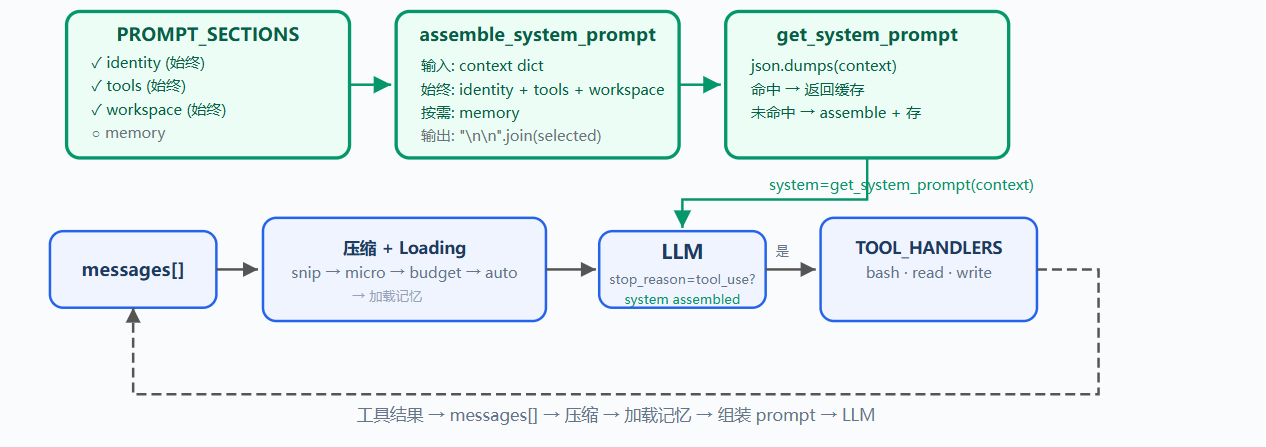
System prompt 应该是运行时配置,根据当前工具、上下文、记忆和 prompt cache 需求组装
解决方案:
把硬编码 SYSTEM 拆成独立 section,运行时根据真实状态按需拼接;缓存结果,避免重复组装
四个 section,两种加载策略:
| Section | 加载策略 | 内容 | 判断依据 |
|---|---|---|---|
| identity | 始终 | 你是谁、怎么做事 | 始终存在 |
| tools | 始终 | 可用工具列表 | enabled_tools |
| workspace | 始终 | 工作目录 | 始终存在 |
| memory | 按需 | 相关记忆内容 | .memory/MEMORY.md是否存在 |
关键设计:section 是否加载取决于真实状态,而不是根据消息关键词猜测
工作原理:
PROMPT_SECTIONS:分段定义
把大字符串拆成字典,每个 key 对应一个主题,例如 identity、tools、workspace、memory
python
PROMPT_SECTIONS = {
    "identity": "You are a coding agent. Act, don't explain.",
    "tools": "Available tools: bash, read_file, write_file.",
    "workspace": f"Working directory: {WORKDIR}",
    "memory": "Relevant memories are injected below when available.",
}
每个 section 独立维护,修改 tools 不影响 identity,新增 memory 不改 workspace
assemble_system_prompt:按需拼接
不是所有 section 每次都需要,当前没有记忆文件时,加载 memory section 只是浪费 token
python
def assemble_system_prompt(context: dict) -> str:
    """
    组装完整系统提示词,拼接固定基础模块和匹配到的相关记忆
    """
    sections = []

    # 必加载模块:身份设定、工具说明、工作区规则,每轮对话都带上
    sections.append(PROMPT_SECTIONS["identity"])
    sections.append(PROMPT_SECTIONS["tools"])
    sections.append(PROMPT_SECTIONS["workspace"])

    # 按需加载模块:存在匹配记忆时才追加记忆内容
    memories = context.get("memories", "")
    if memories:
        sections.append(f"Relevant memories:\n{memories}")

    # 所有模块用空行分隔拼接成完整system文本返回
    return "\n\n".join(sections)
始终加载:身份、工具、工作目录;按需加载:只有满足真实条件时才有用的内容
不全量加载的原因:system prompt 每轮计费,无关信息会成为噪音,降低模型专注度
get_system_prompt:缓存避免重复拼接
同一轮对话的多次 LLM 调用中,context 可能不变,重新拼接字符串没有必要
python
def get_system_prompt(context: dict) -> str:
    """
    带缓存的系统提示词获取函数,相同上下文直接复用上次拼接结果,避免重复组装消耗token
    """
    global _last_context_key, _last_prompt
    # 将上下文字典序列化为稳定字符串作为缓存key
    key = json.dumps(context, sort_keys=True, ensure_ascii=False, default=str)
    # 缓存命中:上下文无变化,直接返回上次生成好的system文本
    if key == _last_context_key and _last_prompt:
        return _last_prompt
    # 缓存未命中:更新缓存标识,重新组装完整系统提示词并存入缓存
    _last_context_key = key
    _last_prompt = assemble_system_prompt(context)
    return _last_prompt
用确定性序列化生成 cache key,context 不变则直接返回上次 prompt,context 变化才重新调用 assemble_system_prompt()
使用 json.dumps(...,sort_keys=True),不用 python 内置 hash(),是因为 hash() 有进程随机化,且无法处理 list / dict 等不可哈希对象
context:真实状态,不是关键词猜测
context 反映当前运行态:
python
def update_context(context: dict, messages: list) -> dict:
    """
    刷新会话上下文字典:读取记忆索引、注入可用工具、工作目录,供组装系统提示词使用
    """
    memories = ""
    # 如果全局记忆索引文件存在
    if MEMORY_INDEX.exists():
        content = MEMORY_INDEX.read_text().strip()
        # 索引有内容则赋值给memories
        if content:
            memories = content
    # 返回更新后的标准上下文对象
    return {
        "enabled_tools": list(TOOL_HANDLERS.keys()),  # 当前全部可用工具名列表
        "workspace": str(WORKDIR),                    # 当前工作目录路径字符串
        "memories": memories,                         # 全部记忆索引文本
    }
enabled_tools 列出实际注册的工具,memories 检查 .memory/MEMORY.md 是否存在;section 加载基于这些真实状态,而不在消息里搜关键词
综合流程:
python
def agent_loop(messages: list, context: dict):
    """
    Agent主循环:持续和大模型交互、执行工具、刷新上下文与系统提示词
    """
    # 初次加载系统提示词
    system = get_system_prompt(context)
    while True:
        # 调用大模型,传入对话、系统提示、全部可用工具定义
        response = client.messages.create(
            model=MODEL, system=system, messages=messages,
            tools=TOOLS, max_tokens=8000)
        # ... 中间省略逻辑:解析模型返回、循环执行工具、把工具结果追加进messages对话列表 ...

        # 工具执行完毕后刷新上下文(读取最新记忆索引、工作区、工具列表)
        context = update_context(context, messages)
        # 根据新上下文刷新系统提示词(有缓存复用,无缓存重新拼装)
        system = get_system_prompt(context)