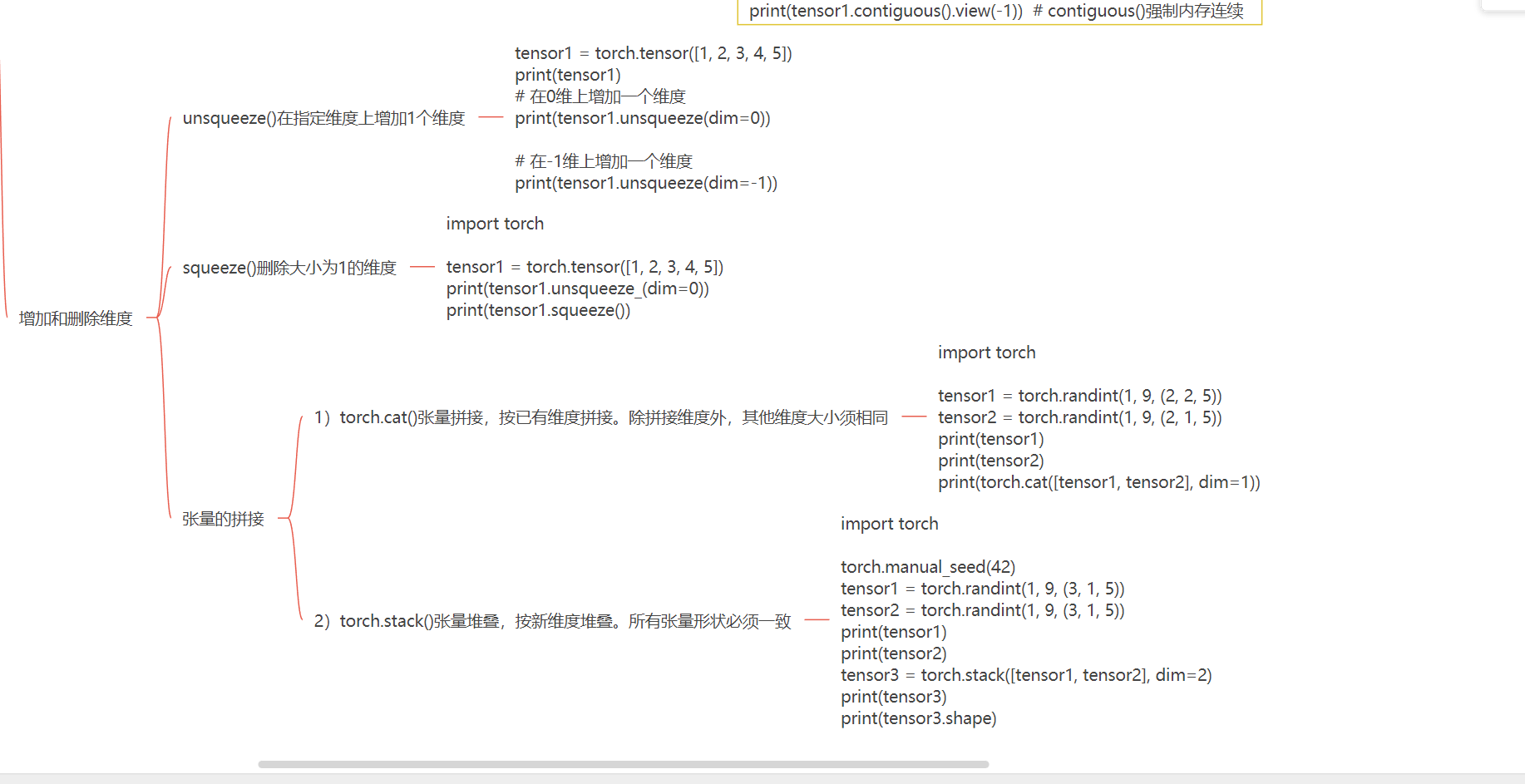
张量的基本操作
导入库
py
import torch2.3 基本张量的创建
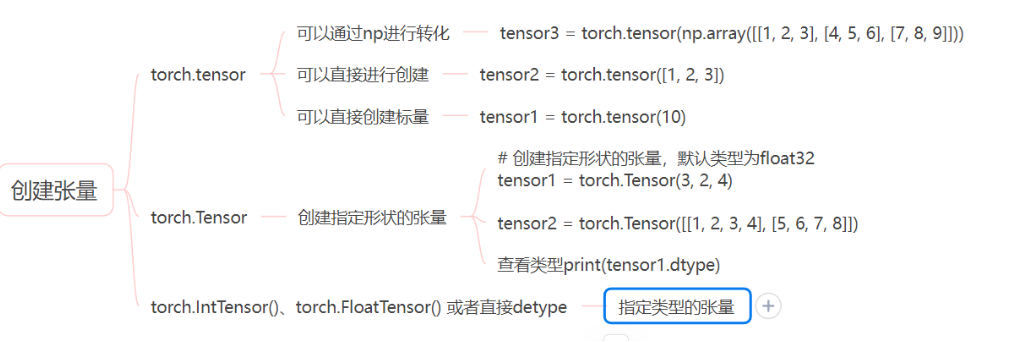
Tensor(张量)是 PyTorch 的核心数据结构。张量在不同学科中有不同的意义,在深度学习中张量表示一个多维数组,是标量、向量、矩阵的拓展。如一个 RGB 图像的数组就是一个三维张量,第 1 维是图像的高,第 2 维是图像的宽,第 3 维是图像的颜色通道。
重点需要掌握的点
- 创建指定形状的张量
- 查看张量的类型
2.3.1 基本张量创建
1) torch.tensor(data) 创建指定内容的张量
python
import torch
import numpy as np

# 创建标量张量
tensor1 = torch.tensor(10)
print(tensor1)

# 使用列表创建张量
tensor2 = torch.tensor([1, 2, 3])
print(tensor2)

# 使用 numpy 创建张量
tensor3 = torch.tensor(np.array([[1, 2, 3], [4, 5, 6], [7, 8, 9]]))
print(tensor3)
2) torch.Tensor(size) 创建指定形状的张量
python
import torch

# 创建指定形状的张量,默认类型为 float32
tensor1 = torch.Tensor(3, 2, 4)
print(tensor1)
print(tensor1.dtype)

# 也可以用来创建指定内容的张量
tensor2 = torch.Tensor([[1, 2, 3, 4], [5, 6, 7, 8]])
print(tensor2)
3) 创建指定类型的张量
可通过 torch.IntTensor()、torch.FloatTensor() 等创建。
或在 torch.tensor() 中通过 dtype 参数指定类型。
python
import torch

# 创建 int32 类型的张量
tensor1 = torch.IntTensor(2, 3)
tensor2 = torch.tensor([1, 2, 3], dtype=torch.int32)
print(tensor1)
print(tensor2)

# 元素类型不匹配则会进行类型转换
tensor1 = torch.IntTensor([1.1, 2.2, 3.6])
tensor2 = torch.tensor([3.1, 2.2, 1.6], dtype=torch.int32)
print(tensor1)
print(tensor2)

# 创建 int64 类型的张量
tensor1 = torch.LongTensor([1, 2, 3])
tensor2 = torch.tensor([1, 2, 3], dtype=torch.int64)
print(tensor1, tensor1.dtype)
print(tensor2, tensor1.dtype)

# 创建 int16 类型的张量
tensor1 = torch.ShortTensor(2, 2)
tensor2 = torch.tensor([1, 2, 3], dtype=torch.int16)
print(tensor1, tensor1.dtype)
print(tensor2, tensor1.dtype)

# 创建 float32 类型的张量
tensor1 = torch.FloatTensor([9, 8, 7])
tensor2 = torch.tensor([1, 2, 3], dtype=torch.float32)
print(tensor1, tensor1.dtype)
print(tensor2, tensor1.dtype)

# 创建 float64 类型的张量
tensor1 = torch.DoubleTensor(2, 3, 1)
tensor2 = torch.tensor([1, 2, 3], dtype=torch.float64)
print(tensor1)
print(tensor2)
2.3.2 指定区间的张量创建
1) torch.arange(start, end, step) 在区间内按步长创建张量
python
import torch

# torch.arange(start, end, step) 在区间[start,end)中创建步长为 step 的张量
tensor1 = torch.arange(10, 30, 2)
print(tensor1)

# torch.arange(end) 创建区间为[0,end),步长为 1 的张量
tensor2 = torch.arange(6)
print(tensor2)
2) torch.linspace(start, end, steps) 在区间内按元素数量创建张量
python
import torch

# torch.linspace(start, end, steps) 在区间按元素数量创建张量
tensor1 = torch.linspace(10, 30, 5)
print(tensor1)
3) torch.logspace(start, end, steps, base) 在指数区间内按指定底数创建张量
python
import torch

# torch.logspace(start, end, steps, base) 在区间[start,end]之间生成 steps 个数,并以 base 为底,区间内的数为指数创建张量
tensor1 = torch.logspace(1, 3, 3, 2)
print(tensor1)
2.3.3 按数值填充张量
torch.zeros(size)创建指定形状的全 0 张量torch.ones(size)创建指定形状的全 1 张量torch.full(size, value)创建指定形状的按指定值填充的张量torch.empty(size)创建指定形状的未初始化的张量torch.zeros_like(input)创建与给定张量形状相同的全 0 张量torch.ones_like(input)创建与给定张量形状相同的全 1 张量torch.full_like(input, value)创建与给定张量形状相同的按指定值填充的张量torch.empty_like(input)创建与给定张量形状相同的未初始化的张量
python
import torch

# torch.zeros(size) 创建指定形状的全 0 张量
tensor1 = torch.zeros(2, 3)
print(tensor1)

# torch.ones_like(input) 创建与给定张量形状相同的全 1 张量
tensor2 = torch.ones_like(tensor1)
print(tensor2)

# torch.full(size, fill_value) 创建指定形状的按指定值填充的张量
tensor1 = torch.full((2, 3), 6)
print(tensor1)

# torch.empty_like(input) 创建与给定张量形状相同的未初始化的张量
tensor2 = torch.empty_like(tensor3)
print(tensor2)

# torch.eye(n, [m]) 创建单位矩阵
import torch

# torch.eye(n) 创建 n*n 的单位矩阵
tensor1 = torch.eye(3)
print(tensor1)

# torch.eye(n, m) 创建指定的行和列创建
tensor2 = torch.eye(3, 4)
print(tensor2)
2.3.4 随机张量创建
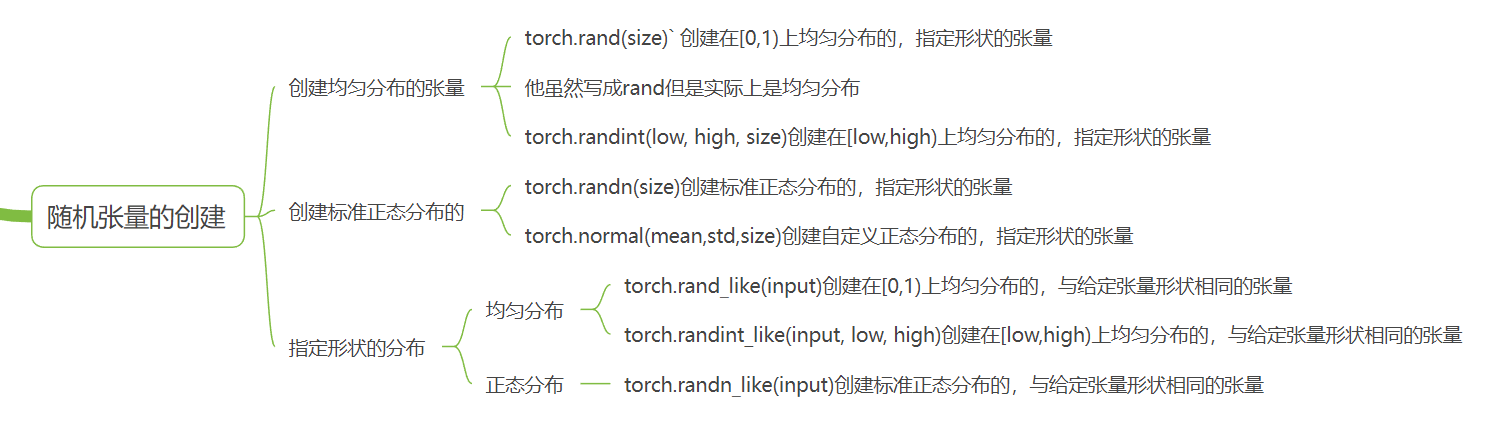
torch.rand(size)创建在[0,1)上均匀分布的,指定形状的张量torch.randint(low, high, size)创建在[low,high)上均匀分布的,指定形状的张量torch.randn(size)创建标准正态分布的,指定形状的张量torch.normal(mean, std, size)创建自定义正态分布的,指定形状的张量。mean 为均值,std 为标准差torch.rand_like(input)创建在[0,1)上均匀分布的,与给定张量形状相同的张量torch.randint_like(input, low, high)创建在[low,high)上均匀分布的,与给定张量形状相同的张量torch.randn_like(input)创建标准正态分布的,与给定张量形状相同的张量torch.randperm(n)生成从 0 到 n-1 的随机排列,类似洗牌
python
import torch

# torch.rand(size) 创建在[0,1)上均匀分布的,指定形状的张量
tensor1 = torch.rand(2, 3)
print(tensor1)

# torch.rand_like(input) 创建在[0,1)上均匀分布的,与给定张量形状相同的张量
tensor2 = torch.rand_like(tensor1)
print(tensor2)

# torch.randn(size) 创建标准正态分布的,指定形状的张量
tensor1 = torch.randn(4, 2)
print(tensor1)

# torch.normal(mean, std, size) 创建自定义正态分布的,指定形状的张量。mean 为均值,std 为标准差
tensor2 = torch.normal(5, 1, tensor1.shape)
print(tensor2)

# torch.randperm(n) 生成从 0 到 n-1 的随机排列
import torch
tensor1 = torch.randperm(10)
print(tensor1)

# 查看随机数种子
print(torch.random.initial_seed())
# 设置随机数种子
torch.manual_seed(42)
print(torch.random.initial_seed())
2.4 张量转换
2.4.1 张量元素类型转换
1) Tensor.type(dtype) 修改张量的类型
python
import torch

tensor1 = torch.tensor([1, 2, 3])
print(tensor1, tensor1.dtype)

# 使用 type 方法修改张量的类型
tensor1 = tensor1.type(torch.float32)
print(tensor1, tensor1.dtype)
2) Tensor.double() 等修改张量的类型
python
import torch

tensor1 = torch.tensor([1, 2, 3])
print(tensor1, tensor1.dtype)

# 使用 double 方法修改张量的类型
tensor1 = tensor1.double()
print(tensor1)

# 使用 long 方法修改张量的类型
tensor1 = tensor1.long()
print(tensor1, tensor1.dtype)
2.4.2 Tensor 与 ndarray 转换
1) Tensor.numpy() 将 Tensor 转换为 ndarray,共享内存。使用 copy() 避免共享内存
python
import torch

# 使用 numpy() 方法将 Tensor 转换为 ndarray,共享内存
tensor1 = torch.rand(3, 2)
numpy_array = tensor1.numpy()
print(tensor1)
print(numpy_array)
print(type(tensor1), type(numpy_array))
2.6 张量数值运算
广播操作
在进行深度学习或数据分析时,我们经常需要对张量(Tensor)或数组进行加减乘除运算。最理想的情况是两个矩阵形状完全一致(比如都是 3×33 \times 33×3),这样可以直接**逐元素(Element-wise)**计算。
但在实际场景中,我们经常会遇到形状不一致的情况。例如,你想给一个 3×33 \times 33×3 的矩阵每一行都加上同一个向量 [1, 2, 3]。这时候,广播机制(Broadcasting) 就登场了
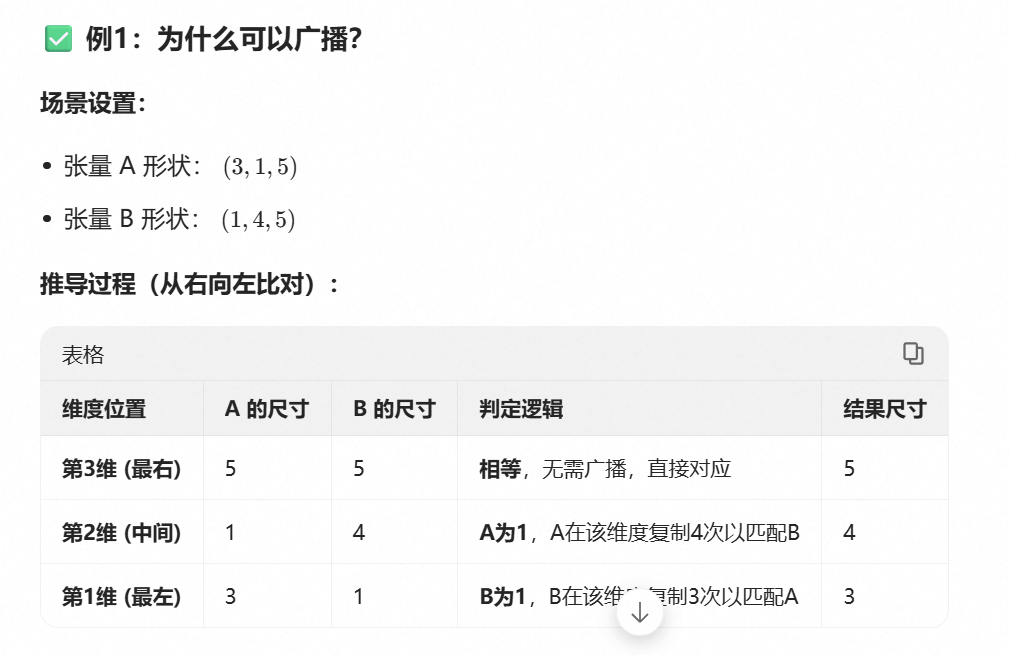
要判断两个数组能否进行广播运算,必须遵循以下规则(从后往前比):
- 对齐: 将两个数组的形状(Shape)向右对齐。
- 兼容条件: 在每一个维度上,两个数组的大小必须满足以下任一 条件:
- 大小相等。
- 其中一个大小为 1。
- 其中一个数组在该维度缺失(即维度数较少)。
如果某个维度上两个数字既不相等,也没有一个是 1,那么广播失败,报错!
成功和失败情况
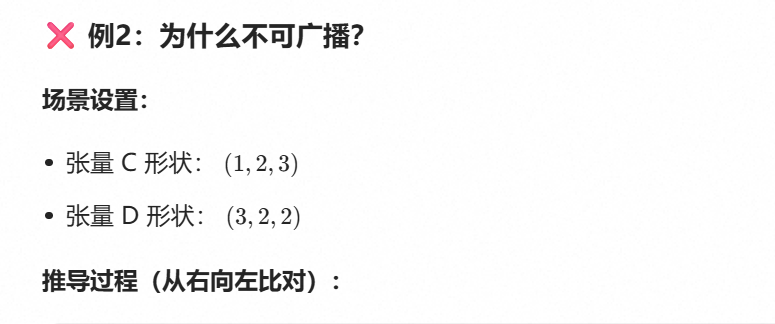
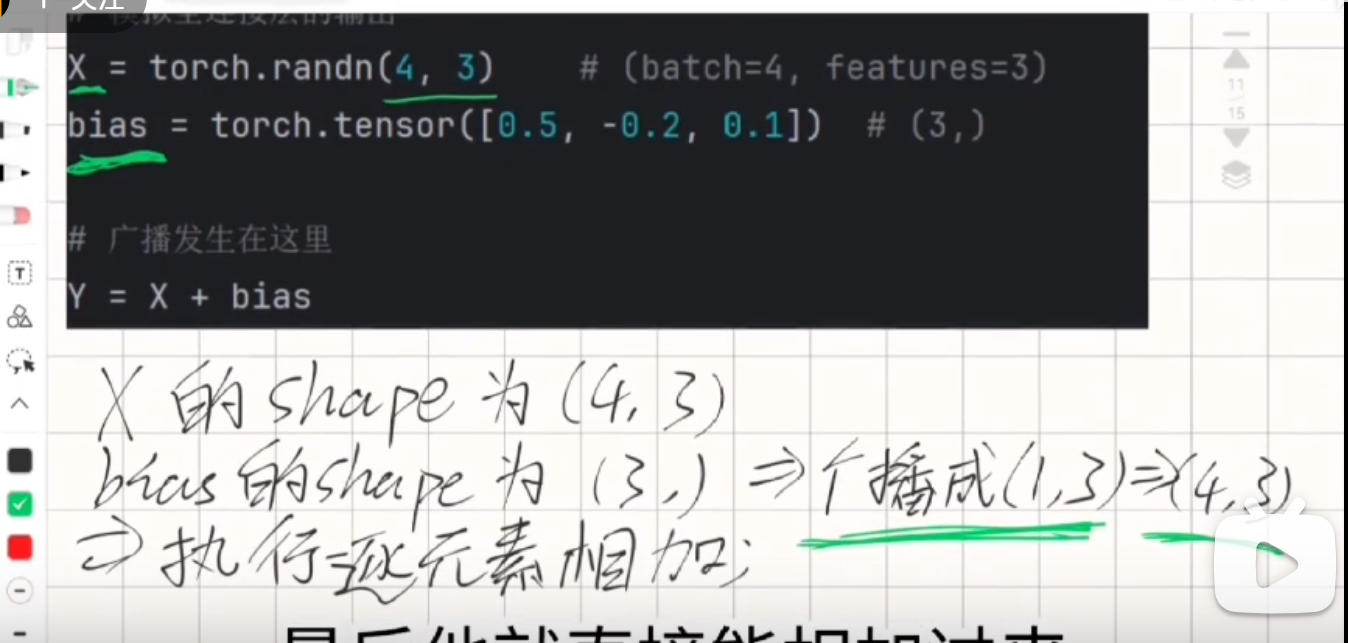
代码实现
python
import numpy as np

# 定义 a: 3行1列 (3, 1)
a = np.array([[0],
              [1],
              [2]])

# 定义 b: 1行2列 (1, 2)
b = np.array([[0, 1]])

print(f"a 的形状: {a.shape}") # (3, 1)
print(f"b 的形状: {b.shape}") # (1, 2)

# 执行加法
result = a + b
print(f"结果的形状: {result.shape}") # (3, 2)
print("结果:\n", result)
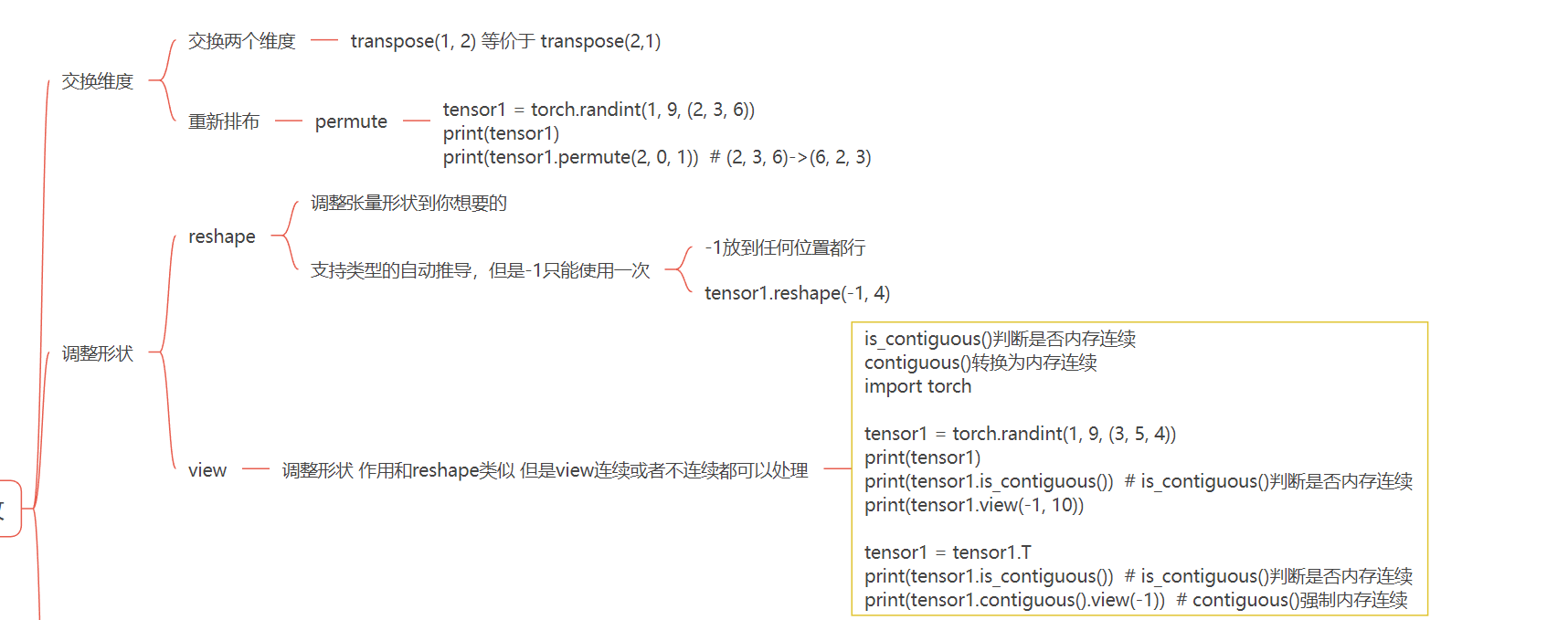
2.8 张量的形状操作
2.9 张量的拼接操作