目录
++[一、Topic(话题)... 2](#一、Topic(话题)... 2)++
++[1.1 创建话题 发布者(Publiser)... 2](#1.1 创建话题 发布者(Publiser)... 2)++
++[1.1.1先进入代码空间... 2](#1.1.1先进入代码空间... 2)++
++[1.1.2创建一个功能包topic_test,以及一个话题发布者publisher 2](#1.1.2创建一个功能包topic_test,以及一个话题发布者publisher 2)++
++[1.1.3打开 vs code. 3](#1.1.3打开 vs code. 3)++
++[1.1.4修改 publisher.py文件内容... 3](#1.1.4修改 publisher.py文件内容... 3)++
++[1.1.5 编译、安装、运行... 4](#1.1.5 编译、安装、运行... 4)++
++[1.2. 创建话题 订阅者(Subscriber)... 5](#1.2. 创建话题 订阅者(Subscriber)... 5)++
++[1.2.1先进入代码空间... 5](#1.2.1先进入代码空间... 5)++
++[1.2.2打开 vs code. 5](#1.2.2打开 vs code. 5)++
++[1.2.3修改 subscriber.py文件内容... 5](#1.2.3修改 subscriber.py文件内容... 5)++
++[1.2.4注册可执行节点... 6](#1.2.4注册可执行节点... 6)++
++[1.2.4 编译、安装... 7](#1.2.4 编译、安装... 7)++
++[1.2.5 运行... 7](#1.2.5 运行... 7)++
一、Topic(话题)
Topic(话题)是 ROS 2 中最基础、最常用的通信方式,它采用发布/订阅(Publish-Subscribe)模型,主要用于节点间异步、单向的数据流传输。
在 ROS 2 中,编写 Topic 通信的代码逻辑非常标准化。无论是 C++ 还是 Python,通常都遵循面向对象编程的思想,核心分为**发布者(Publisher)和订阅者(Subscriber)**两部分。
-
- 创建话题 发布者(Publiser)
以下是 Topic 代码逻辑的通用步骤(以 Python 为例,C++ 逻辑完全对称):创建一个功能包topic_test;包含一个话题发布者节点Publiser;
1.1.1先进入代码空间
|--------------------------------------------------------------|
| root@LHAYR:~# cd ~/ros2_ws/src/ root@LHAYR:~/ros2_ws/src# |
1.1.2创建一个功能包topic_test,以及一个话题发布者publisher
|------------------------------------------------------------------------------------------------------------------------------------------------------------------------------------------------------------------------------------------------------------------------------------------------------------------------------------------------------------------------------------------------------------------------------------------------------------------------------------------------------------------------------------------------------------------------------------------------------------------------------------------------------------------------------------------------------------------------------------------------------------------------------------------------------------------------------------------------------------------------------------------------------------------------------------------------------------------------------------------------------------------------------------------------------------------------------------------------------------------------------------------------------------------------------------------------------------------------------------------------------------------------------------------------------------------------------------------------------------------------------------------------------------------------------------------------------------------------------------------------------------------------------------------------------------------------------|
| root@LHAYR:~# cd ~/ros2_ws/src/ root@LHAYR:~/ros2_ws/src# ros2 pkg create --build-type ament_python --node-name publisher --dependencies rclpy std_msgs --license MIT topic_test going to create a new package package name: topic_test destination directory: /root/ros2_ws/src package format: 3 version: 0.0.0 description: TODO: Package description maintainer: 'root \
1.1.3打开 vs code
|--------------------------------------------------------------|
| root@LHAYR:~/ros2_ws/src# code . root@LHAYR:~/ros2_ws/src# |
1.1.4修改 publisher.py文件内容
修改 publisher.py文件内容(src/topic_test/topic_test/publisher.py)
|----------------------------------------------------------------------------------------------------------------------------------------------------------------------------------------------------------------------------------------------------------------------------------------------------------------------------------------------------------------------------------------------------------------------------------------------------------------------------------------------------------------------------------------------------------------------------------------------------------------------------------------------------------------------------------------------------------------------------------------------------------------------------------------------------------------------------------------------------------|
| #发布者 import rclpy #倒入rclpy库文件 from rclpy.node import Node # 从 rclpy 中导入 Node 基类,后续自定义节点都要继承它 from std_msgs.msg import String# 导入 ROS 2 内置的标准字符串消息类型,用于定义通信的数据格式 class PubNode(Node): def init(self, node_name='pubnode'): super().init(node_name=node_name) self.pub = self.create_publisher(String, '/hello', 5) # 初始化消息对象 self.msg = String() self.num = 0 # 获取日志记录器 self.logger = self.get_logger() # 创建定时器:每1秒执行一次pubmsg方法 self.create_timer(1.0, self.pubmsg) def pubmsg(self): # 格式化消息内容 self.msg.data = f"the {self.num}th hello message." self.num += 1 # 发布消息 self.pub.publish(self.msg) # 打印日志 self.logger.info(f'send message: {self.msg.data}') def main(args=None): rclpy.init(args=args) node = PubNode() try: rclpy.spin(node) except Exception: # node.destroy_node() rclpy.shutdown() exit(0) if name == 'main': main() |
1.1.5 编译、安装、运行
- 保存代码,进行编译,安装(跟新环境变量) 和运行
|-------------------------------------------------------------------------------------------------------------------------------------------------------------------------------------------------------------------------------------------------------------------------------------------------------------------------------------------------------------------------------------------------------------------------------------------------------------------------------------------------------------------------------------------------------------------------------------------------------------------------------------------------------------------------------------------------------------------------------------------------------------------------------------|
| root@LHAYR:~/ros2_ws# colcon build --packages-select topic_test --symlink-install Starting >>> topic_test Finished <<< topic_test 0.64s Summary: 1 package finished 0.74s root@LHAYR:~/ros2_ws# # 刷新环境(关键!每次编译后都要做) root@LHAYR:~/ros2_ws# source install/setup.bash #运行程序 root@LHAYR:~/ros2_ws# ros2 run topic_test publisher INFO 1782968817.189284816 pubnode: send message: the 0th hello message. INFO 1782968818.182780941 pubnode: send message: the 1th hello message. INFO 1782968819.182797906 pubnode: send message: the 2th hello message. INFO 1782968820.182748389 pubnode: send message: the 3th hello message. INFO 1782968821.182864452 pubnode: send message: the 4th hello message. |
- 用指令检测是否发布成功 ros2 topic echo /hello
|-------------------------------------------------------------------------------------------------------------------|
| root@LHAYR:~/ros2_ws/src# ros2 topic echo /hello data: the 71th hello message. --- data: the 72th hello message. |
1.2. 创建话题 订阅者(Subscriber)
订阅者(Subscriber)的代码逻辑
订阅者的作用是被动监听特定话题,一旦有新数据到来就自动执行处理逻辑。
1.2.1先进入代码空间
先进入到cd ros2_ws/src/topic_test/topic_test代码空间,新建一个 订阅者文件subsriber.py
|---------------------------------------------------------------------------------------------------------------------------------------------------------------------------------------------------------------------------------------------------------------------------------------------------------------------------------------------------------------------------|
| root@LHAYR:~# cd ros2_ws/src/topic_test/topic_test root@LHAYR:~/ros2_ws/src/topic_test/topic_test# ls init.py pycache publisher.py root@LHAYR:~/ros2_ws/src/topic_test/topic_test# touch subscriber.py root@LHAYR:~/ros2_ws/src/topic_test/topic_test# ls init.py pycache publisher.py subscriber.py root@LHAYR:~/ros2_ws/src/topic_test/topic_test# |
1.2.2打开 vs code
|--------------------------------------------------------------|
| root@LHAYR:~/ros2_ws/src# code . root@LHAYR:~/ros2_ws/src# |
1.2.3修改 subscriber.py文件内容
修改 subscriber.py文件内容(src/topic_test/topic_test/subscriber.py)
|-----------------------------------------------------------------------------------------------------------------------------------------------------------------------------------------------------------------------------------------------------------------------------------------------------------------------------------------------------------------------------------------------------------------------------------------------------------------------------------------------------------------------------------------------------------------------------------------------------------------------------------|
| # 订阅者 import rclpy from rclpy.node import Node from std_msgs.msg import String class SubNode(Node): def init(self, node_name='subnode'): super().init(node_name=node_name) # 创建订阅者,监听 /hello 话题,回调函数为 self.process_msg self.sub = self.create_subscription(String, '/hello', self.process_msg, 5) def process_msg(self, msg): # 使用 get_logger() 打印收到的消息 self.get_logger().info(f'receive msg: {msg.data}') def main(args=None): rclpy.init(args=args) node = SubNode() try: rclpy.spin(node) except KeyboardInterrupt: pass finally: # 确保节点资源被正确销毁 node.destroy_node() rclpy.shutdown() if name == 'main': main() |
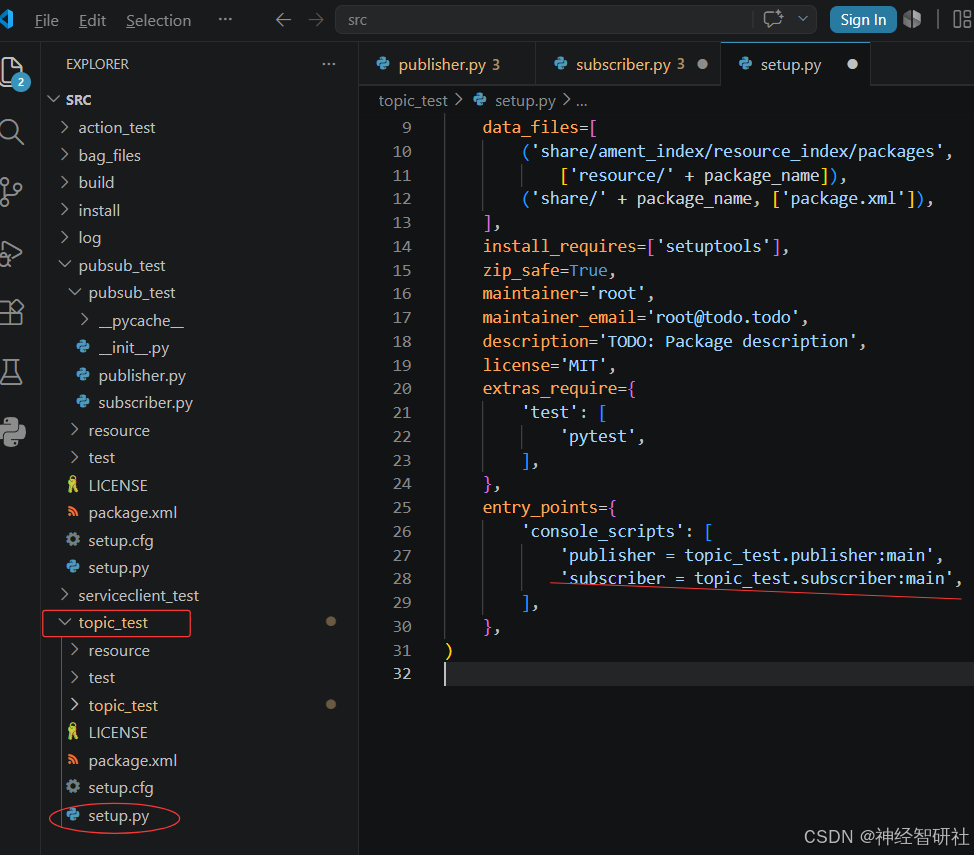
1.2.4注册可执行节点
在vs code 中打开修改 setup.py文件内容(src/topic_test/setip.py)
|---------------------------------------------------------------------------------------------------------------------------------|
| entry_points={ 'console_scripts': 'publisher = topic_test.publisher:main', 'subscriber = topic_test.subscriber:main', , }, |
|  |
|
1.2.4 编译、安装
保存代码,进行编译,安装(跟新环境变量)
|---------------------------------------------------------------------------------------------------------------------------------------------------------------------------------------------------------------------------------------------|
| r root@LHAYR:~/ros2_ws# colcon build --packages-select topic_test --symlink-install Starting >>> topic_test Finished <<< topic_test 0.58s Summary: 1 package finished 0.64s root@LHAYR:~/ros2_ws# source install/setup.bash |
1.2.5 运行
终端 1重新加载环境,运行发布者:
|--------------------------------------------------------------------------------------------------------------------------------------------------------------------------------------------------------------------------------------------------------------------------------------------------------------------|
| root@LHAYR:~/ros2_ws# cd ~/ros2_ws root@LHAYR:~/ros2_ws# source install/setup.bash root@LHAYR:~/ros2_ws# ros2 run topic_test publisher INFO 1782979604.017530886 pubnode: send message: the 0th hello message. INFO 1782979605.012724652 pubnode: send message: the 1th hello message. |
终端 2重新加载环境,运行订阅者:
|---------------------------------------------------------------------------------------------------------------------------------------------------------------------------------------------------------------------------------------------------------------------------------------------------------------------------------------------------------------------------------------------------------------------------------------------------------------------------------------------|
| root@LHAYR:~/ros2_ws# cd ~/ros2_ws root@LHAYR:~/ros2_ws# source install/setup.bash root@LHAYR:~/ros2_ws# ros2 run topic_test subscriber INFO 1782979624.020452777 subnode: receive msg: the 20th hello message. INFO 1782979625.015337360 subnode: receive msg: the 21th hello message. INFO 1782979626.014765692 subnode: receive msg: the 22th hello message. INFO 1782979627.012906893 subnode: receive msg: the 23th hello message. |