笔者个人认为:使用DataTemplate时,一定要先有数据,然后在定义DataTemplate来显示这个数据;以下是我遇到的三个场景:
1.容器控件使用,来显示链表内单条数据
容器控件有一个ItemTemplate属性,是DataTemplate 类型:
XML
    [Bindable(true)]
    [CustomCategory("Content")]
    public DataTemplate ItemTemplate
    {
      get => (DataTemplate) this.GetValue(ItemsControl.ItemTemplateProperty);
      set => this.SetValue(ItemsControl.ItemTemplateProperty, (object) value);
    }
例子:
XML
<telerik:RadTabControl.ItemTemplate>
    <DataTemplate>
        <TextBlock Text="{Binding Name}" />
    </DataTemplate>
</telerik:RadTabControl.ItemTemplate>
XML
  <ListBox
      ItemContainerStyle="{StaticResource ActionItemStyle}"
      ItemsSource="{Binding OverallActions}"
      ScrollViewer.HorizontalScrollBarVisibility="Disabled">

      <ListBox.ItemTemplate>
          <DataTemplate>
              <Border
                  Margin="3"
                  BorderThickness="1"
                  CornerRadius="5">
                  <Grid>
                      <Grid.ColumnDefinitions>
                          <ColumnDefinition Width="*" />
                          <ColumnDefinition Width="Auto" />
                          <ColumnDefinition Width="Auto" />
                      </Grid.ColumnDefinitions>


                      <StackPanel Grid.Column="0" Margin="10">
                          <TextBlock
                              FontSize="14"
                              FontWeight="Bold"
                              Text="{Binding ActionDescription}" />

                      </StackPanel>


                      <TextBlock
                          Grid.Column="1"
                          Margin="10"
                          HorizontalAlignment="Center"
                          VerticalAlignment="Center"
                          FontSize="16"
                          FontWeight="Bold"
                          Text="{Binding ActionIndex}" />

                      <!--  操作按钮  -->
                      <StackPanel
                          Grid.Column="2"
                          Margin="10"
                          Orientation="Horizontal">

                          <Button
                              Width="60"
                              Height="30"
                              Margin="0,0,5,0"
                              Command="{Binding DataContext.ExecuteActionHandleModelCommand, RelativeSource={RelativeSource AncestorType={x:Type ListBox}}}"
                              CommandParameter="{Binding ActionIndex}"
                              Content="执行" />
                      </StackPanel>
                  </Grid>
              </Border>
          </DataTemplate>
      </ListBox.ItemTemplate>
  </ListBox>
cs
   private OneBasedList<ActionHandleModel> _overallActions = new();

   public OneBasedList<ActionHandleModel> OverallActions
   {
       get => _overallActions;
       set
       {
           this.RaiseAndSetIfChanged(ref _overallActions, value);
       }
   }


public class ActionHandleModel : ReactiveObject
{


    public int ActionIndex
    {
        get => _actionIndex;
        set
        {
            this.RaiseAndSetIfChanged(ref _actionIndex, value);
        }
    }
    private int _actionIndex;


    public string ActionDescription
    {
        get => _actionDescription;
        set
        {
            this.RaiseAndSetIfChanged(ref _actionDescription, value);
        }
    }
    private string _actionDescription;


    public bool IsCanRepeat
    {
        get => _isCanRepeat;
        set
        {

            this.RaiseAndSetIfChanged(ref _isCanRepeat, value);
        }
    }
    private bool _isCanRepeat;

    public bool IsCanBackToPreviousStep
    {
        get => _isCanBackToPreviousStep;
        set
        {
            this.RaiseAndSetIfChanged(ref _isCanBackToPreviousStep, value);

        }
    }
    private bool _isCanBackToPreviousStep;


    public SingleFlowExecutionState ExecutionState
    {
        get => _executionState;
        set
        {
            this.RaiseAndSetIfChanged(ref _executionState, value);
        }
    }
    private SingleFlowExecutionState _executionState;
}
2.显示窗体的时候,传入ViewModel,指定模板来显示View
XML
<DataTemplate DataType="{x:Type local:AlarmHistoryDataViewModel}">
    <local:AlarmHistoryData />
</DataTemplate>
<local:AlarmHistoryData /> 实际上定义的是 DataTemplate 的 VisualTree(可视化树)。
因为:
DataTemplate 的继承链是这样的:
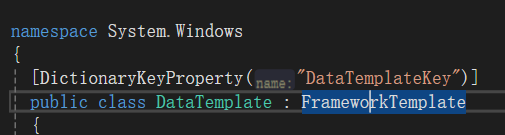
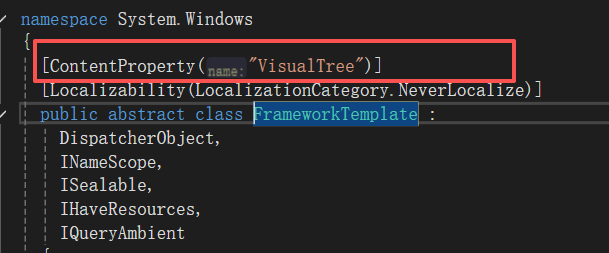
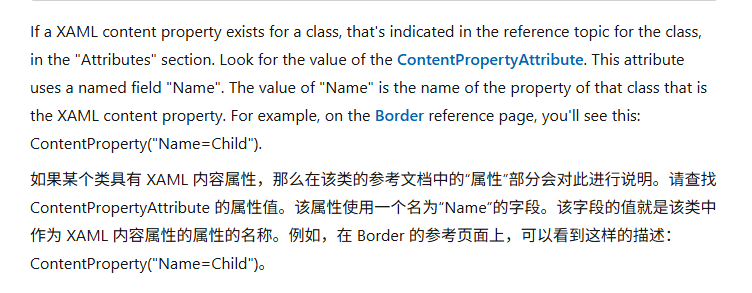
ContentPropertyAttribute 特性指定了属性名:VisualTree,那么 在 DataTemplate 的 xaml内容中定义的元素实际上就是他的**VisualTree属性:**
有关链接:
ContentPropertyAttribute 类 (System.Windows.Markup) | Microsoft Learn
XAML 语法指南 - Windows apps | Microsoft Learn
3.显示某些数据的时候,不想使用基本控件,
XML
[SRCategory("AppearanceCategory")]
public virtual DataTemplate ContentTemplate
{
  get => (DataTemplate) this.GetValue(RadTabControlBase.ContentTemplateProperty);
  set => this.SetValue(RadTabControlBase.ContentTemplateProperty, (object) value);
}
XML
 <telerik:RadTabControl ItemsSource="{Binding Sections}" SelectedIndex="{Binding SelectSectionIndex}">
     <telerik:RadTabControl.ItemTemplate>
         <DataTemplate>
             <TextBlock Text="{Binding Name}" />
         </DataTemplate>
     </telerik:RadTabControl.ItemTemplate>
     <telerik:RadTabControl.ContentTemplate>
         <DataTemplate>
             <telerik:RadGridView
                 HorizontalContentAlignment="Center"
                 VerticalContentAlignment="Center"
                 AutoGenerateColumns="False"
                 CanUserGroupColumns="False"
                 CanUserReorderColumns="False"
                 CanUserResizeColumns="True"
                 CanUserSelect="True"
                 CanUserSortColumns="False"
                 CanUserSortGroups="False"
                 EnableLostFocusSelectedState="False"
                 FrozenColumnsSplitterVisibility="Collapsed"
                 IsFilteringAllowed="False"
                 IsHitTestVisible="True"
                 IsReadOnly="False"
                 IsTabStop="False"
                 ItemsSource="{Binding KeyValues, NotifyOnSourceUpdated=True}"
                 RowHeight="29"
                 RowIndicatorVisibility="Collapsed"
                 SelectionUnit="FullRow"
                 ShowGroupPanel="False"
                 ShowSearchPanel="False">
                 <telerik:RadGridView.Columns>
                     <telerik:GridViewDataColumn
                         Width="*"
                         DataMemberBinding="{Binding Key}"
                         Header="程序枚举值"
                         IsReadOnly="True" />
                     <telerik:GridViewDataColumn
                         Width="2*"
                         DataMemberBinding="{Binding Value}"
                         Header="配置的名称" />
                 </telerik:RadGridView.Columns>
             </telerik:RadGridView>
         </DataTemplate>
     </telerik:RadTabControl.ContentTemplate>
 </telerik:RadTabControl>
cs
private ObservableCollection<IniSection> _sections;
public ObservableCollection<IniSection> Sections
{
    get => _sections;
    set => this.RaiseAndSetIfChanged(ref _sections, value);
}


public class IniSection
{
    public string Name { get; set; }
    public ObservableCollection<IniKeyValue> KeyValues { get; set; } = new ObservableCollection<IniKeyValue>();
}


public class IniKeyValue
{
    public string Key { get; set; }
    public string Value { get; set; }
}
这种有嵌套结构的数据,使用基础控件不能显示,使用TabControl 自定义数据模板比较方便;
每一个tab页就是一个IniSection对象,在tab页里再定义一个表格显示KeyValues 属性;