搭建文件结构
创建core/insert_data.py文件,代码如下:
python
from log import logger

async def init_dept():
  logger.info("🔧 开始新增部门...")

async def init_superuser():
  logger.info("🔧 开始初始化超级管理员用户...")

async def init_menus():
  logger.info("🔧 开始初始化系统菜单...")

async def init_apis():
  logger.info("🔧 开始初始化API数据...")

async def init_roles():
  logger.info("🔧 开始初始化用户角色...")

async def init_insert_data():
  await init_dept()
  await init_superuser()
  await init_menus()
  await init_apis()
await init_roles()修改core/init_app.py文件:
python
from .insert_data import init_insert_data

···
async def init_data():
  logger.info("🚀 系统初始化开始...")

  logger.info("🔧 开始数据库初始化和迁移...")
  await init_db()
  logger.info("✅ 数据库初始化完成")

  await init_insert_data()
  logger.info("🎉 系统初始化完成!")
初始化部门数据
python
from models.admin import Dept

...
async def init_dept():
  logger.info("🔧 开始新增部门...")
  depts = await Dept.exists()
  if not depts:
    await Dept.create(
      name='研发部门',
      code="YFBM",
      parent_id=0,
      tree_path=0,
      sort=1,
    )
    logger.info("✅ 部门创建成功 - 部门: 研发部门")
  else:
    logger.info("ℹ️ 部门已存在,跳过创建")
运行之后,数据库会添加对应数据:

初始化超级管理员用户
python
from models.admin import Dept, User

...
async def init_superuser():
  logger.info("🔧 开始初始化超级管理员用户...")
  user = await User.exists()
  if not user:
    await User.create(
      account="admin",
      username="超级管理员",
      email="admin@admin.com",
      password="abcd1234",
      dept_id=1,
      is_active=True,
      is_superuser=True,
    )
    logger.info("✅ 超级管理员用户创建成功 - 用户名: admin")
  else:
    logger.info("ℹ️ 超级管理员用户已存在,跳过创建")
运行之后,数据库会添加对应数据:

初始化系统菜单
python
from models.admin import Dept, User, Menu
from schemas.menus import MenuType

...
async def init_menus():
  logger.info("🔧 开始初始化系统菜单...")
  menus = await Menu.exists()
  if not menus:
    parent_menu = await Menu.create(
      type=MenuType.CATALOG,
      title="系统管理",
      path="/system",
      sort=1,
      parent_id=0,
      visible=True,
      component="Layout",
      keep_alive=False,
      redirect="/system/user",
    )
    children_menu = [
      Menu(
        type=MenuType.MENU,
        title="用户管理",
        path="user",
        sort=1,
        parent_id=parent_menu.id,
        visible=True,
        component="system/user/index",
        keep_alive=False,
      ),
      Menu(
        type=MenuType.MENU,
        title="角色管理",
        path="role",
        sort=2,
        parent_id=parent_menu.id,
        visible=True,
        component="system/role/index",
        keep_alive=False,
      ),
      Menu(
        type=MenuType.MENU,
        title="菜单管理",
        path="menu",
        sort=3,
        parent_id=parent_menu.id,
        visible=True,
        component="system/menu/index",
        keep_alive=False,
      ),
      Menu(
        type=MenuType.MENU,
        title="API管理",
        path="api",
        sort=4,
        parent_id=parent_menu.id,
        visible=True,
        component="system/api/index",
        keep_alive=False,
      ),
      Menu(
        type=MenuType.MENU,
        title="部门管理",
        path="dept",
        sort=5,
        parent_id=parent_menu.id,
        visible=True,
        component="system/dept/index",
        keep_alive=False,
      ),
      Menu(
        type=MenuType.MENU,
        title="操作日志",
        path="log",
        sort=6,
        parent_id=parent_menu.id,
        visible=True,
        component="system/log/index",
        keep_alive=False,
      ),
    ]
    await Menu.bulk_create(children_menu)
    logger.info("✅ 系统菜单初始化成功 - 菜单数量: 7")
  else:
    logger.info("ℹ️ 系统菜单已存在,跳过初始化")
运行之后,数据库会添加对应数据:

初始化API
python
from models.admin import Dept, User, Menu, Api
from fastapi.routing import APIRoute

...
async def init_apis():
  logger.info("🔧 开始初始化API数据...")
  apis = await Api.exists()
  if not apis:
    from main import app

    routes = app.routes

    for route in routes:
      if isinstance(route, APIRoute):
        method = list(route.methods)[0]
        path = route.path_format
        summary = route.summary
        tags = list(route.tags)[0]
        await Api.create(
          **dict(
            method=method,
            path=path,
            summary=summary,
            tags=tags,
          )
        )
  else:
    api_count = await Api.all().count()
    logger.info(f"ℹ️ API数据已存在,跳过初始化 - 当前API数量: {api_count}")
运行之后,数据库会添加对应数据:

初始化用户角色
python
from models.admin import Dept, User, Menu, Api, Role
from tortoise.expressions import Q

...
async def init_roles():
  logger.info("🔧 开始初始化用户角色...")
  roles = await Role.exists()
  if not roles:
    admin_role = await Role.create(
      name="系统管理员",
      code="ADMIN",
      sort=1,
      desc="系统管理员",
    )
    user_role = await Role.create(
      name="普通用户",
      code="GUEST",
      sort=2,
      desc="普通用户",
    )

    # 分配所有API给管理员角色
    all_apis = await Api.all()
    await admin_role.apis.add(*all_apis)
    # 分配所有菜单给管理员和普通用户
    all_menus = await Menu.all()
    await admin_role.menus.add(*all_menus)
    await user_role.menus.add(*all_menus)

    # 为普通用户分配基本API
    basic_apis = await Api.filter(Q(method__in=["GET"]) | Q(tags="基础模块"))
    await user_role.apis.add(*basic_apis)

    logger.info("✅ 用户角色初始化成功 - 角色: 管理员, 普通用户")
  else:
    role_count = await Role.all().count()
    logger.info(f"ℹ️ 用户角色已存在,跳过初始化 - 当前角色数量: {role_count}")
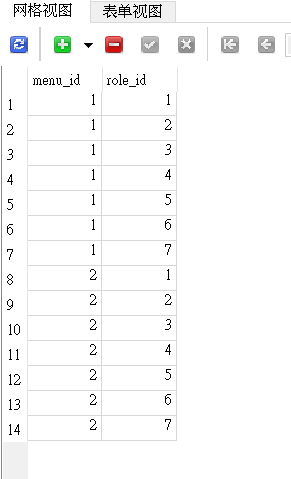
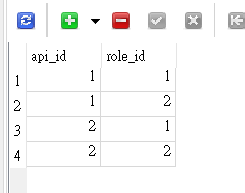
运行之后,数据库会添加对应数据:
sys_role表

sys_role_api表
sys_role_menu表