一、Tabs 滑动切换
1、静态结构
//src\pages\pagesOrder\list\list.vue
<script setup lang="ts">
import { ref } from 'vue'

// 获取屏幕边界到安全区域距离
const { safeAreaInsets } = uni.getSystemInfoSync()
// tabs 数据
const orderTabs = ref([
  { orderState: 0, title: '全部' },
  { orderState: 1, title: '待付款' },
  { orderState: 2, title: '待发货' },
  { orderState: 3, title: '待收货' },
  { orderState: 4, title: '待评价' },
])
</script>

<template>
  <view class="viewport">
    <!-- tabs -->
    <view class="tabs">
      <text class="item" v-for="item in 5" :key="item"> 待付款 </text>
      <!-- 游标 -->
      <view class="cursor" :style="{ left: 0 * 20 + '%' }"></view>
    </view>
    <!-- 滑动容器 -->
    <swiper class="swiper">
      <!-- 滑动项 -->
      <swiper-item v-for="item in 5" :key="item">
        <!-- 订单列表 -->
        <scroll-view scroll-y class="orders">
          <view class="card" v-for="item in 2" :key="item">
            <!-- 订单信息 -->
            <view class="status">
              <text class="date">2023-04-14 13:14:20</text>
              <!-- 订单状态文字 -->
              <text>待付款</text>
              <!-- 待评价/已完成/已取消 状态: 展示删除订单 -->
              <text class="icon-delete"></text>
            </view>
            <!-- 商品信息,点击商品跳转到订单详情,不是商品详情 -->
            <navigator
              v-for="sku in 2"
              :key="sku"
              class="goods"
              :url="`/pagesOrder/detail/detail?id=1`"
              hover-class="none"
            >
              <view class="cover">
                <image
                  mode="aspectFit"
                  src="https://yanxuan-item.nosdn.127.net/c07edde1047fa1bd0b795bed136c2bb2.jpg"
                ></image>
              </view>
              <view class="meta">
                <view class="name ellipsis">ins风小碎花泡泡袖衬110-160cm</view>
                <view class="type">藏青小花 130</view>
              </view>
            </navigator>
            <!-- 支付信息 -->
            <view class="payment">
              <text class="quantity">共5件商品</text>
              <text>实付</text>
              <text class="amount"> <text class="symbol">¥</text>99</text>
            </view>
            <!-- 订单操作按钮 -->
            <view class="action">
              <!-- 待付款状态:显示去支付按钮 -->
              <template v-if="true">
                <view class="button primary">去支付</view>
              </template>
              <template v-else>
                <navigator
                  class="button secondary"
                  :url="`/pagesOrder/create/create?orderId=id`"
                  hover-class="none"
                >
                  再次购买
                </navigator>
                <!-- 待收货状态: 展示确认收货 -->
                <view v-if="false" class="button primary">确认收货</view>
              </template>
            </view>
          </view>
          <!-- 底部提示文字 -->
          <view class="loading-text" :style="{ paddingBottom: safeAreaInsets?.bottom + 'px' }">
            {{ true ? '没有更多数据~' : '正在加载...' }}
          </view>
        </scroll-view>
      </swiper-item>
    </swiper>
  </view>
</template>

<style lang="scss">
page {
  height: 100%;
  overflow: hidden;
}

.viewport {
  height: 100%;
  display: flex;
  flex-direction: column;
  background-color: #fff;
}

// tabs
.tabs {
  display: flex;
  justify-content: space-around;
  line-height: 60rpx;
  margin: 0 10rpx;
  background-color: #fff;
  box-shadow: 0 4rpx 6rpx rgba(240, 240, 240, 0.6);
  position: relative;
  z-index: 9;

  .item {
    flex: 1;
    text-align: center;
    padding: 20rpx;
    font-size: 28rpx;
    color: #262626;
  }

  .cursor {
    position: absolute;
    left: 0;
    bottom: 0;
    width: 20%;
    height: 6rpx;
    padding: 0 50rpx;
    background-color: #27ba9b;
    /* 过渡效果 */
    transition: all 0.4s;
  }
}

// swiper
.swiper {
  background-color: #f7f7f8;
}

// 订单列表
.orders {
  .card {
    min-height: 100rpx;
    padding: 20rpx;
    margin: 20rpx 20rpx 0;
    border-radius: 10rpx;
    background-color: #fff;

    &:last-child {
      padding-bottom: 40rpx;
    }
  }

  .status {
    display: flex;
    align-items: center;
    justify-content: space-between;
    font-size: 28rpx;
    color: #999;
    margin-bottom: 15rpx;

    .date {
      color: #666;
      flex: 1;
    }

    .primary {
      color: #ff9240;
    }

    .icon-delete {
      line-height: 1;
      margin-left: 10rpx;
      padding-left: 10rpx;
      border-left: 1rpx solid #e3e3e3;
    }
  }

  .goods {
    display: flex;
    margin-bottom: 20rpx;

    .cover {
      width: 170rpx;
      height: 170rpx;
      margin-right: 20rpx;
      border-radius: 10rpx;
      overflow: hidden;
      position: relative;
    }

    .quantity {
      position: absolute;
      bottom: 0;
      right: 0;
      line-height: 1;
      padding: 6rpx 4rpx 6rpx 8rpx;
      font-size: 24rpx;
      color: #fff;
      border-radius: 10rpx 0 0 0;
      background-color: rgba(0, 0, 0, 0.6);
    }

    .meta {
      flex: 1;
      display: flex;
      flex-direction: column;
      justify-content: center;
    }

    .name {
      height: 80rpx;
      font-size: 26rpx;
      color: #444;
    }

    .type {
      line-height: 1.8;
      padding: 0 15rpx;
      margin-top: 10rpx;
      font-size: 24rpx;
      align-self: flex-start;
      border-radius: 4rpx;
      color: #888;
      background-color: #f7f7f8;
    }

    .more {
      flex: 1;
      display: flex;
      align-items: center;
      justify-content: center;
      font-size: 22rpx;
      color: #333;
    }
  }

  .payment {
    display: flex;
    justify-content: flex-end;
    align-items: center;
    line-height: 1;
    padding: 20rpx 0;
    text-align: right;
    color: #999;
    font-size: 28rpx;
    border-bottom: 1rpx solid #eee;

    .quantity {
      font-size: 24rpx;
      margin-right: 16rpx;
    }

    .amount {
      color: #444;
      margin-left: 6rpx;
    }

    .symbol {
      font-size: 20rpx;
    }
  }

  .action {
    display: flex;
    justify-content: flex-end;
    align-items: center;
    padding-top: 20rpx;

    .button {
      width: 180rpx;
      height: 60rpx;
      display: flex;
      justify-content: center;
      align-items: center;
      margin-left: 20rpx;
      border-radius: 60rpx;
      border: 1rpx solid #ccc;
      font-size: 26rpx;
      color: #444;
    }

    .secondary {
      color: #27ba9b;
      border-color: #27ba9b;
    }

    .primary {
      color: #fff;
      background-color: #27ba9b;
    }
  }

  .loading-text {
    text-align: center;
    font-size: 28rpx;
    color: #666;
    padding: 20rpx 0;
  }
}
</style>
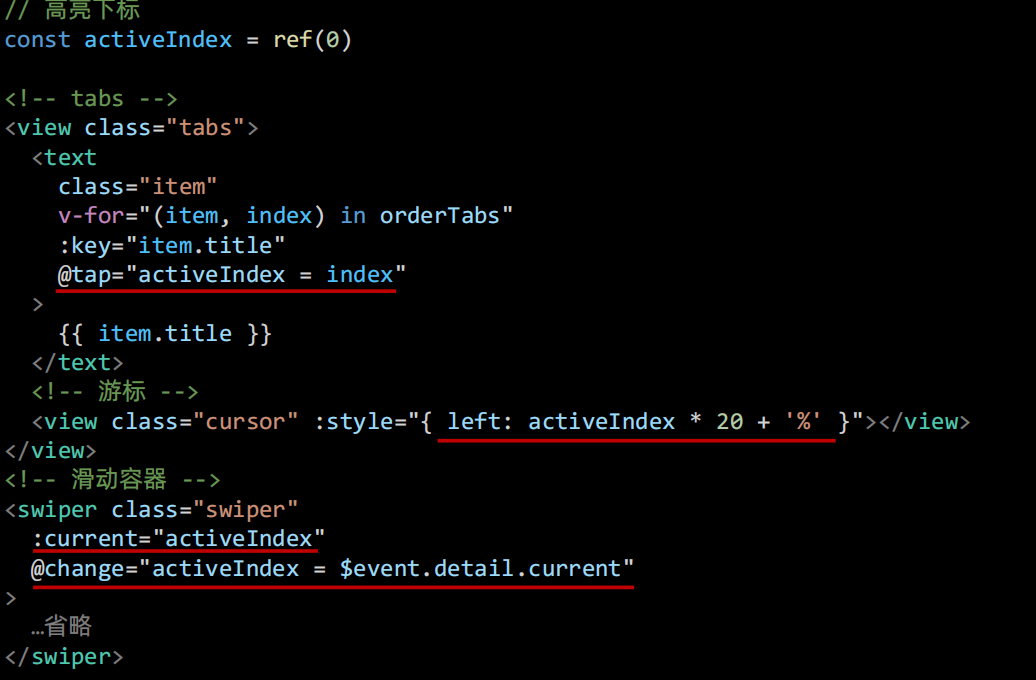
2、swiper滑动切换
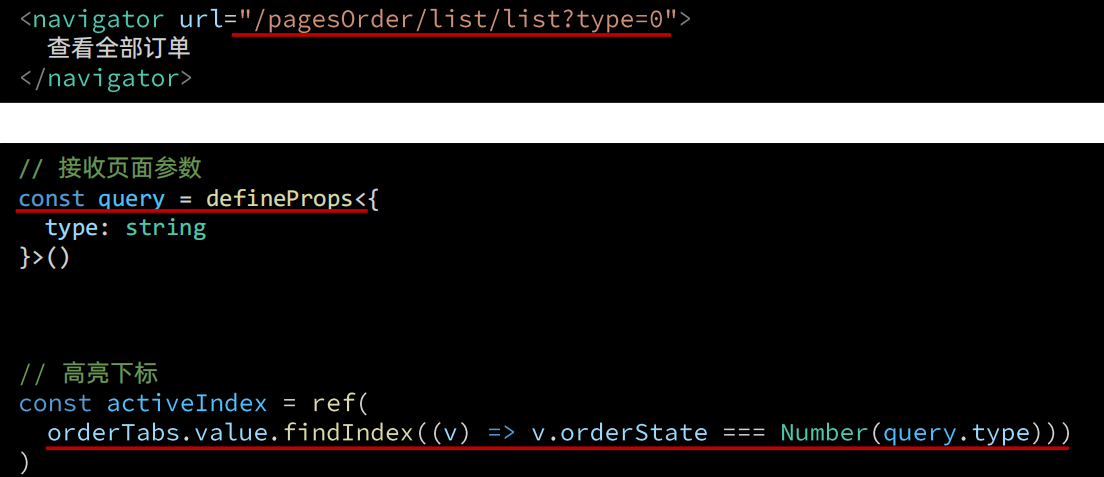
二、Tabs 页面跳转高亮
三、列表渲染
1、封装列表组件
//src\pages\pagesOrder\list\components\OrderList.vue
<script setup lang="ts">
import { OrderState } from '@/services/constants'
import { orderStateList } from '@/services/constants'
import { getMemberOrderAPI } from '@/services/order'
import type { OrderItem } from '@/types/order'
import type { OrderListParams } from '@/types/order'
import { onMounted, ref } from 'vue'

// 获取屏幕边界到安全区域距离
const { safeAreaInsets } = uni.getSystemInfoSync()

// 定义 porps
const props = defineProps<{
  orderState: number
}>()

// 请求参数
const queryParams: OrderListParams = {
  page: 1,
  pageSize: 5,
  orderState: props.orderState,
}

// 获取订单列表
const orderList = ref<OrderItem[]>([])
const getMemberOrderData = async () => {
  const res = await getMemberOrderAPI(queryParams)
  orderList.value = res.result.items
}

onMounted(() => {
  getMemberOrderData()
})
</script>

<template>
  <scroll-view scroll-y class="orders">
    <view class="card" v-for="order in orderList" :key="order.id">
      <!-- 订单信息 -->
      <view class="status">
        <text class="date">{{ order.createTime }}</text>
        <!-- 订单状态文字 -->
        <text>{{ orderStateList[order.orderState].text }}</text>
        <!-- 待评价/已完成/已取消 状态: 展示删除订单 -->
        <text v-if="order.orderState >= OrderState.DaiPingJia" class="icon-delete"></text>
      </view>
      <!-- 商品信息,点击商品跳转到订单详情,不是商品详情 -->
      <navigator
        v-for="item in order.skus"
        :key="item.id"
        class="goods"
        :url="`/pagesOrder/detail/detail?id=${order.id}`"
        hover-class="none"
      >
        <view class="cover">
          <image mode="aspectFit" :src="item.image"></image>
        </view>
        <view class="meta">
          <view class="name ellipsis">{{ item.name }}</view>
          <view class="type">{{ item.attrsText }}</view>
        </view>
      </navigator>
      <!-- 支付信息 -->
      <view class="payment">
        <text class="quantity">共{{ order.totalNum }}件商品</text>
        <text>实付</text>
        <text class="amount"> <text class="symbol">¥</text>{{ order.payMoney }}</text>
      </view>
      <!-- 订单操作按钮 -->
      <view class="action">
        <!-- 待付款状态:显示去支付按钮 -->
        <template v-if="order.orderState === OrderState.DaiFuKuan">
          <view class="button primary">去支付</view>
        </template>
        <template v-else>
          <navigator
            class="button secondary"
            :url="`/pagesOrder/create/create?orderId=id`"
            hover-class="none"
          >
            再次购买
          </navigator>
          <!-- 待收货状态: 展示确认收货 -->
          <view v-if="order.orderState === OrderState.DaiShouHuo" class="button primary"
            >确认收货</view
          >
        </template>
      </view>
    </view>
    <!-- 底部提示文字 -->
    <view class="loading-text" :style="{ paddingBottom: safeAreaInsets?.bottom + 'px' }">
      {{ true ? '没有更多数据~' : '正在加载...' }}
    </view>
  </scroll-view>
</template>

<style lang="scss">
// 订单列表
.orders {
  .card {
    min-height: 100rpx;
    padding: 20rpx;
    margin: 20rpx 20rpx 0;
    border-radius: 10rpx;
    background-color: #fff;

    &:last-child {
      padding-bottom: 40rpx;
    }
  }

  .status {
    display: flex;
    align-items: center;
    justify-content: space-between;
    font-size: 28rpx;
    color: #999;
    margin-bottom: 15rpx;

    .date {
      color: #666;
      flex: 1;
    }

    .primary {
      color: #ff9240;
    }

    .icon-delete {
      line-height: 1;
      margin-left: 10rpx;
      padding-left: 10rpx;
      border-left: 1rpx solid #e3e3e3;
    }
  }

  .goods {
    display: flex;
    margin-bottom: 20rpx;

    .cover {
      width: 170rpx;
      height: 170rpx;
      margin-right: 20rpx;
      border-radius: 10rpx;
      overflow: hidden;
      position: relative;
    }

    .quantity {
      position: absolute;
      bottom: 0;
      right: 0;
      line-height: 1;
      padding: 6rpx 4rpx 6rpx 8rpx;
      font-size: 24rpx;
      color: #fff;
      border-radius: 10rpx 0 0 0;
      background-color: rgba(0, 0, 0, 0.6);
    }

    .meta {
      flex: 1;
      display: flex;
      flex-direction: column;
      justify-content: center;
    }

    .name {
      height: 80rpx;
      font-size: 26rpx;
      color: #444;
    }

    .type {
      line-height: 1.8;
      padding: 0 15rpx;
      margin-top: 10rpx;
      font-size: 24rpx;
      align-self: flex-start;
      border-radius: 4rpx;
      color: #888;
      background-color: #f7f7f8;
    }

    .more {
      flex: 1;
      display: flex;
      align-items: center;
      justify-content: center;
      font-size: 22rpx;
      color: #333;
    }
  }

  .payment {
    display: flex;
    justify-content: flex-end;
    align-items: center;
    line-height: 1;
    padding: 20rpx 0;
    text-align: right;
    color: #999;
    font-size: 28rpx;
    border-bottom: 1rpx solid #eee;

    .quantity {
      font-size: 24rpx;
      margin-right: 16rpx;
    }

    .amount {
      color: #444;
      margin-left: 6rpx;
    }

    .symbol {
      font-size: 20rpx;
    }
  }

  .action {
    display: flex;
    justify-content: flex-end;
    align-items: center;
    padding-top: 20rpx;

    .button {
      width: 180rpx;
      height: 60rpx;
      display: flex;
      justify-content: center;
      align-items: center;
      margin-left: 20rpx;
      border-radius: 60rpx;
      border: 1rpx solid #ccc;
      font-size: 26rpx;
      color: #444;
    }

    .secondary {
      color: #27ba9b;
      border-color: #27ba9b;
    }

    .primary {
      color: #fff;
      background-color: #27ba9b;
    }
  }

  .loading-text {
    text-align: center;
    font-size: 28rpx;
    color: #666;
    padding: 20rpx 0;
  }
}
</style>
2、订单状态父传子
<template>
  <!-- 滑动容器 -->
  <swiper class="swiper" :current="activeIndex" @change="activeIndex = $event.detail.current">
    <!-- 滑动项 -->
    <swiper-item v-for="item in orderTabs" :key="item.title">
      <!-- 订单列表 -->
      <OrderList :order-state="item.orderState" />
    </swiper-item>
  </swiper>
</template>
3、封装请求API
/**
 * 获取订单列表
 * @param data orderState 订单状态
 */
export const getMemberOrderAPI = (data: OrderListParams) => {
  return http<OrderListResult>({
    method: 'GET',
    url: `/member/order`,
    data,
  })
}

import type { PageParams } from '@/types/global'
/** 订单列表参数 */
export type OrderListParams = PageParams & { orderState: number }

/** 订单列表 */
export type OrderListResult = {
  /** 总记录数 */
  counts: number
  /** 数据集合    [ 订单信息 ] */
  items: OrderItem[]
  /** 当前页码 */
  page: number
  /** 总页数 */
  pages: number
  /** 页尺寸 */
  pageSize: number
}

/** 订单列表项 */
export type OrderItem = OrderResult & {
  /** 总件数 */
  totalNum: number
}
4、初始化调用
// 请求参数
const queryParams: OrderListParams = {
  page: 1,
  pageSize: 5,
  orderState: props.orderState,
}

// 获取订单列表
const orderList = ref<OrderItem[]>([])
const getMemberOrderData = async () => {
  const res = await getMemberOrderAPI(queryParams)
  orderList.value = res.result.items
}

onMounted(() => {
  getMemberOrderData()
})
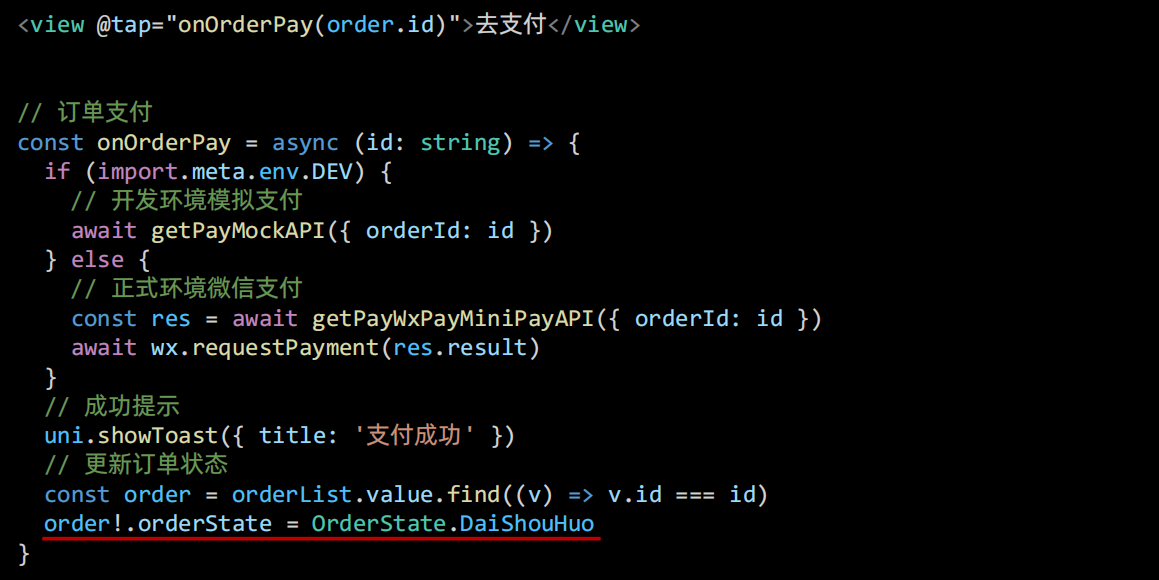
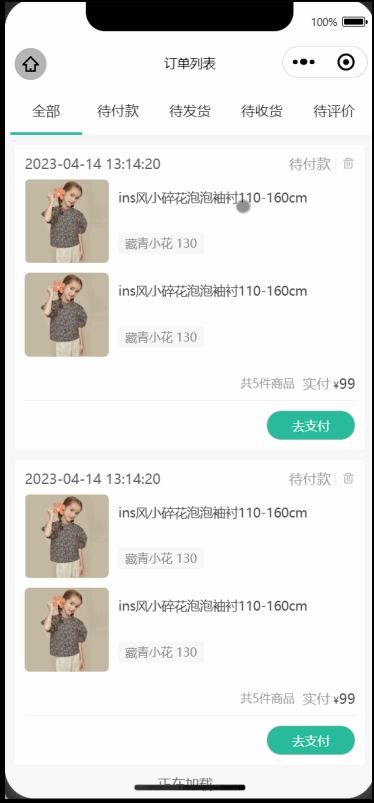
四、订单支付
觉得有帮助的话,打赏一下呗。。