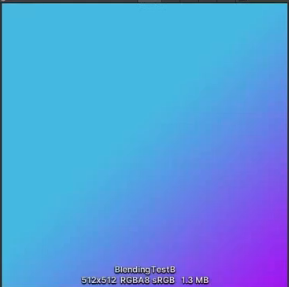
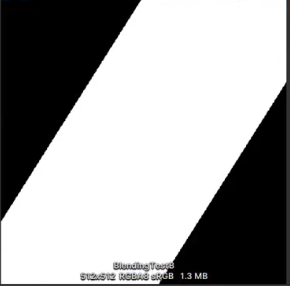
cs
Shader "MyCustom/BlendMode"
{
    Properties
    {
        // A图
        _TexTop             ("_TexTop", 2D) = "white" {}
        // B图
        _TexBottom          ("_TexBottom", 2D) = "white" {}
    }

    SubShader
    {
        CGINCLUDE

        // 适配unity Gamma空间 和 linear空间 的宏
        #ifdef UNITY_COLORSPACE_GAMMA
            #define _ColorLinear2Gamma(c) c
            #define _ColorGamma2Linear(c) c
        #else
            #define _ColorLinear2Gamma(c) pow(c, 0.455)
            #define _ColorGamma2Linear(c) pow(c, 2.2)
        #endif


        // 用于色向转换的公式
        const float EPSILON = 1e-10;

        float3 _hue2rgb(float hue)
        {
            // Hue [0..1] to RGB [0..1]
            // See http://www.chilliant.com/rgb2hsv.html
            float3 rgb = abs(hue * 6. - float3(3, 2, 4)) * float3(1, -1, -1) + float3(-1, 2, 2);
            return clamp(rgb, 0., 1.);
        }

        float3 _rgb2hcv(float3 rgb)
        {
            // RGB [0..1] to Hue-Chroma-Value [0..1]
            // Based on work by Sam Hocevar and Emil Persson
            float4 p = (rgb.g < rgb.b) ? float4(rgb.bg, -1., 2. / 3.) : float4(rgb.gb, 0., -1. / 3.);
            float4 q = (rgb.r < p.x) ? float4(p.xyw, rgb.r) : float4(rgb.r, p.yzx);
            float c = q.x - min(q.w, q.y);
            float h = abs((q.w - q.y) / (6. * c + EPSILON) + q.z);
            return float3(h, c, q.x);
        }

        float3 _hsb2rgb(float3 hsl)
        {
            // Hue-Saturation-Lightness [0..1] to RGB [0..1]
            float3 rgb = _hue2rgb(hsl.x);
            float c = (1. - abs(2. * hsl.z - 1.)) * hsl.y;
            return (rgb - 0.5) * c + hsl.z;
        }

        float3 _rgb2hsb(float3 rgb)
        {
            // RGB [0..1] to Hue-Saturation-Lightness [0..1]
            float3 hcv = _rgb2hcv(rgb);
            float z = hcv.z - hcv.y * 0.5;
            float s = hcv.y / (1. - abs(z * 2. - 1.) + EPSILON);
            return float3(hcv.x, s, z);
        }

        // 正常
        float3 _normal(float3 srcColor, float3 dstColor)
        {
            float3 col = srcColor;
            return col;
        }

        // 变暗
        float3 _darken(float3 srcColor, float3 dstColor)
        {
            float3 col = min(srcColor, dstColor);
            return col;
        }

        // 正片叠底
        float3 _multiply(float3 srcColor, float3 dstColor)
        {
            float3 col = srcColor * dstColor;
            return col;
        }

        // 颜色加深
        float3 _colorBurn(float3 srcColor, float3 dstColor)
        {
            float3 col = 1 - (1 - dstColor) / srcColor;
            col = saturate(col);
            return col;
        }

        // 线性加深
        float3 _linearBurn(float3 srcColor, float3 dstColor)
        {
            float3 col = srcColor + dstColor - 1;
            col = saturate(col);
            return col;
        }

        // 深色
        float3 _darkerColor(float3 srcColor, float3 dstColor)
        {
            // step(a, x): 如果 x < a,返回 0, 如果 x >= a,返回 1
            float flag = step(srcColor.r * 0.22 + srcColor.g * 0.707 + srcColor.b * 0.071, dstColor.r * 0.22 + dstColor.g * 0.707 + dstColor.b * 0.071);
            float3 col = flag * srcColor + (1 - flag) * dstColor;
            return col;
        }

        // Lighten变亮组
        // 变亮
        float3 _lighten(float3 srcColor, float3 dstColor)
        {
            float3 col = max(srcColor, dstColor);
            return col;
        }

        // 滤色, screen是multiply的相反值
        float3 _screen(float3 srcColor, float3 dstColor)
        {
            float3 col = srcColor + dstColor - srcColor * dstColor;
            return col;
        }

        // 颜色减淡, 与_colorBurn的实现相反
        float3 _colorDodge(float3 srcColor, float3 dstColor)
        {
            float3 col = dstColor / (1 - srcColor);
            col = saturate(col);
            return col;
        }

        // 线性减淡(添加)
        float3 _linearDodgeAdd(float3 srcColor, float3 dstColor)
        {
            float3 col = srcColor + dstColor;
            return col;
        }

        // 浅色, 灰度计算同"深色",但是取值交换
        float3 _ligherColor(float3 srcColor, float3 dstColor)
        {
            // step(a, x): 如果 x < a,返回 0, 如果 x >= a,返回 1
            float flag = step(srcColor.r * 0.22 + srcColor.g * 0.707 + srcColor.b * 0.071, dstColor.r * 0.22 + dstColor.g * 0.707 + dstColor.b * 0.071);
            float3 col = flag * dstColor + (1 - flag) * srcColor;
            return col;
        }

        // 对比融合组
        // 叠加
        float3 _overlay(float3 srcColor, float3 dstColor)
        {
            float3 flag = step(0.5, dstColor);
            float3 col = flag * (1 - 2 * (1 - srcColor) * (1 - dstColor)) + (1- flag) * (2 * srcColor * dstColor);
            return col;
        }

        // 柔光
        float3 _softLight(float3 srcColor, float3 dstColor)
        {
            float3 flag = step(0.5, srcColor);
            float3 col = flag * (1 - (1 - dstColor) * (1 - (srcColor - 0.5))) + (1 - flag) * (dstColor * (srcColor + 0.5));
            return col;
        }

        // 强光
        float3 _hardLight(float3 srcColor, float3 dstColor)
        {
            float3 flag = step(0.5, srcColor);
            float3 col = flag * (1 - (1 - dstColor) * (1 - 2 * (srcColor - 0.5))) + (1 - flag) * (dstColor * (2 * srcColor));
            return col;
        }

        // 亮光
        float3 _vividLight(float3 srcColor, float3 dstColor)
        {
            float3 flag = step(0.5, srcColor);
            float3 col = flag * (dstColor / (1 - 2 * (srcColor - 0.5))) + (1 - flag) * (dstColor * (2 * srcColor));
            return col;
        }

        // 线性光
        float3 _linearLight(float3 srcColor, float3 dstColor)
        {
            //float3 flag = step(0.5, srcColor);
            //float3 col = flag * (dstColor + 2 * srcColor - 1) + (1 - flag) * (dstColor + 2 * srcColor - 1);
            float3 col = dstColor + 2 * srcColor - 1;
            col = saturate(col);
            return col;
        }

        // 点光
        float3 _pinLight(float3 srcColor, float3 dstColor)
        {
            float3 flag = step(0.5, srcColor);
            float3 col = flag * (max(dstColor, 2 * (srcColor - 0.5))) + (1 - flag) * (min(dstColor, 2 * srcColor));
            return col;
        }

        // 实色混合
        float3 _hardMix(float3 srcColor, float3 dstColor)
        {
            float3 flag = step(1 - dstColor, srcColor);
            float3 col = flag;
            return col;
        }

        // 差集组
        // 差集
        float3 _difference(float3 srcColor, float3 dstColor)
        {
            float3 col = abs(dstColor - srcColor);
            return col;
        }

        // 排除
        float3 _exclusion(float3 srcColor, float3 dstColor)
        {
            float3 col = srcColor + dstColor - 2 * srcColor * dstColor;
            return col;
        }

        // 减去
        float3 _subtract(float3 srcColor, float3 dstColor)
        {
            float3 col = dstColor - srcColor;
            col = saturate(col);
            return col;
        }

        // 划分
        float3 _divide(float3 srcColor, float3 dstColor)
        {
            float3 col = dstColor / srcColor;
            return col;
        }

        // 色彩组
        // 色相
        float3 _hue(float3 srcColor, float3 dstColor)
        {
            float3 col = _rgb2hsb(dstColor);
            col.x = _rgb2hsb(srcColor).x;
            col = _hsb2rgb(col);
            col = saturate(col);
            return col;
        }

        // 饱和度
        float3 _saturate(float3 srcColor, float3 dstColor)
        {
            float3 col = _rgb2hsb(dstColor);
            col.y = _rgb2hsb(srcColor).y;
            col = _hsb2rgb(col);
            col = saturate(col);
            return col;
        }

        // 饱和度
        float3 _luminosity(float3 srcColor, float3 dstColor)
        {
            float3 col = _rgb2hsb(dstColor);
            col.z = _rgb2hsb(srcColor).z;
            col = _hsb2rgb(col);
            col = saturate(col);
            return col;
        }

        // 颜色
        float3 _color(float3 srcColor, float3 dstColor)
        {
            float3 col = _rgb2hsb(dstColor);
            col.xy = _rgb2hsb(srcColor).xy;
            col = _hsb2rgb(col);
            col = saturate(col);
            return col;
        }

        ENDCG

        Pass
        {
            Tags { "RenderType"="Transparent" "Queue"="Transparent" }
            ZWrite Off
            Blend SrcAlpha OneMinusSrcAlpha

            CGPROGRAM
            #pragma vertex vert
            #pragma fragment frag

            // 引入宏定义
            #pragma shader_feature PS_NORMAL PS_DARKEN PS_MULTIPLY PS_COLORBURN PS_LINEARBURN PS_DARKERCOLOR PS_LIGHTEN PS_SCREEN PS_COLORDODGE PS_LINEARDODGEADD PS_LIGHTERCOLOR PS_OVERLAY PS_SOFTLIGHT PS_HARDLIGHT PS_VIVIDLIGHT PS_LINEARLIGHT PS_PINLIGHT PS_HARDMIX PS_DIFFERENCE PS_EXCLUSION PS_SUBTRACT PS_DIVIDE PS_HUE PS_SATURATION PS_COLOR PS_LUMINOSITY

            #include "UnityCG.cginc"

            struct appdata
            {
                float4 vertex : POSITION;
                float2 uv : TEXCOORD0;
            };

            struct v2f
            {
                float2 uv : TEXCOORD0;
                float4 vertex : SV_POSITION;
            };

            sampler2D _TexTop;
            sampler2D _TexBottom;
            float4 _TexTop_ST;

            v2f vert (appdata v)
            {
                v2f o;
                o.vertex = UnityObjectToClipPos(v.vertex);
                o.uv = v.uv;
                return o;
            }

            fixed4 frag (v2f i) : SV_Target
            {
                // 采集图片
                float4 topColor = tex2D(_TexTop, i.uv);
                float4 bottomColor = tex2D(_TexBottom, i.uv);

                // 由于Photoshop采用Gamma空间,转换Linear到Gamma
                float3 srcColor = _ColorLinear2Gamma(topColor.rgb);
                float3 dstColor = _ColorLinear2Gamma(bottomColor.rgb);

                float3 blend = 0;

                // 根据模式继续混合
                #ifdef PS_NORMAL
                blend = _normal(srcColor, dstColor);

                #elif PS_DARKEN
                blend = _darken(srcColor, dstColor);

                #elif PS_MULTIPLY
                blend = _multiply(srcColor, dstColor);

                #elif PS_COLORBURN
                blend = _colorBurn(srcColor, dstColor);

                #elif PS_LINEARBURN
                blend = _linearBurn(srcColor, dstColor);

                #elif PS_DARKERCOLOR
                blend = _darkerColor(srcColor, dstColor);

                #elif PS_LIGHTEN
                blend = _lighten(srcColor, dstColor);

                #elif PS_SCREEN
                blend = _screen(srcColor, dstColor);

                #elif PS_COLORDODGE
                blend = _colorDodge(srcColor, dstColor);

                #elif PS_LINEARDODGEADD
                blend = _linearDodgeAdd(srcColor, dstColor);

                #elif PS_LIGHTERCOLOR
                blend = _lighterColor(srcColor, dstColor);

                #elif PS_OVERLAY
                blend = _overlay(srcColor, dstColor);

                #elif PS_SOFTLIGHT
                blend = _softLight(srcColor, dstColor);

                #elif PS_HARDLIGHT
                blend = _hardLight(srcColor, dstColor);

                #elif PS_VIVIDLIGHT
                blend = _vividLight(srcColor, dstColor);

                #elif PS_LINEARLIGHT
                blend = _linearLight(srcColor, dstColor);

                #elif PS_PINLIGHT
                blend = _pinLight(srcColor, dstColor);

                #elif PS_HARDMIX
                blend = _hardMix(srcColor, dstColor);

                #elif PS_DIFFERENCE
                blend = _difference(srcColor, dstColor);

                #elif PS_EXCLUSION
                blend = _exclusion(srcColor, dstColor);

                #elif PS_SUBTRACT
                blend = _subtract(srcColor, dstColor);

                #elif PS_DIVIDE
                blend = _divide(srcColor, dstColor);

                #elif PS_HUE
                blend = _hue(srcColor, dstColor);

                #elif PS_SATURATION
                blend = _saturation(srcColor, dstColor);

                #elif PS_COLOR
                blend = _color(srcColor, dstColor);

                #elif PS_LUMINOSITY
                blend = _luminosity(srcColor, dstColor);

                #else
                blend = 0;
                #endif

                // 转换回linear空间适配Unity输出
                blend = _ColorGamma2Linear(blend);

                // Alpha通道混合,交集为1为混合部分
                float blendPart = min(topColor.a, bottomColor.a);

                // 贴图都带有alpha
                float4 finalColor = 1;
                // 图片其他部分采用原色
                finalColor.rgb = topColor.rgb * (topColor.a - blendPart) + bottomColor.rgb * (bottomColor.a - blendPart) + blend * blendPart;
                finalColor.a = max(topColor.a, bottomColor.a);

                //// photoshop图片做混合
                //finalColor.rgb = blend;
                //finalColor.a = 1;

                return finalColor;
            }
            ENDCG
        }
    }
    CustomEditor "GUIExtension.MyCustomBlendModeShaderGUI"
}
前言:本节介绍了各种Blending混合方式是如何工作的,并使用它们完成Photoshop中对应的效果
混合模式shader中定义
Blend SrcFactor Dstsactor
最终的颜色=(shader计算的颜色*SrcFactor)+(屏幕已有的颜色*DstFactor)
- One // 1
- Zero // 0
- SrcColor // shader计算后的rgb值
- SrcAlpha // shader计算后alpha值
- DrcColor // 帧缓冲区的源rgb值(屏幕已有颜色)
- DrcAlpha // 帧缓冲区的源alpha值(屏幕已有颜色的alpha值)
- OneMinusSrcColor // 1 - SrcColor
- OneMinusSrcAlpha // 1 - SrcAlpha
- OneMinusDstColor // 1 - DstColor
- OneMinusDstAlpha // 1 - DstAlpha
Photoshop效果对比
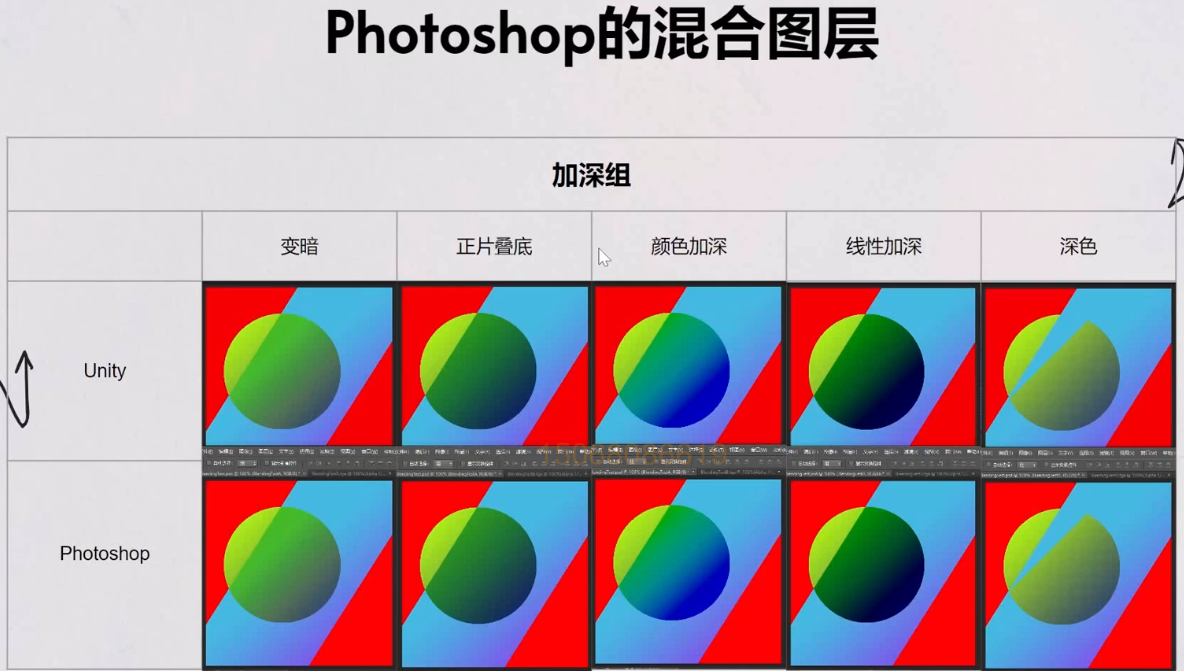
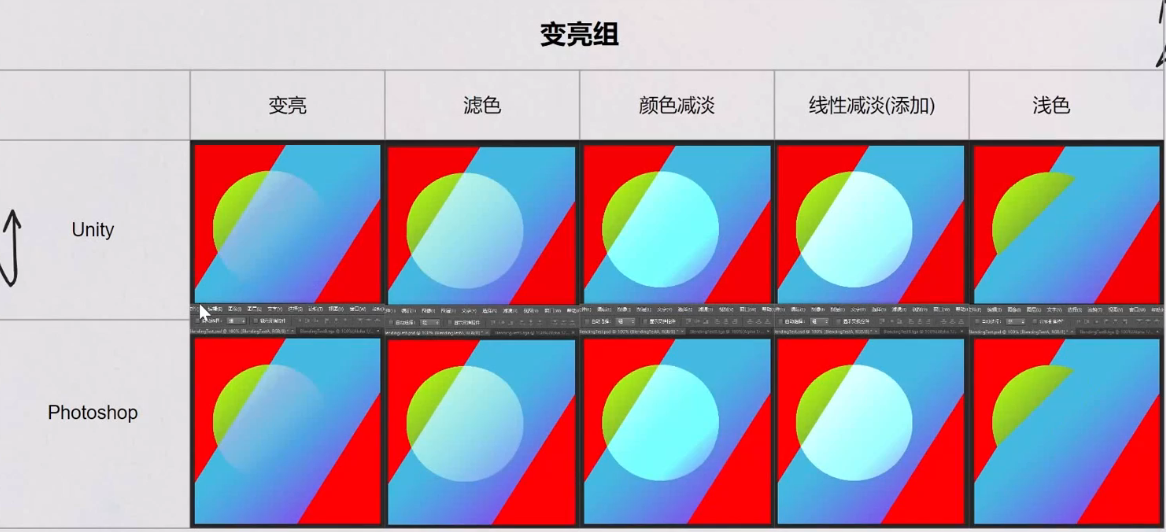
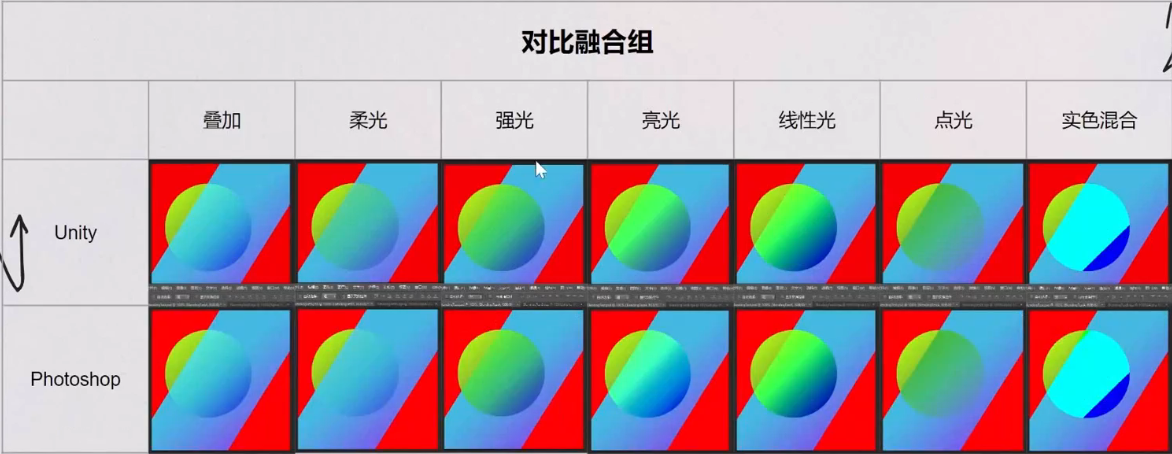
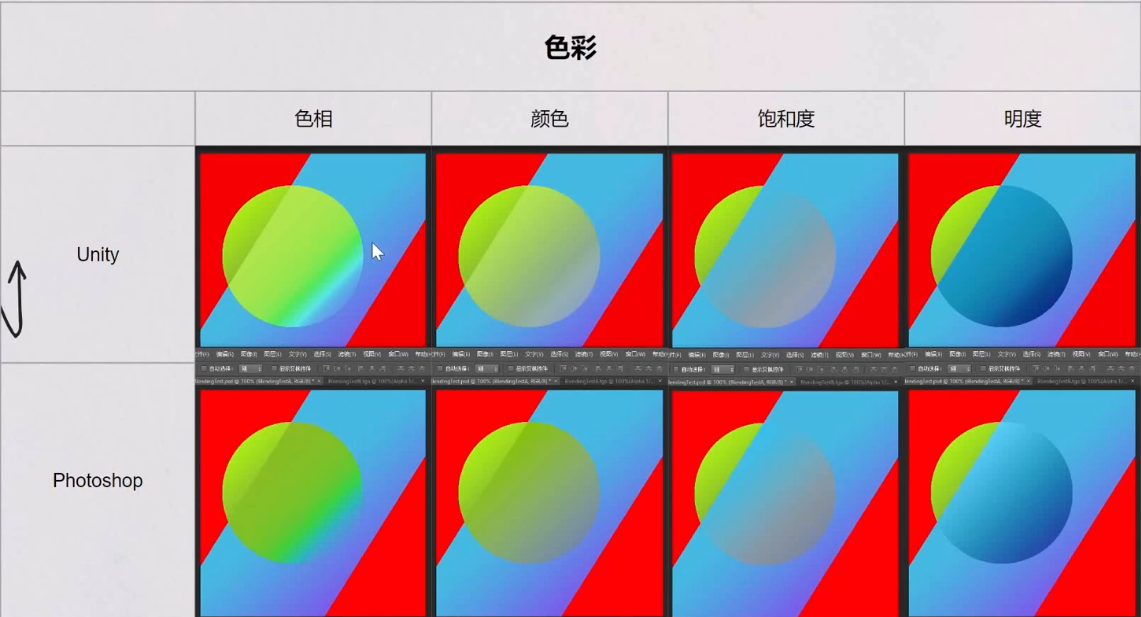
代码实现
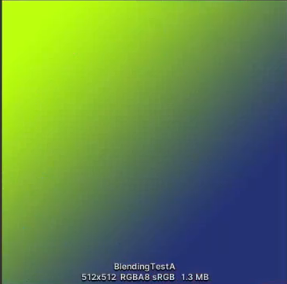
原图片A及Alpha通道:
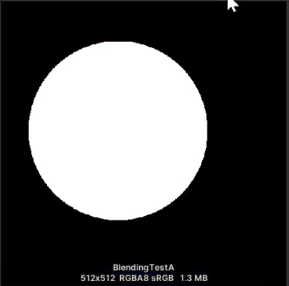
原图片B及Alpha通道