文章目录
- Snowy接入企业微信并同步组织架构
-
- [1. 需求背景与初步构想](#1. 需求背景与初步构想)
-
- [1.1 业务需求](#1.1 业务需求)
- [1.2 初步构想](#1.2 初步构想)
- [1.3 技术选型](#1.3 技术选型)
- [2. 调用企微通讯录 API](#2. 调用企微通讯录 API)
-
- [2.1 企微通讯录 API 简介](#2.1 企微通讯录 API 简介)
- [2.2 手动CURL获取企微组织架构数据](#2.2 手动CURL获取企微组织架构数据)
-
- [2.2.1 获取企微secret并手动运行](#2.2.1 获取企微secret并手动运行)
- [2.2.2 报错:通讯录同步 Secret 已被限制(errcode=48009)](#2.2.2 报错:通讯录同步 Secret 已被限制(errcode=48009))
- [2.2.3 报错:IP 白名单未配置(errcode=60020)](#2.2.3 报错:IP 白名单未配置(errcode=60020))
- [2.2.4 获取成功](#2.2.4 获取成功)
- [3. 代码实现拉取企微组织架构](#3. 代码实现拉取企微组织架构)
-
- [3.1 前期准备:编写代码前的架构思考](#3.1 前期准备:编写代码前的架构思考)
- [3.2 创建配置类](#3.2 创建配置类)
-
- [3.2.1 配置 application.properties](#3.2.1 配置 application.properties)
- [3.2.2 配置 application-local.properties](#3.2.2 配置 application-local.properties)
- [3.2.3 常见失误](#3.2.3 常见失误)
- [3.3 编写核心代码](#3.3 编写核心代码)
-
- [3.3.1 整体模块结构](#3.3.1 整体模块结构)
- [3.3.2 配置类:WeWorkContactProperties](#3.3.2 配置类:WeWorkContactProperties)
- [3.3.3 API 客户端:WeWorkApiClient](#3.3.3 API 客户端:WeWorkApiClient)
- [3.3.4 业务服务层:WeWorkSyncService + WeWorkSyncServiceImpl](#3.3.4 业务服务层:WeWorkSyncService + WeWorkSyncServiceImpl)
- [3.3.5 同步结果对象:WeWorkSyncResult](#3.3.5 同步结果对象:WeWorkSyncResult)
- [3.3.6 HTTP 接口入口:](#3.3.6 HTTP 接口入口:)
- [3.3.7 完整的模块文件清单](#3.3.7 完整的模块文件清单)
- [3.4 企微和snowy系统的数据映射问题](#3.4 企微和snowy系统的数据映射问题)
-
- [3.4.1 数据模型对照](#3.4.1 数据模型对照)
- [3.4.2 踩坑一:根部门的 parentid 处理](#3.4.2 踩坑一:根部门的 parentid 处理)
- [3.4.3 踩坑二:根组织自动关联](#3.4.3 踩坑二:根组织自动关联)
- [3.4.4 踩坑三:Account 大小写问题](#3.4.4 踩坑三:Account 大小写问题)
- [3.5 运行和验证](#3.5 运行和验证)
- [4. 从 HTTP 触发到命令行执行](#4. 从 HTTP 触发到命令行执行)
-
- [4.1 初始方案:HTTP 接口触发](#4.1 初始方案:HTTP 接口触发)
- [4.2 提出疑问:能否命令行执行?](#4.2 提出疑问:能否命令行执行?)
- [4.3 命令行执行器ApplicationRunner](#4.3 命令行执行器ApplicationRunner)
- [4.4 三种方案对比](#4.4 三种方案对比)
- [4.5 @Scheduled 实现](#4.5 @Scheduled 实现)
- [5. 实时回调的思考与实现](#5. 实时回调的思考与实现)
-
- [5.1 为什么需要实时回调](#5.1 为什么需要实时回调)
- [5.2 企微回调机制详解](#5.2 企微回调机制详解)
- [5.3 回调加解密实现](#5.3 回调加解密实现)
- [6. 持续优化](#6. 持续优化)
-
- [6.1 API 模块抽取](#6.1 API 模块抽取)
- [6.2 日志体系建设](#6.2 日志体系建设)
- [6.3 跳过无变化的更新](#6.3 跳过无变化的更新)
- [7. 整体架构总结](#7. 整体架构总结)
-
- [7.1 最终架构](#7.1 最终架构)
- [7.2 完整文件清单](#7.2 完整文件清单)
- [7.3 配置项一览](#7.3 配置项一览)
- [7.4 运行方式总结](#7.4 运行方式总结)
- [7.5 错误码速查表](#7.5 错误码速查表)
- [7.6 企微配置检查清单](#7.6 企微配置检查清单)
- [7.7 参考文档](#7.7 参考文档)
- [7.8 源代码参考](#7.8 源代码参考)
Snowy接入企业微信并同步组织架构
Snowy接入企业微信并同步组织架构------从踩坑到实时回调的完整实践。
背景:基于 Snowy(小诺)快速开发平台将企业微信的组织架构数据(部门、员工、岗位)同步到 Snowy 系统中,实现人员变动后系统数据的自动更新。本文记录了从需求构想到最终实现的完整过程,包括踩过的坑、排查思路以及架构演进。
1. 需求背景与初步构想
1.1 业务需求
我们公司的系统需要与企业微信打通,实现以下目标:
- 当在企业微信后台新增/修改/删除部门或员工时,Snowy 系统中的组织架构数据能够自动同步更新。
- 管理员无需在两个系统中重复维护组织架构数据。
- 员工离职后,系统能及时更新其状态。
1.2 初步构想
最开始,我的构想是:
- 主动拉取 :定时从企业微信拉取全量组织架构数据,与本地的
SYS_ORG、SYS_USER、SYS_POSITION表做对比同步。 - 实时回调(理想方案):当企业微信中的人员或部门发生变动时,企业微信能主动通知我们的系统,实时更新数据,无需等待定时任务。
但当时并不确定企业微信是否支持回调通知,所以先从主动拉取方案开始。
1.3 技术选型
| 维度 | 选型 | 说明 |
|---|---|---|
| 后端框架 | Snowy 3.6.3(Spring Boot 3) | 基于 Java 21,MyBatis-Plus,Sa-Token 鉴权 |
| 企微对接 | 企微通讯录 API | 通过 HTTP 调用企微服务端接口 |
| 数据库操作 | JdbcTemplate | 直接操作 SYS_ORG/SYS_USER 等表,避免编译期跨插件依赖 |
| 缓存 | Redis(Snowy 内置 CommonCacheOperator) | 缓存企微 access_token |
2. 调用企微通讯录 API
2.1 企微通讯录 API 简介
企业微信提供了通讯录管理相关的 API,核心接口包括:
| 接口 | 说明 | 文档地址 |
|---|---|---|
| 获取 access_token | 调用任何 API 的前提 | https://developer.work.weixin.qq.com/document/path/91039 |
| 获取部门列表 | 获取企业全量部门 | https://developer.work.weixin.qq.com/document/path/90208 |
| 获取部门成员详情 | 获取指定部门下的成员 | https://developer.work.weixin.qq.com/document/path/90201 |
| 读取成员 | 获取指定成员的详细信息 | https://developer.work.weixin.qq.com/document/path/90196 |
2.2 手动CURL获取企微组织架构数据
2.2.1 获取企微secret并手动运行
打开企微管理后台,在「我的企业 → 企业信息」中找到了 CorpID。但 Secret 在哪?
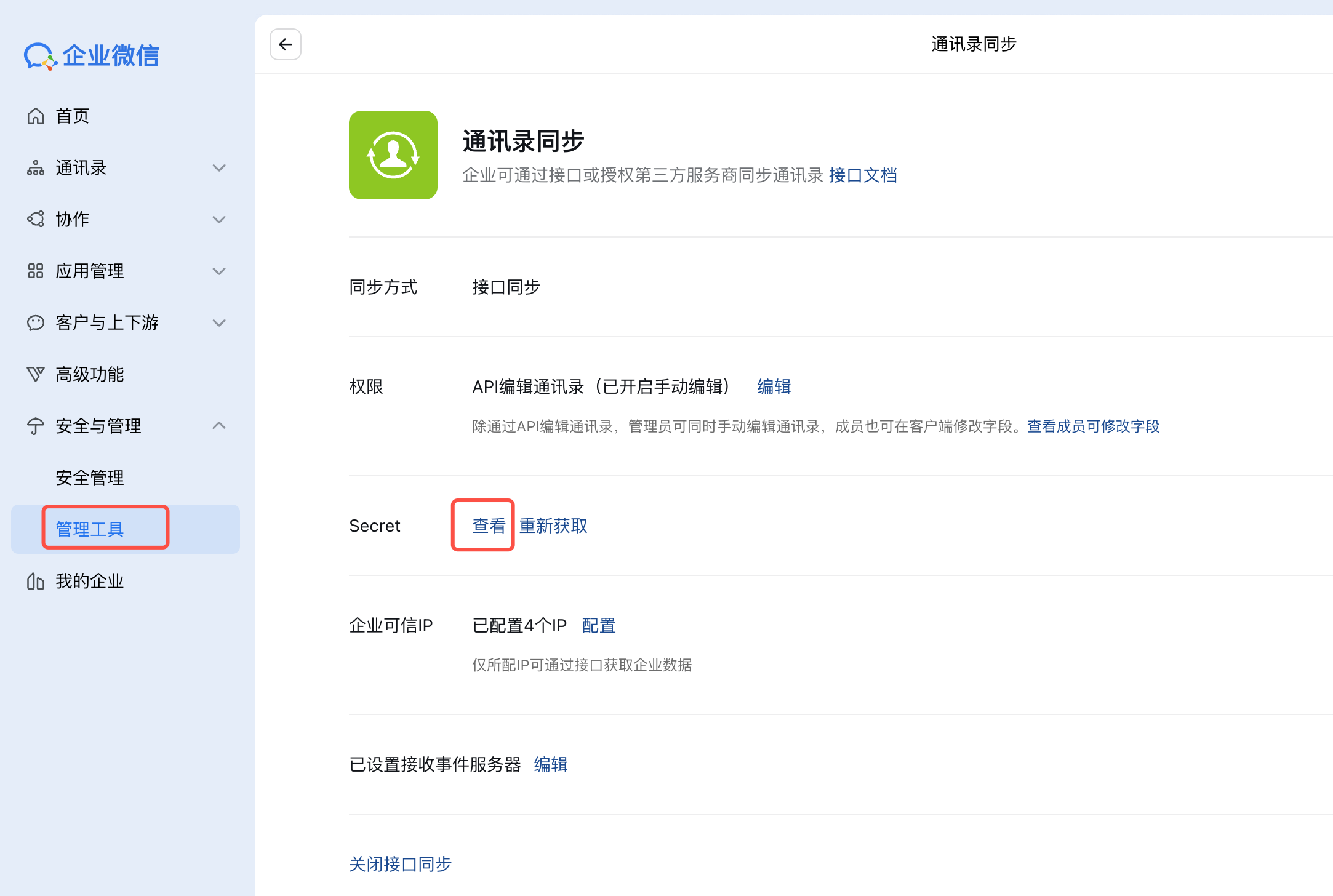
企微官方文档的指引是:「管理工具 → 通讯录同步 → 查看 Secret」。我按照这个路径找到了一个 Secret,复制过来填进配置。
现在,corpid和corpsecret有了,按照企业微信提供了通讯录管理相关的 API接口地址,手动调用一下试试:
以下代码中的敏感信息已隐藏,仅展示思考和调试过程。
bash
# curl手动获取Secret
curl -s "https://qyapi.weixin.qq.com/cgi-bin/gettoken?corpid=ww367xxx&corpsecret=qbQ5Wxxxx" 2>&1
{"errcode":0,"errmsg":"ok","access_token":"aL0dAZ6Ln2X.....","expires_in":7200}%

# 可以直接获取到 access_token,现在用这个token测一下部门列表接口
TOKEN="aL0dAZ6Ln2X...." && curl -s "https://qyapi.weixin.qq.com/cgi-bin/department/list?access_token=$TOKEN" 2>&1
{"errcode":48009,"errmsg":"api forbidden for contact assistant, hint: [1780023821555212482319626], from ip: 1.119.150.146, more info at https://open.work.weixin.qq.com/devtool/query?e=48009","department":[]}%
关键发现!即使用curl直接调企微API,新Secret获取了token,调用 department/list 仍然报 48009!这说明问题不在代码,而是企微账号虽然能获取token,但这个token没有通讯录读取权限。
2.2.2 报错:通讯录同步 Secret 已被限制(errcode=48009)
问题现象:如上,我按照企微官方文档的指引,在「管理工具 → 通讯录同步」页面获取了 Secret,配置到代码中调用通讯录 API。结果返回:
json
{"errcode":48009,"errmsg":"api forbidden for contact assistant, hint: [xxx]"}排查过程:
- 第一步:先看到 errcode=40001(token 无效),怀疑是 Secret 配置错误。检查了 CorpID 和 Secret,确认无误。
- 第二步 :发现错误信息中有
from ip提示,意识到需要配置 IP 白名单。在企微后台添加了服务器公网 IP 后,错误码从 40001 变成了 48009。 - 第三步 :48009 的含义是「api forbidden for contact assistant」。查阅企微官方文档后发现,企业微信在 2024 年做了接口权限调整:「管理工具-通讯录同步」的 Secret 已经不再允许新 IP 访问通讯录接口,仅保留对历史 IP 的兼容。
下图是企微后台「管理工具 → 通讯录同步」页面,此处获取的 Secret 已不可用于获取企微组织架构:
解决方案:
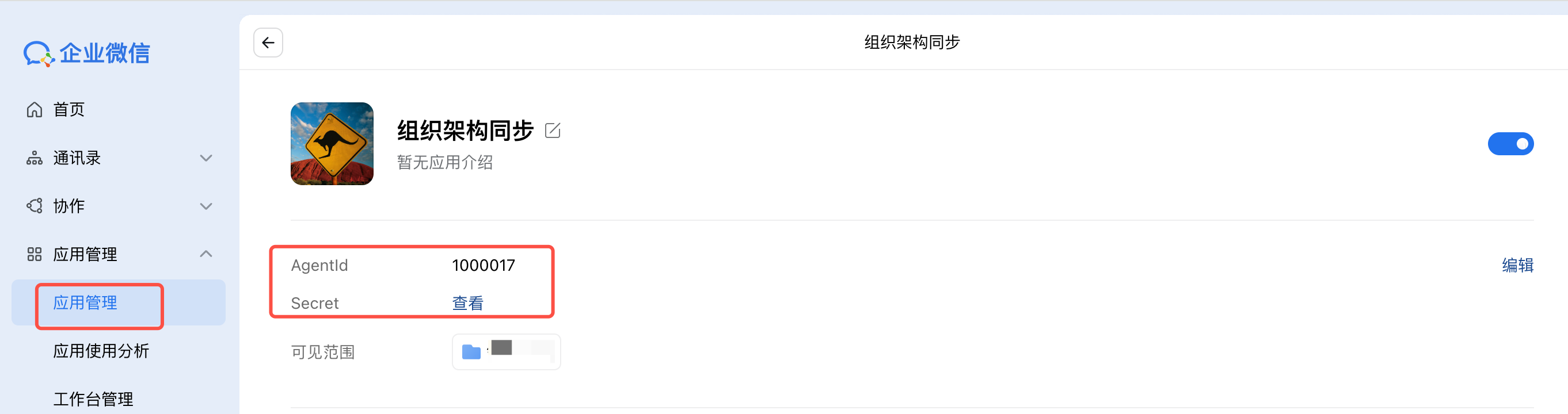
必须改用「应用管理 → 自建应用」的方式:
- 在企微后台「应用管理」中创建一个自建应用(例如命名为"组织架构同步")。
- 使用该自建应用的 AgentId 和 Secret 来调用通讯录 API。
- 在自建应用的「企业可信 IP」中添加服务器公网 IP。
接下来,再次运行试试,这次合并成一条命令直接执行:
bash
TOKEN=$(curl -s "https://qyapi.weixin.qq.com/cgi-bin/gettoken?corpid=ww367....&corpsecret=9RBz4SHo....." | grep -o '"access_token":"[^"]*"' | cut -d '"' -f4) && echo "Token: ${TOKEN:0:30}..." && curl -s "https://qyapi.weixin.qq.com/cgi-bin/department/list?access_token=$TOKEN"
## 报错
{"errcode":60020,"errmsg":"not allow to access from your ip, hint: [xxx]"}
2.2.3 报错:IP 白名单未配置(errcode=60020)
问题现象:切换到自建应用 Secret 后,如果忘记在应用中配置「企业可信 IP」,会返回:
json
{"errcode":60020,"errmsg":"not allow to access from your ip, hint: [xxx]"}排查思路 :错误信息非常明确------not allow to access from your ip。只需要在企微后台「应用管理 → 目标自建应用 → 企业可信 IP」中添加服务器公网 IP (百度:IP查询)即可。
注意 :这里的 IP 白名单是配置在自建应用下的,不是「管理工具 → 通讯录同步」中的 IP 白名单。两者是独立的。
2.2.4 获取成功
接下来,再次运行试试,这次连同获取部门和成员合并成一条命令直接执行:
bash
FRESH_TOKEN=$(curl -s "https://qyapi.weixin.qq.com/cgi-bin/gettoken?corpid=ww367e355ef265307c&corpsecret=9RBz4SHoqdkC8x3rgKz4kbA0kwBhu4jbogrR81lLv7M" \
  | grep -o '"access_token":"[^"]*"' \
  | cut -d '"' -f4) \
  && echo "Token OK, length: ${#FRESH_TOKEN}" \
  && echo "--- 部门列表 ---" \
  && curl -s "https://qyapi.weixin.qq.com/cgi-bin/department/list?access_token=$FRESH_TOKEN" \
  && echo "" \
  && echo "--- 根部门成员 ---" \
  && curl -s "https://qyapi.weixin.qq.com/cgi-bin/user/list?access_token=$FRESH_TOKEN&department_id=1&fetch_child=0"
喜大普奔啊,终于获取成功啦~😄
bash
Token OK, length: 214
--- 部门列表 ---
{"errcode":0,"errmsg":"ok","department":[{"id":1,"name":"XX公司","parentid":0,"order":100000000,"department_leader":[]},{"id":2,"name":"测试部门","parentid":1,"order":100000000,"department_leader":[]},{"id":3,"name":"业务部门","parentid":1,"order":99999000,"department_leader":[]}]}
--- 根部门成员 ---
{"errcode":0,"errmsg":"ok","userlist":[{"name":"李老板","department":[1],"position":"","status":1,"enable":1,"isleader":0,"extattr":{"attrs":[]},"hide_mobile":0,"telephone":"","order":[0],"main_department":1,"alias":"","is_leader_in_dept":[0],"userid":"BossLi","direct_leader":[]}]}
接下来,准备在项目代码中实现。
通过以上的踩坑经历,总结出调用企微通讯录 API 的两个必要条件:
#mermaid-svg-itr6IMk0KUUaiyvC{font-family:"trebuchet ms",verdana,arial,sans-serif;font-size:16px;fill:#333;}@keyframes edge-animation-frame{from{stroke-dashoffset:0;}}@keyframes dash{to{stroke-dashoffset:0;}}#mermaid-svg-itr6IMk0KUUaiyvC .edge-animation-slow{stroke-dasharray:9,5!important;stroke-dashoffset:900;animation:dash 50s linear infinite;stroke-linecap:round;}#mermaid-svg-itr6IMk0KUUaiyvC .edge-animation-fast{stroke-dasharray:9,5!important;stroke-dashoffset:900;animation:dash 20s linear infinite;stroke-linecap:round;}#mermaid-svg-itr6IMk0KUUaiyvC .error-icon{fill:#552222;}#mermaid-svg-itr6IMk0KUUaiyvC .error-text{fill:#552222;stroke:#552222;}#mermaid-svg-itr6IMk0KUUaiyvC .edge-thickness-normal{stroke-width:1px;}#mermaid-svg-itr6IMk0KUUaiyvC .edge-thickness-thick{stroke-width:3.5px;}#mermaid-svg-itr6IMk0KUUaiyvC .edge-pattern-solid{stroke-dasharray:0;}#mermaid-svg-itr6IMk0KUUaiyvC .edge-thickness-invisible{stroke-width:0;fill:none;}#mermaid-svg-itr6IMk0KUUaiyvC .edge-pattern-dashed{stroke-dasharray:3;}#mermaid-svg-itr6IMk0KUUaiyvC .edge-pattern-dotted{stroke-dasharray:2;}#mermaid-svg-itr6IMk0KUUaiyvC .marker{fill:#333333;stroke:#333333;}#mermaid-svg-itr6IMk0KUUaiyvC .marker.cross{stroke:#333333;}#mermaid-svg-itr6IMk0KUUaiyvC svg{font-family:"trebuchet ms",verdana,arial,sans-serif;font-size:16px;}#mermaid-svg-itr6IMk0KUUaiyvC p{margin:0;}#mermaid-svg-itr6IMk0KUUaiyvC .label{font-family:"trebuchet ms",verdana,arial,sans-serif;color:#333;}#mermaid-svg-itr6IMk0KUUaiyvC .cluster-label text{fill:#333;}#mermaid-svg-itr6IMk0KUUaiyvC .cluster-label span{color:#333;}#mermaid-svg-itr6IMk0KUUaiyvC .cluster-label span p{background-color:transparent;}#mermaid-svg-itr6IMk0KUUaiyvC .label text,#mermaid-svg-itr6IMk0KUUaiyvC span{fill:#333;color:#333;}#mermaid-svg-itr6IMk0KUUaiyvC .node rect,#mermaid-svg-itr6IMk0KUUaiyvC .node circle,#mermaid-svg-itr6IMk0KUUaiyvC .node ellipse,#mermaid-svg-itr6IMk0KUUaiyvC .node polygon,#mermaid-svg-itr6IMk0KUUaiyvC .node path{fill:#ECECFF;stroke:#9370DB;stroke-width:1px;}#mermaid-svg-itr6IMk0KUUaiyvC .rough-node .label text,#mermaid-svg-itr6IMk0KUUaiyvC .node .label text,#mermaid-svg-itr6IMk0KUUaiyvC .image-shape .label,#mermaid-svg-itr6IMk0KUUaiyvC .icon-shape .label{text-anchor:middle;}#mermaid-svg-itr6IMk0KUUaiyvC .node .katex path{fill:#000;stroke:#000;stroke-width:1px;}#mermaid-svg-itr6IMk0KUUaiyvC .rough-node .label,#mermaid-svg-itr6IMk0KUUaiyvC .node .label,#mermaid-svg-itr6IMk0KUUaiyvC .image-shape .label,#mermaid-svg-itr6IMk0KUUaiyvC .icon-shape .label{text-align:center;}#mermaid-svg-itr6IMk0KUUaiyvC .node.clickable{cursor:pointer;}#mermaid-svg-itr6IMk0KUUaiyvC .root .anchor path{fill:#333333!important;stroke-width:0;stroke:#333333;}#mermaid-svg-itr6IMk0KUUaiyvC .arrowheadPath{fill:#333333;}#mermaid-svg-itr6IMk0KUUaiyvC .edgePath .path{stroke:#333333;stroke-width:2.0px;}#mermaid-svg-itr6IMk0KUUaiyvC .flowchart-link{stroke:#333333;fill:none;}#mermaid-svg-itr6IMk0KUUaiyvC .edgeLabel{background-color:rgba(232,232,232, 0.8);text-align:center;}#mermaid-svg-itr6IMk0KUUaiyvC .edgeLabel p{background-color:rgba(232,232,232, 0.8);}#mermaid-svg-itr6IMk0KUUaiyvC .edgeLabel rect{opacity:0.5;background-color:rgba(232,232,232, 0.8);fill:rgba(232,232,232, 0.8);}#mermaid-svg-itr6IMk0KUUaiyvC .labelBkg{background-color:rgba(232, 232, 232, 0.5);}#mermaid-svg-itr6IMk0KUUaiyvC .cluster rect{fill:#ffffde;stroke:#aaaa33;stroke-width:1px;}#mermaid-svg-itr6IMk0KUUaiyvC .cluster text{fill:#333;}#mermaid-svg-itr6IMk0KUUaiyvC .cluster span{color:#333;}#mermaid-svg-itr6IMk0KUUaiyvC div.mermaidTooltip{position:absolute;text-align:center;max-width:200px;padding:2px;font-family:"trebuchet ms",verdana,arial,sans-serif;font-size:12px;background:hsl(80, 100%, 96.2745098039%);border:1px solid #aaaa33;border-radius:2px;pointer-events:none;z-index:100;}#mermaid-svg-itr6IMk0KUUaiyvC .flowchartTitleText{text-anchor:middle;font-size:18px;fill:#333;}#mermaid-svg-itr6IMk0KUUaiyvC rect.text{fill:none;stroke-width:0;}#mermaid-svg-itr6IMk0KUUaiyvC .icon-shape,#mermaid-svg-itr6IMk0KUUaiyvC .image-shape{background-color:rgba(232,232,232, 0.8);text-align:center;}#mermaid-svg-itr6IMk0KUUaiyvC .icon-shape p,#mermaid-svg-itr6IMk0KUUaiyvC .image-shape p{background-color:rgba(232,232,232, 0.8);padding:2px;}#mermaid-svg-itr6IMk0KUUaiyvC .icon-shape .label rect,#mermaid-svg-itr6IMk0KUUaiyvC .image-shape .label rect{opacity:0.5;background-color:rgba(232,232,232, 0.8);fill:rgba(232,232,232, 0.8);}#mermaid-svg-itr6IMk0KUUaiyvC .label-icon{display:inline-block;height:1em;overflow:visible;vertical-align:-0.125em;}#mermaid-svg-itr6IMk0KUUaiyvC .node .label-icon path{fill:currentColor;stroke:revert;stroke-width:revert;}#mermaid-svg-itr6IMk0KUUaiyvC :root{--mermaid-font-family:"trebuchet ms",verdana,arial,sans-serif;} 使用通讯录同步Secret
未配置IP白名单
通过
通过
调用企微通讯录API
条件1: 使用自建应用Secret
条件2: 配置IP白名单
errcode=48009 拒绝访问
errcode=60020 IP不允许
access_token获取成功
3. 代码实现拉取企微组织架构
3.1 前期准备:编写代码前的架构思考
在动手写代码之前,先梳理了一下代码要放哪、怎么组织。
模块选择:
Snowy 是多模块项目,所有业务插件都在 snowy-plugin 目录下。企微同步功能不属于现有任何一个插件(如 sys、biz、dev),因此新建一个插件 snowy-plugin-common ------公共插件。
目录规划:
snowy-plugin/snowy-plugin-common/src/main/java/vip/xiaonuo/wework/
├── config/          # 配置类(企微凭证、开关等)
├── api/             # 企微API调用客户端
├── service/         # 同步业务逻辑
├── controller/      # HTTP接口触发
└── result/          # 同步结果对象
3.2 创建配置类
既然要调企微 API,首先得有企业身份凭证------CorpID、Secret。按照 Spring Boot 的习惯,创建一个配置属性类:
java
// snowy-plugin/snowy-plugin-common/src/main/java/vip/xiaonuo/wework/config/WeWorkContactProperties.java
@Getter
@Setter
@Component
@ConfigurationProperties(prefix = "wework-contact")
public class WeWorkContactProperties {
    /** 企业ID(CorpID) */
    private String corpId;
    /** 企业微信 Secret */
    private String secret;
    // ...
}
有了配置类,就需要在配置文件中填入实际的值。这里先介绍一下 Snowy 项目的配置体系,不然很容易踩坑。
Spring Boot 配置回顾:application.properties vs application-local.properties
Snowy 项目使用了 Spring Boot 的多环境配置机制,有两层配置文件:
application.properties(主配置):定义所有配置项的骨架,使用${...}占位符引用环境变量或兜底默认值。application-local.properties(本地配置):覆盖主配置中的值,填入真实的敏感信息(如 Secret、数据库密码等)。
关键点 :application.properties 中的 ${WEWORK_CONTACT_CORP_ID:默认值} 语法,意思是:
- 先读取环境变量
WEWORK_CONTACT_CORP_ID - 如果环境变量不存在,则使用冒号后面的默认值(没有默认值则原样保留
${...}文本) application-local.properties中同名的配置项优先级更高,会覆盖主配置文件
重要 :这两个文件缺一不可 。只配
application-local.properties而忘掉application.properties,或者反过来,都会导致配置加载失败,运行时拿不到正确的值。
3.2.1 配置 application.properties
在 snowy-web-app/src/main/resources/application.properties 中添加以下配置项,使用占位符语法:
properties
#########################################
# wework contact sync configuration(企业微信通讯录同步)
#########################################
wework-contact.corp-id=${WEWORK_CONTACT_CORP_ID:WEWORK_CONTACT_CORP_ID}
wework-contact.agent-id=${WEWORK_CONTACT_AGENT_ID:0}
wework-contact.secret=${WEWORK_CONTACT_SECRET:WEWORK_CONTACT_SECRET}
wework-contact.sync-enabled=${WEWORK_CONTACT_SYNC_ENABLED:false}
wework-contact.sync-cron=${WEWORK_CONTACT_SYNC_CRON:0 0 2 * * ?}
这里的设计意图是:
corp-id、agent-id、secret这三个是敏感信息,不给默认值(或给一个无意义的占位符),强制使用者必须在application-local.properties或环境变量中配置。sync-enabled默认false,表示不开启定时同步,需要时再手动开启。sync-cron默认每天凌晨2点,是一个安全的默认值。
3.2.2 配置 application-local.properties
在 snowy-web-app/src/main/resources/application-local.properties 中填入真实的值:
properties
# 企业微信组织架构同步配置
WEWORK_CONTACT_CORP_ID=wwXXXXXXXXXXXX
WEWORK_CONTACT_AGENT_ID=1000017
WEWORK_CONTACT_SECRET=你的Secret注意这里用的是全大写+下划线 的环境变量格式(如 WEWORK_CONTACT_CORP_ID),而不是 application.properties 中的小写点号格式(wework-contact.corp-id)。这是因为 Spring Boot 允许在 application-local.properties 中通过环境变量名来覆盖主配置中的占位符。
3.2.3 常见失误
这个双层配置机制很容易遗漏。如果你只配置了 application-local.properties,但忘记在 application.properties 中添加对应的 wework-contact.* 占位符行:
- Spring Boot 根本不会加载这些配置项
WeWorkContactProperties中的字段保持默认值(null或0)- 运行时会报
NullPointerException或拿到空的配置
反之,如果你在 application.properties 中加了占位符但没在 application-local.properties 中填值:
- 部署在服务器上时,如果环境变量也未设置,
${WEWORK_CONTACT_SECRET:WEWORK_CONTACT_SECRET}会原样保留字符串WEWORK_CONTACT_SECRET - 用这个去调企微 API,当然会返回 40001(token 无效)
所以正确的操作是:两个文件都要配置。 application.properties 决定"有哪些配置项",application-local.properties 决定"具体值是什么"。
此时的配置看起来是这样的:
properties
WEWORK_CONTACT_CORP_ID=wwXXXXXXXXXXXX
WEWORK_CONTACT_SECRET=获取的Secret
3.3 编写核心代码
有了凭证,就可以开始写代码了。这部分会逐步介绍从 API 客户端到 Controller 的完整链路,并标注每个文件的实际路径,方便读者对照源码。
3.3.1 整体模块结构
在 snowy-plugin-common 模块下创建 vip.xiaonuo.wework 包,按功能分层组织:
snowy-plugin/snowy-plugin-common/src/main/java/vip/xiaonuo/wework/
├── api/                              # 企微HTTP API调用层
│   └── WeWorkApiClient.java          #   封装所有企微通讯录接口调用
├── config/                           # 配置层
│   └── WeWorkContactProperties.java  #   绑定 application.properties 配置项
├── controller/                       # 控制层(HTTP入口)
│   └── WeWorkSyncController.java     #   提供 /wework/sync/* 接口
├── service/                          # 业务逻辑层
│   ├── WeWorkSyncService.java        #   接口定义
│   └── impl/
│       └── WeWorkSyncServiceImpl.java # 实现类(核心同步逻辑)
├── result/                           # 返回对象
│   └── WeWorkSyncResult.java         #   同步结果封装(成功/失败/统计数)
├── runner/                           # 命令行执行器
│   └── WeWorkSyncCommandLineRunner.java # 支持 --wework-sync=all 参数
└── util/                             # 工具类
└── WeWorkSyncLogger.java # 专用日志记录每个文件的职责明确,调用关系是:Controller / Runner → Service → ApiClient → 企微HTTP接口。
3.3.2 配置类:WeWorkContactProperties
文件路径:
snowy-plugin/snowy-plugin-common/.../wework/config/WeWorkContactProperties.java
这个类通过 @ConfigurationProperties(prefix = "wework-contact") 绑定配置文件中的 wework-contact.* 前缀下的所有属性:
java
// snowy-plugin/snowy-plugin-common/src/main/java/vip/xiaonuo/wework/config/WeWorkContactProperties.java
@Getter
@Setter
@Component
@ConfigurationProperties(prefix = "wework-contact")
public class WeWorkContactProperties {
    /** 企业ID(CorpID) */
    private String corpId;
    /** 组织架构同步自建应用 AgentId */
    private Integer agentId;
    /** 组织架构同步自建应用 Secret */
    private String secret;
    /** 是否开启定时同步(默认false) */
    private Boolean syncEnabled = false;
    /** 定时同步 cron 表达式(默认每天凌晨2点) */
    private String syncCron = "0 0 2 * * ?";
}
3.3.3 API 客户端:WeWorkApiClient
文件路径:
snowy-plugin/snowy-plugin-common/.../wework/api/WeWorkApiClient.java
这是直接与企微服务器通信的底层类。它封装了 Hutool 的 HttpRequest 来调用企微的 HTTP 接口,所有请求超时设为 10 秒,统一做错误码判断和异常转换。
核心方法如下:
| 方法 | 调用的企微API | 用途 |
|---|---|---|
getContactsAccessToken() |
POST /cgi-bin/gettoken |
获取 access_token,先从 Redis 缓存取,缓存失效再调接口,过期前 5 分钟刷新 |
getAllDepartments() |
GET /cgi-bin/department/list |
获取企业全量部门列表,返回 JSONArray |
getAllUsers() |
GET /cgi-bin/user/list?department_id=1&fetch_child=1 |
从根部门递归获取全量成员,按 userid 去重 |
getUserDetail(accessToken, userId) |
GET /cgi-bin/user/get |
获取单个成员的详细信息,用于回调场景增量同步 |
getDepartmentDetail(accessToken, deptId) |
GET /cgi-bin/department/get |
获取单个部门详细信息,用于回调场景增量同步 |
其中最关键的是 getContactsAccessToken() 的实现逻辑------access_token 有效期 7200 秒,频繁调用会被限流,所以必须缓存:
java
// snowy-plugin/snowy-plugin-common/src/main/java/vip/xiaonuo/wework/api/WeWorkApiClient.java
private String doGetAccessToken(String cacheKey, String corpId, String secret) {
    // 1. 先从 Redis 缓存中取
    Object cachedToken = commonCacheOperator.get(cacheKey);
    if (cachedToken != null && StrUtil.isNotBlank(cachedToken.toString())) {
        return cachedToken.toString();
    }

    // 2. 缓存没有,调企微接口获取
    String url = StrUtil.format("{}?corpid={}&corpsecret={}",
        WEWORK_GET_TOKEN_URL, corpId, secret);
    HttpResponse response = HttpRequest.get(url).timeout(10000).execute();
    JSONObject result = JSONUtil.parseObj(response.body());

    if (result.getInt("errcode", -1) != 0) {
        throw new CommonException("获取access_token失败:{}", result.getStr("errmsg"));
    }

    String accessToken = result.getStr("access_token");
    Integer expiresIn = result.getInt("expires_in", 7200);

    // 3. 存入缓存,提前5分钟过期(避免临界点token失效)
    int cacheSeconds = expiresIn - 300;
    if (cacheSeconds > 0) {
        commonCacheOperator.put(cacheKey, accessToken, cacheSeconds);
    }

    return accessToken;
}
小细节 :
expiresIn - 300的意思是实际缓存 6900 秒而不是 7200 秒。这样在 token 真正过期前 5 分钟就会从缓存中失效,下一次请求会重新获取新 token,避免了临界点上的 40001 错误。
3.3.4 业务服务层:WeWorkSyncService + WeWorkSyncServiceImpl
接口路径:
snowy-plugin/snowy-plugin-common/.../wework/service/WeWorkSyncService.java实现路径:
snowy-plugin/snowy-plugin-common/.../wework/service/impl/WeWorkSyncServiceImpl.java
Service 层是同步业务的核心。接口定义了三组操作:
- 全量同步 :
syncAll()、syncDepartments()、syncUsers() - 定时任务入口 :
scheduledSync()(内部先检查开关syncEnabled) - 增量同步 (为后续回调做准备):
syncSingleUser()、syncSingleDept()、handleUserDelete()、handleDeptDelete()
实现类 WeWorkSyncServiceImpl 使用 JdbcTemplate 直接操作数据库,而不是 MyBatis-Plus 的 Entity/Mapper。这背后的考虑是:
snowy-plugin-common不能编译期依赖snowy-plugin-sys(后者才有BizOrg、BizUser等 Entity),通过 JdbcTemplate 直接写 SQL,编译期零依赖,完全符合 Snowy 的插件化规范。
以 syncDepartments() 为例,全量同步一个部门的流程是:
- 调企微 API 获取全量部门列表
- 查询本地
SYS_ORG_EXT表,建立「企微部门ID ↔ 系统组织ID」的映射表wecomDeptIdToSysOrgIdMap - 按
parentid从小到大排序(确保父部门先创建/更新) - 遍历每个部门:
- 如果已有映射 → 检查字段是否有变化 → 有则 UPDATE,无则跳过
- 如果无映射 → 按名称匹配系统已有的同名组织 → 有则建立映射,无则 INSERT 新组织
- 返回同步结果(新增数、更新数、耗时等)
3.3.5 同步结果对象:WeWorkSyncResult
文件路径:
snowy-plugin/snowy-plugin-common/.../wework/result/WeWorkSyncResult.java
承载同步操作的统计信息,包括:
java
public class WeWorkSyncResult {
    private String syncType;          // DEPT / USER / ALL
    private Boolean success;          // 是否成功
    private String message;           // 提示信息
    private Long costTime;            // 耗时(毫秒)
    private Integer totalDeptCount;   // 企微部门总数
    private Integer addDeptCount;     // 新增部门数
    private Integer updateDeptCount;  // 更新部门数
    private Integer totalUserCount;   // 企微员工总数
    private Integer addUserCount;     // 新增员工数
    private Integer updateUserCount;  // 更新员工数
    private Integer addPositionCount; // 新增岗位数
}
3.3.6 HTTP 接口入口:
文件路径:
snowy-plugin/snowy-plugin-common/.../wework/controller/WeWorkSyncController.java
企业微信组织架构同步控制器,通过POST http://localhost:82/wework/sync/all请求。
java
// snowy-plugin/snowy-plugin-common/src/main/java/vip/xiaonuo/wework/controller/WeWorkSyncController.java
@Tag(name = "企业微信组织架构同步控制器")
@RestController
@RequestMapping("/wework/sync")
public class WeWorkSyncController {

    @Resource
    private WeWorkSyncService weWorkSyncService;

    /** 全量同步(部门 + 员工) */
    @Operation(summary = "全量同步(部门 + 员工)")
    @PostMapping("/all")
    public CommonResult<WeWorkSyncResult> syncAll() {
        return CommonResult.data(weWorkSyncService.syncAll());
    }

    /** 仅同步部门 */
    @PostMapping("/dept")
    public CommonResult<WeWorkSyncResult> syncDept() {
        return CommonResult.data(weWorkSyncService.syncDepartments());
    }

    /** 仅同步员工 */
    @PostMapping("/user")
    public CommonResult<WeWorkSyncResult> syncUser() {
        return CommonResult.data(weWorkSyncService.syncUsers());
    }
}
所以,请求 /wework/sync/all 的完整链路是:
curl POST http://localhost:82/wework/sync/all
  → WeWorkSyncController.syncAll()
    → WeWorkSyncService.syncAll()
      → WeWorkSyncServiceImpl.syncAll()
        → WeWorkApiClient.getAllDepartments()   # 调企微API
        → JdbcTemplate 操作 SYS_ORG/SYS_USER 表
      → 返回 WeWorkSyncResult
    → 包装成 CommonResult 返回 JSON
Controller 上还有一个 @Scheduled 定时任务方法,这是后面的演进------这里先不展开。
3.3.7 完整的模块文件清单
到这里,第一个版本的核心代码就齐了。汇总一下所有新增的文件及其路径:
| 文件 | 路径 |
|---|---|
| WeWorkContactProperties.java | snowy-plugin/snowy-plugin-common/src/main/java/vip/xiaonuo/wework/config/WeWorkContactProperties.java |
| WeWorkApiClient.java | snowy-plugin/snowy-plugin-common/src/main/java/vip/xiaonuo/wework/api/WeWorkApiClient.java |
| WeWorkSyncService.java | snowy-plugin/snowy-plugin-common/src/main/java/vip/xiaonuo/wework/service/WeWorkSyncService.java |
| WeWorkSyncServiceImpl.java | snowy-plugin/snowy-plugin-common/src/main/java/vip/xiaonuo/wework/service/impl/WeWorkSyncServiceImpl.java |
| WeWorkSyncController.java | snowy-plugin/snowy-plugin-common/src/main/java/vip/xiaonuo/wework/controller/WeWorkSyncController.java |
| WeWorkSyncResult.java | snowy-plugin/snowy-plugin-common/src/main/java/vip/xiaonuo/wework/result/WeWorkSyncResult.java |
3.4 企微和snowy系统的数据映射问题
3.4.1 数据模型对照
企业微信的组织架构数据与 Snowy 系统的数据模型并不完全一致,需要做映射:
| 企微数据 | Snowy 系统表 | 映射说明 |
|---|---|---|
| 部门(Department) | SYS_ORG |
id → idSourceOrgId(通过 SYS_ORG_EXT 关联) |
| 部门名称(name) | SYS_ORG.NAME |
直接映射 |
| 部门父ID(parentid) | SYS_ORG.PARENT_ID |
企微根部门 parentid=0 对应 Snowy 根组织 PARENT_ID="0" |
| 成员(User) | SYS_USER |
userid → ACCOUNT |
| 成员姓名(name) | SYS_USER.NAME |
直接映射 |
| 手机号(mobile) | SYS_USER.PHONE |
直接映射 |
| 邮箱(email) | SYS_USER.EMAIL |
直接映射 |
| 职位(position) | SYS_POSITION |
需要自动创建岗位记录 |
| 成员状态(status) | SYS_USER.USER_STATUS |
1=启用→ENABLE, 2=禁用→DISABLED |
为了区分「企微同步创建的组织」和「系统原有的组织」,引入了 SYS_ORG_EXT 扩展表(这个表是snowy自带的):
sql
-- SYS_ORG_EXT 表结构(关键字段)
ID                  -- 主键
ORG_ID              -- 关联 SYS_ORG.ID
SOURCE_FROM_TYPE    -- 来源类型,固定为 'WEWORK_SYNC'
ID_SOURCE_ORG_ID    -- 企微部门ID
DELETE_FLAG         -- 删除标记
这样做的目的是:
- 标识来源 :通过
SOURCE_FROM_TYPE = 'WEWORK_SYNC'可以区分哪些组织是由企微同步创建的。 - 建立映射 :通过
ID_SOURCE_ORG_ID存储企微部门ID,实现企微部门ID → Snowy 组织ID 的双向映射。 - 兼容已有数据:如果系统中已有同名的组织,不会重复创建,而是建立映射关系。
同理,对员工也设计了 SYS_USER_EXT 扩展表。
3.4.2 踩坑一:根部门的 parentid 处理
问题现象:
企微中根部门的 parentid=0,而 Snowy 中根组织的 PARENT_ID="0"(字符串)。最初在代码中直接将企微的 parentid 作为字符串拼接,导致根部门的父组织映射失败。
解决方案:
专门处理根部门的情况:
java
String sysParentId;
if (WEWORK_ROOT_PARENT_ID.equals(String.valueOf(wecomParentId))) {
    // 企微中parentid=0表示顶级,对应Snowy根节点
    sysParentId = SYS_ROOT_PARENT_ID;
} else {
    sysParentId = wecomDeptIdToSysOrgIdMap.get(String.valueOf(wecomParentId));
}
3.4.3 踩坑二:根组织自动关联
问题现象:
企微的根部门(如公司名称)与 Snowy 系统中已有的根组织是同一个实体,但两者没有映射关系。如果不处理,每次全量同步都会创建一个重复的根组织。
解决方案:
在同步部门时,对根部门做特殊处理------自动关联到系统已有的根组织:
- 先按名称匹配:如果企微根部门名称与系统根组织名称一致,直接关联。
- 如果名称不一致但系统只有一个根组织,也自动关联。
- 关联后通过
SYS_ORG_EXT建立映射,后续同步不会再重复创建。
3.4.4 踩坑三:Account 大小写问题
问题现象:
企微的 UserID 通常是英文小写(如 zhangsan),但 Snowy 系统的 ACCOUNT 字段可能在某些场景下是大写存储的。匹配时直接用 equals() 会导致匹配失败。
解决方案:
在匹配时忽略大小写:
java
String[] existingUserInfo = existingUserMap.get(wecomUserId);
if (existingUserInfo == null) {
    existingUserInfo = existingUserMap.get(wecomUserId.toLowerCase());
}
同时在构建映射表时,同时存储原始值和小写值:
java
map.put(account, new String[]{id, orgId});
map.put(account.toLowerCase(), new String[]{id, orgId});
3.5 运行和验证
代码写完后,编译验证一下:
bash
# 全量编译,在父工程(root POM)目录下执行,编译所有子模块,耗时较长。提交代码前用这个命令兜底。
# mvn compile 2>&1 | grep -E "ERROR|BUILD|FAILURE|SUCCESS"

# 如果只改了snowy-plugin-common 这一个模块,也可以只编必要的模块,速度较快。日常开发用这个命令省时间。
mvn compile -pl snowy-plugin/snowy-plugin-common -am 2>&1 | grep -E "ERROR|BUILD|FAILURE|SUCCESS"
[INFO] snowy .............................................. SUCCESS [  0.167 s]
[INFO] snowy-common ....................................... SUCCESS [  1.061 s]
[INFO] snowy-plugin-api ................................... SUCCESS [  0.002 s]
[INFO] snowy-plugin-auth-api .............................. SUCCESS [  0.039 s]
[INFO] snowy-plugin-sys-api ............................... SUCCESS [  0.058 s]
[INFO] snowy-plugin-dev-api ............................... SUCCESS [  0.538 s]
[INFO] snowy-plugin ....................................... SUCCESS [  0.001 s]
[INFO] snowy-plugin-common-api ............................ SUCCESS [  0.752 s]
[INFO] snowy-plugin-common ................................ SUCCESS [  1.004 s]
[INFO] BUILD SUCCESS
备注:-pl 和 -am 的说明:
## -pl snowy-plugin/snowy-plugin-common:只编译 snowy-plugin-common 这一个模块
## -am(also make):自动补全该模块的依赖链------先编译它所依赖的其他模块(如 snowy-common、snowy-plugin-common-api),再编译它自身;比全量编译快得多,适合开发阶段快速验证单个模块的改动是否通过编译。
然后,在本地启动服务,用 curl 触发同步:
bash
curl -X POST http://localhost:82/wework/sync/all

## 输出示例
{"code":200,"msg":"操作成功","data":{"syncType":"ALL","success":true,"message":"部门同步完成 | 员工同步完成","costTime":1345,"totalDeptCount":6,"addDeptCount":0,"updateDeptCount":0,"totalUserCount":5,"addUserCount":0,"updateUserCount":0,"addPositionCount":0},"traceId":"47d4c56dde6747ef8cf5453389a1bb9b"}%
如果出现出现
invalid access_token错误,说明新Secret是对的,但Redis里缓存了旧的access_token,旧token在重新获取Secret后就失效了。需要清除Redis中的旧缓存。最简单的办法:
bashredis-cli -n 1 KEYS "wework-contacts-access-token:*"
然后,查看数据库SYS_USER 用户表、SYS_ORG 组织表、SYS_POSITION 职位表 都已经获取到了企业微信中的相关数据。
登录snowy后台,也查看到了对应的数据。
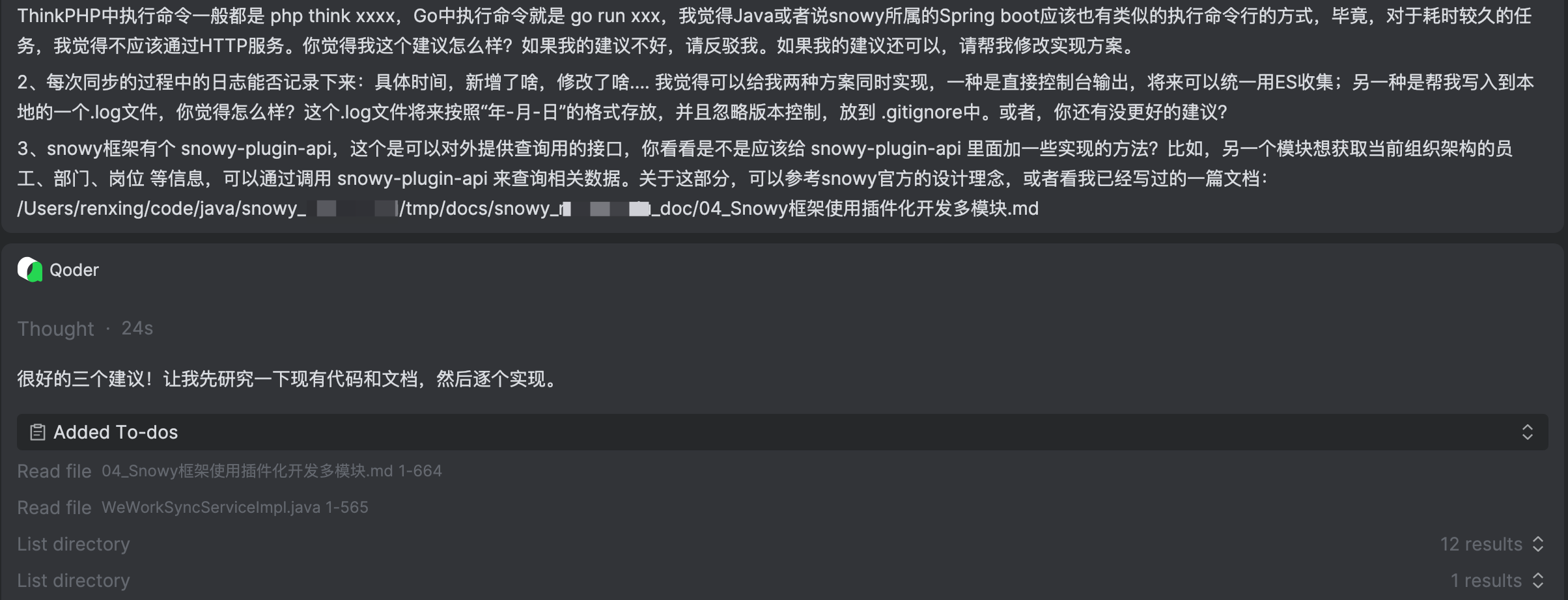
至此,代码中已经实现了拉取企微组织架构的完整流程。但是,这就完了吗?我认为并没有,还有很多需要思考的事情,这是AI没有想到的,需要我自己去想。
4. 从 HTTP 触发到命令行执行
4.1 初始方案:HTTP 接口触发
最初的同步功能仅通过 HTTP 接口触发:
bash
curl -X POST http://localhost:82/wework/sync/all对应的 Controller 代码:
java
@RestController
@RequestMapping("/wework/sync")
public class WeWorkSyncController {
    @PostMapping("/all")
    public CommonResult<WeWorkSyncResult> syncAll() {
        return CommonResult.data(weWorkSyncService.syncAll());
    }
}这在开发阶段很方便,但存在一个问题:生产环境如何定时执行?
4.2 提出疑问:能否命令行执行?
"我能不能直接用命令行执行?类似 PHP 的
php think xxx或 Go 的go run xxx那种方式?我不想每次都通过 HTTP 接口触发。"
这个需求非常合理,原因有:
- 服务器部署:如果定时任务和 API 服务部署在不同机器上,curl 方式会把同步的压力转移到 API 服务器。
- 运维习惯:运维人员更习惯命令行方式,可以在 crontab 中配置定时执行。
- 独立性:命令行方式不需要启动完整的 Web 服务,减少资源占用。
Java/Spring Boot的CLI方式和PHP/Go不太一样------Spring Boot需要先启动Spring上下文(数据库、Redis连接等),然后才能执行业务逻辑。所以最Spring Boot的方式是:
bash
# 开发环境
mvn spring-boot:run -pl snowy-web-app -Dspring-boot.run.arguments="--wework-sync=all"

# 生产环境(打jar包后)用独立进程执行(会启动新的JVM,完成后自动退出)
java -jar /root/project/backend/api/snowy-web-app.jar --spring.profiles.active=prod --wework-sync=all
应用启动后检测到 --wework-sync 参数,执行同步,然后自动退出。HTTP接口保留,两种方式并存。
4.3 命令行执行器ApplicationRunner
利用 Spring Boot 的 ApplicationRunner 机制,通过命令行参数 --wework-sync=all|dept|user 触发同步:
java
// snowy-plugin/snowy-plugin-common/src/main/java/vip/xiaonuo/wework/runner/WeWorkSyncCommandLineRunner.java
@Slf4j
@Component
public class WeWorkSyncCommandLineRunner implements ApplicationRunner {
    @Resource
    private WeWorkSyncService weWorkSyncService;
    @Resource
    private ApplicationContext applicationContext;

    @Override
    public void run(ApplicationArguments args) {
        if (!args.containsOption("wework-sync")) {
            // 没有 --wework-sync 参数,正常启动Web服务
            return;
        }
        // 解析参数,执行同步
        List<String> values = args.getOptionValues("wework-sync");
        String syncType = (values != null && !values.isEmpty()) ? values.get(0) : "all";

        WeWorkSyncResult result;
        switch (syncType.toLowerCase()) {
            case "dept": result = weWorkSyncService.syncDepartments(); break;
            case "user": result = weWorkSyncService.syncUsers(); break;
            default: result = weWorkSyncService.syncAll(); break;
        }

        // 优雅退出
        SpringApplication.exit(applicationContext, () -> result.getSuccess() ? 0 : 1);
    }
}使用方式:
bash
# 开发环境
mvn spring-boot:run -pl snowy-web-app -Dspring-boot.run.arguments="--wework-sync=all"

# 生产环境
java -jar snowy-web-app.jar --wework-sync=all
java -jar snowy-web-app.jar --wework-sync=dept
java -jar snowy-web-app.jar --wework-sync=user
注意 :这里使用
SpringApplication.exit()而不是System.exit(),前者是优雅关闭,会执行 Spring 容器的 destroy 方法、关闭数据库连接池等;后者是强制退出,可能导致资源未正确释放。**注意:**如果报错
Could not find artifact vip.xiaonuo:snowy-plugin-common:jar:3.0.0是因为snowy-plugin-common 还没有安装到本地 Maven 仓库。单独运行 snowy-web-app 时,Maven 从远程仓库找不到这个模块。需要先执行全量 install,把新模块安装到本地仓库:
mvn install -DskipTests -q 2>&1 | tail -20**说明:**新增 Maven 模块后,第一次必须先 mvn install 将其安装到本地仓库(~/.m2/repository),之后 spring-boot:run 才能正确解析依赖。后续正常开发中,只要改过 snowy-plugin-common 的代码,再
mvn install -DskipTests -pl snowy-plugin/snowy-plugin-common -am增量安装即可。
4.4 三种方案对比
| 方案 | 实现方式 | 优点 | 缺点 |
|---|---|---|---|
| A: crontab + CLI | 服务器 crontab 定时执行 java -jar snowy-web-app.jar --wework-sync=all |
完全独立于 API 服务,压力不转移 | 需要独立的 JAR 实例,资源占用较高 |
| B: @Scheduled | Spring 内置定时任务,cron 表达式配置 | 实现简单,零外部依赖 | 与 API 服务同进程,共享资源 |
| C: curl HTTP | crontab 调用 curl -X POST http://localhost:82/wework/sync/all |
简单直接 | 同步压力转移到 API 服务器 |
在和AI沟通的过程中,我提出了一个问题:
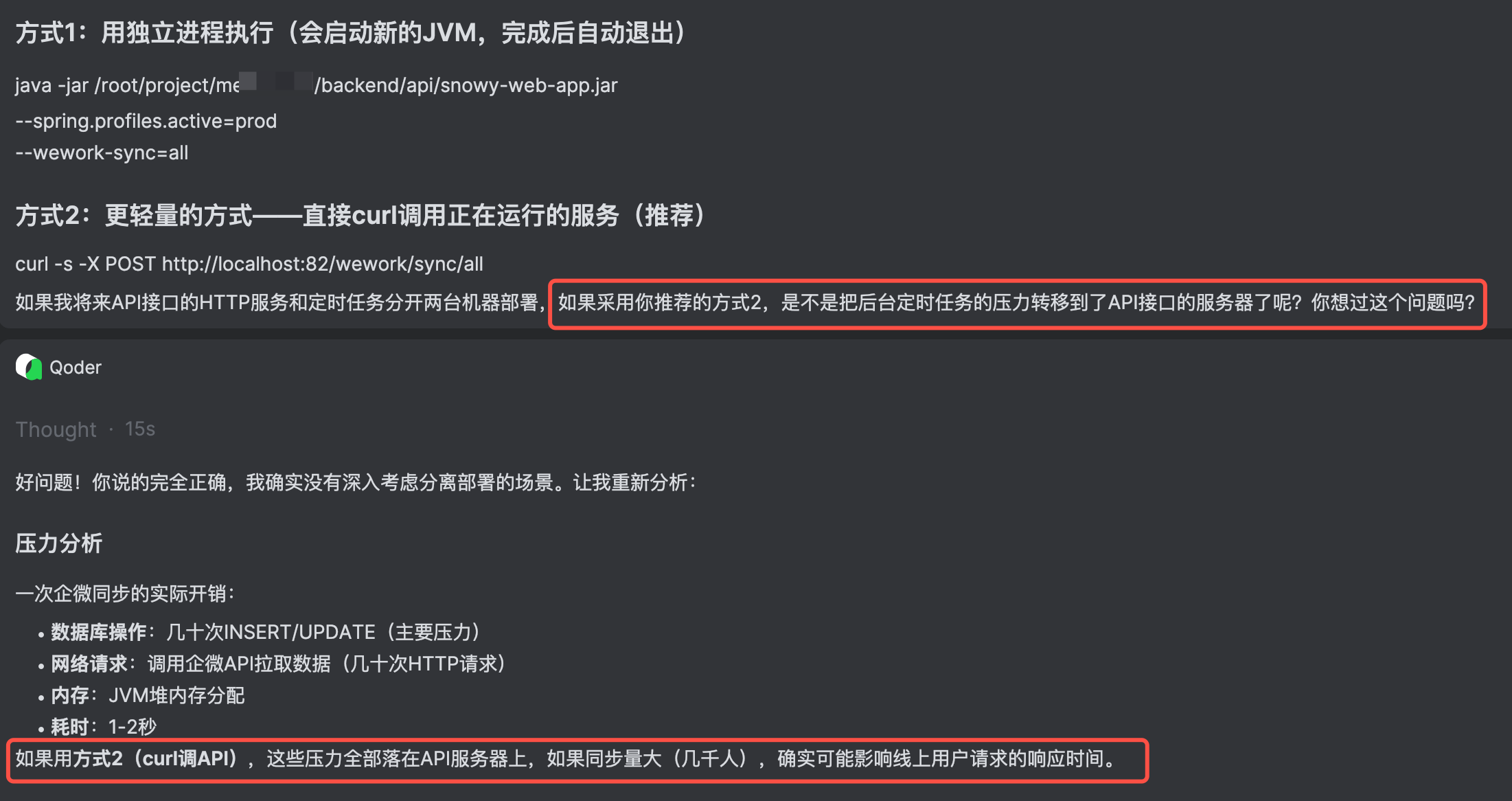
"如果将来 API 接口的 HTTP 服务和定时任务分开两台机器部署,如果采用方案 C,是不是把后台定时任务的压力转移到了 API 接口的服务器了?"
AI回答:确实如此。方案 C 本质上是在 API 服务器上执行同步逻辑,如果同步任务较重(大量数据处理),会占用 API 服务器的 CPU 和数据库连接。
最终建议:
- 单机部署:方案 B(@Scheduled)最简单,推荐使用。
- 分离部署:方案 A(crontab + CLI),在定时任务服务器上独立执行,不影响 API 服务器。
- 方案 C:仅适合轻量级场景,不推荐在生产环境使用。
4.5 @Scheduled 实现
在 Controller 中添加定时任务方法:
java
@Scheduled(cron = "${wework-contact.sync-cron:0 0 2 * * ?}")
public void scheduledSync() {
    weWorkSyncService.scheduledSync();
}
配置项:
properties
# 是否开启定时同步
wework-contact.sync-enabled=${WEWORK_CONTACT_SYNC_ENABLED:false}
# 定时同步 cron 表达式(默认每天凌晨2点)
wework-contact.sync-cron=${WEWORK_CONTACT_SYNC_CRON:0 0 2 * * ?}

## snowy-web-app/src/main/resources/application-local.properties
# 是否开启定时任务同步的开关
WEWORK_CONTACT_SYNC_ENABLED=false
# 调试验证阶段:改为1分钟执行一次
WEWORK_CONTACT_SYNC_CRON=0 0/1 * * * ?
scheduledSync()方法内部会先检查sync-enabled是否开启,未开启则直接跳过。
5. 实时回调的思考与实现
我的思考:咱们现在用的是主动拉取企业微信的数据来和本地的数据校验,总归会有时间差。比如,一个员工离职了,我可能得等到明天凌晨2点才更新TA的状态。我希望当我在企业微信标记某个员工离职了,或者修改了员工的某些个人信息,立即通知我。就是最开始我构想的 我最理想的是:当我的企业微信的组织架构的(员工、部门、岗位)等一系列信息有变动(新增、变更、删除)的时候,在企业微信能不能配置一个什么回调通知的URL,直接实时修改变更我的snowy系统的相关数据。
5.1 为什么需要实时回调
全量同步方案存在一个固有的时间差问题:
"一个员工离职了,我可能得等到明天凌晨2点才更新他的状态。"
定时同步的间隔越长,数据的延迟越大。如果能实现实时回调,当企微中发生变更时立即通知我们的系统,就能将延迟降低到秒级。
5.2 企微回调机制详解
查阅企业微信官方文档,发现企微完全支持通讯录变更的回调通知:
- 文档地址:https://developer.work.weixin.qq.com/document/path/90967
- 配置位置:企微管理后台 → 管理工具 → 通讯录同步 → 设置接收事件服务器
配置步骤:
- 在企微后台「管理工具 → 通讯录同步」中点击「设置接收事件服务器」。
- 填写三个参数:URL、Token、EncodingAESKey。
回调流程示意图:
#mermaid-svg-40uug7ZwrTN5iyTW{font-family:"trebuchet ms",verdana,arial,sans-serif;font-size:16px;fill:#333;}@keyframes edge-animation-frame{from{stroke-dashoffset:0;}}@keyframes dash{to{stroke-dashoffset:0;}}#mermaid-svg-40uug7ZwrTN5iyTW .edge-animation-slow{stroke-dasharray:9,5!important;stroke-dashoffset:900;animation:dash 50s linear infinite;stroke-linecap:round;}#mermaid-svg-40uug7ZwrTN5iyTW .edge-animation-fast{stroke-dasharray:9,5!important;stroke-dashoffset:900;animation:dash 20s linear infinite;stroke-linecap:round;}#mermaid-svg-40uug7ZwrTN5iyTW .error-icon{fill:#552222;}#mermaid-svg-40uug7ZwrTN5iyTW .error-text{fill:#552222;stroke:#552222;}#mermaid-svg-40uug7ZwrTN5iyTW .edge-thickness-normal{stroke-width:1px;}#mermaid-svg-40uug7ZwrTN5iyTW .edge-thickness-thick{stroke-width:3.5px;}#mermaid-svg-40uug7ZwrTN5iyTW .edge-pattern-solid{stroke-dasharray:0;}#mermaid-svg-40uug7ZwrTN5iyTW .edge-thickness-invisible{stroke-width:0;fill:none;}#mermaid-svg-40uug7ZwrTN5iyTW .edge-pattern-dashed{stroke-dasharray:3;}#mermaid-svg-40uug7ZwrTN5iyTW .edge-pattern-dotted{stroke-dasharray:2;}#mermaid-svg-40uug7ZwrTN5iyTW .marker{fill:#333333;stroke:#333333;}#mermaid-svg-40uug7ZwrTN5iyTW .marker.cross{stroke:#333333;}#mermaid-svg-40uug7ZwrTN5iyTW svg{font-family:"trebuchet ms",verdana,arial,sans-serif;font-size:16px;}#mermaid-svg-40uug7ZwrTN5iyTW p{margin:0;}#mermaid-svg-40uug7ZwrTN5iyTW .label{font-family:"trebuchet ms",verdana,arial,sans-serif;color:#333;}#mermaid-svg-40uug7ZwrTN5iyTW .cluster-label text{fill:#333;}#mermaid-svg-40uug7ZwrTN5iyTW .cluster-label span{color:#333;}#mermaid-svg-40uug7ZwrTN5iyTW .cluster-label span p{background-color:transparent;}#mermaid-svg-40uug7ZwrTN5iyTW .label text,#mermaid-svg-40uug7ZwrTN5iyTW span{fill:#333;color:#333;}#mermaid-svg-40uug7ZwrTN5iyTW .node rect,#mermaid-svg-40uug7ZwrTN5iyTW .node circle,#mermaid-svg-40uug7ZwrTN5iyTW .node ellipse,#mermaid-svg-40uug7ZwrTN5iyTW .node polygon,#mermaid-svg-40uug7ZwrTN5iyTW .node path{fill:#ECECFF;stroke:#9370DB;stroke-width:1px;}#mermaid-svg-40uug7ZwrTN5iyTW .rough-node .label text,#mermaid-svg-40uug7ZwrTN5iyTW .node .label text,#mermaid-svg-40uug7ZwrTN5iyTW .image-shape .label,#mermaid-svg-40uug7ZwrTN5iyTW .icon-shape .label{text-anchor:middle;}#mermaid-svg-40uug7ZwrTN5iyTW .node .katex path{fill:#000;stroke:#000;stroke-width:1px;}#mermaid-svg-40uug7ZwrTN5iyTW .rough-node .label,#mermaid-svg-40uug7ZwrTN5iyTW .node .label,#mermaid-svg-40uug7ZwrTN5iyTW .image-shape .label,#mermaid-svg-40uug7ZwrTN5iyTW .icon-shape .label{text-align:center;}#mermaid-svg-40uug7ZwrTN5iyTW .node.clickable{cursor:pointer;}#mermaid-svg-40uug7ZwrTN5iyTW .root .anchor path{fill:#333333!important;stroke-width:0;stroke:#333333;}#mermaid-svg-40uug7ZwrTN5iyTW .arrowheadPath{fill:#333333;}#mermaid-svg-40uug7ZwrTN5iyTW .edgePath .path{stroke:#333333;stroke-width:2.0px;}#mermaid-svg-40uug7ZwrTN5iyTW .flowchart-link{stroke:#333333;fill:none;}#mermaid-svg-40uug7ZwrTN5iyTW .edgeLabel{background-color:rgba(232,232,232, 0.8);text-align:center;}#mermaid-svg-40uug7ZwrTN5iyTW .edgeLabel p{background-color:rgba(232,232,232, 0.8);}#mermaid-svg-40uug7ZwrTN5iyTW .edgeLabel rect{opacity:0.5;background-color:rgba(232,232,232, 0.8);fill:rgba(232,232,232, 0.8);}#mermaid-svg-40uug7ZwrTN5iyTW .labelBkg{background-color:rgba(232, 232, 232, 0.5);}#mermaid-svg-40uug7ZwrTN5iyTW .cluster rect{fill:#ffffde;stroke:#aaaa33;stroke-width:1px;}#mermaid-svg-40uug7ZwrTN5iyTW .cluster text{fill:#333;}#mermaid-svg-40uug7ZwrTN5iyTW .cluster span{color:#333;}#mermaid-svg-40uug7ZwrTN5iyTW div.mermaidTooltip{position:absolute;text-align:center;max-width:200px;padding:2px;font-family:"trebuchet ms",verdana,arial,sans-serif;font-size:12px;background:hsl(80, 100%, 96.2745098039%);border:1px solid #aaaa33;border-radius:2px;pointer-events:none;z-index:100;}#mermaid-svg-40uug7ZwrTN5iyTW .flowchartTitleText{text-anchor:middle;font-size:18px;fill:#333;}#mermaid-svg-40uug7ZwrTN5iyTW rect.text{fill:none;stroke-width:0;}#mermaid-svg-40uug7ZwrTN5iyTW .icon-shape,#mermaid-svg-40uug7ZwrTN5iyTW .image-shape{background-color:rgba(232,232,232, 0.8);text-align:center;}#mermaid-svg-40uug7ZwrTN5iyTW .icon-shape p,#mermaid-svg-40uug7ZwrTN5iyTW .image-shape p{background-color:rgba(232,232,232, 0.8);padding:2px;}#mermaid-svg-40uug7ZwrTN5iyTW .icon-shape .label rect,#mermaid-svg-40uug7ZwrTN5iyTW .image-shape .label rect{opacity:0.5;background-color:rgba(232,232,232, 0.8);fill:rgba(232,232,232, 0.8);}#mermaid-svg-40uug7ZwrTN5iyTW .label-icon{display:inline-block;height:1em;overflow:visible;vertical-align:-0.125em;}#mermaid-svg-40uug7ZwrTN5iyTW .node .label-icon path{fill:currentColor;stroke:revert;stroke-width:revert;}#mermaid-svg-40uug7ZwrTN5iyTW :root{--mermaid-font-family:"trebuchet ms",verdana,arial,sans-serif;} 管理员在企微后台
修改通讯录
企微服务器
推送事件通知
我们的服务器
接收并解密
根据事件类型
调用API拉取详情
更新本地数据库
支持的事件类型:
| 事件 | ChangeType | 回调数据 | 处理方式 |
|---|---|---|---|
| 新增成员 | create_user |
UserID | 调API拉详情 → 创建本地用户 |
| 修改成员 | update_user |
UserID | 调API拉详情 → 增量更新 |
| 删除成员 | delete_user |
UserID | 本地用户标记为禁用 |
| 新增部门 | create_party |
Id(部门ID) | 调API拉详情 → 创建本地组织 |
| 修改部门 | update_party |
Id(部门ID) | 调API拉详情 → 增量更新 |
| 删除部门 | delete_party |
Id(部门ID) | 本地组织标记为删除 |
关键限制:
- 回调只返回 ID,不返回完整数据 :收到
create_user事件时,回调 XML 中只有UserID,需要再调用企微 API(/cgi-bin/user/get)拉取该用户的完整信息。 - API 发起的变更不会触发回调:企微规定"由通讯录同步助手通过 API 发起的更新成员触发的事件不回调给通讯录同步助手应用"。
- 回调验证机制:配置 URL 时,企微会发送 GET 请求验证;之后事件通知通过 POST 请求发送,数据经过 AES 加密。
5.3 回调加解密实现
企微回调消息的加解密方案如下:
- EncodingAESKey:43位字符串,Base64 解码后得到 32 字节 AES 密钥。
- 加密算法:AES-CBC 模式,IV 为密钥的前 16 字节。
- 签名算法:SHA1(sort(token, timestamp, nonce, encrypt))。
- 消息格式:16字节随机字符串 + 4字节消息长度 + 消息体 + CorpID。
核心加解密工具类 WeWorkCallbackCrypto:
java
// snowy-plugin/snowy-plugin-common/src/main/java/vip/xiaonuo/wework/callback/WeWorkCallbackCrypto.java
public class WeWorkCallbackCrypto {
    private final String token;
    private final String corpId;
    private final byte[] aesKey;

    public WeWorkCallbackCrypto(String token, String encodingAesKey, String corpId) {
        this.token = token;
        this.corpId = corpId;
        this.aesKey = Base64.getDecoder().decode(encodingAesKey + "=");
    }

    /** 验证URL(GET请求) */
    public String verifyUrl(String msgSignature, String timestamp,
                            String nonce, String echostr) throws Exception {
        String signature = generateSignature(token, timestamp, nonce, echostr);
        if (!signature.equals(msgSignature)) {
            throw new Exception("签名验证失败");
        }
        return decrypt(echostr);
    }

    /** 解密回调消息(POST请求) */
    public String decryptMsg(String msgSignature, String timestamp,
                             String nonce, String encryptData) throws Exception {
        String signature = generateSignature(token, timestamp, nonce, encryptData);
        if (!signature.equals(msgSignature)) {
            throw new Exception("签名验证失败");
        }
        return decrypt(encryptData);
    }
    // ...
}
添加回调控制器:
java
// snowy-plugin/snowy-plugin-common/src/main/java/vip/xiaonuo/wework/controller/WeWorkCallbackController.java
@RestController
@RequestMapping("/wework/callback")
public class WeWorkCallbackController {

    /** GET 请求:验证回调URL有效性 */
    @GetMapping(produces = MediaType.TEXT_PLAIN_VALUE)
    public String verifyUrl(
            @RequestParam("msg_signature") String msgSignature,
            @RequestParam("timestamp") String timestamp,
            @RequestParam("nonce") String nonce,
            @RequestParam("echostr") String echostr) {
        WeWorkCallbackCrypto crypto = createCrypto();
        String result = crypto.verifyUrl(msgSignature, timestamp, nonce, echostr);
        return result;
    }

    /** POST 请求:接收通讯录变更事件 */
    @PostMapping(produces = MediaType.TEXT_PLAIN_VALUE)
    public String receiveCallback(
            @RequestParam("msg_signature") String msgSignature,
            @RequestParam("timestamp") String timestamp,
            @RequestParam("nonce") String nonce,
            @RequestBody String requestBody) {
        // 1. 提取加密字段
        String encryptData = WeWorkCallbackCrypto.extractEncryptFromXml(requestBody);
        // 2. 解密
        WeWorkCallbackCrypto crypto = createCrypto();
        String plainXml = crypto.decryptMsg(msgSignature, timestamp, nonce, encryptData);
        // 3. 解析XML
        JSONObject xmlObj = XML.toJSONObject(plainXml).getJSONObject("xml");
        String eventType = xmlObj.getStr("ChangeType");
        // 4. 分发处理
        handleEvent(eventType, xmlObj);
        return "success";
    }
}
为回调场景新增四个增量同步方法:
| 方法 | 说明 |
|---|---|
syncSingleUser(wecomUserId) |
拉取单个用户最新信息,新增或更新 |
syncSingleDept(wecomDeptId) |
拉取单个部门最新信息,新增或更新 |
handleUserDelete(wecomUserId) |
将对应用户标记为禁用 |
handleDeptDelete(wecomDeptId) |
将对应组织标记为删除 |
这些方法复用了全量同步中的私有方法(如 createUser、updateUser、createOrg 等),保证了逻辑一致性。
【Sa-Token 认证豁免】
回调 URL 是由企微服务器直接调用的,没有登录态。需要在 Snowy 的认证配置中豁免该路径。
检查发现,/wework/** 已经在 GlobalConfigure.java 的 NO_LOGIN_PATH_ARR 白名单中:
java
public static final String[] NO_LOGIN_PATH_ARR = {
    // ...
    "/wework/**",
};
因此 /wework/callback/** 自动被覆盖,无需额外配置。
【回调配置项】
properties
# 企微通讯录变更回调配置
wework-contact.callback-enabled=false
wework-contact.callback-token=
wework-contact.callback-encoding-aes-key=
在企微后台配置接收事件服务器时,会生成 Token 和 EncodingAESKey,将它们填入配置即可。
6. 持续优化
以上同步企业微信组织架构的逻辑已经基本实现,但是,"追求完美主义"的我,又想到了后续可以做的一些事情。
6.1 API 模块抽取
Snowy 官方文档明确要求:
插件之间的互相调用仅允许通过引用对方的 api 接口方式,严禁为了图方便将对方插件直接引入。
如果企微同步的功能需要被其他插件调用(比如某个业务插件需要查询"企微同步的用户列表"),就必须按照规范创建 snowy-plugin-common-api 模块。
按照 Snowy 的插件化规范,为企微同步功能创建对应的 API 模块snowy-plugin-common-api:
snowy-plugin-api/
└── snowy-plugin-common-api/
    └── src/main/java/vip/xiaonuo/wework/api/
        ├── WeWorkSyncApi.java          # 同步操作接口
        ├── WeWorkOrgApi.java           # 组织架构查询接口
        └── dto/
            ├── WeWorkSyncResultDto.java # 同步结果DTO
            ├── WeWorkOrgDto.java        # 组织DTO
            └── WeWorkUserDto.java       # 用户DTO
WeWorkSyncApi 接口定义:
java
public interface WeWorkSyncApi {
    WeWorkSyncResultDto syncAll();
    WeWorkSyncResultDto syncDepartments();
    WeWorkSyncResultDto syncUsers();
}
WeWorkOrgApi 接口定义:
java
public interface WeWorkOrgApi {
    String getOrgIdByWecomDeptId(String wecomDeptId);
    String getWecomDeptIdByOrgId(String orgId);
    List<WeWorkOrgDto> listWecomSyncedOrgs();
    String getUserIdByWecomUserId(String wecomUserId);
    String getWecomUserIdByUserId(String userId);
    List<WeWorkUserDto> listWecomSyncedUsers();
}
在 snowy-plugin-common 模块中创建 Provider 类实现 API 接口:
java
@Service
public class WeWorkSyncApiProvider implements WeWorkSyncApi {
    @Resource
    private WeWorkSyncService weWorkSyncService;

    @Override
    public WeWorkSyncResultDto syncAll() {
        WeWorkSyncResult result = weWorkSyncService.syncAll();
        return convertResult(result);
    }
    // ...
}
这样其他插件只需要依赖 snowy-plugin-common-api 即可调用企微同步的功能,完全符合 Snowy 的插件化规范。
6.2 日志体系建设
我希望同步过程中有详细的日志记录:
- 控制台输出:方便通过 ELK/ES 收集。
- 独立日志文件:按日期滚动,保留30天,方便排查问题。
- 详细操作记录:新增了哪些部门/员工、更新了哪些、跳过了哪些。
具体实现:WeWorkSyncLogger + Logback 独立 Appender
WeWorkSyncLogger 使用独立的 Logger 名称,便于 Logback 单独配置:
java
public class WeWorkSyncLogger {
    private static final String SYNC_LOGGER_NAME = "WEWORK_SYNC_LOG";
    private static final org.slf4j.Logger SYNC_LOG =
        org.slf4j.LoggerFactory.getLogger(SYNC_LOGGER_NAME);

    // 同时输出到 SYNC_LOG(写文件)和 log(控制台)
    public static void logDeptAdded(String deptName, String orgId,
                                     String wecomDeptId, String parentOrgId) {
        String msg = formatLog("新增部门", ...);
        SYNC_LOG.info(msg);   // 写入独立日志文件
        log.info(msg);        // 控制台输出
    }
}
Logback 配置 (logback-spring.xml 中添加):
xml
<!-- 企微同步专用日志文件 -->
<appender name="WEWORK_SYNC_FILE" class="ch.qos.logback.core.rolling.RollingFileAppender">
    <file>app-log/wework-sync/wework-sync.log</file>
    <rollingPolicy class="ch.qos.logback.core.rolling.TimeBasedRollingPolicy">
        <fileNamePattern>app-log/wework-sync/wework-sync.%d{yyyy-MM-dd}.log</fileNamePattern>
        <maxHistory>30</maxHistory>
    </rollingPolicy>
    <encoder>
        <pattern>%d{yyyy-MM-dd HH:mm:ss} [%thread] %-5level %logger - %msg%n</pattern>
    </encoder>
</appender>

<logger name="WEWORK_SYNC_LOG" level="INFO" additivity="true">
    <appender-ref ref="WEWORK_SYNC_FILE"/>
</logger>日志输出示例:
[2026-05-29 14:30:00] 同步开始 | 类型=ALL
[2026-05-29 14:30:01] 新增部门 | 部门名称=研发部, 系统orgId=189023..., 企微部门ID=3, 父组织ID=189012...
[2026-05-29 14:30:01] 更新员工 | 姓名=张三, 系统userId=189045..., 组织ID=189023...
[2026-05-29 14:30:01] 跳过员工 | 姓名=李四, 账号=lisi, 原因=数据无变化
[2026-05-29 14:30:02] 同步完成 | 类型=ALL, 成功=true, 部门[总计6,新增1,更新0], 员工[总计5,新增0,更新1]
6.3 跳过无变化的更新
**【问题发现】**在全量同步过程中发现,即使企微的所有信息都没有变化,系统仍然会执行 UPDATE 操作。例如,凌晨2点的定时同步每天都会更新所有记录的 UPDATE_TIME,但实际上数据并没有任何变化。
这带来两个问题:
- 不必要的数据库写入:大量无意义的 UPDATE 语句。
- 审计日志混淆:UPDATE_TIME 被频繁更新,无法区分哪些是真正有变化的数据。
**【解决方案】**更新前先对比。在执行 UPDATE 前,先 SELECT 当前值,对比所有字段是否变化:
部门更新 :比对 NAME、PARENT_ID、SORT_CODE。
java
private boolean updateOrg(String orgId, String name, String parentId, Integer sortOrder) {
    List<Map<String, Object>> existing = jdbcTemplate.queryForList(
        "SELECT NAME, PARENT_ID, SORT_CODE FROM SYS_ORG WHERE ID = ? AND DELETE_FLAG = 'NOT_DELETE'", orgId);
    if (!existing.isEmpty()) {
        Map<String, Object> row = existing.get(0);
        String currentName = String.valueOf(row.get("NAME"));
        String currentParentId = String.valueOf(row.get("PARENT_ID"));
        Integer currentSortCode = ...;
        Integer newSortCode = sortOrder != null ? sortOrder : 99;
        if (name.equals(currentName) && parentId.equals(currentParentId)
                && newSortCode.equals(currentSortCode != null ? currentSortCode : 99)) {
            return false; // 无变化,跳过
        }
    }
    jdbcTemplate.update("UPDATE SYS_ORG SET ...", ...);
    return true;
}
员工更新 :比对 NAME、PHONE、EMAIL、ORG_ID、POSITION_ID、USER_STATUS。
java
private boolean updateUser(String userId, String name, String phone, String email,
                        String orgId, String positionId, Integer status) {
    // ... 先 SELECT 对比,无变化返回 false
    // ... 有变化执行 UPDATE 返回 true
}
同步统计更准确 :只有真正执行了 UPDATE 的记录才计入 updateCount:
java
if (updateOrg(existingOrgId, wecomDeptName, sysParentId, sortOrder)) {
    updateCount.incrementAndGet();
    WeWorkSyncLogger.logDeptUpdated(wecomDeptName, existingOrgId, sysParentId);
} else {
    WeWorkSyncLogger.logDeptSkipped(wecomDeptName, "数据无变化");
}
7. 整体架构总结
7.1 最终架构
#mermaid-svg-908BPnT2GKk6sCKH{font-family:"trebuchet ms",verdana,arial,sans-serif;font-size:16px;fill:#333;}@keyframes edge-animation-frame{from{stroke-dashoffset:0;}}@keyframes dash{to{stroke-dashoffset:0;}}#mermaid-svg-908BPnT2GKk6sCKH .edge-animation-slow{stroke-dasharray:9,5!important;stroke-dashoffset:900;animation:dash 50s linear infinite;stroke-linecap:round;}#mermaid-svg-908BPnT2GKk6sCKH .edge-animation-fast{stroke-dasharray:9,5!important;stroke-dashoffset:900;animation:dash 20s linear infinite;stroke-linecap:round;}#mermaid-svg-908BPnT2GKk6sCKH .error-icon{fill:#552222;}#mermaid-svg-908BPnT2GKk6sCKH .error-text{fill:#552222;stroke:#552222;}#mermaid-svg-908BPnT2GKk6sCKH .edge-thickness-normal{stroke-width:1px;}#mermaid-svg-908BPnT2GKk6sCKH .edge-thickness-thick{stroke-width:3.5px;}#mermaid-svg-908BPnT2GKk6sCKH .edge-pattern-solid{stroke-dasharray:0;}#mermaid-svg-908BPnT2GKk6sCKH .edge-thickness-invisible{stroke-width:0;fill:none;}#mermaid-svg-908BPnT2GKk6sCKH .edge-pattern-dashed{stroke-dasharray:3;}#mermaid-svg-908BPnT2GKk6sCKH .edge-pattern-dotted{stroke-dasharray:2;}#mermaid-svg-908BPnT2GKk6sCKH .marker{fill:#333333;stroke:#333333;}#mermaid-svg-908BPnT2GKk6sCKH .marker.cross{stroke:#333333;}#mermaid-svg-908BPnT2GKk6sCKH svg{font-family:"trebuchet ms",verdana,arial,sans-serif;font-size:16px;}#mermaid-svg-908BPnT2GKk6sCKH p{margin:0;}#mermaid-svg-908BPnT2GKk6sCKH .label{font-family:"trebuchet ms",verdana,arial,sans-serif;color:#333;}#mermaid-svg-908BPnT2GKk6sCKH .cluster-label text{fill:#333;}#mermaid-svg-908BPnT2GKk6sCKH .cluster-label span{color:#333;}#mermaid-svg-908BPnT2GKk6sCKH .cluster-label span p{background-color:transparent;}#mermaid-svg-908BPnT2GKk6sCKH .label text,#mermaid-svg-908BPnT2GKk6sCKH span{fill:#333;color:#333;}#mermaid-svg-908BPnT2GKk6sCKH .node rect,#mermaid-svg-908BPnT2GKk6sCKH .node circle,#mermaid-svg-908BPnT2GKk6sCKH .node ellipse,#mermaid-svg-908BPnT2GKk6sCKH .node polygon,#mermaid-svg-908BPnT2GKk6sCKH .node path{fill:#ECECFF;stroke:#9370DB;stroke-width:1px;}#mermaid-svg-908BPnT2GKk6sCKH .rough-node .label text,#mermaid-svg-908BPnT2GKk6sCKH .node .label text,#mermaid-svg-908BPnT2GKk6sCKH .image-shape .label,#mermaid-svg-908BPnT2GKk6sCKH .icon-shape .label{text-anchor:middle;}#mermaid-svg-908BPnT2GKk6sCKH .node .katex path{fill:#000;stroke:#000;stroke-width:1px;}#mermaid-svg-908BPnT2GKk6sCKH .rough-node .label,#mermaid-svg-908BPnT2GKk6sCKH .node .label,#mermaid-svg-908BPnT2GKk6sCKH .image-shape .label,#mermaid-svg-908BPnT2GKk6sCKH .icon-shape .label{text-align:center;}#mermaid-svg-908BPnT2GKk6sCKH .node.clickable{cursor:pointer;}#mermaid-svg-908BPnT2GKk6sCKH .root .anchor path{fill:#333333!important;stroke-width:0;stroke:#333333;}#mermaid-svg-908BPnT2GKk6sCKH .arrowheadPath{fill:#333333;}#mermaid-svg-908BPnT2GKk6sCKH .edgePath .path{stroke:#333333;stroke-width:2.0px;}#mermaid-svg-908BPnT2GKk6sCKH .flowchart-link{stroke:#333333;fill:none;}#mermaid-svg-908BPnT2GKk6sCKH .edgeLabel{background-color:rgba(232,232,232, 0.8);text-align:center;}#mermaid-svg-908BPnT2GKk6sCKH .edgeLabel p{background-color:rgba(232,232,232, 0.8);}#mermaid-svg-908BPnT2GKk6sCKH .edgeLabel rect{opacity:0.5;background-color:rgba(232,232,232, 0.8);fill:rgba(232,232,232, 0.8);}#mermaid-svg-908BPnT2GKk6sCKH .labelBkg{background-color:rgba(232, 232, 232, 0.5);}#mermaid-svg-908BPnT2GKk6sCKH .cluster rect{fill:#ffffde;stroke:#aaaa33;stroke-width:1px;}#mermaid-svg-908BPnT2GKk6sCKH .cluster text{fill:#333;}#mermaid-svg-908BPnT2GKk6sCKH .cluster span{color:#333;}#mermaid-svg-908BPnT2GKk6sCKH div.mermaidTooltip{position:absolute;text-align:center;max-width:200px;padding:2px;font-family:"trebuchet ms",verdana,arial,sans-serif;font-size:12px;background:hsl(80, 100%, 96.2745098039%);border:1px solid #aaaa33;border-radius:2px;pointer-events:none;z-index:100;}#mermaid-svg-908BPnT2GKk6sCKH .flowchartTitleText{text-anchor:middle;font-size:18px;fill:#333;}#mermaid-svg-908BPnT2GKk6sCKH rect.text{fill:none;stroke-width:0;}#mermaid-svg-908BPnT2GKk6sCKH .icon-shape,#mermaid-svg-908BPnT2GKk6sCKH .image-shape{background-color:rgba(232,232,232, 0.8);text-align:center;}#mermaid-svg-908BPnT2GKk6sCKH .icon-shape p,#mermaid-svg-908BPnT2GKk6sCKH .image-shape p{background-color:rgba(232,232,232, 0.8);padding:2px;}#mermaid-svg-908BPnT2GKk6sCKH .icon-shape .label rect,#mermaid-svg-908BPnT2GKk6sCKH .image-shape .label rect{opacity:0.5;background-color:rgba(232,232,232, 0.8);fill:rgba(232,232,232, 0.8);}#mermaid-svg-908BPnT2GKk6sCKH .label-icon{display:inline-block;height:1em;overflow:visible;vertical-align:-0.125em;}#mermaid-svg-908BPnT2GKk6sCKH .node .label-icon path{fill:currentColor;stroke:revert;stroke-width:revert;}#mermaid-svg-908BPnT2GKk6sCKH :root{--mermaid-font-family:"trebuchet ms",verdana,arial,sans-serif;} Snowy系统
企微服务器
POST回调
通讯录管理后台
回调通知服务
触发方式
(HTTP/CLI/定时/回调)
WeWorkSyncService
同步逻辑
WeWorkApiClient
调用企微API
SYS_ORG
组织表
SYS_USER
用户表
扩展映射表
含岗位/ORG_EXT/USER_EXT
7.2 完整文件清单
snowy-plugin-api/snowy-plugin-common-api/
└── src/main/java/vip/xiaonuo/wework/api/
    ├── WeWorkSyncApi.java              # 同步操作API接口
    ├── WeWorkOrgApi.java               # 组织架构查询API接口
    └── dto/
        ├── WeWorkSyncResultDto.java     # 同步结果DTO
        ├── WeWorkOrgDto.java            # 组织DTO
        └── WeWorkUserDto.java           # 用户DTO

snowy-plugin/snowy-plugin-common/
└── src/main/java/vip/xiaonuo/wework/
    ├── api/
    │   └── WeWorkApiClient.java         # 企微API调用客户端
    ├── callback/
    │   └── WeWorkCallbackCrypto.java     # 回调加解密工具
    ├── config/
    │   └── WeWorkContactProperties.java  # 配置属性类
    ├── controller/
    │   ├── WeWorkSyncController.java     # 同步HTTP接口+定时任务
    │   └── WeWorkCallbackController.java # 回调通知控制器
    ├── provider/
    │   ├── WeWorkSyncApiProvider.java    # 同步操作Provider
    │   └── WeWorkOrgApiProvider.java     # 组织查询Provider
    ├── result/
    │   └── WeWorkSyncResult.java         # 同步结果对象
    ├── runner/
    │   └── WeWorkSyncCommandLineRunner.java  # CLI命令行执行器
    ├── service/
    │   ├── WeWorkSyncService.java        # 同步服务接口
    │   └── impl/
    │       └── WeWorkSyncServiceImpl.java # 同步服务实现
    └── util/
        └── WeWorkSyncLogger.java         # 专用日志工具

snowy-web-app/src/main/resources/
├── application.properties                # 主配置(含回调配置项)
├── application-local.properties          # 本地配置
└── logback-spring.xml                    # 日志配置(含WEWORK_SYNC_FILE appender)
7.3 配置项一览
| 配置项 | 说明 | 默认值 |
|---|---|---|
wework-contact.corp-id |
企业ID | - |
wework-contact.agent-id |
自建应用AgentId | 0 |
wework-contact.secret |
自建应用Secret | - |
wework-contact.sync-enabled |
是否开启定时同步 | false |
wework-contact.sync-cron |
定时同步cron表达式 | 0 0 2 * * ? |
wework-contact.callback-enabled |
是否开启回调通知 | false |
wework-contact.callback-token |
回调Token | - |
wework-contact.callback-encoding-aes-key |
回调EncodingAESKey | - |
7.4 运行方式总结
一、手动触发(HTTP)
bash
# 全量同步(部门+员工)
curl -X POST http://服务IP:82/wework/sync/all

# 仅部门 / 仅员工
curl -X POST http://服务IP:82/wework/sync/dept
curl -X POST http://服务IP:82/wework/sync/user
二、命令行执行(CLI)
bash
# 开发环境:
mvn spring-boot:run -pl snowy-web-app -Dspring-boot.run.arguments="--wework-sync=all"

# 生产环境(JAR包):# 可选 all / dept / user
java -jar snowy-web-app.jar --spring.profiles.active=prod --wework-sync=all

# crontab 示例(每天2点全量同步):
# 代码变更后需先执行:`mvn install -DskipTests -pl snowy-plugin/snowy-plugin-common -am`
0 2 * * * java -jar /opt/snowy/snowy-web-app.jar --wework-sync=all >> /var/log/wework-sync.log
三、定时自动同步(@Scheduled)
properties
WEWORK_CONTACT_SYNC_ENABLED=true          # 开启
WEWORK_CONTACT_SYNC_CRON=0 0 2 * * ?      # 默认每天2点
四、实时回调(增量同步)
前置 :企微后台配置回调 URL http://IP:82/wework/callback,填入 Token 和 EncodingAESKey。
Snowy 配置:
properties
WEWORK_CONTACT_CALLBACK_ENABLED=true
WEWORK_CONTACT_CALLBACK_TOKEN=企微通讯录的Token
WEWORK_CONTACT_CALLBACK_ENCODING_AES_KEY=企微通讯录的密钥
回调路径已在
/wework/**免登录白名单中。
五、日志查看
bash
tail -f app-log/wework-sync/wework-sync.log六、常用配置项速查
| 环境变量 | 说明 | 必填 |
|---|---|---|
WEWORK_CONTACT_CORP_ID |
企业ID | 是 |
WEWORK_CONTACT_SECRET |
自建应用Secret | 是 |
WEWORK_CONTACT_AGENT_ID |
自建应用AgentId | 是 |
WEWORK_CONTACT_SYNC_ENABLED |
定时同步开关 | 否(默认false) |
WEWORK_CONTACT_CALLBACK_ENABLED |
回调开关 | 否(默认false) |
七、快速故障排查
| 问题 | 命令 |
|---|---|
| 手动全量同步 | curl -X POST http://localhost:82/wework/sync/all |
| 清除Redis中过期token | `redis-cli -n 1 KEYS "wework-contacts-access-token:*" |
| 查看同步日志 | tail -100 app-log/wework-sync/wework-sync.log |
7.5 错误码速查表
| errcode | 含义 | 排查思路 |
|---|---|---|
| 40001 | access_token 无效/过期 | 检查 Secret 是否正确,检查缓存中的 token 是否过期 |
| 48009 | API 禁止通讯录助手访问 | 必须使用自建应用 Secret,不能用通讯录同步 Secret |
| 60020 | IP 不允许访问 | 在自建应用的「企业可信 IP」中添加服务器公网 IP |
【排查问题思路】
- 先看错误码:企微的 errcode 非常明确,先根据错误码定位问题方向。
- 检查配置:CorpID、AgentId、Secret 三者是否匹配同一个自建应用。
- 检查网络:服务器能否正常访问
qyapi.weixin.qq.com?公网 IP 是否正确? - 检查白名单:IP 白名单是否已配置在正确的位置(自建应用下,而非通讯录同步下)。
- 查看日志:同步日志文件
app-log/wework-sync/wework-sync.log记录了每一步操作。
7.6 企微配置检查清单
- 企业ID(CorpID)是否正确
- 是否创建了自建应用(非使用通讯录同步助手)
- 自建应用的 Secret 是否已配置到代码中
- 自建应用的「企业可信 IP」是否已添加服务器公网 IP
- 自建应用的可见范围是否包含需要同步的部门
- 如果使用回调,是否在「管理工具→通讯录同步」中配置了接收事件服务器
7.7 参考文档
| 资料 | 地址 | 用途 |
|---|---|---|
| 企微通讯录管理-概述 | https://developer.work.weixin.qq.com/document/path/90193 | 通讯录API总览 |
| 企微通讯录回调-概述 | https://developer.work.weixin.qq.com/document/path/90967 | 回调通知机制 |
| 企微成员变更通知 | https://developer.work.weixin.qq.com/document/path/90970 | 成员回调事件定义 |
| 企微部门变更通知 | https://developer.work.weixin.qq.com/document/path/90971 | 部门回调事件定义 |
| 企微回调配置 | https://developer.work.weixin.qq.com/document/path/90930 | 回调URL配置说明 |
| 企微通讯录同步接口调整 | https://developer.work.weixin.qq.com/document/path/96079 | 48009错误背景说明 |
| Snowy 官方开发文档 | https://xiaonuo.vip/doc | 插件化开发规范 |
| 腾讯云-企微通讯录回调模板 | https://cloud.tencent.com/developer/article/2306868 | 回调XML转JSON参考 |
7.8 源代码参考
本文涉及的源代码参考:https://gitee.com/rxbook/java-snowy-demo/tree/v1.1