在 App 开发中,用户不可能每次小改动都重新下载安装完整安装包。
比如修一个页面样式、改一段 JS 逻辑、更新几张图片,如果都发整包,体验会很重。
这时候就可以用 热更新。
本文以 uni-app App 端为例,讲清楚:
- 实现热更新需要准备什么
- 热更新完整流程是什么
- 如何请求版本接口
- 如何下载 wgt 包
- 如何安装并重启应用
- 最后附一个可直接给 AI 使用的开发提示词
一、热更新需要准备哪些东西?
实现热更新,前后端都需要配合。
1. 当前 App 版本号
App 本地需要知道自己当前的版本号,例如:
json
{
  "versionName": "1.1.0",
  "versionCode": 343
}
其中:
versionName:展示给用户看的版本号,例如1.1.0versionCode:用于程序比较的新旧版本号,例如343
热更新接口一般会用 versionCode 来判断是否有新版本。
2. 后端版本检查接口
例如:
txt
/api/xxx接口返回示例:
json
{
  "msg": "操作成功",
  "code": 200,
  "data": {
    "dataid": "f2a5c7dd-2b08-44ed-8e00-5317e383e75c",
    "versioncode": "344",
    "versionname": "1.1.1",
    "filepath": "https://xxx.com/update/app.wgt",
    "updatecontent": "更新文案",
    "enabledstate": 1,
    "priority": 1,
    "apptype": 3
  }
}
重点字段:
| 字段 | 说明 |
|---|---|
versioncode |
服务端最新版本号 |
versionname |
服务端最新版本名称 |
filepath |
wgt 热更新包下载地址 |
updatecontent |
更新内容 |
priority |
更新优先级,可用于后续强更逻辑 |
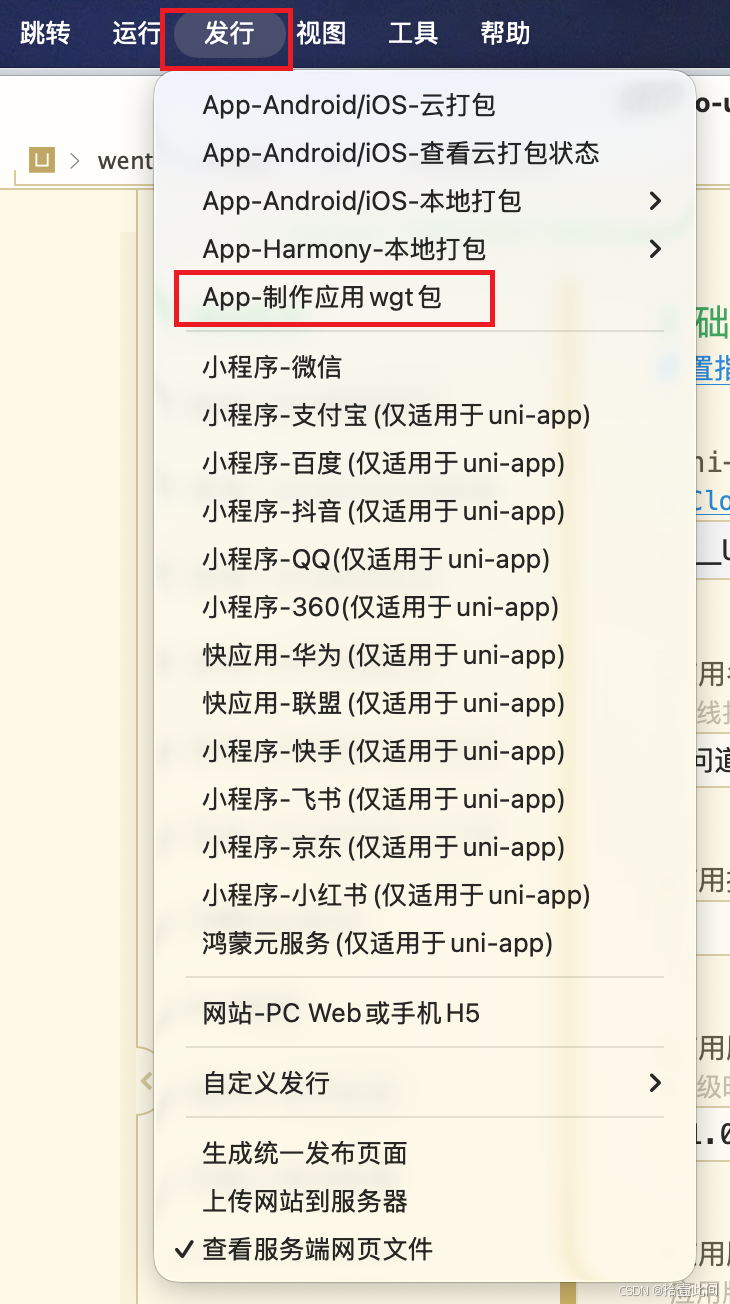
3. wgt 热更新包
uni-app App 热更新一般使用 .wgt 包。
你需要在打包平台或 HBuilderX 中生成 wgt 资源包,然后上传到服务器,后端接口返回它的下载地址。
4. App 端安装能力
uni-app App 端使用 5+ Runtime API:
js
plus.runtime.install(filePath, options, successCallback, errorCallback)安装成功后,建议调用:
js
plus.runtime.restart()因为新 JS、CSS、图片等资源需要重新加载后才能稳定生效。
二、热更新整体流程
#mermaid-svg-zfA62Y5cw6g2lNFd{font-family:"trebuchet ms",verdana,arial,sans-serif;font-size:16px;fill:#333;}@keyframes edge-animation-frame{from{stroke-dashoffset:0;}}@keyframes dash{to{stroke-dashoffset:0;}}#mermaid-svg-zfA62Y5cw6g2lNFd .edge-animation-slow{stroke-dasharray:9,5!important;stroke-dashoffset:900;animation:dash 50s linear infinite;stroke-linecap:round;}#mermaid-svg-zfA62Y5cw6g2lNFd .edge-animation-fast{stroke-dasharray:9,5!important;stroke-dashoffset:900;animation:dash 20s linear infinite;stroke-linecap:round;}#mermaid-svg-zfA62Y5cw6g2lNFd .error-icon{fill:#552222;}#mermaid-svg-zfA62Y5cw6g2lNFd .error-text{fill:#552222;stroke:#552222;}#mermaid-svg-zfA62Y5cw6g2lNFd .edge-thickness-normal{stroke-width:1px;}#mermaid-svg-zfA62Y5cw6g2lNFd .edge-thickness-thick{stroke-width:3.5px;}#mermaid-svg-zfA62Y5cw6g2lNFd .edge-pattern-solid{stroke-dasharray:0;}#mermaid-svg-zfA62Y5cw6g2lNFd .edge-thickness-invisible{stroke-width:0;fill:none;}#mermaid-svg-zfA62Y5cw6g2lNFd .edge-pattern-dashed{stroke-dasharray:3;}#mermaid-svg-zfA62Y5cw6g2lNFd .edge-pattern-dotted{stroke-dasharray:2;}#mermaid-svg-zfA62Y5cw6g2lNFd .marker{fill:#333333;stroke:#333333;}#mermaid-svg-zfA62Y5cw6g2lNFd .marker.cross{stroke:#333333;}#mermaid-svg-zfA62Y5cw6g2lNFd svg{font-family:"trebuchet ms",verdana,arial,sans-serif;font-size:16px;}#mermaid-svg-zfA62Y5cw6g2lNFd p{margin:0;}#mermaid-svg-zfA62Y5cw6g2lNFd .label{font-family:"trebuchet ms",verdana,arial,sans-serif;color:#333;}#mermaid-svg-zfA62Y5cw6g2lNFd .cluster-label text{fill:#333;}#mermaid-svg-zfA62Y5cw6g2lNFd .cluster-label span{color:#333;}#mermaid-svg-zfA62Y5cw6g2lNFd .cluster-label span p{background-color:transparent;}#mermaid-svg-zfA62Y5cw6g2lNFd .label text,#mermaid-svg-zfA62Y5cw6g2lNFd span{fill:#333;color:#333;}#mermaid-svg-zfA62Y5cw6g2lNFd .node rect,#mermaid-svg-zfA62Y5cw6g2lNFd .node circle,#mermaid-svg-zfA62Y5cw6g2lNFd .node ellipse,#mermaid-svg-zfA62Y5cw6g2lNFd .node polygon,#mermaid-svg-zfA62Y5cw6g2lNFd .node path{fill:#ECECFF;stroke:#9370DB;stroke-width:1px;}#mermaid-svg-zfA62Y5cw6g2lNFd .rough-node .label text,#mermaid-svg-zfA62Y5cw6g2lNFd .node .label text,#mermaid-svg-zfA62Y5cw6g2lNFd .image-shape .label,#mermaid-svg-zfA62Y5cw6g2lNFd .icon-shape .label{text-anchor:middle;}#mermaid-svg-zfA62Y5cw6g2lNFd .node .katex path{fill:#000;stroke:#000;stroke-width:1px;}#mermaid-svg-zfA62Y5cw6g2lNFd .rough-node .label,#mermaid-svg-zfA62Y5cw6g2lNFd .node .label,#mermaid-svg-zfA62Y5cw6g2lNFd .image-shape .label,#mermaid-svg-zfA62Y5cw6g2lNFd .icon-shape .label{text-align:center;}#mermaid-svg-zfA62Y5cw6g2lNFd .node.clickable{cursor:pointer;}#mermaid-svg-zfA62Y5cw6g2lNFd .root .anchor path{fill:#333333!important;stroke-width:0;stroke:#333333;}#mermaid-svg-zfA62Y5cw6g2lNFd .arrowheadPath{fill:#333333;}#mermaid-svg-zfA62Y5cw6g2lNFd .edgePath .path{stroke:#333333;stroke-width:2.0px;}#mermaid-svg-zfA62Y5cw6g2lNFd .flowchart-link{stroke:#333333;fill:none;}#mermaid-svg-zfA62Y5cw6g2lNFd .edgeLabel{background-color:rgba(232,232,232, 0.8);text-align:center;}#mermaid-svg-zfA62Y5cw6g2lNFd .edgeLabel p{background-color:rgba(232,232,232, 0.8);}#mermaid-svg-zfA62Y5cw6g2lNFd .edgeLabel rect{opacity:0.5;background-color:rgba(232,232,232, 0.8);fill:rgba(232,232,232, 0.8);}#mermaid-svg-zfA62Y5cw6g2lNFd .labelBkg{background-color:rgba(232, 232, 232, 0.5);}#mermaid-svg-zfA62Y5cw6g2lNFd .cluster rect{fill:#ffffde;stroke:#aaaa33;stroke-width:1px;}#mermaid-svg-zfA62Y5cw6g2lNFd .cluster text{fill:#333;}#mermaid-svg-zfA62Y5cw6g2lNFd .cluster span{color:#333;}#mermaid-svg-zfA62Y5cw6g2lNFd div.mermaidTooltip{position:absolute;text-align:center;max-width:200px;padding:2px;font-family:"trebuchet ms",verdana,arial,sans-serif;font-size:12px;background:hsl(80, 100%, 96.2745098039%);border:1px solid #aaaa33;border-radius:2px;pointer-events:none;z-index:100;}#mermaid-svg-zfA62Y5cw6g2lNFd .flowchartTitleText{text-anchor:middle;font-size:18px;fill:#333;}#mermaid-svg-zfA62Y5cw6g2lNFd rect.text{fill:none;stroke-width:0;}#mermaid-svg-zfA62Y5cw6g2lNFd .icon-shape,#mermaid-svg-zfA62Y5cw6g2lNFd .image-shape{background-color:rgba(232,232,232, 0.8);text-align:center;}#mermaid-svg-zfA62Y5cw6g2lNFd .icon-shape p,#mermaid-svg-zfA62Y5cw6g2lNFd .image-shape p{background-color:rgba(232,232,232, 0.8);padding:2px;}#mermaid-svg-zfA62Y5cw6g2lNFd .icon-shape .label rect,#mermaid-svg-zfA62Y5cw6g2lNFd .image-shape .label rect{opacity:0.5;background-color:rgba(232,232,232, 0.8);fill:rgba(232,232,232, 0.8);}#mermaid-svg-zfA62Y5cw6g2lNFd .label-icon{display:inline-block;height:1em;overflow:visible;vertical-align:-0.125em;}#mermaid-svg-zfA62Y5cw6g2lNFd .node .label-icon path{fill:currentColor;stroke:revert;stroke-width:revert;}#mermaid-svg-zfA62Y5cw6g2lNFd :root{--mermaid-font-family:"trebuchet ms",verdana,arial,sans-serif;} 否
是
否
是
否
是
否
是
App 启动或用户点击检查更新
获取当前 App versionCode
请求版本检查接口
服务端是否有更高版本?
结束;手动检查时提示已是最新版本
弹窗展示版本号和更新内容
用户是否立即更新?
取消更新
下载 filepath 对应的 wgt 包
下载是否成功?
提示下载失败
plus.runtime.install 安装 wgt
安装是否成功?
提示安装失败
关闭 loading
plus.runtime.restart 软重启
新资源生效
三、热更新核心代码
下面是一个较完整的封装示例。
js
import operationApi from "@/api/operation/index.js";
import { showBrandToast } from "@/utils/method.js";

const APP_TYPE = 3;

let checkingPromise = null;
let downloading = false;
let downloadTask = null;

function toInt(value) {
  const n = Number.parseInt(String(value ?? "").trim(), 10);
  return Number.isFinite(n) ? n : 0;
}

function formatBytes(size) {
  const n = Number(size) || 0;
  if (n < 1024) return `${n}B`;
  if (n < 1024 * 1024) return `${Math.floor((n / 1024) * 100) / 100}KB`;
  return `${Math.floor((n / 1024 / 1024) * 100) / 100}MB`;
}

function getRuntimeProperty() {
  // #ifdef APP-PLUS
  return new Promise((resolve) => {
    if (typeof plus === "undefined" || !plus.runtime?.getProperty) {
      resolve({});
      return;
    }

    plus.runtime.getProperty(plus.runtime.appid, (info) => {
      resolve(info || {});
    });
  });
  // #endif

  // #ifndef APP-PLUS
  return Promise.resolve({});
  // #endif
}

export async function getCurrentAppVersion() {
  const runtimeInfo = await getRuntimeProperty();

  return {
    versionCode: String(runtimeInfo.versionCode || ""),
    versionName: String(runtimeInfo.version || ""),
  };
}

function normalizeUpdateInfo(data) {
  if (!data || typeof data !== "object") return null;

  const currentVersionCode = toInt(data.currentVersionCode);
  const nextVersionCode = toInt(data.versioncode);

  if (!nextVersionCode || nextVersionCode <= currentVersionCode) {
    return null;
  }

  return {
    versionCode: String(data.versioncode || ""),
    versionName: String(data.versionname || ""),
    filePath: String(data.filepath || "").trim(),
    updateContent: String(data.updatecontent || "").trim(),
    priority: toInt(data.priority),
  };
}

function showUpdateConfirm(updateInfo) {
  const content = [
    `发现新版本 V${updateInfo.versionName || updateInfo.versionCode}`,
    updateInfo.updateContent,
  ]
    .filter(Boolean)
    .join("\n\n");

  return new Promise((resolve) => {
    uni.showModal({
      title: "版本更新",
      content,
      cancelText: "稍后再说",
      confirmText: "立即更新",
      success: (res) => resolve(Boolean(res.confirm)),
      fail: () => resolve(false),
    });
  });
}

function closeWaiting(waiting) {
  try {
    if (waiting?.close) waiting.close();
  } catch {}

  try {
    uni.hideLoading();
  } catch {}

  // #ifdef APP-PLUS
  try {
    if (typeof plus !== "undefined" && plus.nativeUI?.closeWaiting) {
      plus.nativeUI.closeWaiting();
    }
  } catch {}
  // #endif
}

function createWaiting(title) {
  // #ifdef APP-PLUS
  if (typeof plus !== "undefined" && plus.nativeUI?.showWaiting) {
    return plus.nativeUI.showWaiting(title, { modal: true });
  }
  // #endif

  uni.showLoading({ title, mask: true });
  return null;
}

function updateWaiting(waiting, title) {
  if (waiting?.setTitle) {
    waiting.setTitle(title);
    return;
  }

  uni.showLoading({
    title,
    mask: true,
  });
}

function installWgt(filePath) {
  return new Promise((resolve, reject) => {
    // #ifdef APP-PLUS
    if (typeof plus === "undefined" || !plus.runtime?.install) {
      reject(new Error("当前环境不支持安装更新包"));
      return;
    }

    plus.runtime.install(
      filePath,
      { force: false },
      () => resolve(),
      (err) => reject(err || new Error("安装更新包失败"))
    );
    // #endif

    // #ifndef APP-PLUS
    reject(new Error("当前环境不支持安装更新包"));
    // #endif
  });
}

function restartApp() {
  // #ifdef APP-PLUS
  if (typeof plus !== "undefined" && plus.runtime?.restart) {
    plus.runtime.restart();
  }
  // #endif
}

function restartAfterInstall() {
  closeWaiting();

  setTimeout(() => {
    restartApp();
  }, 300);
}

function downloadAndInstall(updateInfo) {
  if (downloading) {
    showBrandToast("更新包下载中");
    return Promise.resolve(false);
  }

  if (!updateInfo.filePath) {
    showBrandToast("更新包地址为空");
    return Promise.resolve(false);
  }

  downloading = true;
  let waiting = createWaiting("准备下载...");

  return new Promise((resolve) => {
    downloadTask = uni.downloadFile({
      url: updateInfo.filePath,

      success: async (downloadResult) => {
        if (downloadResult.statusCode !== 200) {
          closeWaiting(waiting);
          downloading = false;
          downloadTask = null;
          showBrandToast("更新包下载失败");
          resolve(false);
          return;
        }

        try {
          updateWaiting(waiting, "正在安装...");
          await installWgt(downloadResult.tempFilePath);

          closeWaiting(waiting);
          waiting = null;

          restartAfterInstall();
          resolve(true);
        } catch (err) {
          console.error("安装更新包失败:", err);
          showBrandToast("更新包安装失败");
          resolve(false);
        } finally {
          if (waiting) closeWaiting(waiting);
          downloading = false;
          downloadTask = null;
        }
      },

      fail: (err) => {
        console.error("下载更新包失败:", err);
        closeWaiting(waiting);
        downloading = false;
        downloadTask = null;
        showBrandToast("更新包下载失败");
        resolve(false);
      },
    });

    downloadTask?.onProgressUpdate?.((res) => {
      const progress = Math.max(0, Math.min(100, Number(res.progress) || 0));
      const written = formatBytes(res.totalBytesWritten);
      const total = formatBytes(res.totalBytesExpectedToWrite);

      updateWaiting(waiting, `下载中 ${progress}%\n${written}/${total}`);
    });
  });
}

export function cancelAppUpdateDownload() {
  if (!downloadTask) return false;

  downloadTask.abort();
  downloadTask = null;
  downloading = false;
  uni.hideLoading();

  return true;
}

export async function checkAppUpdate(options = {}) {
  const { manual = false } = options;

  // #ifndef APP-PLUS
  if (manual) {
    const version = await getCurrentAppVersion();
    showBrandToast(`当前版本 V${version.versionName || "1.0.0"}`);
  }
  return null;
  // #endif

  if (checkingPromise) return checkingPromise;

  checkingPromise = (async () => {
    try {
      const current = await getCurrentAppVersion();
      const currentVersionCode = current.versionCode;

      if (!currentVersionCode) {
        if (manual) showBrandToast("未获取到当前版本号");
        return null;
      }

      const data = await operationApi.getAppVersionManagement(
        {
          versioncode: currentVersionCode,
          apptype: APP_TYPE,
        },
        {
          loading: manual,
          silent: true,
        }
      );

      const updateInfo = normalizeUpdateInfo({
        ...(data || {}),
        currentVersionCode,
      });

      if (!updateInfo) {
        if (manual) showBrandToast("已是最新版本");
        return null;
      }

      const confirmed = await showUpdateConfirm(updateInfo);

      if (!confirmed) {
        return updateInfo;
      }

      await downloadAndInstall(updateInfo);
      return updateInfo;
    } catch (err) {
      console.error("检查 App 更新失败:", err);

      if (manual) {
        showBrandToast("检查更新失败");
      }

      return null;
    } finally {
      checkingPromise = null;
    }
  })();

  return checkingPromise;
}
四、App 启动时检查更新
可以在 App.vue 中启动检查。
js
// #ifdef APP-PLUS
import { checkAppUpdate } from "@/utils/appUpdate.js";
// #endif

export default {
  onLaunch() {
    // #ifdef APP-PLUS
    setTimeout(() => {
      checkAppUpdate({ manual: false });
    }, 1200);
    // #endif
  },
};
为什么加 setTimeout?
因为 App 刚启动时,首页、权限、推送、登录态等逻辑可能也在初始化。
稍微延迟检查更新,可以减少和其他启动逻辑抢资源的问题。
五、设置页手动检查更新
比如设置页有一行:
vue
<view class="settings-item" @click="handleCheckUpdate">
  <text class="item-label">版本更新</text>
  <view class="item-right">
    <text class="item-value">当前版本:V{{ version }}</text>
  </view>
</view>
脚本中:
js
import { ref } from "vue";
import { onLoad } from "@dcloudio/uni-app";
import { checkAppUpdate, getCurrentAppVersion } from "@/utils/appUpdate.js";

const version = ref("");

const handleCheckUpdate = () => {
  checkAppUpdate({ manual: true });
};

const refreshAppVersion = async () => {
  try {
    const appVersion = await getCurrentAppVersion();
    version.value = appVersion.versionName || "1.0.0";
  } catch {
    version.value = "1.0.0";
  }
};

onLoad(() => {
  refreshAppVersion();
});
这样用户可以主动点击检查更新。
六、最终 AI 辅助开发提示词
下面这段可以直接复制给 AI,让它帮你在 uni-app 项目中实现热更新。
txt
你是一个资深 uni-app App 开发工程师,请帮我实现 App 热更新功能,要求代码质量高、结构清晰、可维护。

项目是 uni-app Vue 项目,运行端主要是 APP-PLUS。

需求如下:

1. 新增一个热更新工具模块,例如 src/utils/appUpdate.js。
2. App 当前版本号优先通过 plus.runtime.getProperty 获取:
   - versionCode 用于和服务端比较
   - versionName 用于展示
3. 新增版本检查接口:
   GET /api/xxxxx
   参数:
4. 接口返回示例:
   {
     "code": 200,
     "data": {
       "versioncode": "344",
       "versionname": "1.1.1",
       "filepath": "wgt下载地址",
       "updatecontent": "更新内容",
       "priority": 1,
       "apptype": 3
     }
   }
5. 如果服务端 versioncode 大于当前 versionCode,则认为有新版本。
6. 有新版本时弹窗提示用户:
   - 标题:版本更新
   - 内容展示 versionName 和 updatecontent
   - 按钮:稍后再说、立即更新
7. 用户点击立即更新后:
   - 使用 uni.downloadFile 下载 filepath 对应的 wgt 包
   - 展示下载进度
   - 下载成功后调用 plus.runtime.install 安装
   - 安装成功后关闭 loading
   - 调用 plus.runtime.restart() 软重启 App,使新资源生效
8. 下载失败、安装失败、filepath 为空时要有友好提示。
9. 要避免重复检查和重复下载。
10. 只在 APP-PLUS 端执行热更新逻辑;H5、小程序端不要调用 plus。
11. App.vue 启动后延迟 1 秒左右静默检查更新。
12. 设置页的"版本更新"按钮可以手动检查更新。
13. 代码中使用条件编译:
    #ifdef APP-PLUS
    #endif
14. 请输出完整代码,并说明每个核心函数的作用。
七、总结
uni-app App 热更新的核心其实就四步:
txt
获取当前版本号 -> 请求服务端版本接口 -> 下载 wgt -> 安装并重启真正要注意的是体验和边界:
- 不要重复下载
- 不要在非 App 端调用
plus - 最后调用
plus.runtime.restart()让新资源生效
这样实现后,小版本修复就可以通过 wgt 包快速下发,用户不用重新安装完整 App,体验会轻很多。