Fortran 语言在2010年6月编程语言排行榜中排名第三十一位。下面就是 GregorianTest.for 程序:
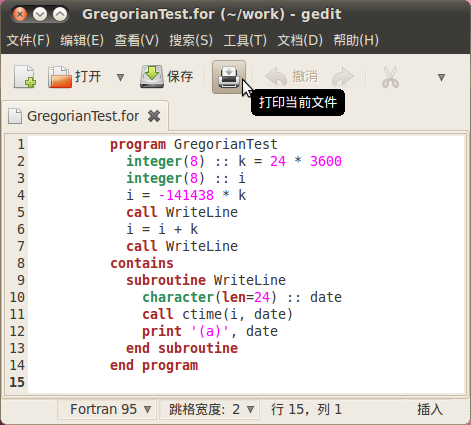
我没有在 Fortran 语言的标准库中找到设置指定日期的函数,只好从 1970-01-01 往回倒数 141,438 天得到 1582-10-04 。
安装 GNU Fortran 编译器,编译和运行:
ben@ben-1520:~/work$ sudo apt-get install gfortran
ben@ben-1520:~/work$ gfortran --version
GNU Fortran (Ubuntu 4.4.3-4ubuntu5) 4.4.3
Copyright (C) 2010 Free Software Foundation, Inc.
GNU Fortran comes with NO WARRANTY, to the extent permitted by law.
You may redistribute copies of GNU Fortran
under the terms of the GNU General Public License.
For more information about these matters, see the file named COPYING
ben@ben-1520:~/work$ gfortran GregorianTest.for
ben@ben-1520:~/work$ ./a.out
Mon Oct  4 08:05:52 1582
Tue Oct  5 08:05:52 1582
ben@ben-1520:~/work$
运行结果和 C 语言一样。
Lua
Lua 语言在2010年6月编程语言排行榜中排名第十七位。下面就是 GregorianTest.lua 程序:
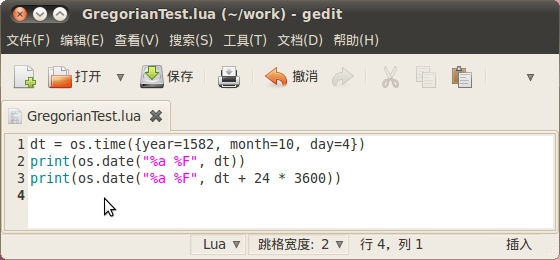
安装 Lua 软件包。luac 是编译器,用于将源程序编译为字节码,默认的文件名是 luac.out,luac --l 可以查看字节码。lua 可以作为交互窗口,也可以解释执行 lua 源程序,还可以用于运行编译后的字节码:
ben@ben-1520:~/work$ sudo apt-get install lua5.1
ben@ben-1520:~/work$ lua
Lua 5.1.4  Copyright (C) 1994-2008 Lua.org, PUC-Rio
> print(math.pi)
3.1415926535898
> (^D)
ben@ben-1520:~/work$ lua GregorianTest.lua
Mon 1582-10-04
Tue 1582-10-05
ben@ben-1520:~/work$ luac GregorianTest.lua
ben@ben-1520:~/work$ luac -l
main <GregorianTest.lua:0,0> (24 instructions, 96 bytes at 0x17bf530)
0+ params, 4 slots, 0 upvalues, 0 locals, 13 constants, 0 functions
	1	[1]	GETGLOBAL	0 -2	; os
	2	[1]	GETTABLE 	0 0 -3	; "time"
	3	[1]	NEWTABLE 	1 0 3
	4	[1]	SETTABLE 	1 -4 -5	; "year" 1582
	5	[1]	SETTABLE 	1 -6 -7	; "month" 10
	6	[1]	SETTABLE 	1 -8 -9	; "day" 4
	7	[1]	CALL     	0 2 2
	8	[1]	SETGLOBAL	0 -1	; dt
	9	[2]	GETGLOBAL	0 -10	; print
	10	[2]	GETGLOBAL	1 -2	; os
	11	[2]	GETTABLE 	1 1 -11	; "date"
	12	[2]	LOADK    	2 -12	; "%a %F"
	13	[2]	GETGLOBAL	3 -1	; dt
	14	[2]	CALL     	1 3 0
	15	[2]	CALL     	0 0 1
	16	[3]	GETGLOBAL	0 -10	; print
	17	[3]	GETGLOBAL	1 -2	; os
	18	[3]	GETTABLE 	1 1 -11	; "date"
	19	[3]	LOADK    	2 -12	; "%a %F"
	20	[3]	GETGLOBAL	3 -1	; dt
	21	[3]	ADD      	3 3 -13	; - 86400
	22	[3]	CALL     	1 3 0
	23	[3]	CALL     	0 0 1
	24	[3]	RETURN   	0 1
ben@ben-1520:~/work$ lua luac.out
Mon 1582-10-04
Tue 1582-10-05
ben@ben-1520:~/work$
运行结果和 C 语言一样。
Lisp
Lisp 语言在2010年6月编程语言排行榜中排名第十六位。下面就是 GregorianTest.lisp 程序:
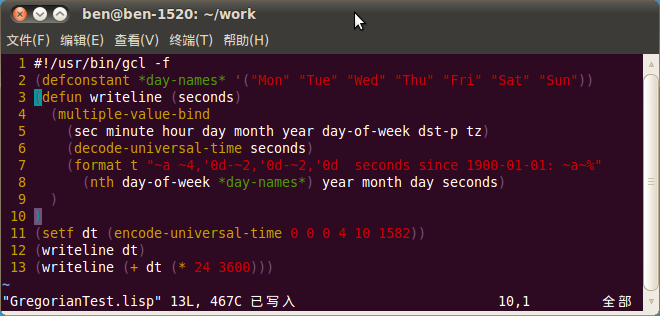
安装 GNU Common Lisp 软件包,gcl 可以作为交互窗口,也可编译源程序(使用 --compile 参数),还可以解释执行(使用 --f 参数):
ben@ben-1520:~/work$ sudo apt-get install gcl
ben@ben-1520:~/work$ gcl
GCL (GNU Common Lisp)  2.6.7 CLtL1    Feb 15 2010 17:57:54
Source License: LGPL(gcl,gmp), GPL(unexec,bfd,xgcl)
Binary License:  GPL due to GPL'ed components: (XGCL READLINE BFD UNEXEC)
Modifications of this banner must retain notice of a compatible license
Dedicated to the memory of W. Schelter
Use (help) to get some basic information on how to use GCL.
Temporary directory for compiler files set to /tmp/
>(bye)
ben@ben-1520:~/work$ gcl -f GregorianTest.lisp
Mon 1583-01--88  seconds since 1900-01-01: -10011254400
Tue 1583-01--87  seconds since 1900-01-01: -10011168000
ben@ben-1520:~/work$
运行结果基本和 C 语言一样,但是有一个 bug,认为 1582-10-04 是1583年1月的第 --88 天。这是一个很奇怪的 bug,其它大部分日期是正常的,如下所示:
ben@ben-1520:~/work$ gcl -f GregorianTest2.lisp
Sun 2010-06-20  seconds since 1900-01-01: 3485980800
Mon 2010-06-21  seconds since 1900-01-01: 3486067200
ben@ben-1520:~/work$ gcl -f GregorianTest3.lisp
Tue 1582-05-04  seconds since 1900-01-01: -10024473600
Wed 1582-05-05  seconds since 1900-01-01: -10024387200
ben@ben-1520:~/work$
此外,还可以选择安装 GNU CLISP 软件包,clisp 是符合 ANSI Common Lisp 标准的编译器、解释器和调试器:
ben@ben-1520:~/work$ sudo apt-get install clisp
ben@ben-1520:~/work$ clisp
  i i i i i i i       ooooo    o        ooooooo   ooooo   ooooo
  I I I I I I I      8     8   8           8     8     o  8    8
  I  \ `+' /  I      8         8           8     8        8    8
   \  `-+-'  /       8         8           8      ooooo   8oooo
    `-__|__-'        8         8           8           8  8
        |            8     o   8           8     o     8  8
  ------+------       ooooo    8oooooo  ooo8ooo   ooooo   8
Welcome to GNU CLISP 2.44.1 (2008-02-23)
Copyright (c) Bruno Haible, Michael Stoll 1992, 1993
Copyright (c) Bruno Haible, Marcus Daniels 1994-1997
Copyright (c) Bruno Haible, Pierpaolo Bernardi, Sam Steingold 1998
Copyright (c) Bruno Haible, Sam Steingold 1999-2000
Copyright (c) Sam Steingold, Bruno Haible 2001-2008
Type :h and hit Enter for context help.
[1]> (bye)
Bye.
ben@ben-1520:~/work$ clisp GregorianTest2.lisp
Sun 2010-06-20  seconds since 1900-01-01: 3485952000
Mon 2010-06-21  seconds since 1900-01-01: 3486038400
ben@ben-1520:~/work$ clisp GregorianTest.lisp
*** - incorrect date: 1582-10-4 0:0:0, time zone NIL
ben@ben-1520:~/work$
可以看出,GNU CLISP 不支持 1900-01-01 以前的日期。
Logo
在2010年6月编程语言排行榜中排名第三十六位的 Logo 语言的原型来自 Lisp 语言,内置一套海龟绘图系统,很适合于儿童学习。下面是一个用海龟绘图的 mn_eck.logo 程序:
code
<span style="background-color:aliceblue"><span style="color:#000000"><span style="color:#000000"><strong>1:  </strong></span><span style="color:#0000ff">to</span> <span style="color:#2b91af">n_eck</span> :ne :sz
<span style="color:#000000"><strong>2:  </strong></span>  <span style="color:#0000ff">repeat</span> :ne [<span style="color:#0000ff">rt</span> 360 / :ne <span style="color:#0000ff">fd</span> :sz]
<span style="color:#000000"><strong>3:  </strong></span><span style="color:#0000ff">end</span>
<span style="color:#000000"><strong>4:  </strong></span>
<span style="color:#000000"><strong>5:  </strong></span><span style="color:#0000ff">to</span> <span style="color:#2b91af">mn_eck</span> :ne :sz
<span style="color:#000000"><strong>6:  </strong></span>  <span style="color:#0000ff">repeat</span> :ne [<span style="color:#0000ff">rt</span> 360 / :ne <span style="color:#2b91af">n_eck</span> :ne :sz]
<span style="color:#000000"><strong>7:  </strong></span><span style="color:#0000ff">end</span>
<span style="color:#000000"><strong>8:  </strong></span>
<span style="color:#000000"><strong>9:  </strong></span><span style="color:#2b91af">mn_eck</span> 36 20</span></span>
安装 UC Berkeley Logo 软件包,启动交互窗口:
ben@ben-1520:~/work$ sudo apt-get install ucblogo
ben@ben-1520:~/work$ logo
Welcome to Berkeley Logo version 5.5
? print exp 1
2.71828182845905
? load "mn_eck.logo
? bye
Thank you for using Logo.
Have a nice day.
ben@ben-1520:~/work$
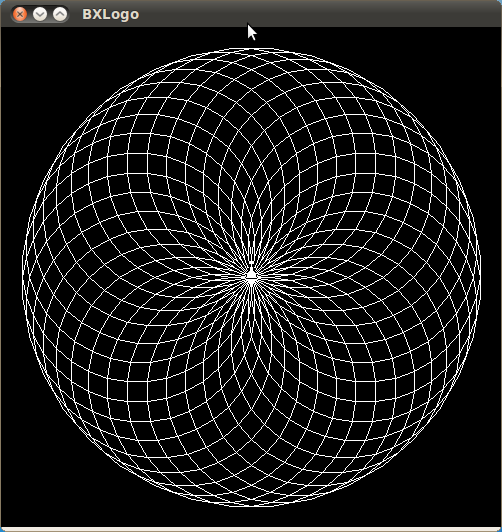
运行结果如下所示: