1 MCP 是什么
Model Context Protocol (MCP) 是 Anthropic 推动的开放协议,专门解决 LLM 应用与外部工具、数据源集成时的 接口不统一 问题。
类比:
- USB-C:不同设备用同一套物理/逻辑接口
- MCP:不同 LLM Host 用同一套协议连接工具与数据
没有 MCP 时,每个 Host(Cursor、Claude Desktop、自研 Agent)都要为 filesystem、GitHub、数据库等 各自写一套集成;有了 MCP,同一个 MCP Server 可被多个 Host 复用。
MCP 生态:
| 组成部分 | 说明 |
|---|---|
| MCP Specification | 协议规范:消息格式、生命周期、能力协商 |
| MCP SDK | 各语言官方/社区 SDK(如 TS @modelcontextprotocol/sdk) |
| MCP 开发者工具 | Inspector、调试 CLI 等 |
| 参考实现 / 官方 Servers | filesystem、fetch、github 等现成 Server |
2 架构:Host / Client / Server
MCP 采用 Client-Server 架构,基于 JSON-RPC 2.0 通信。
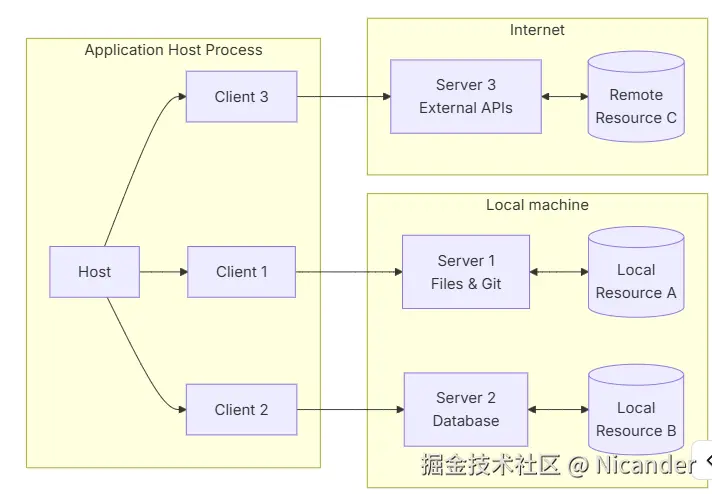
| 角色 | 职责 |
|---|---|
| Host | 面向用户的应用;内嵌 LLM、编排对话、管理多个 Client |
| MCP Client | Host 内的协议客户端;连接 Server、握手、发现能力、发请求 |
| MCP Server | 独立进程或服务;暴露 Resource / Tool / Prompt 等能力 |
3 MCP Server 提供什么
| 能力 | 说明 | 典型用途 |
|---|---|---|
| Tools | 可被模型调用的函数(带 JSON Schema 参数) | 读文件、搜网页、执行 SQL |
| Resources | 可读取的上下文数据 | 文件内容、schema、配置快照 |
| Prompts | 可复用的提示词模板 | 代码审查模板、固定 workflow |
4 MCP Client 提供什么
MCP 是 双向 的:Server 暴露 Tools 等能力的同时,也可以 反向请求 Client 的能力(需在 initialize 握手时声明 capabilities)。
| Client 能力 | 说明 |
|---|---|
| Roots | 告诉 Server 客户端允许访问的文件系统边界(file:// URI 列表);Server 通过 roots/list 获取 |
| Sampling | Server 在处理过程中,可请求 Client 代为调用 LLM (sampling/createMessage);API Key 留在 Client,Server 无需持钥 |
| Elicitation | Server 在处理过程中,可向用户 征集结构化输入 (form 模式)或 引导打开 URL(url 模式,如 OAuth、支付) |
5 MCP Specification
5.1 传输层(Transport)
| 传输方式 | 场景 |
|---|---|
| stdio | 本地子进程;Client spawn Server,stdin/stdout 传 JSON(Claude Desktop、本仓库常用) |
| Streamable HTTP | 远程 Server,HTTP 流式 |
| SSE | 旧版 HTTP 方案,仍可见但逐步被 Streamable HTTP 取代 |
5.2 连接生命周期
arduino
Client                          Server
  │── initialize ──────────────→│  (协议版本 + 双方 capabilities)
  │←─ InitializeResult ───────│
  │── notifications/initialized →│  (Client 就绪)
  │── tools/list ──────────────→│  (之后才能正常调用)
  │←─ { tools: [...] } ──────────│
  │── tools/call ──────────────→│
  │←─ { content: [...] } ────────│
5.3 能力协商(Capability Negotiation)
握手时双方声明支持什么;未声明的能力,对方 不应调用 。例如 Client 未声明 sampling,Server 就不该发 sampling/createMessage。
5.4 消息格式
底层均为 JSON-RPC 2.0:
- Request/Response :
tools/list、tools/call(有id,需回复) - Notification :
notifications/initialized(无id,不等回复)
6 示例:modelcontextprotocol/sdk
@modelcontextprotocol/sdk 是MCP官方提供的TS版本的sdk,实现了完整的MCP规范。
6.1 安装
bash
npm install @modelcontextprotocol/sdk zod6.2 创建 MCP Server
ts
// server.ts
import { McpServer } from "@modelcontextprotocol/sdk/server/mcp.js";
import { StdioServerTransport } from "@modelcontextprotocol/sdk/server/stdio.js";
import { z } from "zod";

const server = new McpServer({
  name: "demo-server",
  version: "1.0.0",
});

server.registerTool(
  "add",
  {
    description: "Add two numbers",
    inputSchema: { a: z.number(), b: z.number() },
  },
  async ({ a, b }) => ({
    content: [{ type: "text", text: `The sum of ${a} and ${b} is ${a + b}` }],
  }),
);

// stdio:从 stdin 读协议消息,向 stdout 写回复
const transport = new StdioServerTransport();
await server.connect(transport);
console.error("MCP Server running via stdio");
6.3 创建 MCP Client + 接 OpenAI
ts
// client.ts
import { Client } from "@modelcontextprotocol/sdk/client/index.js";
import { StdioClientTransport } from "@modelcontextprotocol/sdk/client/stdio.js";
import OpenAI from "openai";

const openai = new OpenAI({ apiKey: process.env.OPENAI_API_KEY });

// spawn 子进程并 connect(内部会发 initialize 握手)
const transport = new StdioClientTransport({
  command: "npx",
  args: ["tsx", "server.ts"],
});
const mcpClient = new Client({ name: "demo-client", version: "1.0.0" });
await mcpClient.connect(transport);

const { tools } = await mcpClient.listTools();

const openaiTools = tools.map((tool) => ({
  type: "function" as const,
  function: {
    name: tool.name,
    description: tool.description,
    parameters: tool.inputSchema,
  },
}));

const messages: OpenAI.ChatCompletionMessageParam[] = [
  { role: "user", content: "What is 5 + 3 and 4 * 7?" },
];

let response = await openai.chat.completions.create({
  model: "gpt-4o",
  messages,
  tools: openaiTools,
  tool_choice: "auto",
});

const assistantMsg = response.choices[0].message;
messages.push(assistantMsg);

if (assistantMsg.tool_calls?.length) {
  for (const toolCall of assistantMsg.tool_calls) {
    const result = await mcpClient.callTool({
      name: toolCall.function.name,
      arguments: JSON.parse(toolCall.function.arguments),
    });

    const text = (result.content ?? [])
      .map((c) => (c.type === "text" ? c.text : JSON.stringify(c)))
      .join("\n");

    messages.push({
      role: "tool",
      tool_call_id: toolCall.id,
      content: text,
    });
  }

  const final = await openai.chat.completions.create({
    model: "gpt-4o",
    messages,
  });
  console.log("Final:", final.choices[0].message.content);
} else {
  console.log("Answer:", assistantMsg.content);
}

await mcpClient.close();
Client 侧流程:
StdioClientTransportspawn Server 子进程Client.connect()完成 MCP 握手listTools()发现工具 → 转成 LLM API 格式- LLM 返回 tool_calls →
callTool()执行 → 结果追加到prompt中给 LLM