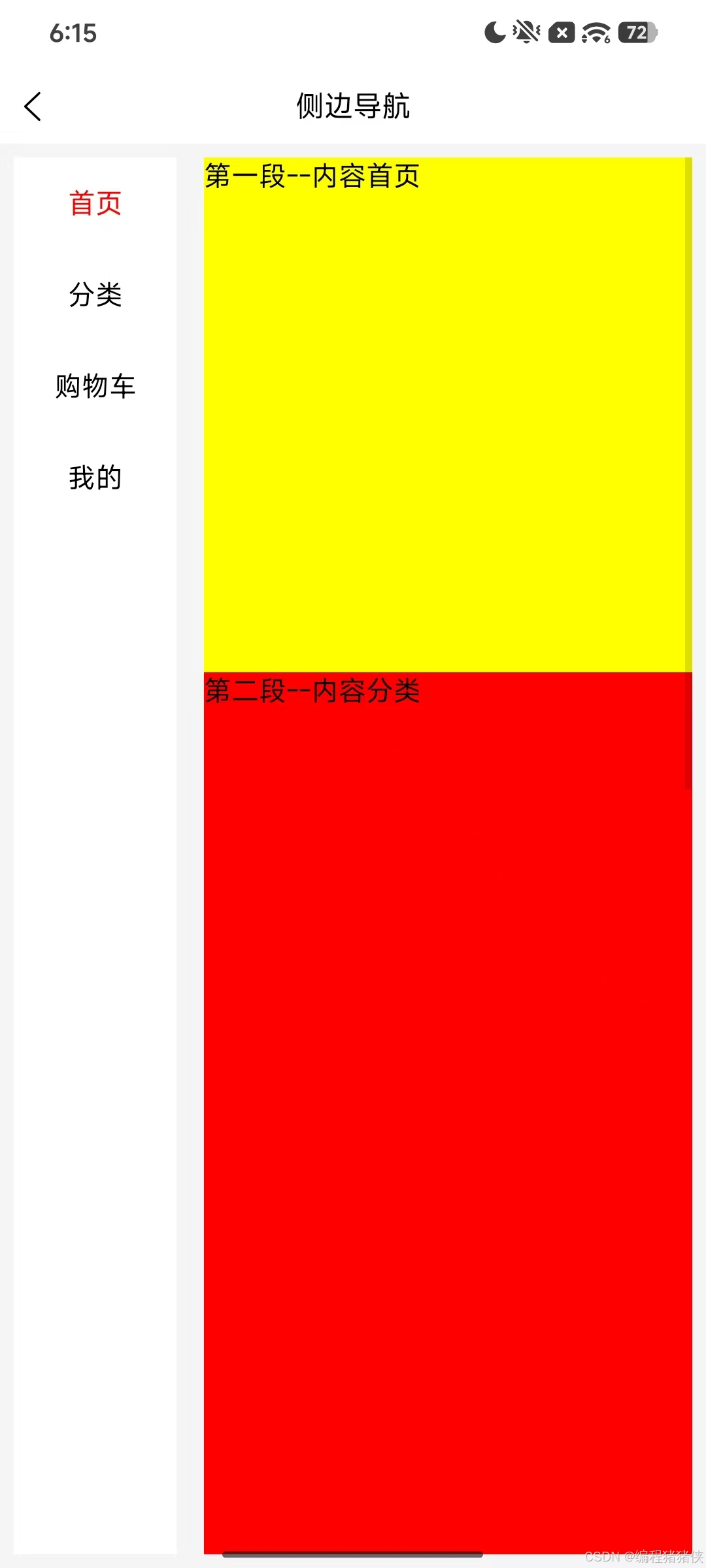
UniAppx安卓app实现左侧导航与右侧内容联动滚动
在移动端开发中,"左侧导航 + 右侧滚动内容"是电商类 APP 分类页面的经典交互模式。本文将基于实际项目代码,详细介绍如何在 UniAppx + uts + uvue 环境下实现这一功能。
功能概述
实现的核心功能包括:
- 左侧导航菜单:垂直排列的菜单项,点击可切换到对应内容区域
- 右侧滚动内容:可垂直滚动的内容区域,包含多个独立模块
- 滚动联动:右侧内容滚动时自动高亮左侧对应菜单,点击左侧菜单时右侧内容平滑滚动
项目结构
packageA/
└── stepperScroller/
    ├── index.uvue    # 主组件逻辑
    └── index.scss    # 样式文件
模板结构设计
模板采用 Flex 布局实现左右分栏。左侧是一个滚动视图容器,内部通过 v-for 循环渲染菜单项,每个菜单项绑定点击事件。右侧也是一个滚动视图容器,包含四个内容模块,每个模块有唯一的 id 用于定位。
关键属性说明:
- scroll-top:绑定滚动位置,实现点击导航时的平滑滚动
- scroll-with-animation:开启滚动动画
- @scroll:监听滚动事件,实现导航联动
核心数据结构
组件使用 ref 和 reactive 管理状态,定义了两个 TypeScript 接口:StepperScrollerItem 和 offSetItem。其中 offSetHeight 数组是实现联动的核心数据,存储每个内容块相对于滚动容器顶部的距离。数据初始化时包含四个菜单项:首页、分类、购物车、我的。
滚动容器信息变量
三个关键变量用于计算滚动边界和判断滚动位置:
- containerClientHeight:可视区域高度
- containerScrollHeight:内容总高度
- maxScrollTop:最大滚动距离
初始化计算偏移量
在 onMounted 钩子中,通过 nextTick 确保 DOM 渲染完成后再进行计算:
- 获取滚动容器的可视高度,使用 uni.getElementById 获取容器元素,通过 getBoundingClientRect 获取元素位置信息
- 遍历 offSetHeight 数组,计算每个内容块的偏移量 top,通过 rect.top 减去容器顶部位置得到相对偏移
- 累加每个内容块的高度,计算内容总高度
- 计算最大可滚动距离,即内容总高度减去可视区域高度,确保值不为负数
滚动监听与导航联动
handleScroll 函数处理滚动事件,根据滚动位置判断应该激活哪个菜单项:
- 获取当前滚动位置 scrollTop
- 检测是否滚动到底部,通过 scrollTop + 可视高度 >= 内容总高度来判断
- 如果滚动到底部,激活最后一个菜单项
- 否则从后往前遍历偏移量数组,找到第一个偏移量小于等于当前滚动位置的元素,将其索引设为当前激活项
- 只有当新索引与当前索引不同时才更新,避免不必要的更新
点击导航与内容滚动
switchNav 函数处理点击导航事件:
- 更新当前激活索引
- 通过 nextTick 确保 DOM 更新完成后再执行滚动
- 获取目标内容块的偏移量作为滚动目标位置
- 处理最后一项的边界情况:如果是最后一项且偏移量超过最大可滚动距离,则将目标位置设为最大滚动距离
- 更新 scrollTop 触发滚动
样式设计
使用 SCSS 嵌套语法实现清晰的布局结构:
- container 使用 flex-direction: row 实现左右分栏
- menu 固定宽度 24%,content 使用 flex: 1 占据剩余空间
- 所有 flex 容器都显式声明 flex-direction,确保安卓兼容性
- 内容区域包含四个不同高度和颜色的模块用于演示
安卓兼容性注意事项
在 UniApp 安卓端开发时,需要注意以下几点:
- flex-direction 必须显式声明:安卓端对 flex 布局的默认行为支持不一致,建议显式声明方向
- 避免使用 calc():部分安卓设备不支持 CSS calc() 函数,建议使用百分比或固定值
- getBoundingClientRect() 返回值:在安卓端可能需要类型断言
优化建议
1. 性能优化
滚动事件触发频率很高,建议添加节流优化,限制滚动事件处理的频率。
2. 动态内容支持
如果内容是动态加载的,需要在数据更新后重新计算偏移量,可通过 watch 监听数据变化。
3. 防抖处理
点击导航后,暂时禁用滚动监听,避免动画过程中触发导航切换,导致状态混乱。
总结
通过以上实现,我们完成了一个完整的"左侧导航 + 右侧内容联动滚动"功能。核心要点包括:
- 使用 getBoundingClientRect() 计算元素位置
- 维护偏移量数组实现滚动位置与导航的映射
- 处理边界情况确保滚动行为的正确性
- 使用 nextTick 确保 DOM 操作的时机正确
这种实现方式具有良好的兼容性和可扩展性,可以轻松应用于各种需要导航联动的场景。
完整代码
index.uvue
html
<template>
	<view class="container">
		<scroll-view class="menu">
			<view @click="switchNav(index)" class="menu-item" v-for="(item, index) in stepperScrollerData" :key="index">
				<text :class="current === index ? 'active_text' : 'normal_text'">{{ item.title }}</text>
			</view>
		</scroll-view>
		<scroll-view id="content1" :scroll-top="data.scrollTop" class="content" direction="vertical" :scroll-with-animation="true" @scroll="handleScroll">
			<view id="demo1" class="demo1">第一段--内容{{stepperScrollerData[0].title}}</view>
			<view id="demo2" class="demo2">第二段--内容{{stepperScrollerData[1].title}}</view>
			<view id="demo3" class="demo3">第三段--内容{{stepperScrollerData[2].title}}</view>
			<view id="demo4" class="demo4">第四段--内容{{stepperScrollerData[3].title}}</view>
		</scroll-view>
	</view>
</template>

<script setup lang="uts">
	import { ref, onMounted,reactive,nextTick } from 'vue';

	type StepperScrollerItem = {
		title : string;
	}

	type offSetItem = {
		top : number;
		id : string;
	}

	const current = ref(0);
	const data = reactive({
		scrollTop: 0,
		currentScrollTop: 0,
	});
	const offSetHeight = ref<Array<offSetItem>>([
		{ top: 0, id: 'demo1' },
		{ top: 0, id: 'demo2' },
		{ top: 0, id: 'demo3' },
		{ top: 0, id: 'demo4' }
	]);

	const stepperScrollerData = ref<StepperScrollerItem[]>([
		{ title: '首页' },
		{ title: '分类' },
		{ title: '购物车' },
		{ title: '我的' }
	]);

	let containerClientHeight = 0;
	let containerScrollHeight = 0;
	let maxScrollTop = 0;

	const handleScroll = (e: UniScrollEvent) => {
		const scrollTop = e.detail.scrollTop as number;
		data.currentScrollTop = scrollTop;

		let newIndex = 0;

		const isAtBottom = scrollTop + containerClientHeight >= containerScrollHeight - 1;
		if (isAtBottom && offSetHeight.value.length > 0) {
			newIndex = offSetHeight.value.length - 1;
		} else {
			for (let i = offSetHeight.value.length - 1; i >= 0; i--) {
				if (scrollTop >= offSetHeight.value[i].top) {
					newIndex = i;
					break;
				}
			}
		}

		if (newIndex !== current.value) {
			current.value = newIndex;
		}
	};

	const switchNav = (index: number) => {
		current.value = index;
		nextTick(() => {
			let targetTop = offSetHeight.value[index].top;
			if (index === offSetHeight.value.length - 1 && targetTop > maxScrollTop) {
				targetTop = maxScrollTop;
			}
			data.scrollTop = targetTop;
		});
	};

	onMounted(() => {
		nextTick(() => {
			const content = uni.getElementById('content1');
			let containerTop = 0;
			let containerHeight = 0;
			if (content != null) {
				const rect = content.getBoundingClientRect();
				containerTop = rect.top;
				containerClientHeight = rect.height;
			}

			offSetHeight.value.forEach((item, index) => {
				const element = uni.getElementById(item.id);
				if (element != null) {
					const rect = element.getBoundingClientRect();
					offSetHeight.value[index].top = rect.top - (containerTop as number) + (data.currentScrollTop as number);
				}
			});

			let totalHeight = 0;
			offSetHeight.value.forEach((item, idx) => {
				const element = uni.getElementById(item.id);
				if (element != null) {
					const rect = element.getBoundingClientRect();
					totalHeight += rect.height;
				}
			});
			containerScrollHeight = totalHeight;

			maxScrollTop = containerScrollHeight - containerClientHeight;
			if (maxScrollTop < 0) maxScrollTop = 0;

			console.log('可视高度', containerClientHeight);
			console.log('内容总高度', containerScrollHeight);
			console.log('最大滚动距离', maxScrollTop);
			console.log('偏移量数组', offSetHeight.value);
		});
	});
</script>

<style scoped lang="scss" src="./index.scss">
</style>
index.scss
scss
.container {
    width: 100%;
    height: 100%;
    display: flex;
    flex-direction: row;
    align-items: center;
    justify-content: space-between;
    background-color: #f5f5f5;
    box-sizing: border-box;
    padding: 8px;

    .menu {
        width: 24%;
        height: 100%;
        margin-right: 16px;
        background-color: #fff;

        .menu-item {
            padding: 16px 0;
            display: flex;
            flex-direction: row;
            align-items: center;
            justify-content: center;
            color: red;

            .active_text {
                color: red;
            }

            .normal_text {
                color: #000;
            }
        }

    }

    .content {
        flex: 1;
        height: 100%;
        background-color: #fff;

        .demo1 {
            height: 300px;
            background-color: yellow;
            width: 100%;
        }

        .demo2 {
            height: 600px;
            background-color: red;
            width: 100%;
        }

        .demo3 {
            height: 400px;
            background-color: green;
            width: 100%;
        }

        .demo4 {
            height: 500px;
            background-color: blue;
            width: 100%;
        }
    }
}