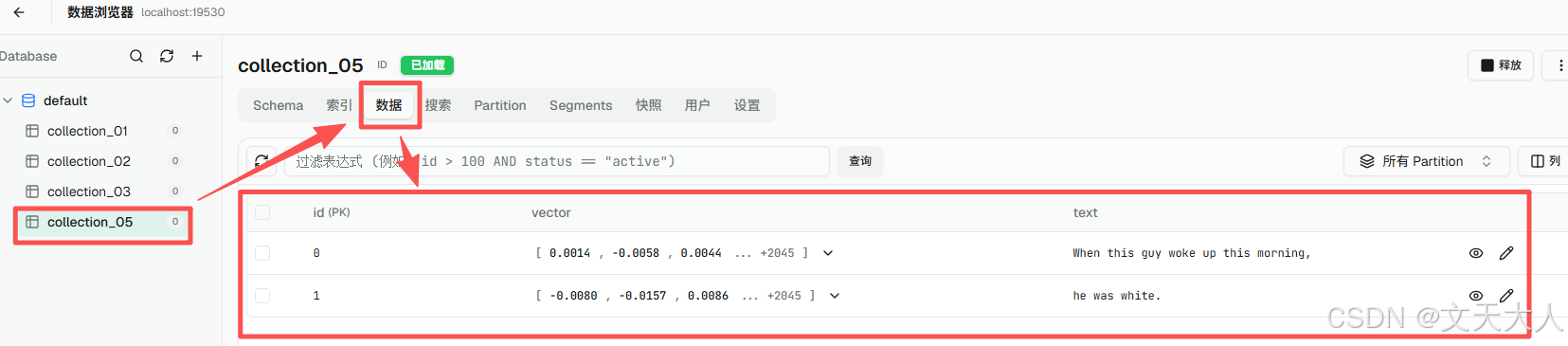
文本变成向量这个操作是由大模型的embedding模型去做的,根据业界约定,如果你看到模型内部由encode开头的函数,指的就是将XXX变成向量,具体XXX是什么不一定,文本,图片,视频什么的都有可能,本文的代码是我从官方文档中摘出来的,本文将when this guy woke up this morning, he was white这句话变成向量
目录
- 安装国产智谱的embedding模型
- 创建一个数据库表
- 使用智谱embedding模型将文本转换成向量并存入到Milvus数据库的collection_05的表中
- 通过ATTU查看Milvus中刚刚插入的数据
安装国产智谱的embedding模型
我们不用官网的,我们这里使用国产embedding模型,智谱的模型主要官网简洁,申请key特别好找,能免费用一些,阿里云的控制台太复杂了,找个key费死劲了,其次就是国产的网络好
cpp
# 安装paraphrase-albert-small-v2,服务器在国外,不好用
# pip install "pymilvus[model]" -i https://mirrors.aliyun.com/pypi/simple/ --trusted-host mirrors.aliyun.com
# 安装国产智谱的embedding模型
pip install zhipuai
创建一个数据库表
cpp
from pymilvus import MilvusClient,DataType

client = MilvusClient(uri="http://localhost:19530")
schema = client.create_schema()
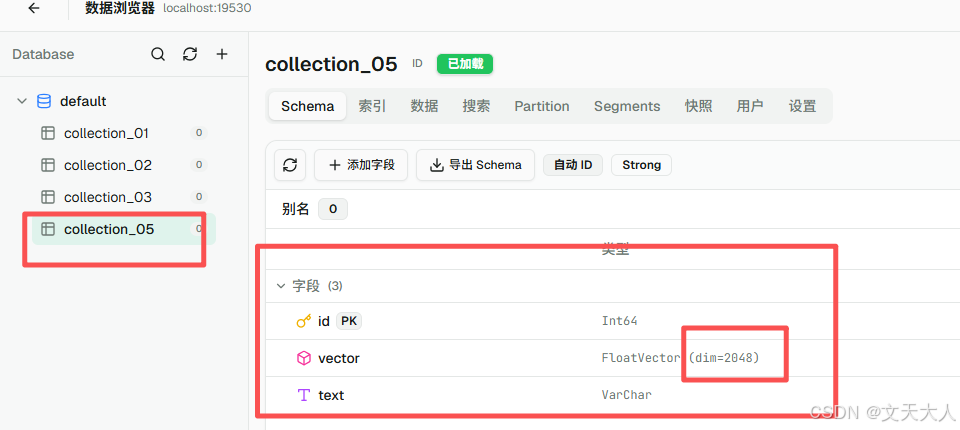
# 创建一个collection_05的表,有3个字段,一个叫id的主键字段,一个叫vector的向量字段,一个叫text的普通字段
schema.add_field(field_name="id", datatype=DataType.INT64, is_primary=True, auto_id=True)
# 设置vector字段的维度为2048,因为我们后面用的智谱embedding模型将文本转换成的向量,维度就是2048,否则和数据库维度不同会报错
schema.add_field(field_name="vector", datatype=DataType.FLOAT_VECTOR, dim=2048)
schema.add_field(field_name="text", datatype=DataType.VARCHAR)
client.create_collection(
    collection_name="collection_05",
    # metric_type="L2",假设我这里设置L2,生效的只有vector字段,因为在id,vector和text三个字段中,只有vector字段是向量字段,另外两个不是
    schema = schema
)
代码执行完毕,通过ATTU查看如下图
使用智谱embedding模型将文本转换成向量并存入到Milvus数据库的collection_05的表中
cpp
from zhipuai import ZhipuAI
from pymilvus import MilvusClient
# 创建智谱python客户端
zhipu_client = ZhipuAI(api_key="智谱的API-key,在官网注册帐号,很好找,新建一个key,自动免费试用")

# 我们自己定义一句话,这句话出自经典美剧《越狱》T-bag名场面,你不会不知道吧????
docs = [
    "When this guy woke up this morning,",
    "he was white."
]
# 我们使用智谱的embedding-3模型,它还有2,但是我看3便宜,以后花钱的时候可以花几块钱买个3,测试够用了
response = zhipu_client.embeddings.create(
      model="embedding-3",
      input=docs
  )
vectors = [item.embedding for item in response.data]

data = [
    {"id": i, "vector": vectors[i], "text": docs[i]}
    for i in range(len(vectors))
]

# 将生成的数据插入到数据库
milvus_client = MilvusClient(uri="http://localhost:19530")
res = milvus_client.insert(collection_name="collection_05", data=data)
print(res)
通过ATTU查看Milvus中刚刚插入的数据