创建插件项目
新建项目,在扩展性标签中,选择Editor Classifier模版,命名为ShaderEditor,点击确定。
Visual Studio为我们生成了如下几个文件。
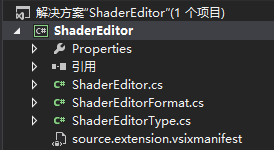
ShaderEditorFormat.cs文件的默认代码如下:

 1     [Export(typeof(EditorFormatDefinition))]
 2     [ClassificationType(ClassificationTypeNames = "ShaderEditor")]
 3     [Name("ShaderEditor")]
 4     [UserVisible(true)] //this should be visible to the end user
 5     [Order(Before = Priority.Default)] //set the priority to be after the default classifiers
 6     internal sealed class ShaderEditorFormat : ClassificationFormatDefinition {
 7         /// <summary>
 8         /// Defines the visual format for the "ShaderEditor" classification type
 9         /// </summary>
10         public ShaderEditorFormat() {
11             this.DisplayName = "ShaderEditor"; //human readable version of the name
12             this.BackgroundColor = Colors.BlueViolet;
13             this.TextDecorations = System.Windows.TextDecorations.Underline;
14         }
15     }
这段代码定义了一个名为"ShaderEditor"的着色类型,编译工程并运行,我们可以在Visual Studio实验实例的工具->选项->字体和颜色中找到一个名为"ShaderEditor"的条目。同时我们会发现所有文本文件的颜色都变成了Colors.BlueViolet并带上了下划线。修改this.DisplayName = "ShaderEditor"的内容,可以改变在字体和颜色中显示的名字。下面的格式设置可以任意修改成喜欢的样式,但要注意在这里的格式只是插件首次安装时的默认设置,这些条目和其它着色选项一样,都可以被用户任意更改。
3. 创建GLSL的着色类型我们已经了解了如何将着色类型添加到Visual Studio,现在修改ShaderEditorFormat.cs,添加我们的着色类型。
 1     [Export(typeof(EditorFormatDefinition))]
 2     [ClassificationType(ClassificationTypeNames = "GLSLText")]
 3     [Name("GLSLText")]
 4     [UserVisible(true)]
 5     [Order(Before = Priority.Default)]
 6     internal sealed class GLSLTextFormatDefinition : ClassificationFormatDefinition {
 7         public GLSLTextFormatDefinition() {
 8             this.DisplayName = "GLSL文本";
 9             this.ForegroundColor = Colors.Brown;
10         }
11     }
12
13     [Export(typeof(EditorFormatDefinition))]
14     [ClassificationType(ClassificationTypeNames = "GLSLIdentifier")]
15     [Name("GLSLIdentifier")]
16     [UserVisible(true)]
17     [Order(Before = Priority.Default)]
18     internal sealed class GLSLIdentifierFormatDefinition : ClassificationFormatDefinition {
19         public GLSLIdentifierFormatDefinition() {
20             this.DisplayName = "GLSL标识符";
21             this.ForegroundColor = Colors.Brown;
22         }
23     }
24
25     [Export(typeof(EditorFormatDefinition))]
26     [ClassificationType(ClassificationTypeNames = "GLSLComment")]
27     [Name("GLSLComment")]
28     [UserVisible(true)]
29     [Order(Before = Priority.Default)]
30     internal sealed class GLSLCommentFormatDefinition : ClassificationFormatDefinition {
31         public GLSLCommentFormatDefinition() {
32             this.DisplayName = "GLSL注释";
33             this.ForegroundColor = Colors.DarkGray;
34         }
35     }
36
37     [Export(typeof(EditorFormatDefinition))]
38     [ClassificationType(ClassificationTypeNames = "GLSLKeyword")]
39     [Name("GLSLKeyword")]
40     [UserVisible(true)]
41     [Order(Before = Priority.Default)]
42     internal sealed class GLSLKeywordFormatDefinition : ClassificationFormatDefinition {
43         public GLSLKeywordFormatDefinition() {
44             this.DisplayName = "GLSL关键字";
45             this.ForegroundColor = Colors.Blue;
46         }
47     }
48
49     [Export(typeof(EditorFormatDefinition))]
50     [ClassificationType(ClassificationTypeNames = "GLSLClass")]
51     [Name("GLSLClass")]
52     [UserVisible(true)]
53     [Order(Before = Priority.Default)]
54     internal sealed class GLSLClassFormatDefinition : ClassificationFormatDefinition {
55         public GLSLClassFormatDefinition() {
56             this.DisplayName = "GLSL类型";
57             this.ForegroundColor = Colors.Green;
58         }
59     }
60
61     [Export(typeof(EditorFormatDefinition))]
62     [ClassificationType(ClassificationTypeNames = "GLSLQualifier")]
63     [Name("GLSLQualifier")]
64     [UserVisible(true)]
65     [Order(Before = Priority.Default)]
66     internal sealed class GLSLQualifierFormatDefinition : ClassificationFormatDefinition {
67         public GLSLQualifierFormatDefinition() {
68             this.DisplayName = "GLSL限定符";
69             this.ForegroundColor = Colors.Pink;
70         }
71     }
72
73     [Export(typeof(EditorFormatDefinition))]
74     [ClassificationType(ClassificationTypeNames = "GLSLVariable")]
75     [Name("GLSLVariable")]
76     [UserVisible(true)]
77     [Order(Before = Priority.Default)]
78     internal sealed class GLSLVariableFormatDefinition : ClassificationFormatDefinition {
79         public GLSLVariableFormatDefinition() {
80             this.DisplayName = "GLSL系统变量";
81             this.ForegroundColor = Colors.DarkOrange;
82         }
83     }
84
85     [Export(typeof(EditorFormatDefinition))]
86     [ClassificationType(ClassificationTypeNames = "GLSLFunction")]
87     [Name("GLSLFunction")]
88     [UserVisible(true)]
89     [Order(Before = Priority.Default)]
90     internal sealed class GLSLFunctionFormatDefinition : ClassificationFormatDefinition {
91         public GLSLFunctionFormatDefinition() {
92             this.DisplayName = "GLSL系统函数";
93             this.ForegroundColor = Colors.DarkTurquoise;
94         }
95     }
4. 导出着色类型
Editor Classifier使用了MEF框架,关于MEF的具体细节,请参考MSDN的相关文档。
我们需要注意的是,在MEF中,光定义了着色类型还不够,我们需要导出一个ClassificationTypeDefinition,才能在系统中生效。
打开ShaderEditorType.cs,我们看到系统生成的代码如下:
1     internal static class ShaderEditorClassificationDefinition {
2         [Export(typeof(ClassificationTypeDefinition))]
3         [Name("ShaderEditor")]
4         internal static ClassificationTypeDefinition ShaderEditorType = null;
5     }
这里的Name与之前默认生成的ShaderEditor相同,同理,我们将这里的代码修改成方才定义的类型
 1     internal static class ShaderEditorClassificationDefinition {
 2         [Export(typeof(ClassificationTypeDefinition))]
 3         [Name("GLSLText")]
 4         internal static ClassificationTypeDefinition GLSLTextType = null;
 5
 6         [Export(typeof(ClassificationTypeDefinition))]
 7         [Name("GLSLIdentifier")]
 8         internal static ClassificationTypeDefinition GLSLIdentifierType = null;
 9
10         [Export(typeof(ClassificationTypeDefinition))]
11         [Name("GLSLComment")]
12         internal static ClassificationTypeDefinition GLSLCommentType = null;
13
14         [Export(typeof(ClassificationTypeDefinition))]
15         [Name("GLSLKeyword")]
16         internal static ClassificationTypeDefinition GLSLKeywordType = null;
17
18         [Export(typeof(ClassificationTypeDefinition))]
19         [Name("GLSLClass")]
20         internal static ClassificationTypeDefinition GLSLClassType = null;
21
22         [Export(typeof(ClassificationTypeDefinition))]
23         [Name("GLSLQualifier")]
24         internal static ClassificationTypeDefinition GLSLQualifierType = null;
25
26         [Export(typeof(ClassificationTypeDefinition))]
27         [Name("GLSLVariable")]
28         internal static ClassificationTypeDefinition GLSLVariableType = null;
29
30         [Export(typeof(ClassificationTypeDefinition))]
31         [Name("GLSLFunction")]
32         internal static ClassificationTypeDefinition GLSLFunctionType = null;
33     }
5. 关联文件类型
打开ShaderEditor.cs
 1     [Export(typeof(IClassifierProvider))]
 2     [ContentType("text")]
 3     internal class ShaderEditorProvider : IClassifierProvider {
 4         [Import]
 5         internal IClassificationTypeRegistryService ClassificationRegistry = null; // Set via MEF
 6
 7         public IClassifier GetClassifier(ITextBuffer buffer) {
 8             return buffer.Properties.GetOrCreateSingletonProperty<ShaderEditor>(delegate { return new ShaderEditor(ClassificationRegistry); });
 9         }
10     }