在前文中,介绍了.NET下的多种异步的形式,在WEB程序中,天生就是多线程的,因此使用异步应该更为谨慎。本文将着重展开ASP.NET中的异步。
【注意】本文中提到的异步指的是服务器端异步,而非客户端异步(Ajax)。
对于HTTP的请求响应模型,服务器无法主动通知或回调客户端,当客户端发起一个请求后,必须保持连接等待服务器的返回结果,才能继续处理,因此,对于客户端来说,请求与响应是无法异步进行,也就是说无论服务器如何处理请求,对于客户端来说没有任何差别。
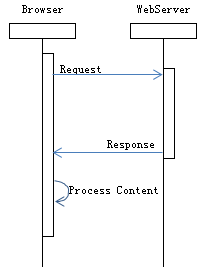
那么ASP.NET异步指的又是什么,解决了什么问题呢?
在解释ASP.NET异步前,先来考察下ASP.NET线程模型。
ASP.NET线程模型
我们知道,一个WEB服务可以同时服务器多个用户,我们可以想象一下,WEB程序应该运行于多线程环境中,对于运行WEB程序的线程,我们可以称之为WEB线程,那么,先来看看WEB线程长什么样子吧。
我们可以用一个HttpHandler输出一些内容。

public class Handler : IHttpHandler
{

    public void ProcessRequest(HttpContext context)
    {
        context.Response.ContentType = "text/plain";
        var thread = Thread.CurrentThread;
        context.Response.Write(
            string.Format("Name:{0}\r\nManagedThreadId:{1}\r\nIsBackground:{2}\r\nIsThreadPoolThread:{3}",
                thread.Name,
                thread.ManagedThreadId,
                thread.IsBackground,
                thread.IsThreadPoolThread)
            );
    }

    public bool IsReusable
    {
        get {return true;}
    }
}
你可以看到类似于这样的结果:
Name:
ManagedThreadId:57
IsBackground:True
IsThreadPoolThread:True
这里可以看到,WEB线程是一个没有名称的线程池中的线程,如果刷新这个页面,还有机会看到 ManagedThreadId 在不断变化,并且可能重复出现。说明WEB程序有机会运行于线程池中的不同线程。
为了模拟多用户并发访问的情况,我们需要对这个处理程序添加人为的延时,并输出线程相关信息与开始结束时间,再通过客户端程序同时发起多个请求,查看返回的内容,分析请求的处理情况。

public void ProcessRequest(HttpContext context)
{
    DateTime begin = DateTime.Now;
    int t1, t2, t3;
    ThreadPool.GetAvailableThreads(out t1, out t3);
    ThreadPool.GetMaxThreads(out t2, out t3);
    Thread.Sleep(TimeSpan.FromSeconds(10));
    DateTime end = DateTime.Now;
    context.Response.ContentType = "text/plain";
    var thread = Thread.CurrentThread;
    context.Response.Write(
        string.Format("TId:{0}\tApp:{1}\tBegin:{2:mm:ss,ffff}\tEnd:{3:mm:ss,ffff}\tTPool:{4}",
            thread.ManagedThreadId,
            context.ApplicationInstance.GetHashCode(),
            begin,
            end,
            t2 - t1
            )
        );
}
我们用一个命令行程序来发起请求,并显示结果。

static void Main()
{
    var url = new Uri("http://localhost:8012/Handler.ashx");
    var num = 50;
    for (int i = 0; i < num; i++)
    {
        var request = WebRequest.Create(url);
        request.GetResponseAsync().ContinueWith(t =>
        {
            var stream = t.Result.GetResponseStream();
            using (TextReader tr = new StreamReader(stream))
            {
                Console.WriteLine(tr.ReadToEnd());
            }
        });
    }
    Console.ReadLine();
}
这里,我们同时发起了50个请求,然后观察响应的情况。
【注意】后面的结果会因为操作系统、IIS版本、管道模式、.NET版本、配置项 的不同而不同,以下结果为在Windows Server 2008 R2 + IIS7.5 + .NET 4.5 beta(.NET 4 runtime) + 默认配置 中测试的结果,在没有特别说明的情况下,均为重启IIS后第一次运行的情况。
这个程序在我的电脑运行结果是这样的:

TId:6   App:35898671    Begin:55:30,3176        End:55:40,3182  TPool:2
TId:5   App:22288629    Begin:55:30,3176        End:55:40,3212  TPool:2
TId:7   App:12549444    Begin:55:31,0426        End:55:41,0432  TPool:3
TId:8   App:22008501    Begin:55:31,5747        End:55:41,5752  TPool:4
TId:9   App:37121646    Begin:55:32,1067        End:55:42,1073  TPool:5
TId:10  App:33156464    Begin:55:32,6387        End:55:42,6393  TPool:6
TId:11  App:7995840     Begin:55:33,1707        End:55:43,1713  TPool:7
TId:12  App:36610825    Begin:55:33,7028        End:55:43,7033  TPool:8
TId:13  App:20554616    Begin:55:34,2048        End:55:44,2054  TPool:9
TId:14  App:15510466    Begin:55:35,2069        End:55:45,2074  TPool:10
TId:15  App:23324256    Begin:55:36,2049        End:55:46,2055  TPool:11
TId:16  App:34250480    Begin:55:37,2050        End:55:47,2055  TPool:12
TId:17  App:58408916    Begin:55:38,2050        End:55:48,2056  TPool:13
TId:18  App:2348279     Begin:55:39,2051        End:55:49,2057  TPool:14
TId:19  App:61669314    Begin:55:40,2051        End:55:50,2057  TPool:15
TId:6   App:35898671    Begin:55:40,3212        End:55:50,3217  TPool:15
TId:5   App:22288629    Begin:55:40,3232        End:55:50,3237  TPool:15
TId:7   App:12549444    Begin:55:41,0432        End:55:51,0438  TPool:15
TId:8   App:22008501    Begin:55:41,5752        End:55:51,5758  TPool:15
TId:9   App:37121646    Begin:55:42,1073        End:55:52,1078  TPool:15
TId:10  App:33156464    Begin:55:42,6393        End:55:52,6399  TPool:15
TId:11  App:7995840     Begin:55:43,1713        End:55:53,1719  TPool:15
TId:12  App:36610825    Begin:55:43,7043        End:55:53,7049  TPool:15
TId:13  App:20554616    Begin:55:44,2054        End:55:54,2059  TPool:15
TId:20  App:36865354    Begin:55:45,2074        End:55:55,2080  TPool:16
TId:14  App:15510466    Begin:55:45,2084        End:55:55,2090  TPool:16
TId:21  App:3196068     Begin:55:46,2055        End:55:56,2061  TPool:17
TId:15  App:23324256    Begin:55:46,2065        End:55:56,2071  TPool:17
TId:22  App:4186222     Begin:55:47,2055        End:55:57,2061  TPool:18
TId:16  App:34250480    Begin:55:47,2065        End:55:57,2071  TPool:18
TId:23  App:764807      Begin:55:48,2046        End:55:58,2052  TPool:19
TId:17  App:58408916    Begin:55:48,2056        End:55:58,2062  TPool:19
TId:24  App:10479095    Begin:55:49,2047        End:55:59,2052  TPool:20
TId:18  App:2348279     Begin:55:49,2057        End:55:59,2062  TPool:20
TId:25  App:4684807     Begin:55:50,2047        End:56:00,2053  TPool:21
TId:19  App:61669314    Begin:55:50,2057        End:56:00,2063  TPool:21
TId:6   App:35898671    Begin:55:50,3227        End:56:00,3233  TPool:21
TId:5   App:22288629    Begin:55:50,3237        End:56:00,3243  TPool:21
TId:7   App:12549444    Begin:55:51,0438        End:56:01,0443  TPool:21
TId:8   App:22008501    Begin:55:51,5758        End:56:01,5764  TPool:21
TId:9   App:37121646    Begin:55:52,1078        End:56:02,1084  TPool:21
TId:10  App:33156464    Begin:55:52,6399        End:56:02,6404  TPool:21
TId:11  App:7995840     Begin:55:53,1719        End:56:03,1725  TPool:21
TId:26  App:41662089    Begin:55:53,7049        End:56:03,7055  TPool:22
TId:12  App:36610825    Begin:55:53,7059        End:56:03,7065  TPool:22
TId:13  App:20554616    Begin:55:54,2069        End:56:04,2075  TPool:22
TId:27  App:46338128    Begin:55:55,2070        End:56:05,2076  TPool:23
TId:14  App:15510466    Begin:55:55,2090        End:56:05,2096  TPool:23
TId:20  App:36865354    Begin:55:55,2090        End:56:05,2096  TPool:23
TId:28  App:28975576    Begin:55:56,2051        End:56:06,2056  TPool:24
从这个结果大概可以看出,开始两个请求几乎同时开始处理,因为线程池最小线程数为2(可配置),紧接着后面的请求会每隔半秒钟开始一个,因为如果池中的线程都忙,会等待半秒(.NET版本不同而不同),如果还是没有线程释放则开启新的线程,直到达到最大线程数(可配置)。未能在线程池中处理的请求将被放入请求队列,当一个线程释放后,下一个请求紧接着开始在该线程处理。
最终50个请求共产生24个线程,总用时约35.9秒。
光看数据不够形象,用简单的代码把数据转换成图形吧,下面是100个请求的处理过程。
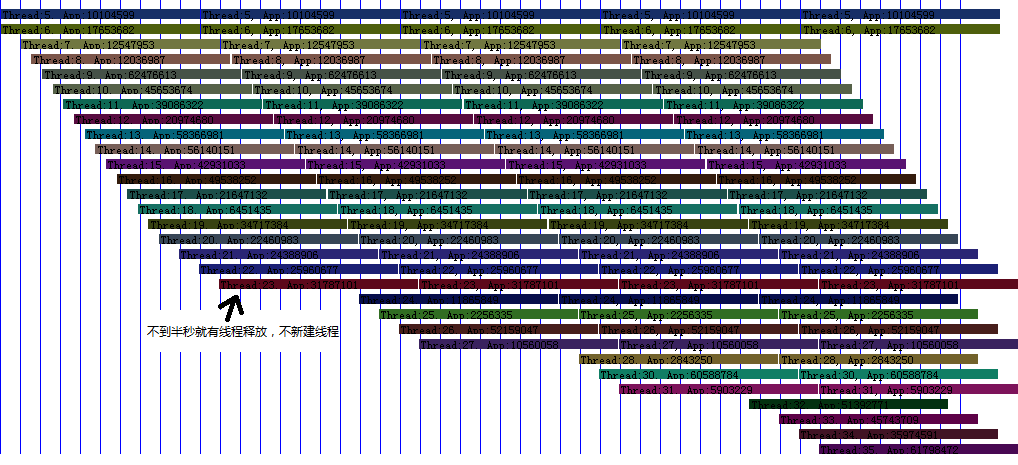
我们可以看到,当WEB线程长时间被占用时,请求会由于线程池而阻塞,同时产生大量的线程,最终响应时间变长。
作为对比,我们列出处理时间10毫秒的数据。

TId:6   App:44665200    Begin:41:07,9932        End:41:08,0032  TPool:2
TId:5   App:37489757    Begin:41:07,9932        End:41:08,0032  TPool:2
TId:5   App:44665200    Begin:41:08,0042        End:41:08,0142  TPool:2
TId:6   App:37489757    Begin:41:08,0052        End:41:08,0152  TPool:2
TId:5   App:44665200    Begin:41:08,0142        End:41:08,0242  TPool:2
TId:6   App:37489757    Begin:41:08,0152        End:41:08,0252  TPool:2
TId:5   App:44665200    Begin:41:08,0242        End:41:08,0342  TPool:2
TId:6   App:37489757    Begin:41:08,0252        End:41:08,0352  TPool:2
TId:5   App:44665200    Begin:41:08,0342        End:41:08,0442  TPool:2
TId:6   App:37489757    Begin:41:08,0352        End:41:08,0452  TPool:2
TId:5   App:44665200    Begin:41:08,0442        End:41:08,0542  TPool:2
TId:6   App:37489757    Begin:41:08,0452        End:41:08,0552  TPool:2
TId:5   App:44665200    Begin:41:08,0542        End:41:08,0642  TPool:2
TId:6   App:37489757    Begin:41:08,0552        End:41:08,0652  TPool:2
TId:5   App:44665200    Begin:41:08,0642        End:41:08,0742  TPool:2
TId:6   App:37489757    Begin:41:08,0652        End:41:08,0752  TPool:2
TId:5   App:44665200    Begin:41:08,0742        End:41:08,0842  TPool:2
TId:6   App:37489757    Begin:41:08,0752        End:41:08,0852  TPool:2
TId:5   App:44665200    Begin:41:08,0842        End:41:08,0942  TPool:2
TId:6   App:37489757    Begin:41:08,0852        End:41:08,0952  TPool:2
TId:5   App:44665200    Begin:41:08,0942        End:41:08,1042  TPool:2
TId:6   App:37489757    Begin:41:08,0952        End:41:08,1052  TPool:2
TId:5   App:44665200    Begin:41:08,1042        End:41:08,1142  TPool:2
TId:6   App:37489757    Begin:41:08,1052        End:41:08,1152  TPool:2
TId:5   App:44665200    Begin:41:08,1142        End:41:08,1242  TPool:2
TId:6   App:37489757    Begin:41:08,1152        End:41:08,1252  TPool:2
TId:5   App:44665200    Begin:41:08,1242        End:41:08,1342  TPool:2
TId:6   App:37489757    Begin:41:08,1252        End:41:08,1352  TPool:2
TId:5   App:44665200    Begin:41:08,1342        End:41:08,1442  TPool:2
TId:6   App:37489757    Begin:41:08,1352        End:41:08,1452  TPool:2
TId:5   App:44665200    Begin:41:08,1442        End:41:08,1542  TPool:2
TId:6   App:37489757    Begin:41:08,1452        End:41:08,1552  TPool:2
TId:5   App:44665200    Begin:41:08,1542        End:41:08,1642  TPool:2
TId:6   App:37489757    Begin:41:08,1552        End:41:08,1652  TPool:2
TId:5   App:44665200    Begin:41:08,1642        End:41:08,1742  TPool:2
TId:6   App:37489757    Begin:41:08,1652        End:41:08,1752  TPool:2
TId:5   App:44665200    Begin:41:08,1742        End:41:08,1842  TPool:3
TId:7   App:12547953    Begin:41:08,1752        End:41:08,1852  TPool:3
TId:6   App:37489757    Begin:41:08,1762        End:41:08,1862  TPool:3
TId:5   App:44665200    Begin:41:08,1842        End:41:08,1942  TPool:3
TId:7   App:12547953    Begin:41:08,1852        End:41:08,1952  TPool:3
TId:6   App:37489757    Begin:41:08,1862        End:41:08,1962  TPool:3
TId:5   App:44665200    Begin:41:08,1942        End:41:08,2042  TPool:3
TId:7   App:12547953    Begin:41:08,1952        End:41:08,2092  TPool:3
TId:6   App:37489757    Begin:41:08,1962        End:41:08,2102  TPool:3
TId:5   App:44665200    Begin:41:08,2052        End:41:08,2152  TPool:3
TId:7   App:12547953    Begin:41:08,2092        End:41:08,2192  TPool:3
TId:6   App:37489757    Begin:41:08,2102        End:41:08,2202  TPool:3
TId:5   App:44665200    Begin:41:08,2152        End:41:08,2252  TPool:3
TId:7   App:12547953    Begin:41:08,2192        End:41:08,2292  TPool:3
共产生线程3个,总用时0.236秒。
根据以上的数据,我们可以得出结论,要提高系统响应时间与并发处理数,应尽可能减少WEB线程的等待。
【略】请各位自行查验当一次并发全部处理完毕后再次测试的处理情况。
【略】请各位自行查验当处理程序中使用线程池处理等待任务的处理情况。
如何减少WEB线程的等待呢,那就应该尽早的结果ProcessRequest方法,前一篇中讲到,对于一些需要等待完成的任务,可以使用异步方法来做,于是我们可以在ProcessRequest中调用异步方法,但问题是当ProcessRequest结束后,请求处理也即将结束,一但请求结束,将没有办法在这一次请求中返回结果给客户端,但是此时,异步任务还没有完成,当异步任务完成时,也许再也没有办法将结果传给客户端了。(难道用轮询?囧)
我们需要的方案是,处理请求时可以暂停处理(不是暂停线程),并保持客户端连接,在需要时,向客户端输出结果,并结束请求。
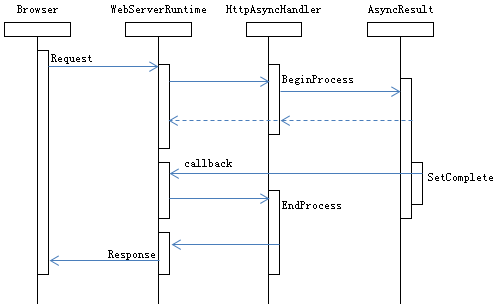
在这个模型中,可以看到,对于WebServerRuntime来说,我们的请求处理程序就是一个异步方法,而对于客户端来说,却并不知道后面的处理情况。无论在WebServerRuntime或是我们的处理程序,都没有直接占用线程,一切由何时SetComplete决定。同时可以看到,这种模式需要WebServerRuntime的紧密配合,提供调用异步方法的接口。在ASP.NET中,这个接口就是IHttpAsyncHandler。
异步ASP.NET处理程序
首先,我们来实现第一个异步处理程序,在适当的时候触发结束,在开始和结束时输出一些信息。

public class Handler : IHttpHandler, IHttpAsyncHandler
{
    public void ProcessRequest(HttpContext context)
    {
        //异步处理器不执行该方法
    }

    public bool IsReusable
    {
        //设置允许重用对象
        get { return false; }
    }

    //请求开始时由ASP.NET调用此方法
    public IAsyncResult BeginProcessRequest(HttpContext context, AsyncCallback cb, object extraData)
    {
        context.Response.ContentType = "text/xml";
        context.Response.Write("App:");
        context.Response.Write(context.ApplicationInstance.GetHashCode());
        context.Response.Write("\tBegin:");
        context.Response.Write(DateTime.Now.ToString("mm:ss,ffff"));
        //输出当前线程
        context.Response.Write("\tThreadId:");
        context.Response.Write(Thread.CurrentThread.ManagedThreadId);
        //构建异步结果并返回
        var result = new WebAsyncResult(cb, context);
        //用一个定时器来模拟异步触发完成
        Timer timer = null;
        timer = new Timer(o =>
        {
            result.SetComplete();
            timer.Dispose();
        }, null, TimeSpan.FromSeconds(5), TimeSpan.FromSeconds(5));
        return result;
    }

    //异步结束时,由ASP.NET调用此方法
    public void EndProcessRequest(IAsyncResult result)
    {
        WebAsyncResult webresult = (WebAsyncResult)result;
        webresult.Context.Response.Write("\tEnd:");
        webresult.Context.Response.Write(DateTime.Now.ToString("mm:ss,ffff"));
        //输出当前线程
        webresult.Context.Response.Write("\tThreadId:");
        webresult.Context.Response.Write(Thread.CurrentThread.ManagedThreadId);
    }

    //WEB异步方法结果
    class WebAsyncResult : IAsyncResult
    {
        private AsyncCallback _callback;

        public WebAsyncResult(AsyncCallback cb, HttpContext context)
        {
            Context = context;
            _callback = cb;
        }

        //当异步完成时调用该方法
        public void SetComplete()
        {
            IsCompleted = true;
            if (_callback != null)
            {
                _callback(this);
            }
        }

        public HttpContext Context
        {
            get;
            private set;
        }

        public object AsyncState
        {
            get { return null; }
        }

        //由于ASP.NET不会等待WEB异步方法,所以不使用此对象
        public WaitHandle AsyncWaitHandle
        {
            get { throw new NotImplementedException(); }
        }