03 module.json5 配置文件全解:能力声明、权限申请与设备支持
前言
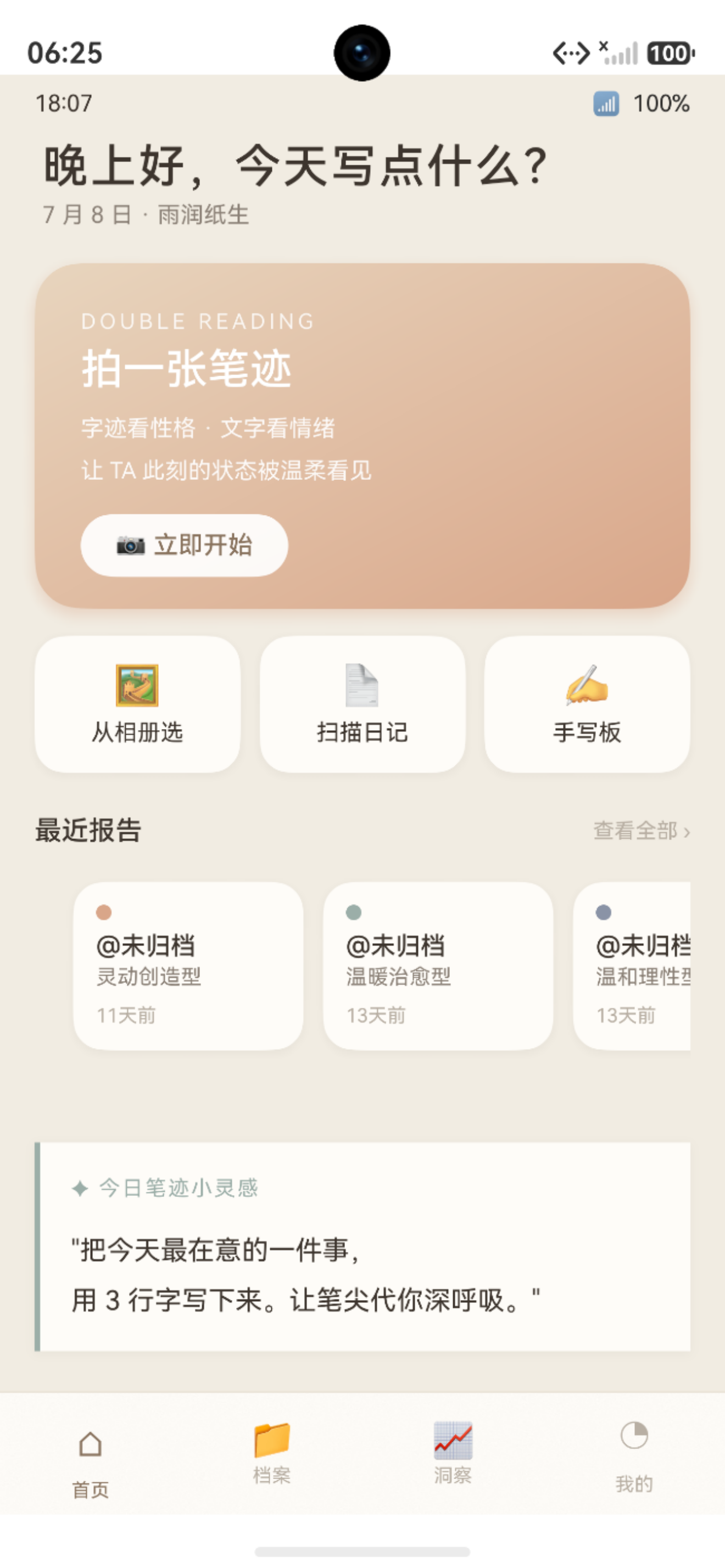
图:03 module.json5 配置文件全解:能力声明、权限申请与设备支持 运行效果截图(HarmonyOS NEXT)
在 HarmonyOS NEXT Stage 模型中,module.json5 是每个模块(Module)的"户口本"------它向系统声明了这个模块有什么能力(Ability)、请求了什么权限、支持什么设备。配置错误可能导致应用无法安装、权限申请失败或 HAP 在不兼容设备上崩溃。
本文以"鹿鹿·笔迹心理分析"的完整 module.json5 配置为例,逐字段解析每个配置项的含义、类型、可选值和实际影响。
官方文档·module.json5 配置说明:developer.huawei.com
项目源码仓库:harmony-app(GitHub)
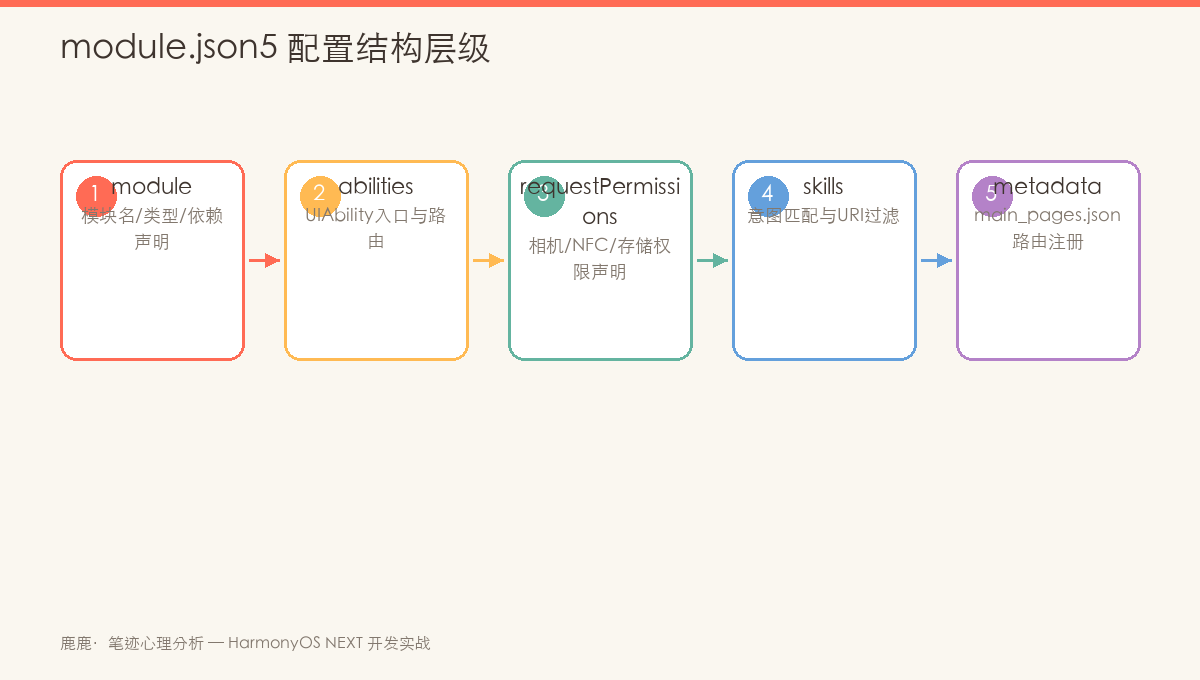
图:module.json5 核心配置层级------module → abilities / extensionAbilities / requestPermissions
一、module.json5 文件位置与作用
1.1 文件位置
entry/
└── src/main/
    └── module.json5   ← 就是这个文件
每个 Module(entry/feature/hsp)都有一个独立的 module.json5,它描述了该 Module 的元数据。
1.2 与 app.json5 的区别
| 配置文件 | 位置 | 作用范围 | 主要内容 |
|---|---|---|---|
AppScope/app.json5 |
AppScope 目录 | 整个应用(全局) | 应用包名、版本号、图标、标签 |
entry/module.json5 |
每个 Module | 单个 Module | Ability、权限、设备类型、页面路由 |
二、module.json5 完整配置解析
2.1 顶层结构
json
{
  "module": {
    "name": "entry",
    "type": "entry",
    "description": "$string:module_desc",
    "mainElement": "EntryAbility",
    "deviceTypes": ["phone"],
    "deliveryWithInstall": true,
    "installationFree": false,
    "pages": "$profile:main_pages",
    "abilities": [ ... ],
    "extensionAbilities": [ ... ],
    "requestPermissions": [ ... ]
  }
}
2.2 基础字段说明
| 字段 | 类型 | 说明 | 项目值 |
|---|---|---|---|
name |
string | Module 名称,需唯一 | "entry" |
type |
string | Module 类型 | "entry"(入口模块) |
description |
string | 模块描述,支持资源引用 | "$string:module_desc" |
mainElement |
string | 应用启动时的入口 Ability | "EntryAbility" |
deviceTypes |
string\[\] | 支持的设备类型列表 | ["phone"] |
deliveryWithInstall |
boolean | 是否随应用安装一起下载 | true |
installationFree |
boolean | 是否免安装(原子化服务) | false |
pages |
string | 页面路由配置文件引用 | "$profile:main_pages" |
2.3 deviceTypes 设备类型
deviceTypes 数组决定了应用支持的设备范围:
json
// 仅支持手机
"deviceTypes": ["phone"]

// 支持手机+平板
"deviceTypes": ["phone", "tablet"]

// 支持手机+平板+智慧屏
"deviceTypes": ["phone", "tablet", "2in1", "tv"]
支持的设备类型值:
| 值 | 设备 |
|---|---|
"phone" |
智能手机 |
"tablet" |
平板电脑 |
"2in1" |
二合一设备(折叠屏/平板+键盘) |
"tv" |
智慧屏/TV |
"wearable" |
可穿戴设备(手表等) |
"car" |
车机 |
提示 :"鹿鹿"项目当前仅支持
phone。若要在平板上适配,需要额外实现响应式布局和多窗口支持。
三、abilities 配置详解
3.1 abilities 数组
abilities 数组定义了 Module 中所有的 UIAbility:
json
"abilities": [
  {
    "name": "EntryAbility",
    "srcEntry": "./ets/EntryAbility.ets",
    "description": "$string:EntryAbility_desc",
    "icon": "$media:app_icon",
    "label": "$string:EntryAbility_label",
    "startWindowIcon": "$media:startIcon",
    "startWindowBackground": "$color:start_window_background",
    "exported": true,
    "launchType": "singleton",
    "skills": [
      {
        "entities": ["entity.system.home"],
        "actions": ["action.system.home"]
      }
    ]
  }
]
3.2 Ability 字段逐项说明
| 字段 | 必须 | 说明 | 示例值 |
|---|---|---|---|
name |
✅ | Ability 名称,需唯一 | "EntryAbility" |
srcEntry |
✅ | 源码相对路径 | "./ets/EntryAbility.ets" |
description |
推荐 | Ability 描述(本地化) | "$string:EntryAbility_desc" |
icon |
推荐 | 任务栏图标 | "$media:app_icon" |
label |
推荐 | 任务栏标签(应用名) | "$string:EntryAbility_label" |
startWindowIcon |
推荐 | 启动白屏时显示的图标 | "$media:startIcon" |
startWindowBackground |
推荐 | 启动白屏背景色 | "$color:start_window_background" |
exported |
推荐 | 是否允许其他应用拉起 | true(桌面入口) |
launchType |
可选 | 启动模式 | "singleton"(默认单实例) |
3.3 skills(能力标签)
skills 声明了 Ability 能够响应的 Intent(意图)。桌面图标入口必须声明:
json
"skills": [
  {
    "entities": ["entity.system.home"],
    "actions": ["action.system.home"]
  }
]entity.system.home:表示这是桌面入口action.system.home:表示响应桌面启动操作
#mermaid-svg-nIdd0VhtAqyu4UBL{font-family:"trebuchet ms",verdana,arial,sans-serif;font-size:16px;fill:#333;}@keyframes edge-animation-frame{from{stroke-dashoffset:0;}}@keyframes dash{to{stroke-dashoffset:0;}}#mermaid-svg-nIdd0VhtAqyu4UBL .edge-animation-slow{stroke-dasharray:9,5!important;stroke-dashoffset:900;animation:dash 50s linear infinite;stroke-linecap:round;}#mermaid-svg-nIdd0VhtAqyu4UBL .edge-animation-fast{stroke-dasharray:9,5!important;stroke-dashoffset:900;animation:dash 20s linear infinite;stroke-linecap:round;}#mermaid-svg-nIdd0VhtAqyu4UBL .error-icon{fill:#552222;}#mermaid-svg-nIdd0VhtAqyu4UBL .error-text{fill:#552222;stroke:#552222;}#mermaid-svg-nIdd0VhtAqyu4UBL .edge-thickness-normal{stroke-width:1px;}#mermaid-svg-nIdd0VhtAqyu4UBL .edge-thickness-thick{stroke-width:3.5px;}#mermaid-svg-nIdd0VhtAqyu4UBL .edge-pattern-solid{stroke-dasharray:0;}#mermaid-svg-nIdd0VhtAqyu4UBL .edge-thickness-invisible{stroke-width:0;fill:none;}#mermaid-svg-nIdd0VhtAqyu4UBL .edge-pattern-dashed{stroke-dasharray:3;}#mermaid-svg-nIdd0VhtAqyu4UBL .edge-pattern-dotted{stroke-dasharray:2;}#mermaid-svg-nIdd0VhtAqyu4UBL .marker{fill:#333333;stroke:#333333;}#mermaid-svg-nIdd0VhtAqyu4UBL .marker.cross{stroke:#333333;}#mermaid-svg-nIdd0VhtAqyu4UBL svg{font-family:"trebuchet ms",verdana,arial,sans-serif;font-size:16px;}#mermaid-svg-nIdd0VhtAqyu4UBL p{margin:0;}#mermaid-svg-nIdd0VhtAqyu4UBL .label{font-family:"trebuchet ms",verdana,arial,sans-serif;color:#333;}#mermaid-svg-nIdd0VhtAqyu4UBL .cluster-label text{fill:#333;}#mermaid-svg-nIdd0VhtAqyu4UBL .cluster-label span{color:#333;}#mermaid-svg-nIdd0VhtAqyu4UBL .cluster-label span p{background-color:transparent;}#mermaid-svg-nIdd0VhtAqyu4UBL .label text,#mermaid-svg-nIdd0VhtAqyu4UBL span{fill:#333;color:#333;}#mermaid-svg-nIdd0VhtAqyu4UBL .node rect,#mermaid-svg-nIdd0VhtAqyu4UBL .node circle,#mermaid-svg-nIdd0VhtAqyu4UBL .node ellipse,#mermaid-svg-nIdd0VhtAqyu4UBL .node polygon,#mermaid-svg-nIdd0VhtAqyu4UBL .node path{fill:#ECECFF;stroke:#9370DB;stroke-width:1px;}#mermaid-svg-nIdd0VhtAqyu4UBL .rough-node .label text,#mermaid-svg-nIdd0VhtAqyu4UBL .node .label text,#mermaid-svg-nIdd0VhtAqyu4UBL .image-shape .label,#mermaid-svg-nIdd0VhtAqyu4UBL .icon-shape .label{text-anchor:middle;}#mermaid-svg-nIdd0VhtAqyu4UBL .node .katex path{fill:#000;stroke:#000;stroke-width:1px;}#mermaid-svg-nIdd0VhtAqyu4UBL .rough-node .label,#mermaid-svg-nIdd0VhtAqyu4UBL .node .label,#mermaid-svg-nIdd0VhtAqyu4UBL .image-shape .label,#mermaid-svg-nIdd0VhtAqyu4UBL .icon-shape .label{text-align:center;}#mermaid-svg-nIdd0VhtAqyu4UBL .node.clickable{cursor:pointer;}#mermaid-svg-nIdd0VhtAqyu4UBL .root .anchor path{fill:#333333!important;stroke-width:0;stroke:#333333;}#mermaid-svg-nIdd0VhtAqyu4UBL .arrowheadPath{fill:#333333;}#mermaid-svg-nIdd0VhtAqyu4UBL .edgePath .path{stroke:#333333;stroke-width:2.0px;}#mermaid-svg-nIdd0VhtAqyu4UBL .flowchart-link{stroke:#333333;fill:none;}#mermaid-svg-nIdd0VhtAqyu4UBL .edgeLabel{background-color:rgba(232,232,232, 0.8);text-align:center;}#mermaid-svg-nIdd0VhtAqyu4UBL .edgeLabel p{background-color:rgba(232,232,232, 0.8);}#mermaid-svg-nIdd0VhtAqyu4UBL .edgeLabel rect{opacity:0.5;background-color:rgba(232,232,232, 0.8);fill:rgba(232,232,232, 0.8);}#mermaid-svg-nIdd0VhtAqyu4UBL .labelBkg{background-color:rgba(232, 232, 232, 0.5);}#mermaid-svg-nIdd0VhtAqyu4UBL .cluster rect{fill:#ffffde;stroke:#aaaa33;stroke-width:1px;}#mermaid-svg-nIdd0VhtAqyu4UBL .cluster text{fill:#333;}#mermaid-svg-nIdd0VhtAqyu4UBL .cluster span{color:#333;}#mermaid-svg-nIdd0VhtAqyu4UBL div.mermaidTooltip{position:absolute;text-align:center;max-width:200px;padding:2px;font-family:"trebuchet ms",verdana,arial,sans-serif;font-size:12px;background:hsl(80, 100%, 96.2745098039%);border:1px solid #aaaa33;border-radius:2px;pointer-events:none;z-index:100;}#mermaid-svg-nIdd0VhtAqyu4UBL .flowchartTitleText{text-anchor:middle;font-size:18px;fill:#333;}#mermaid-svg-nIdd0VhtAqyu4UBL rect.text{fill:none;stroke-width:0;}#mermaid-svg-nIdd0VhtAqyu4UBL .icon-shape,#mermaid-svg-nIdd0VhtAqyu4UBL .image-shape{background-color:rgba(232,232,232, 0.8);text-align:center;}#mermaid-svg-nIdd0VhtAqyu4UBL .icon-shape p,#mermaid-svg-nIdd0VhtAqyu4UBL .image-shape p{background-color:rgba(232,232,232, 0.8);padding:2px;}#mermaid-svg-nIdd0VhtAqyu4UBL .icon-shape .label rect,#mermaid-svg-nIdd0VhtAqyu4UBL .image-shape .label rect{opacity:0.5;background-color:rgba(232,232,232, 0.8);fill:rgba(232,232,232, 0.8);}#mermaid-svg-nIdd0VhtAqyu4UBL .label-icon{display:inline-block;height:1em;overflow:visible;vertical-align:-0.125em;}#mermaid-svg-nIdd0VhtAqyu4UBL .node .label-icon path{fill:currentColor;stroke:revert;stroke-width:revert;}#mermaid-svg-nIdd0VhtAqyu4UBL :root{--mermaid-font-family:"trebuchet ms",verdana,arial,sans-serif;} 桌面图标
skills 匹配
entity.system.home ✅
action.system.home ✅
启动 EntryAbility
3.4 launchType 启动模式
| 模式 | 含义 | 适用场景 |
|---|---|---|
singleton |
单实例(默认) | 主入口 Ability,全局唯一 |
standard |
标准(多实例) | 需要多个独立实例的场景 |
specified |
指定实例 | 按条件选择或创建实例 |
四、requestPermissions 权限声明
4.1 鸿蒙权限模型
鸿蒙采用静态声明 + 动态授权的两阶段权限模型:
#mermaid-svg-LUtKdHgL6NsEtiX1{font-family:"trebuchet ms",verdana,arial,sans-serif;font-size:16px;fill:#333;}@keyframes edge-animation-frame{from{stroke-dashoffset:0;}}@keyframes dash{to{stroke-dashoffset:0;}}#mermaid-svg-LUtKdHgL6NsEtiX1 .edge-animation-slow{stroke-dasharray:9,5!important;stroke-dashoffset:900;animation:dash 50s linear infinite;stroke-linecap:round;}#mermaid-svg-LUtKdHgL6NsEtiX1 .edge-animation-fast{stroke-dasharray:9,5!important;stroke-dashoffset:900;animation:dash 20s linear infinite;stroke-linecap:round;}#mermaid-svg-LUtKdHgL6NsEtiX1 .error-icon{fill:#552222;}#mermaid-svg-LUtKdHgL6NsEtiX1 .error-text{fill:#552222;stroke:#552222;}#mermaid-svg-LUtKdHgL6NsEtiX1 .edge-thickness-normal{stroke-width:1px;}#mermaid-svg-LUtKdHgL6NsEtiX1 .edge-thickness-thick{stroke-width:3.5px;}#mermaid-svg-LUtKdHgL6NsEtiX1 .edge-pattern-solid{stroke-dasharray:0;}#mermaid-svg-LUtKdHgL6NsEtiX1 .edge-thickness-invisible{stroke-width:0;fill:none;}#mermaid-svg-LUtKdHgL6NsEtiX1 .edge-pattern-dashed{stroke-dasharray:3;}#mermaid-svg-LUtKdHgL6NsEtiX1 .edge-pattern-dotted{stroke-dasharray:2;}#mermaid-svg-LUtKdHgL6NsEtiX1 .marker{fill:#333333;stroke:#333333;}#mermaid-svg-LUtKdHgL6NsEtiX1 .marker.cross{stroke:#333333;}#mermaid-svg-LUtKdHgL6NsEtiX1 svg{font-family:"trebuchet ms",verdana,arial,sans-serif;font-size:16px;}#mermaid-svg-LUtKdHgL6NsEtiX1 p{margin:0;}#mermaid-svg-LUtKdHgL6NsEtiX1 .label{font-family:"trebuchet ms",verdana,arial,sans-serif;color:#333;}#mermaid-svg-LUtKdHgL6NsEtiX1 .cluster-label text{fill:#333;}#mermaid-svg-LUtKdHgL6NsEtiX1 .cluster-label span{color:#333;}#mermaid-svg-LUtKdHgL6NsEtiX1 .cluster-label span p{background-color:transparent;}#mermaid-svg-LUtKdHgL6NsEtiX1 .label text,#mermaid-svg-LUtKdHgL6NsEtiX1 span{fill:#333;color:#333;}#mermaid-svg-LUtKdHgL6NsEtiX1 .node rect,#mermaid-svg-LUtKdHgL6NsEtiX1 .node circle,#mermaid-svg-LUtKdHgL6NsEtiX1 .node ellipse,#mermaid-svg-LUtKdHgL6NsEtiX1 .node polygon,#mermaid-svg-LUtKdHgL6NsEtiX1 .node path{fill:#ECECFF;stroke:#9370DB;stroke-width:1px;}#mermaid-svg-LUtKdHgL6NsEtiX1 .rough-node .label text,#mermaid-svg-LUtKdHgL6NsEtiX1 .node .label text,#mermaid-svg-LUtKdHgL6NsEtiX1 .image-shape .label,#mermaid-svg-LUtKdHgL6NsEtiX1 .icon-shape .label{text-anchor:middle;}#mermaid-svg-LUtKdHgL6NsEtiX1 .node .katex path{fill:#000;stroke:#000;stroke-width:1px;}#mermaid-svg-LUtKdHgL6NsEtiX1 .rough-node .label,#mermaid-svg-LUtKdHgL6NsEtiX1 .node .label,#mermaid-svg-LUtKdHgL6NsEtiX1 .image-shape .label,#mermaid-svg-LUtKdHgL6NsEtiX1 .icon-shape .label{text-align:center;}#mermaid-svg-LUtKdHgL6NsEtiX1 .node.clickable{cursor:pointer;}#mermaid-svg-LUtKdHgL6NsEtiX1 .root .anchor path{fill:#333333!important;stroke-width:0;stroke:#333333;}#mermaid-svg-LUtKdHgL6NsEtiX1 .arrowheadPath{fill:#333333;}#mermaid-svg-LUtKdHgL6NsEtiX1 .edgePath .path{stroke:#333333;stroke-width:2.0px;}#mermaid-svg-LUtKdHgL6NsEtiX1 .flowchart-link{stroke:#333333;fill:none;}#mermaid-svg-LUtKdHgL6NsEtiX1 .edgeLabel{background-color:rgba(232,232,232, 0.8);text-align:center;}#mermaid-svg-LUtKdHgL6NsEtiX1 .edgeLabel p{background-color:rgba(232,232,232, 0.8);}#mermaid-svg-LUtKdHgL6NsEtiX1 .edgeLabel rect{opacity:0.5;background-color:rgba(232,232,232, 0.8);fill:rgba(232,232,232, 0.8);}#mermaid-svg-LUtKdHgL6NsEtiX1 .labelBkg{background-color:rgba(232, 232, 232, 0.5);}#mermaid-svg-LUtKdHgL6NsEtiX1 .cluster rect{fill:#ffffde;stroke:#aaaa33;stroke-width:1px;}#mermaid-svg-LUtKdHgL6NsEtiX1 .cluster text{fill:#333;}#mermaid-svg-LUtKdHgL6NsEtiX1 .cluster span{color:#333;}#mermaid-svg-LUtKdHgL6NsEtiX1 div.mermaidTooltip{position:absolute;text-align:center;max-width:200px;padding:2px;font-family:"trebuchet ms",verdana,arial,sans-serif;font-size:12px;background:hsl(80, 100%, 96.2745098039%);border:1px solid #aaaa33;border-radius:2px;pointer-events:none;z-index:100;}#mermaid-svg-LUtKdHgL6NsEtiX1 .flowchartTitleText{text-anchor:middle;font-size:18px;fill:#333;}#mermaid-svg-LUtKdHgL6NsEtiX1 rect.text{fill:none;stroke-width:0;}#mermaid-svg-LUtKdHgL6NsEtiX1 .icon-shape,#mermaid-svg-LUtKdHgL6NsEtiX1 .image-shape{background-color:rgba(232,232,232, 0.8);text-align:center;}#mermaid-svg-LUtKdHgL6NsEtiX1 .icon-shape p,#mermaid-svg-LUtKdHgL6NsEtiX1 .image-shape p{background-color:rgba(232,232,232, 0.8);padding:2px;}#mermaid-svg-LUtKdHgL6NsEtiX1 .icon-shape .label rect,#mermaid-svg-LUtKdHgL6NsEtiX1 .image-shape .label rect{opacity:0.5;background-color:rgba(232,232,232, 0.8);fill:rgba(232,232,232, 0.8);}#mermaid-svg-LUtKdHgL6NsEtiX1 .label-icon{display:inline-block;height:1em;overflow:visible;vertical-align:-0.125em;}#mermaid-svg-LUtKdHgL6NsEtiX1 .node .label-icon path{fill:currentColor;stroke:revert;stroke-width:revert;}#mermaid-svg-LUtKdHgL6NsEtiX1 :root{--mermaid-font-family:"trebuchet ms",verdana,arial,sans-serif;} normal 普通权限
system_basic 系统基础权限
system_core 系统核心权限
module.json5 静态声明
应用安装时系统校验
权限等级?
安装即自动授予
运行时弹窗请求用户授权
需要系统签名,普通应用不可用
用户同意 → 权限生效
用户拒绝 → 功能降级
4.2 项目权限声明完整示例
json
"requestPermissions": [
  {
    "name": "ohos.permission.CAMERA",
    "reason": "$string:camera_permission_reason",
    "usedScene": {
      "abilities": ["EntryAbility"],
      "when": "inuse"
    }
  },
  {
    "name": "ohos.permission.READ_IMAGEVIDEO",
    "reason": "$string:storage_permission_reason",
    "usedScene": {
      "abilities": ["EntryAbility"],
      "when": "inuse"
    }
  },
  {
    "name": "ohos.permission.WRITE_IMAGEVIDEO",
    "reason": "$string:write_storage_permission_reason",
    "usedScene": {
      "abilities": ["EntryAbility"],
      "when": "inuse"
    }
  },
  {
    "name": "ohos.permission.NFC_TAG",
    "reason": "$string:nfc_permission_reason",
    "usedScene": {
      "abilities": ["EntryAbility"],
      "when": "inuse"
    }
  }
]
4.3 权限字段逐项说明
| 字段 | 必须 | 说明 |
|---|---|---|
name |
✅ | 权限名称(官方定义的字符串常量) |
reason |
✅(system_basic 级别必须) | 权限申请原因(用户可见),必须使用 $string: 资源引用 |
usedScene.abilities |
可选 | 使用该权限的 Ability 列表 |
usedScene.when |
可选 | "inuse"(前台使用)或 "always"(后台也需要) |
4.4 项目用到的权限一览
| 权限 | 级别 | 用途 | 使用时机 |
|---|---|---|---|
ohos.permission.CAMERA |
system_basic | 拍照功能 | 进入 CapturePage 时 |
ohos.permission.READ_IMAGEVIDEO |
system_basic | 从相册选图 | 使用相册功能时 |
ohos.permission.WRITE_IMAGEVIDEO |
system_basic | 保存图片到相册 | 导出分析图片时 |
ohos.permission.NFC_TAG |
normal | NFC 碰一碰 | 使用配对功能时 |
五、$profile 资源引用机制
5.1 main_pages 引用
"pages": "$profile:main_pages" 中的 $profile: 前缀用于引用 resources/base/profile/ 目录下的配置文件:
entry/src/main/resources/base/profile/
└── main_pages.json   ← $profile:main_pages 指向此文件
json
// main_pages.json 完整示例
{
  "src": [
    "pages/LoginPage",
    "pages/HomePage",
    "pages/CapturePage",
    "pages/AnalyzingPage",
    "pages/ReportDetailPage"
  ]
}
5.2 其他 $ 前缀资源引用
| 引用格式 | 作用 | 示例 |
|---|---|---|
$string:xxx |
引用字符串资源 | "$string:app_name" |
$media:xxx |
引用媒体资源(图片、SVG) | "$media:app_icon" |
$color:xxx |
引用颜色资源 | "$color:start_window_background" |
$profile:xxx |
引用 profile JSON 配置文件 | "$profile:main_pages" |
json
// resources/base/element/color.json
{
  "color": [
    {
      "name": "start_window_background",
      "value": "#F1ECE2"
    }
  ]
}
六、完整的 module.json5
6.1 项目完整配置
json
{
  "module": {
    "name": "entry",
    "type": "entry",
    "description": "$string:module_desc",
    "mainElement": "EntryAbility",
    "deviceTypes": ["phone"],
    "deliveryWithInstall": true,
    "installationFree": false,
    "pages": "$profile:main_pages",
    "abilities": [
      {
        "name": "EntryAbility",
        "srcEntry": "./ets/EntryAbility.ets",
        "description": "$string:EntryAbility_desc",
        "icon": "$media:app_icon",
        "label": "$string:EntryAbility_label",
        "startWindowIcon": "$media:startIcon",
        "startWindowBackground": "$color:start_window_background",
        "exported": true,
        "launchType": "singleton",
        "skills": [
          {
            "entities": ["entity.system.home"],
            "actions": ["action.system.home"]
          }
        ]
      }
    ],
    "requestPermissions": [
      {
        "name": "ohos.permission.CAMERA",
        "reason": "$string:camera_permission_reason",
        "usedScene": { "abilities": ["EntryAbility"], "when": "inuse" }
      },
      {
        "name": "ohos.permission.READ_IMAGEVIDEO",
        "reason": "$string:storage_permission_reason",
        "usedScene": { "abilities": ["EntryAbility"], "when": "inuse" }
      },
      {
        "name": "ohos.permission.WRITE_IMAGEVIDEO",
        "reason": "$string:write_storage_permission_reason",
        "usedScene": { "abilities": ["EntryAbility"], "when": "inuse" }
      },
      {
        "name": "ohos.permission.NFC_TAG",
        "reason": "$string:nfc_permission_reason",
        "usedScene": { "abilities": ["EntryAbility"], "when": "inuse" }
      }
    ]
  }
}
6.2 配置常见错误
| 错误场景 | 原因 | 解决方案 |
|---|---|---|
| 应用安装后桌面无图标 | skills 未声明 entity.system.home |
检查 abilities 中的 skills 配置 |
| 权限弹窗未出现 | module.json5 中未声明权限 | 在 requestPermissions 中添加对应权限 |
| Camera 功能崩溃 | 权限申请了但未在代码中动态请求 | 使用 requestPermissionsFromUser 动态申请 |
| 模拟器上运行正常,真机崩溃 | 模拟器跳过了某些权限检查 | 确保所有权限都已声明并动态申请 |
七、动态权限申请代码
7.1 在代码中动态请求权限
仅在 module.json5 中声明权限还不够,system_basic 级别的权限必须在代码中再次动态申请:
typescript
// CapturePage.ets --- 进入相机前检查并申请权限
import { abilityAccessCtrl, Permissions } from '@kit.AbilityKit';

private async checkAndRequestPermissions(): Promise<boolean> {
  const permissions: Permissions[] = [
    'ohos.permission.CAMERA',
    'ohos.permission.READ_IMAGEVIDEO'
  ];

  const atManager = abilityAccessCtrl.createAtManager();

  // 检查权限状态
  const grantStatus = await atManager.checkAccessToken(
    this.context.tokenID,
    'ohos.permission.CAMERA'
  );

  if (grantStatus === abilityAccessCtrl.GrantStatus.PERMISSION_GRANTED) {
    return true; // 已有权限
  }

  // 请求权限
  const result = await atManager.requestPermissionsFromUser(
    this.context,
    permissions
  );

  return result.authResults[0] === abilityAccessCtrl.GrantStatus.PERMISSION_GRANTED;
}
八、注意事项与常见问题
8.1 开发注意事项
在实际开发过程中,需特别注意以下几点:
- API 兼容性:部分接口仅在特定 HarmonyOS NEXT 版本中可用,需做版本条件判断
- 权限模型:采用静态声明(module.json5)+ 动态申请(requestPermissionsFromUser)的两阶段授权
- 生命周期 :合理使用
aboutToAppear()和aboutToDisappear()管理资源初始化与释放 - 状态同步 :跨页面数据通过 AppStorage 共享,组件内状态使用
@State/@Prop/@Link装饰器
8.2 常见错误与解决方案
常见问题快速排查表:
| 问题类型 | 排查方向 | 参考方法 |
|---|---|---|
| 应用崩溃 | 查看 hilog 错误日志 | hilog.error(TAG, "...", e.message) |
| 状态丢失 | 检查 AppStorage 键名拼写 | 统一使用常量管理键名 |
| 动画不流畅 | 避免在 animateTo 回调中执行 I/O | 动画与数据操作分离 |
总结
module.json5 是鸿蒙应用模块的核心配置文件,关键要点:
- 基础字段 :
name、type、mainElement、deviceTypes是必须正确填写的基础配置 - abilities 配置 :每个 UIAbility 都需要在此声明,桌面入口必须配置正确的
skills - 权限声明 :所有需要的权限必须先在
requestPermissions中静态声明,再在代码中动态申请 - ** p r o f i l e 引用 ∗ ∗ :通过 ' profile 引用**:通过 ` profile引用∗∗:通过'profile:main_pages` 引用页面路由配置,实现配置与代码分离
下一篇预告 :第04篇 oh-package.json5 与依赖管理
如果这篇文章对你有帮助,欢迎点赞👍、收藏⭐、关注🔔,你的支持是我持续创作的动力!
相关资源: