一、自定义导航栏交互
1、静态结构
//src\pages\pagesOrder\detail\detail.vue
<script setup lang="ts">
import { useGuessList } from '@/composables'
import { ref } from 'vue'

// 获取屏幕边界到安全区域距离
const { safeAreaInsets } = uni.getSystemInfoSync()
// 猜你喜欢
const { guessRef, onScrolltolower } = useGuessList()
// 弹出层组件
const popup = ref<UniHelper.UniPopupInstance>()
// 取消原因列表
const reasonList = ref([
  '商品无货',
  '不想要了',
  '商品信息填错了',
  '地址信息填写错误',
  '商品降价',
  '其它',
])
// 订单取消原因
const reason = ref('')
// 复制内容
const onCopy = (id: string) => {
  // 设置系统剪贴板的内容
  uni.setClipboardData({ data: id })
}
// 获取页面参数
const query = defineProps<{
  id: string
}>()
</script>

<template>
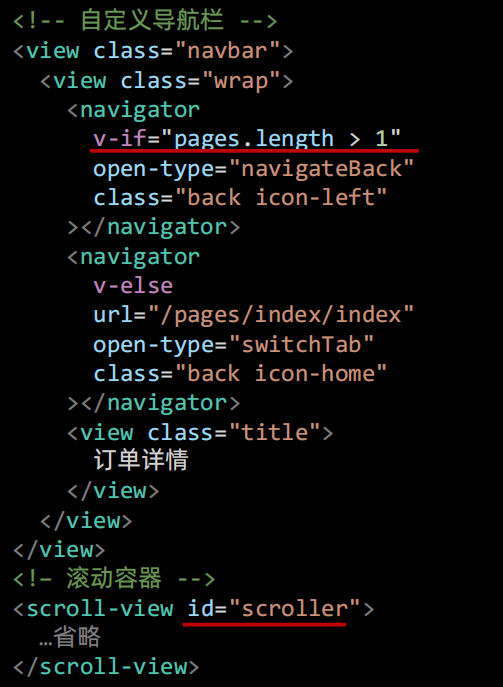
  <!-- 自定义导航栏: 默认透明不可见, scroll-view 滚动到 50 时展示 -->
  <view class="navbar" :style="{ paddingTop: safeAreaInsets?.top + 'px' }">
    <view class="wrap">
      <navigator v-if="true" open-type="navigateBack" class="back icon-left"></navigator>
      <navigator v-else url="/pages/index/index" open-type="switchTab" class="back icon-home">
      </navigator>
      <view class="title">订单详情</view>
    </view>
  </view>
  <scroll-view scroll-y class="viewport" id="scroller" @scrolltolower="onScrolltolower">
    <template v-if="true">
      <!-- 订单状态 -->
      <view class="overview" :style="{ paddingTop: safeAreaInsets!.top + 20 + 'px' }">
        <!-- 待付款状态:展示去支付按钮和倒计时 -->
        <template v-if="true">
          <view class="status icon-clock">等待付款</view>
          <view class="tips">
            <text class="money">应付金额: ¥ 99.00</text>
            <text class="time">支付剩余</text>
            00 时 29 分 59 秒
          </view>
          <view class="button">去支付</view>
        </template>
        <!-- 其他订单状态:展示再次购买按钮 -->
        <template v-else>
          <!-- 订单状态文字 -->
          <view class="status"> 待付款 </view>
          <view class="button-group">
            <navigator
              class="button"
              :url="`/pagesOrder/create/create?orderId=${query.id}`"
              hover-class="none"
            >
              再次购买
            </navigator>
            <!-- 待发货状态:模拟发货,开发期间使用,用于修改订单状态为已发货 -->
            <view v-if="false" class="button"> 模拟发货 </view>
          </view>
        </template>
      </view>
      <!-- 配送状态 -->
      <view class="shipment">
        <!-- 订单物流信息 -->
        <view v-for="item in 1" :key="item" class="item">
          <view class="message">
            您已在广州市天河区黑马程序员完成取件,感谢使用菜鸟驿站,期待再次为您服务。
          </view>
          <view class="date"> 2023-04-14 13:14:20 </view>
        </view>
        <!-- 用户收货地址 -->
        <view class="locate">
          <view class="user"> 张三 13333333333 </view>
          <view class="address"> 广东省 广州市 天河区 黑马程序员 </view>
        </view>
      </view>

      <!-- 商品信息 -->
      <view class="goods">
        <view class="item">
          <navigator
            class="navigator"
            v-for="item in 2"
            :key="item"
            :url="`/pages/goods/goods?id=${item}`"
            hover-class="none"
          >
            <image
              class="cover"
              src="https://yanxuan-item.nosdn.127.net/c07edde1047fa1bd0b795bed136c2bb2.jpg"
            ></image>
            <view class="meta">
              <view class="name ellipsis">ins风小碎花泡泡袖衬110-160cm</view>
              <view class="type">藏青小花, 130</view>
              <view class="price">
                <view class="actual">
                  <text class="symbol">¥</text>
                  <text>99.00</text>
                </view>
              </view>
              <view class="quantity">x1</view>
            </view>
          </navigator>
          <!-- 待评价状态:展示按钮 -->
          <view class="action" v-if="true">
            <view class="button primary">申请售后</view>
            <navigator url="" class="button"> 去评价 </navigator>
          </view>
        </view>
        <!-- 合计 -->
        <view class="total">
          <view class="row">
            <view class="text">商品总价: </view>
            <view class="symbol">99.00</view>
          </view>
          <view class="row">
            <view class="text">运费: </view>
            <view class="symbol">10.00</view>
          </view>
          <view class="row">
            <view class="text">应付金额: </view>
            <view class="symbol primary">109.00</view>
          </view>
        </view>
      </view>

      <!-- 订单信息 -->
      <view class="detail">
        <view class="title">订单信息</view>
        <view class="row">
          <view class="item">
            订单编号: {{ query.id }} <text class="copy" @tap="onCopy(query.id)">复制</text>
          </view>
          <view class="item">下单时间: 2023-04-14 13:14:20</view>
        </view>
      </view>

      <!-- 猜你喜欢 -->
      <XtxGuess ref="guessRef" />

      <!-- 底部操作栏 -->
      <view class="toolbar-height" :style="{ paddingBottom: safeAreaInsets?.bottom + 'px' }"></view>
      <view class="toolbar" :style="{ paddingBottom: safeAreaInsets?.bottom + 'px' }">
        <!-- 待付款状态:展示支付按钮 -->
        <template v-if="true">
          <view class="button primary"> 去支付 </view>
          <view class="button" @tap="popup?.open?.()"> 取消订单 </view>
        </template>
        <!-- 其他订单状态:按需展示按钮 -->
        <template v-else>
          <navigator
            class="button secondary"
            :url="`/pagesOrder/create/create?orderId=${query.id}`"
            hover-class="none"
          >
            再次购买
          </navigator>
          <!-- 待收货状态: 展示确认收货 -->
          <view class="button primary"> 确认收货 </view>
          <!-- 待评价状态: 展示去评价 -->
          <view class="button"> 去评价 </view>
          <!-- 待评价/已完成/已取消 状态: 展示删除订单 -->
          <view class="button delete"> 删除订单 </view>
        </template>
      </view>
    </template>
    <template v-else>
      <!-- 骨架屏组件 -->
      <PageSkeleton />
    </template>
  </scroll-view>
  <!-- 取消订单弹窗 -->
  <uni-popup ref="popup" type="bottom" background-color="#fff">
    <view class="popup-root">
      <view class="title">订单取消</view>
      <view class="description">
        <view class="tips">请选择取消订单的原因:</view>
        <view class="cell" v-for="item in reasonList" :key="item" @tap="reason = item">
          <text class="text">{{ item }}</text>
          <text class="icon" :class="{ checked: item === reason }"></text>
        </view>
      </view>
      <view class="footer">
        <view class="button" @tap="popup?.close?.()">取消</view>
        <view class="button primary">确认</view>
      </view>
    </view>
  </uni-popup>
</template>

<style lang="scss">
page {
  display: flex;
  flex-direction: column;
  height: 100%;
  overflow: hidden;
}

.navbar {
  width: 750rpx;
  color: #000;
  position: fixed;
  top: 0;
  left: 0;
  z-index: 9;
  /* background-color: #f8f8f8; */
  background-color: transparent;

  .wrap {
    position: relative;

    .title {
      height: 44px;
      display: flex;
      justify-content: center;
      align-items: center;
      font-size: 32rpx;
      /* color: #000; */
      color: transparent;
    }

    .back {
      position: absolute;
      left: 0;
      height: 44px;
      width: 44px;
      font-size: 44rpx;
      display: flex;
      align-items: center;
      justify-content: center;
      /* color: #000; */
      color: #fff;
    }
  }
}

.viewport {
  background-color: #f7f7f8;
}

.overview {
  display: flex;
  flex-direction: column;
  align-items: center;

  line-height: 1;
  padding-bottom: 30rpx;
  color: #fff;
  background-image: url(https://pcapi-xiaotuxian-front-devtest.itheima.net/miniapp/images/order_bg.png);
  background-size: cover;

  .status {
    font-size: 36rpx;
  }

  .status::before {
    margin-right: 6rpx;
    font-weight: 500;
  }

  .tips {
    margin: 30rpx 0;
    display: flex;
    font-size: 14px;
    align-items: center;

    .money {
      margin-right: 30rpx;
    }
  }

  .button-group {
    margin-top: 30rpx;
    display: flex;
    justify-content: center;
    align-items: center;
  }

  .button {
    width: 260rpx;
    height: 64rpx;
    margin: 0 10rpx;
    text-align: center;
    line-height: 64rpx;
    font-size: 28rpx;
    color: #27ba9b;
    border-radius: 68rpx;
    background-color: #fff;
  }
}

.shipment {
  line-height: 1.4;
  padding: 0 20rpx;
  margin: 20rpx 20rpx 0;
  border-radius: 10rpx;
  background-color: #fff;

  .locate,
  .item {
    min-height: 120rpx;
    padding: 30rpx 30rpx 25rpx 75rpx;
    background-size: 50rpx;
    background-repeat: no-repeat;
    background-position: 6rpx center;
  }

  .locate {
    background-image: url(https://pcapi-xiaotuxian-front-devtest.itheima.net/miniapp/images/locate.png);

    .user {
      font-size: 26rpx;
      color: #444;
    }

    .address {
      font-size: 24rpx;
      color: #666;
    }
  }

  .item {
    background-image: url(https://pcapi-xiaotuxian-front-devtest.itheima.net/miniapp/images/car.png);
    border-bottom: 1rpx solid #eee;
    position: relative;

    .message {
      font-size: 26rpx;
      color: #444;
    }

    .date {
      font-size: 24rpx;
      color: #666;
    }
  }
}

.goods {
  margin: 20rpx 20rpx 0;
  padding: 0 20rpx;
  border-radius: 10rpx;
  background-color: #fff;

  .item {
    padding: 30rpx 0;
    border-bottom: 1rpx solid #eee;

    .navigator {
      display: flex;
      margin: 20rpx 0;
    }

    .cover {
      width: 170rpx;
      height: 170rpx;
      border-radius: 10rpx;
      margin-right: 20rpx;
    }

    .meta {
      flex: 1;
      display: flex;
      flex-direction: column;
      justify-content: center;
      position: relative;
    }

    .name {
      height: 80rpx;
      font-size: 26rpx;
      color: #444;
    }

    .type {
      line-height: 1.8;
      padding: 0 15rpx;
      margin-top: 6rpx;
      font-size: 24rpx;
      align-self: flex-start;
      border-radius: 4rpx;
      color: #888;
      background-color: #f7f7f8;
    }

    .price {
      display: flex;
      margin-top: 6rpx;
      font-size: 24rpx;
    }

    .symbol {
      font-size: 20rpx;
    }

    .original {
      color: #999;
      text-decoration: line-through;
    }

    .actual {
      margin-left: 10rpx;
      color: #444;
    }

    .text {
      font-size: 22rpx;
    }

    .quantity {
      position: absolute;
      bottom: 0;
      right: 0;
      font-size: 24rpx;
      color: #444;
    }

    .action {
      display: flex;
      flex-direction: row-reverse;
      justify-content: flex-start;
      padding: 30rpx 0 0;

      .button {
        width: 200rpx;
        height: 60rpx;
        text-align: center;
        justify-content: center;
        line-height: 60rpx;
        margin-left: 20rpx;
        border-radius: 60rpx;
        border: 1rpx solid #ccc;
        font-size: 26rpx;
        color: #444;
      }

      .primary {
        color: #27ba9b;
        border-color: #27ba9b;
      }
    }
  }

  .total {
    line-height: 1;
    font-size: 26rpx;
    padding: 20rpx 0;
    color: #666;

    .row {
      display: flex;
      align-items: center;
      justify-content: space-between;
      padding: 10rpx 0;
    }

    .symbol::before {
      content: '¥';
      font-size: 80%;
      margin-right: 3rpx;
    }

    .primary {
      color: #cf4444;
      font-size: 36rpx;
    }
  }
}

.detail {
  line-height: 1;
  padding: 30rpx 20rpx 0;
  margin: 20rpx 20rpx 0;
  font-size: 26rpx;
  color: #666;
  border-radius: 10rpx;
  background-color: #fff;

  .title {
    font-size: 30rpx;
    color: #444;
  }

  .row {
    padding: 20rpx 0;

    .item {
      padding: 10rpx 0;
      display: flex;
      align-items: center;
    }

    .copy {
      border-radius: 20rpx;
      font-size: 20rpx;
      border: 1px solid #ccc;
      padding: 5rpx 10rpx;
      margin-left: 10rpx;
    }
  }
}

.toolbar-height {
  height: 100rpx;
  box-sizing: content-box;
}

.toolbar {
  position: fixed;
  left: 0;
  right: 0;
  bottom: calc(var(--window-bottom));
  z-index: 1;

  height: 100rpx;
  padding: 0 20rpx;
  display: flex;
  align-items: center;
  flex-direction: row-reverse;
  border-top: 1rpx solid #ededed;
  border-bottom: 1rpx solid #ededed;
  background-color: #fff;
  box-sizing: content-box;

  .button {
    display: flex;
    justify-content: center;
    align-items: center;

    width: 200rpx;
    height: 72rpx;
    margin-left: 15rpx;
    font-size: 26rpx;
    border-radius: 72rpx;
    border: 1rpx solid #ccc;
    color: #444;
  }

  .delete {
    order: 4;
  }

  .button {
    order: 3;
  }

  .secondary {
    order: 2;
    color: #27ba9b;
    border-color: #27ba9b;
  }

  .primary {
    order: 1;
    color: #fff;
    background-color: #27ba9b;
  }
}

.popup-root {
  padding: 30rpx 30rpx 0;
  border-radius: 10rpx 10rpx 0 0;
  overflow: hidden;

  .title {
    font-size: 30rpx;
    text-align: center;
    margin-bottom: 30rpx;
  }

  .description {
    font-size: 28rpx;
    padding: 0 20rpx;

    .tips {
      color: #444;
      margin-bottom: 12rpx;
    }

    .cell {
      display: flex;
      justify-content: space-between;
      align-items: center;
      padding: 15rpx 0;
      color: #666;
    }

    .icon::before {
      content: '\e6cd';
      font-family: 'erabbit' !important;
      font-size: 38rpx;
      color: #999;
    }

    .icon.checked::before {
      content: '\e6cc';
      font-size: 38rpx;
      color: #27ba9b;
    }
  }

  .footer {
    display: flex;
    justify-content: space-between;
    padding: 30rpx 0 40rpx;
    font-size: 28rpx;
    color: #444;

    .button {
      flex: 1;
      height: 72rpx;
      text-align: center;
      line-height: 72rpx;
      margin: 0 20rpx;
      color: #444;
      border-radius: 72rpx;
      border: 1rpx solid #ccc;
    }

    .primary {
      color: #fff;
      background-color: #27ba9b;
      border: none;
    }
  }
}
</style>
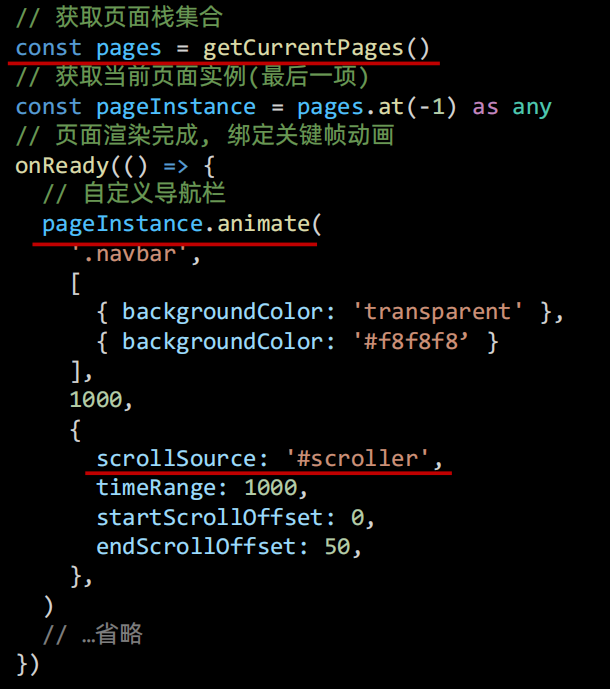
2、滚动驱动的动画
二、订单状态渲染
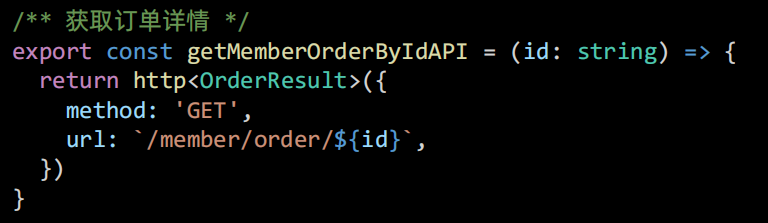
1、封装请求API
2、初始化调用
// 获取订单详情
const order = ref<OrderResult>()
const getMemberOrderByIdData = async () => {
  const res = await getMemberOrderByIdAPI(query.id)
  order.value = res.result
}

onLoad(() => {
  getMemberOrderByIdData()
})
3、类型声明文件
/** 订单详情 返回信息 */
export type OrderResult = {
  /** 订单编号 */
  id: string
  /** 订单状态,1为待付款、2为待发货、3为待收货、4为待评价、5为已完成、6为已取消 */
  orderState: number
  /** 倒计时--剩余的秒数 -1 表示已经超时,正数表示倒计时未结束 */
  countdown: number
  /** 商品集合 [ 商品信息 ] */
  skus: OrderSkuItem[]
  /** 收货人 */
  receiverContact: string
  /** 收货人手机 */
  receiverMobile: string
  /** 收货人完整地址 */
  receiverAddress: string
  /** 下单时间 */
  createTime: string
  /** 商品总价 */
  totalMoney: number
  /** 运费 */
  postFee: number
  /** 应付金额 */
  payMoney: number
}

/** 商品信息 */
export type OrderSkuItem = {
  /** sku id */
  id: string
  /** 商品 id */
  spuId: string
  /** 商品名称 */
  name: string
  /** 商品属性文字 */
  attrsText: string
  /** 数量 */
  quantity: number
  /** 购买时单价 */
  curPrice: number
  /** 图片地址 */
  image: string
}

//src\services\constants.ts
/** 订单状态枚举 */
export enum OrderState {
  /** 待付款 */
  DaiFuKuan = 1,
  /** 待发货 */
  DaiFaHuo = 2,
  /** 待收货 */
  DaiShouHuo = 3,
  /** 待评价 */
  DaiPingJia = 4,
  /** 已完成 */
  YiWanCheng = 5,
  /** 已取消 */
  YiQuXiao = 6,
}

/** 订单状态列表 */
export const orderStateList = [
  { id: 0, text: '' },
  { id: 1, text: '待付款' },
  { id: 2, text: '待发货' },
  { id: 3, text: '待收货' },
  { id: 4, text: '待评价' },
  { id: 5, text: '已完成' },
  { id: 6, text: '已取消' },
]
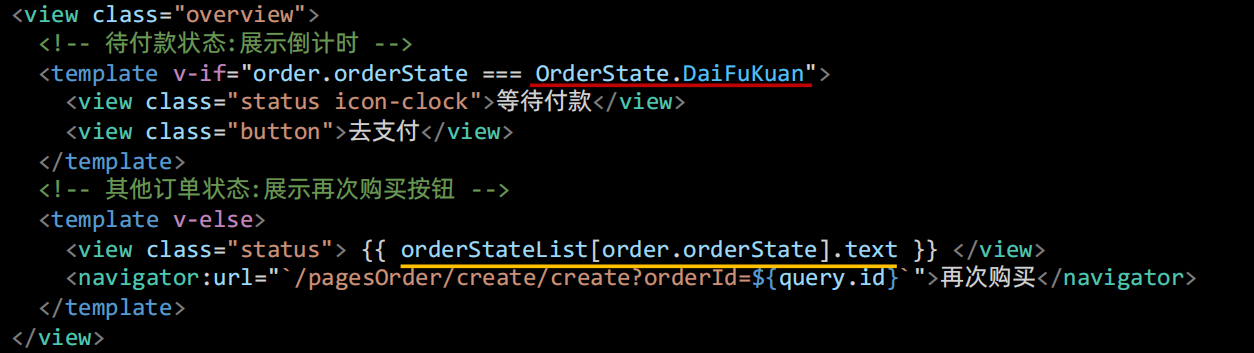
4、渲染订单状态
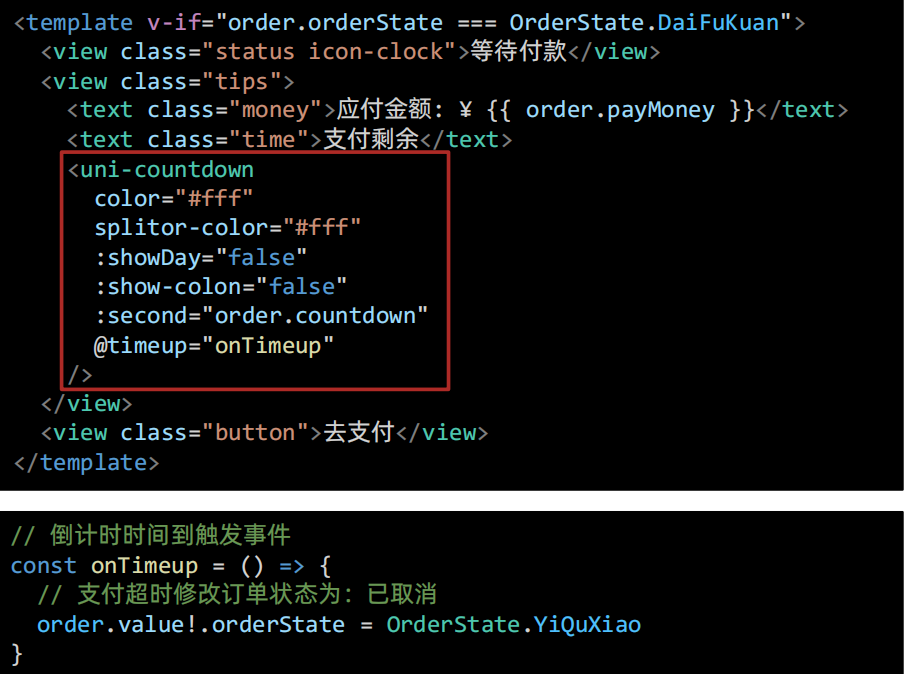
三、待付款 - 倒计时
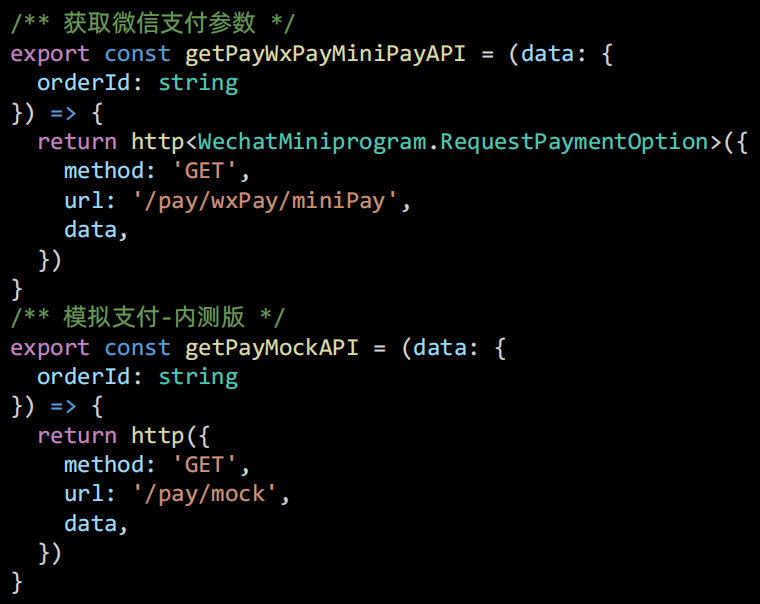
四、待付款 - 订单支付

1、支付API
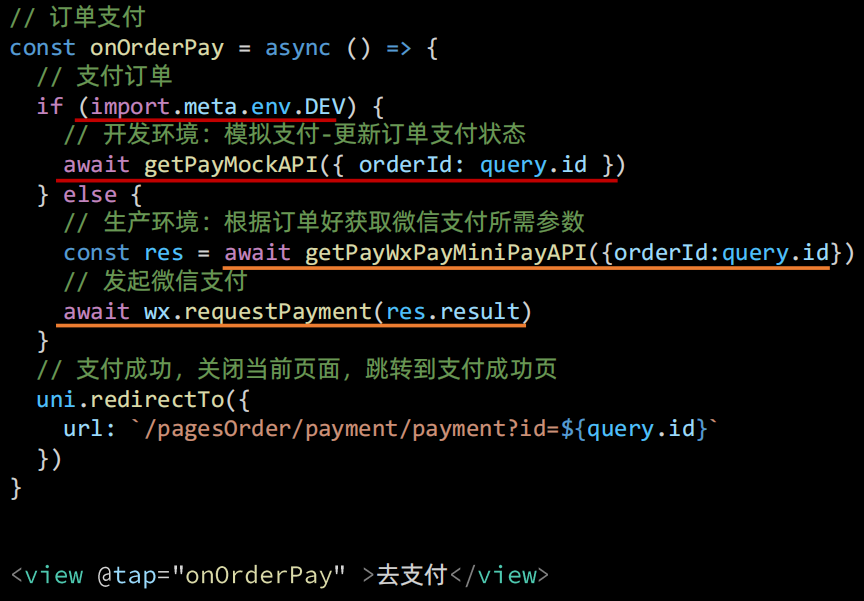
2、调用API
3、支付结果
<script setup lang="ts">
import { useGuessList } from '@/composables'

// 获取页面参数
const query = defineProps<{
  id: string
}>()

// 猜你喜欢
const { guessRef, onScrolltolower } = useGuessList()
</script>

<template>
  <scroll-view class="viewport" scroll-y @scrolltolower="onScrolltolower">
    <!-- 订单状态 -->
    <view class="overview">
      <view class="status icon-checked">支付成功</view>
      <view class="buttons">
        <navigator
          hover-class="none"
          class="button navigator"
          url="/pages/index/index"
          open-type="switchTab"
        >
          返回首页
        </navigator>
        <navigator
          hover-class="none"
          class="button navigator"
          :url="`/pagesOrder/detail/detail?id=${query.id}`"
          open-type="redirect"
        >
          查看订单
        </navigator>
      </view>
    </view>

    <!-- 猜你喜欢 -->
    <XtxGuess ref="guessRef" />
  </scroll-view>
</template>

<style lang="scss">
page {
  display: flex;
  flex-direction: column;
  height: 100%;
  overflow: hidden;
}

.viewport {
  background-color: #f7f7f8;
}

.overview {
  line-height: 1;
  padding: 50rpx 0;
  color: #fff;
  background-color: #27ba9b;

  .status {
    font-size: 36rpx;
    font-weight: 500;
    text-align: center;
  }

  .status::before {
    display: block;
    font-size: 110rpx;
    margin-bottom: 20rpx;
  }

  .buttons {
    height: 60rpx;
    line-height: 60rpx;
    display: flex;
    justify-content: center;
    align-items: center;
    margin-top: 60rpx;
  }

  .button {
    text-align: center;
    margin: 0 10rpx;
    font-size: 28rpx;
    color: #fff;

    &:first-child {
      width: 200rpx;
      border-radius: 64rpx;
      border: 1rpx solid #fff;
    }
  }
}
</style>
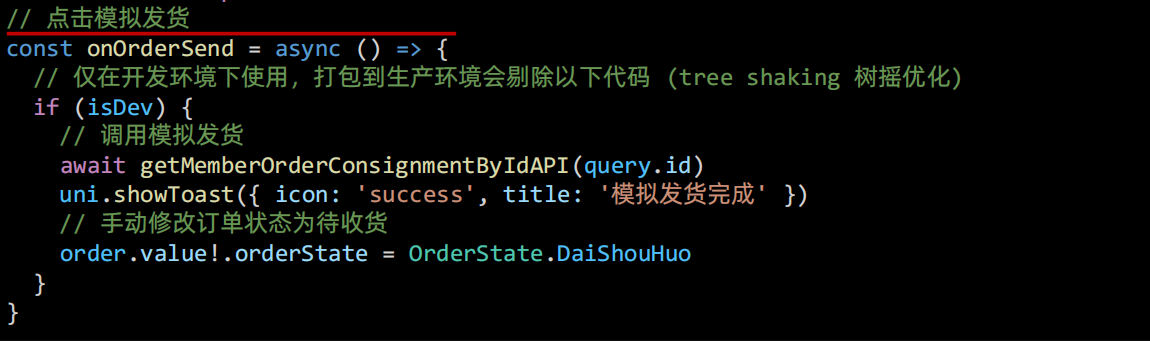
五、待发货 - 模拟发货
1、封装请求API

2、条件渲染

3、调用API
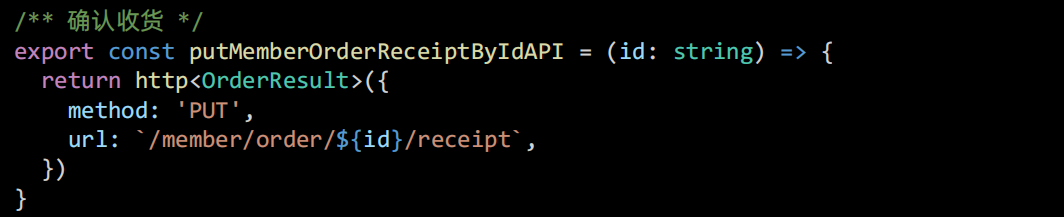
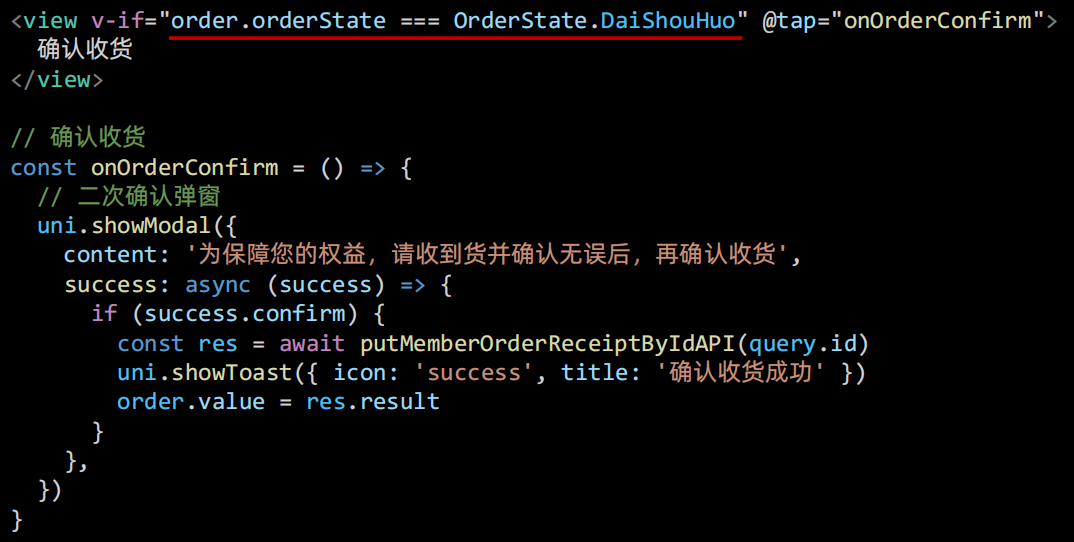
六、待收货 -- 确认收货
1、封装请求API
2、调用API
七、订单物流
1、封装请求API
 2、获取物流信息
// 订单详情响应式变量
const order = ref<OrderResult>()
// 获取订单详情接口函数
const getMemberOrderByIdData = async () => {
  const res = await getMemberOrderByIdAPI(query.id)
  order.value = res.result
  // 判断订单状态:待收货、待评价、已完成这三种状态才去请求物流
  if ([OrderState.DaiShouHuo, OrderState.DaiPingJia, OrderState.YiWanCheng].includes(order.value.orderState)) {
    getMemberOrderLogisticsByIdData()
  }
}

// 物流列表响应式变量,初始是空数组
const logisticList = ref<LogisticItem[]>([])
// 获取物流详情接口函数
const getMemberOrderLogisticsByIdData = async () => {
  const res = await getMemberOrderLogisticsByIdAPI(query.id)
  logisticList.value = res.result.list
}
3、渲染物流信息
<!-- 配送状态 -->
<view class="shipment">
<!-- 订单物流信息 -->
<view v-for="item in logisticList" :key="item.id" class="item">
  <view class="message">
	{{ item.text }}
  </view>
  <view class="date"> {{ item.time }} </view>
</view>
<!-- 用户收货地址 -->
<view class="locate">
  <view class="user"> {{ order.receiverContact }} {{ order.receiverMobile }} </view>
  <view class="address"> {{ order.receiverAddress }} </view>
</view>
</view>
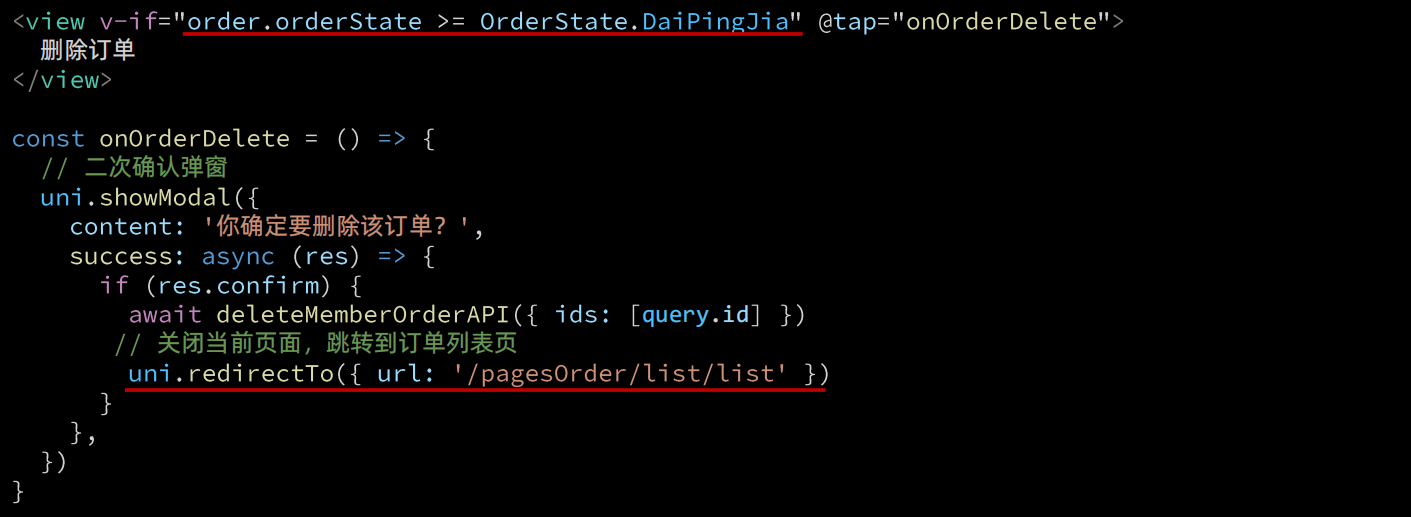
八、删除订单
1、封装请求API

2、调用API