1. 核心工具横向对比
| 特性 | Playwright | DrissionPage | NoDriver | Selenium |
|---|---|---|---|---|
| 定位 | 企业级测试/高并发爬虫 | 国产全能瑞士军刀 | 极致反检测/异步 | 传统自动化测试 |
| 底层协议 | CDP / WebDriver | CDP / HTTP 混合 | 纯 CDP (无 WebDriver) | WebDriver |
| 反爬能力 | ⭐⭐⭐ (需插件) | ⭐⭐⭐⭐ (接管浏览器) | ⭐⭐⭐⭐⭐ (原生无特征) | ⭐⭐ (极易被识别) |
| 上手难度 | ⭐⭐⭐ (异步/同步双模式) | ⭐ (语法极简,中文友好) | ⭐⭐⭐⭐ (纯异步,门槛高) | ⭐⭐ (API 繁琐) |
| 性能 | 🚀 极快 (多上下文隔离) | 🚀 快 (HTTP 模式极快) | 🚀 极快 (无驱动开销) | 🐢 较慢 |
| 核心杀手锏 | 自动等待、多浏览器支持、网络拦截 | 浏览器/HTTP 无缝切换、跨 iframe 查找 | 完全绕过 WebDriver 检测 | 生态庞大、历史资料多 |
| 适用语言 | Python, JS, Java, C# | Python | Python (Async) | 全语言 |
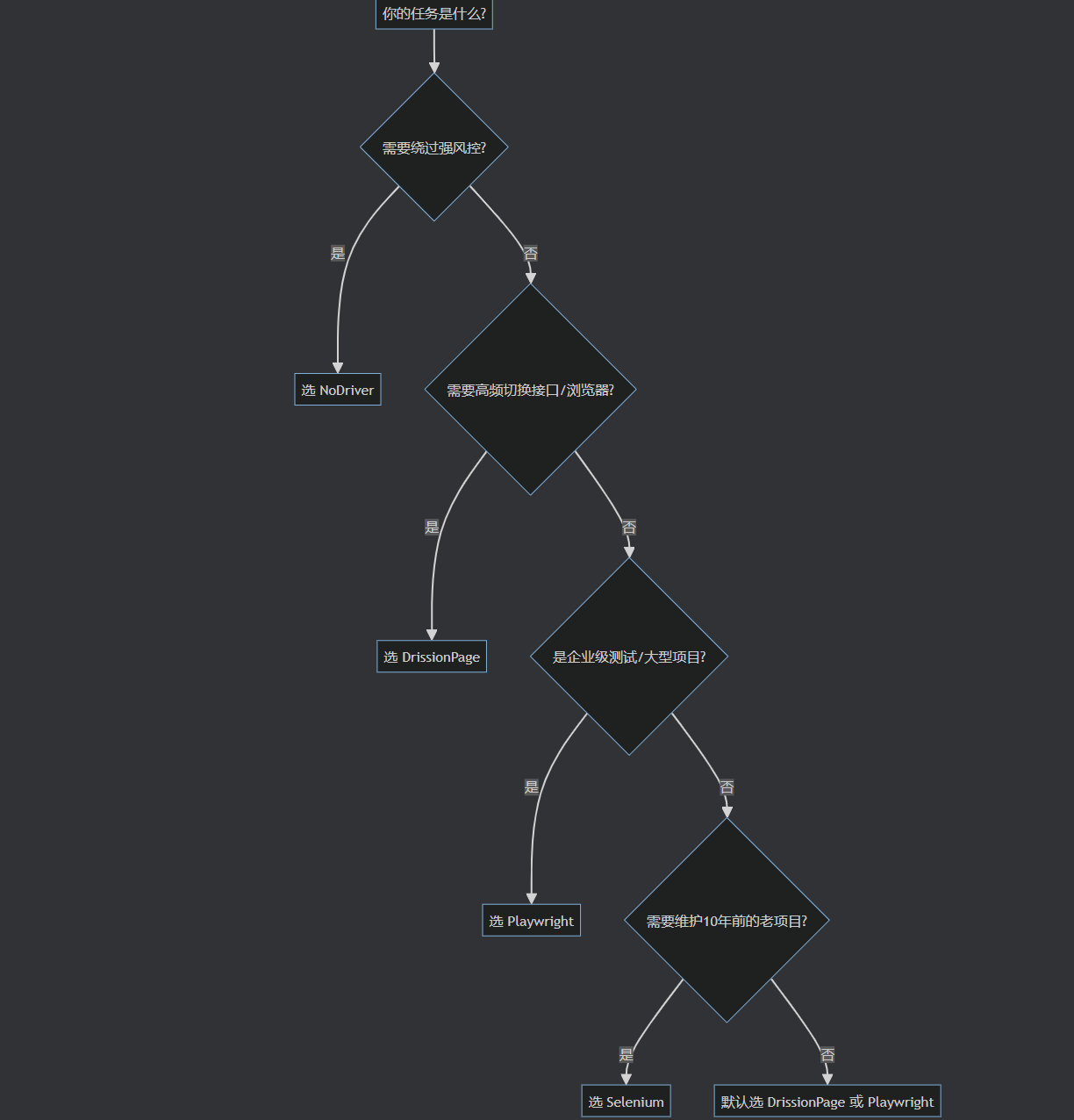
2. 场景决策树 🌳
#mermaid-svg-xkALUXRz1IlHYY1h{font-family:"trebuchet ms",verdana,arial,sans-serif;font-size:16px;fill:#333;}@keyframes edge-animation-frame{from{stroke-dashoffset:0;}}@keyframes dash{to{stroke-dashoffset:0;}}#mermaid-svg-xkALUXRz1IlHYY1h .edge-animation-slow{stroke-dasharray:9,5!important;stroke-dashoffset:900;animation:dash 50s linear infinite;stroke-linecap:round;}#mermaid-svg-xkALUXRz1IlHYY1h .edge-animation-fast{stroke-dasharray:9,5!important;stroke-dashoffset:900;animation:dash 20s linear infinite;stroke-linecap:round;}#mermaid-svg-xkALUXRz1IlHYY1h .error-icon{fill:#552222;}#mermaid-svg-xkALUXRz1IlHYY1h .error-text{fill:#552222;stroke:#552222;}#mermaid-svg-xkALUXRz1IlHYY1h .edge-thickness-normal{stroke-width:1px;}#mermaid-svg-xkALUXRz1IlHYY1h .edge-thickness-thick{stroke-width:3.5px;}#mermaid-svg-xkALUXRz1IlHYY1h .edge-pattern-solid{stroke-dasharray:0;}#mermaid-svg-xkALUXRz1IlHYY1h .edge-thickness-invisible{stroke-width:0;fill:none;}#mermaid-svg-xkALUXRz1IlHYY1h .edge-pattern-dashed{stroke-dasharray:3;}#mermaid-svg-xkALUXRz1IlHYY1h .edge-pattern-dotted{stroke-dasharray:2;}#mermaid-svg-xkALUXRz1IlHYY1h .marker{fill:#333333;stroke:#333333;}#mermaid-svg-xkALUXRz1IlHYY1h .marker.cross{stroke:#333333;}#mermaid-svg-xkALUXRz1IlHYY1h svg{font-family:"trebuchet ms",verdana,arial,sans-serif;font-size:16px;}#mermaid-svg-xkALUXRz1IlHYY1h p{margin:0;}#mermaid-svg-xkALUXRz1IlHYY1h .label{font-family:"trebuchet ms",verdana,arial,sans-serif;color:#333;}#mermaid-svg-xkALUXRz1IlHYY1h .cluster-label text{fill:#333;}#mermaid-svg-xkALUXRz1IlHYY1h .cluster-label span{color:#333;}#mermaid-svg-xkALUXRz1IlHYY1h .cluster-label span p{background-color:transparent;}#mermaid-svg-xkALUXRz1IlHYY1h .label text,#mermaid-svg-xkALUXRz1IlHYY1h span{fill:#333;color:#333;}#mermaid-svg-xkALUXRz1IlHYY1h .node rect,#mermaid-svg-xkALUXRz1IlHYY1h .node circle,#mermaid-svg-xkALUXRz1IlHYY1h .node ellipse,#mermaid-svg-xkALUXRz1IlHYY1h .node polygon,#mermaid-svg-xkALUXRz1IlHYY1h .node path{fill:#ECECFF;stroke:#9370DB;stroke-width:1px;}#mermaid-svg-xkALUXRz1IlHYY1h .rough-node .label text,#mermaid-svg-xkALUXRz1IlHYY1h .node .label text,#mermaid-svg-xkALUXRz1IlHYY1h .image-shape .label,#mermaid-svg-xkALUXRz1IlHYY1h .icon-shape .label{text-anchor:middle;}#mermaid-svg-xkALUXRz1IlHYY1h .node .katex path{fill:#000;stroke:#000;stroke-width:1px;}#mermaid-svg-xkALUXRz1IlHYY1h .rough-node .label,#mermaid-svg-xkALUXRz1IlHYY1h .node .label,#mermaid-svg-xkALUXRz1IlHYY1h .image-shape .label,#mermaid-svg-xkALUXRz1IlHYY1h .icon-shape .label{text-align:center;}#mermaid-svg-xkALUXRz1IlHYY1h .node.clickable{cursor:pointer;}#mermaid-svg-xkALUXRz1IlHYY1h .root .anchor path{fill:#333333!important;stroke-width:0;stroke:#333333;}#mermaid-svg-xkALUXRz1IlHYY1h .arrowheadPath{fill:#333333;}#mermaid-svg-xkALUXRz1IlHYY1h .edgePath .path{stroke:#333333;stroke-width:2.0px;}#mermaid-svg-xkALUXRz1IlHYY1h .flowchart-link{stroke:#333333;fill:none;}#mermaid-svg-xkALUXRz1IlHYY1h .edgeLabel{background-color:rgba(232,232,232, 0.8);text-align:center;}#mermaid-svg-xkALUXRz1IlHYY1h .edgeLabel p{background-color:rgba(232,232,232, 0.8);}#mermaid-svg-xkALUXRz1IlHYY1h .edgeLabel rect{opacity:0.5;background-color:rgba(232,232,232, 0.8);fill:rgba(232,232,232, 0.8);}#mermaid-svg-xkALUXRz1IlHYY1h .labelBkg{background-color:rgba(232, 232, 232, 0.5);}#mermaid-svg-xkALUXRz1IlHYY1h .cluster rect{fill:#ffffde;stroke:#aaaa33;stroke-width:1px;}#mermaid-svg-xkALUXRz1IlHYY1h .cluster text{fill:#333;}#mermaid-svg-xkALUXRz1IlHYY1h .cluster span{color:#333;}#mermaid-svg-xkALUXRz1IlHYY1h div.mermaidTooltip{position:absolute;text-align:center;max-width:200px;padding:2px;font-family:"trebuchet ms",verdana,arial,sans-serif;font-size:12px;background:hsl(80, 100%, 96.2745098039%);border:1px solid #aaaa33;border-radius:2px;pointer-events:none;z-index:100;}#mermaid-svg-xkALUXRz1IlHYY1h .flowchartTitleText{text-anchor:middle;font-size:18px;fill:#333;}#mermaid-svg-xkALUXRz1IlHYY1h rect.text{fill:none;stroke-width:0;}#mermaid-svg-xkALUXRz1IlHYY1h .icon-shape,#mermaid-svg-xkALUXRz1IlHYY1h .image-shape{background-color:rgba(232,232,232, 0.8);text-align:center;}#mermaid-svg-xkALUXRz1IlHYY1h .icon-shape p,#mermaid-svg-xkALUXRz1IlHYY1h .image-shape p{background-color:rgba(232,232,232, 0.8);padding:2px;}#mermaid-svg-xkALUXRz1IlHYY1h .icon-shape .label rect,#mermaid-svg-xkALUXRz1IlHYY1h .image-shape .label rect{opacity:0.5;background-color:rgba(232,232,232, 0.8);fill:rgba(232,232,232, 0.8);}#mermaid-svg-xkALUXRz1IlHYY1h .label-icon{display:inline-block;height:1em;overflow:visible;vertical-align:-0.125em;}#mermaid-svg-xkALUXRz1IlHYY1h .node .label-icon path{fill:currentColor;stroke:revert;stroke-width:revert;}#mermaid-svg-xkALUXRz1IlHYY1h :root{--mermaid-font-family:"trebuchet ms",verdana,arial,sans-serif;} 是
否
是
否
是
否
是
否
你的任务是什么?
需要绕过强风控?
选 NoDriver
需要高频切换接口/浏览器?
选 DrissionPage
是企业级测试/大型项目?
选 Playwright
需要维护10年前的老项目?
选 Selenium
默认选 DrissionPage 或 Playwright
💡 快速判断口诀:
- 搞爬虫、要快、要省内存 ➡️
DrissionPage - 搞测试、要稳、要并发 ➡️
Playwright - 搞风控、要隐、要过盾 ➡️
NoDriver - 搞老项目、要查资料 ➡️
Selenium
3. 核心代码模板 📝
🅰️ DrissionPage:混合模式(最推荐爬虫用)
python
from DrissionPage import WebPage

page = WebPage()
# 1. 浏览器模式:处理登录、验证码、复杂交互
page.get('https://example.com/login')
page.ele('#username').input('admin')
page.ele('#password').input('123456')
page.ele('@type=submit').click()

# 2. 无缝切换:利用已有 Cookie 高速抓包
page.change_mode()
resp = page.get('https://api.example.com/data')
print(resp.json())
🅱️ Playwright:异步并发模板
python
import asyncio
from playwright.async_api import async_playwright

async def main():
    async with async_playwright() as p:
        browser = await p.chromium.launch(headless=True)
        # 并发打开多个上下文,互不干扰
        tasks = [scrape_page(browser, url) for url in urls]
        await asyncio.gather(*tasks)
        await browser.close()

async def scrape_page(browser, url):
    context = await browser.new_context()
    page = await context.new_page()
    await page.goto(url)
    # 自动等待元素出现,无需 sleep
    await page.wait_for_selector('.content')
    print(await page.title())
    await context.close()

asyncio.run(main())
🅲️ NoDriver:反检测启动模板
python
import asyncio
import nodriver as uc

async def main():
    browser = await uc.start()
    page = await browser.get('https://bot.sannysoft.com/')
    # 原生无 WebDriver 特征,直接过检测
    await page.sleep(2)
    await browser.stop()

asyncio.run(main())
4. 避坑与最佳实践 ⚠️
🚫 绝对不要做的事:
- 在循环里写
time.sleep(5):所有现代工具都有wait_for或ele().wait(),用智能等待代替死等。 - Selenium 硬刚抖音/淘宝 :除非你用了
undetected-chromedriver,否则原生 Selenium 100% 被识别。 - DrissionPage 混用同步/异步 :DrissionPage 是同步库,不要试图在
asyncio里直接跑它,会卡死事件循环。
✅ 推荐工作流:
- Cookie 注入 :优先用 DrissionPage 的
page.set.cookies(cookie_string),比 Playwright 解析字典更方便。 - 资源拦截:Playwright 和 DrissionPage 都支持拦截图片/字体,爬虫务必开启,速度提升 300%。
- 指纹伪装 :NoDriver 默认伪装,Playwright 建议配合
playwright-stealth插件使用。
5. 常用命令速查表
| 操作 | DrissionPage | Playwright (Sync) | NoDriver |
|---|---|---|---|
| 启动 | ChromiumPage() |
p.chromium.launch() |
await uc.start() |
| 访问 | page.get(url) |
page.goto(url) |
await browser.get(url) |
| 点击 | page.ele('#id').click() |
page.click('#id') |
await ele.click() |
| 输入 | page.ele('#id').input('txt') |
page.fill('#id', 'txt') |
await ele.send_keys('txt') |
| 等待 | page.ele('#id').wait(10) |
page.wait_for_selector('#id') |
await page.sleep() / wait_for |
| 获取文本 | page.ele('#id').text |
page.text_content('#id') |
await ele.get_text() |
| 执行JS | page.run_js('return 1') |
page.evaluate('() => 1') |
await page.evaluate('1') |
6. 扩展生态推荐
- AI Agent 控制 :
PinchTab(通过 HTTP API 控制浏览器,适合 LLM 调度) - Node.js 生态 :
Puppeteer(Playwright 的前身,仅支持 Chromium) - 前端测试 :
Cypress(运行在浏览器内部,调试体验极佳) - 纯 HTTP 爬虫 :
httpx/curl_cffi(DrissionPage 的 SessionPage 底层就是它们)
💬 备注 :
如果遇到抖音/小红书等强风控,优先尝试 DrissionPage 接管本地浏览器 ,其次 NoDriver ,最后才考虑 Playwright + Stealth。
文档会持续更新,建议收藏。