- 服务器系统:Ubuntu 24.04 LTS
- 服务器资源:4core+8G+500G(这里大小自己斟酌即可,我这里没那多空间,先测试流程)
- 镜像根目录:/mirrors (建议单独挂载磁盘使用)
- 先做 APT / Ubuntu 系测试同步
- 先用 IP 地址访问
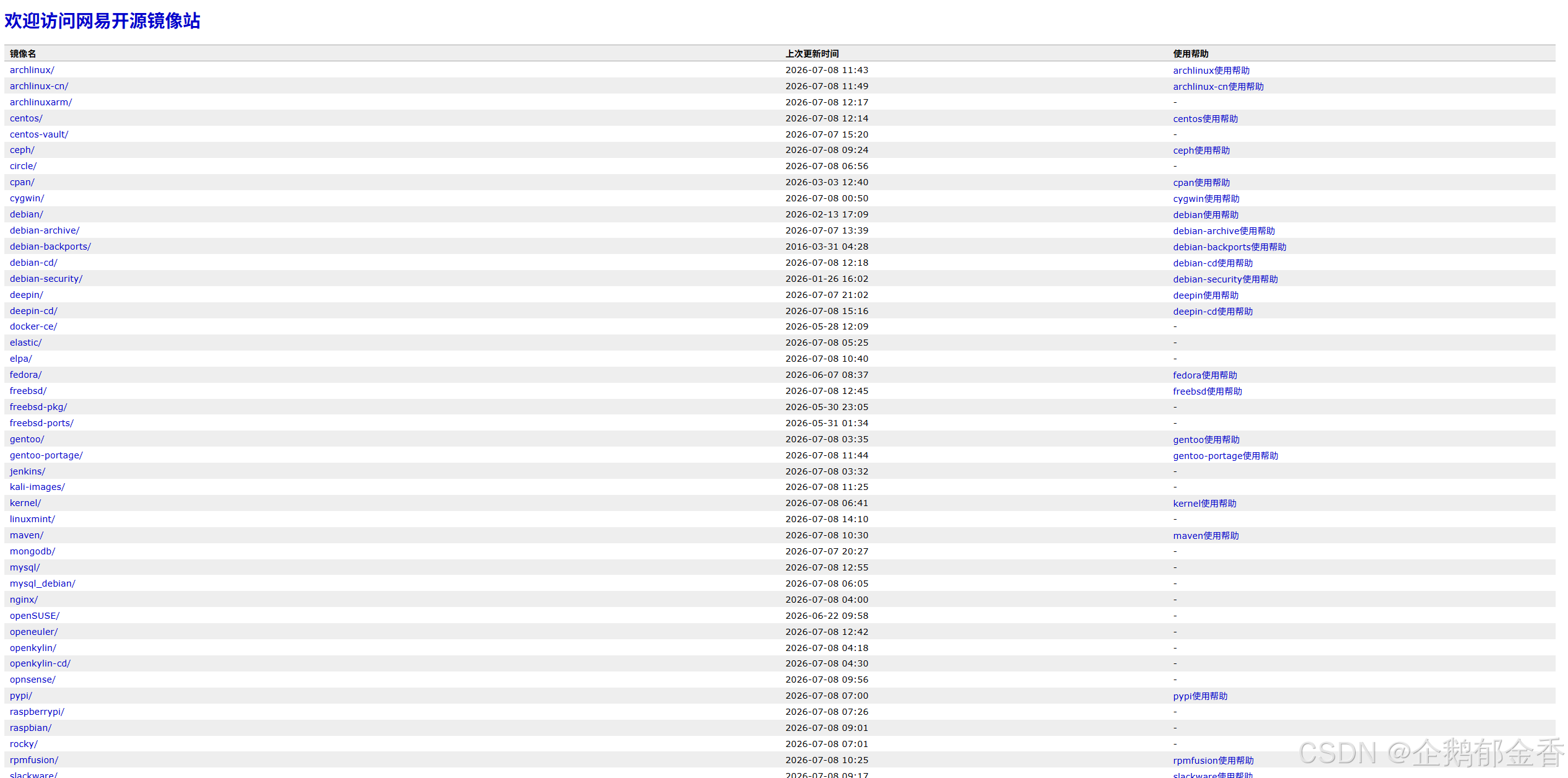
- 提供一个 像网易开源镜像站那种简洁目录首页
- 后续可平滑扩展到 Debian / Ubuntu Ports / RPM 源
一、整体方案结构
- 目录规划
- 安装同步与 Web 服务软件
- 测试同步 Ubuntu/APT 仓库
- Nginx 发布 /mirrors
- 做一个类似网易风格的首页
- 定时同步、日志、权限、后续扩展
二、目录规划
shell
# 整体目录结构
/mirrors/
├── ubuntu/                 # Ubuntu APT 仓库
├── ubuntu-ports/           # Ubuntu Ports 仓库(后续)
├── debian/                 # Debian 仓库(后续)
├── html/                   # 首页静态页面
├── scripts/                # 同步脚本
├── logs/                   # 同步日志
└── tmp/                    # 临时目录

# 创建目录
sudo mkdir -p /mirrors/{ubuntu,ubuntu-ports,debian,html,scripts,logs,tmp}
sudo chown -R root:root /mirrors
sudo chmod -R 755 /mirrors
三、安装基础软件
shell
sudo apt update
sudo apt install -y nginx debmirror rsync apache2-utils curl vim tree jq wget lftp

说明:
nginx:Web 发布
debmirror:APT 系同步工具
rsync:同步基础
apache2-utils:后面有些辅助命令可用
curl:测试 Web 访问
vim:编辑脚本
tree:看目录结构方便
四、同步源
我这边先同步Ubuntu最小仓库合集,跑完整体流程,后面同步大差不差
先同步一个最小 Ubuntu 仓库测试集:
发行版:jammy
pocket:jammy, jammy-updates, jammy-security
组件:main
架构:amd64
不同步源码:--nosource
shell
sudo vim /mirrors/scripts/sync-ubuntu.sh
内容如下:
#!/bin/bash
set -euo pipefail

TARGET="/mirrors/ubuntu"
LOGDIR="/mirrors/logs"
DATE="$(date +%F_%H-%M-%S)"
LOGFILE="${LOGDIR}/sync-ubuntu-${DATE}.log"

HOST="mirrors.tuna.tsinghua.edu.cn"
ROOT="/ubuntu"
SECTIONS="main"
ARCHES="amd64"
DISTS="jammy,jammy-updates,jammy-security"

mkdir -p "$TARGET" "$LOGDIR"

exec > >(tee -a "$LOGFILE") 2>&1

echo "==== $(date) start sync ubuntu ===="

/usr/bin/debmirror \
  --method=rsync \
  --host="$HOST" \
  --root="$ROOT" \
  --dist="$DISTS" \
  --section="$SECTIONS" \
  --arch="$ARCHES" \
  --nosource \
  --progress \
  --ignore-release-gpg \
  --no-check-gpg \
  "$TARGET"

echo "==== $(date) sync ubuntu done ===="

# 增加执行权限
sudo chmod +x /mirrors/scripts/sync-ubuntu.sh

# 先检查上游的rsync源 的 ubuntu是否可用
rsync rsync://mirrors.tuna.tsinghua.edu.cn/ubuntu/
# 如有内容输出,说明可用
#如果不行,就把脚本改成 http 模式,后面写备选写法。

# 执行源同步
./sync-ubuntu.sh  # 等待同步完成

# 同步完成后,检查目录:
tree -L 2 /mirrors/ubuntu
同步Ubuntu源或者是其他源,这里只用ubuntu 做最小测试,后面要同步其他源,一些脚本都会后续整理发出来。
可知的是,80%的源都可以分为APT和RPM两种,剩余的20%,都是例外。
APT系的例外:
直接 wget/rsync
或者用 aptly mirror
或者定制脚本
RPM系的例外
有些第三方 yum 仓库:
repo 文件写法特殊,认证特殊,历史元数据不全,modular 仓库行为复杂
这时可能要:
dnf reposync
手工 createrepo_c
或者上游直接 rsync 更省事
也就是说 :
APT 体系优先用 debmirror
RPM 体系优先用 reposync
但保留例外处理能力
五、Nginx发布mirrors页
现在我们要把 /mirrors 变成一个可访问的镜像站。
这里我们参考网易的镜像站简洁风格。
我们先把首页文件放到:/mirrors/html
这个目录是首页静态页面目录。
5.1 配置 Nginx 站点
shell
sudo vim /etc/nginx/sites-available/mirror
server {
    listen 80 default_server;
    listen [::]:80 default_server;

    server_name _;

    charset utf-8;
    root /mirrors/html;
    index index.html;

    access_log /var/log/nginx/mirror_access.log;
    error_log  /var/log/nginx/mirror_error.log;

    autoindex on;
    autoindex_exact_size off;
    autoindex_localtime on;

    # 首页
    location / {
        try_files $uri $uri/ /index.html;
    }

    # 静态资源
    location /static/ {
        alias /mirrors/html/static/;
        autoindex off;
    }

    # Ubuntu 镜像
    location /ubuntu/ {
        alias /mirrors/ubuntu/;
        autoindex on;
    }

    # Ubuntu Ports
    location /ubuntu-ports/ {
        alias /mirrors/ubuntu-ports/;
        autoindex on;
    }

    # Debian
    location /debian/ {
        alias /mirrors/debian/;
        autoindex on;
    }

    # 浏览整个 mirrors 根目录
    location /pub/ {
        alias /mirrors/;
        autoindex on;
    }
}

# 启用站点
sudo rm -f /etc/nginx/sites-enabled/default
sudo ln -s /etc/nginx/sites-available/mirror /etc/nginx/sites-enabled/mirror
sudo nginx -t
sudo systemctl reload nginx
sudo systemctl enable nginx
5.2 做"网易"风格的站点
shell
sudo mkdir -p /mirrors/html/static   # 风格的静态首页。
sudo vim /mirrors/html/index.html    # 首页HTML
<!DOCTYPE html>
<html lang="zh-CN">
<head>
    <meta charset="utf-8">
    <title>内网开源镜像站</title>
    <style>
        body {
            font-family: Arial, Helvetica, sans-serif;
            background: #fff;
            color: #333;
            margin: 20px;
        }
        h1 {
            color: #1e50a2;
            font-size: 28px;
            margin-bottom: 20px;
        }
        .desc {
            margin-bottom: 20px;
            color: #555;
        }
        table {
            width: 100%;
            border-collapse: collapse;
            font-size: 14px;
        }
        th, td {
            border: 1px solid #ddd;
            padding: 8px 10px;
            text-align: left;
        }
        th {
            background: #f3f3f3;
        }
        tr:nth-child(even) {
            background: #fafafa;
        }
        a {
            color: #1a4fb3;
            text-decoration: none;
        }
        a:hover {
            text-decoration: underline;
        }
        .footer {
            margin-top: 30px;
            color: #777;
            font-size: 12px;
        }
        code {
            background: #f6f6f6;
            padding: 2px 4px;
        }
    </style>
</head>
<body>
    <h1>欢迎访问内网开源镜像站</h1>

    <div class="desc">
        当前为测试环境,暂时通过服务器 IP 访问。<br>
        镜像根目录:<code>/mirrors</code>
    </div>

    <table>
        <thead>
            <tr>
                <th>镜像名</th>
                <th>上次更新时间</th>
                <th>使用帮助</th>
            </tr>
        </thead>
        <tbody>
            <tr>
                <td><a href="/ubuntu/">ubuntu/</a></td>
                <td>2026-7-9</td>
                <td><a href="/static/ubuntu-help.html">Ubuntu 使用帮助</a></td>
            </tr>
            <tr>
                <td><a href="/ubuntu-ports/">ubuntu-ports/</a></td>
                <td>2026-7-9</td>
                <td><a href="/static/ubuntu-ports-help.html">Ubuntu Ports 使用帮助</a></td>
            </tr>
            <tr>
                <td><a href="/debian/">debian/</a></td>
                <td>2026-7-9</td>
                <td><a href="/static/debian-help.html">Debian 使用帮助</a></td>
            </tr>
        </tbody>
    </table>

    <div class="footer">
        内网镜像站测试页面 · Ubuntu 24.04 LTS · Nginx
    </div>
</body>
</html>
5.3 配置【使用帮助】页面
shell
sudo vim /mirrors/html/static/ubuntu-help.html
<!DOCTYPE html>
<html lang="zh-CN">
<head>
    <meta charset="utf-8">
    <title>Ubuntu 使用帮助</title>
    <style>
        body { font-family: Arial, Helvetica, sans-serif; margin: 20px; color: #333; }
        h1 { color: #1e50a2; }
        pre {
            background: #f6f6f6;
            border: 1px solid #ddd;
            padding: 12px;
            overflow-x: auto;
        }
        a { color: #1a4fb3; text-decoration: none; }
    </style>
</head>
<body>
    <h1>Ubuntu 使用帮助</h1>

    <p>请将下列 IP 替换为你的镜像站服务器地址,例如:<strong>http://192.168.1.10/ubuntu</strong></p>

    <h2>Ubuntu 22.04 / 24.04 示例</h2>
    <pre>
deb http://你的服务器IP/ubuntu jammy main
deb http://你的服务器IP/ubuntu jammy-updates main
deb http://你的服务器IP/ubuntu jammy-security main
    </pre>

    <p>修改完成后执行:</p>
    <pre>
sudo apt update
    </pre>

    <p><a href="/">返回首页</a></p>
</body>
</html>
后续其余的帮助页面参考Ubuntu的这个就行,或者不行就让AI帮你写一个。
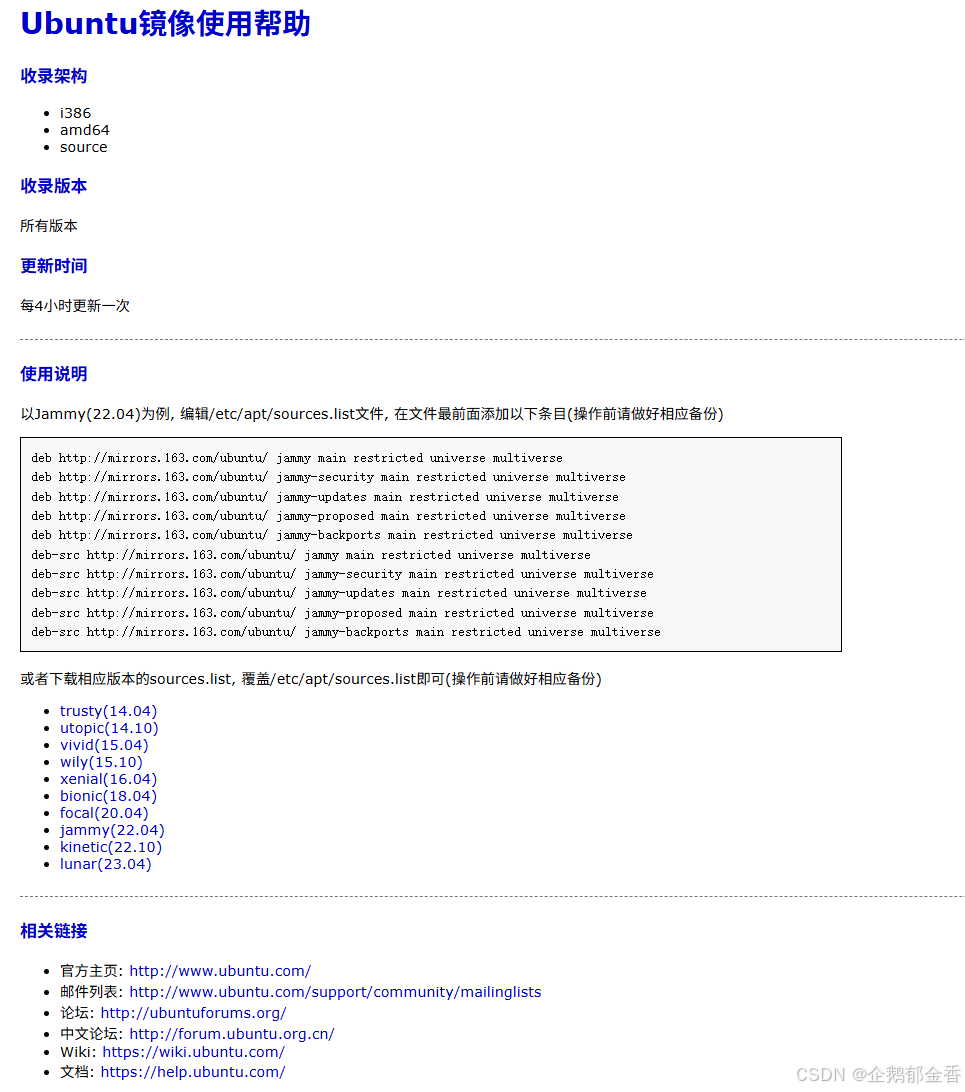
使用帮助也可以参考网易的使用帮助格式-都可以自定义,网易的使用帮助风格如下:
六、访问测试,包含客户端测试
直接浏览器 输入 IP 即可访问到镜像站首页。
如果打不开,检查防火墙。

找一台 Ubuntu 客户端测试。
shell
sudo cp /etc/apt/sources.list /etc/apt/sources.list.bak
sudo vim /etc/apt/sources.list
deb http://192.168.1.100/ubuntu jammy main
deb http://192.168.1.100/ubuntu jammy-updates main
deb http://192.168.1.100/ubuntu jammy-security main

sudo apt update
如果成功,说明:
上游同步
本地目录结构
Nginx 发布
APT 客户端访问
这一整条链路已经跑通了
七、如果 rsync 不行,改成 HTTP 模式
有些镜像站的 rsync 支持可能有限
如果你发现 debmirror 的 rsync 有问题,可以改脚本成:
shell
#!/bin/bash
set -euo pipefail

TARGET="/mirrors/ubuntu"
LOGDIR="/mirrors/logs"
DATE="$(date +%F_%H-%M-%S)"
LOGFILE="${LOGDIR}/sync-ubuntu-test-${DATE}.log"

HOST="mirrors.tuna.tsinghua.edu.cn"
ROOT="/ubuntu"
SECTIONS="main"
ARCHES="amd64"

exec > >(tee -a "$LOGFILE") 2>&1

echo "==== $(date) start sync ubuntu test ===="

sync_one() {
    local dist="$1"
    echo "---- syncing $dist ----"
    /usr/bin/debmirror \
      --no-check-gpg \
      --ignore-release-gpg \
      --progress \
      --method=http \
      --host="$HOST" \
      --root="$ROOT" \
      --dist="$dist" \
      --section="$SECTIONS" \
      --arch="$ARCHES" \
      --nosource \
      "$TARGET"
}

sync_one "jammy"
sync_one "jammy-updates"
sync_one "jammy-security"

echo "==== $(date) sync ubuntu test done ===="
八、统一脚本规范
后面会同步更多源,所以建议从现在开始规范起来
- 脚本目录 统一放在 /mirrors/scripts/
- 日志目录 统一放在 /mirrors/logs/
- 首页文件统一放在 /mirrors/html/
- 临时文件统一放在 /mirrors/tmp/
九、定时任务
测试跑通后,你可以先加个 cron。
shell
sudo crontab -e
例如每天凌晨 2:30 跑一次测试同步:
30 2 * * * /mirrors/scripts/sync-ubuntu.sh
.....等等
十、加一个"更新目录时间"的展示能力
当前的index.html 页面的更新时间是写死的,暂时可以写死,没问题。
可以增加一个脚本,根据目录修改时间自动生成 index.html 表格。
- 目标:
自动扫描 /mirrors
自动找出镜像目录
自动生成首页 HTML
自动显示最后更新时间
风格保持简单
重要: 先定义哪些目录显示在首页,脚本里可以自行修改。
例如:
ubuntu
ubuntu-ports
debian
debian-security
我这里给的是:只显示存在且非空的目录
这个脚本它其实就是做三件事:
定义哪些镜像需要展示
定义展示名/帮助链接
定义如何取最后更新时间
并输出成 HTML
也就是说,维护点只有这几个:增加一个新仓库
删除一个仓库
修改帮助链接
修改排序
修改样式
10.1 创建更新首页的脚本
可以自动更新web页面的首页,但是不包括自动更新帮助文档,帮助文档特殊情况比较多,所以建议手动维护。
shell
sudo vim /mirrors/scripts/update-index.sh
#!/usr/bin/env bash
# =========================
# 配置区:你以后主要维护这里
# =========================
HTML_DIR="/mirrors/html"
INDEX_FILE="${HTML_DIR}/index.html"
STATIC_PREFIX="/static"                 # 帮助页对外 URL 前缀
SITE_TITLE="内网开源镜像站"             # 站点标题
#SITE_SUBTITLE=""                       # 站点副标题
MIRROR_ROOT_LABEL="/mirrors"
#FOOTER_TEXT=""                         # 页脚

# 首页展示顺序:只展示此列表中的仓库;且目录存在时才展示
REPOS=(
  "ubuntu"
  "ubuntu-ports"
  "debian"
  "debian-security"
  "debian-backports"
  "ubuntu-old-releases"
  "docker-ce"
  "nginx"
  "postgresql"
  "nodejs"
  "mysql"
  "gitlab-runner"
  "kubernetes"
  "elastic"
)
# 仓库说明(显示在"使用帮助"的文案中)
declare -A DESC_MAP=(
  ["ubuntu"]="Ubuntu APT 镜像"
  ["ubuntu-ports"]="Ubuntu Ports 镜像"
  ["debian"]="Debian APT 镜像"
  ["debian-security"]="Debian Security 镜像"
  ["debian-backports"]="Debian Backports 镜像"
  ["ubuntu-old-releases"]="Ubuntu Old Releases 镜像"
  ["docker-ce"]="Docker CE APT 镜像"
  ["nginx"]="Nginx 官方 APT 镜像"
  ["postgresql"]="PostgreSQL APT 镜像"
  ["nodejs"]="NodeSource APT 镜像"
  ["mysql"]="MySQL APT 镜像"
  ["gitlab-runner"]="GitLab Runner APT 镜像"
  ["kubernetes"]="Kubernetes APT 镜像"
  ["elastic"]="Elastic APT 镜像"
)
# 帮助页文件名(手工维护);为空或文件不存在则显示"暂无"
declare -A HELP_MAP=(
  ["ubuntu"]="ubuntu-help.html"
  ["ubuntu-ports"]="ubuntu-ports-help.html"
  ["debian"]="debian-help.html"
  ["debian-security"]="debian-security-help.html"
  ["debian-backports"]="debian-backports-help.html"
  ["ubuntu-old-releases"]="ubuntu-old-releases-help.html"
  ["docker-ce"]="docker-help.html"
  ["nginx"]="nginx-help.html"
  ["postgresql"]="postgresql-help.html"
  ["nodejs"]="nodejs-help.html"
  ["mysql"]="mysql-help.html"
  ["gitlab-runner"]="gitlab-runner-help.html"
  ["kubernetes"]="kubernetes-help.html"
  ["elastic"]="elastic-help.html"
)

# 可选:自定义"仓库目录"与"对外访问路径"
# 默认:
#   本地目录 = /mirrors/<repo>
#   对外路径 = /<repo>/
# 若不同,可在这里覆盖。例如:
# DIR_MAP["docker-ce"]="/mirrors/docker"
# URL_MAP["docker-ce"]="/docker/"
declare -A DIR_MAP=()
declare -A URL_MAP=()

# 可选:手动隐藏某些目录(即使存在也不展示)
declare -A HIDE_MAP=(
  # ["kubernetes"]="1"
)


# =========================
# 生成逻辑:一般不用改
# =========================
mkdir -p "$HTML_DIR"
TMP_FILE="$(mktemp)"
NOW="$(date '+%F %T')"
get_server_addr() {
  if [[ "$SERVER_ADDR_MODE" == "fixed" ]]; then
    printf '%s\n' "$SERVER_ADDR_FIXED"
    return
  fi
  local ip
  ip="$(hostname -I 2>/dev/null | awk '{print $1}')"
  if [[ -n "${ip:-}" ]]; then
    printf 'http://%s\n' "$ip"
  else
    printf 'http://127.0.0.1\n'
  fi
}
SERVER_ADDR="$(get_server_addr)"
repo_dir() {
  local repo="$1"
  if [[ -n "${DIR_MAP[$repo]:-}" ]]; then
    printf '%s\n' "${DIR_MAP[$repo]}"
  else
    printf '/mirrors/%s\n' "$repo"
  fi
}
repo_url() {
  local repo="$1"
  if [[ -n "${URL_MAP[$repo]:-}" ]]; then
    printf '%s\n' "${URL_MAP[$repo]}"
  else
    printf '/%s/\n' "$repo"
  fi
}
has_any_content() {
  local dir="$1"
  [[ -d "$dir" ]] || return 1
  find "$dir" -mindepth 1 -print -quit 2>/dev/null | grep -q .
}
get_last_update() {
  local dir="$1"
  [[ -d "$dir" ]] || { printf '%s\n' "-"; return; }
  has_any_content "$dir" || { printf '%s\n' "-"; return; }
  # 取目录内最新文件时间;不看 /mirrors/logs,因此不会被日志污染
  local ts
  ts="$(
    find "$dir" -type f -printf '%TY-%Tm-%Td %TH:%TM:%TS\n' 2>/dev/null \
      | LC_ALL=C sort | tail -1 | cut -d'.' -f1
  )"
  if [[ -n "${ts:-}" ]]; then
    printf '%s\n' "$ts"
  else
    printf '%s\n' "-"
  fi
}
help_cell_html() {
  local repo="$1"
  local desc="${DESC_MAP[$repo]:-$repo}"
  local help_file="${HELP_MAP[$repo]:-}"
  if [[ -n "$help_file" && -f "${HTML_DIR}${STATIC_PREFIX}/${help_file}" ]]; then
    printf '<a href="%s/%s">%s使用帮助</a>' "$STATIC_PREFIX" "$help_file" "$desc"
  else
    printf '<span style="color:#999;">暂无</span>'
  fi
}
print_row() {
  local repo="$1"
  local dir url last help
  dir="$(repo_dir "$repo")"
  url="$(repo_url "$repo")"
  last="$(get_last_update "$dir")"
  help="$(help_cell_html "$repo")"
  cat <<EOF_ROW
        <tr>
          <td><a href="${url}">${repo}/</a></td>
          <td>${last}</td>
          <td>${help}</td>
        </tr>
EOF_ROW
}
cat >"$TMP_FILE" <<EOF
<!DOCTYPE html>
<html lang="zh-CN">
<head>
  <meta charset="utf-8">
  <meta name="viewport" content="width=device-width, initial-scale=1">
  <title>${SITE_TITLE}</title>
  <style>
    :root {
      --text: #000000;
      --muted: #666;
      --line: #dcdcdc;
      --head: #efefef;
      --link: #0000ff;
      --title: #1e50a2;
      --stripe: #e8e8e8;
    }
    body {
      font-family: Arial, Helvetica, sans-serif;
      background: #fff;
      color: var(--text);
      margin: 16px;
    }
    h1 {
      color: var(--title);
      font-size: 32px;
      color: #0000ff;
      margin: 10px 0 12px 0;
      margin-bottom: 8px;
      font-family: "Bitstream Vera Sans", "Lucida Sans", "Lucida Grande", "Lucida Sans Unicode", Verdana, Arial, sans-serif;
    }
    .desc {
      margin-bottom: 0px;
      color: var(--muted);
      line-height: 1.8;
    }
    table {
      width: 100%;
      border-collapse: collapse;
      font-size: 14px;
      border: 1px solid var(--line);
    }
    th, td {
      border: none;
      padding: 4px 10px;
      text-align: left;
      vertical-align: top;
    }
    th { background: var(--head); }
    tbody tr:nth-child(even) { background: var(--stripe); }
    a {
      color: var(--link);
      text-decoration: none;
    }
    a:hover { text-decoration: underline; }
    .footer {
      margin-top: 28px;
      color: #777;
      font-size: 12px;
    }
    code {
      background: #f6f6f6;
      padding: 2px 4px;
    }
   /* 表格列宽控制 */
   th:first-child, td:first-child { width: 50%; }   /* 镜像名 */
   th:nth-child(2), td:nth-child(2) { width: 25%; } /* 更新时间 */
   th:nth-child(3), td:nth-child(3) { width: 25%; } /* 使用帮助 */
  </style>
</head>
<body>
  <h1>${SITE_TITLE}</h1>
  <div class="desc">
    ${SITE_SUBTITLE}<br>
  </div>
  <table>
    <thead>
      <tr>
        <th>镜像名</th>
        <th>上次更新时间</th>
        <th>使用帮助</th>
      </tr>
    </thead>
    <tbody>
EOF
row_count=0
for repo in "${REPOS[@]}"; do
  [[ "${HIDE_MAP[$repo]:-0}" == "1" ]] && continue
  dir="$(repo_dir "$repo")"
  [[ -d "$dir" ]] || continue
  print_row "$repo" >>"$TMP_FILE"
  row_count=$((row_count + 1))
done
if [[ "$row_count" -eq 0 ]]; then
  cat >>"$TMP_FILE" <<'EOF'
        <tr>
          <td colspan="3" style="color:#999;">暂无已发布镜像目录</td>
        </tr>
EOF
fi
cat >>"$TMP_FILE" <<EOF
    </tbody>
  </table>
  <div class="footer">${FOOTER_TEXT}</div>
</body>
</html>
EOF
mv "$TMP_FILE" "$INDEX_FILE"
chmod 644 "$INDEX_FILE"
echo "Updated ${INDEX_FILE}"

###################################
# 赋予权限
sudo chmod +x /mirrors/scripts/update-index.sh

# 执行
sudo /mirrors/scripts/update-index.sh
10.2这个脚本如何维护?
以后主要只改顶部配置区,也就是这几块
10.2.1.比如你想新增 rocky、epel,就加进去:REPO配置区
注意:
只有当对应目录存在时才会显示。
默认目录是 /mirrors/。
10.2.2.控制"帮助文案":DESC_MAP
shell
比如:
declare -A DESC_MAP=(
  ["docker-ce"]="Docker CE APT 镜像"
  ["nginx"]="Nginx 官方 APT 镜像"
)
这会影响首页第三列链接的文字,比如:
Docker CE APT 镜像使用帮助
Nginx 官方 APT 镜像使用帮助
102.3 控制"帮助页文件":HELP_MAP
shell
比如你手工维护了:
/mirrors/html/static/docker-help.html
/mirrors/html/static/nginx-help.html
那就这样配:
declare -A HELP_MAP=(
  ["docker-ce"]="docker-help.html"
  ["nginx"]="nginx-help.html"
)
如果文件不存在,首页会显示"暂无"。
10.2.4 目录或访问路径不是默认值时:DIR_MAP / URL_MAP
shell
默认逻辑是:
本地目录:/mirrors/<repo>
对外路径:/<repo>/

但如果你有例外,比如:
本地目录其实是 /mirrors/docker
外部访问想仍然用 /docker-ce/
那就写:
declare -A DIR_MAP=(
  ["docker-ce"]="/mirrors/docker"
)
declare -A URL_MAP=(
  ["docker-ce"]="/docker-ce/"
)
10.2.5 想临时隐藏某个仓库:HIDE_MAP
shell
比如你暂时不想在首页展示 kubernetes:
declare -A HIDE_MAP=(
  ["kubernetes"]="1"
)
目录还在、数据还在,只是不展示。
到此 ,流程基本跑通了...
十一、维护例子,举例
shell
# 1.加一个新仓库时怎么改
假设你要加 grafana
1.1 新建目录
 sudo mkdir -p /mirrors/grafana
1.2 写同步脚本
/mirrors/scripts/sync-grafana.sh
1.3 写帮助页
sudo vim /mirrors/html/static/grafana-help.html
1.4 改 update-index.sh
在这三处分别加入:REPO 、DESC_MAP、HELP_MAP
"grafana"
["grafana"]="Grafana 软件仓库镜像"
["grafana"]="grafana-help.html"
1.5 执行首页更新
sudo /mirrors/scripts/update-index.sh

删除一个仓库,这个就不用说了吧,推荐暂时隐藏
declare -A HIDE_MAP=(
  ["elastic"]="1"
)
这样来说更安全。
#####################################
附录1-标准化同步脚本:
后面所有脚本都采用统一规范:
set -euo pipefail
日志写到 /mirrors/logs
每个脚本都可单独执行
同步成功后自动更新首页
如果你以后想从清华或其他国内源同步 ubuntu-ports,也只要改 HOST 和 ROOT 。
想同步多个架构的,修改ARCHES即可,在后面追加 ARCHES="amd64,i386,arm64,armhf,ppc64el,s390x"
想同步多个dists的,在脚本的DISTS参数里后面追加即可。
总控脚本:一键同步
shell
这个脚本非常实用,以后可以只跑它。
sudo vim /mirrors/scripts/sync-all.sh
#!/bin/bash
set -euo pipefail
echo "==== $(date) start all sync jobs ===="
/mirrors/scripts/sync-ubuntu.sh
/mirrors/scripts/sync-ubuntu-ports.sh
/mirrors/scripts/sync-debian.sh
echo "==== $(date) all test sync jobs done ===="
/mirrors/scripts/update-index.sh || true

sudo chmod +x /mirrors/scripts/sync-all.sh
如下是同步脚本的模板:
以后你新增任何同步脚本,都建议按这个格式写
shell
#!/bin/bash
set -euo pipefail
TARGET="/mirrors/ubuntu"
LOGDIR="/mirrors/logs"
DATE="$(date +%F_%H-%M-%S)"
LOGFILE="${LOGDIR}/sync-ubuntu-full-${DATE}.log"
HOST="mirrors.tuna.tsinghua.edu.cn"
ROOT="/ubuntu"
SECTIONS="main,restricted,universe,multiverse"
ARCHES="amd64"
DISTS=("xxx" "xxx")
mkdir -p "$TARGET" "$LOGDIR"
exec > >(tee -a "$LOGFILE") 2>&1
echo "==== $(date) start sync ${NAME} ===="
###############
# 这里写同步逻辑
##############
echo "==== $(date) sync ${NAME} done ===="
/mirrors/scripts/update-index.sh || true
如下是很多个具体的同步脚本
- Ubuntu 同步脚本
shell
sudo vim /mirrors/scripts/sync-ubuntu.sh
#!/bin/bash
set -euo pipefail

TARGET="/mirrors/ubuntu"
LOGDIR="/mirrors/logs"
DATE="$(date +%F_%H-%M-%S)"
LOGFILE="${LOGDIR}/sync-ubuntu-full-${DATE}.log"

HOST="mirrors.tuna.tsinghua.edu.cn"
ROOT="/ubuntu"
SECTIONS="main,restricted,universe,multiverse"
ARCHES="amd64"
DISTS="jammy,jammy-updates,jammy-security,noble,noble-updates,noble-security"

mkdir -p "$TARGET" "$LOGDIR"

exec > >(tee -a "$LOGFILE") 2>&1

echo "==== $(date) start sync ubuntu full ===="

debmirror \
  --method=rsync \
  --host="$HOST" \
  --root="$ROOT" \
  --dist="$DISTS" \
  --section="$SECTIONS" \
  --arch="$ARCHES" \
  --nosource \
  --progress \
  --ignore-release-gpg \
  --no-check-gpg \
  "$TARGET"

echo "==== $(date) sync ubuntu full done ===="

/mirrors/scripts/update-index.sh || true

# 赋予权限
sudo chmod +x /mirrors/scripts/sync-ubuntu.sh- Ubuntu Ports 同步脚本
shell
这个适合 ARM 等 Ports 架构
sudo vim /mirrors/scripts/sync-ubuntu-ports.sh
#!/bin/bash
set -euo pipefail

TARGET="/mirrors/ubuntu-ports"
LOGDIR="/mirrors/logs"
DATE="$(date +%F_%H-%M-%S)"
LOGFILE="${LOGDIR}/sync-ubuntu-ports-test-${DATE}.log"

HOST="ports.ubuntu.com"
ROOT="/ubuntu-ports"
SECTIONS="main"
ARCHES="arm64"
DISTS="jammy,jammy-updates,jammy-security"

mkdir -p "$TARGET" "$LOGDIR"

exec > >(tee -a "$LOGFILE") 2>&1

echo "==== $(date) start sync ubuntu-ports test ===="

debmirror \
  --method=rsync \
  --host="$HOST" \
  --root="$ROOT" \
  --dist="$DISTS" \
  --section="$SECTIONS" \
  --arch="$ARCHES" \
  --nosource \
  --progress \
  --ignore-release-gpg \
  --no-check-gpg \
  "$TARGET"

echo "==== $(date) sync ubuntu-ports test done ===="

/mirrors/scripts/update-index.sh || true

# 赋予权限
sudo chmod +x /mirrors/scripts/sync-ubuntu-ports.sh- Debian 同步脚本
shell
sudo vim /mirrors/scripts/sync-debian.sh
#!/bin/bash
set -euo pipefail

TARGET="/mirrors/debian"
LOGDIR="/mirrors/logs"
DATE="$(date +%F_%H-%M-%S)"
LOGFILE="${LOGDIR}/sync-debian-test-${DATE}.log"

HOST="mirrors.tuna.tsinghua.edu.cn"
ROOT="/debian"
SECTIONS="main"
ARCHES="amd64"
DISTS="bookworm,bookworm-updates"

mkdir -p "$TARGET" "$LOGDIR"

exec > >(tee -a "$LOGFILE") 2>&1

echo "==== $(date) start sync debian test ===="

debmirror \
  --method=rsync \
  --host="$HOST" \
  --root="$ROOT" \
  --dist="$DISTS" \
  --section="$SECTIONS" \
  --arch="$ARCHES" \
  --nosource \
  --progress \
  --ignore-release-gpg \
  --no-check-gpg \
  "$TARGET"

echo "==== $(date) sync debian test done ===="

/mirrors/scripts/update-index.sh || true

# 赋予权限
sudo chmod +x /mirrors/scripts/sync-debian.sh- Debian Security 同步脚本
shell
sudo vim /mirrors/scripts/sync-debian-security.sh
#!/bin/bash
set -euo pipefail
TARGET="/mirrors/debian-security"
LOGDIR="/mirrors/logs"
DATE="$(date +%F_%H-%M-%S)"
LOGFILE="${LOGDIR}/sync-debian-security-test-${DATE}.log"
HOST="security.debian.org"
ROOT="/debian-security"
SECTIONS="main"
ARCHES="amd64"
DISTS="bookworm-security"
mkdir -p "$TARGET" "$LOGDIR"
exec > >(tee -a "$LOGFILE") 2>&1
echo "==== $(date) start sync debian-security test ===="
debmirror \
  --method=rsync \
  --host="$HOST" \
  --root="$ROOT" \
  --dist="$DISTS" \
  --section="$SECTIONS" \
  --arch="$ARCHES" \
  --nosource \
  --progress \
  --ignore-release-gpg \
  --no-check-gpg \
  "$TARGET"
echo "==== $(date) sync debian-security test done ===="
/mirrors/scripts/update-index.sh || true

# 赋予权限
sudo chmod +x /mirrors/scripts/sync-debian-security-test.sh
后续会继续持续更新其他更多源的脚本...