QT实现随机验证码校验
废话不多说,直接先来上效果
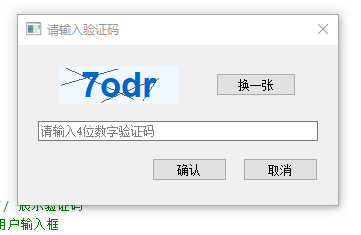
刚开始一看觉得实现起来可能会比较麻烦,但是实际操作过程很简单
下面来看来具体的实现操作吧
具体实现
1.首先我这里是一个弹窗的校验效果,所以第一时间想到的是创建一个QDialog
VerifyCodeDialog.h
cpp
#ifndef VERIFYCODEDIALOG_H
#define VERIFYCODEDIALOG_H

#include <QDialog>
#include <QPushButton>
#include <QLineEdit>
#include <QLabel>
#include <QRandomGenerator>
#include <QHBoxLayout>
#include <QVBoxLayout>
#include <QMessageBox>
#include "codelabel.h"
class VerifyCodeDialog : public QDialog
{
    Q_OBJECT
public:
    explicit VerifyCodeDialog(QWidget *parent = nullptr);

    // 获取用户输入的验证码
    QString getInputCode() const;

private:
    // 生成4位随机数字验证码
    void generateCode();
    // 刷新验证码
    void refreshCode();
    // 校验验证码
    bool checkCode();

private:
    CodeLabel *m_labCode;       // 展示验证码
    QLineEdit *m_editInput;  // 用户输入框
    QString m_realCode;      // 当前正确验证码
};

#endif // VERIFYCODEDIALOG_H
VerifyCodeDialog.cpp
cpp
#include "verifycodedialog.h"
#include <QPushButton>


VerifyCodeDialog::VerifyCodeDialog(QWidget *parent)
    : QDialog(parent)
{

    Qt::WindowFlags flags = windowFlags();
    flags &= ~Qt::WindowContextHelpButtonHint;
    setWindowFlags(flags);

    setWindowTitle(QStringLiteral("请输入验证码"));
    setFixedSize(320, 160);
    setModal(true);

    m_labCode = new CodeLabel(this);
    // 样式表全部一行,不换行拆分,彻底杜绝常量换行报错
    m_labCode->setStyleSheet("font-size:26px; font-weight:bold; color:#0066cc; background:#f0f7ff; padding:6px 12px;");
    m_labCode->setFixedWidth(120);

    QPushButton *btnRefresh = new QPushButton(QStringLiteral("换一张"), this);
    btnRefresh->setFixedWidth(80);

    m_editInput = new QLineEdit(this);
    m_editInput->setPlaceholderText(QStringLiteral("请输入4位数字验证码"));
    m_editInput->setMaxLength(4);

    QPushButton *btnOk = new QPushButton(QStringLiteral("确认"), this);
    QPushButton *btnCancel = new QPushButton(QStringLiteral("取消"), this);

    QHBoxLayout *layCode = new QHBoxLayout();
    layCode->addWidget(m_labCode);
    layCode->addWidget(btnRefresh);

    QHBoxLayout *layBtn = new QHBoxLayout();
    layBtn->addStretch();
    layBtn->addWidget(btnOk);
    layBtn->addWidget(btnCancel);

    QVBoxLayout *mainLay = new QVBoxLayout(this);
    mainLay->setContentsMargins(20,20,20,20);
    mainLay->setSpacing(16);
    mainLay->addLayout(layCode);
    mainLay->addWidget(m_editInput);
    mainLay->addLayout(layBtn);

    generateCode();

    connect(btnRefresh, &QPushButton::clicked, this, &VerifyCodeDialog::refreshCode);
    connect(btnCancel, &QPushButton::clicked, this, &QDialog::reject);
    connect(btnOk, &QPushButton::clicked, this, [this](){
        if(checkCode()){
            accept();
        }
    });
}

void VerifyCodeDialog::generateCode()
{
    m_realCode.clear();
    const QString chars = "abcdefghijklmnopqrstuvwxyz0123456789";
    for(int i = 0; i < 4; i++)
    {
        int idx = QRandomGenerator::global()->bounded(chars.size());
        m_realCode += chars.at(idx);
    }
    m_labCode->setText(m_realCode);
}

void VerifyCodeDialog::refreshCode()
{
    m_labCode->clear();   // 清空旧文字
    m_labCode->update();  // 强制重绘清除残影
    generateCode();
    m_editInput->clear();
}

bool VerifyCodeDialog::checkCode()
{
    QString input = m_editInput->text().trimmed();
    if(input.isEmpty()){
        QMessageBox::warning(this, "提示", "请输入验证码");
        return false;
    }
    if(input.toLower() != m_realCode.toLower()){
        QMessageBox::warning(this, "错误", "验证码不正确,请重新输入");
        refreshCode();
        return false;
    }
    return true;
}

QString VerifyCodeDialog::getInputCode() const
{
    return m_editInput->text().trimmed();
}这样就实现了弹窗的效果,并且显示换一张,点击换一张按钮会再次随机生成内容,我这里的内容范围是abcdefghijklmnopqrstuvwxyz0123456789 数字和字母,并且再点击确认的时候 校验部分大小写。
那字母带横线去混淆是如何实现的呢,刚开始我觉得这个可能会不好实现,但是很简单,.h文件中我引入了一个**#include "codelabel.h"** 这个就是实现的类
具体代码如下:
cpp
#ifndef CODELABEL_H
#define CODELABEL_H
#include <QLabel>
#include <QPainter>
#include <QRandomGenerator>
class CodeLabel : public QLabel
{
public:
    explicit CodeLabel(QWidget *p = nullptr):QLabel(p){}
protected:
    void paintEvent(QPaintEvent *) override{
        QPainter p(this);
        p.fillRect(rect(), QColor(240,247,255));
        // 绘制干扰线
        for(int i=0;i<4;i++){
            p.setPen(QPen(QColor(100,100,100),1));
            p.drawLine(QRandomGenerator::global()->bounded(width()),
                       QRandomGenerator::global()->bounded(height()),
                       QRandomGenerator::global()->bounded(width()),
                       QRandomGenerator::global()->bounded(height()));
        }
        // 绘制验证码文字
        p.setPen(QColor(0,102,204));
        p.setFont(QFont("",26,QFont::Bold));
        p.drawText(rect(), Qt::AlignCenter, text());
    }
};
#endif // CODELABEL_H
继承自QLabel 重写paintEvent绘制干扰线即可
具体使用
cpp
    VerifyCodeDialog dlg;
    int ret = dlg.exec();
    if(ret == QDialog::Accepted){

    }else{

    }
再使用的地方调用即可,即可include.h哦!
欧克,到这里就实现了 自定义随机验证码的功能了,具体校验的内容可以自己定义 感谢观看!!!