大家好,我是Java1234_小锋老师,最近更新《2027版 一天学会 FastAPI Python web开发 视频教程(无废话版)》专辑,感谢大家支持。
本课程主要介绍和讲解FastAPI简介,HelloWorld实现,自动生成交互式API文档,路径参数,查询参数,请求体,参数校验,响应模型 ,表单数据和模型,中间件,依赖注入,集成SQLAlchemy ORM 操作数据库,集成Pydantic数据校验等
视频教程+课件+源码打包下载:
链接:https://pan.baidu.com/s/1_NzaNr0Wln6kv1rdiQnUTg
提取码:0000
表单数据与模型
当你需要接收表单字段而不是 JSON 时,可以使用 Form
使用Form之前需要先安装 python-multipart
pip install python-multipart --trusted-host pypi.tuna.tsinghua.edu.cn我们来看一个实例:
python
class FormData(BaseModel):
username: str
password: str
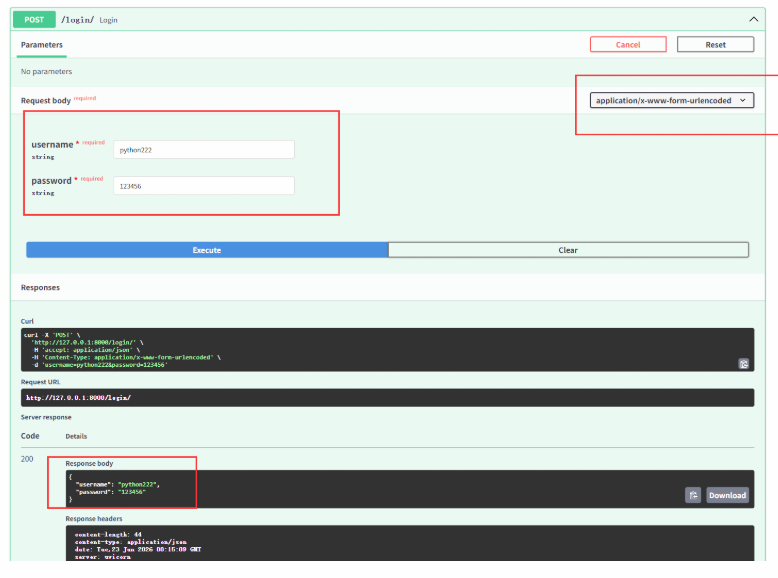
@app.post("/login/")
async def login(data: Annotated[FormData, Form()]):
return data然后打开浏览器访问 http://127.0.0.1:8000/docs,进行测试,注意,这里请求信息类型已经是form表单类型了。(之前测试案例是json)
请求表单与文件
FastAPI 支持同时使用 File 和 Form 定义文件和表单字段。
文件类型有两种,分别是bytes 整个文件一次性读进内存,和UploadFile 文件流式上传,适合大文件
我们看一个实例:
python
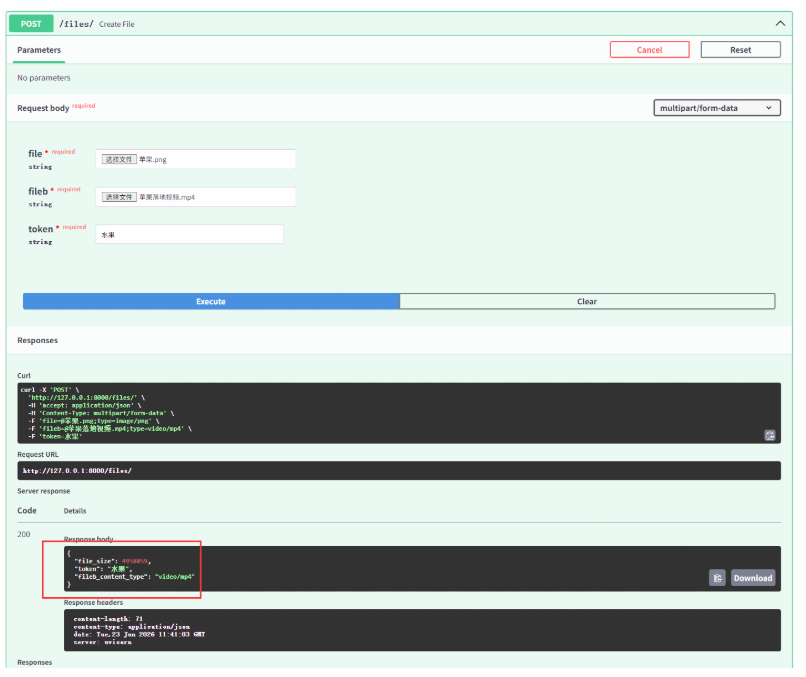
@app.post("/files/")
async def create_file(
    file: Annotated[bytes, File()], # 整个文件一次性读进内存
    fileb: Annotated[UploadFile, File()], # 文件流式上传,适合大文件
    token: Annotated[str, Form()],
):
    return {
        "file_size": len(file), # 获取文件大小
        "token": token, # 获取表单参数
        "fileb_content_type": fileb.content_type, # 获取文件类型
    }
然后打开浏览器访问 http://127.0.0.1:8000/docs,进行测试
响应类型 - 返回文件类型
在FastAPI中,除了默认的JSON响应,你可以通过response_class参数或直接返回特定的响应对象,来灵活地返回HTML、文件、纯文本、流媒体等各种类型的内容。
🧐 响应类型设置方式
在FastAPI中,主要有两种方式来指定非JSON的响应类型:
-
通过 response_class 参数声明 :在路由装饰器(如
@app.get())中使用response_class参数,可以声明该接口的响应媒体类型。这会在OpenAPI文档中自动生成相应的说明。 -
直接返回响应对象 :在路径操作函数中,直接实例化并返回一个具体的响应对象(如
FileResponse、StreamingResponse)。这种方式更加灵活,适用于需要动态决定响应类型的场景。
📦 常用响应类型介绍与实例
1,返回HTML内容实例:
python
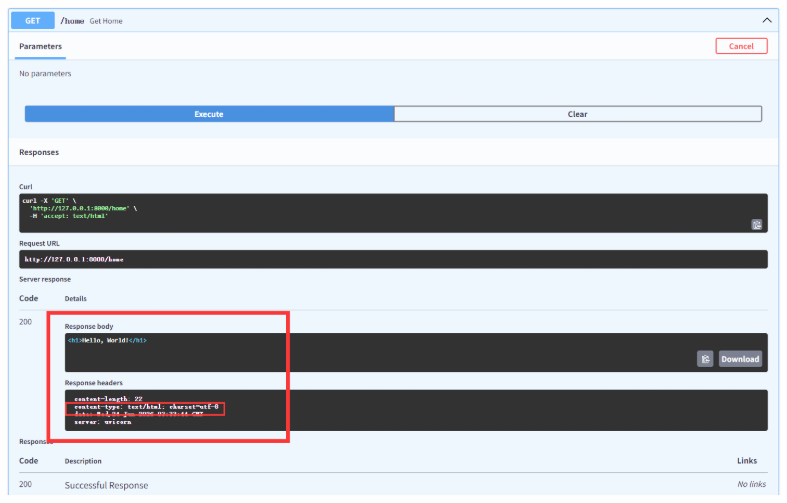
@app.get("/home", response_class=HTMLResponse)
async def get_home():
    return "<h1>Hello, World!</h1>"
然后打开浏览器访问 http://127.0.0.1:8000/docs,进行测试,返回的是html文件类型
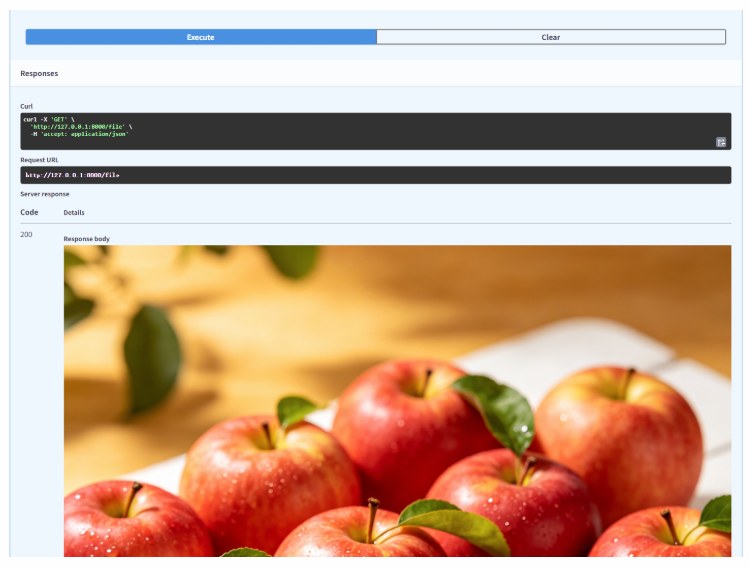
2,返回File文件实例:
python
@app.get("/file")
async def get_file():
    return FileResponse("./files/苹果.png")
然后打开浏览器访问 http://127.0.0.1:8000/docs,进行测试,返回的是image文件类型
3,返回流式文件实例:
python
@app.get("/stream-file")
async def stream_large_file():
file_path = "./files/苹果落地视频.mp4"
media_type, _ = mimetypes.guess_type(file_path) # 获取文件类型
def iterfile():
with open(file_path, "rb") as file_like:
# 每次读取 1MB 并 yield 出去
while chunk := file_like.read(1024 * 1024): # 1024 * 1024 = 1MB
yield chunk # yield yield 是 Python 中用来定义生成器(Generator) 的关键字。它可以让一个函数"暂停"并"记住"当前的状态,
filename = quote(os.path.basename(file_path)) # 对文件名进行 URL 编码
return StreamingResponse(
iterfile(),
media_type=media_type or "application/octet-stream",
headers={"Content-Disposition": f"attachment; filename*=UTF-8''{filename}"},
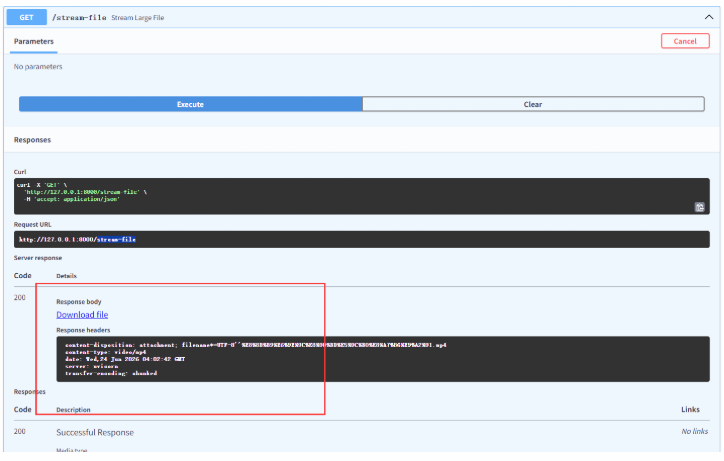
)然后打开浏览器访问 http://127.0.0.1:8000/docs,进行测试,返回的是流媒体文件类型
4,请求重定向
python
@app.get("/redirect")
async def redirect():
    return RedirectResponse(url="https://python222.java1234.com/")
请求 http://localhost:8000/redirect,直接跳转 https://python222.java1234.com/
以下是一个完整的清单,包含了用途和入门实例
🚀 FastAPI 响应类型清单与实例
| 响应类型 | 用途 | 入门实例 (代码片段) |
|---|---|---|
| JSONResponse | 默认响应类型,自动将字典、列表等 Python 对象转换为 JSON 格式。 | python<br>from fastapi.responses import JSONResponse<br><br>@app.get("/json")<br>async def get_json():<br> # 直接返回字典,FastAPI 会自动使用 JSONResponse<br> return {"message": "Hello World"}<br> # 或者显式返回 JSONResponse 对象<br> # return JSONResponse(content={"message": "Hello World"})<br> |
| HTMLResponse | 返回 HTML 内容,浏览器会将其渲染为网页。 | python<br>from fastapi.responses import HTMLResponse<br><br>@app.get("/html", response_class=HTMLResponse)<br>async def get_html():<br> html_content = """<br> <html><body><h1>Hello, FastAPI!</h1></body></html><br> """<br> return html_content<br> |
| PlainTextResponse | 返回纯文本内容。 | python<br>from fastapi.responses import PlainTextResponse<br><br>@app.get("/text", response_class=PlainTextResponse)<br>async def get_text():<br> return "This is a plain text response."<br> |
| FileResponse | 返回文件 (如图片、PDF)供下载或预览。异步读取整个文件,适合大小适中的文件。 | python<br>from fastapi.responses import FileResponse<br><br>@app.get("/image")<br>async def get_image():<br> # 返回图片文件,浏览器会直接显示或下载<br> return FileResponse("path/to/your/image.png")<br> # 也可以自定义下载文件名和MIME类型 @app.get("/download") async def download_file(): return FileResponse("path/to/file.pdf", filename="custom_name.pdf", media_type="application/pdf") |
| StreamingResponse | 流式传输 大文件、实时数据等。逐块读取和发送数据,内存占用低,适合大文件或动态生成的内容。 | python<br>from fastapi.responses import StreamingResponse<br><br>@app.get("/large-file")<br>async def stream_large_file():<br> def iterfile(): # 定义一个生成器函数<br> with open("large_file.zip", mode="rb") as file_like:<br> yield from file_like # 逐块读取并产出数据<br> return StreamingResponse(iterfile(), media_type="application/zip")<br> |
| RedirectResponse | 将请求重定向到另一个 URL。 | python<br>from fastapi.responses import RedirectResponse<br><br>@app.get("/old-page")<br>async def redirect():<br> return RedirectResponse(url="https://example.com/new-page")<br> |
| ORJSONResponse | 一个高性能的 JSON 响应类,使用 orjson 库进行序列化。 |
python<br>from fastapi.responses import ORJSONResponse<br><br>@app.get("/orjson", response_class=ORJSONResponse)<br>async def get_orjson():<br> return {"data": "This is serialized by orjson"}<br> 注意 :需要先安装 orjson (pip install orjson)。 |