1-WebGLRendererMini 的代码
src\renderers\WebGLRendererMini.js
ini
import { Vector4 } from '../math/Vector4.js';
import { WebGLAttributesMini } from './webgl/WebGLAttributesMini.js';
import { WebGLBackgroundMini } from './webgl/WebGLBackgroundMini.js';
import { WebGLBindingStatesMini } from './webgl/WebGLBindingStatesMini.js';
import { WebGLBufferRendererMini } from './webgl/WebGLBufferRendererMini.js';
import { WebGLGeometriesMini } from './webgl/WebGLGeometriesMini.js';
import { WebGLObjectsMini } from './webgl/WebGLObjectsMini.js';
import { WebGLProgramsMini } from './webgl/WebGLProgramsMini.js';
import { WebGLProperties } from './webgl/WebGLProperties.js';
import { WebGLRenderListMini } from './webgl/WebGLRenderListsMini.js';
import { WebGLStateMini } from './webgl/WebGLStateMini.js';
import { WebGLUniformsMini } from './webgl/WebGLUniformsMini.js';
import { WebGLMaterialsMini } from './webgl/WebGLMaterialsMini.js';
import { createCanvasElement } from '../utils.js';
/**
* WebGL 渲染器精简版:保留「场景遍历 → 渲染列表 → 着色器 → VAO → drawArrays」主链路。
* 仅支持 WebGL2、不透明物体、MeshMiniMaterial;无透明排序、阴影、多 Pass 等。
*/
class WebGLRendererMini {
constructor( parameters = {} ) {
const {
canvas = createCanvasElement(),
} = parameters;
/** 当前帧的渲染项列表,仅在 render() 执行期间有效 */
let currentRenderList = null;
this.domElement = canvas;
const _this = this;
let _width = canvas.width;
let _height = canvas.height;
let _pixelRatio = 1;
const _viewport = new Vector4( 0, 0, _width, _height );
let _gl = canvas.getContext( 'webgl2', );
// 各子系统实例,在 initGLContext 中初始化
let state;
let properties;
let attributes, geometries, objects;
let programCache, materials;
let background, bufferRenderer;
let bindingStates;
/** 组装 WebGL 子系统,与完整版 WebGLRenderer 的 initGLContext 结构对应 */
function initGLContext() {
// 初始化 GL 状态
state = new WebGLStateMini( _gl );
// 初始化材质/对象运行时缓存
properties = new WebGLProperties();
// 初始化 BufferGeometry → GPU buffer 管线
attributes = new WebGLAttributesMini( _gl );
// 初始化 VAO 与顶点属性绑定
bindingStates = new WebGLBindingStatesMini( _gl, attributes );
// 初始化几何体管理,管理几何体缓存
geometries = new WebGLGeometriesMini( _gl, attributes, bindingStates );
// 初始化对象管理,管理对象缓存
objects = new WebGLObjectsMini( geometries );
// 初始化 shader 编译缓存
programCache = new WebGLProgramsMini( _this, bindingStates );
// 初始化材质 uniform 同步
materials = new WebGLMaterialsMini();
// 初始化清屏
background = new WebGLBackgroundMini( _this, state );
// 初始化底层 draw call
bufferRenderer = new WebGLBufferRendererMini( _gl );
}
initGLContext();
this.getContext = function () {
return _gl;
};
// 设置画布大小
this.setSize = function ( width, height ) {
canvas.width = Math.floor( width * _pixelRatio );
canvas.height = Math.floor( height * _pixelRatio );
canvas.style.width = width + 'px';
canvas.style.height = height + 'px';
this.setViewport( 0, 0, width, height );
};
// 设置视口
this.setViewport = function ( x, y, width, height ) {
_viewport.set( x, y, width, height );
state.viewport( _viewport );
};
// 清屏
this.clear = function () {
_gl.clear( _gl.COLOR_BUFFER_BIT );
};
/**
* 单个几何体的直接绘制入口:选 program → 绑 VAO → gl.drawArrays。
* 完整版 renderBufferDirect 还处理 Instancing、多 group、线框等,此处仅三角形。
*/
this.renderBufferDirect = function ( camera, scene, geometry, material, object ) {
const program = setProgram( camera, scene, geometry, material, object );
const position = geometry.attributes.position;
// 设置 VAO 与顶点属性绑定
bindingStates.setup( program, geometry );
// 设置绘制模式
bufferRenderer.setMode( _gl.TRIANGLES );
// 绘制几何体
bufferRenderer.render( 0, position.count );
};
/** 主渲染入口:遍历场景 → 清屏 → 按 opaque 列表逐对象绘制 */
this.render = function ( scene, camera ) {
    camera.updateMatrixWorld();
    currentRenderList = new WebGLRenderListMini();
    projectObject( scene, camera );
    background.render( scene );
    renderScene( currentRenderList, scene, camera );
};
/** 深度优先遍历场景树,将 Mesh 的 geometry/material 推入渲染列表 */
function projectObject( object, camera ) {
if ( object.isMesh ) {
// 将 BufferGeometry 同步到 GPU(attributes 有变化时才上传)
const geometry = objects.update( object );
const material = object.material;
currentRenderList.push( object, geometry, material );
}
const children = object.children;
for ( let i = 0, l = children.length; i < l; i ++ ) {
projectObject( children[ i ], camera );
}
}
/** Mini 版仅 opaque 队列,无 transparent 排序与多 Pass */
function renderScene( currentRenderList, scene, camera ) {
const { opaque: opaqueObjects } = currentRenderList;
renderObjects( opaqueObjects, scene, camera );
}
function renderObjects( renderList, scene, camera ) {
for ( let i = 0, l = renderList.length; i < l; i ++ ) {
const renderItem = renderList[ i ];
const { object, geometry, material } = renderItem;
renderObject( object, scene, camera, geometry, material );
}
}
function renderObject( object, scene, camera, geometry, material ) {
// modelView = view × model,供顶点着色器变换
object.modelViewMatrix.multiplyMatrices( camera.matrixWorldInverse, object.matrixWorld );
_this.renderBufferDirect( camera, scene, geometry, material, object );
}
/**
* 按材质获取 WebGLProgramMini:先查材质级缓存,未命中则编译并写入全局 programsMap。
* currentProgram 相同时直接返回,避免重复 useProgram。
*/
function getProgram( material ) {
const materialProperties = properties.get( material );
const parameters = programCache.getParameters( material );
const programCacheKey = programCache.getProgramCacheKey( parameters );
let programs = materialProperties.programs;
if ( programs === undefined ) {
material.addEventListener( 'dispose', onMaterialDispose );
programs = new Map();
materialProperties.programs = programs;
}
let program = programs.get( programCacheKey );
if ( program !== undefined && materialProperties.currentProgram === program ) {
return program;
}
if ( program === undefined ) {
parameters.uniforms = programCache.getUniforms( material );
program = programCache.acquireProgram( parameters, programCacheKey );
programs.set( programCacheKey, program );
materialProperties.uniforms = parameters.uniforms;
materialProperties.uniformsList = null; // 新 program 需重建 uniform 上传列表
}
materialProperties.currentProgram = program;
return program;
}
/** 将 program 的 uniform 声明序列与材质 uniform 值配对,结果缓存供 upload 复用 */
function getUniformList( materialProperties ) {
if ( materialProperties.uniformsList === null ) {
// 获取WebglProgram的uniforms
const progUniforms = materialProperties.currentProgram.getUniforms();
materialProperties.uniformsList = WebGLUniformsMini.seqWithValue( progUniforms.seq, materialProperties.uniforms );
}
return materialProperties.uniformsList;
}
/** 切换 shader、上传 projectionMatrix / modelViewMatrix 及材质 uniform
* material: Material
*/
function setProgram( camera, scene, geometry, material, object ) {
const materialProperties = properties.get( material );
// 并向materialProperties.uniforms 写入WebglProgram的uniforms
const program = getProgram( material );
// 从program中获取uniforms,p_uniforms:WebGLUniformsMini
const p_uniforms = program.getUniforms();
// 自定义的uniforms,如ShaderLibMini.mini.uniforms
const m_uniforms = materialProperties.uniforms;
state.useProgram( program.program );
// 设置projectionMatrix
p_uniforms.setValue( _gl, 'projectionMatrix', camera.projectionMatrix );
// 刷新材质的uniforms,将material的uniforms同步到program的m_uniforms
materials.refreshMaterialUniforms( m_uniforms, material );
// 上传材质的uniforms,将program的uniforms同步到GPU
// getUniformList( materialProperties ) 获取program的uniforms列表
WebGLUniformsMini.upload( _gl, getUniformList( materialProperties ), m_uniforms );
// 设置modelViewMatrix
p_uniforms.setValue( _gl, 'modelViewMatrix', object.modelViewMatrix );
// 返回program
return program;
}
/** 材质销毁时,释放 program 引用 */
function onMaterialDispose( event ) {
console.log('onMaterialDispose', event);
const material = event.target;
material.removeEventListener( 'dispose', onMaterialDispose );
deallocateMaterial( material );
}
function deallocateMaterial( material ) {
releaseMaterialProgramReferences( material );
properties.remove( material );
}
function releaseMaterialProgramReferences( material ) {
const materialProperties = properties.get( material );
const programs = materialProperties.programs;
if ( programs !== undefined ) {
for ( const program of programs.values() ) {
programCache.releaseProgram( program );
}
}
}
}
}
export { WebGLRendererMini };
2-WebGLRendererMini 的功能定位
WebGLRenderer 是 Three.js 的核心 WebGL 2 渲染器(约 3700 行)。
WebGLRenderer 把场景图(Scene Graph)转成 GPU 上的 draw call(绘制调用),是你在应用里最常接触的类之一:
scss
const renderer = new WebGLRenderer();
renderer.setSize(window.innerWidth, window.innerHeight);
document.body.appendChild(renderer.domElement);
function animate() {
requestAnimationFrame(animate);
renderer.render(scene, camera);
}WebGLRenderer 的整体定位:编排器,而非"全部实现"。
WebGLRenderer 本身不直接写大量 GLSL 或底层 WebGL 调用,而是作为总调度器,组合 webgl/ 目录下约 20 个子模块:
| 模块 | 职责 |
|---|---|
WebGLPrograms |
Shader 编译、程序缓存 |
WebGLState |
深度测试、混合、视口等 GL 状态 |
WebGLGeometries / WebGLAttributes |
几何体、顶点缓冲 |
WebGLTextures |
纹理上传与管理 |
WebGLRenderLists |
渲染队列(opaque / transmissive / transparent) |
WebGLRenderStates |
每帧灯光、阴影等渲染状态 |
WebGLShadowMap |
阴影贴图 |
WebGLBackground |
背景色 / 天空盒 / 环境贴图 |
WebGLBindingStates |
VAO、顶点属性绑定 |
WebXRManager |
VR/AR 支持 |
可以理解为:Three.js 的高层 API → WebGLRenderer → 各 WebGL 子系统 → 原生 WebGL 2 API。
WebGLRendererMini 保留了WebGLRenderer 的核心更能,但具体功能做了删减。
WebGLRendererMini 保留了最核心的 WebGL 渲染链路:
场景遍历 → 渲染列表 → 着色器程序 → VBO 写入 → VAO 绑定 → drawArrays
3-WebGLRendererMini 的限制
| 支持 | 不支持 |
|---|---|
| WebGL2 | WebGL1 |
| 不透明 Mesh | 透明物体排序 |
MeshMiniMaterial |
多种材质类型 |
三角形 drawArrays |
实例化、线框、阴影、多 Pass |
4-WebGLRendererMini 的整体架构
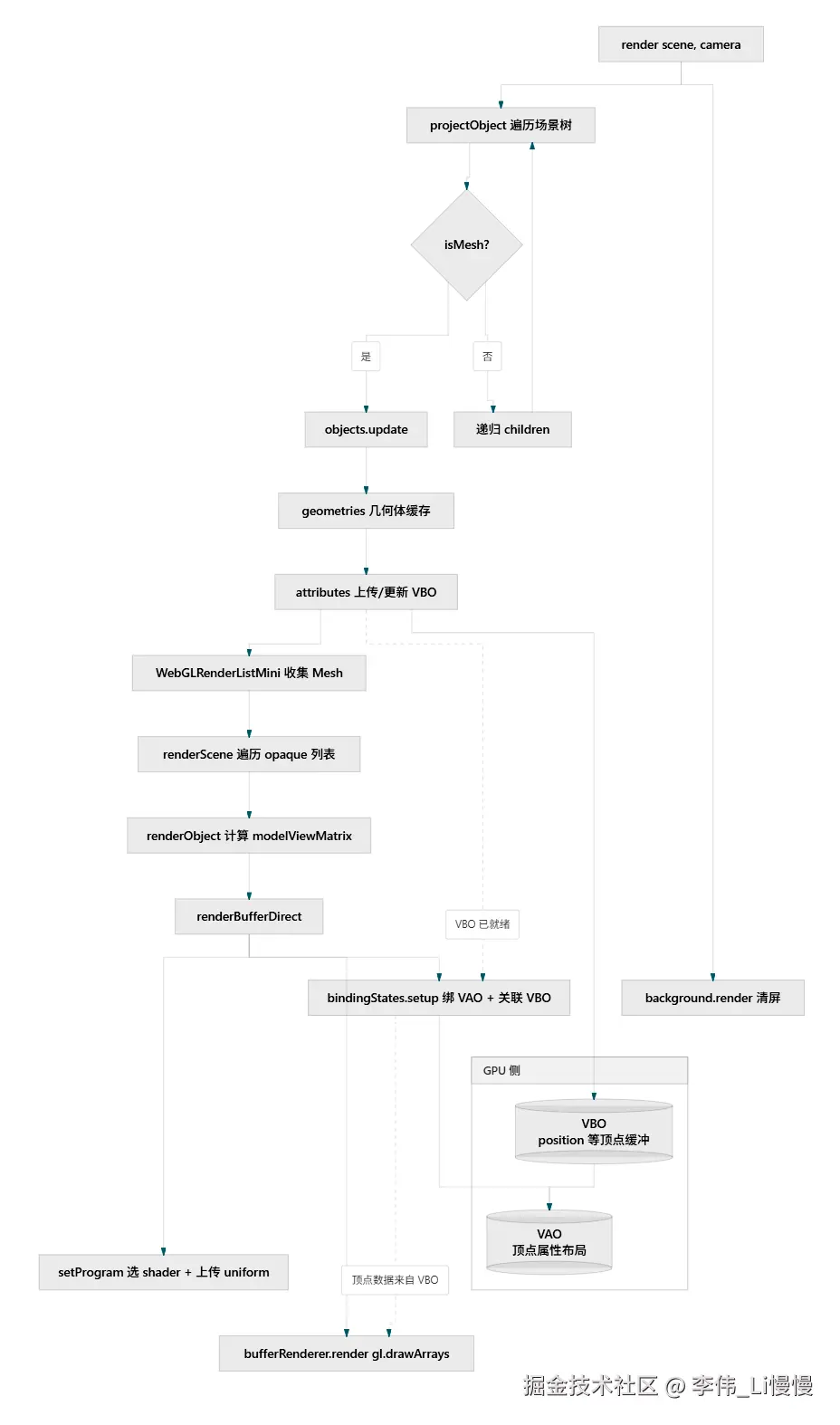
5-构造函数:初始化 WebGL 上下文与子系统
ini
class WebGLRendererMini {
constructor( parameters = {} ) {
// ...
let _gl = canvas.getContext( 'webgl2', );
function initGLContext() {
state = new WebGLStateMini( _gl );
properties = new WebGLProperties();
attributes = new WebGLAttributesMini( _gl );
bindingStates = new WebGLBindingStatesMini( _gl, attributes );
geometries = new WebGLGeometriesMini( _gl, attributes, bindingStates );
objects = new WebGLObjectsMini( geometries );
programCache = new WebGLProgramsMini( _this, bindingStates );
materials = new WebGLMaterialsMini();
background = new WebGLBackgroundMini( _this, state );
bufferRenderer = new WebGLBufferRendererMini( _gl );
}各子模块职责:
| 模块 | 作用 |
|---|---|
WebGLStateMini |
管理 GL 状态(viewport、useProgram 等) |
WebGLProperties |
材质/对象的运行时缓存(program、uniforms) |
WebGLAttributesMini |
BufferAttribute → GPU buffer |
WebGLBindingStatesMini |
VAO 与顶点属性绑定 |
WebGLGeometriesMini |
几何体 GPU 缓存 |
WebGLObjectsMini |
对象级几何体更新 |
WebGLProgramsMini |
shader 编译与 program 池 |
WebGLMaterialsMini |
材质 uniform 同步 |
WebGLBackgroundMini |
清屏/背景色 |
WebGLBufferRendererMini |
底层 gl.drawArrays |
结构与完整版 WebGLRenderer.initGLContext() 一一对应,只是每个模块都换成了 Mini 版。
6. 对外 API
setSize / setViewport
设置 canvas 物理像素尺寸、CSS 尺寸,并更新 WebGL viewport。
clear
只清颜色缓冲:gl.clear(COLOR_BUFFER_BIT)。
render(scene, camera) --- 主入口
ini
this.render = function ( scene, camera ) {
camera.updateMatrixWorld();
currentRenderList = new WebGLRenderListMini();
projectObject( scene, camera );
background.render( scene );
renderScene( currentRenderList, scene, camera );
};每帧流程:
- 更新相机世界矩阵
- 新建渲染列表
- 遍历场景,收集所有 Mesh
- 清屏
- 按 opaque 列表逐个绘制
7-场景遍历:projectObject
ini
function projectObject( object, camera ) {
    if ( object.isMesh ) {
        const geometry = objects.update( object );
        const material = object.material;
        currentRenderList.push( object, geometry, material );
    }
    const children = object.children;
    for ( let i = 0, l = children.length; i < l; i ++ ) {
        projectObject( children[ i ], camera );
    }
}- 递归遍历场景树
- 遇到
isMesh时:把 geometry 同步到 GPU,推入渲染列表 - 不做 视锥剔除、透明排序、层级排序
8-渲染列表:WebGLRenderListMini
只有一个 opaque 数组,每项包含 { object, geometry, material }。
完整版还有 transparent 队列和按深度排序,这里全部省略。
9-单对象绘制:renderObject → renderBufferDirect
php
function renderObject( object, scene, camera, geometry, material ) {
    object.modelViewMatrix.multiplyMatrices( camera.matrixWorldInverse, object.matrixWorld );
    _this.renderBufferDirect( camera, scene, geometry, material, object );
}
ini
this.renderBufferDirect = function ( camera, scene, geometry, material, object ) {
    const program = setProgram( camera, scene, geometry, material, object );
    const position = geometry.attributes.position;
    bindingStates.setup( program, geometry );
    bufferRenderer.setMode( _gl.TRIANGLES );
    bufferRenderer.render( 0, position.count );
};
三步完成一次 draw call:
setProgram--- 选 shader、上传 uniformbindingStates.setup--- 绑定 VAO / 顶点属性bufferRenderer.render---gl.drawArrays(TRIANGLES, 0, count)
10-Shader program管理:getProgram
ini
function getProgram( material ) {
const materialProperties = properties.get( material );
const parameters = programCache.getParameters( material );
const programCacheKey = programCache.getProgramCacheKey( parameters );
// ...
let program = programs.get( programCacheKey );
if ( program !== undefined && materialProperties.currentProgram === program ) {
return program;
}
if ( program === undefined ) {
parameters.uniforms = programCache.getUniforms( material );
program = programCache.acquireProgram( parameters, programCacheKey );
programs.set( programCacheKey, program );
// ...
}
materialProperties.currentProgram = program;
return program;
}缓存策略(与完整版一致):
-
在WebGLProgramsMini的programsMap 中缓存WebGLProgramMini 对象。
-
programsMap 会以Material 中的特定属性为鉴,存储WebGLProgramMini 对象。
以此可以根据相应的键,从WebGLProgramsMini的programsMap 中获取相应的WebGLProgramMini 对象。
iniconst materialProperties = properties.get( material ); const parameters = programCache.getParameters( material ); const programCacheKey = programCache.getProgramCacheKey( parameters ); -
currentProgram 是当前的WebGLProgramMini,若WebGLProgramMini 未变,则跳过useProgram。
11-Uniform 上传:setProgram
ini
function setProgram( camera, scene, geometry, material, object ) {
    const materialProperties = properties.get( material );
    const program = getProgram( material );
    const p_uniforms = program.getUniforms();
    const m_uniforms = materialProperties.uniforms;
    state.useProgram( program.program );
    p_uniforms.setValue( _gl, 'projectionMatrix', camera.projectionMatrix );
    materials.refreshMaterialUniforms( m_uniforms, material );
    WebGLUniformsMini.upload( _gl, getUniformList( materialProperties ), m_uniforms );
    p_uniforms.setValue( _gl, 'modelViewMatrix', object.modelViewMatrix );
    return program;
}
在上传uniform 之前需要先useProgram,从而确定要上传到哪个shader program。
projectionMatrix 和modelViewMatrix 是通用的uniform,通过p_uniforms.setValue 方法单独上传的。
跟具体材质相关uniform 是通过WebGLUniformsMini.upload() 方法上传的。
getUniformList( materialProperties ) 方法可以获取响应材质所对应的WebglProgram的uniforms。
12-资源释放
scss
function onMaterialDispose( event ) {
const material = event.target;
material.removeEventListener( 'dispose', onMaterialDispose );
deallocateMaterial( material );
}
function deallocateMaterial( material ) {
releaseMaterialProgramReferences( material );
properties.remove( material );
}
function releaseMaterialProgramReferences( material ) {
const materialProperties = properties.get( material );
const programs = materialProperties.programs;
if ( programs !== undefined ) {
for ( const program of programs.values() ) {
programCache.releaseProgram( program );
}
}
}材质触发 dispose 时:
- 释放关联的 WebGL program
- 从
properties中移除材质缓存
13-使用示例
examples/webgl_renderer_mini.html
xml
<!DOCTYPE html>
<html lang="en">
<head>
<title>three.js webgl - geometry - triangle</title>
<meta charset="utf-8">
<meta name="viewport" content="width=device-width, user-scalable=no, minimum-scale=1.0, maximum-scale=1.0">
<link type="text/css" rel="stylesheet" href="main.css">
</head>
<body>
<script type="importmap">
{
"imports": {
"three": "../build/three.module.js",
"three/addons/": "./jsm/"
}
}
</script>
<script type="module">
import * as THREE from 'three';
const camera = new THREE.PerspectiveCamera( 70, window.innerWidth / window.innerHeight, 0.1, 100 );
camera.position.z = 4;
const scene = new THREE.Scene();
const geometry = new THREE.BufferGeometry();
const vertices = new Float32Array( [
- 1.0, - 1.0, 0.0,
1.0, - 1.0, 0.0,
0.0, 1.0, 0.0
] );
geometry.setAttribute( 'position', new THREE.BufferAttribute( vertices, 3 ) );
const material = new THREE.MeshMiniMaterial( { color: 0x00acec } );
const mesh = new THREE.Mesh( geometry, material );
scene.add( mesh );
const renderer = new THREE.WebGLRendererMini( { antialias: true } );
renderer.setSize( window.innerWidth, window.innerHeight );
renderer.render( scene, camera );
document.body.appendChild( renderer.domElement );
window.addEventListener( 'resize', onWindowResize );
function onWindowResize() {
camera.aspect = window.innerWidth / window.innerHeight;
camera.updateProjectionMatrix();
renderer.setSize( window.innerWidth, window.innerHeight );
renderer.render( scene, camera );
}
</script>
</body>
</html>
效果如下:
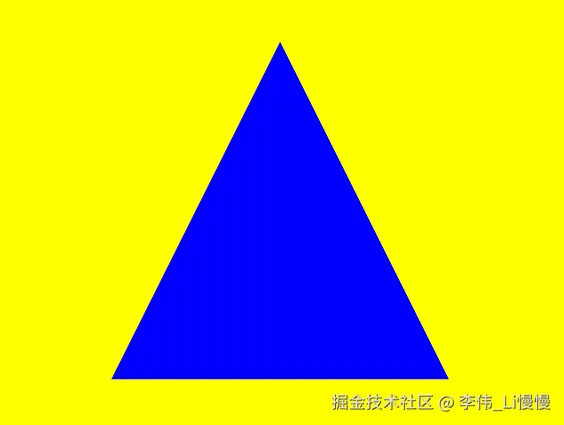
14-与完整版 WebGLRenderer 的对比
| 环节 | 完整版 | Mini 版 |
|---|---|---|
| 场景遍历 | 剔除、排序、多 Pass | 简单 DFS,只收集 Mesh |
| 渲染队列 | opaque + transparent | 仅 opaque |
| 材质 | 几十种 | 仅 MeshMiniMaterial |
| 绘制 | drawArrays / drawElements / Instanced | 仅 drawArrays(TRIANGLES) |
| 阴影/后处理/MSAA | 有 | 无 |
总结
WebGLRendererMini 是 Three.js 渲染管线的最小可读实现,核心就一条链:
Scene 树 → Mesh 收集 → 清屏 → 对每个 Mesh:
  编译/缓存 Program → 上传 Matrix + Material Uniform → 绑 VAO → drawArrays
现在大家应该给已经对three.js 整体的架构原理有了一个基本认知,接下来我们便可以以此为锲口,深入研究其中我们尚未说过的内容。