效果图
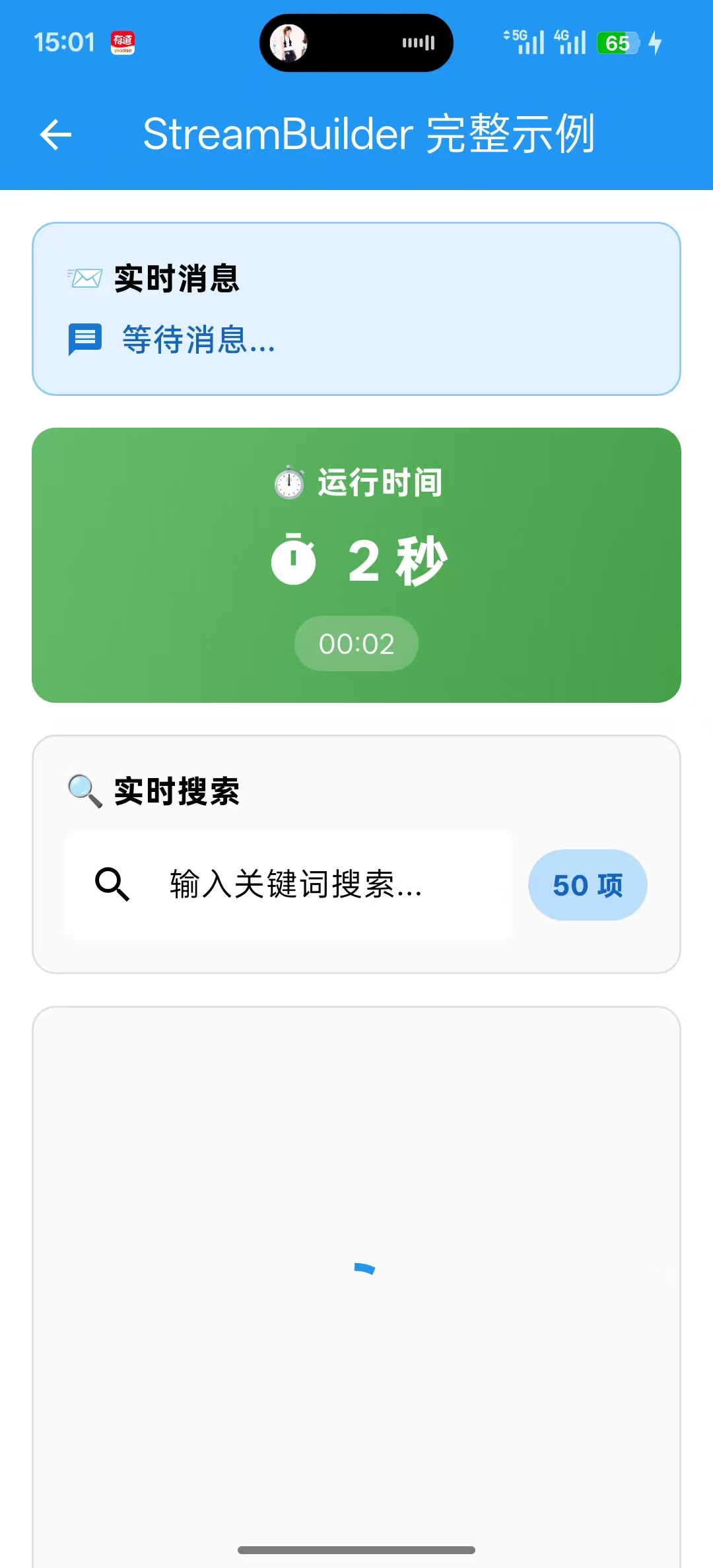
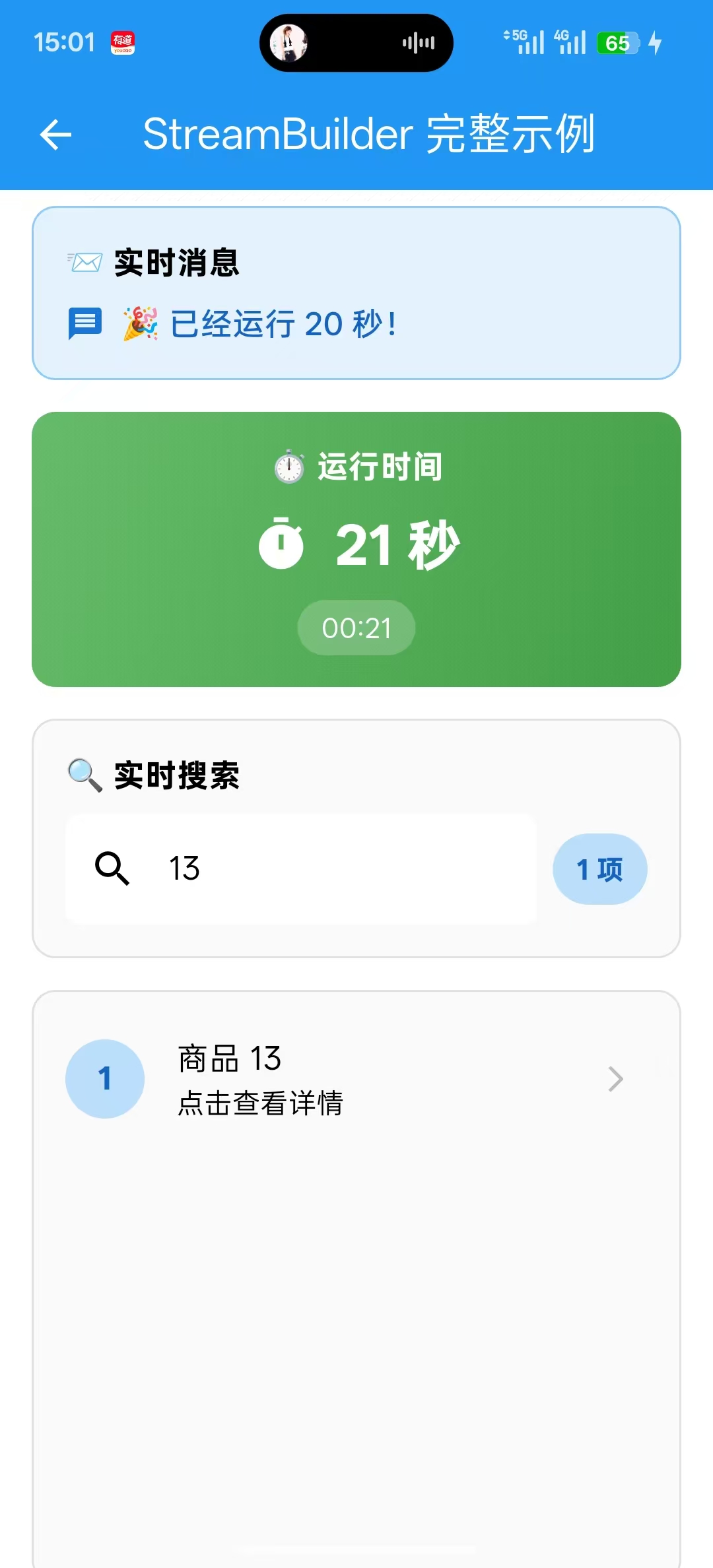
关键代码
Dart
1.定义StreamController
  final StreamController<int> _counterController = StreamController<int>.broadcast();
  final StreamController<String> _messageController = StreamController<String>.broadcast();
  final StreamController<List<String>> _searchController = StreamController<List<String>>.broadcast();

2.通过.add()往Stream里面添加数据
_counterController.add(0);
_messageController.add("欢迎使用 StreamBuilder 示例");
_searchController.add(_allItems);

3.设置StreamBuilder,拿到最新数据snapshot.data,并且设置在UI上
 StreamBuilder<String>(
            stream: _messageController.stream,  // ⭐ 监听管道出口
            initialData: "等待消息...",  // ⭐ 初始值(还没有数据时显示)
            builder: (context, snapshot) {  // ⭐ 数据变化时自动调用,这里的snapshot.data就是最新的数据
              return Row(
                children: [
                  Icon(
                    Icons.message,
                    size: 20,
                    color: Colors.blue[700],
                  ),
                  const SizedBox(width: 8),
                  Expanded(
                    child: Text(
                      snapshot.data ?? "无消息", // ⭐ 最新数据
                      style: TextStyle(
                        fontSize: 16,
                        color: Colors.blue[800],
                        fontWeight: FontWeight.w500,
                      ),
                    ),
                  ),
                ],
              );
            },
          ),
代码实例
Dart
import 'dart:async';
import 'package:flutter/material.dart';

class DemoPage extends StatefulWidget {
  const DemoPage({super.key});

  @override
  State<DemoPage> createState() => _DemoPageState();
}

class _DemoPageState extends State<DemoPage> {

  // ==================== 1. StreamController 定义 ====================
  //使用 BroadcastStreamController 允许多次监听
  final StreamController<int> _counterController = StreamController<int>.broadcast();
  final StreamController<String> _messageController = StreamController<String>.broadcast();
  final StreamController<List<String>> _searchController = StreamController<List<String>>.broadcast();

  // ==================== 2. 数据源 ====================
  int _counter = 0;
  final List<String> _allItems = List.generate(50, (i) => "商品 ${i + 1}");

  // ==================== 3. 搜索防抖 ====================
  Timer? _debounceTimer;

  // ==================== 4. 初始化 ====================
  @override
  void initState() {
    super.initState();
    // 发送初始数据
    _counterController.add(0);
    _messageController.add("欢迎使用 StreamBuilder 示例");
    _searchController.add(_allItems);

    // 启动自动计时器
    _startAutoTimer();
  }

  // ==================== 5. 自动计时器 ====================
  void _startAutoTimer() {
    Timer.periodic(const Duration(seconds: 1), (timer) {
      if (mounted) {

        _counter++;

        _counterController.add(_counter); //⭐秒数变化回调

        if (_counter % 5 == 0) { //⭐每5秒往消息控制器里面发一条消息
          _messageController.add("🎉 已经运行 $_counter 秒!");
        }
      }
    });
  }

  // ==================== 6. 搜索功能 ====================
  void _onSearchChanged(String query) {
    //取消之前的定时器
    _debounceTimer?.cancel();
    //创建新的定时器
    _debounceTimer = Timer(const Duration(milliseconds: 500), () {
      //执行搜索逻辑
      //空搜索,则显示全部
      if (query.isEmpty) {
        _searchController.add(_allItems);
        return;
      }

      //过滤数据
      final results = _allItems
          .where((item) => item.toLowerCase().contains(query.toLowerCase()))
          .toList();
      //发送结果
      _searchController.add(results);
    });
  }

  // ==================== 7. 清理资源 ====================
  @override
  void dispose() {
    _counterController.close();
    _messageController.close();
    _searchController.close();
    _debounceTimer?.cancel();
    super.dispose();
  }

  // ==================== 8. UI 构建 ====================
  @override
  Widget build(BuildContext context) {
    return Scaffold(
      appBar: AppBar(
        title: const Text("StreamBuilder 完整示例"),
        backgroundColor: Colors.blue,
        foregroundColor: Colors.white,
        elevation: 0,
      ),
      //防止溢出
      body: SingleChildScrollView(
        padding: const EdgeInsets.all(16.0),
        child: Column(
          crossAxisAlignment: CrossAxisAlignment.start,
          children: [
            // ==================== 消息显示 ====================
            _buildMessageSection(),

            const SizedBox(height: 16),

            // ==================== 计数器显示 ====================
            _buildCounterSection(),

            const SizedBox(height: 16),

            // ==================== 搜索功能 ====================
            _buildSearchSection(),

            const SizedBox(height: 16),

            // ==================== 搜索结果显示 ====================
            SizedBox(
              height: 300,
              child: _buildSearchResultSection(),
            ),
          ],
        ),
      ),
    );
  }

  // ==================== 9. 消息区域 ====================
  Widget _buildMessageSection() {
    return Container(
      padding: const EdgeInsets.all(16),
      decoration: BoxDecoration(
        color: Colors.blue[50],
        borderRadius: BorderRadius.circular(12),
        border: Border.all(color: Colors.blue[200]!),
      ),
      child: Column(
        crossAxisAlignment: CrossAxisAlignment.start,
        children: [
          const Text(
            "📨 实时消息",
            style: TextStyle(
              fontWeight: FontWeight.bold,
              fontSize: 16,
            ),
          ),
          const SizedBox(height: 8),

          StreamBuilder<String>(
            stream: _messageController.stream,  // ⭐ 监听管道出口
            initialData: "等待消息...",  // ⭐ 初始值(还没有数据时显示)
            builder: (context, snapshot) {  // ⭐ 数据变化时自动调用,这里的snapshot.data就是最新的数据
              return Row(
                children: [
                  Icon(
                    Icons.message,
                    size: 20,
                    color: Colors.blue[700],
                  ),
                  const SizedBox(width: 8),
                  Expanded(
                    child: Text(
                      snapshot.data ?? "无消息", // ⭐ 最新数据
                      style: TextStyle(
                        fontSize: 16,
                        color: Colors.blue[800],
                        fontWeight: FontWeight.w500,
                      ),
                    ),
                  ),
                ],
              );
            },
          ),
        ],
      ),
    );
  }

  // ==================== 10. 计数器区域 ====================
  Widget _buildCounterSection() {
    return Container(
      padding: const EdgeInsets.all(16),
      decoration: BoxDecoration(
        gradient: LinearGradient(
          colors: [Colors.green[400]!, Colors.green[600]!],
          begin: Alignment.topLeft,
          end: Alignment.bottomRight,
        ),
        borderRadius: BorderRadius.circular(12),
      ),
      child: Column(
        children: [
          const Text(
            "⏱️ 运行时间",
            style: TextStyle(
              color: Colors.white,
              fontWeight: FontWeight.bold,
              fontSize: 16,
            ),
          ),
          const SizedBox(height: 8),

          StreamBuilder<int>(
            stream: _counterController.stream,// ⭐ 监听管道出口
            initialData: 0,// ⭐ 初始值(还没有数据时显示)
            builder: (context, snapshot) {// ⭐ 数据变化时自动调用,这里的snapshot.data就是最新的数据
              return Row(
                mainAxisAlignment: MainAxisAlignment.center,
                children: [
                  Icon(
                    Icons.timer,
                    color: Colors.white,
                    size: 30,
                  ),
                  const SizedBox(width: 12),
                  Text(
                    "${snapshot.data ?? 0} 秒",
                    style: const TextStyle(
                      color: Colors.white,
                      fontSize: 28,
                      fontWeight: FontWeight.bold,
                    ),
                  ),
                ],
              );
            },
          ),
          const SizedBox(height: 8),
          Container(
            padding: const EdgeInsets.symmetric(horizontal: 12, vertical: 4),
            decoration: BoxDecoration(
              color: Colors.white.withOpacity(0.2),
              borderRadius: BorderRadius.circular(20),
            ),
            child: StreamBuilder<int>(
              stream: _counterController.stream,
              initialData: 0,
              builder: (context, snapshot) {
                final seconds = snapshot.data ?? 0;
                final minutes = seconds ~/ 60;
                final remainingSeconds = seconds % 60;
                return Text(
                  "${minutes.toString().padLeft(2, '0')}:${remainingSeconds.toString().padLeft(2, '0')}",
                  style: const TextStyle(
                    color: Colors.white,
                    fontSize: 14,
                  ),
                );
              },
            ),
          ),
        ],
      ),
    );
  }

  // ==================== 11. 搜索区域 ====================
  Widget _buildSearchSection() {
    return Container(
      padding: const EdgeInsets.all(16),
      decoration: BoxDecoration(
        color: Colors.grey[50],
        borderRadius: BorderRadius.circular(12),
        border: Border.all(color: Colors.grey[300]!),
      ),
      child: Column(
        crossAxisAlignment: CrossAxisAlignment.start,
        children: [
          const Text(
            "🔍 实时搜索",
            style: TextStyle(
              fontWeight: FontWeight.bold,
              fontSize: 16,
            ),
          ),
          const SizedBox(height: 8),
          Row(
            children: [
              Expanded(
                child: TextField(
                  onChanged: _onSearchChanged,
                  decoration: InputDecoration(
                    hintText: "输入关键词搜索...",
                    prefixIcon: const Icon(Icons.search),
                    border: OutlineInputBorder(
                      borderRadius: BorderRadius.circular(8),
                      borderSide: BorderSide.none,
                    ),
                    fillColor: Colors.white,
                    filled: true,
                  ),
                ),
              ),
              const SizedBox(width: 8),

              //显示搜索结果的数量
              StreamBuilder<List<String>>(
                stream: _searchController.stream, // ⭐ 监听管道出口
                initialData: _allItems, // ⭐ 初始值(还没有数据时显示)
                builder: (context, snapshot) { // ⭐ 数据变化时自动调用,这里的snapshot.data就是最新的数据
                  final count = snapshot.data?.length ?? 0;
                  return Container(
                    padding: const EdgeInsets.symmetric(
                      horizontal: 12,
                      vertical: 8,
                    ),
                    decoration: BoxDecoration(
                      color: Colors.blue[100],
                      borderRadius: BorderRadius.circular(20),
                    ),
                    child: Text(
                      "$count 项",
                      style: TextStyle(
                        color: Colors.blue[800],
                        fontWeight: FontWeight.bold,
                      ),
                    ),
                  );
                },
              ),
            ],
          ),
        ],
      ),
    );
  }

  // ==================== 12. 搜索结果区域 ====================
  Widget _buildSearchResultSection() {
    return Container(
      width: double.infinity,
      decoration: BoxDecoration(
        color: Colors.grey[50],
        borderRadius: BorderRadius.circular(12),
        border: Border.all(color: Colors.grey[300]!),
      ),

      //显示搜索结果
      child: StreamBuilder<List<String>>(

        stream: _searchController.stream, // ⭐ 监听管道出口
        initialData: _allItems, // ⭐ 初始值(还没有数据时显示)
        builder: (context, snapshot) { // ⭐ 数据变化时自动调用,这里的snapshot.data就是最新的数据
          // 1️⃣ 等待状态
          if (snapshot.connectionState == ConnectionState.waiting) {
            return const Center(
              child: CircularProgressIndicator(),
            );
          }

          // 2️⃣ 错误状态
          if (snapshot.hasError) {
            return Center(
              child: Column(
                mainAxisAlignment: MainAxisAlignment.center,
                children: [
                  Icon(
                    Icons.error_outline,
                    size: 60,
                    color: Colors.red[300],
                  ),
                  const SizedBox(height: 8),
                  Text(
                    "发生错误:${snapshot.error}",
                    style: const TextStyle(color: Colors.red),
                  ),
                ],
              ),
            );
          }

          // 3️⃣ 数据状态
          final items = snapshot.data ?? [];
          if (items.isEmpty) {
            return Center(
              child: Column(
                mainAxisAlignment: MainAxisAlignment.center,
                children: [
                  Icon(
                    Icons.search_off,
                    size: 60,
                    color: Colors.grey[400],
                  ),
                  const SizedBox(height: 8),
                  const Text(
                    "没有找到匹配的商品",
                    style: TextStyle(
                      color: Colors.grey,
                      fontSize: 16,
                    ),
                  ),
                ],
              ),
            );
          }

          // 4️⃣ 显示数据列表
          return ListView.builder(
            padding: const EdgeInsets.symmetric(vertical: 8),
            itemCount: items.length,
            itemBuilder: (context, index) {
              final item = items[index];
              return ListTile(
                leading: CircleAvatar(
                  backgroundColor: Colors.blue[100],
                  child: Text(
                    "${index + 1}",
                    style: TextStyle(
                      color: Colors.blue[800],
                      fontWeight: FontWeight.bold,
                    ),
                  ),
                ),
                title: Text(item),
                subtitle: Text("点击查看详情"),
                trailing: Icon(
                  Icons.arrow_forward_ios,
                  size: 16,
                  color: Colors.grey[400],
                ),
                onTap: () {
                  ScaffoldMessenger.of(context).showSnackBar(
                    SnackBar(
                      content: Text("你点击了:$item"),
                      duration: const Duration(milliseconds: 800),
                    ),
                  );
                },
              );
            },
          );
        },
      ),
    );
  }
}
相关知识点