创建定义所有接口的库(一个),但需分别在不同的库中实现接口;利用Orleans服务自动发现已加载程序集中的所有Gain的特性,在进程启动时,先动态加载Gain的实现程序集,在启动silo服务时,控制当前silo启动哪个Gain。
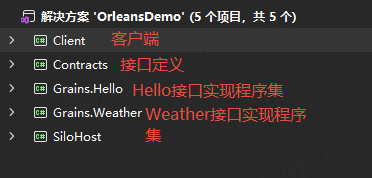
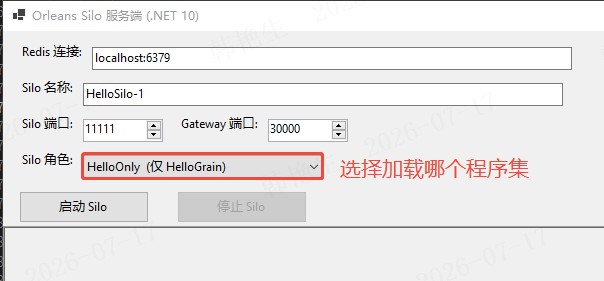
启动Silo前使用Assembly.LoadFrom方法调用选择的程序集。
cs
            // 非对称部署(物理分离方案):Orleans 7.0+ 移除了 GrainClassOptions.ExcludedGrainTypes,
            // 改用"运行时按角色加载 Grain 程序集"实现------只有被 Assembly.LoadFrom 加载进 AppDomain
            // 的 Grain 实现才会被 Silo 发现并托管。HelloGrain 和 WeatherGrain 分别在独立的
            // Grains.Hello.dll / Grains.Weather.dll 中(由 SiloHost.csproj 的 CopyGrainDlls target 复制)。
            LoadGrainAssemblies(role);

            var builder = Host.CreateApplicationBuilder();
            builder.Logging.AddProvider(new RichTextLoggerProvider(_logBox));
            builder.Logging.AddFilter("Orleans", LogLevel.Information);

            // 让每个 Grain 能报告自己运行在哪个 Silo(验证非对称部署)
            builder.Services.AddSingleton<ISiloIdentity>(new SiloIdentity(siloName));

            builder.UseOrleans(siloBuilder =>
            {
                siloBuilder
                    .Configure<ClusterOptions>(options =>
                    {
                        options.ClusterId = ClusterId;
                        options.ServiceId = ServiceId;
                    })
                    .Configure<SiloOptions>(options => options.SiloName = siloName)
                    .ConfigureEndpoints("localhost", siloPort, gatewayPort)
                    .UseRedisClustering(options =>
                    {
                        options.ConfigurationOptions = ConfigurationOptions.Parse(redisConn);
                    });
            });

            _host = builder.Build();
            await _host.StartAsync();
            Log($"Silo '{siloName}' 已加入集群 '{ClusterId}'。");
            _stopBtn.Enabled = true;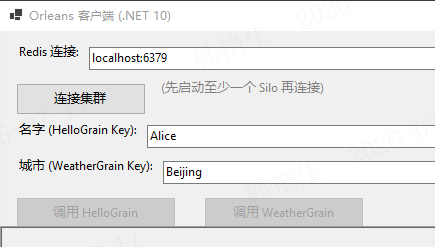
cs
        try
        {
            var redisConn = _redisBox.Text.Trim();
            Log($"通过 Redis '{redisConn}' 连接集群 '{ClusterId}' ...");

            var builder = Host.CreateApplicationBuilder();
            builder.UseOrleansClient(clientBuilder =>
            {
                clientBuilder
                    .Configure<ClusterOptions>(options =>
                    {
                        options.ClusterId = ClusterId;
                        options.ServiceId = ServiceId;
                    })
                    .UseRedisClustering(options =>
                    {
                        options.ConfigurationOptions = ConfigurationOptions.Parse(redisConn);
                    });
                    // Orleans 7.0+ 已移除 Application Parts,改由 Source Generator 自动发现 Grain 类型。
                    // Client 项目已通过 ProjectReference 引用 Contracts 程序集,无需手动注册。
            });

            _host = builder.Build();
            await _host.StartAsync();
            _client = _host.Services.GetRequiredService<IClusterClient>();
            Log("已连接到集群,可以调用 Grain。");
            _helloBtn.Enabled = true;
            _weatherBtn.Enabled = true;
        }
        catch (Exception ex)
        {
            Log($"连接失败: {ex}");
            _connectBtn.Enabled = true;
            if (_host is not null)
            {
                try { _host.Dispose(); } catch { }
                _host = null;
            }
        }


    private async void OnCallHello(object? sender, EventArgs e)
    {
        if (_client is null) return;
        var name = _nameBox.Text.Trim();
        if (string.IsNullOrEmpty(name)) { Log("请输入名字。"); return; }
        _helloBtn.Enabled = false;
        try
        {
            var grain = _client.GetGrain<IHelloGrain>(name);
            var result = await grain.SayHello(name);
            Log($"HelloGrain -> {result}");
        }
        catch (Exception ex)
        {
            Log($"调用 HelloGrain 失败: {ex.Message}");
        }
        finally
        {
            _helloBtn.Enabled = true;
        }
    }

    private async void OnCallWeather(object? sender, EventArgs e)
    {
        if (_client is null) return;
        var city = _cityBox.Text.Trim();
        if (string.IsNullOrEmpty(city)) { Log("请输入城市。"); return; }
        _weatherBtn.Enabled = false;
        try
        {
            var grain = _client.GetGrain<IWeatherGrain>(city);
            var result = await grain.GetForecast(city);
            Log($"WeatherGrain -> {result}");
        }
        catch (Exception ex)
        {
            Log($"调用 WeatherGrain 失败: {ex.Message}");
        }
        finally
        {
            _weatherBtn.Enabled = true;
        }
    }
如对应Gain没有启动服务,客户端调用没有明显卡顿,直接抛异常。