文章目录
-
- [阶段二:LIO 前端 - 深入学习 IVox 局部地图](#阶段二:LIO 前端 - 深入学习 IVox 局部地图)
-
- [一、什么是 IVox?](#一、什么是 IVox?)
- 二、核心成员变量
- [三、核心函数 1:AddPoints() - 添加点云](#三、核心函数 1:AddPoints() - 添加点云)
- [四、核心函数 2:GetClosestPoint() - 最近邻搜索](#四、核心函数 2:GetClosestPoint() - 最近邻搜索)
- [五、核心函数 3:GenerateNearbyGrids() - 预先生成邻居格子](#五、核心函数 3:GenerateNearbyGrids() - 预先生成邻居格子)
- [六、Options 配置参数](#六、Options 配置参数)
- [七、IVox 的优点总结](#七、IVox 的优点总结)
- [阶段二:LIO 前端 - 总结](#阶段二:LIO 前端 - 总结)
- 下一步
阶段二:LIO 前端 - 深入学习 IVox 局部地图
这是 Lightning-LM 里一个很有特色的模块,是一种高效的空间数据结构!
一、什么是 IVox?
看 ivox3d.h
IVox = Incremental Voxel (增量式体素地图)
IVox 的核心功能 :
- 添加点云 ( AddPoints() )
- 最近邻搜索 ( GetClosestPoint() )→ 这是 LIO 匹配时要用的!
先看类的模板声明:
cpp
template <int dim = 3, IVoxNodeType node_type = IVoxNodeType::DEFAULT, typename PointType = pcl::PointXYZ>
class IVox
二、核心成员变量
cpp
Options options_;  // 配置参数

// voxel 哈希表:key → (grid_key, voxel_node) 的迭代器
std::unordered_map<KeyType, typename std::list<std::pair<KeyType, NodeType>>::iterator, math::hash_vec<dim>> grids_map_;

// voxel 缓存列表(用 list 是为了方便 splice 操作)
std::list<std::pair<KeyType, NodeType>> grids_cache_;

// 要搜索的"邻居格子"
std::vector<KeyType> nearby_grids_;
数据结构的巧妙之处 :
- grids_map_ :哈希表,用于 O(1) 查找某个网格是否存在
- grids_cache_ :双向链表,用于实现 最近最少使用(LRU) !
- nearby_grids_ :预先生成的"邻居格子"的坐标偏移
三、核心函数 1:AddPoints() - 添加点云
看 ivox3d.h
这是增量式的核心!
cpp
void IVox::AddPoints(const PointVector& points_to_add) {
  std::for_each(points_to_add.begin(), points_to_add.end(), [this](const auto& pt) {
    // 1. 把点的坐标转成网格坐标
    auto key = Pos2Grid(math::ToEigen<float, dim>(pt));

    // 2. 查找这个网格是否已经存在
    auto iter = grids_map_.find(key);

    if (iter == grids_map_.end()) {
      // 3a. 不存在,创建新网格
      PointType center;
      center.getVector3fMap() = key.template cast<float>() * options_.resolution_;

      // 放到链表的最前面
      grids_cache_.push_front({key, NodeType(center, options_.resolution_)});
      grids_map_.insert({key, grids_cache_.begin()});

      grids_cache_.front().second.InsertPoint(pt);

      // 4. 如果超过容量,删除最久未使用的(链表最后一个)
      if (grids_map_.size() >= options_.capacity_) {
        grids_map_.erase(grids_cache_.back().first);
        grids_cache_.pop_back();
      }
    } else {
      // 3b. 已存在,直接插入点
      iter->second->second.InsertPoint(pt);

      // 5. 关键!把这个网格移到链表最前面(表示刚用过)
      grids_cache_.splice(grids_cache_.begin(), grids_cache_, iter->second);
      grids_map_[key] = grids_cache_.begin();
    }
  });
}
关键点 1:LRU 策略
- 用 list 的 splice 操作,把刚访问过的网格移到最前面
- 当容量满时,删除链表最后面的(最久未使用的)
关键点 2:Pos2Grid() 函数
cpp
KeyType Pos2Grid(const PtType& pt) const {
  return (pt * options_.inv_resolution_).array().round().template cast<int>();
}- 把三维坐标转成网格坐标(整数)
- 比如: resolution = 0.2 ,点 (0.3, 0.3, 0.3) → 网格 (1, 1, 1)
四、核心函数 2:GetClosestPoint() - 最近邻搜索
看 ivox3d.h
这是 LIO 匹配时调用的!
先看单最近邻版本:
cpp
bool IVox::GetClosestPoint(const PointType& pt, PointType& closest_pt) {
  std::vector<DistPoint> candidates;
  auto key = Pos2Grid(math::ToEigen<float, dim>(pt));

  // 1. 在"邻居格子"里找候选点
  std::for_each(nearby_grids_.begin(), nearby_grids_.end(), [&](const KeyType& delta) {
    auto dkey = key + delta;
    auto iter = grids_map_.find(dkey);
    if (iter != grids_map_.end()) {
      DistPoint dist_point;
      bool found = iter->second->second.NNPoint(pt, dist_point);
      if (found) candidates.emplace_back(dist_point);
    }
  });

  if (candidates.empty()) return false;

  // 2. 在候选点里找最近的
  auto iter = std::min_element(candidates.begin(), candidates.end());
  closest_pt = iter->Get();
  return true;
}
再看多最近邻版本:
cpp
bool IVox::GetClosestPoint(const PointType& pt, PointVector& closest_pt,
                           int max_num, double max_range) {
  // ...

  // 1. 在邻居格子里收集候选点
  for (const KeyType& delta : nearby_grids_) {
    auto dkey = key + delta;
    auto iter = grids_map_.find(dkey);
    if (iter != grids_map_.end()) {
      iter->second->second.KNNPointByCondition(candidates, pt, max_num, max_range);
    }
  }

  // 2. 用 nth_element 快速找到前 max_num 个最近的(不需要全排序!)
  if (candidates.size() > max_num) {
    std::nth_element(candidates.begin(), candidates.begin() + max_num - 1, candidates.end());
    candidates.resize(max_num);
  }

  // ...
}
关键技巧 : std::nth_element
- 不需要把所有点都排序
- 只需要把第 max_num 个位置的元素放到正确位置
- 左边的都比它小,右边的都比它大
- 复杂度是 O(n),比排序 O(n log n) 快!
五、核心函数 3:GenerateNearbyGrids() - 预先生成邻居格子
看 ivox3d.h
cpp
void IVox::GenerateNearbyGrids() {
  if (options_.nearby_type_ == NearbyType::CENTER) {
    // 只搜索中心格子
    nearby_grids_.emplace_back(KeyType::Zero());
  } else if (options_.nearby_type_ == NearbyType::NEARBY6) {
    // 搜索中心 + 前后左右上下 6 个邻居
    nearby_grids_ = {KeyType(0,0,0), KeyType(-1,0,0), KeyType(1,0,0),
                     KeyType(0,1,0), KeyType(0,-1,0), KeyType(0,0,-1), KeyType(0,0,1)};
  } else if (options_.nearby_type_ == NearbyType::NEARBY18) {
    // 搜索 18 个邻居(面相邻 + 边相邻)
    nearby_grids_ = { ... };
  } else if (options_.nearby_type_ == NearbyType::NEARBY26) {
    // 搜索 26 个邻居(面相邻 + 边相邻 + 角相邻)
    nearby_grids_ = { ... };
  }
}
为什么预先生成?
- 避免每次搜索时重复计算
- 空间换时间
六、Options 配置参数
cpp
struct Options {
  float resolution_ = 0.2;  // 格子大小(分辨率)
  float inv_resolution_ = 10.0;  // 1/resolution
  NearbyType nearby_type_ = NearbyType::NEARBY6;  // 搜索范围
  std::size_t capacity_ = 1000000;  // 最大格子数
};
参数选择建议 :
- resolution_ :0.1~0.3,越小越准但越慢
- nearby_type_ :通常 NEARBY6 就够了
- capacity_ :根据场景大小调整,大场景设大一点
七、IVox 的优点总结
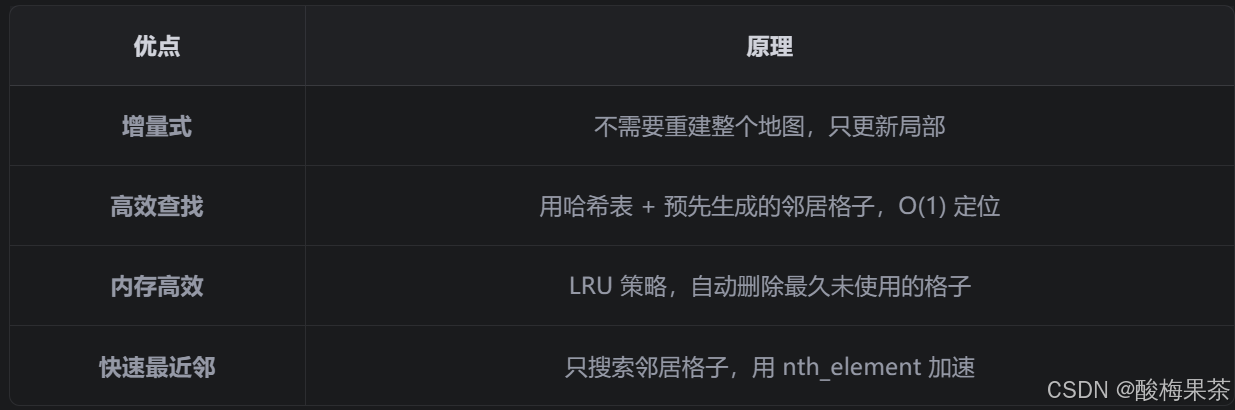
阶段二:LIO 前端 - 总结
现在 LIO 前端的所有核心模块都学完了!
- 点云预处理 :统一不同雷达数据,抽稀,滤波
- IMU 处理 :初始化,去畸变
- ESKF 滤波器 :预测,更新,迭代优化
- LaserMapping 主流程 :把这些模块串起来
- IVox 局部地图 :增量式,高效最近邻搜索
下一步
接下来可以学习 后端 和 定位模块 :
- 回环检测 ( loop_closing.h/cc )
- 位姿图优化 ( pose_graph/ )
- 定位系统 ( loc_system.h/cc )
- 地图管理 ( maps/tiled_map.h/cc )