大家好,我是Java1234_小锋老师,最近更新《2027版 一天学会 FastAPI Python web开发 视频教程(无废话版)》专辑,感谢大家支持。
本课程主要介绍和讲解FastAPI简介,HelloWorld实现,自动生成交互式API文档,路径参数,查询参数,请求体,参数校验,响应模型 ,表单数据和模型,中间件 ,依赖注入,集成SQLAlchemy ORM 操作数据库,集成Pydantic数据校验等
视频教程+课件+源码打包下载:
链接:https://pan.baidu.com/s/1_NzaNr0Wln6kv1rdiQnUTg
提取码:0000
集成SQLAlchemy ORM 操作数据库
FastAPI 是目前非常流行的 Python 异步 Web 框架,而 SQLAlchemy 则是 Python 生态中最强大、最成熟的 ORM(对象关系映射)工具。将两者结合,可以快速构建出高性能、类型安全且易于维护的 Web 应用。本文将从零开始,带你完成 FastAPI 与 SQLAlchemy 的集成,实现数据库的建表及完整的增删改查(CRUD)功能。
整体架构
python
fastapi_pro/
├── main.py              # FastAPI 入口(已有)
├── database.py          # 数据库连接与 Session 管理
├── models/
│   └── item.py          # SQLAlchemy ORM 模型(对应表 t_item)
├── schemas/
│   └── item.py          # Pydantic 模型(请求/响应校验)
├── crud/
│   └── item.py          # 数据库 CRUD 操作
└── routers/
    └── item.py          # Item 相关 API 路由
数据流向如下:
HTTP 请求 → FastAPI 路由 → Pydantic 校验 → CRUD 层 → SQLAlchemy Session → MySQL这与项目中已有的写法一致:路由层负责接收参数,Pydantic 负责校验,HTTPException 负责错误响应,response_model 负责过滤返回字段。
一、安装依赖
在项目虚拟环境中安装:
python
pip install sqlalchemy pymysql cryptography| 包名 | 作用 |
|---|---|
sqlalchemy |
ORM 框架 |
pymysql |
MySQL 驱动 |
cryptography |
pymysql 连接加密时可能需要 |
二、创建数据库
在 MySQL 中先创建数据库(库名以 db_ 开头):
python
CREATE DATABASE IF NOT EXISTS db_fastapi_pro
  DEFAULT CHARACTER SET utf8mb4
  DEFAULT COLLATE utf8mb4_unicode_ci;
三、数据库连接配置
新建 database.py,统一管理引擎、Session 与依赖注入:
python
from sqlalchemy import create_engine
from sqlalchemy.orm import sessionmaker, DeclarativeBase
# MySQL 连接串(密码按项目约定为 123456)
SQLALCHEMY_DATABASE_URL = (
"mysql+pymysql://root:123456@127.0.0.1:3308/db_fastapi_pro?charset=utf8mb4"
)
# 创建引擎
engine = create_engine(
SQLALCHEMY_DATABASE_URL,
pool_pre_ping=True, # 连接池自动检测断线重连
pool_recycle=3600, # 每小时回收连接,避免 MySQL 8 小时超时
)
# Session 工厂
SessionLocal = sessionmaker(autocommit=False, autoflush=False, bind=engine)
# SQLAlchemy 2.0 声明式基类
class Base(DeclarativeBase):
pass
def get_db():
"""FastAPI 依赖:每个请求独立 Session,用完自动关闭"""
db = SessionLocal()
try:
yield db # yield作用 暂停在这里,把 db 交给 FastAPI;
finally:
db.close()要点说明:
-
get_db()通过yield实现依赖注入,与main3.py中Depends(common_parameters)的用法相同。 -
每个 HTTP 请求使用独立 Session,避免线程/协程间共享连接。
-
yield 作用是把 get_db() 变成一个生成器函数,FastAPI 的 Depends(get_db) 会按「先拿到资源 → 执行接口 → 再清理资源」这个顺序运行。
四、定义 ORM 模型(建表)
新建 models/item.py,定义与 t_item 表映射的 ORM 类:
python
from datetime import datetime
from sqlalchemy import String, Float, DateTime, Integer, Text
from sqlalchemy.orm import Mapped, mapped_column
from database import Base
class ItemModel(Base):
"""物品表 ORM 模型,对应数据库表 t_item"""
__tablename__ = "t_item"
id: Mapped[int] = mapped_column(Integer, primary_key=True, autoincrement=True, comment="主键ID")
name: Mapped[str] = mapped_column(String(50), nullable=False, comment="物品名称")
price: Mapped[float] = mapped_column(Float, nullable=False, comment="价格")
description: Mapped[str | None] = mapped_column(Text, nullable=True, comment="描述")
created_at: Mapped[datetime] = mapped_column(
DateTime, default=datetime.now, comment="创建时间"
)
updated_at: Mapped[datetime] = mapped_column(
DateTime, default=datetime.now, onupdate=datetime.now, comment="更新时间"
)自动建表
在应用启动时执行 Base.metadata.create_all(),SQLAlchemy 会根据模型自动创建 t_item 表:
python
from database import engine, Base
from models.item import ItemModel # 必须导入,否则模型不会注册
# 创建所有表(已存在的表不会重复创建)
Base.metadata.create_all(bind=engine)自动建表,刷新sqlyog
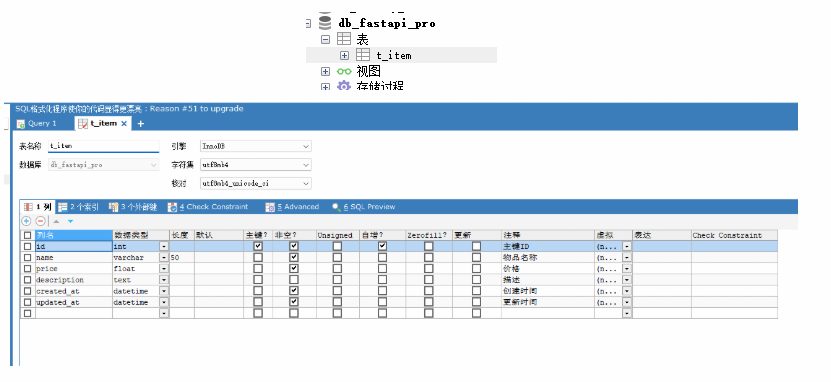
等价于执行以下 SQL:
python
CREATE TABLE t_item (
    id          INT AUTO_INCREMENT PRIMARY KEY COMMENT '主键ID',
    name        VARCHAR(50)  NOT NULL COMMENT '物品名称',
    price       FLOAT        NOT NULL COMMENT '价格',
    description TEXT         NULL COMMENT '描述',
    created_at  DATETIME     NOT NULL COMMENT '创建时间',
    updated_at  DATETIME     NOT NULL COMMENT '更新时间'
) ENGINE=InnoDB DEFAULT CHARSET=utf8mb4;
五、Pydantic 模型(请求/响应)
新建 schemas/item.py。字段校验规则参考 main.py 中已有的 ItemCreate:
python
from datetime import datetime
from pydantic import BaseModel, Field, ConfigDict
class ItemCreate(BaseModel):
"""创建物品时的请求体"""
name: str = Field(..., min_length=2, max_length=50, description="物品名称,2~50个字符")
price: float = Field(..., gt=0, le=9999.99, description="价格,必须大于0")
description: str | None = Field(None, max_length=200, description="可选描述")
class ItemUpdate(BaseModel):
"""更新物品时的请求体(字段均可选)"""
name: str | None = Field(None, min_length=2, max_length=50)
price: float | None = Field(None, gt=0, le=9999.99)
description: str | None = Field(None, max_length=200)
class ItemOut(BaseModel):
"""返回给客户端的数据结构"""
id: int
name: str
price: float
description: str | None = None
created_at: datetime
updated_at: datetime
model_config = ConfigDict(from_attributes=True)from_attributes=True 允许 Pydantic 直接从 SQLAlchemy ORM 对象读取属性,无需手动转字典。
六、CRUD 操作
新建 crud/item.py,封装对 t_item 表的增删改查:
python
from sqlalchemy.orm import Session
from models.item import ItemModel
from schemas.item import ItemCreate, ItemUpdate
# -------- 增(Create)--------
def create_item(db: Session, item: ItemCreate) -> ItemModel:
db_item = ItemModel(
name=item.name,
price=item.price,
description=item.description,
)
db.add(db_item)
db.commit()
db.refresh(db_item)
return db_item
# -------- 查(Read)--------
def get_item(db: Session, item_id: int) -> ItemModel | None:
return db.query(ItemModel).filter(ItemModel.id == item_id).first()
def get_items(db: Session, skip: int = 0, limit: int = 10) -> list[ItemModel]:
return db.query(ItemModel).offset(skip).limit(limit).all()
# -------- 改(Update)--------
def update_item(db: Session, item_id: int, item: ItemUpdate) -> ItemModel | None:
db_item = get_item(db, item_id)
if not db_item:
return None
update_data = item.model_dump(
exclude_unset=True) # 排除未设置的字段 model_dump() 会把模型转成普通字典 exclude_unset=True 是关键:只包含客户端在 JSON 里实际传了的字段,没传的字段不会出现在字典里。
for field, value in update_data.items():
setattr(db_item, field, value) # 设置字段值
db.commit()
db.refresh(db_item)
return db_item
# -------- 删(Delete)--------
def delete_item(db: Session, item_id: int) -> bool:
db_item = get_item(db, item_id)
if not db_item:
return False
db.delete(db_item)
db.commit()
return TrueCRUD 对应 SQL 说明
| 操作 | ORM 方法 | 等价 SQL |
|---|---|---|
| 增 | db.add() + db.commit() |
INSERT INTO t_item ... |
| 查单条 | db.query().filter().first() |
SELECT * FROM t_item WHERE id = ? LIMIT 1 |
| 查列表 | db.query().offset().limit().all() |
SELECT * FROM t_item LIMIT ? OFFSET ? |
| 改 | setattr() + db.commit() |
UPDATE t_item SET ... WHERE id = ? |
| 删 | db.delete() + db.commit() |
DELETE FROM t_item WHERE id = ? |
七、FastAPI 路由集成
新建 routers/item.py,将 CRUD 暴露为 REST API:
python
from typing import Annotated
from fastapi import APIRouter, Depends, HTTPException, Query
from sqlalchemy.orm import Session
from crud import item as item_crud
from database import get_db
from schemas.item import ItemCreate, ItemUpdate, ItemOut
router = APIRouter(prefix="/items", tags=["物品管理"])
DbSession = Annotated[Session, Depends(get_db)]
@router.post("/", response_model=ItemOut, summary="新增物品")
def create_item(item: ItemCreate, db: DbSession):
return item_crud.create_item(db, item)
@router.get("/", response_model=list[ItemOut], summary="物品列表(分页)")
def list_items(
db: DbSession,
skip: int = Query(0, ge=0, title="跳过条数"),
limit: int = Query(10, ge=1, le=100, title="返回条数"),
):
return item_crud.get_items(db, skip=skip, limit=limit)
@router.get("/{item_id}", response_model=ItemOut, summary="查询单个物品")
def read_item(item_id: int, db: DbSession):
db_item = item_crud.get_item(db, item_id)
if not db_item:
raise HTTPException(status_code=404, detail="Item项不存在")
return db_item
@router.put("/{item_id}", response_model=ItemOut, summary="更新物品")
def update_item(item_id: int, item: ItemUpdate, db: DbSession):
db_item = item_crud.update_item(db, item_id, item)
if not db_item:
raise HTTPException(status_code=404, detail="Item项不存在")
return db_item
@router.delete("/{item_id}", summary="删除物品")
def remove_item(item_id: int, db: DbSession):
success = item_crud.delete_item(db, item_id)
if not success:
raise HTTPException(status_code=404, detail="Item项不存在")
return {"message": "删除成功", "item_id": item_id}404 错误处理方式与 main.py 中 read_item 接口一致:
python
# main.py 中的写法
if item_id != 1:
    raise HTTPException(status_code=404, detail="Item项不存在")
八、注册路由并启动
在 main.py(或新建 main_db.py)中整合:
python
from contextlib import asynccontextmanager
from fastapi import FastAPI
from database import engine, Base
from models.item import ItemModel
from routers.item import router as item_router
# 这段代码是 FastAPI 的应用生命周期(lifespan)管理,用来在服务启动时做初始化,在服务关闭时做清理。
@asynccontextmanager # 异步上下文管理器
async def lifespan(app: FastAPI):
# ===== 启动时执行 =====
Base.metadata.create_all(bind=engine)
yield # 应用运行中...
# ===== 关闭时执行(Ctrl+C、重启、进程退出)=====
engine.dispose() # 释放数据库连接池
print("应用已关闭")
app = FastAPI(title="FastAPI + SQLAlchemy 示例", lifespan=lifespan)
# 注册路由
app.include_router(item_router)
@app.get("/")
async def root():
return {"message": "你好,FastAPI + SQLAlchemy!"}启动服务:
uvicorn main_db:app --reload访问 Swagger 文档:http://127.0.0.1:8000/docs
九、API 测试示例
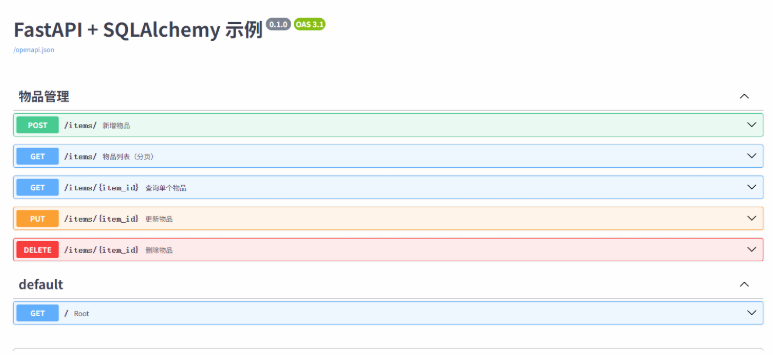
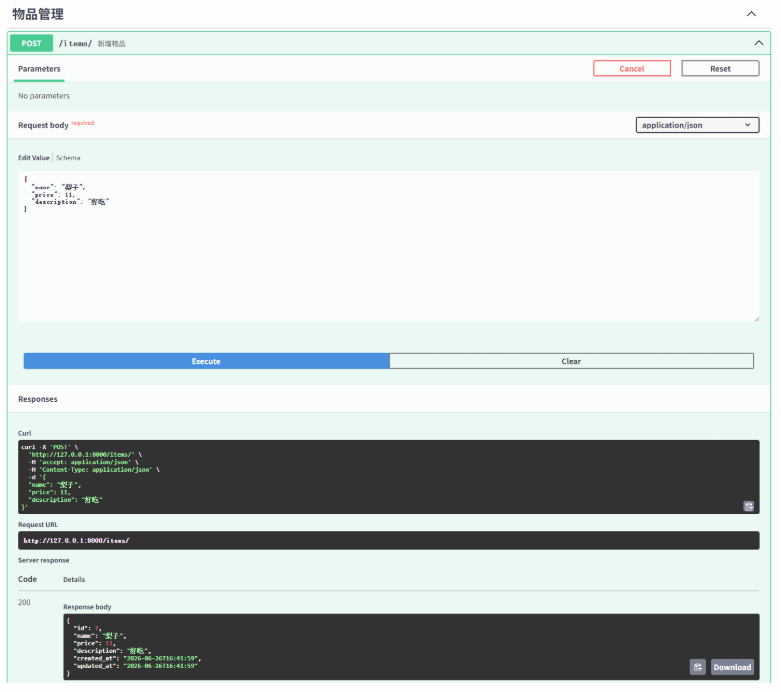
新增测试:
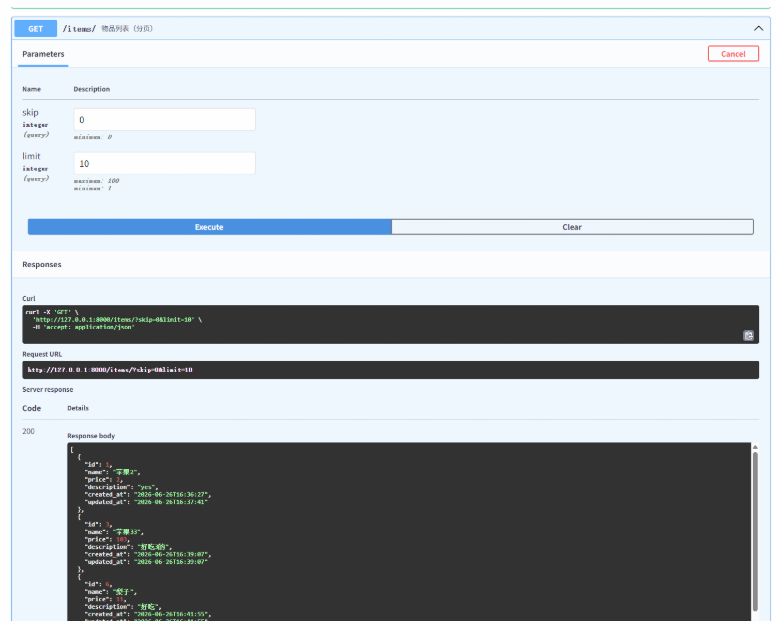
查询测试:
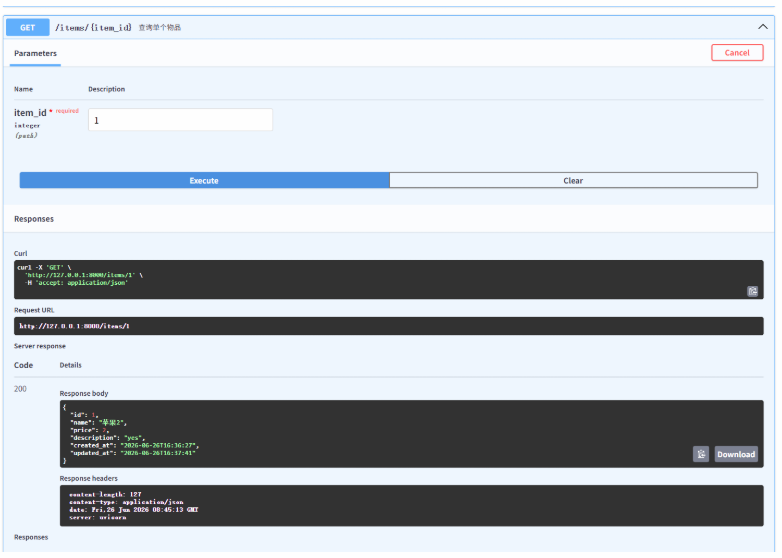
单个查询:
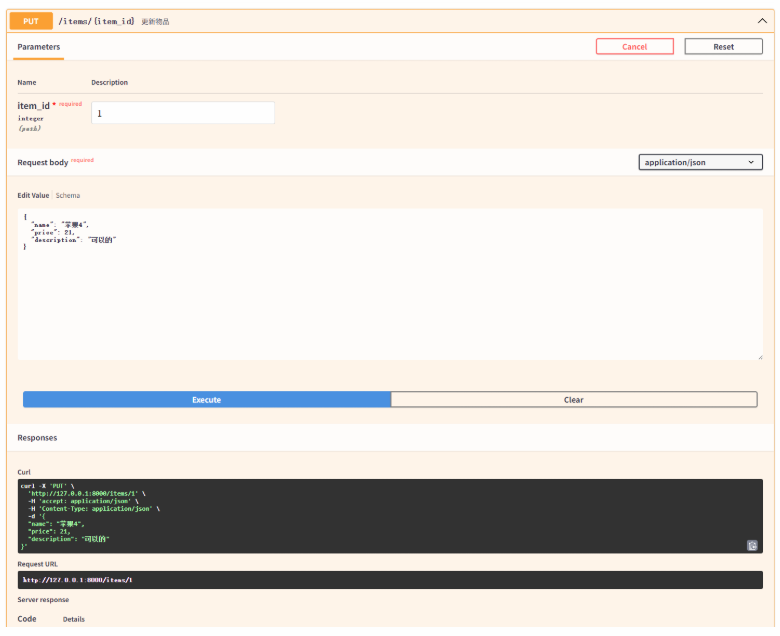
更新操作:
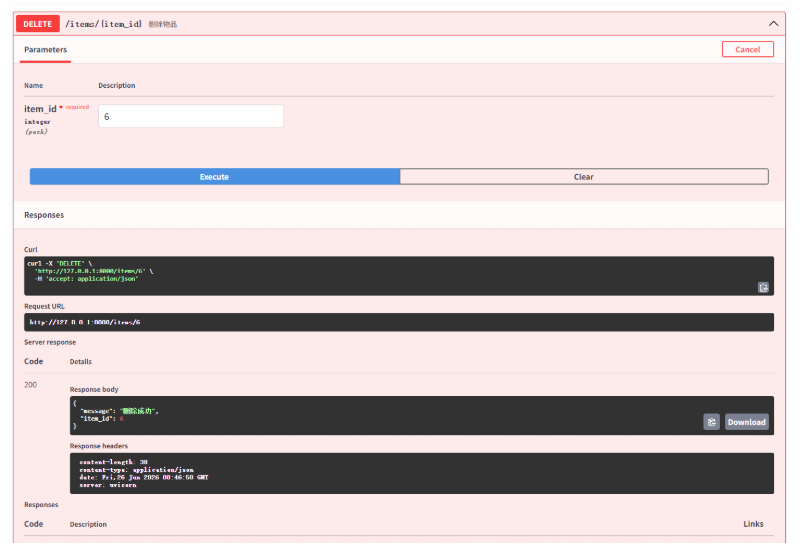
删除测试: