系列:鸿蒙 HarmonyOS 6.1 新特性实战 · 第 39 篇
Badge(徽标)用于在图标或按钮上附加消息计数、红点提醒或文字标记;Chip(标签)则用于展示可操作的关键词标签。本篇演示 Badge 的数字、文字、位置三个维度,以及用自定义 Row 实现可关闭、可选中的 Chip 标签组。
运行效果
初始状态,Badge 数字徽标和 Chip 标签列表:
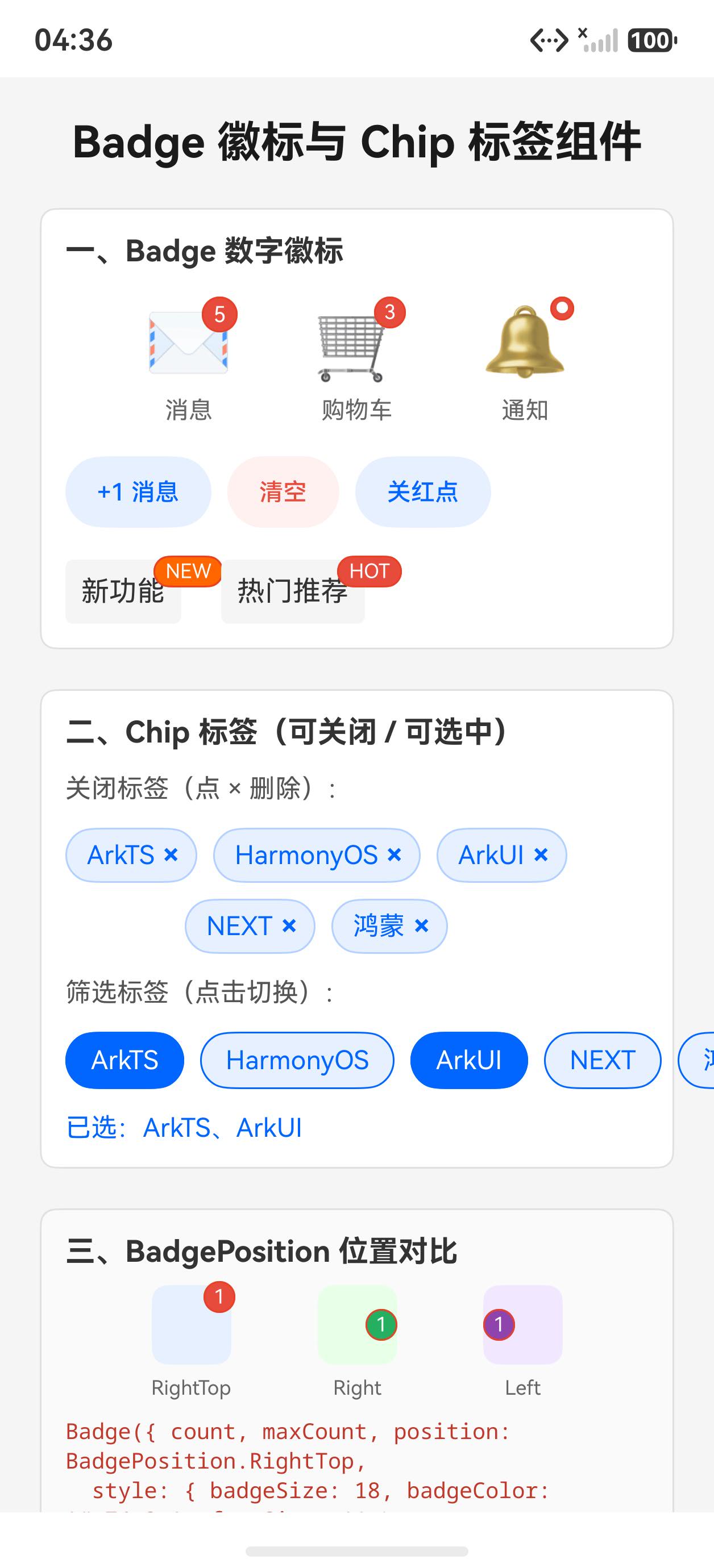
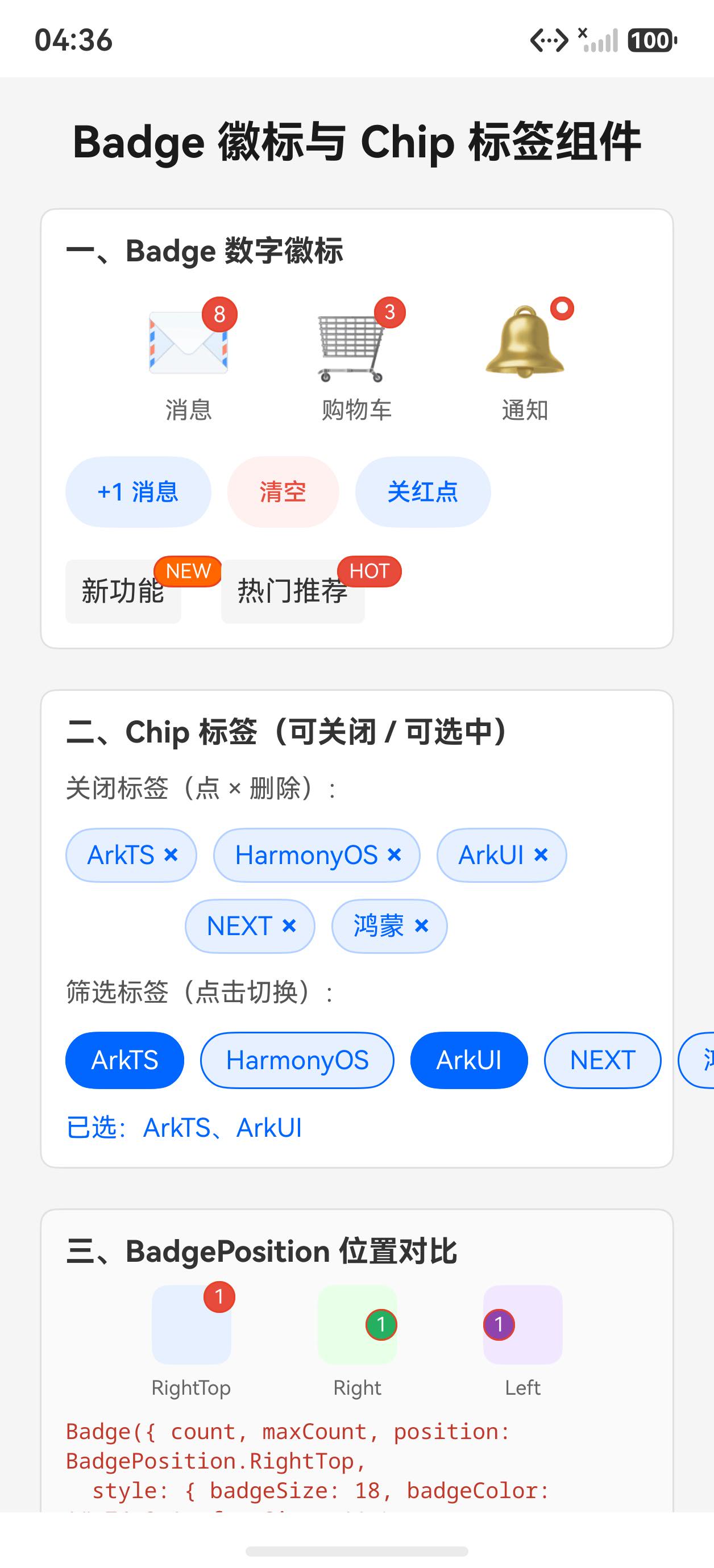
点击 +1 消息后,徽标数字递增:
一、Badge 数字徽标
typescript
@State msgCount: number = 5

Badge({
  count: this.msgCount,    // 数字徽标
  maxCount: 99,            // 超过显示 99+
  position: BadgePosition.RightTop,
  style: {
    badgeSize: 18,
    badgeColor: '#e74c3c',
    fontSize: 11
  }
}) {
  Text('✉').fontSize(36)   // 被包裹的内容
}
点击按钮更新数字:
typescript
Button('+1 消息')
  .onClick(() => { this.msgCount = Math.min(this.msgCount + 1, 999) })

Button('清空')
  .onClick(() => { this.msgCount = 0 })
当 count 为 0 时,Badge 自动隐藏,不需要条件渲染。
二、文字徽标(value 属性)
typescript
// 文字标签(NEW、HOT 等)
Badge({
  value: 'NEW',
  position: BadgePosition.RightTop,
  style: { badgeSize: 16, badgeColor: '#ff6600', fontSize: 10 }
}) {
  Text('新功能').padding(8).backgroundColor('#f5f5f5').borderRadius(4)
}

// 红点(只显示一个圆点)
Badge({
  value: this.redDot ? '●' : '',
  position: BadgePosition.RightTop,
  style: { badgeSize: 12, badgeColor: '#e74c3c', fontSize: 8 }
}) {
  Text('🔔').fontSize(36)
}
三、BadgePosition 位置
typescript
// RightTop:右上角(最常用,消息通知)
Badge({ count: 1, position: BadgePosition.RightTop, style: {...} }) { ... }

// Right:右侧居中
Badge({ count: 1, position: BadgePosition.Right, style: {...} }) { ... }

// Left:左侧居中
Badge({ count: 1, position: BadgePosition.Left, style: {...} }) { ... }
四、自定义 Chip 标签
ArkUI 6.1 中 Chip 组件在某些 SDK 版本不可用,可用 Row + Text 自行实现:
typescript
@State chips: string[] = ['ArkTS', 'HarmonyOS', 'ArkUI', 'NEXT', '鸿蒙']
@State chipActive: boolean[] = [true, false, true, false, false]

// 可关闭标签
Row({ space: 4 }) {
  Text(chip).fontSize(13).fontColor('#0066ff')
  Text('×').fontSize(14).fontColor('#0066ff').fontWeight(FontWeight.Bold)
    .onClick(() => {
      const arr = this.chips.filter((_: string, i: number) => i !== idx)
      const aArr = this.chipActive.filter((_: boolean, i: number) => i !== idx)
      this.chips = arr
      this.chipActive = aArr
    })
}
.padding({ left: 10, right: 8, top: 5, bottom: 5 })
.backgroundColor('#e8f0ff').borderRadius(16).border({ width: 1, color: '#b3d1ff' })
ArkTS 的 ForEach 注意事项:
- 不能在 ForEach 的 UI builder 回调内声明
const变量 - 因为
Row没有flexWrap,多个 Chip 需要按行拆分到不同 Row 容器
typescript
// 分两行渲染(避免 Row 没有 flexWrap 的限制)
Column({ space: 8 }) {
  Row({ space: 8 }) {
    ForEach(this.chips.slice(0, 3), (chip: string, idx: number) => {
      Row({ space: 4 }) {
        Text(chip).fontSize(13).fontColor('#0066ff')
        Text('×').fontSize(14).fontColor('#0066ff')
          .onClick(() => {
            const arr = this.chips.filter((_: string, i: number) => i !== idx)
            this.chips = arr
          })
      }
      .padding({ left: 10, right: 8, top: 5, bottom: 5 })
      .backgroundColor('#e8f0ff').borderRadius(16)
    })
  }
  Row({ space: 8 }) {
    ForEach(this.chips.slice(3), (chip: string, relIdx: number) => {
      Row({ space: 4 }) {
        Text(chip).fontSize(13).fontColor('#0066ff')
        Text('×').fontSize(14).fontColor('#0066ff')
          .onClick(() => {
            // 用 relIdx + 3 代替 const idx = relIdx + 3(ArkTS 限制)
            const arr = this.chips.filter((_: string, i: number) => i !== relIdx + 3)
            this.chips = arr
          })
      }
      .padding({ left: 10, right: 8, top: 5, bottom: 5 })
      .backgroundColor('#e8f0ff').borderRadius(16)
    })
  }
}
可选中标签:
typescript
ForEach(this.chips, (chip: string, idx: number) => {
  Text(chip)
    .fontSize(13)
    .fontColor(this.chipActive[idx] ? '#fff' : '#0066ff')
    .padding({ left: 12, right: 12, top: 6, bottom: 6 })
    .backgroundColor(this.chipActive[idx] ? '#0066ff' : '#e8f0ff')
    .borderRadius(16).border({ width: 1, color: '#0066ff' })
    .onClick(() => {
      const arr = this.chipActive.slice()
      arr[idx] = !arr[idx]
      this.chipActive = arr
    })
})
完整代码
typescript
@Entry
@Component
struct Index {
  @State msgCount: number = 5
  @State redDot: boolean = true
  @State chips: string[] = ['ArkTS', 'HarmonyOS', 'ArkUI', 'NEXT', '鸿蒙']
  @State chipActive: boolean[] = [true, false, true, false, false]

  build() {
    Scroll() {
      Column({ space: 20 }) {
        Text('Badge 徽标与 Chip 标签组件')
          .fontSize(22).fontWeight(FontWeight.Bold).fontColor('#1a1a1a')

        // Badge 数字徽标
        Column({ space: 16 }) {
          Text('一、Badge 数字徽标').fontSize(15).fontWeight(FontWeight.Bold).fontColor('#333')
          Row({ space: 32 }) {
            Column({ space: 6 }) {
              Badge({
                count: this.msgCount, maxCount: 99, position: BadgePosition.RightTop,
                style: { badgeSize: 18, badgeColor: '#e74c3c', fontSize: 11 }
              }) { Text('✉').fontSize(36) }
              Text('消息').fontSize(12).fontColor('#666')
            }
            Column({ space: 6 }) {
              Badge({
                count: 3, maxCount: 99, position: BadgePosition.RightTop,
                style: { badgeSize: 16, badgeColor: '#e74c3c' }
              }) { Text('🛒').fontSize(36) }
              Text('购物车').fontSize(12).fontColor('#666')
            }
            Column({ space: 6 }) {
              Badge({
                value: this.redDot ? '●' : '', position: BadgePosition.RightTop,
                style: { badgeSize: 12, badgeColor: '#e74c3c', fontSize: 8 }
              }) { Text('🔔').fontSize(36) }
              Text('通知').fontSize(12).fontColor('#666')
            }
          }
          .width('100%').justifyContent(FlexAlign.SpaceEvenly).alignItems(VerticalAlign.Bottom)

          Row({ space: 8 }) {
            Button('+1 消息').fontSize(12).height(36).backgroundColor('#e8f0ff').fontColor('#0066ff')
              .onClick(() => { this.msgCount = Math.min(this.msgCount + 1, 999) })
            Button('清空').fontSize(12).height(36).backgroundColor('#fff0f0').fontColor('#e74c3c')
              .onClick(() => { this.msgCount = 0 })
            Button(this.redDot ? '关红点' : '开红点').fontSize(12).height(36)
              .backgroundColor('#e8f0ff').fontColor('#0066ff')
              .onClick(() => { this.redDot = !this.redDot })
          }
        }
        .padding(12).backgroundColor('#fff').borderRadius(8).width('100%')
        .border({ width: 1, color: '#e0e0e0' }).alignItems(HorizontalAlign.Start)

        // Chip 标签
        Column({ space: 12 }) {
          Text('二、Chip 标签(可关闭 / 可选中)').fontSize(15).fontWeight(FontWeight.Bold).fontColor('#333')
          Text('关闭标签(点 × 删除):').fontSize(13).fontColor('#555')

          Column({ space: 8 }) {
            Row({ space: 8 }) {
              ForEach(this.chips.slice(0, 3), (chip: string, idx: number) => {
                Row({ space: 4 }) {
                  Text(chip).fontSize(13).fontColor('#0066ff')
                  Text('×').fontSize(14).fontColor('#0066ff').fontWeight(FontWeight.Bold)
                    .onClick(() => {
                      this.chips = this.chips.filter((_: string, i: number) => i !== idx)
                      this.chipActive = this.chipActive.filter((_: boolean, i: number) => i !== idx)
                    })
                }
                .padding({ left: 10, right: 8, top: 5, bottom: 5 })
                .backgroundColor('#e8f0ff').borderRadius(16).border({ width: 1, color: '#b3d1ff' })
              })
            }
            Row({ space: 8 }) {
              ForEach(this.chips.slice(3), (chip: string, relIdx: number) => {
                Row({ space: 4 }) {
                  Text(chip).fontSize(13).fontColor('#0066ff')
                  Text('×').fontSize(14).fontColor('#0066ff').fontWeight(FontWeight.Bold)
                    .onClick(() => {
                      this.chips = this.chips.filter((_: string, i: number) => i !== relIdx + 3)
                      this.chipActive = this.chipActive.filter((_: boolean, i: number) => i !== relIdx + 3)
                    })
                }
                .padding({ left: 10, right: 8, top: 5, bottom: 5 })
                .backgroundColor('#e8f0ff').borderRadius(16).border({ width: 1, color: '#b3d1ff' })
              })
            }
          }

          if (this.chips.length === 0) {
            Button('重置标签').fontSize(13).height(38).backgroundColor('#0066ff').fontColor('#fff')
              .onClick(() => {
                this.chips = ['ArkTS', 'HarmonyOS', 'ArkUI', 'NEXT', '鸿蒙']
                this.chipActive = [true, false, true, false, false]
              })
          }

          Text('筛选标签(点击切换):').fontSize(13).fontColor('#555')
          Row({ space: 8 }) {
            ForEach(this.chips, (chip: string, idx: number) => {
              Text(chip).fontSize(13)
                .fontColor(this.chipActive[idx] ? '#fff' : '#0066ff')
                .padding({ left: 12, right: 12, top: 6, bottom: 6 })
                .backgroundColor(this.chipActive[idx] ? '#0066ff' : '#e8f0ff')
                .borderRadius(16).border({ width: 1, color: '#0066ff' })
                .onClick(() => {
                  const arr = this.chipActive.slice()
                  arr[idx] = !arr[idx]
                  this.chipActive = arr
                })
            })
          }
        }
        .padding(12).backgroundColor('#fff').borderRadius(8).width('100%')
        .border({ width: 1, color: '#e0e0e0' }).alignItems(HorizontalAlign.Start)
      }
      .padding(20).width('100%')
    }
    .width('100%').height('100%').backgroundColor('#f5f5f5')
  }
}
API 速查
| 组件/属性 | 说明 |
|---|---|
Badge({ count, maxCount, position, style }) |
数字徽标,count=0 自动隐藏 |
Badge({ value, position, style }) |
文字徽标('NEW'、'HOT' 等) |
BadgePosition.RightTop / Right / Left |
徽标位置 |
style.badgeSize |
徽标圆圈大小 |
style.badgeColor |
徽标背景色 |
小结
- Badge count=0 自动隐藏 :不需要用
if条件判断是否显示 Badge - ArkUI 没有内置 Chip 组件 (6.1 部分版本):用
Row + Text + Text('×')可以完美模拟 - Row 没有 flexWrap:多行标签需要手动拆 Row,或改用 Flex 组件
- ForEach UI 回调内不能声明 const :需要在回调内计算的索引用表达式
relIdx + 3内联
上一篇:Select 与 TextPicker 选择器 | 下一篇:RichEditor 富文本编辑器:内联样式与 Span 管理