系列:鸿蒙 HarmonyOS 6.1 新特性实战 · 第 41 篇
Search 组件是 ArkUI 中专为搜索场景设计的输入控件,内置搜索按钮、清除图标和键盘触发机制。本篇将完整实现联想词实时过滤、历史记录去重管理以及热门标签一键触发搜索三大功能,覆盖实际 App 搜索页面的典型交互需求。
运行效果
初始状态: 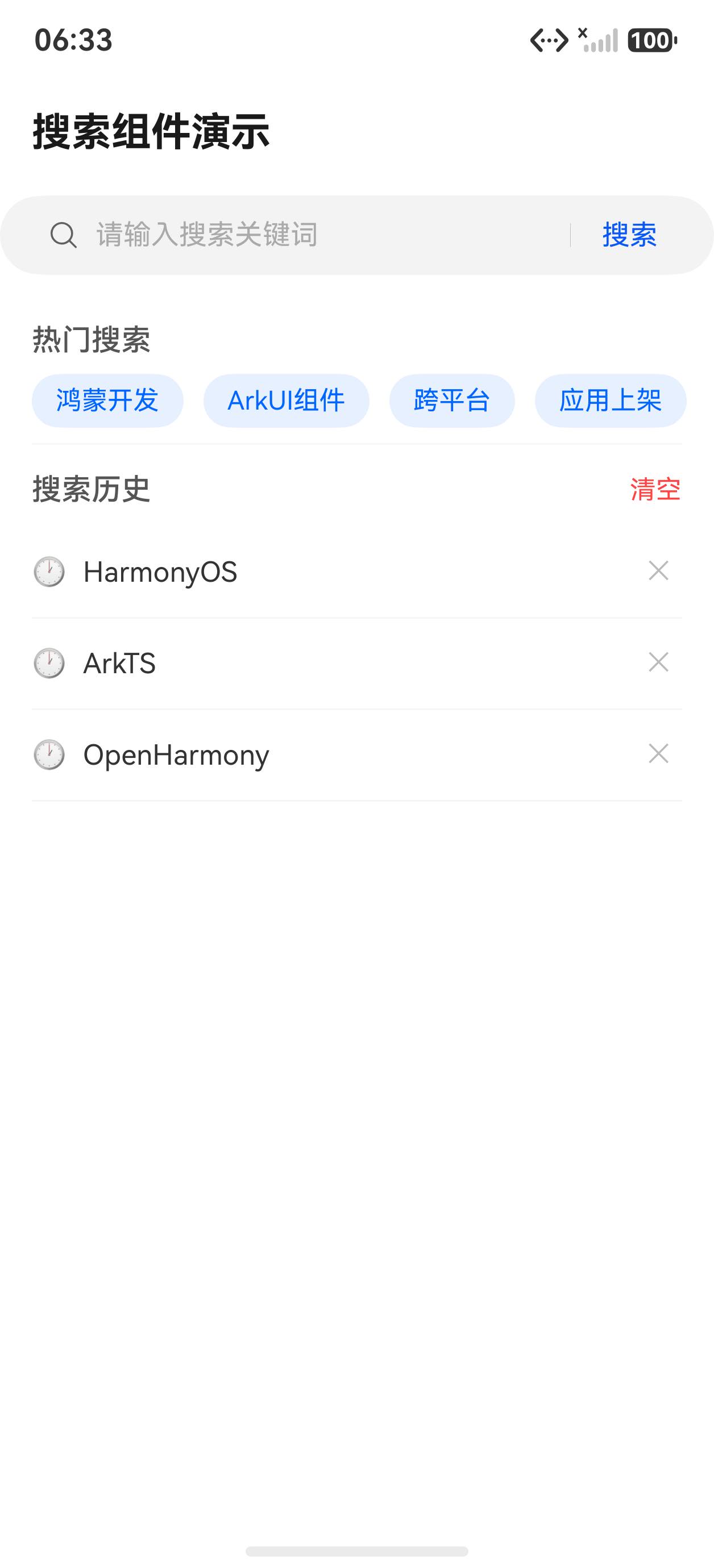
点击热门标签后显示搜索结果: 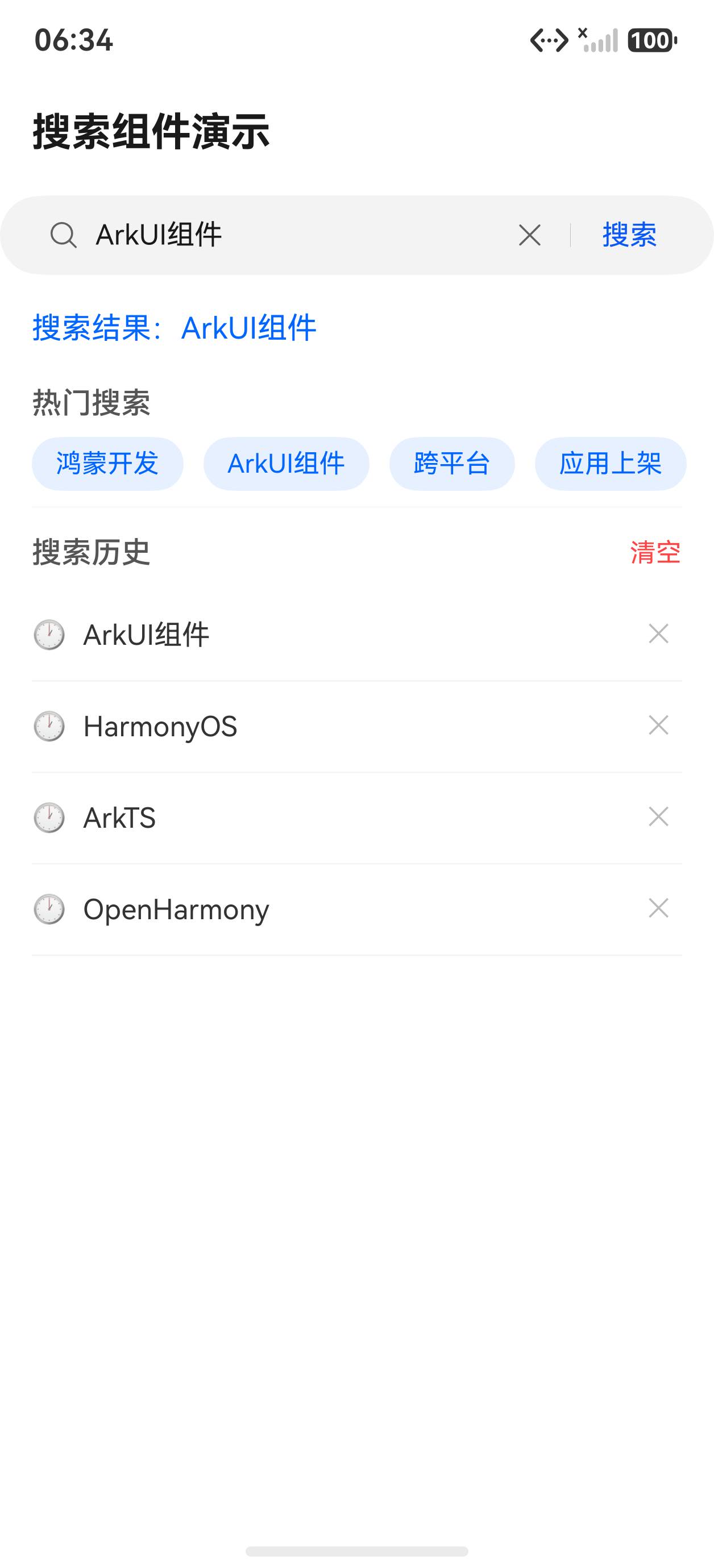
Search 组件基础配置
Search 组件通过双向绑定 value 属性同步输入内容,placeholder 提供占位文案。与普通 TextInput 不同,它内置了右侧搜索按钮和一键清除图标,更贴近搜索场景的交互习惯。
typescript
Search({ value: this.searchVal, placeholder: '请输入搜索关键词' })
  .searchButton('搜索')
  .placeholderColor('#aaaaaa')
  .placeholderFont({ size: 14 })
  .textFont({ size: 14 })
  .onChange((val: string) => {
    this.searchVal = val
    this.filterSuggestions(val)
  })
  .onSubmit((val: string) => {
    this.doSearch(val)
})onChange:每次按键后触发,适合实时联想词过滤onSubmit:用户点击键盘"搜索"键或右侧搜索按钮时触发,用于执行正式搜索searchButton:设置右侧按钮文字,传入空字符串则隐藏按钮
联想词实时过滤
联想词从预设关键词数组中过滤,使用 indexOf 实现大小写不敏感匹配。结果列表显示在搜索框正下方,点击即填充关键词并触发搜索。
typescript
private allKeywords: string[] = [
  'HarmonyOS', 'ArkUI', 'ArkTS', '鸿蒙开发', '组件教程',
  '状态管理', '路由导航', '网络请求', '数据持久化', '动画效果'
]

@State suggestions: string[] = []

filterSuggestions(val: string): void {
  if (val.trim().length === 0) {
    this.suggestions = []
    return
  }
  const lower = val.toLowerCase()
  this.suggestions = this.allKeywords.filter(
    (k: string) => k.toLowerCase().indexOf(lower) !== -1
  )
}
联想词列表渲染:
typescript
if (this.suggestions.length > 0) {
  Column() {
    ForEach(this.suggestions, (item: string) => {
      Text(item)
        .width('100%')
        .padding({ left: 16, top: 10, bottom: 10 })
        .fontSize(14)
        .fontColor('#333333')
        .backgroundColor('#ffffff')
        .onClick(() => {
          this.searchVal = item
          this.suggestions = []
          this.doSearch(item)
        })
      Divider().strokeWidth(0.5).color('#eeeeee')
    })
  }
  .width('100%')
  .borderRadius(8)
  .shadow({ radius: 8, color: '#22000000', offsetY: 4 })
}
历史记录管理
搜索历史存储在状态数组中,提交时去重插入到队列头部,保留最近 10 条。支持单条删除和一键清空。
typescript
@State history: string[] = []

doSearch(keyword: string): void {
  const trimmed = keyword.trim()
  if (trimmed.length === 0) return
  // 去重:已存在则先移除旧条目
  const filtered = this.history.filter((h: string) => h !== trimmed)
  // 插入队首,最多保留 10 条
  const updated = [trimmed, ...filtered]
  this.history = updated.length > 10 ? updated.slice(0, 10) : updated
  this.suggestions = []
  this.searchVal = trimmed
}

removeHistory(item: string): void {
  this.history = this.history.filter((h: string) => h !== item)
}
历史记录渲染区域:
typescript
Row() {
  Text('历史记录').fontSize(13).fontColor('#999999').layoutWeight(1)
  Text('清空').fontSize(13).fontColor('#0066ff')
    .onClick(() => { this.history = [] })
}
.width('100%').padding({ left: 4, right: 4, bottom: 8 })

Flex({ wrap: FlexWrap.Wrap }) {
  ForEach(this.history, (item: string) => {
    Row({ space: 4 }) {
      Text(item).fontSize(13).fontColor('#333333')
      Text('×').fontSize(13).fontColor('#aaaaaa')
        .onClick(() => { this.removeHistory(item) })
    }
    .padding({ left: 10, right: 10, top: 6, bottom: 6 })
    .margin({ right: 8, bottom: 8 })
    .backgroundColor('#f5f5f5')
    .borderRadius(16)
    .onClick(() => {
      this.searchVal = item
      this.doSearch(item)
    })
  })
}
热门标签
热门标签固定展示,点击直接触发搜索,无需经过输入框。使用 Flex 组件实现自动换行。
typescript
private hotTags: string[] = [
  '鸿蒙 6.1 新特性', 'ArkUI 组件', '状态管理', '动画教程', '网络请求'
]

Flex({ wrap: FlexWrap.Wrap }) {
  ForEach(this.hotTags, (tag: string, index: number) => {
    Text(tag)
      .fontSize(13)
      .fontColor('#0066ff')
      .padding({ left: 12, right: 12, top: 6, bottom: 6 })
      .margin({ right: 8, bottom: 8 })
      .border({ width: 1, color: '#0066ff', radius: 16 })
      .onClick(() => {
        this.searchVal = tag
        this.doSearch(tag)
      })
  })
}
完整代码
typescript
import router from '@ohos.router'

@Entry
@Component
struct SearchPage {
  @State searchVal: string = ''
  @State suggestions: string[] = []
  @State history: string[] = []
  @State searchResult: string = ''

  private allKeywords: string[] = [
    'HarmonyOS', 'ArkUI', 'ArkTS', '鸿蒙开发', '组件教程',
    '状态管理', '路由导航', '网络请求', '数据持久化', '动画效果'
  ]

  private hotTags: string[] = [
    '鸿蒙 6.1 新特性', 'ArkUI 组件', '状态管理', '动画教程', '网络请求'
  ]

  filterSuggestions(val: string): void {
    if (val.trim().length === 0) {
      this.suggestions = []
      return
    }
    const lower = val.toLowerCase()
    this.suggestions = this.allKeywords.filter(
      (k: string) => k.toLowerCase().indexOf(lower) !== -1
    )
  }

  doSearch(keyword: string): void {
    const trimmed = keyword.trim()
    if (trimmed.length === 0) return
    const filtered = this.history.filter((h: string) => h !== trimmed)
    const updated = [trimmed, ...filtered]
    this.history = updated.length > 10 ? updated.slice(0, 10) : updated
    this.suggestions = []
    this.searchVal = trimmed
    this.searchResult = `搜索「${trimmed}」共找到 ${Math.floor(Math.random() * 100) + 1} 条结果`
  }

  removeHistory(item: string): void {
    this.history = this.history.filter((h: string) => h !== item)
  }

  build() {
    Column({ space: 0 }) {
      // 顶部标题栏
      Row() {
        Text('搜索').fontSize(18).fontWeight(FontWeight.Bold).fontColor('#333333')
      }
      .width('100%')
      .height(56)
      .padding({ left: 16, right: 16 })

      // 搜索框区域
      Column() {
        Search({ value: this.searchVal, placeholder: '请输入搜索关键词' })
          .searchButton('搜索')
          .placeholderColor('#aaaaaa')
          .placeholderFont({ size: 14 })
          .textFont({ size: 14 })
          .width('100%')
          .onChange((val: string) => {
            this.searchVal = val
            this.filterSuggestions(val)
          })
          .onSubmit((val: string) => {
            this.doSearch(val)
          })

        // 联想词下拉
        if (this.suggestions.length > 0) {
          Column() {
            ForEach(this.suggestions, (item: string) => {
              Text(item)
                .width('100%')
                .padding({ left: 16, top: 10, bottom: 10 })
                .fontSize(14)
                .fontColor('#333333')
                .backgroundColor('#ffffff')
                .onClick(() => {
                  this.searchVal = item
                  this.suggestions = []
                  this.doSearch(item)
                })
              Divider().strokeWidth(0.5).color('#eeeeee')
            })
          }
          .width('100%')
          .borderRadius(8)
          .shadow({ radius: 8, color: '#22000000', offsetY: 4 })
        }
      }
      .width('100%')
      .padding({ left: 16, right: 16 })

      // 搜索结果提示
      if (this.searchResult.length > 0) {
        Text(this.searchResult)
          .width('100%')
          .padding({ left: 16, right: 16, top: 12 })
          .fontSize(13)
          .fontColor('#0066ff')
      }

      Scroll() {
        Column({ space: 0 }) {
          // 历史记录
          if (this.history.length > 0) {
            Column({ space: 4 }) {
              Row() {
                Text('历史记录').fontSize(13).fontColor('#999999').layoutWeight(1)
                Text('清空').fontSize(13).fontColor('#0066ff')
                  .onClick(() => { this.history = [] })
              }
              .width('100%')
              .padding({ left: 4, right: 4, bottom: 8 })

              Flex({ wrap: FlexWrap.Wrap }) {
                ForEach(this.history, (item: string) => {
                  Row({ space: 4 }) {
                    Text(item).fontSize(13).fontColor('#333333')
                    Text('×').fontSize(13).fontColor('#aaaaaa')
                      .onClick(() => { this.removeHistory(item) })
                  }
                  .padding({ left: 10, right: 10, top: 6, bottom: 6 })
                  .margin({ right: 8, bottom: 8 })
                  .backgroundColor('#f5f5f5')
                  .borderRadius(16)
                  .onClick(() => {
                    this.searchVal = item
                    this.doSearch(item)
                  })
                })
              }
            }
            .width('100%')
            .padding({ left: 16, right: 16, top: 16, bottom: 8 })
          }

          // 热门搜索
          Column({ space: 4 }) {
            Text('热门搜索').fontSize(13).fontColor('#999999').width('100%')
              .padding({ left: 4, bottom: 8 })

            Flex({ wrap: FlexWrap.Wrap }) {
              ForEach(this.hotTags, (tag: string) => {
                Text(tag)
                  .fontSize(13)
                  .fontColor('#0066ff')
                  .padding({ left: 12, right: 12, top: 6, bottom: 6 })
                  .margin({ right: 8, bottom: 8 })
                  .border({ width: 1, color: '#0066ff', radius: 16 })
                  .onClick(() => {
                    this.searchVal = tag
                    this.doSearch(tag)
                  })
              })
            }
          }
          .width('100%')
          .padding({ left: 16, right: 16, top: 16 })
        }
      }
      .layoutWeight(1)
    }
    .width('100%')
    .height('100%')
    .backgroundColor('#f8f8f8')
  }
}
API 速查
| 属性/方法 | 说明 |
|---|---|
Search({ value, placeholder }) |
创建搜索框,value 绑定输入内容 |
.searchButton(text) |
设置右侧搜索按钮文字,空字符串隐藏 |
.placeholderColor(color) |
占位文字颜色 |
.placeholderFont({ size }) |
占位文字字体,支持 size/weight/style |
.textFont({ size }) |
输入文字字体配置 |
.onChange(callback) |
每次输入变化触发,参数为当前输入值 |
.onSubmit(callback) |
点击搜索键或搜索按钮时触发 |
Array.filter(fn) |
数组过滤,ArkTS 中可直接使用 |
String.indexOf(str) |
查找子串位置,-1 表示不存在 |
小结
onChange在每次按键时触发,适合实时联想词过滤;onSubmit在提交搜索时触发,两者职责分离- 历史记录去重:先
filter移除已有条目,再插入队首,保证顺序且无重复 - ArkTS 中
Array.filter()是标准方法,可直接使用;避免使用数组解构语法 - 联想词列表使用
shadow属性模拟下拉浮层效果,无需额外弹窗组件 - 热门标签固定展示,使用
Flex + FlexWrap.Wrap实现自动换行,适配不同屏幕宽度 - 搜索框清空输入时应同步清空联想词列表,避免遮挡下方内容
上一篇:RichEditor 富文本编辑器实战 | 下一篇:QRCode 与 PatternLock 安全组件