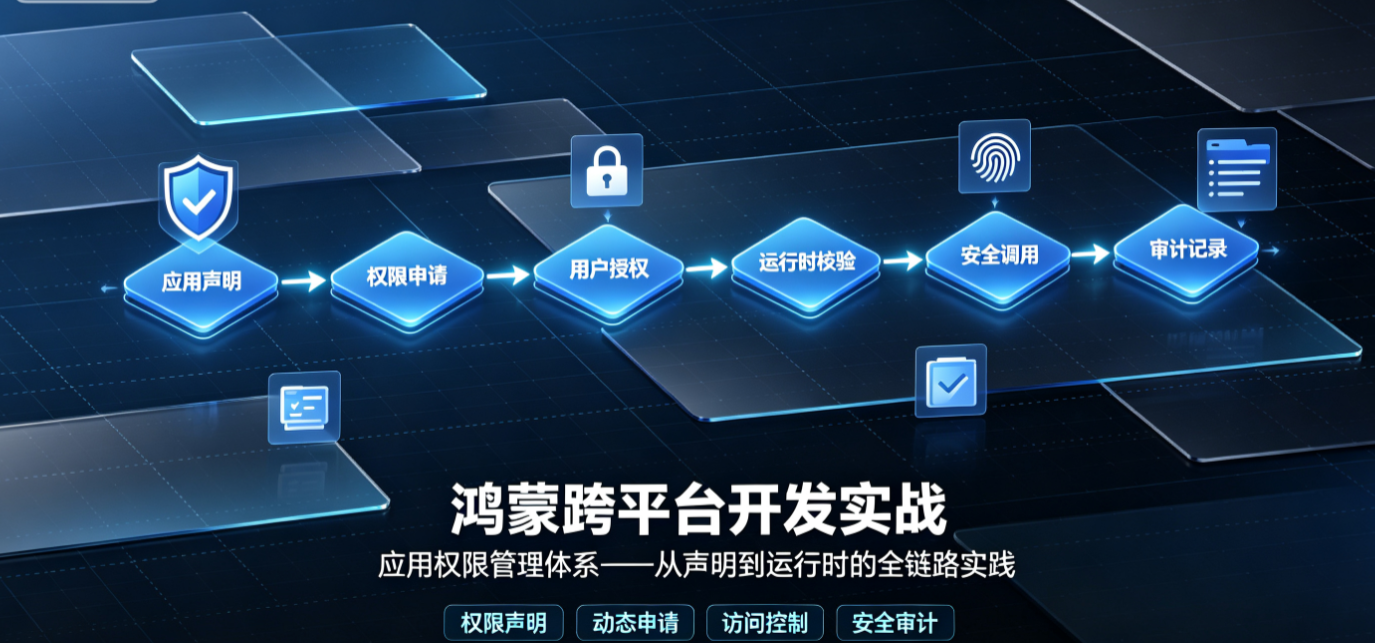
一、引言
在跨平台应用开发中,权限管理是一道绕不开的门槛。无论是获取设备标识、访问相册照片,还是调用位置服务,每个平台都有一套严密的权限管控体系。HarmonyOS NEXT 作为单框架系统(去 AOSP、纯鸿蒙内核),其权限管理机制与 Android/iOS 存在显著差异。
与 Android 的 AndroidManifest.xml 声明 + requestPermissions 运行时请求、iOS 的 Info.plist + CLLocationManager 请求模式不同,HarmonyOS NEXT 引入了 abilityAccessCtrl 统一授权中心,并提供了从 module.json5 静态声明到运行时动态申请、权限组关联授权、敏感权限二次校验、自定义权限的完整链路。
本文将系统性地梳理 HarmonyOS 权限管理的全貌,并提供一个可在生产环境中直接使用的权限管理封装工具集。
二、权限体系总览
2.1 权限分类
HarmonyOS 将权限分为三大层级:
| 层级 | 级别 | 授权方式 | 说明 | 示例 |
|---|---|---|---|---|
| L1 | system_basic | 系统自动授权 | 不涉及用户隐私,安装即授权 | 网络访问、WiFi 信息 |
| L2 | system_grant | 安装时授权列表 | 预授权,安装时静默授予 | 日历读取、设备信息 |
| L3 | user_grant | 运行时弹窗授权 | 敏感权限,需用户明确同意 | 相机、位置、麦克风 |
关键区别 :
system_grant与user_grant是module.json5中permissionType字段的核心取值。system_grant的权限安装时自动授予、不可撤销(除非卸载应用);user_grant的权限必须运行时弹窗申请,且用户可随时在设置中关闭。
2.2 权限组(PermissionGroup)
为了减少反复弹窗对用户造成的干扰,HarmonyOS 借鉴了 Android 的权限组概念:同属一个权限组的多个权限,只要用户授予了其中任意一个,其他权限会自动获得授权状态。
常用的权限组有:
| 权限组 | 包含权限 |
|---|---|
| CAMERA | ohos.permission.CAMERA |
| MICROPHONE | ohos.permission.MICROPHONE |
| LOCATION | ohos.permission.LOCATION、ohos.permission.LOCATION_IN_BACKGROUND |
| STORAGE | ohos.permission.READ_MEDIA、ohos.permission.WRITE_MEDIA |
| CALENDAR | ohos.permission.READ_CALENDAR、ohos.permission.WRITE_CALENDAR |
当应用首次请求 ohos.permission.CAMERA 时,系统会自动将整个 CAMERA 权限组的状态置为"已授予";后续再请求该组内其他权限(如有),将直接返回已授权,不再弹窗。
三、module.json5 权限声明
权限声明的入口是 entry/src/main/module.json5。所有需要使用的权限(无论是 system_grant 还是 user_grant)都必须在此文件中声明。
3.1 requestPermissions 配置
json5
{
  "module": {
    // ... 其他配置
    "requestPermissions": [
      {
        "name": "ohos.permission.CAMERA",
        "reason": "$string:camera_reason",      // 必填(user_grant),本地化字符串
        "usedScene": {
          "abilities": ["EntryAbility"],
          "when": "inuse"                         // inuse 或 always
        }
      },
      {
        "name": "ohos.permission.MICROPHONE",
        "reason": "$string:microphone_reason",
        "usedScene": {
          "abilities": ["EntryAbility"],
          "when": "inuse"
        }
      },
      {
        "name": "ohos.permission.ACCESS_FINE_LOCATION",
        "reason": "$string:location_reason",
        "usedScene": {
          "abilities": ["EntryAbility"],
          "when": "inuse"
        }
      },
      {
        "name": "ohos.permission.READ_MEDIA",
        "reason": "$string:read_media_reason",
        "usedScene": {
          "abilities": ["EntryAbility"],
          "when": "inuse"
        }
      },
      // system_grant 权限------安装时自动授予,reason 建议填写但非必须
      {
        "name": "ohos.permission.INTERNET",
        "usedScene": {
          "abilities": ["EntryAbility"],
          "when": "always"
        }
      },
      {
        "name": "ohos.permission.GET_WIFI_INFO",
        "usedScene": {
          "abilities": ["EntryAbility"],
          "when": "always"
        }
      }
    ]
  }
}
3.2 配置要点
| 字段 | 说明 | 必填 |
|---|---|---|
name |
权限名称,完整字符串 | 是 |
reason |
使用权限的理由描述,推荐引用 $string:xxx 本地化资源 |
user_grant 必填 |
usedScene.abilities |
使用该权限的 Ability 列表 | 建议填写 |
usedScene.when |
inuse(前台使用时)或 always(前后台均需) |
建议填写 |
⚠️ 温馨提示 :
reason字段必须引用resources/base/element/string.json中定义的字符串资源,最终会展示在权限弹窗和系统设置权限详情页中。不填或填写不当,可能面临应用审核驳回。
对应的 string.json 资源:
json
{
  "string": [
    {
      "name": "camera_reason",
      "value": "用于扫码和拍照识别"
    },
    {
      "name": "microphone_reason",
      "value": "用于语音输入和通话"
    },
    {
      "name": "location_reason",
      "value": "用于获取您的位置信息以提供附近服务"
    },
    {
      "name": "read_media_reason",
      "value": "用于读取相册中的图片和视频"
    }
  ]
}
四、abilityAccessCtrl 运行时权限申请
module.json5 中声明了 user_grant 类型的权限后,并不意味着应用已经获得了这些权限------用户必须在运行时明确同意。
4.1 核心 API:abilityAccessCtrl
HarmonyOS 的权限管理中心是 @kit.AbilityKit 中的 abilityAccessCtrl 模块。关键类型和接口如下:
typescript
import { abilityAccessCtrl, Permissions, PermissionRequestResult } from '@kit.AbilityKit';
import { common } from '@kit.AbilityKit';
核心接口:
| API | 说明 |
|---|---|
abilityAccessCtrl.createAtManager() |
创建访问控制管理器实例 |
atManager.requestPermissionsFromUser(context, permissions) |
以标准弹窗方式请求一组权限 |
atManager.checkAccessToken(tokenID, permission) |
检查应用是否拥有指定权限 |
atManager.verifyAccessToken(tokenID, permission) |
验证权限授予状态,返回 GrantStatus |
context.on('requestPermission') / context.off('requestPermission') |
注册/注销自定义权限请求回调(API 12+) |
4.2 标准请求:requestPermissionsFromUser
最常用的 API。它会弹出系统权限对话框,依次请求用户授权。
typescript
import { abilityAccessCtrl, Permissions, PermissionRequestResult, common } from '@kit.AbilityKit';
import { BusinessError } from '@kit.BasicServicesKit';

async function requestCameraPermission(context: common.UIAbilityContext): Promise<void> {
  const atManager = abilityAccessCtrl.createAtManager();
  try {
    const result: PermissionRequestResult = await atManager.requestPermissionsFromUser(
      context,
      ['ohos.permission.CAMERA']
    );
    if (result.authResults[0] === 0) {
      console.info('[Permission] 相机权限已授予');
    } else {
      console.warn('[Permission] 相机权限被拒绝');
    }
  } catch (err) {
    const businessError = err as BusinessError;
    console.error(`[Permission] 请求失败: ${businessError.code}, ${businessError.message}`);
  }
}
4.3 批量请求与结果解析
实际场景中,应用往往需要同时请求多个权限(例如首次启动时请求相机、麦克风、位置)。requestPermissionsFromUser 支持一次传入权限数组:
typescript
async function requestMultiplePermissions(context: common.UIAbilityContext): Promise<Map<string, boolean>> {
  const atManager = abilityAccessCtrl.createAtManager();
  const permissions: Array<Permissions> = [
    'ohos.permission.CAMERA',
    'ohos.permission.MICROPHONE',
    'ohos.permission.ACCESS_FINE_LOCATION',
    'ohos.permission.READ_MEDIA'
  ];

  const resultMap = new Map<string, boolean>();

  try {
    const grantResult: PermissionRequestResult = await atManager.requestPermissionsFromUser(
      context,
      permissions
    );
    // grantResult 结构:
    // {
    //   permissions: ['ohos.permission.CAMERA', 'ohos.permission.MICROPHONE', ...],
    //   authResults: [0, -1, 0, 0]   // 0=授予, -1=拒绝, 其他=异常
    // }
    grantResult.permissions.forEach((perm, index) => {
      const granted = grantResult.authResults[index] === 0;
      resultMap.set(perm, granted);
      console.info(`[Permission] ${perm} -> ${granted ? '已授予' : '已拒绝'}`);
    });
  } catch (err) {
    const businessError = err as BusinessError;
    console.error(`[Permission] 批量请求异常: ${businessError.code}`);
  }

  return resultMap;
}
💡 最佳实践:建议将相关的权限分组合并请求(如拍摄功能同时请求 CAMERA + MICROPHONE),减少弹窗次数,提升用户体验。
4.4 onPermissionRequest 回调(API 12+)
这是 HarmonyOS NEXT(API 12+)引入的重要特性 :Ability 可以通过注册 onPermissionRequest 回调,在系统需要请求权限时获得通知,从而执行个性化的预处理逻辑(例如展示自定义引导说明)。
此机制与标准的 requestPermissionsFromUser 有以下区别:
| 维度 | requestPermissionsFromUser | onPermissionRequest 回调 |
|---|---|---|
| 触发者 | 开发者主动调用 | 系统触发(如 FeatureAbility 内部调用) |
| 控制力 | 完全由开发者控制调用时机 | 开发者只能监听并干预流程 |
| 预处理 | 调用前自行准备 | 可在回调中执行引导/教育弹窗 |
| 适用场景 | 应用层主动申请权限 | 系统组件/Ability 内部自动触发权限申请 |
typescript
// EntryAbility.ets
import { UIAbility, AbilityConstant, Want, abilityAccessCtrl } from '@kit.AbilityKit';

export default class EntryAbility extends UIAbility {
  // ... 其他生命周期方法

  // 注册 onPermissionRequest 回调(API 12+)
  protected async onPermissionRequest(permissions: Array<string>): Promise<void> {
    console.info(`[PermissionRequest] 系统请求权限: ${JSON.stringify(permissions)}`);

    // 可在此处展示自定义引导弹窗,解释为什么需要这些权限
    // 然后决定是否调用系统授权流程或拒绝

    // 示例:展示自定义教育弹窗后继续系统流程
    // 实际项目中建议弹出自定义 Dialog 解释
    const atManager = abilityAccessCtrl.createAtManager();
    const tokenId = this.context.tokenId;

    for (const perm of permissions) {
      const grantStatus = abilityAccessCtrl.GrantStatus.PERMISSION_DENIED;
      // 此回调的默认行为是返回拒绝,需要显式调用 requestPermissionsFromUser
      // 或在回调中决定批量的授权策略
    }

    // 注意:onPermissionRequest 中不要直接再次调用 requestPermissionsFromUser
    // 这会导致死循环。正确的做法是通过自定义 UI 交互后,在主流程中调用。
  }
}
⚠️ 注意 :
onPermissionRequest在 API 12+ 中属于新增能力。实际使用中建议配合requestPermissionsFromUser协同工作------前者作为系统主动触发场景的监听器,后者作为应用主动请求的主要手段。
五、权限授予回调处理(PermissionRequestResult)
PermissionRequestResult 是 requestPermissionsFromUser 的返回类型,包含两个关键字段:
typescript
interface PermissionRequestResult {
  permissions: Array<Permissions>;  // 请求的权限列表
  authResults: Array<number>;       // 每个权限的授予结果
  // 0 = PERMISSION_GRANTED
  // -1 = PERMISSION_DENIED
  // 其他值 = 系统异常
}
5.1 细粒度结果处理
授权结果不仅仅有"授予/拒绝"两种状态。以下是完整的结果码含义:
| 值 | 常量 | 含义 |
|---|---|---|
0 |
PERMISSION_GRANTED |
用户已授予该权限 |
-1 |
PERMISSION_DENIED |
用户拒绝了该权限 |
-2 |
PERMISSION_DENIED_NEVER_ASK |
用户拒绝并勾选"不再询问"(API 12+ 行为) |
其中 -2 是特别需要关注的返回值:一旦用户选择了"不再询问",后续的 requestPermissionsFromUser 调用将不会再弹出系统对话框,而是直接返回拒绝结果。此时必须引导用户前往系统设置页面手动开启权限。
typescript
function handleGrantResult(result: PermissionRequestResult): void {
  const NEVER_ASK = -2;

  result.permissions.forEach((perm, index) => {
    const authResult = result.authResults[index];

    switch (authResult) {
      case 0:
        console.info(`[Permission] ${perm}: 已授予`);
        break;
      case -1:
        console.warn(`[Permission] ${perm}: 已拒绝(可再次弹窗)`);
        // 此时可以再次调用 requestPermissionsFromUser
        break;
      case NEVER_ASK:
        console.warn(`[Permission] ${perm}: 拒绝且不再询问`);
        // 必须引导用户去系统设置手动开启
        showPermissionSettingsDialog(perm);
        break;
      default:
        console.error(`[Permission] ${perm}: 未知错误码 ${authResult}`);
    }
  });
}

function showPermissionSettingsDialog(permission: string): void {
  // 弹出自定义对话框,引导用户前往设置页
  // 跳转系统设置页的 API 见后文
}
六、权限组关联授权
当应用请求某个权限时,HarmonyOS 会检查该权限所在的权限组(PermissionGroup)。如果同组内的另一个权限已经被授权,则当前权限会直接返回 已授予(0),不会再次弹窗。
6.1 权限组映射
typescript
/**
 * 权限组映射表(常用)
 * 同一组内的权限,只要有一个被授予,其他则自动视为已授权
 */
const PERMISSION_GROUP_MAP: Record<string, Array<string>> = {
  'LOCATION': [
    'ohos.permission.LOCATION',
    'ohos.permission.LOCATION_IN_BACKGROUND',
    'ohos.permission.APPROXIMATELY_LOCATION'
  ],
  'CAMERA': [
    'ohos.permission.CAMERA'
  ],
  'MICROPHONE': [
    'ohos.permission.MICROPHONE'
  ],
  'STORAGE': [
    'ohos.permission.READ_MEDIA',
    'ohos.permission.WRITE_MEDIA'
  ],
  'CALENDAR': [
    'ohos.permission.READ_CALENDAR',
    'ohos.permission.WRITE_CALENDAR'
  ]
};
6.2 利用权限组优化请求策略
利用权限组的特性,可以优化请求策略:不需要逐个请求同组权限,只需要请求一个,其余自动关联授权。
typescript
/**
 * 按权限组去重请求
 * 只请求同组中的一个权限,其余依赖关联授权
 */
async function requestByGroup(
  context: common.UIAbilityContext,
  permissions: Array<string>
): Promise<Map<string, boolean>> {
  const groupedPermissions = new Set<string>();
  const groupNames = Object.keys(PERMISSION_GROUP_MAP);

  for (const perm of permissions) {
    // 检查该权限是否属于某个已知组
    const parentGroup = groupNames.find(groupName =>
      PERMISSION_GROUP_MAP[groupName].includes(perm)
    );
    if (parentGroup) {
      // 同组只需添加第一个权限,组内其他权限自动关联授权
      groupedPermissions.add(PERMISSION_GROUP_MAP[parentGroup][0]);
    } else {
      groupedPermissions.add(perm);
    }
  }

  const atManager = abilityAccessCtrl.createAtManager();
  try {
    const result = await atManager.requestPermissionsFromUser(
      context,
      Array.from(groupedPermissions)
    );

    const resultMap = new Map<string, boolean>();
    // 展开结果:传入的每个权限都映射到对应的分组结果
    permissions.forEach(perm => {
      const parentGroup = groupNames.find(groupName =>
        PERMISSION_GROUP_MAP[groupName].includes(perm)
      );
      if (parentGroup) {
        const groupPerm = PERMISSION_GROUP_MAP[parentGroup][0];
        const idx = Array.from(groupedPermissions).indexOf(groupPerm);
        resultMap.set(perm, result.authResults[idx] === 0);
      } else {
        const idx = Array.from(groupedPermissions).indexOf(perm);
        resultMap.set(perm, result.authResults[idx] === 0);
      }
    });

    return resultMap;
  } catch (err) {
    console.error('[Permission] 分组请求失败');
    return new Map();
  }
}
七、敏感权限二次校验
某些敏感权限 (如位置、相机、麦克风)在被授予后,仍需在每次使用前进行二次校验。这是因为用户可能在设置中随时关闭权限,应用不应缓存一次性的授权结果。
7.1 使用前检查 checkAccessToken
typescript
import { abilityAccessCtrl, Permissions } from '@kit.AbilityKit';

/**
 * 检查指定权限的授予状态
 * @param tokenId 应用 Token ID(可通过 context.tokenId 获取)
 * @param permission 权限名称
 * @returns true 表示已授权
 */
async function checkPermission(
  tokenId: number,
  permission: Permissions
): Promise<boolean> {
  const atManager = abilityAccessCtrl.createAtManager();
  try {
    const state: number = await atManager.checkAccessToken(tokenId, permission);
    // 返回 0 表示 PERMISSION_GRANTED,-1 表示 PERMISSION_DENIED
    return state === 0;
  } catch (err) {
    console.error(`[Permission] 检查权限 ${permission} 失败`);
    return false;
  }
}
7.2 verifyAccessToken 同步校验
verifyAccessToken 是同步版本,适合在非异步上下文中使用:
typescript
/**
 * 同步校验权限状态
 * @param tokenId 应用 TokenID
 * @param permission 权限名称
 * @returns GrantStatus(PERMISSION_GRANTED 或 PERMISSION_DENIED)
 */
function verifyPermission(tokenId: number, permission: Permissions): abilityAccessCtrl.GrantStatus {
  const atManager = abilityAccessCtrl.createAtManager();
  return atManager.verifyAccessToken(tokenId, permission);
}
7.3 二次校验的最佳实践
typescript
/**
 * 安全的相机使用流程
 * 每次使用前进行二次校验
 */
async function safeCameraAccess(): Promise<void> {
  const context = getContext(this) as common.UIAbilityContext;
  const tokenId = context.tokenId;
  const cameraPermission: Permissions = 'ohos.permission.CAMERA';

  // 1. 二次校验:检查权限当前状态
  const hasPermission = await checkPermission(tokenId, cameraPermission);

  if (!hasPermission) {
    // 2. 未授权,申请权限
    const atManager = abilityAccessCtrl.createAtManager();
    const result = await atManager.requestPermissionsFromUser(context, [cameraPermission]);

    if (result.authResults[0] !== 0) {
      // 3. 授权被拒,提示用户
      AlertDialog.show({
        title: '需要相机权限',
        message: '请在系统设置中手动开启相机权限',
        primaryButton: {
          value: '去设置',
          action: () => {
            openAppPermissionSettings();
          }
        },
        secondaryButton: {
          value: '取消',
          action: () => {}
        }
      });
      return;
    }
  }

  // 4. 权限通过,执行相机操作
  startCamera();
}
八、跳转系统权限设置页
当用户拒绝并不再询问时,必须引导用户前往系统设置页面手动开启权限。HarmonyOS 提供了两种方式:
8.1 使用 Want 跳转
typescript
import { common, Want } from '@kit.AbilityKit';
import { BusinessError } from '@kit.BasicServicesKit';
import { hilog } from '@kit.PerformanceAnalysisKit';

/**
 * 打开系统应用权限设置页
 * 这是推荐方式,因为应用可以跳转到自己的权限设置页面
 */
async function openAppPermissionSettings(): Promise<void> {
  try {
    const context = getContext(this) as common.UIAbilityContext;
    const bundleName = context.applicationInfo.bundleName;

    const want: Want = {
      bundleName: 'com.huawei.hmos.settings',
      abilityName: 'com.huawei.hmos.settings.MainAbility',
      uri: 'application_info_entry',
      parameters: {
        pushParams: bundleName
      }
    };

    await context.startAbility(want);
  } catch (err) {
    const businessError = err as BusinessError;
    hilog.error(0x0000, 'PermissionDemo',
      `跳转设置页失败: ${businessError.code}`);
  }
}

/**
 * 直接跳转到某个具体权限的设置页
 * API 12+ 支持这种方式
 */
async function openSpecificPermissionSettings(permissionName: string): Promise<void> {
  try {
    const context = getContext(this) as common.UIAbilityContext;
    const want: Want = {
      bundleName: 'com.huawei.hmos.settings',
      abilityName: 'com.huawei.hmos.settings.permission.manager.PermissionDetailAbility',
      parameters: {
        permissionName: permissionName
      }
    };
    await context.startAbility(want);
  } catch (err) {
    const businessError = err as BusinessError;
    hilog.error(0x0000, 'PermissionDemo',
      `跳转具体权限设置页失败: ${businessError.code}`);
  }
}
8.2 使用 startAbilityForResult 接收返回
typescript
async function openSettingsAndWait(context: common.UIAbilityContext): Promise<void> {
  try {
    const want: Want = {
      bundleName: 'com.huawei.hmos.settings',
      abilityName: 'com.huawei.hmos.settings.permission.manager.PermissionDetailAbility',
      parameters: {
        permissionName: 'ohos.permission.CAMERA'
      }
    };

    const result = await context.startAbilityForResult(want);
    if (result.resultCode === 0) {
      // 用户从设置页返回
      // 此时应重新检查权限状态
      console.info('[Permission] 从设置页返回');
    }
  } catch (err) {
    console.error('[Permission] 跳转设置页异常');
  }
}
九、自定义权限(CustomPermission)
HarmonyOS NEXT(API 12+)引入了 自定义权限 机制。当你的应用作为 API 提供方,希望其他应用调用你的能力时必须拥有特定权限,可以使用自定义权限。
9.1 自定义权限声明
在提供方应用的 module.json5 中声明自定义权限:
json5
{
  "module": {
    "requestPermissions": [
      // ... 系统权限声明
    ],
    "customPermissions": [
      {
        "name": "com.example.app.READ_USER_DATA",
        "grantMode": "available_grant",          // 授权模式
        "availableScope": "signature",            // 可用范围
        "label": "$string:custom_perm_label",
        "description": "$string:custom_perm_desc"
      },
      {
        "name": "com.example.app.WRITE_SETTINGS",
        "grantMode": "system_grant",              // 系统自动授权
        "availableScope": "signature",            // 同签名应用可用
        "label": "$string:write_settings_label",
        "description": "$string:write_settings_desc"
      }
    ]
  }
}| 字段 | 说明 | 可选值 |
|---|---|---|
name |
自定义权限名称,通常用 appDomain + permissionName 格式 |
字符串 |
grantMode |
授权模式 | available_grant(运行时弹窗)或 system_grant(安装时静默) |
availableScope |
可用范围 | signature(同签名)、restricted(受限)、global(全局) |
label |
权限标签,展示给用户 | 本地化字符串 |
description |
权限描述 | 本地化字符串 |
9.2 自定义权限的校验
提供方应用在暴露 API 前,需要校验调用方是否拥有自定义权限:
typescript
import { abilityAccessCtrl, Permissions } from '@kit.AbilityKit';
import { rpc } from '@kit.IPCKit';

/**
 * 校验调用方是否拥有自定义权限
 * @param callingTokenId 调用方的 TokenID(可通过 rpc 获取)
 * @param customPermission 自定义权限名称
 * @returns 是否授权
 */
async function checkCustomPermission(
  callingTokenId: number,
  customPermission: string
): Promise<boolean> {
  const atManager = abilityAccessCtrl.createAtManager();
  try {
    const state = await atManager.checkAccessToken(callingTokenId, customPermission);
    return state === 0;
  } catch (err) {
    console.error(`[CustomPermission] 校验失败: ${customPermission}`);
    return false;
  }
}

// 在 ServiceExtension 中使用
class DataServiceExtension extends ServiceExtension {
  async onRemoteMessage(want: Want, startId: number): Promise<void> {
    const callingTokenId = rpc.IPCSkeleton.getCallingTokenId();
    const hasPermission = await checkCustomPermission(
      callingTokenId,
      'com.example.app.READ_USER_DATA'
    );

    if (!hasPermission) {
      console.error('[CustomPermission] 调用方无权访问');
      return;
    }

    // 执行受保护的 API
    this.provideData();
  }
}
十、完整权限管理封装类
以下提供一个可以在生产项目中直接使用的权限管理封装类。它包含了权限检查、批量请求、二次校验、跳转设置、权限状态监控等核心能力。
typescript
// PermissionManager.ets
import { abilityAccessCtrl, Permissions, PermissionRequestResult, common } from '@kit.AbilityKit';
import { BusinessError } from '@kit.BasicServicesKit';
import { hilog } from '@kit.PerformanceAnalysisKit';

const TAG = 'PermissionManager';
const DOMAIN = 0x0000;

/**
 * 权限授权结果枚举
 */
export enum AuthStatus {
  /** 已授权 */
  GRANTED = 0,
  /** 拒绝(可再次弹窗) */
  DENIED = -1,
  /** 拒绝并不再询问 */
  DENIED_FOREVER = -2,
  /** 未知错误 */
  ERROR = -999
}

/**
 * 权限状态封装
 */
export interface PermissionState {
  name: Permissions | string;
  status: AuthStatus;
  groupName?: string;
}

/**
 * 权限管理单例
 * 职责:权限检查、申请、状态监控、跳转设置页
 */
export class PermissionManager {
  private static instance: PermissionManager;
  private atManager: abilityAccessCtrl.AtManager;
  private tokenId: number = 0;
  private context: common.UIAbilityContext | null = null;

  /** 权限组映射 */
  private readonly groupMap: Record<string, Array<string>> = {
    'CAMERA': ['ohos.permission.CAMERA'],
    'MICROPHONE': ['ohos.permission.MICROPHONE'],
    'LOCATION': [
      'ohos.permission.LOCATION',
      'ohos.permission.LOCATION_IN_BACKGROUND',
      'ohos.permission.APPROXIMATELY_LOCATION'
    ],
    'STORAGE': [
      'ohos.permission.READ_MEDIA',
      'ohos.permission.WRITE_MEDIA'
    ],
    'CALENDAR': [
      'ohos.permission.READ_CALENDAR',
      'ohos.permission.WRITE_CALENDAR'
    ],
    'PHONE': [
      'ohos.permission.READ_CONTACTS',
      'ohos.permission.WRITE_CONTACTS'
    ]
  };

  private constructor() {
    this.atManager = abilityAccessCtrl.createAtManager();
  }

  /**
   * 获取单例实例
   */
  static getInstance(): PermissionManager {
    if (!PermissionManager.instance) {
      PermissionManager.instance = new PermissionManager();
    }
    return PermissionManager.instance;
  }

  /**
   * 初始化(必须在 Ability 创建后调用)
   */
  init(context: common.UIAbilityContext): void {
    this.context = context;
    this.tokenId = context.tokenId;
    hilog.info(DOMAIN, TAG, 'PermissionManager 初始化完成');
  }

  /**
   * 检查单个权限是否已授权
   */
  async hasPermission(permission: Permissions): Promise<boolean> {
    if (!this.tokenId) {
      hilog.error(DOMAIN, TAG, 'tokenId 未初始化');
      return false;
    }
    try {
      const state = await this.atManager.checkAccessToken(this.tokenId, permission);
      return state === 0;
    } catch (err) {
      const businessError = err as BusinessError;
      hilog.error(DOMAIN, TAG, `checkAccessToken 异常: ${businessError.code}`);
      return false;
    }
  }

  /**
   * 批量检查权限状态
   */
  async checkPermissions(permissions: Array<Permissions>): Promise<Map<string, boolean>> {
    const result = new Map<string, boolean>();
    for (const perm of permissions) {
      result.set(perm, await this.hasPermission(perm));
    }
    return result;
  }

  /**
   * 请求单个权限
   */
  async requestPermission(permission: Permissions): Promise<AuthStatus> {
    if (!this.context) {
      hilog.error(DOMAIN, TAG, 'context 未初始化');
      return AuthStatus.ERROR;
    }

    try {
      const result: PermissionRequestResult = await this.atManager.requestPermissionsFromUser(
        this.context,
        [permission]
      );
      return result.authResults[0] as AuthStatus;
    } catch (err) {
      const businessError = err as BusinessError;
      hilog.error(DOMAIN, TAG, `requestPermission 异常: ${businessError.code}`);
      return AuthStatus.ERROR;
    }
  }

  /**
   * 请求一组权限(自动按权限组去重)
   */
  async requestPermissions(permissions: Array<Permissions>): Promise<Map<string, AuthStatus>> {
    if (!this.context) {
      hilog.error(DOMAIN, TAG, 'context 未初始化');
      return new Map();
    }

    // 去重:同权限组只请求第一个
    const deduplicated = this.deduplicateByGroup(permissions);

    try {
      const result: PermissionRequestResult = await this.atManager.requestPermissionsFromUser(
        this.context,
        deduplicated.dedupedList
      );

      const resultMap = new Map<string, AuthStatus>();

      // 将去重后的结果映射回原始权限列表
      permissions.forEach(perm => {
        const dedupIndex = deduplicated.getOriginalIndex(perm);
        if (dedupIndex >= 0 && dedupIndex < result.authResults.length) {
          resultMap.set(perm, result.authResults[dedupIndex] as AuthStatus);
        } else {
          // 该权限被去重(同组已请求),检查其同组权限的授权状态
          const groupName = deduplicated.findGroup(perm);
          if (groupName) {
            const groupPerm = this.groupMap[groupName][0];
            const idx = deduplicated.dedupedList.indexOf(groupPerm);
            resultMap.set(perm, result.authResults[idx] as AuthStatus);
          } else {
            resultMap.set(perm, AuthStatus.ERROR);
          }
        }
      });

      this.logGrantResults(resultMap);
      return resultMap;
    } catch (err) {
      const businessError = err as BusinessError;
      hilog.error(DOMAIN, TAG, `requestPermissions 异常: ${businessError.code}`);
      return new Map();
    }
  }

  /**
   * 请求权限并提供结果回调
   */
  async requestPermissionsWithCallback(
    permissions: Array<Permissions>,
    onGranted?: (permission: string) => void,
    onDenied?: (permission: string, status: AuthStatus) => void
  ): Promise<void> {
    const result = await this.requestPermissions(permissions);
    result.forEach((status, perm) => {
      if (status === AuthStatus.GRANTED) {
        onGranted?.(perm);
      } else {
        onDenied?.(perm, status);
      }
    });
  }

  /**
   * 获取未授权的权限列表
   */
  async getDeniedPermissions(permissions: Array<Permissions>): Promise<Array<string>> {
    const denied: Array<string> = [];
    const states = await this.checkPermissions(permissions);
    states.forEach((granted, perm) => {
      if (!granted) {
        denied.push(perm);
      }
    });
    return denied;
  }

  /**
   * 跳转系统应用权限设置页
   */
  async openPermissionSettings(): Promise<void> {
    if (!this.context) {
      hilog.error(DOMAIN, TAG, 'context 未初始化');
      return;
    }

    try {
      const bundleName = this.context.applicationInfo.bundleName;
      const want = {
        bundleName: 'com.huawei.hmos.settings',
        abilityName: 'com.huawei.hmos.settings.MainAbility',
        uri: 'application_info_entry',
        parameters: {
          pushParams: bundleName
        }
      };
      await this.context.startAbility(want);
      hilog.info(DOMAIN, TAG, '已跳转至权限设置页');
    } catch (err) {
      const businessError = err as BusinessError;
      hilog.error(DOMAIN, TAG, `跳转设置页失败: ${businessError.code}`);
    }
  }

  /**
   * 跳转具体权限设置页
   */
  async openSpecificPermission(permissionName: string): Promise<void> {
    if (!this.context) {
      return;
    }
    try {
      const want = {
        bundleName: 'com.huawei.hmos.settings',
        abilityName: 'com.huawei.hmos.settings.permission.manager.PermissionDetailAbility',
        parameters: {
          permissionName: permissionName
        }
      };
      await this.context.startAbility(want);
    } catch (err) {
      hilog.error(DOMAIN, TAG, '跳转具体权限设置页失败');
    }
  }

  /**
   * 请求权限时展示教育弹窗
   * 在 requestPermission 之前调用,向用户解释为何需要该权限
   */
  showPermissionRationale(
    title: string,
    message: string,
    onConfirm: () => void,
    onCancel?: () => void
  ): void {
    AlertDialog.show({
      title: title,
      message: message,
      primaryButton: {
        value: '允许',
        action: () => onConfirm()
      },
      secondaryButton: {
        value: '拒绝',
        action: () => onCancel?.()
      }
    });
  }

  // ============ 私有方法 ============

  /**
   * 按权限组去重
   */
  private deduplicateByGroup(permissions: Array<string>): {
    dedupedList: Array<string>;
    getOriginalIndex: (perm: string) => number;
    findGroup: (perm: string) => string | null;
  } {
    const dedupedList: Array<string> = [];
    const seen = new Set<string>();
    const groupNames = Object.keys(this.groupMap);

    for (const perm of permissions) {
      if (seen.has(perm)) continue;

      // 检查是否属于已有组
      let isDuplicated = false;
      for (const groupName of groupNames) {
        const groupPerms = this.groupMap[groupName];
        if (groupPerms.includes(perm)) {
          // 组内第一个权限已在列表里吗?
          const firstInGroup = groupPerms[0];
          if (dedupedList.includes(firstInGroup)) {
            isDuplicated = true;
            break;
          }
        }
      }

      if (!isDuplicated) {
        dedupedList.push(perm);
        seen.add(perm);
      }
    }

    return {
      dedupedList,
      getOriginalIndex: (perm: string) => dedupedList.indexOf(perm),
      findGroup: (perm: string) => {
        for (const groupName of groupNames) {
          if (this.groupMap[groupName].includes(perm)) {
            return groupName;
          }
        }
        return null;
      }
    };
  }

  /**
   * 记录授权结果日志
   */
  private logGrantResults(resultMap: Map<string, AuthStatus>): void {
    resultMap.forEach((status, perm) => {
      const statusText = status === AuthStatus.GRANTED
        ? '✅ 已授权'
        : status === AuthStatus.DENIED
          ? '❌ 已拒绝'
          : status === AuthStatus.DENIED_FOREVER
            ? '🚫 拒绝并不再询问'
            : '⚠️ 异常';
      hilog.info(DOMAIN, TAG, `${perm}: ${statusText}`);
    });
  }
}
十一、运行时权限申请页面
接下来,我们实现一个完整的请求权限引导页面。用户首次打开应用时,引导用户逐个授予所需权限。
typescript
// PermissionGuidePage.ets
import { Permissions } from '@kit.AbilityKit';
import { PermissionManager, AuthStatus } from './PermissionManager';
import { common } from '@kit.AbilityKit';

interface PermissionItem {
  icon: ResourceStr;
  title: string;
  description: string;
  permission: Permissions;
  granted: boolean;
}

@Entry
@Component
struct PermissionGuidePage {
  @State permissionItems: PermissionItem[] = [
    {
      icon: $r('app.media.icon_camera'),
      title: '相机权限',
      description: '用于扫码和拍照识别,快速录入商品信息',
      permission: 'ohos.permission.CAMERA',
      granted: false
    },
    {
      icon: $r('app.media.icon_mic'),
      title: '麦克风权限',
      description: '用于语音搜索和语音输入功能',
      permission: 'ohos.permission.MICROPHONE',
      granted: false
    },
    {
      icon: $r('app.media.icon_location'),
      title: '位置权限',
      description: '用于获取附近门店和服务推荐',
      permission: 'ohos.permission.ACCESS_FINE_LOCATION',
      granted: false
    },
    {
      icon: $r('app.media.icon_storage'),
      title: '存储权限',
      description: '用于读取和保存图片、文件',
      permission: 'ohos.permission.READ_MEDIA',
      granted: false
    }
  ];

  @State currentIndex: number = 0;
  @State showDeniedAlert: boolean = false;
  @State deniedMessage: string = '';

  private permManager = PermissionManager.getInstance();

  aboutToAppear(): void {
    this.permManager.init(getContext(this) as common.UIAbilityContext);
    this.checkAllPermissions();
  }

  /**
   * 检查所有权限的当前状态
   */
  async checkAllPermissions(): Promise<void> {
    for (let i = 0; i < this.permissionItems.length; i++) {
      const item = this.permissionItems[i];
      const granted = await this.permManager.hasPermission(item.permission);
      this.permissionItems[i].granted = granted;
    }
    // 更新 currentIndex 到第一个未授权的权限
    this.updateCurrentIndex();
  }

  updateCurrentIndex(): void {
    const nextIndex = this.permissionItems.findIndex(item => !item.granted);
    this.currentIndex = nextIndex >= 0 ? nextIndex : this.permissionItems.length;
  }

  get allGranted(): boolean {
    return this.permissionItems.every(item => item.granted);
  }

  build() {
    Column() {
      // 顶部进度指示
      if (!this.allGranted) {
        this.GuideHeader()
      }

      // 权限列表或完成页面
      if (this.allGranted) {
        this.AllGrantedView()
      } else {
        this.PermissionListView()
      }
    }
    .width('100%')
    .height('100%')
    .backgroundColor($r('sys.color.ohos_id_color_white'))
  }

  @Builder
  GuideHeader() {
    Column() {
      Text('应用权限设置')
        .fontSize(24)
        .fontWeight(FontWeight.Bold)
        .margin({ top: 48 })

      Text('为了提供完整的服务体验,请允许以下权限')
        .fontSize(14)
        .fontColor($r('sys.color.ohos_id_color_secondary'))
        .margin({ top: 8, bottom: 24 })

      // 进度条
      Row() {
        ForEach(this.permissionItems, (item: PermissionItem, index: number) => {
          Circle()
            .width(10)
            .height(10)
            .fill(item.granted
              ? $r('sys.color.ohos_id_color_emphasize')
              : index === this.currentIndex
                ? $r('sys.color.ohos_id_color_primary')
                : $r('sys.color.ohos_id_color_disabled'))
            .margin({ left: 4, right: 4 })
        })
      }
      .margin({ bottom: 32 })
    }
    .width('100%')
    .alignItems(HorizontalAlign.Center)
  }

  @Builder
  PermissionListView() {
    Column() {
      // 单个权限卡片
      ForEach(
        this.permissionItems,
        (item: PermissionItem, index: number) => {
          if (index === this.currentIndex) {
            this.PermissionCard(item)
          }
        }
      )

      // 底部按钮
      Button('授权并继续')
        .width('80%')
        .height(48)
        .backgroundColor($r('sys.color.ohos_id_color_emphasize'))
        .fontColor(Color.White)
        .borderRadius(24)
        .margin({ top: 32 })
        .onClick(() => this.handleGrantCurrentPermission())

      // 跳过
      Text('跳过(可在设置中随时开启)')
        .fontSize(14)
        .fontColor($r('sys.color.ohos_id_color_secondary'))
        .margin({ top: 16 })
        .onClick(() => this.skipToNext())
    }
    .width('100%')
    .padding({ left: 24, right: 24 })
    .alignItems(HorizontalAlign.Center)
    .layoutWeight(1)
  }

  @Builder
  PermissionCard(item: PermissionItem) {
    Column() {
      Image(item.icon)
        .width(80)
        .height(80)
        .margin({ top: 40, bottom: 24 })

      Text(item.title)
        .fontSize(20)
        .fontWeight(FontWeight.Medium)

      Text(item.description)
        .fontSize(14)
        .fontColor($r('sys.color.ohos_id_color_secondary'))
        .textAlign(TextAlign.Center)
        .margin({ top: 12, left: 32, right: 32 })
        .maxLines(2)
    }
    .width('100%')
    .alignItems(HorizontalAlign.Center)
  }

  @Builder
  AllGrantedView() {
    Column() {
      Image($r('app.media.icon_success'))
        .width(100)
        .height(100)
        .margin({ top: 80 })

      Text('权限已全部开启')
        .fontSize(24)
        .fontWeight(FontWeight.Bold)
        .margin({ top: 24 })

      Text('现在可以体验完整功能了')
        .fontSize(14)
        .fontColor($r('sys.color.ohos_id_color_secondary'))
        .margin({ top: 8 })

      Button('开始使用')
        .width('80%')
        .height(48)
        .backgroundColor($r('sys.color.ohos_id_color_emphasize'))
        .fontColor(Color.White)
        .borderRadius(24)
        .margin({ top: 48 })
        .onClick(() => {
          // 跳转主页
          router.replaceUrl({ url: 'pages/Index' });
        })
    }
    .width('100%')
    .alignItems(HorizontalAlign.Center)
    .layoutWeight(1)
  }

  /**
   * 处理当前权限的授权请求
   */
  async handleGrantCurrentPermission(): Promise<void> {
    const item = this.permissionItems[this.currentIndex];
    const status = await this.permManager.requestPermission(item.permission);

    if (status === AuthStatus.GRANTED) {
      this.permissionItems[this.currentIndex].granted = true;
      this.updateCurrentIndex();
    } else if (status === AuthStatus.DENIED_FOREVER) {
      this.deniedMessage = `${item.title}已被永久拒绝,请前往系统设置手动开启`;
      this.showDeniedAlert = true;
    } else {
      // 普通拒绝,允许用户再次尝试
      AlertDialog.show({
        title: '权限需要开启',
        message: `"${item.title}"是应用功能所必需的,请允许使用`,
        primaryButton: {
          value: '重新授权',
          action: () => this.handleGrantCurrentPermission()
        },
        secondaryButton: {
          value: '跳过',
          action: () => this.skipToNext()
        }
      });
    }
  }

  /**
   * 跳过当前权限
   */
  skipToNext(): void {
    this.currentIndex++;
    if (this.currentIndex >= this.permissionItems.length) {
      // 所有权限都跳过,直接进入主页
      router.replaceUrl({ url: 'pages/Index' });
    }
  }
}
十二、权限状态监控
除了在应用启动时一次性请求权限,某些场景下还需要实时监控权限状态的变化(例如用户通过系统设置改变了权限)。
12.1 定时轮询检查
适用于不需要实时性极强但需要定期确认的场景:
typescript
// PermissionMonitor.ets
import { Permissions } from '@kit.AbilityKit';
import { PermissionManager } from './PermissionManager';

export type PermissionChangeCallback = (permission: string, granted: boolean) => void;

export class PermissionMonitor {
  private static instance: PermissionMonitor;
  private permManager = PermissionManager.getInstance();
  private watchList: Array<Permissions> = [];
  private callbacks: Map<string, Array<PermissionChangeCallback>> = new Map();
  private lastStates: Map<string, boolean> = new Map();
  private timerId: number | null = null;
  private intervalMs: number = 3000; // 默认 3 秒检查一次

  static getInstance(): PermissionMonitor {
    if (!PermissionMonitor.instance) {
      PermissionMonitor.instance = new PermissionMonitor();
    }
    return PermissionMonitor.instance;
  }

  /**
   * 开始监控指定权限
   */
  startWatching(
    permissions: Array<Permissions>,
    callback: PermissionChangeCallback,
    intervalMs?: number
  ): void {
    if (intervalMs !== undefined) {
      this.intervalMs = intervalMs;
    }

    // 注册回调
    permissions.forEach(perm => {
      if (!this.callbacks.has(perm)) {
        this.callbacks.set(perm, []);
      }
      this.callbacks.get(perm)!.push(callback);

      if (!this.watchList.includes(perm)) {
        this.watchList.push(perm);
      }
    });

    // 启动定时器
    if (this.timerId === null) {
      this.startTimer();
    }

    // 立即检查一次初始状态
    this.checkAndNotify();
  }

  /**
   * 停止监控
   */
  stopWatching(permissions?: Array<Permissions>, callback?: PermissionChangeCallback): void {
    if (permissions && callback) {
      permissions.forEach(perm => {
        const cbs = this.callbacks.get(perm);
        if (cbs) {
          const idx = cbs.indexOf(callback);
          if (idx >= 0) cbs.splice(idx, 1);
          if (cbs.length === 0) {
            this.callbacks.delete(perm);
          }
        }
      });
      this.watchList = Array.from(this.callbacks.keys());
    }

    if (this.callbacks.size === 0 && this.timerId !== null) {
      this.stopTimer();
    }
  }

  /**
   * 设置检查间隔
   */
  setInterval(ms: number): void {
    this.intervalMs = ms;
    if (this.timerId !== null) {
      this.stopTimer();
      this.startTimer();
    }
  }

  /**
   * 销毁监控器
   */
  destroy(): void {
    this.stopTimer();
    this.callbacks.clear();
    this.watchList = [];
    this.lastStates.clear();
  }

  private startTimer(): void {
    this.timerId = setInterval(() => {
      this.checkAndNotify();
    }, this.intervalMs);
  }

  private stopTimer(): void {
    if (this.timerId !== null) {
      clearInterval(this.timerId);
      this.timerId = null;
    }
  }

  private async checkAndNotify(): Promise<void> {
    for (const perm of this.watchList) {
      const currentState = await this.permManager.hasPermission(perm);
      const lastState = this.lastStates.get(perm);

      if (lastState !== undefined && currentState !== lastState) {
        // 状态发生变化,通知所有回调
        const cbs = this.callbacks.get(perm);
        if (cbs) {
          cbs.forEach(cb => cb(perm, currentState));
        }
      }

      this.lastStates.set(perm, currentState);
    }
  }
}
12.2 使用示例
typescript
// 在页面中使用权限监控
@Entry
@Component
struct CameraPage {
  @State cameraGranted: boolean = true;
  private monitor = PermissionMonitor.getInstance();

  aboutToAppear(): void {
    this.monitor.startWatching(
      ['ohos.permission.CAMERA'],
      (permission, granted) => {
        console.info(`[PermissionMonitor] ${permission} 状态变更为: ${granted}`);
        if (permission === 'ohos.permission.CAMERA') {
          this.cameraGranted = granted;
          if (!granted) {
            // 权限被撤销,暂停相机预览
            this.handleCameraPermissionLost();
          }
        }
      },
      2000 // 每 2 秒检查一次
    );
  }

  aboutToDisappear(): void {
    this.monitor.stopWatching(['ohos.permission.CAMERA']);
  }

  handleCameraPermissionLost(): void {
    AlertDialog.show({
      title: '相机权限已关闭',
      message: '请在系统设置中重新开启相机权限以继续使用拍摄功能',
    });
  }

  build() {
    Column() {
      if (this.cameraGranted) {
        // 相机预览组件
        Text('相机预览区域')
          .width('100%')
          .height(300)
          .backgroundColor(Color.Gray)
          .textAlign(TextAlign.Center)
      } else {
        // 权限不可用的提示
        Column() {
          Image($r('app.media.icon_permission_denied'))
            .width(60)
            .height(60)
          Text('相机权限未开启')
            .fontSize(16)
            .margin({ top: 12 })
          Button('前往设置')
            .onClick(() => {
              PermissionManager.getInstance().openSpecificPermission('ohos.permission.CAMERA');
            })
        }
        .width('100%')
        .height(300)
        .justifyContent(FlexAlign.Center)
      }
    }
    .width('100%')
    .height('100%')
  }
}
十三、权限管理的跨平台差异对照
对于同时开发 HarmonyOS 与 Android/iOS 的开发团队,以下对照表有助于快速理解三者的异同:
| 维度 | HarmonyOS NEXT | Android | iOS |
|---|---|---|---|
| 声明文件 | module.json5 → requestPermissions[] |
AndroidManifest.xml → <uses-permission> |
Info.plist → 权限键值对 |
| 运行时请求 | abilityAccessCtrl.requestPermissionsFromUser() |
ActivityCompat.requestPermissions() |
CLLocationManager.requestWhenInUseAuthorization()等 |
| 权限组 | 系统预定义组,同组关联授权 | <permission-group> 定义 |
无权限组概念 |
| 回调接口 | PermissionRequestResult |
onRequestPermissionsResult() 回调 |
CLLocationManagerDelegate 代理 |
| 自定义权限 | 支持(module.json5 → customPermissions) |
支持(<permission> 标签) |
不支持 |
| 安装时权限 | system_grant 类型(安装时静默授予) |
低于 normal 级别安装时授 | 无 |
| 不再询问 | 返回 -2(DENIED_FOREVER) |
返回 PERMISSION_DENIED,需自行判断 |
无标志位,需自行管理状态 |
| 跳转设置 | Want 打开系统设置 Ability | Settings.ACTION_APPLICATION_DETAILS_SETTINGS |
UIApplicationOpenSettingsURLString |
| 状态校验 | checkAccessToken() / verifyAccessToken() |
ContextCompat.checkSelfPermission() |
CLLocationManager.authorizationStatus() |
十四、最佳实践总结
14.1 DO's
- 尽量批量请求:将同一功能的权限组合并请求(如拍摄 = 相机 + 麦克风),减少弹窗次数。
- 使用前二次校验 :每次使用敏感权限前调用
checkAccessToken,因为用户可能在设置中随时关闭。 - 处理"不再询问" :捕获
-2返回码,引导用户跳转系统设置。 - 利用权限组去重:同组的权限只请求一次,其余自动关联授权。
- 权限请求时机:在用户即将使用相关功能时请求,而不是应用启动时一股脑全部请求(权限引导页除外)。
- 提供教育弹窗:在首次请求前简要说明为何需要该权限,可提高授权成功率。
14.2 DON'Ts
- 不要缓存权限状态:始终在运行时检查当前状态。
- 不要在
onPermissionRequest回调中再次调用requestPermissionsFromUser:会导致死循环。 - 不要忽略
reason字段:不写理由会导致应用审核被拒。 - 不要请求不必要的权限:只申请功能真正需要的权限,过度请求会降低用户信任。
- 不要在后台线程中调用权限 API:权限申请需要 UI 上下文。
十五、参考资源
本文为「鸿蒙跨平台开发实战」系列第七篇,对应权限管理体系主题。
前篇回顾:0711(响应式布局)、0712(ArkUI-X 跨平台)、0713(多设备形态 UI)、0715(状态管理跨端架构)、0717(国际化 i18n)、0718(ArkUI MVI 架构)
下一篇预告:无障碍 Accessibility 适配实战
鸿蒙跨平台开发实战:应用权限管理体系------从声明到运行时的全链路实践
适用平台 :HarmonyOS NEXT(API 12+)
核心领域 :应用权限管理
版本声明:基于 API 12 Release(Build 5.0.0.600),API 13 特性另作标注
一、引言
在跨平台应用开发中,权限管理是一道绕不开的门槛。无论是获取设备标识、访问相册照片,还是调用位置服务,每个平台都有一套严密的权限管控体系。HarmonyOS NEXT 作为单框架系统(去 AOSP、纯鸿蒙内核),其权限管理机制与 Android/iOS 存在显著差异。
与 Android 的 AndroidManifest.xml 声明 + requestPermissions 运行时请求、iOS 的 Info.plist + CLLocationManager 请求模式不同,HarmonyOS NEXT 引入了 abilityAccessCtrl 统一授权中心,并提供了从 module.json5 静态声明到运行时动态申请、权限组关联授权、敏感权限二次校验、自定义权限的完整链路。
本文将系统性地梳理 HarmonyOS 权限管理的全貌,并提供一个可在生产环境中直接使用的权限管理封装工具集。
二、权限体系总览
2.1 权限分类
HarmonyOS 将权限分为三大层级:
| 层级 | 级别 | 授权方式 | 说明 | 示例 |
|---|---|---|---|---|
| L1 | system_basic | 系统自动授权 | 不涉及用户隐私,安装即授权 | 网络访问、WiFi 信息 |
| L2 | system_grant | 安装时授权列表 | 预授权,安装时静默授予 | 日历读取、设备信息 |
| L3 | user_grant | 运行时弹窗授权 | 敏感权限,需用户明确同意 | 相机、位置、麦克风 |
关键区别 :
system_grant与user_grant是module.json5中permissionType字段的核心取值。system_grant的权限安装时自动授予、不可撤销(除非卸载应用);user_grant的权限必须运行时弹窗申请,且用户可随时在设置中关闭。
2.2 权限组(PermissionGroup)
为了减少反复弹窗对用户造成的干扰,HarmonyOS 借鉴了 Android 的权限组概念:同属一个权限组的多个权限,只要用户授予了其中任意一个,其他权限会自动获得授权状态。
常用的权限组有:
| 权限组 | 包含权限 |
|---|---|
| CAMERA | ohos.permission.CAMERA |
| MICROPHONE | ohos.permission.MICROPHONE |
| LOCATION | ohos.permission.LOCATION、ohos.permission.LOCATION_IN_BACKGROUND |
| STORAGE | ohos.permission.READ_MEDIA、ohos.permission.WRITE_MEDIA |
| CALENDAR | ohos.permission.READ_CALENDAR、ohos.permission.WRITE_CALENDAR |
当应用首次请求 ohos.permission.CAMERA 时,系统会自动将整个 CAMERA 权限组的状态置为"已授予";后续再请求该组内其他权限(如有),将直接返回已授权,不再弹窗。
三、module.json5 权限声明
权限声明的入口是 entry/src/main/module.json5。所有需要使用的权限(无论是 system_grant 还是 user_grant)都必须在此文件中声明。
3.1 requestPermissions 配置
json5
{
  "module": {
    // ... 其他配置
    "requestPermissions": [
      {
        "name": "ohos.permission.CAMERA",
        "reason": "$string:camera_reason",      // 必填(user_grant),本地化字符串
        "usedScene": {
          "abilities": ["EntryAbility"],
          "when": "inuse"                         // inuse 或 always
        }
      },
      {
        "name": "ohos.permission.MICROPHONE",
        "reason": "$string:microphone_reason",
        "usedScene": {
          "abilities": ["EntryAbility"],
          "when": "inuse"
        }
      },
      {
        "name": "ohos.permission.ACCESS_FINE_LOCATION",
        "reason": "$string:location_reason",
        "usedScene": {
          "abilities": ["EntryAbility"],
          "when": "inuse"
        }
      },
      {
        "name": "ohos.permission.READ_MEDIA",
        "reason": "$string:read_media_reason",
        "usedScene": {
          "abilities": ["EntryAbility"],
          "when": "inuse"
        }
      },
      // system_grant 权限------安装时自动授予,reason 建议填写但非必须
      {
        "name": "ohos.permission.INTERNET",
        "usedScene": {
          "abilities": ["EntryAbility"],
          "when": "always"
        }
      },
      {
        "name": "ohos.permission.GET_WIFI_INFO",
        "usedScene": {
          "abilities": ["EntryAbility"],
          "when": "always"
        }
      }
    ]
  }
}
3.2 配置要点
| 字段 | 说明 | 必填 |
|---|---|---|
name |
权限名称,完整字符串 | 是 |
reason |
使用权限的理由描述,推荐引用 $string:xxx 本地化资源 |
user_grant 必填 |
usedScene.abilities |
使用该权限的 Ability 列表 | 建议填写 |
usedScene.when |
inuse(前台使用时)或 always(前后台均需) |
建议填写 |
⚠️ 温馨提示 :
reason字段必须引用resources/base/element/string.json中定义的字符串资源,最终会展示在权限弹窗和系统设置权限详情页中。不填或填写不当,可能面临应用审核驳回。
对应的 string.json 资源:
json
{
  "string": [
    {
      "name": "camera_reason",
      "value": "用于扫码和拍照识别"
    },
    {
      "name": "microphone_reason",
      "value": "用于语音输入和通话"
    },
    {
      "name": "location_reason",
      "value": "用于获取您的位置信息以提供附近服务"
    },
    {
      "name": "read_media_reason",
      "value": "用于读取相册中的图片和视频"
    }
  ]
}
四、abilityAccessCtrl 运行时权限申请
module.json5 中声明了 user_grant 类型的权限后,并不意味着应用已经获得了这些权限------用户必须在运行时明确同意。
4.1 核心 API:abilityAccessCtrl
HarmonyOS 的权限管理中心是 @kit.AbilityKit 中的 abilityAccessCtrl 模块。关键类型和接口如下:
typescript
import { abilityAccessCtrl, Permissions, PermissionRequestResult } from '@kit.AbilityKit';
import { common } from '@kit.AbilityKit';
核心接口:
| API | 说明 |
|---|---|
abilityAccessCtrl.createAtManager() |
创建访问控制管理器实例 |
atManager.requestPermissionsFromUser(context, permissions) |
以标准弹窗方式请求一组权限 |
atManager.checkAccessToken(tokenID, permission) |
检查应用是否拥有指定权限 |
atManager.verifyAccessToken(tokenID, permission) |
验证权限授予状态,返回 GrantStatus |
context.on('requestPermission') / context.off('requestPermission') |
注册/注销自定义权限请求回调(API 12+) |
4.2 标准请求:requestPermissionsFromUser
最常用的 API。它会弹出系统权限对话框,依次请求用户授权。
typescript
import { abilityAccessCtrl, Permissions, PermissionRequestResult, common } from '@kit.AbilityKit';
import { BusinessError } from '@kit.BasicServicesKit';

async function requestCameraPermission(context: common.UIAbilityContext): Promise<void> {
  const atManager = abilityAccessCtrl.createAtManager();
  try {
    const result: PermissionRequestResult = await atManager.requestPermissionsFromUser(
      context,
      ['ohos.permission.CAMERA']
    );
    if (result.authResults[0] === 0) {
      console.info('[Permission] 相机权限已授予');
    } else {
      console.warn('[Permission] 相机权限被拒绝');
    }
  } catch (err) {
    const businessError = err as BusinessError;
    console.error(`[Permission] 请求失败: ${businessError.code}, ${businessError.message}`);
  }
}
4.3 批量请求与结果解析
实际场景中,应用往往需要同时请求多个权限(例如首次启动时请求相机、麦克风、位置)。requestPermissionsFromUser 支持一次传入权限数组:
typescript
async function requestMultiplePermissions(context: common.UIAbilityContext): Promise<Map<string, boolean>> {
  const atManager = abilityAccessCtrl.createAtManager();
  const permissions: Array<Permissions> = [
    'ohos.permission.CAMERA',
    'ohos.permission.MICROPHONE',
    'ohos.permission.ACCESS_FINE_LOCATION',
    'ohos.permission.READ_MEDIA'
  ];

  const resultMap = new Map<string, boolean>();

  try {
    const grantResult: PermissionRequestResult = await atManager.requestPermissionsFromUser(
      context,
      permissions
    );
    // grantResult 结构:
    // {
    //   permissions: ['ohos.permission.CAMERA', 'ohos.permission.MICROPHONE', ...],
    //   authResults: [0, -1, 0, 0]   // 0=授予, -1=拒绝, 其他=异常
    // }
    grantResult.permissions.forEach((perm, index) => {
      const granted = grantResult.authResults[index] === 0;
      resultMap.set(perm, granted);
      console.info(`[Permission] ${perm} -> ${granted ? '已授予' : '已拒绝'}`);
    });
  } catch (err) {
    const businessError = err as BusinessError;
    console.error(`[Permission] 批量请求异常: ${businessError.code}`);
  }

  return resultMap;
}
💡 最佳实践:建议将相关的权限分组合并请求(如拍摄功能同时请求 CAMERA + MICROPHONE),减少弹窗次数,提升用户体验。
4.4 onPermissionRequest 回调(API 12+)
这是 HarmonyOS NEXT(API 12+)引入的重要特性 :Ability 可以通过注册 onPermissionRequest 回调,在系统需要请求权限时获得通知,从而执行个性化的预处理逻辑(例如展示自定义引导说明)。
此机制与标准的 requestPermissionsFromUser 有以下区别:
| 维度 | requestPermissionsFromUser | onPermissionRequest 回调 |
|---|---|---|
| 触发者 | 开发者主动调用 | 系统触发(如 FeatureAbility 内部调用) |
| 控制力 | 完全由开发者控制调用时机 | 开发者只能监听并干预流程 |
| 预处理 | 调用前自行准备 | 可在回调中执行引导/教育弹窗 |
| 适用场景 | 应用层主动申请权限 | 系统组件/Ability 内部自动触发权限申请 |
typescript
// EntryAbility.ets
import { UIAbility, AbilityConstant, Want, abilityAccessCtrl } from '@kit.AbilityKit';

export default class EntryAbility extends UIAbility {
  // ... 其他生命周期方法

  // 注册 onPermissionRequest 回调(API 12+)
  protected async onPermissionRequest(permissions: Array<string>): Promise<void> {
    console.info(`[PermissionRequest] 系统请求权限: ${JSON.stringify(permissions)}`);

    // 可在此处展示自定义引导弹窗,解释为什么需要这些权限
    // 然后决定是否调用系统授权流程或拒绝

    // 示例:展示自定义教育弹窗后继续系统流程
    // 实际项目中建议弹出自定义 Dialog 解释
    const atManager = abilityAccessCtrl.createAtManager();
    const tokenId = this.context.tokenId;

    for (const perm of permissions) {
      const grantStatus = abilityAccessCtrl.GrantStatus.PERMISSION_DENIED;
      // 此回调的默认行为是返回拒绝,需要显式调用 requestPermissionsFromUser
      // 或在回调中决定批量的授权策略
    }

    // 注意:onPermissionRequest 中不要直接再次调用 requestPermissionsFromUser
    // 这会导致死循环。正确的做法是通过自定义 UI 交互后,在主流程中调用。
  }
}
⚠️ 注意 :
onPermissionRequest在 API 12+ 中属于新增能力。实际使用中建议配合requestPermissionsFromUser协同工作------前者作为系统主动触发场景的监听器,后者作为应用主动请求的主要手段。
五、权限授予回调处理(PermissionRequestResult)
PermissionRequestResult 是 requestPermissionsFromUser 的返回类型,包含两个关键字段:
typescript
interface PermissionRequestResult {
  permissions: Array<Permissions>;  // 请求的权限列表
  authResults: Array<number>;       // 每个权限的授予结果
  // 0 = PERMISSION_GRANTED
  // -1 = PERMISSION_DENIED
  // 其他值 = 系统异常
}
5.1 细粒度结果处理
授权结果不仅仅有"授予/拒绝"两种状态。以下是完整的结果码含义:
| 值 | 常量 | 含义 |
|---|---|---|
0 |
PERMISSION_GRANTED |
用户已授予该权限 |
-1 |
PERMISSION_DENIED |
用户拒绝了该权限 |
-2 |
PERMISSION_DENIED_NEVER_ASK |
用户拒绝并勾选"不再询问"(API 12+ 行为) |
其中 -2 是特别需要关注的返回值:一旦用户选择了"不再询问",后续的 requestPermissionsFromUser 调用将不会再弹出系统对话框,而是直接返回拒绝结果。此时必须引导用户前往系统设置页面手动开启权限。
typescript
function handleGrantResult(result: PermissionRequestResult): void {
  const NEVER_ASK = -2;

  result.permissions.forEach((perm, index) => {
    const authResult = result.authResults[index];

    switch (authResult) {
      case 0:
        console.info(`[Permission] ${perm}: 已授予`);
        break;
      case -1:
        console.warn(`[Permission] ${perm}: 已拒绝(可再次弹窗)`);
        // 此时可以再次调用 requestPermissionsFromUser
        break;
      case NEVER_ASK:
        console.warn(`[Permission] ${perm}: 拒绝且不再询问`);
        // 必须引导用户去系统设置手动开启
        showPermissionSettingsDialog(perm);
        break;
      default:
        console.error(`[Permission] ${perm}: 未知错误码 ${authResult}`);
    }
  });
}

function showPermissionSettingsDialog(permission: string): void {
  // 弹出自定义对话框,引导用户前往设置页
  // 跳转系统设置页的 API 见后文
}
六、权限组关联授权
当应用请求某个权限时,HarmonyOS 会检查该权限所在的权限组(PermissionGroup)。如果同组内的另一个权限已经被授权,则当前权限会直接返回 已授予(0),不会再次弹窗。
6.1 权限组映射
typescript
/**
 * 权限组映射表(常用)
 * 同一组内的权限,只要有一个被授予,其他则自动视为已授权
 */
const PERMISSION_GROUP_MAP: Record<string, Array<string>> = {
  'LOCATION': [
    'ohos.permission.LOCATION',
    'ohos.permission.LOCATION_IN_BACKGROUND',
    'ohos.permission.APPROXIMATELY_LOCATION'
  ],
  'CAMERA': [
    'ohos.permission.CAMERA'
  ],
  'MICROPHONE': [
    'ohos.permission.MICROPHONE'
  ],
  'STORAGE': [
    'ohos.permission.READ_MEDIA',
    'ohos.permission.WRITE_MEDIA'
  ],
  'CALENDAR': [
    'ohos.permission.READ_CALENDAR',
    'ohos.permission.WRITE_CALENDAR'
  ]
};
6.2 利用权限组优化请求策略
利用权限组的特性,可以优化请求策略:不需要逐个请求同组权限,只需要请求一个,其余自动关联授权。
typescript
/**
 * 按权限组去重请求
 * 只请求同组中的一个权限,其余依赖关联授权
 */
async function requestByGroup(
  context: common.UIAbilityContext,
  permissions: Array<string>
): Promise<Map<string, boolean>> {
  const groupedPermissions = new Set<string>();
  const groupNames = Object.keys(PERMISSION_GROUP_MAP);

  for (const perm of permissions) {
    // 检查该权限是否属于某个已知组
    const parentGroup = groupNames.find(groupName =>
      PERMISSION_GROUP_MAP[groupName].includes(perm)
    );
    if (parentGroup) {
      // 同组只需添加第一个权限,组内其他权限自动关联授权
      groupedPermissions.add(PERMISSION_GROUP_MAP[parentGroup][0]);
    } else {
      groupedPermissions.add(perm);
    }
  }

  const atManager = abilityAccessCtrl.createAtManager();
  try {
    const result = await atManager.requestPermissionsFromUser(
      context,
      Array.from(groupedPermissions)
    );

    const resultMap = new Map<string, boolean>();
    // 展开结果:传入的每个权限都映射到对应的分组结果
    permissions.forEach(perm => {
      const parentGroup = groupNames.find(groupName =>
        PERMISSION_GROUP_MAP[groupName].includes(perm)
      );
      if (parentGroup) {
        const groupPerm = PERMISSION_GROUP_MAP[parentGroup][0];
        const idx = Array.from(groupedPermissions).indexOf(groupPerm);
        resultMap.set(perm, result.authResults[idx] === 0);
      } else {
        const idx = Array.from(groupedPermissions).indexOf(perm);
        resultMap.set(perm, result.authResults[idx] === 0);
      }
    });

    return resultMap;
  } catch (err) {
    console.error('[Permission] 分组请求失败');
    return new Map();
  }
}
七、敏感权限二次校验
某些敏感权限 (如位置、相机、麦克风)在被授予后,仍需在每次使用前进行二次校验。这是因为用户可能在设置中随时关闭权限,应用不应缓存一次性的授权结果。
7.1 使用前检查 checkAccessToken
typescript
import { abilityAccessCtrl, Permissions } from '@kit.AbilityKit';

/**
 * 检查指定权限的授予状态
 * @param tokenId 应用 Token ID(可通过 context.tokenId 获取)
 * @param permission 权限名称
 * @returns true 表示已授权
 */
async function checkPermission(
  tokenId: number,
  permission: Permissions
): Promise<boolean> {
  const atManager = abilityAccessCtrl.createAtManager();
  try {
    const state: number = await atManager.checkAccessToken(tokenId, permission);
    // 返回 0 表示 PERMISSION_GRANTED,-1 表示 PERMISSION_DENIED
    return state === 0;
  } catch (err) {
    console.error(`[Permission] 检查权限 ${permission} 失败`);
    return false;
  }
}
7.2 verifyAccessToken 同步校验
verifyAccessToken 是同步版本,适合在非异步上下文中使用:
typescript
/**
 * 同步校验权限状态
 * @param tokenId 应用 TokenID
 * @param permission 权限名称
 * @returns GrantStatus(PERMISSION_GRANTED 或 PERMISSION_DENIED)
 */
function verifyPermission(tokenId: number, permission: Permissions): abilityAccessCtrl.GrantStatus {
  const atManager = abilityAccessCtrl.createAtManager();
  return atManager.verifyAccessToken(tokenId, permission);
}
7.3 二次校验的最佳实践
typescript
/**
 * 安全的相机使用流程
 * 每次使用前进行二次校验
 */
async function safeCameraAccess(): Promise<void> {
  const context = getContext(this) as common.UIAbilityContext;
  const tokenId = context.tokenId;
  const cameraPermission: Permissions = 'ohos.permission.CAMERA';

  // 1. 二次校验:检查权限当前状态
  const hasPermission = await checkPermission(tokenId, cameraPermission);

  if (!hasPermission) {
    // 2. 未授权,申请权限
    const atManager = abilityAccessCtrl.createAtManager();
    const result = await atManager.requestPermissionsFromUser(context, [cameraPermission]);

    if (result.authResults[0] !== 0) {
      // 3. 授权被拒,提示用户
      AlertDialog.show({
        title: '需要相机权限',
        message: '请在系统设置中手动开启相机权限',
        primaryButton: {
          value: '去设置',
          action: () => {
            openAppPermissionSettings();
          }
        },
        secondaryButton: {
          value: '取消',
          action: () => {}
        }
      });
      return;
    }
  }

  // 4. 权限通过,执行相机操作
  startCamera();
}
八、跳转系统权限设置页
当用户拒绝并不再询问时,必须引导用户前往系统设置页面手动开启权限。HarmonyOS 提供了两种方式:
8.1 使用 Want 跳转
typescript
import { common, Want } from '@kit.AbilityKit';
import { BusinessError } from '@kit.BasicServicesKit';
import { hilog } from '@kit.PerformanceAnalysisKit';

/**
 * 打开系统应用权限设置页
 * 这是推荐方式,因为应用可以跳转到自己的权限设置页面
 */
async function openAppPermissionSettings(): Promise<void> {
  try {
    const context = getContext(this) as common.UIAbilityContext;
    const bundleName = context.applicationInfo.bundleName;

    const want: Want = {
      bundleName: 'com.huawei.hmos.settings',
      abilityName: 'com.huawei.hmos.settings.MainAbility',
      uri: 'application_info_entry',
      parameters: {
        pushParams: bundleName
      }
    };

    await context.startAbility(want);
  } catch (err) {
    const businessError = err as BusinessError;
    hilog.error(0x0000, 'PermissionDemo',
      `跳转设置页失败: ${businessError.code}`);
  }
}

/**
 * 直接跳转到某个具体权限的设置页
 * API 12+ 支持这种方式
 */
async function openSpecificPermissionSettings(permissionName: string): Promise<void> {
  try {
    const context = getContext(this) as common.UIAbilityContext;
    const want: Want = {
      bundleName: 'com.huawei.hmos.settings',
      abilityName: 'com.huawei.hmos.settings.permission.manager.PermissionDetailAbility',
      parameters: {
        permissionName: permissionName
      }
    };
    await context.startAbility(want);
  } catch (err) {
    const businessError = err as BusinessError;
    hilog.error(0x0000, 'PermissionDemo',
      `跳转具体权限设置页失败: ${businessError.code}`);
  }
}
8.2 使用 startAbilityForResult 接收返回
typescript
async function openSettingsAndWait(context: common.UIAbilityContext): Promise<void> {
  try {
    const want: Want = {
      bundleName: 'com.huawei.hmos.settings',
      abilityName: 'com.huawei.hmos.settings.permission.manager.PermissionDetailAbility',
      parameters: {
        permissionName: 'ohos.permission.CAMERA'
      }
    };

    const result = await context.startAbilityForResult(want);
    if (result.resultCode === 0) {
      // 用户从设置页返回
      // 此时应重新检查权限状态
      console.info('[Permission] 从设置页返回');
    }
  } catch (err) {
    console.error('[Permission] 跳转设置页异常');
  }
}
九、自定义权限(CustomPermission)
HarmonyOS NEXT(API 12+)引入了 自定义权限 机制。当你的应用作为 API 提供方,希望其他应用调用你的能力时必须拥有特定权限,可以使用自定义权限。
9.1 自定义权限声明
在提供方应用的 module.json5 中声明自定义权限:
json5
{
  "module": {
    "requestPermissions": [
      // ... 系统权限声明
    ],
    "customPermissions": [
      {
        "name": "com.example.app.READ_USER_DATA",
        "grantMode": "available_grant",          // 授权模式
        "availableScope": "signature",            // 可用范围
        "label": "$string:custom_perm_label",
        "description": "$string:custom_perm_desc"
      },
      {
        "name": "com.example.app.WRITE_SETTINGS",
        "grantMode": "system_grant",              // 系统自动授权
        "availableScope": "signature",            // 同签名应用可用
        "label": "$string:write_settings_label",
        "description": "$string:write_settings_desc"
      }
    ]
  }
}| 字段 | 说明 | 可选值 |
|---|---|---|
name |
自定义权限名称,通常用 appDomain + permissionName 格式 |
字符串 |
grantMode |
授权模式 | available_grant(运行时弹窗)或 system_grant(安装时静默) |
availableScope |
可用范围 | signature(同签名)、restricted(受限)、global(全局) |
label |
权限标签,展示给用户 | 本地化字符串 |
description |
权限描述 | 本地化字符串 |
9.2 自定义权限的校验
提供方应用在暴露 API 前,需要校验调用方是否拥有自定义权限:
typescript
import { abilityAccessCtrl, Permissions } from '@kit.AbilityKit';
import { rpc } from '@kit.IPCKit';

/**
 * 校验调用方是否拥有自定义权限
 * @param callingTokenId 调用方的 TokenID(可通过 rpc 获取)
 * @param customPermission 自定义权限名称
 * @returns 是否授权
 */
async function checkCustomPermission(
  callingTokenId: number,
  customPermission: string
): Promise<boolean> {
  const atManager = abilityAccessCtrl.createAtManager();
  try {
    const state = await atManager.checkAccessToken(callingTokenId, customPermission);
    return state === 0;
  } catch (err) {
    console.error(`[CustomPermission] 校验失败: ${customPermission}`);
    return false;
  }
}

// 在 ServiceExtension 中使用
class DataServiceExtension extends ServiceExtension {
  async onRemoteMessage(want: Want, startId: number): Promise<void> {
    const callingTokenId = rpc.IPCSkeleton.getCallingTokenId();
    const hasPermission = await checkCustomPermission(
      callingTokenId,
      'com.example.app.READ_USER_DATA'
    );

    if (!hasPermission) {
      console.error('[CustomPermission] 调用方无权访问');
      return;
    }

    // 执行受保护的 API
    this.provideData();
  }
}
十、完整权限管理封装类
以下提供一个可以在生产项目中直接使用的权限管理封装类。它包含了权限检查、批量请求、二次校验、跳转设置、权限状态监控等核心能力。
typescript
// PermissionManager.ets
import { abilityAccessCtrl, Permissions, PermissionRequestResult, common } from '@kit.AbilityKit';
import { BusinessError } from '@kit.BasicServicesKit';
import { hilog } from '@kit.PerformanceAnalysisKit';

const TAG = 'PermissionManager';
const DOMAIN = 0x0000;

/**
 * 权限授权结果枚举
 */
export enum AuthStatus {
  /** 已授权 */
  GRANTED = 0,
  /** 拒绝(可再次弹窗) */
  DENIED = -1,
  /** 拒绝并不再询问 */
  DENIED_FOREVER = -2,
  /** 未知错误 */
  ERROR = -999
}

/**
 * 权限状态封装
 */
export interface PermissionState {
  name: Permissions | string;
  status: AuthStatus;
  groupName?: string;
}

/**
 * 权限管理单例
 * 职责:权限检查、申请、状态监控、跳转设置页
 */
export class PermissionManager {
  private static instance: PermissionManager;
  private atManager: abilityAccessCtrl.AtManager;
  private tokenId: number = 0;
  private context: common.UIAbilityContext | null = null;

  /** 权限组映射 */
  private readonly groupMap: Record<string, Array<string>> = {
    'CAMERA': ['ohos.permission.CAMERA'],
    'MICROPHONE': ['ohos.permission.MICROPHONE'],
    'LOCATION': [
      'ohos.permission.LOCATION',
      'ohos.permission.LOCATION_IN_BACKGROUND',
      'ohos.permission.APPROXIMATELY_LOCATION'
    ],
    'STORAGE': [
      'ohos.permission.READ_MEDIA',
      'ohos.permission.WRITE_MEDIA'
    ],
    'CALENDAR': [
      'ohos.permission.READ_CALENDAR',
      'ohos.permission.WRITE_CALENDAR'
    ],
    'PHONE': [
      'ohos.permission.READ_CONTACTS',
      'ohos.permission.WRITE_CONTACTS'
    ]
  };

  private constructor() {
    this.atManager = abilityAccessCtrl.createAtManager();
  }

  /**
   * 获取单例实例
   */
  static getInstance(): PermissionManager {
    if (!PermissionManager.instance) {
      PermissionManager.instance = new PermissionManager();
    }
    return PermissionManager.instance;
  }

  /**
   * 初始化(必须在 Ability 创建后调用)
   */
  init(context: common.UIAbilityContext): void {
    this.context = context;
    this.tokenId = context.tokenId;
    hilog.info(DOMAIN, TAG, 'PermissionManager 初始化完成');
  }

  /**
   * 检查单个权限是否已授权
   */
  async hasPermission(permission: Permissions): Promise<boolean> {
    if (!this.tokenId) {
      hilog.error(DOMAIN, TAG, 'tokenId 未初始化');
      return false;
    }
    try {
      const state = await this.atManager.checkAccessToken(this.tokenId, permission);
      return state === 0;
    } catch (err) {
      const businessError = err as BusinessError;
      hilog.error(DOMAIN, TAG, `checkAccessToken 异常: ${businessError.code}`);
      return false;
    }
  }

  /**
   * 批量检查权限状态
   */
  async checkPermissions(permissions: Array<Permissions>): Promise<Map<string, boolean>> {
    const result = new Map<string, boolean>();
    for (const perm of permissions) {
      result.set(perm, await this.hasPermission(perm));
    }
    return result;
  }

  /**
   * 请求单个权限
   */
  async requestPermission(permission: Permissions): Promise<AuthStatus> {
    if (!this.context) {
      hilog.error(DOMAIN, TAG, 'context 未初始化');
      return AuthStatus.ERROR;
    }

    try {
      const result: PermissionRequestResult = await this.atManager.requestPermissionsFromUser(
        this.context,
        [permission]
      );
      return result.authResults[0] as AuthStatus;
    } catch (err) {
      const businessError = err as BusinessError;
      hilog.error(DOMAIN, TAG, `requestPermission 异常: ${businessError.code}`);
      return AuthStatus.ERROR;
    }
  }

  /**
   * 请求一组权限(自动按权限组去重)
   */
  async requestPermissions(permissions: Array<Permissions>): Promise<Map<string, AuthStatus>> {
    if (!this.context) {
      hilog.error(DOMAIN, TAG, 'context 未初始化');
      return new Map();
    }

    // 去重:同权限组只请求第一个
    const deduplicated = this.deduplicateByGroup(permissions);

    try {
      const result: PermissionRequestResult = await this.atManager.requestPermissionsFromUser(
        this.context,
        deduplicated.dedupedList
      );

      const resultMap = new Map<string, AuthStatus>();

      // 将去重后的结果映射回原始权限列表
      permissions.forEach(perm => {
        const dedupIndex = deduplicated.getOriginalIndex(perm);
        if (dedupIndex >= 0 && dedupIndex < result.authResults.length) {
          resultMap.set(perm, result.authResults[dedupIndex] as AuthStatus);
        } else {
          // 该权限被去重(同组已请求),检查其同组权限的授权状态
          const groupName = deduplicated.findGroup(perm);
          if (groupName) {
            const groupPerm = this.groupMap[groupName][0];
            const idx = deduplicated.dedupedList.indexOf(groupPerm);
            resultMap.set(perm, result.authResults[idx] as AuthStatus);
          } else {
            resultMap.set(perm, AuthStatus.ERROR);
          }
        }
      });

      this.logGrantResults(resultMap);
      return resultMap;
    } catch (err) {
      const businessError = err as BusinessError;
      hilog.error(DOMAIN, TAG, `requestPermissions 异常: ${businessError.code}`);
      return new Map();
    }
  }

  /**
   * 请求权限并提供结果回调
   */
  async requestPermissionsWithCallback(
    permissions: Array<Permissions>,
    onGranted?: (permission: string) => void,
    onDenied?: (permission: string, status: AuthStatus) => void
  ): Promise<void> {
    const result = await this.requestPermissions(permissions);
    result.forEach((status, perm) => {
      if (status === AuthStatus.GRANTED) {
        onGranted?.(perm);
      } else {
        onDenied?.(perm, status);
      }
    });
  }

  /**
   * 获取未授权的权限列表
   */
  async getDeniedPermissions(permissions: Array<Permissions>): Promise<Array<string>> {
    const denied: Array<string> = [];
    const states = await this.checkPermissions(permissions);
    states.forEach((granted, perm) => {
      if (!granted) {
        denied.push(perm);
      }
    });
    return denied;
  }

  /**
   * 跳转系统应用权限设置页
   */
  async openPermissionSettings(): Promise<void> {
    if (!this.context) {
      hilog.error(DOMAIN, TAG, 'context 未初始化');
      return;
    }

    try {
      const bundleName = this.context.applicationInfo.bundleName;
      const want = {
        bundleName: 'com.huawei.hmos.settings',
        abilityName: 'com.huawei.hmos.settings.MainAbility',
        uri: 'application_info_entry',
        parameters: {
          pushParams: bundleName
        }
      };
      await this.context.startAbility(want);
      hilog.info(DOMAIN, TAG, '已跳转至权限设置页');
    } catch (err) {
      const businessError = err as BusinessError;
      hilog.error(DOMAIN, TAG, `跳转设置页失败: ${businessError.code}`);
    }
  }

  /**
   * 跳转具体权限设置页
   */
  async openSpecificPermission(permissionName: string): Promise<void> {
    if (!this.context) {
      return;
    }
    try {
      const want = {
        bundleName: 'com.huawei.hmos.settings',
        abilityName: 'com.huawei.hmos.settings.permission.manager.PermissionDetailAbility',
        parameters: {
          permissionName: permissionName
        }
      };
      await this.context.startAbility(want);
    } catch (err) {
      hilog.error(DOMAIN, TAG, '跳转具体权限设置页失败');
    }
  }

  /**
   * 请求权限时展示教育弹窗
   * 在 requestPermission 之前调用,向用户解释为何需要该权限
   */
  showPermissionRationale(
    title: string,
    message: string,
    onConfirm: () => void,
    onCancel?: () => void
  ): void {
    AlertDialog.show({
      title: title,
      message: message,
      primaryButton: {
        value: '允许',
        action: () => onConfirm()
      },
      secondaryButton: {
        value: '拒绝',
        action: () => onCancel?.()
      }
    });
  }

  // ============ 私有方法 ============

  /**
   * 按权限组去重
   */
  private deduplicateByGroup(permissions: Array<string>): {
    dedupedList: Array<string>;
    getOriginalIndex: (perm: string) => number;
    findGroup: (perm: string) => string | null;
  } {
    const dedupedList: Array<string> = [];
    const seen = new Set<string>();
    const groupNames = Object.keys(this.groupMap);

    for (const perm of permissions) {
      if (seen.has(perm)) continue;

      // 检查是否属于已有组
      let isDuplicated = false;
      for (const groupName of groupNames) {
        const groupPerms = this.groupMap[groupName];
        if (groupPerms.includes(perm)) {
          // 组内第一个权限已在列表里吗?
          const firstInGroup = groupPerms[0];
          if (dedupedList.includes(firstInGroup)) {
            isDuplicated = true;
            break;
          }
        }
      }

      if (!isDuplicated) {
        dedupedList.push(perm);
        seen.add(perm);
      }
    }

    return {
      dedupedList,
      getOriginalIndex: (perm: string) => dedupedList.indexOf(perm),
      findGroup: (perm: string) => {
        for (const groupName of groupNames) {
          if (this.groupMap[groupName].includes(perm)) {
            return groupName;
          }
        }
        return null;
      }
    };
  }

  /**
   * 记录授权结果日志
   */
  private logGrantResults(resultMap: Map<string, AuthStatus>): void {
    resultMap.forEach((status, perm) => {
      const statusText = status === AuthStatus.GRANTED
        ? '✅ 已授权'
        : status === AuthStatus.DENIED
          ? '❌ 已拒绝'
          : status === AuthStatus.DENIED_FOREVER
            ? '🚫 拒绝并不再询问'
            : '⚠️ 异常';
      hilog.info(DOMAIN, TAG, `${perm}: ${statusText}`);
    });
  }
}
十一、运行时权限申请页面
接下来,我们实现一个完整的请求权限引导页面。用户首次打开应用时,引导用户逐个授予所需权限。
typescript
// PermissionGuidePage.ets
import { Permissions } from '@kit.AbilityKit';
import { PermissionManager, AuthStatus } from './PermissionManager';
import { common } from '@kit.AbilityKit';

interface PermissionItem {
  icon: ResourceStr;
  title: string;
  description: string;
  permission: Permissions;
  granted: boolean;
}

@Entry
@Component
struct PermissionGuidePage {
  @State permissionItems: PermissionItem[] = [
    {
      icon: $r('app.media.icon_camera'),
      title: '相机权限',
      description: '用于扫码和拍照识别,快速录入商品信息',
      permission: 'ohos.permission.CAMERA',
      granted: false
    },
    {
      icon: $r('app.media.icon_mic'),
      title: '麦克风权限',
      description: '用于语音搜索和语音输入功能',
      permission: 'ohos.permission.MICROPHONE',
      granted: false
    },
    {
      icon: $r('app.media.icon_location'),
      title: '位置权限',
      description: '用于获取附近门店和服务推荐',
      permission: 'ohos.permission.ACCESS_FINE_LOCATION',
      granted: false
    },
    {
      icon: $r('app.media.icon_storage'),
      title: '存储权限',
      description: '用于读取和保存图片、文件',
      permission: 'ohos.permission.READ_MEDIA',
      granted: false
    }
  ];

  @State currentIndex: number = 0;
  @State showDeniedAlert: boolean = false;
  @State deniedMessage: string = '';

  private permManager = PermissionManager.getInstance();

  aboutToAppear(): void {
    this.permManager.init(getContext(this) as common.UIAbilityContext);
    this.checkAllPermissions();
  }

  /**
   * 检查所有权限的当前状态
   */
  async checkAllPermissions(): Promise<void> {
    for (let i = 0; i < this.permissionItems.length; i++) {
      const item = this.permissionItems[i];
      const granted = await this.permManager.hasPermission(item.permission);
      this.permissionItems[i].granted = granted;
    }
    // 更新 currentIndex 到第一个未授权的权限
    this.updateCurrentIndex();
  }

  updateCurrentIndex(): void {
    const nextIndex = this.permissionItems.findIndex(item => !item.granted);
    this.currentIndex = nextIndex >= 0 ? nextIndex : this.permissionItems.length;
  }

  get allGranted(): boolean {
    return this.permissionItems.every(item => item.granted);
  }

  build() {
    Column() {
      // 顶部进度指示
      if (!this.allGranted) {
        this.GuideHeader()
      }

      // 权限列表或完成页面
      if (this.allGranted) {
        this.AllGrantedView()
      } else {
        this.PermissionListView()
      }
    }
    .width('100%')
    .height('100%')
    .backgroundColor($r('sys.color.ohos_id_color_white'))
  }

  @Builder
  GuideHeader() {
    Column() {
      Text('应用权限设置')
        .fontSize(24)
        .fontWeight(FontWeight.Bold)
        .margin({ top: 48 })

      Text('为了提供完整的服务体验,请允许以下权限')
        .fontSize(14)
        .fontColor($r('sys.color.ohos_id_color_secondary'))
        .margin({ top: 8, bottom: 24 })

      // 进度条
      Row() {
        ForEach(this.permissionItems, (item: PermissionItem, index: number) => {
          Circle()
            .width(10)
            .height(10)
            .fill(item.granted
              ? $r('sys.color.ohos_id_color_emphasize')
              : index === this.currentIndex
                ? $r('sys.color.ohos_id_color_primary')
                : $r('sys.color.ohos_id_color_disabled'))
            .margin({ left: 4, right: 4 })
        })
      }
      .margin({ bottom: 32 })
    }
    .width('100%')
    .alignItems(HorizontalAlign.Center)
  }

  @Builder
  PermissionListView() {
    Column() {
      // 单个权限卡片
      ForEach(
        this.permissionItems,
        (item: PermissionItem, index: number) => {
          if (index === this.currentIndex) {
            this.PermissionCard(item)
          }
        }
      )

      // 底部按钮
      Button('授权并继续')
        .width('80%')
        .height(48)
        .backgroundColor($r('sys.color.ohos_id_color_emphasize'))
        .fontColor(Color.White)
        .borderRadius(24)
        .margin({ top: 32 })
        .onClick(() => this.handleGrantCurrentPermission())

      // 跳过
      Text('跳过(可在设置中随时开启)')
        .fontSize(14)
        .fontColor($r('sys.color.ohos_id_color_secondary'))
        .margin({ top: 16 })
        .onClick(() => this.skipToNext())
    }
    .width('100%')
    .padding({ left: 24, right: 24 })
    .alignItems(HorizontalAlign.Center)
    .layoutWeight(1)
  }

  @Builder
  PermissionCard(item: PermissionItem) {
    Column() {
      Image(item.icon)
        .width(80)
        .height(80)
        .margin({ top: 40, bottom: 24 })

      Text(item.title)
        .fontSize(20)
        .fontWeight(FontWeight.Medium)

      Text(item.description)
        .fontSize(14)
        .fontColor($r('sys.color.ohos_id_color_secondary'))
        .textAlign(TextAlign.Center)
        .margin({ top: 12, left: 32, right: 32 })
        .maxLines(2)
    }
    .width('100%')
    .alignItems(HorizontalAlign.Center)
  }

  @Builder
  AllGrantedView() {
    Column() {
      Image($r('app.media.icon_success'))
        .width(100)
        .height(100)
        .margin({ top: 80 })

      Text('权限已全部开启')
        .fontSize(24)
        .fontWeight(FontWeight.Bold)
        .margin({ top: 24 })

      Text('现在可以体验完整功能了')
        .fontSize(14)
        .fontColor($r('sys.color.ohos_id_color_secondary'))
        .margin({ top: 8 })

      Button('开始使用')
        .width('80%')
        .height(48)
        .backgroundColor($r('sys.color.ohos_id_color_emphasize'))
        .fontColor(Color.White)
        .borderRadius(24)
        .margin({ top: 48 })
        .onClick(() => {
          // 跳转主页
          router.replaceUrl({ url: 'pages/Index' });
        })
    }
    .width('100%')
    .alignItems(HorizontalAlign.Center)
    .layoutWeight(1)
  }

  /**
   * 处理当前权限的授权请求
   */
  async handleGrantCurrentPermission(): Promise<void> {
    const item = this.permissionItems[this.currentIndex];
    const status = await this.permManager.requestPermission(item.permission);

    if (status === AuthStatus.GRANTED) {
      this.permissionItems[this.currentIndex].granted = true;
      this.updateCurrentIndex();
    } else if (status === AuthStatus.DENIED_FOREVER) {
      this.deniedMessage = `${item.title}已被永久拒绝,请前往系统设置手动开启`;
      this.showDeniedAlert = true;
    } else {
      // 普通拒绝,允许用户再次尝试
      AlertDialog.show({
        title: '权限需要开启',
        message: `"${item.title}"是应用功能所必需的,请允许使用`,
        primaryButton: {
          value: '重新授权',
          action: () => this.handleGrantCurrentPermission()
        },
        secondaryButton: {
          value: '跳过',
          action: () => this.skipToNext()
        }
      });
    }
  }

  /**
   * 跳过当前权限
   */
  skipToNext(): void {
    this.currentIndex++;
    if (this.currentIndex >= this.permissionItems.length) {
      // 所有权限都跳过,直接进入主页
      router.replaceUrl({ url: 'pages/Index' });
    }
  }
}
十二、权限状态监控
除了在应用启动时一次性请求权限,某些场景下还需要实时监控权限状态的变化(例如用户通过系统设置改变了权限)。
12.1 定时轮询检查
适用于不需要实时性极强但需要定期确认的场景:
typescript
// PermissionMonitor.ets
import { Permissions } from '@kit.AbilityKit';
import { PermissionManager } from './PermissionManager';

export type PermissionChangeCallback = (permission: string, granted: boolean) => void;

export class PermissionMonitor {
  private static instance: PermissionMonitor;
  private permManager = PermissionManager.getInstance();
  private watchList: Array<Permissions> = [];
  private callbacks: Map<string, Array<PermissionChangeCallback>> = new Map();
  private lastStates: Map<string, boolean> = new Map();
  private timerId: number | null = null;
  private intervalMs: number = 3000; // 默认 3 秒检查一次

  static getInstance(): PermissionMonitor {
    if (!PermissionMonitor.instance) {
      PermissionMonitor.instance = new PermissionMonitor();
    }
    return PermissionMonitor.instance;
  }

  /**
   * 开始监控指定权限
   */
  startWatching(
    permissions: Array<Permissions>,
    callback: PermissionChangeCallback,
    intervalMs?: number
  ): void {
    if (intervalMs !== undefined) {
      this.intervalMs = intervalMs;
    }

    // 注册回调
    permissions.forEach(perm => {
      if (!this.callbacks.has(perm)) {
        this.callbacks.set(perm, []);
      }
      this.callbacks.get(perm)!.push(callback);

      if (!this.watchList.includes(perm)) {
        this.watchList.push(perm);
      }
    });

    // 启动定时器
    if (this.timerId === null) {
      this.startTimer();
    }

    // 立即检查一次初始状态
    this.checkAndNotify();
  }

  /**
   * 停止监控
   */
  stopWatching(permissions?: Array<Permissions>, callback?: PermissionChangeCallback): void {
    if (permissions && callback) {
      permissions.forEach(perm => {
        const cbs = this.callbacks.get(perm);
        if (cbs) {
          const idx = cbs.indexOf(callback);
          if (idx >= 0) cbs.splice(idx, 1);
          if (cbs.length === 0) {
            this.callbacks.delete(perm);
          }
        }
      });
      this.watchList = Array.from(this.callbacks.keys());
    }

    if (this.callbacks.size === 0 && this.timerId !== null) {
      this.stopTimer();
    }
  }

  /**
   * 设置检查间隔
   */
  setInterval(ms: number): void {
    this.intervalMs = ms;
    if (this.timerId !== null) {
      this.stopTimer();
      this.startTimer();
    }
  }

  /**
   * 销毁监控器
   */
  destroy(): void {
    this.stopTimer();
    this.callbacks.clear();
    this.watchList = [];
    this.lastStates.clear();
  }

  private startTimer(): void {
    this.timerId = setInterval(() => {
      this.checkAndNotify();
    }, this.intervalMs);
  }

  private stopTimer(): void {
    if (this.timerId !== null) {
      clearInterval(this.timerId);
      this.timerId = null;
    }
  }

  private async checkAndNotify(): Promise<void> {
    for (const perm of this.watchList) {
      const currentState = await this.permManager.hasPermission(perm);
      const lastState = this.lastStates.get(perm);

      if (lastState !== undefined && currentState !== lastState) {
        // 状态发生变化,通知所有回调
        const cbs = this.callbacks.get(perm);
        if (cbs) {
          cbs.forEach(cb => cb(perm, currentState));
        }
      }

      this.lastStates.set(perm, currentState);
    }
  }
}
12.2 使用示例
typescript
// 在页面中使用权限监控
@Entry
@Component
struct CameraPage {
  @State cameraGranted: boolean = true;
  private monitor = PermissionMonitor.getInstance();

  aboutToAppear(): void {
    this.monitor.startWatching(
      ['ohos.permission.CAMERA'],
      (permission, granted) => {
        console.info(`[PermissionMonitor] ${permission} 状态变更为: ${granted}`);
        if (permission === 'ohos.permission.CAMERA') {
          this.cameraGranted = granted;
          if (!granted) {
            // 权限被撤销,暂停相机预览
            this.handleCameraPermissionLost();
          }
        }
      },
      2000 // 每 2 秒检查一次
    );
  }

  aboutToDisappear(): void {
    this.monitor.stopWatching(['ohos.permission.CAMERA']);
  }

  handleCameraPermissionLost(): void {
    AlertDialog.show({
      title: '相机权限已关闭',
      message: '请在系统设置中重新开启相机权限以继续使用拍摄功能',
    });
  }

  build() {
    Column() {
      if (this.cameraGranted) {
        // 相机预览组件
        Text('相机预览区域')
          .width('100%')
          .height(300)
          .backgroundColor(Color.Gray)
          .textAlign(TextAlign.Center)
      } else {
        // 权限不可用的提示
        Column() {
          Image($r('app.media.icon_permission_denied'))
            .width(60)
            .height(60)
          Text('相机权限未开启')
            .fontSize(16)
            .margin({ top: 12 })
          Button('前往设置')
            .onClick(() => {
              PermissionManager.getInstance().openSpecificPermission('ohos.permission.CAMERA');
            })
        }
        .width('100%')
        .height(300)
        .justifyContent(FlexAlign.Center)
      }
    }
    .width('100%')
    .height('100%')
  }
}
十三、权限管理的跨平台差异对照
对于同时开发 HarmonyOS 与 Android/iOS 的开发团队,以下对照表有助于快速理解三者的异同:
| 维度 | HarmonyOS NEXT | Android | iOS |
|---|---|---|---|
| 声明文件 | module.json5 → requestPermissions[] |
AndroidManifest.xml → <uses-permission> |
Info.plist → 权限键值对 |
| 运行时请求 | abilityAccessCtrl.requestPermissionsFromUser() |
ActivityCompat.requestPermissions() |
CLLocationManager.requestWhenInUseAuthorization()等 |
| 权限组 | 系统预定义组,同组关联授权 | <permission-group> 定义 |
无权限组概念 |
| 回调接口 | PermissionRequestResult |
onRequestPermissionsResult() 回调 |
CLLocationManagerDelegate 代理 |
| 自定义权限 | 支持(module.json5 → customPermissions) |
支持(<permission> 标签) |
不支持 |
| 安装时权限 | system_grant 类型(安装时静默授予) |
低于 normal 级别安装时授 | 无 |
| 不再询问 | 返回 -2(DENIED_FOREVER) |
返回 PERMISSION_DENIED,需自行判断 |
无标志位,需自行管理状态 |
| 跳转设置 | Want 打开系统设置 Ability | Settings.ACTION_APPLICATION_DETAILS_SETTINGS |
UIApplicationOpenSettingsURLString |
| 状态校验 | checkAccessToken() / verifyAccessToken() |
ContextCompat.checkSelfPermission() |
CLLocationManager.authorizationStatus() |
十四、最佳实践总结
14.1 DO's
- 尽量批量请求:将同一功能的权限组合并请求(如拍摄 = 相机 + 麦克风),减少弹窗次数。
- 使用前二次校验 :每次使用敏感权限前调用
checkAccessToken,因为用户可能在设置中随时关闭。 - 处理"不再询问" :捕获
-2返回码,引导用户跳转系统设置。 - 利用权限组去重:同组的权限只请求一次,其余自动关联授权。
- 权限请求时机:在用户即将使用相关功能时请求,而不是应用启动时一股脑全部请求(权限引导页除外)。
- 提供教育弹窗:在首次请求前简要说明为何需要该权限,可提高授权成功率。
14.2 DON'Ts
- 不要缓存权限状态:始终在运行时检查当前状态。
- 不要在
onPermissionRequest回调中再次调用requestPermissionsFromUser:会导致死循环。 - 不要忽略
reason字段:不写理由会导致应用审核被拒。 - 不要请求不必要的权限:只申请功能真正需要的权限,过度请求会降低用户信任。
- 不要在后台线程中调用权限 API:权限申请需要 UI 上下文。