2026年7月17日更新:搞了一个 Cesium 中文 API 镜像,这是相关介绍(Cesium-1.143 中文版 API),欢迎使用。
暗黑底图一般用于三维地图大屏展示,也是现在比较主流的数据表现形式。
本文通过调整图层色调、对比度等参数实现暗黑底图。
本文包括渲染暗黑底图核心代码、完整代码以及在线示例。
渲染暗黑底图核心代码
这里放上核心代码:
javascript
/**
 * @todo 开启暗黑底图
 * @param {Object} options - 参数
 * @param {number} options.hue - 色调
 * @param {number} options.contrast - 对比度
 */
function openDarken(options) {
    options = {
        // 色调
        hue: 3,
        // 对比度
        contrast: -1.2,
        ...options
    };

    const _beautifyLayer = imageLayer;

    origin = {
        hue: _beautifyLayer.hue,
        contrast: _beautifyLayer.contrast,
    };

    if (_beautifyLayer) {
        _beautifyLayer.hue = options.hue;
        _beautifyLayer.contrast = options.contrast;
    }
}

/**
 * @todo 关闭暗黑底图
 */
function closeDarken() {
    const _beautifyLayer = imageLayer;

    if (_beautifyLayer) {
        _beautifyLayer.hue = origin.hue;
        _beautifyLayer.contrast = origin.contrast;
    }
}
完整代码:
html
<!DOCTYPE html>
<html lang="en">
<head>
    <!-- Use correct character set. -->
    <meta charset="utf-8"/>
    <!-- Tell IE to use the latest, best version. -->
    <meta http-equiv="X-UA-Compatible" content="IE=edge"/>
    <!-- Make the application on mobile take up the full browser screen and disable user scaling. -->
    <meta
            name="viewport"
            content="width=device-width, initial-scale=1, maximum-scale=1, minimum-scale=1, user-scalable=no"
    />
    <title>Cesium darken layer</title>
    <script src="http://openlayers.vip/examples/csdn/Cesium.js"></script>
    <script src="./cesium_init.js"></script>
    <script src="http://www.openlayers.vip/examples/resources/jquery-3.5.1.min.js"></script>
    <style>
        @import url(./Widgets/widgets.css);

        html,
        body,
        #cesiumContainer {
            width: 100%;
            height: 100%;
            margin: 0;
            padding: 0;
            overflow: hidden;
        }
    </style>

    <script>
        var _hmt = _hmt || [];
        (function () {
            var hm = document.createElement("script");
            hm.src = "https://hm.baidu.com/hm.js?f80a36f14f8a73bb0f82e0fdbcee3058";
            var s = document.getElementsByTagName("script")[0];
            s.parentNode.insertBefore(hm, s);
        })();
    </script>
</head>
<body>
<button id="openBeautify" onClick="openDarken()">暗黑地球</button>
<button id="closeBeautifyFunc" onClick="closeDarken()">还原</button>

<div id="cesiumContainer"></div>
<script>

    // 创建三维球
    const viewer = init();

    // 这个 tk 只能在本域名下使用
    var token = '2b7cbf61123cbe4e9ec6267a87e7442f';
    // 服务域名
    var tdtUrl = 'https://t{s}.tianditu.gov.cn/';

    var subdomains = ['0', '1', '2', '3', '4', '5', '6', '7'];

    // // 叠加矢量图
    var vecMap = viewer.imageryLayers.addImageryProvider(new window.Cesium.UrlTemplateImageryProvider({
        url: tdtUrl + 'DataServer?T=vec_w&x={x}&y={y}&l={z}&tk=' + token,
        subdomains: subdomains,
        tilingScheme: new window.Cesium.WebMercatorTilingScheme(),
        maximumLevel: 18
    }));

    // 美化影像图层
    const imageLayer = vecMap;
    // 原始参数
    let origin;

    /**
     * @todo 开启暗黑底图
     * @param {Object} options - 参数
     * @param {number} options.hue - 色调
     * @param {number} options.contrast - 对比度
     */
    function openDarken(options) {
        options = {
            // 色调
            hue: 3,
            // 对比度
            contrast: -1.2,
            ...options
        };

        const _beautifyLayer = imageLayer;

        origin = {
            hue: _beautifyLayer.hue,
            contrast: _beautifyLayer.contrast,
        };

        if (_beautifyLayer) {
            _beautifyLayer.hue = options.hue;
            _beautifyLayer.contrast = options.contrast;
        }
    }

    /**
     * @todo 关闭暗黑底图
     */
    function closeDarken() {
        const _beautifyLayer = imageLayer;

        if (_beautifyLayer) {
            _beautifyLayer.hue = origin.hue;
            _beautifyLayer.contrast = origin.contrast;
        }
    }

</script>
</body>
</html>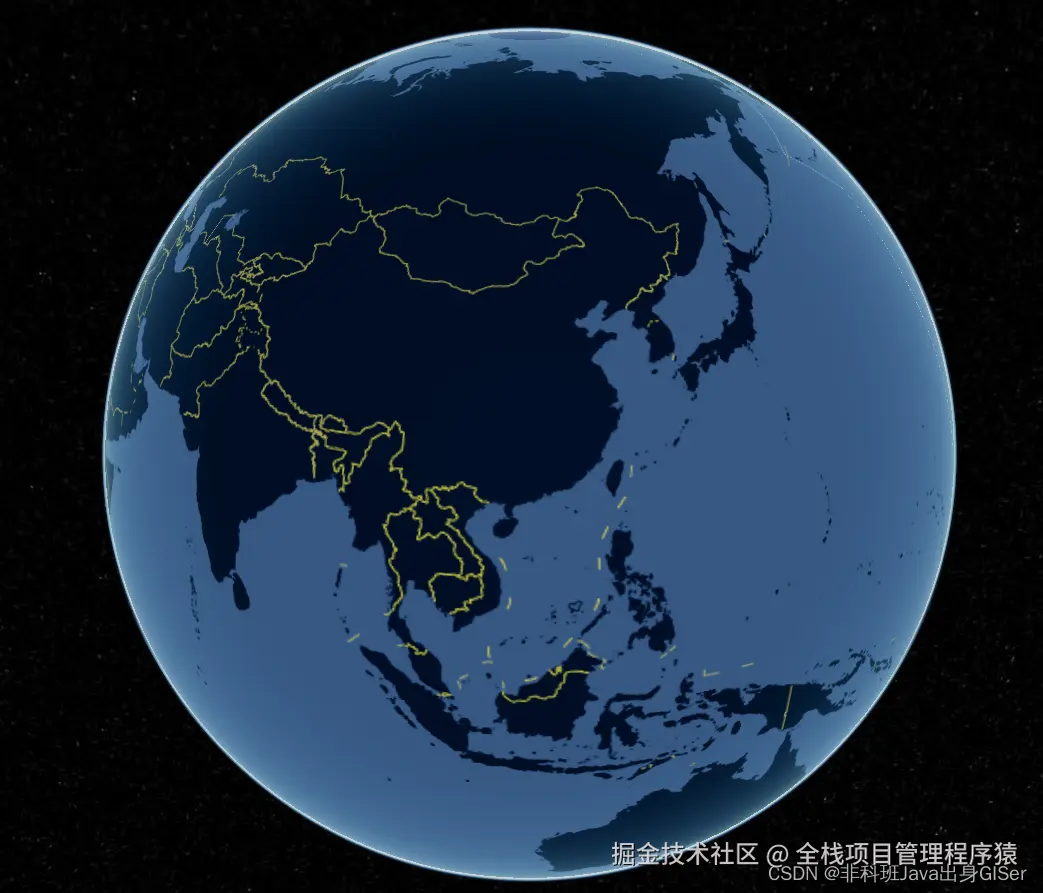
在线示例
Cesium 在线示例:调整色调、对比度等参数,加载渲染暗黑底图