Demo6:Three.js 带主题切换的数据可视化大屏 ------ 技巧与实现
项目路径:
sc-datav-main在线入口:
/demo6标题:全国智慧城市数据大脑
一、这个 Demo 能做什么?
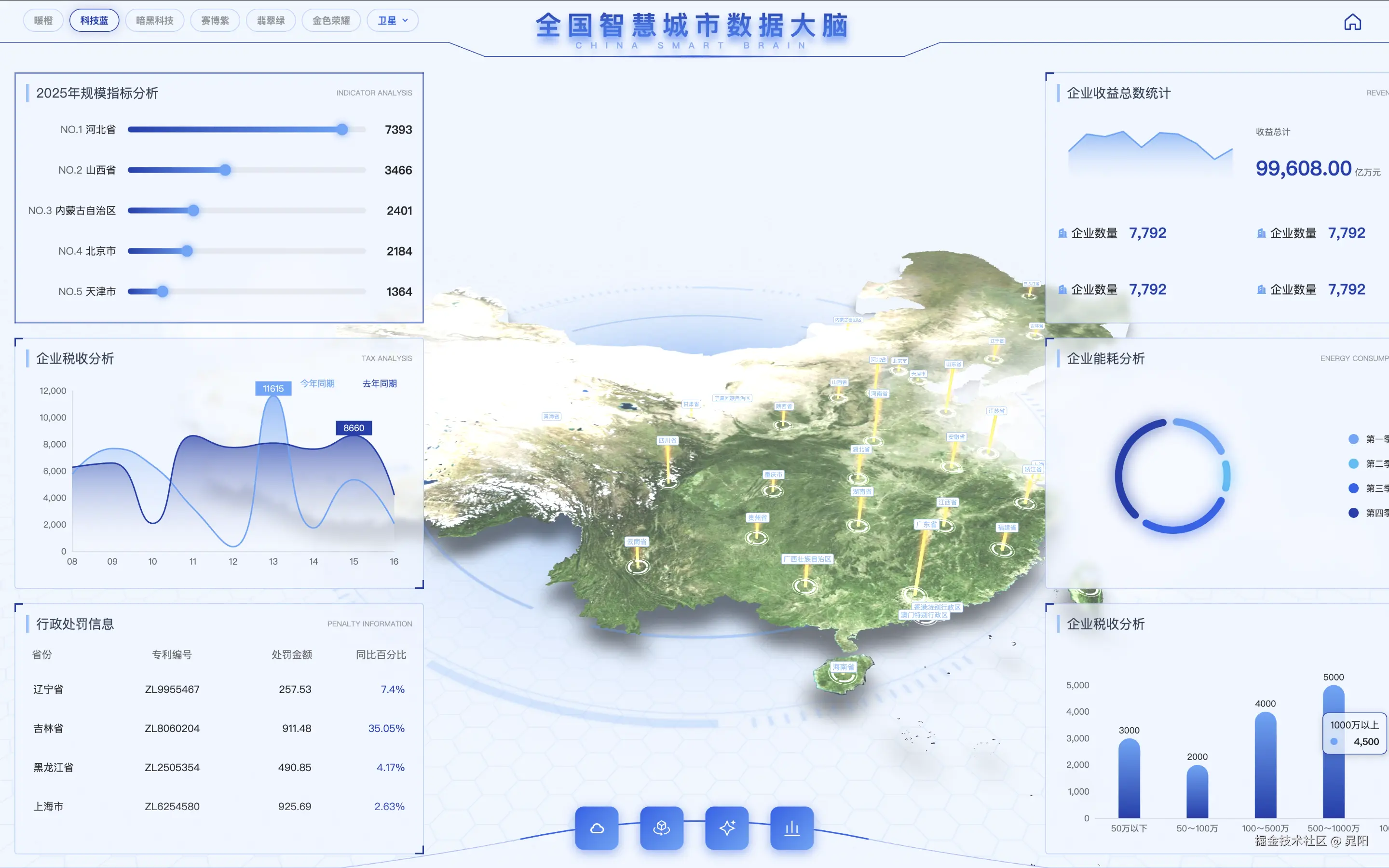
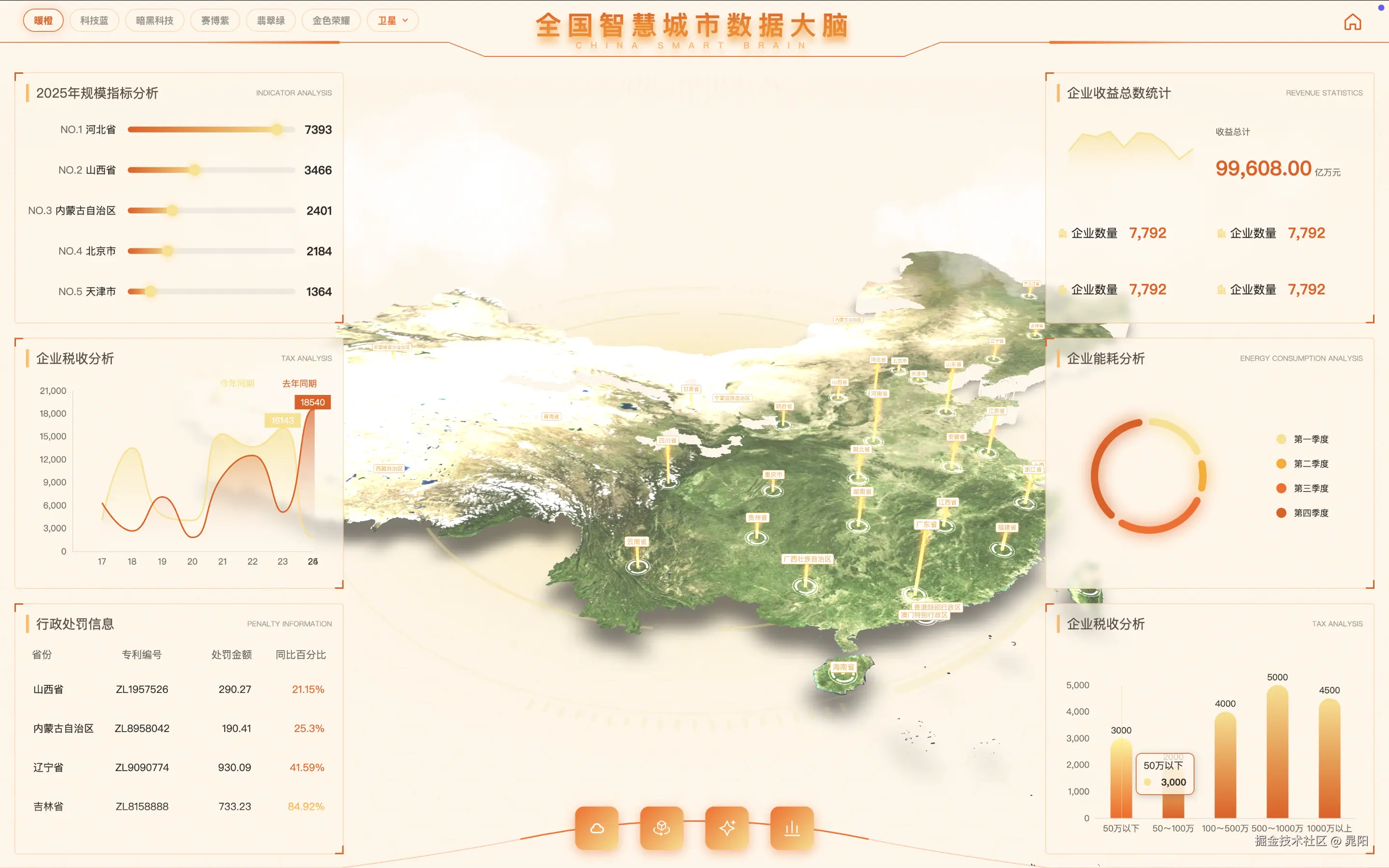
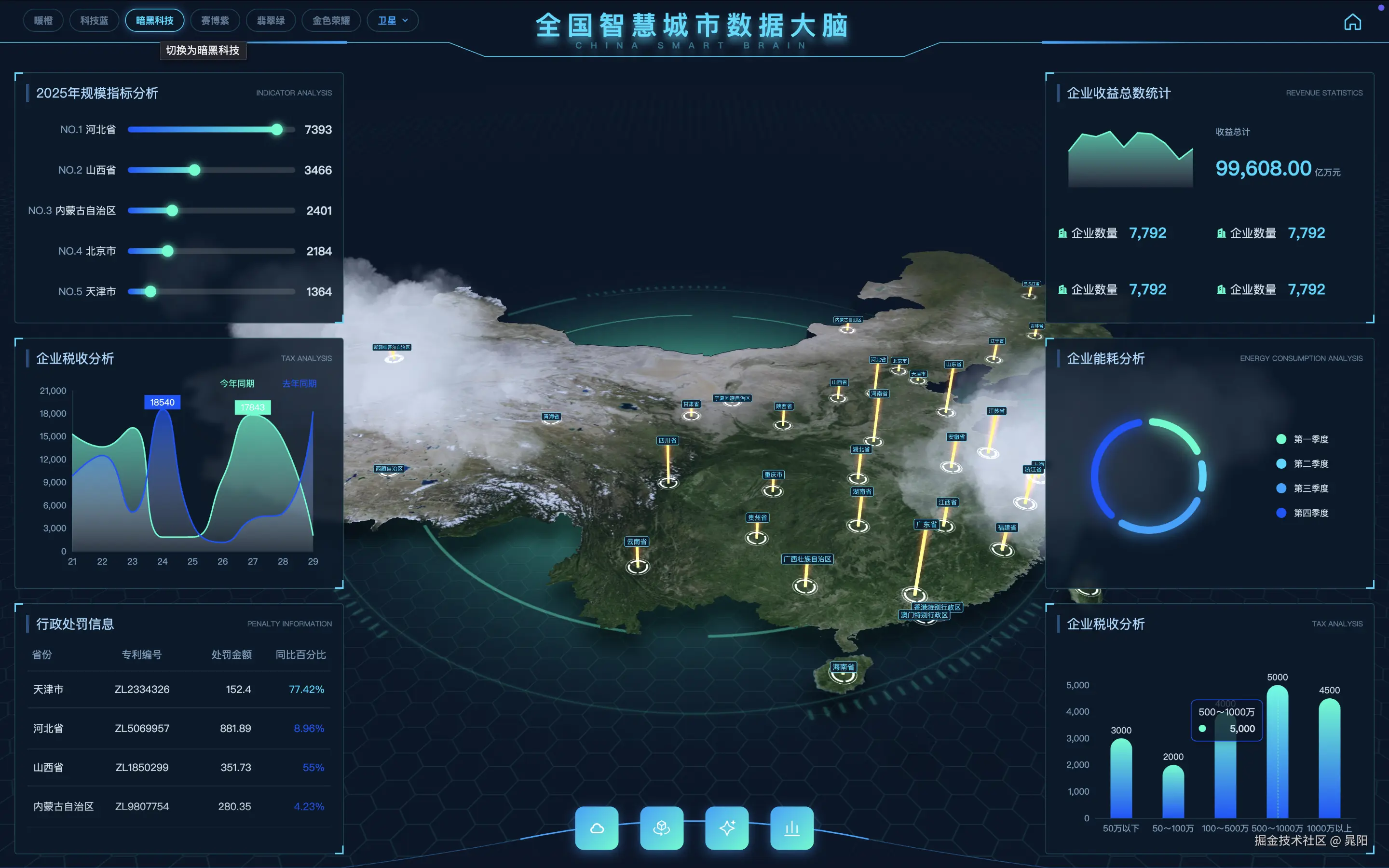
Demo6 是一套 React + Three.js + ECharts 的全国三维地图大屏,核心能力包括:
| 能力 | 说明 |
|---|---|
| 三维中国地图 | 省份挤出、柱状图、标签、Tooltip |
| 省 / 市 / 区三级下钻 | 点击区域逐级深入 |
| 6 套 UI 主题 | 暖橙、科技蓝、暗黑科技、赛博紫、翡翠绿、金色荣耀 |
| 10 种地图底图风格 | 卫星 / 矢量 / 路网 + 多种纹理 / 视频贴图 |
| 左右数据面板 | ECharts 图表随主题变色 |
| 入场动画 | GSAP 镜头推进 + 地图挤出 |
左上角可一键切换主题和地图风格,适合演示「同一套大屏,多套视觉方案」。
二、技术栈
bash
React 19          → UI 框架
Vite              → 构建
@react-three/fiber → React 封装 Three.js
@react-three/drei  → 阴影、轨道控制等
Three.js          → 3D 地图渲染
d3-geo            → GeoJSON 墨卡托投影
GSAP              → 镜头 / 下钻动画
ECharts 6         → 左右统计图表
styled-components → 主题 Token + CSS-in-JS
Zustand           → 全局状态(主题、下钻栈、地图风格)
三、整体架构
scss
┌─────────────────────────────────────────────────────┐
│  index.tsx                                          │
│  ThemeProvider(themeKey) ← Zustand                  │
│    └─ demo.tsx                                      │
│         ├─ map/index.tsx   (R3F Canvas + Three.js)  │
│         └─ panel/          (ECharts + styled UI)    │
└─────────────────────────────────────────────────────┘
分层原则:
- UI 主题层(styled-components):面板、标题、图表、按钮
- 3D 场景层(R3F):地图、灯光、背景、柱状图
- 状态层 (Zustand):
themeKey、mapStyleKey、drillStack
UI 和 3D 共用同一套主题 Token,切换主题时两侧同步变色。
四、主题系统设计(核心)
4.1 单一数据源:DashboardTheme
所有颜色收敛到 src/pages/Demo6/themes/types.ts:
ts
export interface DashboardTheme {
  id: ThemeKey;
  name: string;
  colors: {
    primary: string;
    accent: string;
    background: string;
    backgroundRgb: string;   // rgba() 拼接用
    mapBg: string;           // Three.js 场景背景
    mapLight: string;        // 平行光颜色
    mapSurface: string;      // 挤出侧面材质
    chartGradient: [string, string];
    chartPalette: [string, string, string, string];
    glow: string;
    // ... 共 30+ 个语义化 Token
  };
}
技巧 1:用语义 Token,不用硬编码颜色
tsx
// ❌ 不好
color: "#2563EB"

// ✅ 好
color: ${({ theme }) => theme.colors.accent};
新增主题只需在 themes/index.ts 填一份配置,不用改组件。
4.2 主题注入:ThemeProvider + Zustand
tsx
// index.tsx
const themeKey = useConfigStore((s) => s.themeKey);

return (
  <ThemeProvider theme={themes[themeKey]}>
    <Demo />
  </ThemeProvider>
);
ts
// stores/index.ts
setTheme: (key) => set({ themeKey: key }),
cycleTheme: () => { /* 循环切换 */ },
切换主题 = 改 themeKey → ThemeProvider 重渲染 → 所有 useTheme() / useDashboardTheme() 拿到新 Token。
技巧 2:下钻重置时保留主题
ts
reset: () => {
  const { themeKey, mapStyleKey } = store.getState();
  set({ ...store.getInitialState(), themeKey, mapStyleKey });
},
避免用户下钻后回到全国视图时主题被重置。
4.3 styled-components 类型扩展
ts
// themes/styled.d.ts
declare module "styled-components" {
  export interface DefaultTheme extends DashboardTheme {}
}
之后 theme.colors.xxx 有完整 TypeScript 提示。
4.4 统一 Hook:useDashboardTheme
ts
export default function useDashboardTheme(): DashboardTheme {
  return useTheme();
}
Three.js 组件、ECharts 组件、面板组件都通过它读主题,避免两套 API。
五、Three.js 地图实现
5.1 场景入口
tsx
// map/index.tsx
<Canvas flat shadows camera={{ position: [-50, 150, 280], fov: 50 }}>
  <MapBackground />   {/* 场景背景色 */}
  <Lights />          {/* 环境光 + 平行光 */}
  <Scene />           {/* 地图主体 */}
  <ContactShadows />
  <OrbitControls />
</Canvas>
5.2 GeoJSON → 三维挤出
流程:
css
china.json / 省市区 GeoJSON
    ↓ d3-geo geoMercator 投影
Vector2[][] 轮廓点
    ↓ THREE.Shape + ExtrudeGeometry
挤出网格 + 顶面贴图
关键文件:
| 文件 | 职责 |
|---|---|
map/base.tsx |
全国 / 省 / 市 / 区四级地图切换 |
map/city.tsx |
单区域挤出、交互、柱状图 |
map/shape.tsx |
UV 映射(geo 对齐 / 装饰纹理) |
map/bar.tsx |
3D 柱状指标 |
5.3 主题如何影响 Three.js
Three.js 不能直接用 CSS 变量,需要在 React 组件里读主题后赋给材质:
tsx
// map/background.tsx --- 场景背景
useEffect(() => {
  scene.background = new Color(theme.colors.mapBg);
}, [scene, theme.colors.mapBg]);

// map/lights.tsx --- 平行光
<directionalLight color={theme.colors.mapLight} />

// map/city.tsx --- 侧面材质
<meshStandardMaterial color={theme.colors.mapSurface} />
技巧 3:3D 主题色单独定义 mapBg / mapLight / mapSurface
浅色主题(暖橙、科技蓝)用浅背景 + 深色文字;暗色主题(暗黑科技)用深蓝背景 + 亮色光。同一套面板 Token 和地图 Token 分开设计,避免「面板好看但地图发黑」。
5.4 地图贴图与主题的关系
地图贴图由 mapStyleKey 控制,与 UI 主题 独立:
| 类型 | 示例 | UV 模式 |
|---|---|---|
| geo 对齐 | satellite / vector / road | uvMode: "geo",贴图与省界对齐 |
| 装饰纹理 | texture_mapbg(视频) | uvMode: "decorative",整图铺满 |
ts
function uvModeForStyle(style: MapStyleKey): UvMode {
  return isGeoAlignedStyle(style) ? "geo" : "decorative";
}
装饰模式下开启 emissiveMap,让视频纹理更亮:
tsx
<meshStandardMaterial
  map={map}
  emissiveMap={uvMode === "decorative" ? map : undefined}
  emissiveIntensity={uvMode === "decorative" ? 0.45 : 0}
/>
技巧 4:UI 主题和地图风格解耦
- 主题 = 面板 / 图表 / 灯光 / 场景背景色
- 地图风格 = 省域表面贴图(卫星图 or 科技纹理)
可以「暗黑科技主题 + 卫星底图」,或「科技蓝主题 + 视频纹理」,组合更灵活。
六、ECharts 随主题切换
图表不接入 ECharts 内置 theme,而是 每次用主题色拼 option:
tsx
const theme = useDashboardTheme();
const colors = theme.colors.chartGradient;

const option = useMemo(() => ({
  series: [{
    itemStyle: {
      color: {
        type: "linear",
        colorStops: [
          { offset: 0, color: colors[0] },
          { offset: 1, color: colors[1] },
        ],
      },
    },
  }],
}), [theme.id]); // 依赖 theme.id 触发重算

return <Chart key={theme.id} option={option} />;
技巧 5:给 Chart 加 key={theme.id}
强制 ECharts 实例在切主题时完整重建,避免渐变色残留旧配置。
七、三级下钻
markdown
全国(34 省) → 点击省 → 省级(各市)
              → 点击市 → 市级(各区县)
              → 点击区 → 区县聚焦
状态用 drillStack: DrillTarget[] 栈管理:
ts
pushDrill: (target) =>
  set((s) => s.drillStack.length >= 3 ? s : { drillStack: [...s.drillStack, target] }),
popDrill: () => set((s) => ({ drillStack: s.drillStack.slice(0, -1) })),
每层切换时:
- 加载对应 GeoJSON(本地缓存 or DataV 远程)
- GSAP 动画调整相机位置
- 地图 group
scale.z从 0.01 挤出到 1
技巧 6:用 key={mapStyleKey} 强制贴图切换时重建地图层
tsx
<ProvinceMap key={mapStyleKey} ... />避免 Three.js 材质缓存导致换风格后贴图不更新。
八、主题切换 UI
panel/themeSwitcher.tsx 提供两组切换:
- 主题标签:暖橙 / 科技蓝 / 暗黑科技 ...
- 地图风格下拉:卫星 / 矢量 / 纹理·mapbg ...
tsx
<ThemeTag onClick={() => setTheme(key)} $active={themeKey === key}>
  {t.name}
</ThemeTag>地图风格会检查资源是否已生成(isMapStyleAvailable),未生成的选项置灰。
九、实现带主题切换大屏的 8 条技巧(总结)
① 设计 Token 表,一次定义、处处引用
把 primary、accent、chartGradient、mapBg 等语义化,6 套主题只是 6 份 JSON 式配置。
② UI 与 3D 共用 ThemeProvider
不要在 Three 里维护独立颜色表,通过 useDashboardTheme() 读同一份 Token。
③ 3D 材质响应主题变化
useEffect 监听 theme.colors.mapBg 更新 scene.background;灯光、侧面材质同理。
④ ECharts 用 useMemo + key={theme.id}
option 依赖主题色重算,key 强制图表重建。
⑤ UI 主题与地图贴图解耦
themeKey 管面板,mapStyleKey 管贴图,互不干扰。
⑥ 贴图缓存按风格分 key
ts
const cacheKey = `${style}-${provinceAdcode ?? "national"}`;避免切换风格后读到旧纹理。
⑦ geo / decorative 双 UV 模式
卫星图必须 geo 对齐;科技纹理用 decorative 铺满 + emissive 提亮。
⑧ 下钻 / 重置时保留用户选择的主题
reset() 时把 themeKey、mapStyleKey 从当前状态带回。
十、目录结构速查
bash
src/pages/Demo6/
├── index.tsx              # ThemeProvider 入口
├── demo.tsx               # 页面布局
├── stores/index.ts        # Zustand(themeKey / mapStyleKey / drillStack)
├── themes/
│   ├── types.ts           # DashboardTheme 类型
│   ├── index.ts           # 6 套主题配置
│   └── styled.d.ts        # TS 类型扩展
├── config/mapStyles.ts    # 10 种地图风格定义
├── hooks/useDashboardTheme.ts
├── panel/
│   ├── themeSwitcher.tsx  # 主题 + 地图风格切换
│   ├── headder.tsx
│   └── chart1~6.tsx       # ECharts 图表
└── map/
    ├── index.tsx          # R3F Canvas
    ├── base.tsx           # 四级地图 + 下钻
    ├── city.tsx           # 单城市挤出
    ├── background.tsx     # 场景背景(读主题)
    ├── lights.tsx         # 灯光(读主题)
    └── scene.tsx
十一、如何新增一套主题
- 在
themes/types.ts的ThemeKey联合类型里加新 key - 在
themes/index.ts新增theme7配置对象 - 加入
themes和themeList - 刷新页面,左上角自动出现新标签
建议每套主题至少检查:
- 浅色 / 深色背景下文字对比度
-
mapBg与mapLight在 Three 场景里是否协调 -
chartGradient在 ECharts 柱状 / 折线图里是否清晰 -
glow/glowStrong在标题描边上是否过曝
十二、如何生成地图贴图资源
bash
# 生成全部省份卫星贴图 + 城市 mock 数据
npm run gen:provinces

# 仅生成矢量风格
npm run gen:map:vector

# 跳过已有贴图
npm run gen:provinces:skip
贴图输出到 src/assets/provinces/textures/{style}/{adcode}.jpg。
十三、本地运行
bash
cd sc-datav-main
npm install
npm run dev
# 浏览器打开 http://localhost:5173/demo6
十四、与「普通大屏」的差异
| 对比项 | 普通 CSS 大屏 | Demo6 |
|---|---|---|
| 地图 | ECharts 2D geo | Three.js 3D 挤出 |
| 主题 | 换 CSS 变量 | Token + ThemeProvider + 3D 材质联动 |
| 下钻 | 切 geo 数据源 | 切场景 + 相机动画 |
| 底图 | 单张背景图 | 卫星 / 矢量 / 视频纹理可切换 |
| 图表 | 固定配色 | 随 themeKey 动态拼 option |
十五、可继续扩展的方向
- 主题持久化:
localStorage.setItem('demo6-theme', themeKey) - 自定义主题编辑器:可视化调 Token 实时预览
- PostProcessing 随主题切换(暗色主题加 Bloom,浅色主题关闭)
- 接入真实 API,柱状图高度绑定业务数据
- 导出当前主题为 JSON,供其他 Demo 复用
总结: Demo6 的核心不是「换几张背景图」,而是 Token 化主题系统 + UI/图表/Three.js 三层联动 。掌握 DashboardTheme → ThemeProvider → useDashboardTheme() 这条链路,就能在任意 Three.js 大屏里优雅地做主题切换。