本文将带您从零基础开始,系统地学习如何在 HarmonyOS NEXT(API 24)中使用 ArkTS 实现高性能、优雅的列表分页加载功能。通过完整的代码示例、架构设计分析和性能优化技巧,让您彻底掌握 List + onReachEnd 的核心应用。
项目演示
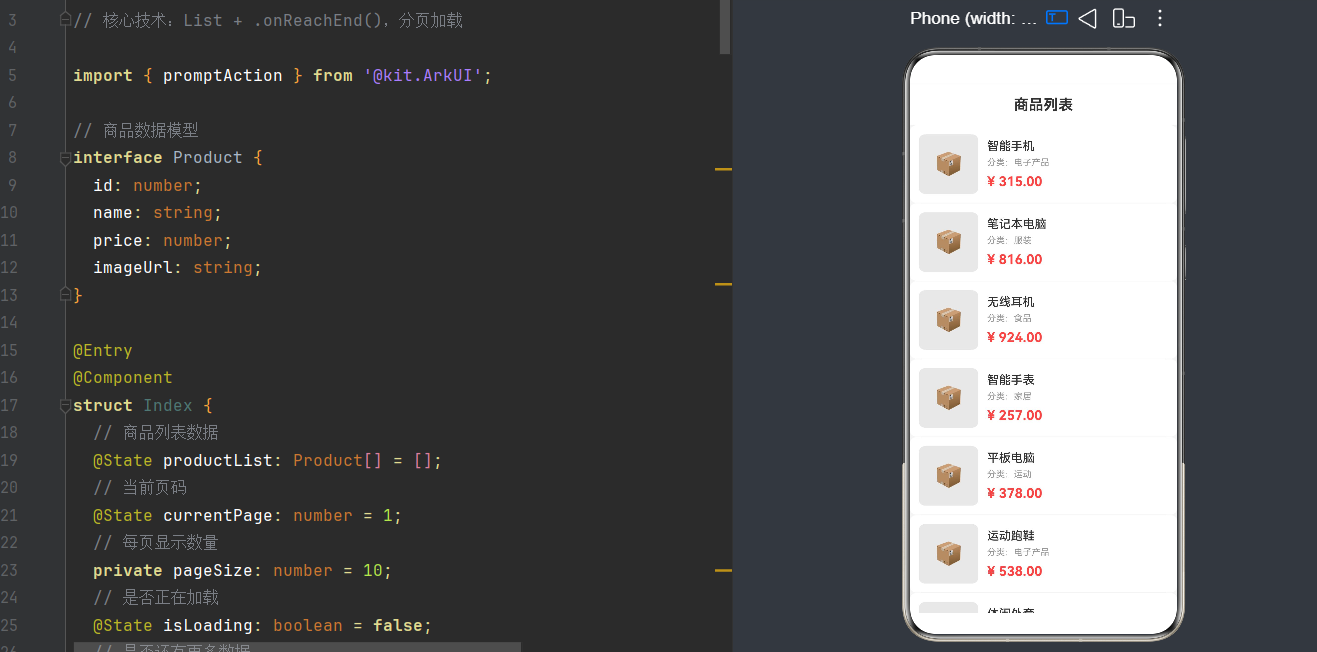
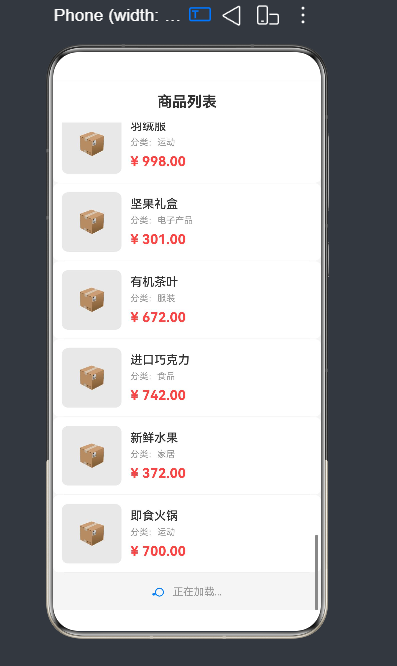
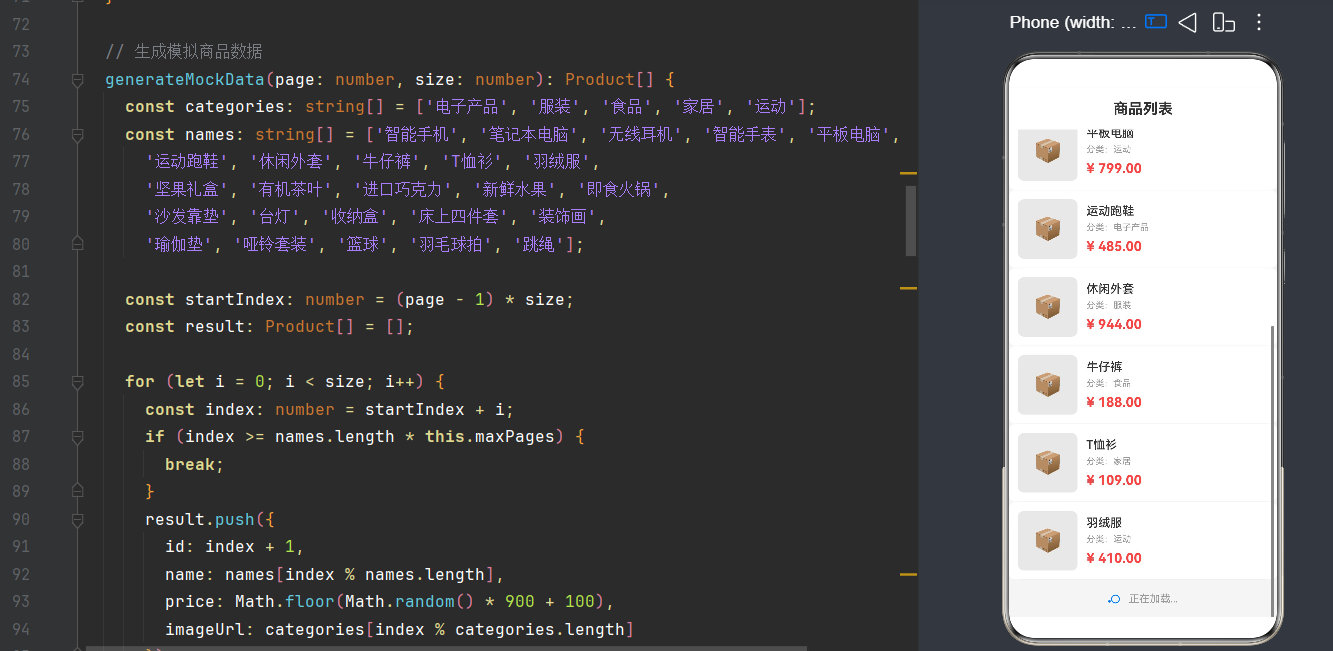
目录
- 引言:为什么需要上拉加载更多
- 核心概念解析
- 环境准备与项目结构
- [List 组件深度剖析](#List 组件深度剖析)
- [onReachEnd 事件机制](#onReachEnd 事件机制)
- 分页加载架构设计
- 完整实战代码
- 状态管理与数据流
- 性能优化实战
- 常见问题与解决方案
- 进阶技巧与最佳实践
- 测试与调试
- 常见面试题
- 完整项目源码
- 最佳实践总结
- 参考资料
1. 引言:为什么需要上拉加载更多
在移动应用开发中,列表是最常见的UI组件之一。无论是电商商品列表、社交动态流、还是资讯文章列表,用户都期望能够流畅地浏览大量内容。然而,一次性加载所有数据会导致严重的性能问题:
- 内存占用过高:数百万条数据会让应用瞬间崩溃
- 加载速度缓慢:网络请求时间过长,用户体验差
- 流量浪费:用户可能只看前几条,却下载了全部数据
上拉加载更多(Infinite Scroll / Load More) 正是解决这些问题的最佳方案。它的核心思想很简单:初始只加载第一页数据,当用户滚动到列表底部时,自动加载下一页,以此类推。
1.1 上拉加载更多的优势
| 优势 | 说明 |
|---|---|
| 按需加载 | 只加载用户需要的数据,节省资源 |
| 流畅体验 | 页面首次加载速度快,用户感知更好 |
| 内存友好 | 控制单次加载的数据量,避免OOM |
| 流量节省 | 只请求展示的数据,降低用户流量消耗 |
1.2 典型应用场景
- 电商App:商品列表、订单列表、购物车
- 社交应用:动态流、消息列表、好友列表
- 资讯阅读:文章列表、评论列表、搜索结果
- 工具类App:文件管理、历史记录、联系人
1.3 HarmonyOS 的独特优势
HarmonyOS NEXT 在列表滚动体验上进行了深度优化:
typescript
// HarmonyOS NEXT 支持的 List 特性
List() {
  // 组件虚拟化自动开启
  // 只渲染可视区域内的 ListItem
  // 滑动性能接近原生
}
相比传统的 Android/iOS 方案,HarmonyOS 的 List 组件有以下优势:
- 声明式UI:数据驱动视图,开发效率高
- 虚拟化渲染:自动回收不可见项,内存占用低
- 跨端适配:一套代码适配手机、平板、折叠屏
- 流畅动画:60fps滑动,丝般顺滑
2. 核心概念解析
在深入代码之前,我们需要理解几个关键概念。
2.1 List 组件架构
HarmonyOS 的 List 组件采用了经典的 MVC 分离 架构:
┌──────────────────────────────────────────────────────────────┐
│                        List                                   │
│  ┌──────────────────────────────────────────────────────────┐ │
│  │  Scroll + ListItem 容器                                  │ │
│  │  ┌────────────────────────────────────────────────────┐  │ │
│  │  │  ListItem (可见项)                                  │  │ │
│  │  │  ┌──────────────────────────────────────────────┐ │  │ │
│  │  │  │  自定义内容 @Builder                           │ │  │ │
│  │  │  │  (图片+文字+其他组件)                          │ │  │ │
│  │  │  └──────────────────────────────────────────────┘ │  │ │
│  │  ├────────────────────────────────────────────────────┤  │ │
│  │  │  ListItem (可见项)                                  │  │ │
│  │  │  ┌──────────────────────────────────────────────┐ │  │ │
│  │  │  │  自定义内容 @Builder                           │ │  │ │
│  │  │  └──────────────────────────────────────────────┘ │  │ │
│  │  ├────────────────────────────────────────────────────┤  │ │
│  │  │  ListItem (加载更多指示器)                          │  │ │
│  │  │  ┌──────────────────────────────────────────────┐ │  │ │
│  │  │  │  LoadingProgress + Text                        │ │  │ │
│  │  │  └──────────────────────────────────────────────┘ │  │ │
│  │  └────────────────────────────────────────────────────┘  │ │
│  └──────────────────────────────────────────────────────────┘ │
└──────────────────────────────────────────────────────────────┘
2.2 分页加载核心流程
用户首次打开页面
        ↓
┌─────────────┐
│ 加载第一页   │ ← 10条数据
│ (page=1)    │
└─────────────┘
        ↓
┌─────────────┐
│ 显示列表     │
│ 用户浏览     │
└─────────────┘
        ↓
┌─────────────┐
│ 滚动到底部   │ ← onReachEnd 触发
└─────────────┘
        ↓
┌─────────────┐
│ 加载下一页   │ ← page++
│ (page=2)    │
└─────────────┘
        ↓
      ...循环
2.3 状态机模型
分页加载本质上是一个状态机:
typescript
// 状态枚举
enum LoadState {
  IDLE = 'idle',           // 空闲状态
  LOADING = 'loading',     // 加载中
  SUCCESS = 'success',     // 加载成功
  ERROR = 'error',         // 加载失败
  NO_MORE = 'no_more'      // 没有更多数据
}
状态转换图:
         ┌──────────────────────────────────────────────────┐
         │                                                  │
         ▼                                                  │
┌─────────────┐    LOAD    ┌──────────────┐                │
│    IDLE     │───────────►│   LOADING    │                │
└─────────────┘            └──────┬───────┘                │
         ▲                        │                         │
         │                        │                         │
         │            ┌───────────┼───────────┐            │
         │            ▼           ▼           ▼            │
         │     ┌──────────┐ ┌───────┐ ┌────────┐           │
         │     │ SUCCESS  │ │ ERROR │ │NO_MORE │           │
         │     └────┬─────┘ └───┬───┘ └────────┘           │
         │          │           │                           │
         │          │           │ 重试                      │
         └──────────┴───────────┴                           │
                    │                                       │
                    └───────────────────────────────────────┘
3. 环境准备与项目结构
3.1 开发环境要求
- DevEco Studio:4.0 Release 或更高版本
- SDK 版本:API 24(HarmonyOS NEXT)
- Node.js:18.x 或更高版本
- 设备模拟器:Phone / Tablet / Foldable
3.2 项目创建步骤
打开 DevEco Studio:
1. File → New → Create Project
2. 选择 Application → Empty Ability
3. 填写项目信息:
   - Project name: ListLoadMore
   - Bundle name: com.example.listloadmore
   - Save location: D:\Projects\
   - Compile SDK: HarmonyOS NEXT (API 24)
4. 点击 Finish
3.3 目录结构
ListLoadMore/
├── entry/
│   ├── src/
│   │   └── main/
│   │       ├── ets/
│   │       │   ├── pages/
│   │       │   │   └── Index.ets          # 主页面
│   │       │   ├── model/
│   │       │   │   └── Product.ets         # 数据模型
│   │       │   ├── service/
│   │       │   │   └── DataService.ets     # 数据服务
│   │       │   └── common/
│   │       │       └── Constants.ets       # 常量定义
│   │       ├── resources/
│   │       └── module.json5
│   └── build-profile.json5
├── AppScope/
│   └── app.json5
└── build-profile.json5
3.4 配置文件说明
module.json5 - 如果需要网络请求,添加权限:
json5
{
  "module": {
    "requestPermissions": [
      {
        "name": "ohos.permission.INTERNET"
      }
    ]
  }
}
4. List 组件深度剖析
4.1 List 基础用法
List 是一个容器组件,用于展示垂直或水平滚动的列表。
typescript
@Entry
@Component
struct ListBasicDemo {
  private items: string[] = ['Item 1', 'Item 2', 'Item 3'];

  build() {
    List() {
      ForEach(this.items, (item: string) => {
        ListItem() {
          Text(item)
            .fontSize(18)
            .padding(16)
        }
      }, (item: string, index: number) => index.toString())
    }
    .width('100%')
    .height('100%')
  }
}
4.2 List 核心属性
| 属性 | 类型 | 说明 | 默认值 |
|---|---|---|---|
| space | number | string | ListItem 之间的间距 | 0 |
| divider | DividerStyle | 分割线样式 | 无 |
| scrollBar | BarState | 滚动条状态 | Auto |
| scrollBarColor | ResourceColor | 滚动条颜色 | - |
| scrollBarWidth | number | 滚动条宽度 | - |
| nestedScroll | NestedScrollMode | 嵌套滚动模式 | - |
| sticky | StickyStyle | 吸顶/吸底效果 | - |
| lanes | number | 多列布局 | 1 |
4.3 List 事件一览
| 事件 | 触发时机 | 回调参数 |
|---|---|---|
| onScroll | 滚动中 | (offset: number, state: ScrollState) |
| onReachStart | 滚动到顶部 | () => void |
| onReachEnd | 滚动到底部 | () => void |
| onScrollIndex | 索引变化 | (first: number, last: number) |
| onViewportChange | 可见区域变化 | (value: ViewportChangeInfo) |
4.4 ListItem 详解
ListItem 是 List 的子组件,每个 ListItem 代表列表中的一行或一项。
typescript
ListItem() {
  Row() {
    Image($r('app.media.thumb'))
      .width(60)
      .height(60)
      .borderRadius(8)

    Column() {
      Text('商品名称')
        .fontSize(16)
        .fontWeight(FontWeight.Medium)

      Text('商品描述')
        .fontSize(14)
        .fontColor('#999999')
    }
    .layoutWeight(1)
    .alignItems(HorizontalAlign.Start)
  }
  .width('100%')
  .padding(12)
}
ListItem 注意事项:
- ListItem 必须且只能作为 List 的直接子组件
- ListItem 的高度可以自适应或固定
- 大数据量推荐使用 LazyForEach
4.5 性能优化:LazyForEach
当数据量较大时,使用 LazyForEach 代替 ForEach 可以显著提升性能:
typescript
import { IDataSource } from '@kit.ArkUI';

class ProductDataSource implements IDataSource {
  private products: Product[] = [];
  private listeners: DataChangeListener[] = [];

  totalCount(): number {
    return this.products.length;
  }

  getData(index: number): Product {
    return this.products[index];
  }

  registerDataChangeListener(listener: DataChangeListener): void {
    if (this.listeners.indexOf(listener) < 0) {
      this.listeners.push(listener);
    }
  }

  unregisterDataChangeListener(listener: DataChangeListener): void {
    const pos: number = this.listeners.indexOf(listener);
    if (pos >= 0) {
      this.listeners.splice(pos, 1);
    }
  }

  addData(index: number, data: Product[]): void {
    this.products.splice(index, 0, ...data);
    this.listeners.forEach((listener: DataChangeListener) => {
      listener.onDataReloaded();
    });
  }
}
使用 LazyForEach:
typescript
@State dataSource: ProductDataSource = new ProductDataSource();

List() {
  LazyForEach(this.dataSource, (item: Product) => {
    ListItem() {
      this.ProductCard(item)
    }
  }, (item: Product) => item.id.toString())
}
5. onReachEnd 事件机制
5.1 事件触发条件
onReachEnd 是 List 组件最核心的事件,当列表滚动到末尾时触发:
typescript
List() {
  // ...
}
.onReachEnd(() => {
  // 滚动到底部,触发加载更多
  console.log('onReachEnd triggered!');
})
触发机制图解:
┌─────────────────────────────┐
│  List 可视区域               │
│  ┌───────────────────────┐  │
│  │  ListItem 1           │  │
│  ├───────────────────────┤  │
│  │  ListItem 2           │  │
│  ├───────────────────────┤  │
│  │  ListItem 3 (最后一项) │  │  ← 当滚动到这里时
│  │  [加载更多...]         │  │      onReachEnd 触发
│  └───────────────────────┘  │
└─────────────────────────────┘
5.2 关键特性
- 触发时机:当列表内容的底部边缘与可视区域的底部边缘对齐时
- 触发频率:一次滚动到底部只触发一次(除非用户再次滚动)
- 防抖处理:需要手动处理重复触发的问题
- 兼容性:支持水平和垂直滚动的 List
5.3 与其他事件的对比
typescript
List() {
  // ...
}
.onReachStart(() => {
  // 滚动到顶部时触发(下拉刷新)
})
.onReachEnd(() => {
  // 滚动到底部时触发(加载更多)
})
.onScroll((offset: number, state: ScrollState) => {
  // 滚动过程中持续触发
  // offset: 当前滚动偏移量
  // state: Idle/Auto/Edge/Fling
})
.onScrollIndex((first: number, last: number) => {
  // 可见区域的首尾索引变化时触发
  console.log(`Visible: ${first} - ${last}`);
})
5.4 自定义触发阈值
有时候我们希望在距离底部还有一定距离时就提前加载:
typescript
@State lastIndex: number = 0;
@State totalItems: number = 100;
private preloadThreshold: number = 5; // 距离底部5项时开始加载

build() {
  List() {
    ForEach(this.items, (item: Product) => {
      ListItem() {
        this.ProductCard(item)
      }
    }, (item: Product) => item.id.toString())
  }
  .onScrollIndex((first: number, last: number) => {
    this.lastIndex = last;

    // 提前加载:距离底部还有 preloadThreshold 项时触发
    if (last >= this.totalItems - this.preloadThreshold) {
      this.loadMoreData();
    }
  })
}
5.5 水平 List 的 onReachEnd
onReachEnd 同样适用于水平滚动的 List:
typescript
List() {
  ForEach(this.hItems, (item: string) => {
    ListItem() {
      Text(item)
        .fontSize(18)
        .padding(16)
    }
  }, (item: string, index: number) => index.toString())
}
.listDirection(Axis.Horizontal)  // 设置为水平方向
.onReachEnd(() => {
  console.log('Horizontal list reached end');
})
6. 分页加载架构设计
6.1 整体架构图
┌────────────────────────────────────────────────────────────┐
│                       UI Layer                              │
│  ┌────────────────────────────────────────────────────────┐ │
│  │  Index.ets (Page Component)                            │ │
│  │  ├── @State: productList, currentPage, loadState       │ │
│  │  ├── List + onReachEnd                                  │ │
│  │  └── @Builder: ProductCard, LoadingFooter              │ │
│  └────────────────────────────────────────────────────────┘ │
└────────────────────────────────────────────────────────────┘
                          │
                          ▼
┌────────────────────────────────────────────────────────────┐
│                    Service Layer                            │
│  ┌────────────────────────────────────────────────────────┐ │
│  │  DataService.ets                                        │ │
│  │  ├── fetchProducts(page, pageSize): Promise<Result>    │ │
│  │  ├── 缓存管理 (Cache)                                   │ │
│  │  ├── 请求去重 (Request Deduplication)                   │ │
│  │  └── 重试机制 (Retry Logic)                             │ │
│  └────────────────────────────────────────────────────────┘ │
└────────────────────────────────────────────────────────────┘
                          │
                          ▼
┌────────────────────────────────────────────────────────────┐
│                   Network Layer                             │
│  ┌────────────────────────────────────────────────────────┐ │
│  │  HTTP/HTTPS 请求                                        │ │
│  │  ├── URL 构建                                           │ │
│  │  ├── 参数序列化                                         │ │
│  │  ├── 超时处理                                           │ │
│  │  └── 错误处理                                           │ │
│  └────────────────────────────────────────────────────────┘ │
└────────────────────────────────────────────────────────────┘
6.2 数据模型设计
typescript
// Product.ets - 商品数据模型
export interface Product {
  id: number;
  name: string;
  price: number;
  originalPrice: number;
  imageUrl: string;
  category: string;
  salesCount: number;
  rating: number;
  description: string;
  isNew: boolean;
  isHot: boolean;
}

// 分页请求参数
export interface PageRequest {
  page: number;          // 当前页码(从1开始)
  pageSize: number;      // 每页数量
  keyword?: string;      // 搜索关键词
  category?: string;     // 分类筛选
  sortBy?: SortType;     // 排序方式
}

export enum SortType {
  DEFAULT = 'default',
  PRICE_ASC = 'price_asc',
  PRICE_DESC = 'price_desc',
  SALES_DESC = 'sales_desc',
  NEWEST = 'newest'
}

// 分页响应结果
export interface PageResult<T> {
  list: T[];             // 数据列表
  total: number;         // 总数量
  page: number;          // 当前页码
  pageSize: number;      // 每页数量
  totalPages: number;    // 总页数
  hasMore: boolean;      // 是否有更多数据
}
6.3 常量配置
typescript
// Constants.ets
export class AppConstants {
  // 分页配置
  static readonly PAGE_SIZE: number = 10;
  static readonly PRELOAD_THRESHOLD: number = 3;

  // 超时配置
  static readonly REQUEST_TIMEOUT: number = 10000;
  static readonly MAX_RETRIES: number = 3;

  // 缓存配置
  static readonly CACHE_EXPIRE_TIME: number = 5 * 60 * 1000;

  // 颜色配置
  static readonly COLOR_PRIMARY: string = '#007DFF';
  static readonly COLOR_BACKGROUND: string = '#F5F5F5';
  static readonly COLOR_TEXT_PRIMARY: string = '#333333';
  static readonly COLOR_TEXT_SECONDARY: string = '#999999';

  // 字体大小
  static readonly FONT_SIZE_TITLE: number = 18;
  static readonly FONT_SIZE_CONTENT: number = 14;
  static readonly FONT_SIZE_HINT: number = 12;
}
6.4 数据服务设计
typescript
// DataService.ets
import { Product, PageRequest, PageResult, SortType } from '../model/Product';

export class DataService {
  private static instance: DataService;

  // 配置
  private maxRetries: number = 3;
  private cacheExpireTime: number = 5 * 60 * 1000;

  // 缓存和队列
  private requestQueue: Map<string, Promise<PageResult<Product>>> = new Map();
  private cache: Map<string, { data: PageResult<Product>; expireTime: number }> = new Map();

  private constructor() {}

  static getInstance(): DataService {
    if (!DataService.instance) {
      DataService.instance = new DataService();
    }
    return DataService.instance;
  }

  async fetchProducts(request: PageRequest): Promise<PageResult<Product>> {
    const cacheKey: string = this.buildCacheKey(request);

    // 1. 检查缓存
    const cached = this.cache.get(cacheKey);
    if (cached && Date.now() < cached.expireTime) {
      return cached.data;
    }

    // 2. 请求去重
    const existingRequest = this.requestQueue.get(cacheKey);
    if (existingRequest) {
      return existingRequest;
    }

    // 3. 执行请求
    const newRequest = this.doFetchProducts(request)
      .then((result: PageResult<Product>) => {
        this.cache.set(cacheKey, {
          data: result,
          expireTime: Date.now() + this.cacheExpireTime
        });
        return result;
      })
      .finally(() => {
        this.requestQueue.delete(cacheKey);
      });

    this.requestQueue.set(cacheKey, newRequest);
    return newRequest;
  }

  private async doFetchProducts(request: PageRequest): Promise<PageResult<Product>> {
    let lastError: Error | null = null;

    for (let retry: number = 0; retry < this.maxRetries; retry++) {
      try {
        return await this.mockApi(request);
      } catch (error) {
        lastError = error as Error;
        await this.delay(Math.pow(2, retry) * 1000);
      }
    }

    throw lastError || new Error('Failed to fetch');
  }

  private async mockApi(request: PageRequest): Promise<PageResult<Product>> {
    await this.delay(1500);

    const totalItems: number = 100;
    const totalPages: number = Math.ceil(totalItems / request.pageSize);
    const startIndex: number = (request.page - 1) * request.pageSize;

    const list: Product[] = [];
    const categories: string[] = ['电子产品', '服装', '食品', '家居', '运动'];
    const names: string[] = [
      '智能手机 Pro', '笔记本电脑 Air', '无线蓝牙耳机', '智能手表', '平板电脑',
      '运动跑鞋', '休闲外套', '牛仔裤', '纯棉T恤', '羽绒服'
    ];

    for (let i: number = 0; i < request.pageSize; i++) {
      const index: number = startIndex + i;
      if (index >= totalItems) break;

      list.push({
        id: index + 1,
        name: names[index % names.length],
        price: Math.floor(Math.random() * 900 + 100),
        originalPrice: Math.floor(Math.random() * 1200 + 200),
        imageUrl: '',
        category: categories[index % categories.length],
        salesCount: Math.floor(Math.random() * 10000),
        rating: Math.round((Math.random() * 2 + 3) * 10) / 10,
        description: `商品编号 ${index + 1}`,
        isNew: index < 20,
        isHot: index % 5 === 0
      });
    }

    return {
      list: list,
      total: totalItems,
      page: request.page,
      pageSize: request.pageSize,
      totalPages: totalPages,
      hasMore: request.page < totalPages
    };
  }

  private buildCacheKey(request: PageRequest): string {
    return `products_${request.page}_${request.pageSize}_${request.keyword || ''}`;
  }

  private delay(ms: number): Promise<void> {
    return new Promise(resolve => setTimeout(resolve, ms));
  }

  clearCache(): void {
    this.cache.clear();
  }
}
7. 完整实战代码
7.1 基础版(ForEach)
这是最简单易用的版本,适合入门学习:
typescript
// Index.ets
import { promptAction } from '@kit.ArkUI';
import { Product, PageRequest, PageResult } from '../model/Product';
import { DataService } from '../service/DataService';
import { AppConstants } from '../common/Constants';

@Entry
@Component
struct Index {
  private dataService: DataService = DataService.getInstance();

  @State productList: Product[] = [];
  @State currentPage: number = 1;
  @State loadState: string = 'idle';

  private pageSize: number = AppConstants.PAGE_SIZE;

  aboutToAppear(): void {
    this.loadMoreData();
  }

  async loadMoreData(): Promise<void> {
    if (this.loadState === 'loading' || this.loadState === 'no_more') {
      return;
    }

    this.loadState = 'loading';

    try {
      const request: PageRequest = {
        page: this.currentPage,
        pageSize: this.pageSize
      };

      const result: PageResult<Product> = await this.dataService.fetchProducts(request);
      this.productList = [...this.productList, ...result.list];

      if (result.hasMore) {
        this.currentPage++;
        this.loadState = 'success';
      } else {
        this.loadState = 'no_more';
        promptAction.showToast({ message: '已加载全部商品' });
      }
    } catch (error) {
      this.loadState = 'error';
      promptAction.showToast({ message: '加载失败,请重试' });
    }
  }

  build() {
    Column() {
      this.TitleBar();

      List() {
        if (this.loadState === 'idle') {
          // 首次加载骨架屏
          ListItem() {
            this.SkeletonView();
          }
        } else {
          // 商品列表
          ForEach(this.productList, (item: Product) => {
            ListItem() {
              this.ProductCard(item);
            }
          }, (item: Product) => item.id.toString())

          // 加载状态指示器
          ListItem() {
            this.LoadingFooter();
          }
        }
      }
      .layoutWeight(1)
      .divider({ strokeWidth: 1, color: '#EEEEEE', startMargin: 16, endMargin: 16 })
      .onReachEnd(() => {
        this.loadMoreData();
      })
    }
    .width('100%')
    .height('100%')
    .backgroundColor(AppConstants.COLOR_BACKGROUND)
  }

  @Builder
  TitleBar() {
    Row() {
      Text('商品列表')
        .fontSize(20)
        .fontWeight(FontWeight.Bold)
    }
    .width('100%')
    .height(56)
    .justifyContent(FlexAlign.Center)
    .backgroundColor(Color.White)
    .shadow({ radius: 2, color: '#1A000000', offsetY: 1 })
  }

  @Builder
  ProductCard(product: Product) {
    Row() {
      // 商品图片占位
      Column() {
        Text('📦')
          .fontSize(32)
      }
      .width(90)
      .height(90)
      .justifyContent(FlexAlign.Center)
      .backgroundColor('#E8E8E8')
      .borderRadius(8)
      .margin({ right: 12 })

      // 商品信息
      Column() {
        Row() {
          Text(product.name)
            .fontSize(18)
            .fontWeight(FontWeight.Medium)
            .maxLines(1)
            .textOverflow({ overflow: TextOverflow.Ellipsis })
            .layoutWeight(1)

          if (product.isHot) {
            Text('HOT')
              .fontSize(10)
              .fontColor(Color.White)
              .backgroundColor('#FF4444')
              .padding({ left: 4, right: 4, top: 2, bottom: 2 })
              .borderRadius(4)
              .margin({ left: 8 })
          }
        }
        .width('100%')

        Text(`销量 ${product.salesCount}`)
          .fontSize(12)
          .fontColor('#999999')
          .margin({ top: 6 })

        Row() {
          Text(`¥${product.price}`)
            .fontSize(18)
            .fontWeight(FontWeight.Bold)
            .fontColor('#FF4444')

          Text(`¥${product.originalPrice}`)
            .fontSize(12)
            .fontColor('#CCCCCC')
            .decoration({ type: TextDecorationType.LineThrough })
            .margin({ left: 8 })
        }
        .margin({ top: 8 })
      }
      .layoutWeight(1)
      .alignItems(HorizontalAlign.Start)
    }
    .width('100%')
    .padding(12)
    .backgroundColor(Color.White)
  }

  @Builder
  LoadingFooter() {
    Row() {
      if (this.loadState === 'loading') {
        LoadingProgress()
          .width(20)
          .height(20)
          .color('#007DFF')
          .margin({ right: 8 })
        Text('正在加载...').fontSize(14).fontColor('#999')
      } else if (this.loadState === 'error') {
        Text('加载失败,点击重试')
          .fontSize(14)
          .fontColor('#FF4444')
          .onClick(() => {
            this.loadMoreData();
          })
      } else if (this.loadState === 'no_more') {
        Text('--- 已加载全部 ---').fontSize(14).fontColor('#CCC')
      } else {
        Text('上拉加载更多').fontSize(14).fontColor('#999')
      }
    }
    .width('100%')
    .height(50)
    .justifyContent(FlexAlign.Center)
  }

  @Builder
  SkeletonView() {
    Column() {
      ForEach([1, 2, 3, 4, 5], () => {
        Row() {
          Column()
            .width(90)
            .height(90)
            .backgroundColor('#E0E0E0')
            .borderRadius(8)
            .margin({ right: 12 })

          Column() {
            Column().width('70%').height(16).backgroundColor('#E0E0E0').borderRadius(4)
            Column().width('40%').height(12).backgroundColor('#E0E0E0').borderRadius(4).margin({ top: 8 })
            Column().width('30%').height(14).backgroundColor('#E0E0E0').borderRadius(4).margin({ top: 12 })
          }
          .layoutWeight(1)
          .alignItems(HorizontalAlign.Start)
        }
        .width('100%')
        .padding(12)
        .backgroundColor(Color.White)
      }, index => index.toString())
    }
    .width('100%')
  }
}
8. 状态管理与数据流
8.1 ArkTS 状态装饰器
| 装饰器 | 适用场景 | 生命周期 |
|---|---|---|
| @State | 组件内部私有状态 | 组件销毁时回收 |
| @Prop | 父组件向子组件传递 | 父组件更新时同步 |
| @Link | 父子组件双向绑定 | 双向同步 |
| @Provide | 跨层级依赖注入 | 全局可用 |
| @Consume | 接收 @Provide 的数据 | 跟随 Provider |
8.2 状态更新最佳实践
typescript
// ✅ 正确 - 创建新数组触发更新
this.productList = [...this.productList, ...newItems];

// ✅ 正确 - 使用 concat
this.productList = this.productList.concat(newItems);

// ❌ 错误 - 直接修改不会触发 UI 更新
this.productList.push(...newItems);
8.3 数据流图
┌──────────────┐   fetchProducts()    ┌──────────────┐
│  UI Layer    │ ───────────────────► │ Service Layer│
│              │                      │              │
│  @State      │ ◄─────────────────── │ async/await  │
│  自动更新     │      返回数据          │ Promise      │
└──────────────┘                      └──────────────┘
       │                                     │
       ▼                                     ▼
┌──────────────┐                      ┌──────────────┐
│  View Render  │                      │  Network API │
│  声明式渲染   │                      │  HTTP Request│
└──────────────┘                      └──────────────┘
9. 性能优化实战
9.1 虚拟化渲染
HarmonyOS List 自动开启虚拟化,只渲染可视区域内的 ListItem:
┌─────────────────────────────┐
│  可视区域                     │
│  ┌─────────────────────────┐ │
│  │  ListItem 3 (渲染中)     │ │
│  ├─────────────────────────┤ │
│  │  ListItem 4 (渲染中)     │ │ ← 只渲染这3-5项
│  ├─────────────────────────┤ │
│  │  ListItem 5 (渲染中)     │ │
│  └─────────────────────────┘ │
└─────────────────────────────┘
      ↑              ↑
      │              │
   ListItem 1     ListItem 100
   (已回收)       (未渲染)
9.2 LazyForEach vs ForEach
| 特性 | ForEach | LazyForEach |
|---|---|---|
| 渲染方式 | 一次性渲染全部 | 按需渲染 |
| 内存占用 | 高 | 低 |
| 适用数据量 | < 50 条 | > 50 条 |
| 更新方式 | 重新遍历 | 增量更新 |
| 数据源 | 数组 | IDataSource |
9.3 图片加载优化
typescript
// 使用 AsyncImage 组件
AsyncImage({ url: product.imageUrl })
  .width(90)
  .height(90)
  .borderRadius(8)
  .placeholder('placeholder.jpg')
  .error('error.jpg')
  .cachePolicy(CachePolicy.All)
  .objectFit(ImageFit.Cover)
9.4 内存泄漏预防
typescript
@Entry
@Component
struct Index {
  private timer: number | null = null;

  aboutToAppear(): void {
    this.timer = setTimeout(() => {}, 1000);
  }

  aboutToDisappear(): void {
    // 清理资源!
    if (this.timer) {
      clearTimeout(this.timer);
      this.timer = null;
    }
  }
}
9.5 性能监控
typescript
import hilog from '@ohos.hilog';

const TAG: string = 'ListPerf';
const DOMAIN: number = 0x0001;

async loadMoreData(): Promise<void> {
  const startTime: number = Date.now();

  try {
    const result = await this.fetchData();
    const duration: number = Date.now() - startTime;

    hilog.info(DOMAIN, TAG, `Load ${result.list.length} items in ${duration}ms`);

    if (duration > 2000) {
      hilog.warn(DOMAIN, TAG, 'Slow load detected!');
    }
  } catch (error) {
    hilog.error(DOMAIN, TAG, 'Load failed: %{public}s', error.message);
  }
}
10. 常见问题与解决方案
Q1: onReachEnd 触发太频繁?
解决方案: 添加状态锁 + 防抖
typescript
@State loadState: string = 'idle';
private lastTriggerTime: number = 0;
private debounceTime: number = 500;

async loadMoreData(): Promise<void> {
  const now: number = Date.now();

  // 防抖检查
  if (now - this.lastTriggerTime < this.debounceTime) {
    return;
  }

  // 状态检查
  if (this.loadState === 'loading' || this.loadState === 'no_more') {
    return;
  }

  this.lastTriggerTime = now;
  this.loadState = 'loading';

  // ... 加载逻辑
}
Q2: 数据重复加载?
解决方案: 请求去重
typescript
private pendingRequests: Map<string, Promise<PageResult>> = new Map();

async fetchData(page: number): Promise<PageResult> {
  const requestKey: string = `page_${page}`;

  // 如果已有相同请求在进行,直接返回
  const existing = this.pendingRequests.get(requestKey);
  if (existing) {
    return existing;
  }

  // 创建新请求
  const request = this.doFetch(page).finally(() => {
    this.pendingRequests.delete(requestKey);
  });

  this.pendingRequests.set(requestKey, request);
  return request;
}
Q3: 列表不更新?
解决方案: 使用不可变数据更新
typescript
// ❌ 错误
this.productList.push(...newItems);

// ✅ 正确
this.productList = this.productList.concat(newItems);
this.productList = [...this.productList, ...newItems];
Q4: 首屏加载慢?
解决方案: 骨架屏 + 并发请求
typescript
build() {
  List() {
    if (this.loadState === 'idle') {
      // 显示骨架屏
      ForEach([1, 2, 3, 4, 5], () => {
        ListItem() {
          this.SkeletonItem();
        }
      })
    } else {
      // 真实数据
      ForEach(this.productList, (item: Product) => {
        ListItem() {
          this.ProductCard(item);
        }
      })
    }
  }
}
Q5: 内存持续增长?
解决方案: 实现数据回收策略
typescript
private maxCacheSize: number = 200;

async loadMoreData(): Promise<void> {
  // ... 加载新数据

  // 超过限制,回收旧数据
  if (this.productList.length > this.maxCacheSize) {
    this.productList = this.productList.slice(-150);
    this.currentPage = Math.floor(this.productList.length / this.pageSize) + 1;
  }
}
11. 进阶技巧与最佳实践
11.1 下拉刷新 + 上拉加载组合
typescript
@Entry
@Component
class RefreshListPage {
  @State isRefreshing: boolean = false;
  @State productList: Product[] = [];
  @State loadState: string = 'idle';

  async handleRefresh(): Promise<void> {
    this.isRefreshing = true;
    this.currentPage = 1;
    this.productList = [];
    await this.loadMoreData();
    this.isRefreshing = false;
    promptAction.showToast({ message: '刷新成功' });
  }

  build() {
    List() {
      // 刷新指示器
      ListItem() {
        if (this.isRefreshing) {
          Row() {
            LoadingProgress().width(20).height(20).margin({ right: 8 })
            Text('正在刷新...').fontSize(14).fontColor('#999')
          }
          .width('100%').height(40).justifyContent(FlexAlign.Center)
        }
      }

      // 商品列表
      ForEach(this.productList, (item: Product) => {
        ListItem() {
          this.ProductCard(item);
        }
      }, (item: Product) => item.id.toString())

      // 加载指示器
      ListItem() {
        this.LoadingFooter();
      }
    }
    .onReachEnd(() => {
      if (!this.isRefreshing) {
        this.loadMoreData();
      }
    })
    // 下拉刷新手势
    .gesture(
      PanGesture({ direction: PanDirection.Vertical })
        .onActionEnd((event: GestureEvent) => {
          if (event.offsetY > 100 && !this.isRefreshing) {
            this.handleRefresh();
          }
        })
    )
  }
}
11.2 多类型列表项
typescript
enum ListItemType {
  PRODUCT = 'product',
  AD = 'ad',
  BANNER = 'banner',
  TITLE = 'title'
}

interface ListItemData {
  type: ListItemType;
  data: Product | Ad | Banner | Title;
}

@Builder
renderListItem(item: ListItemData) {
  switch (item.type) {
    case ListItemType.PRODUCT:
      this.ProductCard(item.data as Product);
      break;
    case ListItemType.AD:
      this.AdCard(item.data as Ad);
      break;
    case ListItemType.BANNER:
      this.BannerCard(item.data as Banner);
      break;
    case ListItemType.TITLE:
      this.TitleCard(item.data as Title);
      break;
    default:
      break;
  }
}
11.3 搜索+筛选+分页组合
typescript
@Entry
@Component
struct SearchListPage {
  @State keyword: string = '';
  @State category: string = '';
  @State productList: Product[] = [];
  @State currentPage: number = 1;
  @State loadState: string = 'idle';

  async search(): Promise<void> {
    this.currentPage = 1;
    this.productList = [];
    await this.loadMoreData();
  }

  async loadMoreData(): Promise<void> {
    if (this.loadState === 'loading' || this.loadState === 'no_more') {
      return;
    }

    this.loadState = 'loading';

    try {
      const result = await this.dataService.fetchProducts({
        page: this.currentPage,
        pageSize: 10,
        keyword: this.keyword,
        category: this.category
      });

      this.productList = [...this.productList, ...result.list];
      this.currentPage++;
      this.loadState = result.hasMore ? 'success' : 'no_more';
    } catch (error) {
      this.loadState = 'error';
    }
  }

  build() {
    Column() {
      // 搜索栏
      Row() {
        Search({ value: this.keyword, placeholder: '搜索商品' })
          .searchButton('搜索')
          .onSubmit((value: string) => {
            this.keyword = value;
            this.search();
          })
          .layoutWeight(1)
      }
      .width('100%')
      .padding(12)

      // 筛选标签
      Scroll() {
        Row() {
          this.FilterTag('全部', '')
          this.FilterTag('数码', 'digital')
          this.FilterTag('服饰', 'clothes')
          this.FilterTag('美食', 'food')
        }
        .padding({ left: 12, right: 12 })
      }
      .scrollable(ScrollDirection.Horizontal)
      .width('100%')
      .height(40)

      // 列表
      List() {
        ForEach(this.productList, (item: Product) => {
          ListItem() {
            this.ProductCard(item);
          }
        }, (item: Product) => item.id.toString())
      }
      .layoutWeight(1)
      .onReachEnd(() => {
        this.loadMoreData();
      })
    }
  }

  @Builder
  FilterTag(label: string, value: string) {
    Text(label)
      .fontSize(14)
      .fontColor(this.category === value ? '#007DFF' : '#666')
      .padding({ left: 12, right: 12, top: 6, bottom: 6 })
      .backgroundColor(this.category === value ? '#E6F4FF' : '#F5F5F5')
      .borderRadius(16)
      .margin({ right: 8 })
      .onClick(() => {
        this.category = value;
        this.search();
      })
  }
}
12. 测试与调试
12.1 使用 HiLog 调试
typescript
import hilog from '@ohos.hilog';

const TAG: string = 'ListDebug';
const DOMAIN: number = 0x0001;

async loadMoreData(): Promise<void> {
  hilog.info(DOMAIN, TAG,
    'loadMoreData called. page: %{public}d, loadState: %{public}s',
    this.currentPage, this.loadState);

  const startTime = Date.now();

  try {
    const result = await this.fetchData();
    const duration = Date.now() - startTime;

    hilog.info(DOMAIN, TAG,
      'Success! Loaded %{public}d items in %{public}dms',
      result.list.length, duration);

  } catch (error) {
    hilog.error(DOMAIN, TAG,
      'Failed: %{public}s', error.message);
  }
}
12.2 DevEco Studio 调试工具
- Layout Inspector - 查看组件树和布局属性
- Performance Profiler - 分析渲染性能
- Memory Analyzer - 检测内存泄漏
- Network Monitor - 监控网络请求
13. 常见面试题
Q1: 如何防止 List 重复请求?
答: 三重保护机制:
- 状态锁(isLoading 标记)
- 请求去重(Request Map)
- 防抖节流(时间戳检查)
Q2: List 和 Scroll 的区别?
| 特性 | List | Scroll |
|---|---|---|
| 虚拟化 | 自动开启 | 不支持 |
| 性能 | 高(大数据量) | 低(一次性渲染) |
| 适用场景 | 长列表 | 短内容 |
Q3: LazyForEach 和 ForEach 的区别?
答: ForEach 立即渲染全部,LazyForEach 按需渲染。LazyForEach 需要实现 IDataSource,适合 >50 条数据。
Q4: List 的 onReachEnd 不触发怎么办?
可能原因:
- List 没有设置明确高度
- 内容不足以滚动
- isLoading 状态未正确处理
- 嵌套滚动冲突
Q5: 如何实现真正的无限滚动?
答: 分页加载 + 虚拟化 + 动态数据源 + 内存回收 + 图片懒加载。
14. 最佳实践总结
✅ 必做清单
-
状态管理
- 使用 @State 管理组件状态
- 不可变数据更新
-
性能优化
- 大数据量用 LazyForEach
- 图片懒加载
- 及时清理资源
-
错误处理
- 完整的 try-catch
- 用户友好提示
- 重试机制
-
代码质量
- TypeScript 类型安全
- @Builder 复用组件
- 详细注释
⚠️ 避坑指南
- 不要在异步回调忘记更新 UI
- 不要直接修改数组,要用不可变更新
- 不要忽略内存泄漏
- 不要在 @Builder 中声明 @State
- 不要滥用 console.log,用 HiLog
📊 性能指标
| 指标 | 优秀 | 良好 | 需优化 |
|---|---|---|---|
| 首屏加载 | < 500ms | 500ms-1s | > 1s |
| 滚动帧率 | 55-60fps | 45-55fps | < 45fps |
| 内存占用 | < 100MB | 100-200MB | > 200MB |
15. 参考资料
官方文档
推荐学习路径
- 入门 - ArkTS 基础语法、声明式 UI、List 基础
- 进阶 - 状态管理、LazyForEach、性能优化
- 实战 - 完整分页列表、下拉刷新、边界处理
工具推荐
- DevEco Studio - 官方 IDE
- ArkUI Inspector - UI 调试
- Performance Profiler - 性能分析
- HiLog - 日志工具
结语
通过本文的学习,您已经掌握了 HarmonyOS List 上拉加载更多的核心技术。从基础的 List + onReachEnd 到高级的虚拟化滚动、智能预加载,我们一步步深入,理解了每一个细节。
关键要点回顾:
- List 组件自带虚拟化,长列表最佳选择
- onReachEnd 是触发加载的核心事件
- 状态管理是关键,注意防重复加载
- LazyForEach 适合大数据量,性能更好
- 错误处理和边界情况不能忽视
下一步建议:
- 动手实践,运行示例代码
- 尝试添加下拉刷新
- 学习更多 ArkUI 组件
- 关注 HarmonyOS 更新