以下内容源于网络资源的学习与整理,如有侵权请告知删除。
网易开源镜像站:http://mirrors.163.com/
阿里开源镜像站:https://developer.aliyun.com/mirror/
华为开源镜像站:https://mirrors.huaweicloud.com/repository/
腾讯开源镜像站:https://mirrors.cloud.tencent.com/
清华大学开源软件镜像站:https://mirrors.tuna.tsinghua.edu.cn/
中科大开源软件镜像站:https://mirrors.ustc.edu.cn/
一、什么叫更换yum源
更换yum源,其实就是更换yum源的配置文件,即更换/etc/yum.repo.d/目录下的.repo文件。
我购买的腾讯云服务器安装了CentOS 7.6系统,在/etc/yum.repo.d/目录下有以下文件:
bash
[root@VM-0-3-centos ~]# cd /etc/yum.repos.d
[root@VM-0-3-centos yum.repos.d]# ls
CentOS-Base.repo  CentOS-Epel.repo
[root@VM-0-3-centos yum.repos.d]#
如果再执行yum update命令,在此目录下会生成以下文件:
bash
[root@VM-0-3-centos ~]# cd /etc/yum.repos.d/
[root@VM-0-3-centos yum.repos.d]# ls
CentOS-Base.repo  CentOS-Debuginfo.repo  CentOS-fasttrack.repo  CentOS-Sources.repo  CentOS-x86_64-kernel.repo
CentOS-CR.repo    CentOS-Epel.repo       CentOS-Media.repo      CentOS-Vault.repo
[root@VM-0-3-centos yum.repos.d]#
打开这些.repo文件,可知大部分文件中的仓库都是enable=0,也就是不启用该仓库(=0表示不启用,=1表示启用,没写的话则默认表示启用)。值得关注的是CentOS-Base.repo、CentOS-Epel.repo文件,它们的内容分别如下(经查验,代码中的baseurl已经失效,需要将前缀改为 https://mirrors.cloud.tencent.com/。但之前我居然可以正确执行yum update命令,这是为何?待查明):
bash
[extras]
gpgcheck=1
gpgkey=http://mirrors.tencentyun.com/centos-vault/RPM-GPG-KEY-CentOS-7
enabled=1
baseurl=http://mirrors.tencentyun.com/centos-vault/7.9.2009/extras/$basearch/
name=Qcloud centos extras - $basearch

[os]
gpgcheck=1
gpgkey=http://mirrors.tencentyun.com/centos-vault/RPM-GPG-KEY-CentOS-7
enabled=1
baseurl=http://mirrors.tencentyun.com/centos-vault/7.9.2009/os/$basearch/
name=Qcloud centos os - $basearch

[updates]
gpgcheck=1
gpgkey=http://mirrors.tencentyun.com/centos-vault/RPM-GPG-KEY-CentOS-7
enabled=1
baseurl=http://mirrors.tencentyun.com/centos-vault/7.9.2009/updates/$basearch/
name=Qcloud centos updates - $basearch
bash
[epel]
name=EPEL for redhat/centos $releasever - $basearch
failovermethod=priority
gpgcheck=1
gpgkey=http://mirrors.tencentyun.com/epel/RPM-GPG-KEY-EPEL-7
enabled=1
baseurl=http://mirrors.tencentyun.com/epel/$releasever/$basearch/我们说的更换yum源,主要是更换CentOS-Base.repo文件。
二、为什么要更换yum源
CentOS 7.6系统的 /etc/yum.repos.d/ 目录下本来就有配置文件,为什么要更换呢?
因为CentOS7 官方已于 2024 年 6 月 30 日停止维护(EOL),官方原源已经失效 ,所以需要改为官方 vault 归档源。但是官方 vault 归档源也是国外地址(比如 https://vault.centos.org/7.9.2009/),国内去访问与下载的速度会很慢,因此建议更换为国内的yum源(比如对应的网址https://mirrors.aliyun.com/centos-vault/7.9.2009/)。
CentOS7.6 属于 CentOS7 分支,操作通用。
三、如何更换yum源
这里讲述如何更换 CentOS-Base.repo 文件。
1、备份原有 yum 配置
bash
# 创建备份目录
mkdir -p /etc/yum.repos.d/bak
# 移动所有原有repo文件到备份
mv /etc/yum.repos.d/*.repo /etc/yum.repos.d/bak/
2、下载 CentOS-Base.repo 文件
/etc/yum.repos.d/CentOS-Base.repo 不是凭空生成,是 CentOS 操作系统安装阶段,由系统安装介质自带的 rpm 包部署出来的。过程如下:安装程序 → 自动安装 centos-release 包 → 自动生成 CentOS-Base.repo,内容默认指向官方上游地址 mirror.centos.org。
很多云厂商定制镜像时,提前修改了 centos-release 附带的 repo 文件,因此我们安装完系统看到的 CentOS-Base.repo 已经指向阿里云 / 腾讯云镜像源,不是原版官方源。而这些修改后的repo文件,云厂商也将其放在了它们镜像站点某目录下。
那具体从哪里下载 CentOS-Base.repo 文件?这里有许多可选的镜像源(所下载的.repo文件合集见链接)。
方案 1:阿里云 CentOS 7 vault 源(稳定推荐)
在Linux系统联网的情况下,执行下列命令,也就是从网址 https://mirrors.aliyun.com/repo/Centos-7.repo 获取 Centos-7.repo 文件,然后改名为CentOS-Base.repo,并存放在/etc/yum.repos.d/目录下。
bash
curl -o /etc/yum.repos.d/CentOS-Base.repo https://mirrors.aliyun.com/repo/Centos-7.repo方案 2:网易 163 CentOS7 vault 源
在Linux系统联网的情况下,执行下列命令,也就是从网址http://mirrors.163.com/.help/CentOS7-Base-163.repo获取 Centos-7.repo 文件,然后改名为CentOS-Base.repo,并存放在/etc/yum.repos.d/目录下。
bash
curl -o /etc/yum.repos.d/CentOS-Base.repo http://mirrors.163.com/.help/CentOS7-Base-163.repo方案 3:腾讯 CentOS7 vault 源
bash
curl -o /etc/yum.repos.d/CentOS-Base.repo http://mirrors.cloud.tencent.com/repo/centos7_base.repo方案 4:华为 CentOS7 vault 源
bash
curl -o /etc/yum.repos.d/CentOS-Base.repo https://mirrors.huaweicloud.com/repository/conf/CentOS-7-anon.repo如果服务器没有curl这个工具,则改用wget工具,如下所示。如果curl和wget这两个工具都没有,可以自个去上面地址下载好.repo文件,并想办法放在Linux系统的/etc/yum.repos.d/目录下,然后改名为Centos-Base.repo即可。
bash
wget -O /etc/yum.repos.d/CentOS-Base.repo https://mirrors.aliyun.com/repo/Centos-7.repo3、清理并重建缓存
bash
yum clean all
yum makecache四、安装 EPEL扩展源(可选操作,常用第三方软件)
上面第三步更换了Base源(核心基础源,系统基础软件包),接下来可以选择性地安装EPEL扩展源(Extra Packages for Enterprise Linux),即CentOS Base 官方源没有收录的软件包(虽然名字如此,但也不是所有都收录了,比如mysql就不在EPEL源中)。
安装 EPEL 扩展源,需要在Linux终端执行下面命令:
bash
# 阿里云epel源
curl -o /etc/yum.repos.d/epel.repo https://mirrors.aliyun.com/repo/epel-7.repo
bash
yum clean all && yum makecache五、常见报错处理
1、网络不通无法下载 repo 文件
此时可以手动地改写Linux系统/etc/yum.repos.d/CentOS-Base.repo文件的内容,或者直接复制下面的.repo文件(任选其一):
bash
[base]
name=CentOS-$releasever - Base - 163.com
baseurl=http://mirrors.163.com/centos/$releasever/os/$basearch/
gpgcheck=1
gpgkey=http://mirrors.163.com/centos/RPM-GPG-KEY-CentOS-7

[updates]
name=CentOS-$releasever - Updates - 163.com
baseurl=http://mirrors.163.com/centos/$releasever/updates/$basearch/
gpgcheck=1
gpgkey=http://mirrors.163.com/centos/RPM-GPG-KEY-CentOS-7

[extras]
name=CentOS-$releasever - Extras - 163.com
baseurl=http://mirrors.163.com/centos/$releasever/extras/$basearch/
gpgcheck=1
gpgkey=http://mirrors.163.com/centos/RPM-GPG-KEY-CentOS-7

[centosplus]
name=CentOS-$releasever - Plus - 163.com
baseurl=http://mirrors.163.com/centos/$releasever/centosplus/$basearch/
gpgcheck=1
enabled=0
gpgkey=http://mirrors.163.com/centos/RPM-GPG-KEY-CentOS-7
bash
# CentOS-Base.repo
#
# The mirror system uses the connecting IP address of the client and the
# update status of each mirror to pick mirrors that are updated to and
# geographically close to the client.  You should use this for CentOS updates
# unless you are manually picking other mirrors.
#
# If the mirrorlist= does not work for you, as a fall back you can try the
# remarked out baseurl= line instead.
#
#

[base]
name=CentOS-$releasever - Base - mirrors.aliyun.com
failovermethod=priority
baseurl=http://mirrors.aliyun.com/centos/$releasever/os/$basearch/
        http://mirrors.aliyuncs.com/centos/$releasever/os/$basearch/
        http://mirrors.cloud.aliyuncs.com/centos/$releasever/os/$basearch/
gpgcheck=1
gpgkey=http://mirrors.aliyun.com/centos/RPM-GPG-KEY-CentOS-7

#released updates
[updates]
name=CentOS-$releasever - Updates - mirrors.aliyun.com
failovermethod=priority
baseurl=http://mirrors.aliyun.com/centos/$releasever/updates/$basearch/
        http://mirrors.aliyuncs.com/centos/$releasever/updates/$basearch/
        http://mirrors.cloud.aliyuncs.com/centos/$releasever/updates/$basearch/
gpgcheck=1
gpgkey=http://mirrors.aliyun.com/centos/RPM-GPG-KEY-CentOS-7

#additional packages that may be useful
[extras]
name=CentOS-$releasever - Extras - mirrors.aliyun.com
failovermethod=priority
baseurl=http://mirrors.aliyun.com/centos/$releasever/extras/$basearch/
        http://mirrors.aliyuncs.com/centos/$releasever/extras/$basearch/
        http://mirrors.cloud.aliyuncs.com/centos/$releasever/extras/$basearch/
gpgcheck=1
gpgkey=http://mirrors.aliyun.com/centos/RPM-GPG-KEY-CentOS-7

#additional packages that extend functionality of existing packages
[centosplus]
name=CentOS-$releasever - Plus - mirrors.aliyun.com
failovermethod=priority
baseurl=http://mirrors.aliyun.com/centos/$releasever/centosplus/$basearch/
        http://mirrors.aliyuncs.com/centos/$releasever/centosplus/$basearch/
        http://mirrors.cloud.aliyuncs.com/centos/$releasever/centosplus/$basearch/
gpgcheck=1
enabled=0
gpgkey=http://mirrors.aliyun.com/centos/RPM-GPG-KEY-CentOS-7

#contrib - packages by Centos Users
[contrib]
name=CentOS-$releasever - Contrib - mirrors.aliyun.com
failovermethod=priority
baseurl=http://mirrors.aliyun.com/centos/$releasever/contrib/$basearch/
        http://mirrors.aliyuncs.com/centos/$releasever/contrib/$basearch/
        http://mirrors.cloud.aliyuncs.com/centos/$releasever/contrib/$basearch/
gpgcheck=1
enabled=0
gpgkey=http://mirrors.aliyun.com/centos/RPM-GPG-KEY-CentOS-7
其中, $releasever系统版本变量,CentOS7 自动解析为7;$basearch架构变量,x86_64 服务器自动解析为x86_64。
另外,如果手动编辑 CentOS-Base.repo文件,baseurl 模板如下(任选其一):
bash
#阿里云
# 常规路径(逐步下线)
baseurl=https://mirrors.aliyun.com/centos/$releasever/os/$basearch/
# Vault归档(稳定推荐)
baseurl=https://mirrors.aliyun.com/centos-vault/7.9.2009/os/$basearch/
bash
#网易163
baseurl=http://mirrors.163.com/centos/$releasever/os/$basearch/
# Vault归档
baseurl=http://mirrors.163.com/centos-vault/7.9.2009/os/$basearch/
bash
#清华
baseurl=https://mirrors.tuna.tsinghua.edu.cn/centos/$releasever/os/$basearch/
# Vault归档
baseurl=https://mirrors.tuna.tsinghua.edu.cn/centos-vault/7.9.2009/os/$basearch/
bash
#中科大
baseurl=https://mirrors.ustc.edu.cn/centos/$releasever/os/$basearch/
# Vault归档
baseurl=https://mirrors.ustc.edu.cn/centos-vault/7.9.2009/os/$basearch/阿里云镜像站居然同时拥有centos、centos-vault仓库,如下所示(注意看它们他们两个的网址。后面我进去发现,centos仓库只在某些大版本号目录比如"7""8"中提供所有文件,小版本目录是空的,而centos-vault仓库所有目录下都包含有全部文件)。
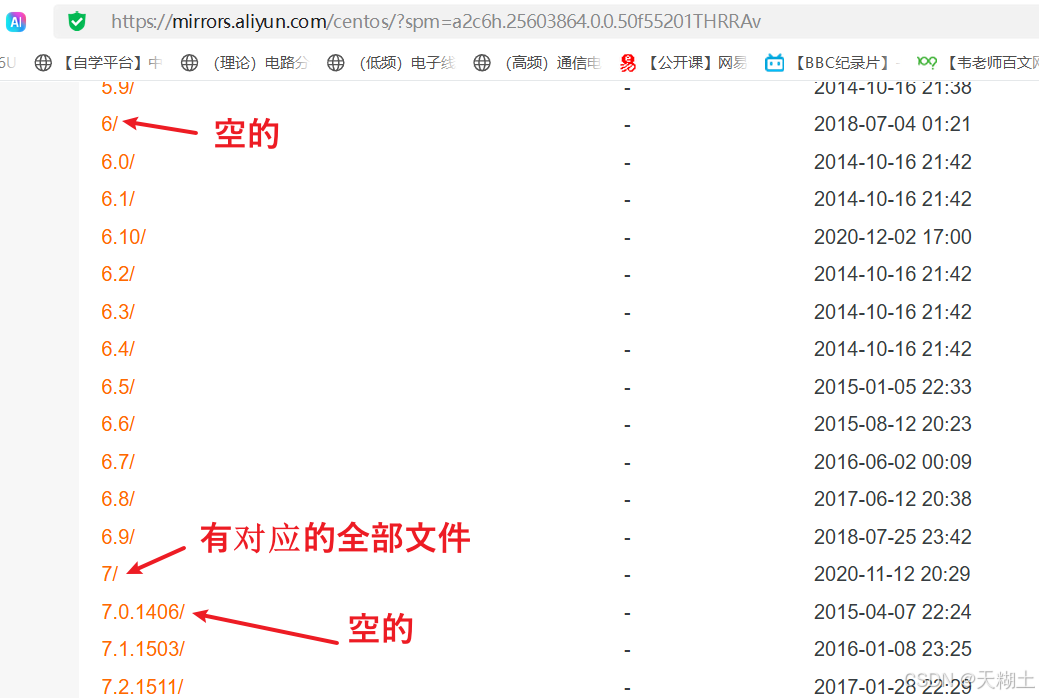
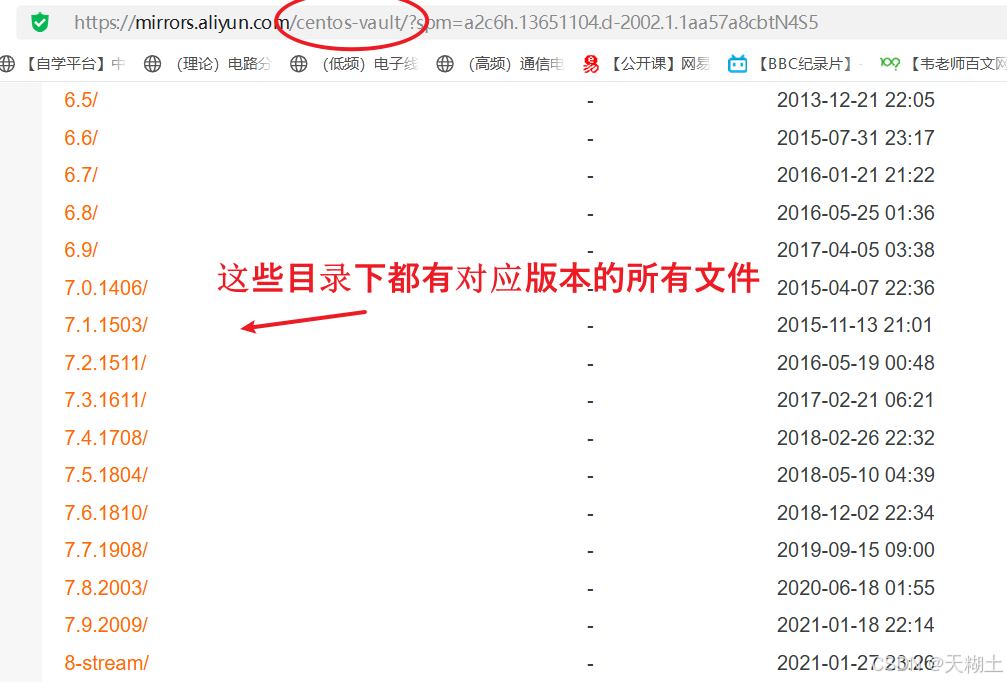
豆包对此的解释如截图所示,这也与上面baseurl 模板的注释对应上了,因此以后还是用centos-vault仓库吧。
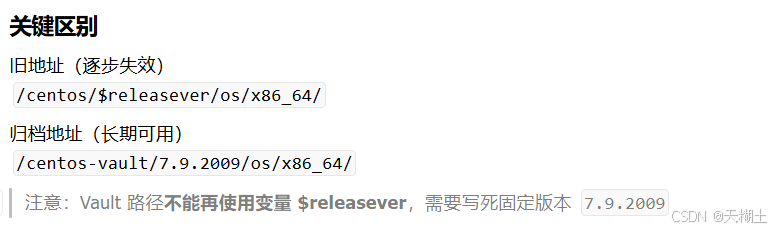
关于vault 归档源,你可以这样理解,系统版本 EOL 停止维护后,官方将全部软件包迁移至归档站点保存(就是换另一个地方进行存储,对应着地址发生改变了),可供安装,但不再推送任何安全更新。CentOS7 环境遇到源废弃报错,则需要切换 centos-vault 归档地址。国内的大厂将这些软件同步存储到它们名下的服务器中,我们只要知道对应地址,就可以快速访问了。
2、离线服务器无法联网
需要自行准备本地 yum 源或内网镜像仓库。见本栏目"如何搭建本地yum源"文章。
六、验证源是否生效
执行下面命令,能正常列出软件包代表源更换成功。
bash
yum list | head -20