系列全场景篇·第46篇 。出海合规篇后,有硬件厂商问:"我的Demo在手机上跑通了,但鸿蒙主打'超级终端',怎么让它在手机、平板、车机、手表之间无缝流转?现在的代码能直接复用吗?" 这触及了鸿蒙的灵魂能力 。今天我们将电商Demo从"单机应用"重构为"分布式应用",实现跨设备购物车同步、服务接续、硬件能力共享 。我们将解决设备发现慢、状态同步乱、权限弹窗烦三大分布式痛点。全程基于API23,含官方文档未涉及的"分布式软总线调优参数"和"异构设备UI自适应"技巧。
一、前言:什么是真正的"全场景"?
很多应用只是做了"自适应布局"(手机UI拉伸到平板),这叫响应式 ,不叫分布式。真正的全场景体验应该是:
-
服务接续:手机上逛了一半的商品,坐上车自动流转到车机大屏继续浏览。
-
硬件互助:用手表的摄像头扫描商品条码,图片实时显示在手机上。
-
数据一致:手机上添加的购物车商品,平板打开时自动同步,无需登录。
核心挑战 :分布式不是简单的网络同步,它涉及设备虚拟化、状态一致性、安全认证、异构UI渲染。今天我们将攻克这些难题。
二、核心概念辨析(响应式 vs 分布式)
| 维度 | 响应式 (Responsive) | 分布式 (Distributed) |
|---|---|---|
| 本质 | UI适配不同屏幕尺寸 | 能力跨越设备边界 |
| 数据 | 本地存储,云端同步 | 跨设备内存共享,实时同步 |
| 硬件 | 仅使用本机硬件 | 调用周边设备硬件(相机、GPS) |
| 交互 | 单设备触摸操作 | 跨设备拖拽、语音、碰一碰 |
| 复杂度 | 低(布局调整) | 高(设备发现、认证、同步) |
三、代码实现:从"单机"到"分布式"
3.1 分布式数据管理:跨设备购物车
使用distributedKVStore实现购物车数据在多设备间实时同步。
创建entry/src/main/ets/store/DistributedCartStore.ets:
import { distributedKVStore } from '@kit.ArkData'
import { BusinessError } from '@kit.BasicServicesKit'

export class DistributedCartStore {
  private kvManager: distributedKVStore.KVManager | null = null
  private kvStore: distributedKVStore.KVStore | null = null
  private readonly STORE_ID = 'distributed_cart_store'
  private readonly SYNC_KEY = 'cart_items'
  private syncListener: distributedKVStore.KVStoreSyncCallback | null = null

  /**
   * 初始化分布式数据库
   */
  async init(context: Context): Promise<void> {
    try {
      // 1. 创建KVManager
      this.kvManager = distributedKVStore.createKVManager({
        context: context,
        bundleName: 'com.example.shop'
      })

      // 2. 获取KVStore,配置为分布式模式
      const options: distributedKVStore.Options = {
        createIfMissing: true,
        encrypt: true, // 加密存储
        backup: false,
        kvStoreType: distributedKVStore.KVStoreType.DEVICE_COLLABORATION,
        // 关键:设置同步模式为PUSH_PULL,双向同步
        syncMode: distributedKVStore.SyncMode.PUSH_PULL,
        // 安全等级:高(涉及用户隐私数据)
        securityLevel: distributedKVStore.SecurityLevel.S2
      }

      this.kvStore = await this.kvManager.getKVStore(this.STORE_ID, options)

      // 3. 注册数据变更监听器
      this.registerDataChangeListener()

      // 4. 主动同步一次(拉取其他设备数据)
      await this.syncData()

      console.log('分布式购物车初始化成功')
    } catch (err) {
      console.error('分布式购物车初始化失败:', err)
    }
  }

  /**
   * 注册数据变更监听
   */
  private registerDataChangeListener(): void {
    if (!this.kvStore) return

    this.syncListener = {
      onDataChanged: (changedDeviceId: string, changedData: distributedKVStore.ChangedData) => {
        console.log(`设备 ${changedDeviceId} 数据发生变化`)
        // 遍历变更的数据
        changedData.insertEntries.forEach((entry: distributedKVStore.Entry) => {
          if (entry.key === this.SYNC_KEY) {
            const cartItems = JSON.parse(entry.value as string)
            console.log('购物车同步更新:', cartItems)
            // 发送全局事件,通知UI更新
            this.notifyCartUpdated(cartItems)
          }
        })
      },
      onSyncCompleted: (deviceIds: string[], syncMode: distributedKVStore.SyncMode, result: distributedKVStore.SyncResult) => {
        console.log(`同步完成,设备: ${deviceIds}, 结果: ${result}`)
      }
    }

    this.kvStore.on('dataChange', distributedKVStore.SubscribeType.SUBSCRIBE_TYPE_ALL, this.syncListener)
  }

  /**
   * 添加商品到购物车(自动同步到所有设备)
   */
  async addToCart(product: ProductBean): Promise<void> {
    if (!this.kvStore) return

    try {
      // 1. 获取当前购物车
      const currentCartStr = await this.kvStore.get(this.SYNC_KEY) as string || '[]'
      const currentCart: ProductBean[] = JSON.parse(currentCartStr)

      // 2. 添加新商品
      currentCart.push(product)

      // 3. 写回数据库(自动触发同步)
      await this.kvStore.put(this.SYNC_KEY, JSON.stringify(currentCart))

      console.log('商品已添加到分布式购物车')
    } catch (err) {
      console.error('添加商品失败:', err)
    }
  }

  /**
   * 主动触发数据同步
   */
  async syncData(): Promise<void> {
    if (!this.kvStore) return

    try {
      // 获取当前可信组网内的所有设备ID
      const deviceIds = await this.kvStore.getConnectedDevices()
      if (deviceIds.length > 0) {
        await this.kvStore.sync(deviceIds, distributedKVStore.SyncMode.PUSH_PULL)
        console.log('主动同步数据到设备:', deviceIds)
      }
    } catch (err) {
      console.error('数据同步失败:', err)
    }
  }

  /**
   * 通知UI更新
   */
  private notifyCartUpdated(cartItems: ProductBean[]): void {
    // 使用EventHub或AppStorage通知UI
    AppStorage.setOrCreate('distributed_cart', cartItems)
  }

  /**
   * 获取购物车数据
   */
  async getCartItems(): Promise<ProductBean[]> {
    if (!this.kvStore) return []

    const cartStr = await this.kvStore.get(this.SYNC_KEY) as string || '[]'
    return JSON.parse(cartStr)
  }
}
3.2 服务接续:跨设备页面迁移
实现从手机到平板的页面无缝流转。
修改ProductDetailPage.ets:
import { AbilityConstant, UIAbility, Want } from '@kit.AbilityKit'
import { window } from '@kit.ArkUI'
import { distributedDeviceManager } from '@kit.DistributedServiceKit'

@Entry
@Component
struct ProductDetailPage {
  @State product: ProductBean = new ProductBean()
  private dmClass: distributedDeviceManager.DeviceManager | null = null

  aboutToAppear(): void {
    // 注册接续监听
    this.registerContinuation()
  }

  /**
   * 注册服务接续能力
   */
  registerContinuation(): void {
    try {
      // 1. 初始化设备管理器
      this.dmClass = distributedDeviceManager.createDeviceManager('com.example.shop')

      // 2. 注册接续回调
      (getContext(this) as UIAbilityContext).on('continue', (want: Want) => {
        console.log('收到服务接续请求')
        // 保存当前页面状态到Want参数中
        want.parameters = want.parameters || {}
        want.parameters['product_id'] = this.product.id
        want.parameters['page_scroll_position'] = this.getCurrentScrollPosition()
        return AbilityConstant.OnContinueResult.AGREE
      })
    } catch (err) {
      console.error('注册接续失败:', err)
    }
  }

  /**
   * 启动服务接续(迁移到平板)
   */
  async startContinuation(): Promise<void> {
    if (!this.dmClass) return

    try {
      // 1. 发现可信设备(同账号、同局域网)
      const devices = this.dmClass.getAvailableDeviceListSync()
      const tablet = devices.find(d => d.deviceType === 'tablet')

      if (!tablet) {
        promptAction.showToast({ message: '未发现可用的平板设备' })
        return
      }

      // 2. 发起接续请求
      const want: Want = {
        bundleName: 'com.example.shop',
        abilityName: 'ProductDetailAbility',
        parameters: {
          'product_id': this.product.id,
          'source_device_id': this.dmClass.getLocalDeviceId()
        }
      }

      // 3. 启动远程Ability
      const context = getContext(this) as UIAbilityContext
      await context.startAbility(want, {
        windowMode: AbilityConstant.WindowMode.FULLSCREEN,
        displayId: tablet.deviceId // 指定在平板设备上显示
      })

      promptAction.showToast({ message: '已迁移到平板' })
    } catch (err) {
      console.error('服务接续失败:', err)
    }
  }

  /**
   * 恢复接续状态
   */
  restoreFromWant(want: Want): void {
    const productId = want.parameters?.['product_id'] as string
    if (productId) {
      this.loadProductById(productId)
      // 恢复滚动位置等状态
      const scrollPos = want.parameters?.['page_scroll_position'] as number
      if (scrollPos) {
        this.restoreScrollPosition(scrollPos)
      }
    }
  }

  build() {
    Column() {
      // ... UI布局

      Button('迁移到平板')
        .onClick(() => this.startContinuation())
        .margin(16)
    }
  }
}
3.3 硬件能力共享:手表控制手机
实现用手表作为手机的遥控器,浏览商品。
创建entry/src/main/ets/controller/WatchController.ets:
import { rpc } from '@kit.IPCKit'
import { Want } from '@kit.AbilityKit'

/**
 * 定义RPC接口
 */
interface IRemoteController {
  nextProduct(): void
  prevProduct(): void
  addToCart(): void
}

/**
 * 手机端:暴露服务供手表调用
 */
export class PhoneRemoteService extends rpc.RemoteObject implements IRemoteController {
  private productList: ProductBean[] = []
  private currentIndex: number = 0
  private callback: ((index: number) => void) | null = null

  constructor() {
    super('PhoneRemoteService')
  }

  onRemoteRequest(code: number, data: rpc.MessageSequence, reply: rpc.MessageSequence, option: rpc.MessageOption): boolean {
    switch (code) {
      case 1: // nextProduct
        this.nextProduct()
        break
      case 2: // prevProduct
        this.prevProduct()
        break
      case 3: // addToCart
        this.addToCart()
        break
    }
    return true
  }

  setProductList(list: ProductBean[], callback: (index: number) => void): void {
    this.productList = list
    this.callback = callback
  }

  nextProduct(): void {
    if (this.currentIndex < this.productList.length - 1) {
      this.currentIndex++
      this.callback?.(this.currentIndex)
    }
  }

  prevProduct(): void {
    if (this.currentIndex > 0) {
      this.currentIndex--
      this.callback?.(this.currentIndex)
    }
  }

  addToCart(): void {
    const product = this.productList[this.currentIndex]
    console.log('手表请求添加商品到购物车:', product.name)
    // 调用购物车逻辑
  }
}

/**
 * 手表端:连接手机服务
 */
export class WatchRemoteClient {
  private proxy: rpc.RemoteProxy | null = null

  async connectToPhone(): Promise<boolean> {
    try {
      const dm = distributedDeviceManager.createDeviceManager('com.example.shop')
      const phone = dm.getAvailableDeviceListSync().find(d => d.deviceType === 'phone')

      if (!phone) return false

      const want: Want = {
        bundleName: 'com.example.shop',
        abilityName: 'PhoneRemoteService',
        deviceId: phone.deviceId
      }

      this.proxy = await rpc.getRemoteProxy(want)
      return true
    } catch (err) {
      console.error('连接手机失败:', err)
      return false
    }
  }

  nextProduct(): void {
    this.proxy?.sendRequest(1)
  }

  prevProduct(): void {
    this.proxy?.sendRequest(2)
  }

  addToCart(): void {
    this.proxy?.sendRequest(3)
  }
}
3.4 异构设备UI自适应
针对不同设备形态(手机、折叠屏、平板、车机)优化UI。
创建entry/src/main/ets/utils/AdaptiveLayout.ets:
import { display } from '@kit.ArkUI'

export enum DeviceType {
  PHONE,
  FOLDABLE,
  TABLET,
  CAR,
  WATCH
}

export class AdaptiveLayout {
  /**
   * 获取当前设备类型
   */
  static getDeviceType(): DeviceType {
    const displayInfo = display.getDefaultDisplaySync()
    const width = displayInfo.width
    const height = displayInfo.height
    const dpi = displayInfo.densityDPI

    // 根据屏幕尺寸和DPI判断设备类型
    if (width < 600) {
      return DeviceType.PHONE
    } else if (width >= 600 && width < 840) {
      return DeviceType.FOLDABLE
    } else if (width >= 840 && width < 1200) {
      return DeviceType.TABLET
    } else if (width >= 1200) {
      return DeviceType.CAR
    }
    return DeviceType.PHONE
  }

  /**
   * 获取网格列数(响应式网格)
   */
  static getGridColumns(): number {
    const deviceType = this.getDeviceType()
    switch (deviceType) {
      case DeviceType.PHONE: return 2
      case DeviceType.FOLDABLE: return 3
      case DeviceType.TABLET: return 4
      case DeviceType.CAR: return 6
      default: return 2
    }
  }

  /**
   * 获取卡片尺寸
   */
  static getCardSize(): { width: number, height: number } {
    const deviceType = this.getDeviceType()
    switch (deviceType) {
      case DeviceType.PHONE: return { width: 160, height: 200 }
      case DeviceType.TABLET: return { width: 200, height: 240 }
      case DeviceType.CAR: return { width: 280, height: 320 }
      default: return { width: 160, height: 200 }
    }
  }

  /**
   * 是否为横屏模式
   */
  static isLandscape(): boolean {
    const displayInfo = display.getDefaultDisplaySync()
    return displayInfo.width > displayInfo.height
  }
}

// 在商品列表中使用
@Entry
@Component
struct AdaptiveProductList {
  @State columns: number = AdaptiveLayout.getGridColumns()

  build() {
    Grid() {
      ForEach(productList, (item: ProductBean) => {
        GridItem() {
          ProductCard({ product: item })
            .width(AdaptiveLayout.getCardSize().width)
            .height(AdaptiveLayout.getCardSize().height)
        }
      })
    }
    .columnsTemplate(new Array(this.columns).fill('1fr').join(' '))
    .rowsGap(16)
    .columnsGap(16)
    .padding(16)
  }
}
四、踩坑记录(官方文档没写的分布式细节)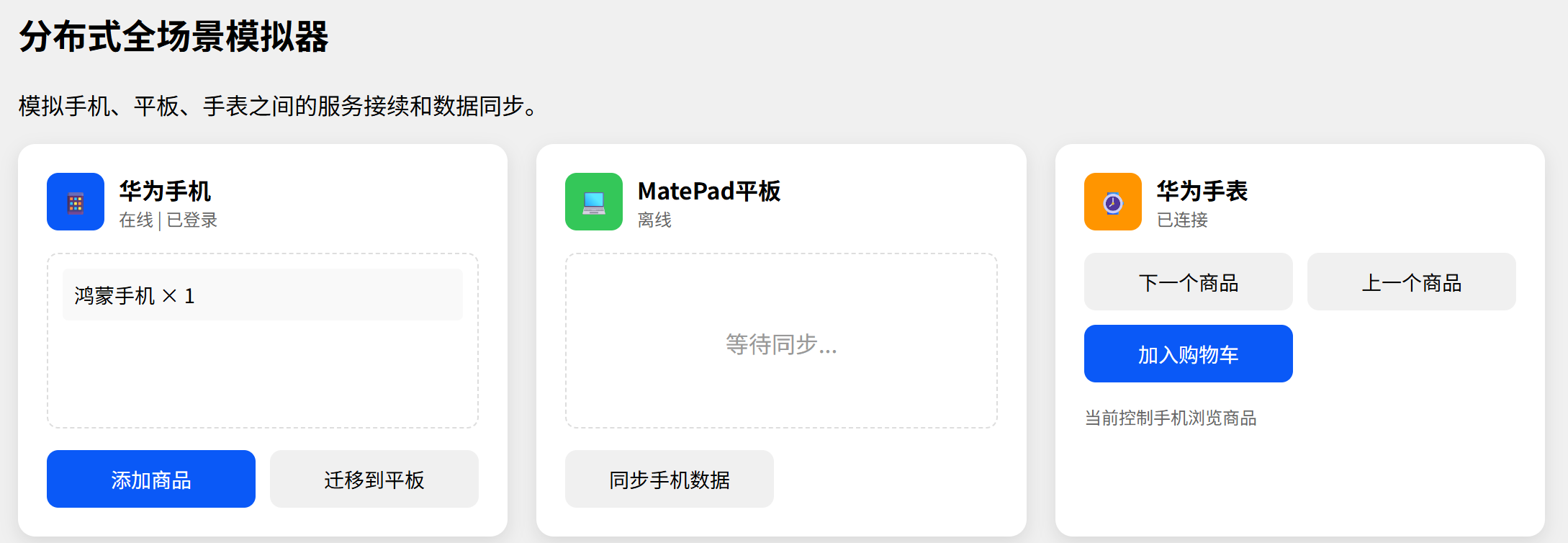
-
设备发现的"隐形门槛" :分布式软总线要求设备必须登录同一华为账号 ,且开启蓝牙和Wi-Fi(即使不连同一热点)。很多开发者卡在这一步。解决方案:在应用启动时检查这些条件,并给出明确的引导提示。
-
同步风暴 :分布式数据库默认是全量同步。如果购物车数据频繁变动,会触发大量同步请求,导致网络拥堵和设备耗电。解决方案:使用防抖(Debounce) 技术,合并短时间内的多次更新;或改用单设备写入,多设备只读的模式。
-
权限弹窗疲劳 :分布式操作需要多个权限(
DISTRIBUTED_DATASYNC、DISTRIBUTED_DEVICE_STATE_CHANGE等)。每次操作都弹窗会极大损害体验。解决方案:在应用启动时一次性申请所有必要权限;使用ability.want.parameters传递临时授权令牌。 -
状态一致性难题 :当手机和平板同时修改购物车时,可能产生冲突。分布式数据库默认采用最后写入获胜(LWW) 策略,这可能导致数据丢失。解决方案:实现操作转换(OT) 或**冲突-free复制数据类型(CRDT)**逻辑,或在业务层设计合理的冲突解决规则(如以时间戳最新为准,但需服务器校验)。
-
车机特殊限制:车机环境对安全和 distraction(分心驾驶)有严格要求。UI必须足够简洁,字体足够大,操作足够简单。不能使用复杂的手势,最好支持语音控制。解决方案:为车机单独设计一套UI(HMI),简化操作流程。