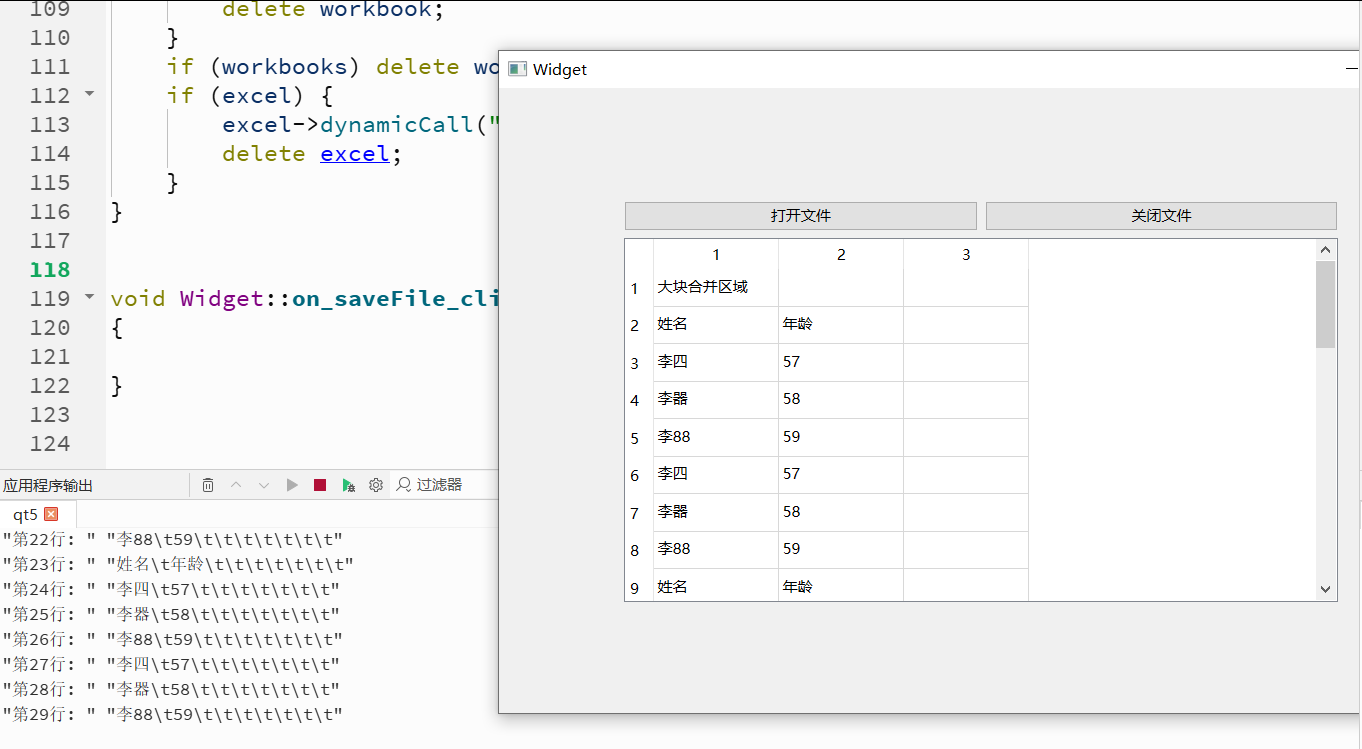
源代码如下:
#include "widget.h"
#include "ui_widget.h"
#include "QToolBox"
#include "QTabWidget"
#include "QPushButton"
#include "QDebug"
#include "QDir"
#include
#include
#include
#include
#include
Widget::Widget(QWidget *parent) : QWidget(parent) , ui(new Ui::Widget)
{
ui->setupUi(this);
this->resize(800,500);
}
Widget::~Widget()
{
delete ui;
}
void Widget::on_openFile_clicked()
{
QAxObject *excel = nullptr;
QAxObject *workbooks = nullptr;
QAxObject *workbook = nullptr;
QAxObject *worksheet = nullptr;
QAxObject *usedRange = nullptr;
try {
    // 1. 启动Excel COM对象
    excel = new QAxObject("Excel.Application", this);
    if (excel->isNull()) {
        qDebug() << "启动失败:请确认电脑已安装 Office 或 WPS";
        return;
    }
    excel->setProperty("Visible", false);       // 后台运行,不弹窗口
    excel->setProperty("DisplayAlerts", false); // 关闭所有提示弹窗

    // 2. 打开指定的Excel文件(注意转Windows原生路径格式)
    workbooks = excel->querySubObject("Workbooks");
    // 在构造函数或按钮槽函数里调用,传入你的Excel文件绝对路径
    QString dir = QDir::currentPath();
    QString filter = "*.xlsx";
    QString filePath = QFileDialog::getOpenFileName(this,"file",dir,filter);
    workbook  = workbooks->querySubObject("Open(const QString&)",
                                         QDir::toNativeSeparators(filePath));
    if (!workbook || workbook->isNull()) {
        qDebug() << "文件打开失败,请检查路径:" << filePath;
        return;
    }

    // 3. 获取第1个工作表
    worksheet = workbook->querySubObject("Worksheets(int)", 1);

    // 4. 获取表格已使用的区域,得到总行数、总列数
    usedRange = worksheet->querySubObject("UsedRange");
    if (!usedRange || usedRange->isNull()) {
        qDebug() << "表格为空,无内容可读取";
        return;
    }
    int rowCount = usedRange->querySubObject("Rows")->property("Count").toInt();
    int colCount = usedRange->querySubObject("Columns")->property("Count").toInt();
    qDebug() << QString("=== 表格共 %1 行,%2 列 ===").arg(rowCount).arg(colCount);

    // 先清空表格原有内容
    ui->tableWidget->clearContents();
    ui->tableWidget->setRowCount(0);
    ui->tableWidget->setColumnCount(3); // 设置总列数

    for (int rowExcel = 1; rowExcel <= rowCount; rowExcel++)
    {
        // QTableWidget 行下标 = Excel行 - 1
        int tableRow = rowExcel - 1;
        // 给表格新增一行
        ui->tableWidget->insertRow(tableRow);

        QString line;
        for (int colExcel = 1; colExcel <= colCount; colExcel++)
        {
            int tableCol = colExcel - 1;

            // 读取Excel单元格文本
            QAxObject *cell = worksheet->querySubObject("Cells(int,int)", rowExcel, colExcel);
            QString cellText = cell->property("Value").toString();
            delete cell;

            // 新建表格单元格条目,填入文本
            QTableWidgetItem *item = new QTableWidgetItem(cellText);
            ui->tableWidget->setItem(tableRow, tableCol, item);

            line += cellText + "\t";
        }
        qDebug() << QString("第%1行: ").arg(rowExcel) << line;
    }
}
catch (...) {
    qDebug() << "读取Excel发生异常";
}

// ========== 必须倒序释放所有COM对象,否则Excel进程会后台残留 ==========
if (usedRange) delete usedRange;
if (worksheet) delete worksheet;
if (workbook) {
    workbook->dynamicCall("Close()"); // 关闭文件,不保存修改
    delete workbook;
}
if (workbooks) delete workbooks;
if (excel) {
    excel->dynamicCall("Quit()");
    delete excel;
}
}
void Widget::on_saveFile_clicked()
{
}
2)创建两个按钮和一个tableWidget部件;
3)测试如下: