硬件型号:海康MV-CU013-AUOM(USB3.0连接)工业相机
软件配置:按照官方教程安装软件,软件链接:
https://www.hikrobotics.com/cn/machinevision/service/download/?module=0
我安装的是MVS V5.0.1(windows)客户端

接好相机,我是将客户端(SDK)的相关配置文件都安装在了D盘,
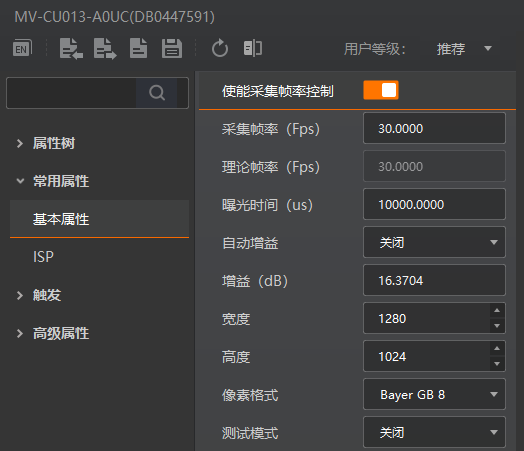
之后进入软件做一下参数调节:(可以参考教程视频简单调节一下参数)
我这里设定的参数如下,曝光时间10000us,采集帧率30fps,增益16.3704(可以自动增益),不调节参数的话,初始相机画面是黑的,调节完参数保存一个用户集,下次打开相机就不需要再调节了
紧接着,找到之前安装客户端配置文件夹MVS,参照如下路径找到支持python调用的(底层文件夹)MvImport
D:\MVS\Development\Samples\Python\MvImport
找到后,将MvImport文件夹整个复制粘贴到桌面,并在桌面的MvImport文件夹中新建一个py文件,将如下代码放入,配置好需要的环境,运行代码即可调用相机(提示为英文格式下按s键开始录制,按q键退出文件夹并将视频保存到相应路径下)
python
# -*- coding: utf-8 -*-
"""
海康 MV-CU013-AOUM USB3.0 相机视频录制脚本
===========================================
按键控制:
  - 按 's' 键:开始/停止录制
  - 按 'q' 键:退出程序
视频保存路径:桌面/1/
"""

import sys
import os
import time
import ctypes
from ctypes import *
from datetime import datetime

# ============================================================
# 1. 配置 DLL 搜索路径(必须在导入 MVS 模块之前完成)
# ============================================================
_MVS_RUNTIME_DIR = r"C:\Program Files (x86)\Common Files\MVS\Runtime\Win64_x64"#-----------MVS客户端安装完成后,该代码会自动找到C盘的.dll驱动文件

if not os.path.isdir(_MVS_RUNTIME_DIR):
    raise FileNotFoundError(f"MVS Runtime 目录不存在: {_MVS_RUNTIME_DIR}")

# 方法1:os.add_dll_directory (Python 3.8+, 向进程 DLL 搜索路径添加目录)
if hasattr(os, 'add_dll_directory'):
    os.add_dll_directory(_MVS_RUNTIME_DIR)
    print(f"[INFO] add_dll_directory: {_MVS_RUNTIME_DIR}")

# 方法2:通过 ctypes 调用 Windows API 直接设置 DLL 搜索路径
_kernel32 = ctypes.WinDLL('kernel32', use_last_error=True)
# SetDllDirectoryW: 添加一个目录到 DLL 搜索路径
_kernel32.SetDllDirectoryW(_MVS_RUNTIME_DIR)
print(f"[INFO] SetDllDirectoryW: {_MVS_RUNTIME_DIR}")

# 方法3:手动预加载 MvCameraControl.dll(完整路径),ctypes 会缓存已加载的 DLL
_dll_full_path = os.path.join(_MVS_RUNTIME_DIR, "MvCameraControl.dll")
try:
    _preload = ctypes.WinDLL(_dll_full_path)
    print(f"[INFO] 已预加载: {_dll_full_path}")
except Exception as e:
    print(f"[WARN] 预加载失败: {e},将尝试后续方法")

# ============================================================
# 2. 添加 MvImport 到 sys.path
# ============================================================
_MVIMPORT_DIR = os.path.join(os.path.dirname(os.path.abspath(__file__)), "MvImport")
if _MVIMPORT_DIR not in sys.path:
    sys.path.append(_MVIMPORT_DIR)

import numpy as np
import cv2

from MvCameraControl_class import *
from MvErrorDefine_const import *
from CameraParams_const import *
from CameraParams_header import *
from PixelType_header import *

# ============================================================
# 3. 配置输出路径
# ============================================================
_OUTPUT_DIR = os.path.join(os.path.expanduser("~"), "Desktop", "1")#-----------可以自行设定保存路径,目前是在Desktop(桌面)生成名称为1的文件夹,并将录制的视频保存在该文件夹中
os.makedirs(_OUTPUT_DIR, exist_ok=True)
print(f"[INFO] 视频输出目录: {_OUTPUT_DIR}")


# ============================================================
# 4. 辅助函数
# ============================================================
def decode_char_array(char_array):
    """安全地从 ctypes 字符数组中解码出字符串"""
    byte_str = memoryview(char_array).tobytes()
    null_idx = byte_str.find(b'\x00')
    if null_idx != -1:
        byte_str = byte_str[:null_idx]
    for enc in ['gbk', 'utf-8', 'latin-1']:
        try:
            return byte_str.decode(enc)
        except UnicodeDecodeError:
            continue
    return byte_str.decode('latin-1', errors='replace')


def is_mono_pixel(pixel_type):
    """判断是否为黑白像素格式"""
    return pixel_type in (
        PixelType_Gvsp_Mono8, PixelType_Gvsp_Mono10,
        PixelType_Gvsp_Mono10_Packed, PixelType_Gvsp_Mono12,
        PixelType_Gvsp_Mono12_Packed, PixelType_Gvsp_Mono14,
        PixelType_Gvsp_Mono16,
    )


def is_hb_pixel(pixel_type):
    """判断是否为 HB (High Bandwidth) 像素格式"""
    return pixel_type in (
        PixelType_Gvsp_HB_Mono8, PixelType_Gvsp_HB_Mono10,
        PixelType_Gvsp_HB_Mono10_Packed, PixelType_Gvsp_HB_Mono12,
        PixelType_Gvsp_HB_Mono12_Packed, PixelType_Gvsp_HB_Mono16,
        PixelType_Gvsp_HB_RGB8_Packed, PixelType_Gvsp_HB_BGR8_Packed,
        PixelType_Gvsp_HB_RGBA8_Packed, PixelType_Gvsp_HB_BGRA8_Packed,
        PixelType_Gvsp_HB_BayerGR8, PixelType_Gvsp_HB_BayerRG8,
        PixelType_Gvsp_HB_BayerGB8, PixelType_Gvsp_HB_BayerBG8,
        PixelType_Gvsp_HB_BayerRBGG8,
        PixelType_Gvsp_HB_BayerGR10, PixelType_Gvsp_HB_BayerGR10_Packed,
        PixelType_Gvsp_HB_BayerRG10, PixelType_Gvsp_HB_BayerRG10_Packed,
        PixelType_Gvsp_HB_BayerGB10, PixelType_Gvsp_HB_BayerGB10_Packed,
        PixelType_Gvsp_HB_BayerBG10, PixelType_Gvsp_HB_BayerBG10_Packed,
        PixelType_Gvsp_HB_BayerGR12, PixelType_Gvsp_HB_BayerGR12_Packed,
        PixelType_Gvsp_HB_BayerRG12, PixelType_Gvsp_HB_BayerRG12_Packed,
        PixelType_Gvsp_HB_BayerGB12, PixelType_Gvsp_HB_BayerGB12_Packed,
        PixelType_Gvsp_HB_BayerBG12, PixelType_Gvsp_HB_BayerBG12_Packed,
    )


# ============================================================
# 5. 主程序
# ============================================================
def main():
    cam = None
    video_writer = None
    recording = False

    try:
        # --- 5a. 初始化 SDK ---
        ret = MvCamera.MV_CC_Initialize()
        if ret != MV_OK:
            raise Exception(f"SDK 初始化失败! ret[0x{ret:x}]")

        sdk_ver = MvCamera.MV_CC_GetSDKVersion()
        print(f"[INFO] SDK 版本: 0x{sdk_ver:08x}")

        # --- 5b. 枚举 USB 设备 ---
        device_list = MV_CC_DEVICE_INFO_LIST()
        tlayer_type = MV_USB_DEVICE | MV_GIGE_DEVICE

        ret = MvCamera.MV_CC_EnumDevices(tlayer_type, device_list)
        if ret != MV_OK:
            raise Exception(f"设备枚举失败! ret[0x{ret:x}]")
        if device_list.nDeviceNum == 0:
            raise Exception("未找到任何设备,请检查相机连接!")

        print(f"[INFO] 找到 {device_list.nDeviceNum} 个设备")

        # 列出所有设备
        usb_indices = []
        for i in range(device_list.nDeviceNum):
            dev_info = cast(device_list.pDeviceInfo[i], POINTER(MV_CC_DEVICE_INFO)).contents
            if dev_info.nTLayerType == MV_USB_DEVICE:
                usb_info = dev_info.SpecialInfo.stUsb3VInfo
                model = decode_char_array(usb_info.chModelName)
                serial = decode_char_array(usb_info.chSerialNumber)
                print(f"  [{i}] USB 设备: {model}  (SN: {serial})")
                usb_indices.append(i)
            elif dev_info.nTLayerType == MV_GIGE_DEVICE:
                ge_info = dev_info.SpecialInfo.stGigEInfo
                model = decode_char_array(ge_info.chModelName)
                print(f"  [{i}] GigE 设备: {model}")

        # 优先选择 USB 设备(CU013 是 USB 相机)
        if usb_indices:
            connect_idx = usb_indices[0]
        else:
            connect_idx = 0
        print(f"[INFO] 将连接设备 [{connect_idx}]")

        # --- 5c. 创建句柄 & 打开设备 ---
        cam = MvCamera()
        st_dev_info = cast(device_list.pDeviceInfo[connect_idx], POINTER(MV_CC_DEVICE_INFO)).contents

        ret = cam.MV_CC_CreateHandle(st_dev_info)
        if ret != MV_OK:
            raise Exception(f"创建句柄失败! ret[0x{ret:x}]")

        ret = cam.MV_CC_OpenDevice(MV_ACCESS_Exclusive, 0)
        if ret != MV_OK:
            raise Exception(f"打开设备失败! ret[0x{ret:x}]")

        print("[INFO] 设备已打开")

        # --- 5d. 获取相机参数 ---
        st_param = MVCC_INTVALUE()
        memset(byref(st_param), 0, sizeof(MVCC_INTVALUE))

        ret = cam.MV_CC_GetIntValue("Width", st_param)
        width = st_param.nCurValue
        if ret != MV_OK:
            raise Exception(f"获取宽度失败! ret[0x{ret:x}]")

        ret = cam.MV_CC_GetIntValue("Height", st_param)
        height = st_param.nCurValue
        if ret != MV_OK:
            raise Exception(f"获取高度失败! ret[0x{ret:x}]")

        # 获取像素格式
        st_enum = MVCC_ENUMVALUE()
        memset(byref(st_enum), 0, sizeof(MVCC_ENUMVALUE))
        ret = cam.MV_CC_GetEnumValue("PixelFormat", st_enum)
        pixel_format = MvGvspPixelType(st_enum.nCurValue)

        # 获取帧率
        st_float = MVCC_FLOATVALUE()
        memset(byref(st_float), 0, sizeof(MVCC_FLOATVALUE))
        ret = cam.MV_CC_GetFloatValue("ResultingFrameRate", st_float)
        fps = st_float.fCurValue if ret == MV_OK else 30.0

        print(f"[INFO] 相机参数: {width}x{height}, 像素格式={pixel_format}, 帧率≈{fps:.1f} fps")

        # --- 5e. 设置触发模式为 OFF (连续采集) ---
        ret = cam.MV_CC_SetEnumValue("TriggerMode", MV_TRIGGER_MODE_OFF)
        if ret != MV_OK:
            print(f"[WARN] 设置触发模式失败! ret[0x{ret:x}]")

        # --- 5f. 开始取流 ---
        ret = cam.MV_CC_StartGrabbing()
        if ret != MV_OK:
            raise Exception(f"开始取流失败! ret[0x{ret:x}]")

        print("[INFO] 取流已开始")
        print("=" * 50)
        print("  按 's' 键 开始/停止录制")
        print("  按 'q' 键 退出程序")
        print("=" * 50)

        # --- 5g. 主循环:取流 → 显示 → 录制 ---
        # 判断输出像素格式
        b_mono = is_mono_pixel(pixel_format)

        # 帧缓冲
        st_frame = MV_FRAME_OUT()
        fps_display = 30.0  # 显示用帧率
        frame_count = 0
        last_fps_time = time.time()

        while True:
            memset(byref(st_frame), 0, sizeof(MV_FRAME_OUT))
            ret = cam.MV_CC_GetImageBuffer(st_frame, 1000)

            if st_frame.pBufAddr is None or ret != MV_OK:
                print(f"[WARN] 取流超时或无数据 ret[0x{ret:x}]")
                continue

            # --- 像素格式转换 ---
            frame_info = st_frame.stFrameInfo
            src_pixel = frame_info.enPixelType
            src_data = st_frame.pBufAddr
            src_data_len = frame_info.nFrameLen

            # 处理 HB 解码
            if is_hb_pixel(src_pixel):
                decode_buf_len = frame_info.nWidth * frame_info.nHeight * 3
                decode_buf = (c_ubyte * decode_buf_len)()
                st_decode = MV_CC_HB_DECODE_PARAM()
                memset(byref(st_decode), 0, sizeof(MV_CC_HB_DECODE_PARAM))
                st_decode.pSrcBuf = src_data
                st_decode.nSrcLen = src_data_len
                st_decode.pDstBuf = decode_buf
                st_decode.nDstBufSize = decode_buf_len
                ret_hb = cam.MV_CC_HBDecode(st_decode)
                if ret_hb != MV_OK:
                    cam.MV_CC_FreeImageBuffer(st_frame)
                    continue
                convert_src_data = st_decode.pDstBuf
                convert_src_len = st_decode.nDstBufLen
                convert_src_pixel = st_decode.enDstPixelType
            else:
                convert_src_data = src_data
                convert_src_len = src_data_len
                convert_src_pixel = src_pixel

            # 决定目标像素格式
            if is_mono_pixel(convert_src_pixel):
                dst_pixel = PixelType_Gvsp_Mono8
                channels = 1
            else:
                dst_pixel = PixelType_Gvsp_RGB8_Packed
                channels = 3

            dst_buf_len = channels * frame_info.nWidth * frame_info.nHeight
            dst_buf = (c_ubyte * dst_buf_len)()

            st_convert = MV_CC_PIXEL_CONVERT_PARAM_EX()
            memset(byref(st_convert), 0, sizeof(MV_CC_PIXEL_CONVERT_PARAM_EX))
            st_convert.nWidth = frame_info.nWidth
            st_convert.nHeight = frame_info.nHeight
            st_convert.enSrcPixelType = convert_src_pixel
            st_convert.pSrcData = convert_src_data
            st_convert.nSrcDataLen = convert_src_len
            st_convert.enDstPixelType = dst_pixel
            st_convert.pDstBuffer = dst_buf
            st_convert.nDstBufferSize = dst_buf_len

            ret_convert = cam.MV_CC_ConvertPixelTypeEx(st_convert)
            if ret_convert != MV_OK:
                print(f"[WARN] 像素转换失败! ret[0x{ret_convert:x}]")
                cam.MV_CC_FreeImageBuffer(st_frame)
                continue

            # --- 转换为 numpy / OpenCV 格式 ---
            if channels == 1:
                img = np.frombuffer(dst_buf, dtype=np.uint8, count=dst_buf_len).reshape(
                    frame_info.nHeight, frame_info.nWidth
                )
                # 灰度图复制为3通道以便 VideoWriter
                img_bgr = cv2.cvtColor(img, cv2.COLOR_GRAY2BGR)
            else:
                img_rgb = np.frombuffer(dst_buf, dtype=np.uint8, count=dst_buf_len).reshape(
                    frame_info.nHeight, frame_info.nWidth, 3
                )
                # RGB → BGR (OpenCV 默认 BGR)
                img_bgr = cv2.cvtColor(img_rgb, cv2.COLOR_RGB2BGR)

            # --- 释放图像缓存 ---
            cam.MV_CC_FreeImageBuffer(st_frame)

            # --- 录制状态指示 ---
            if recording:
                # 写入视频帧
                video_writer.write(img_bgr)
                # 在画面左上角显示录制指示
                cv2.circle(img_bgr, (30, 30), 12, (0, 0, 255), -1)
                cv2.putText(img_bgr, "REC", (50, 38),
                            cv2.FONT_HERSHEY_SIMPLEX, 0.7, (0, 0, 255), 2)

            # 帧率统计
            frame_count += 1
            if frame_count % 30 == 0:
                now = time.time()
                fps_display = 30.0 / (now - last_fps_time + 0.001)
                last_fps_time = now

            # 在画面顶部显示帧率
            cv2.putText(img_bgr, f"FPS: {fps_display:.1f}",
                        (10, frame_info.nHeight - 20),
                        cv2.FONT_HERSHEY_SIMPLEX, 0.6, (0, 255, 0), 1)

            # --- 显示画面 ---
            cv2.imshow("Camera (s:Record  q:Quit)", img_bgr)

            # --- 键盘处理 ---
            key = cv2.waitKey(1) & 0xFF

            if key == ord('s'):
                if not recording:
                    # 开始录制
                    timestamp = datetime.now().strftime("%Y%m%d_%H%M%S")
                    video_path = os.path.join(_OUTPUT_DIR, f"video_{timestamp}.mp4")
                    fourcc = cv2.VideoWriter_fourcc(*'mp4v')
                    # fourcc = cv2.VideoWriter_fourcc(*'XVID')  # AVI 备选
                    video_writer = cv2.VideoWriter(
                        video_path, fourcc, fps, (frame_info.nWidth, frame_info.nHeight)
                    )
                    if not video_writer.isOpened():
                        # 尝试其他编码器
                        fourcc = cv2.VideoWriter_fourcc(*'XVID')
                        video_path = video_path.replace('.mp4', '.avi')
                        video_writer = cv2.VideoWriter(
                            video_path, fourcc, fps, (frame_info.nWidth, frame_info.nHeight)
                        )
                    if video_writer.isOpened():
                        recording = True
                        print(f"[REC] 开始录制 → {video_path}")
                    else:
                        print("[ERROR] 无法创建视频文件,请检查编码器!")
                else:
                    # 停止录制
                    recording = False
                    video_writer.release()
                    video_writer = None
                    print(f"[REC] 录制已停止 → {video_path}")

            elif key == ord('q'):
                print("[INFO] 用户按下 'q',退出...")
                break

    except Exception as e:
        print(f"[ERROR] {e}")
        import traceback
        traceback.print_exc()

    finally:
        # --- 清理 ---
        print("[INFO] 正在清理资源...")

        if recording and video_writer is not None:
            video_writer.release()
            print("[INFO] 视频文件已保存")

        if cam is not None:
            try:
                cam.MV_CC_StopGrabbing()
                print("[INFO] 取流已停止")
            except:
                pass
            try:
                cam.MV_CC_CloseDevice()
                print("[INFO] 设备已关闭")
            except:
                pass
            try:
                cam.MV_CC_DestroyHandle()
                print("[INFO] 句柄已销毁")
            except:
                pass

        MvCamera.MV_CC_Finalize()
        print("[INFO] SDK 已反初始化")

        cv2.destroyAllWindows()
        print("[INFO] 程序结束")


if __name__ == "__main__":
    main()
我配置的环境如下:(记得参考之前我写的教程安装minicanda、cuda11.3与vscode)
certifi==2026.7.22
charset-normalizer==3.4.9
idna=3.15
numpy==1.24.4
opencv-python==5.0.0.93
pillow==10.4.0
pip==24.2
requests==2.32.4
setuptools==75.1.0
torch==1.11.0+cu113
torchaudio==0.11.0+cu113
torchvision==0.12.0+cu113
typing_extensions==4.13.2
urllib3==2.2.3
wheel==0.44.0