目录
[Skill SKILL.md](#Skill SKILL.md)
[配置SSL Proxy代理](#配置SSL Proxy代理)
出发
通过Charles 拦截,spring ai 对接 Deepseek 的报文。
SkillController
java
package com.haiwei.javaai.controller;

import com.haiwei.javaai.tool.LoggingAdvisor;
import com.haiwei.javaai.tool.OrderTools;
import lombok.extern.slf4j.Slf4j;
import org.springaicommunity.agent.tools.SkillsTool;
import org.springframework.ai.chat.client.ChatClient;
import org.springframework.ai.tool.ToolCallback;
import org.springframework.core.io.Resource;
import org.springframework.core.io.ResourceLoader;
import org.springframework.web.bind.annotation.GetMapping;
import org.springframework.web.bind.annotation.RestController;

@Slf4j
@RestController
public class SkillController {

    private final ChatClient chatClient;

    private final OrderTools orderTools;

    public SkillController(ChatClient.Builder chatClientBuilder, ResourceLoader resourceLoader, OrderTools orderTools) {
        // 加载Skill文件
        Resource resource = resourceLoader.getResource("classpath:skills");

        // 将Skill添加为Skill Tool
        ToolCallback skillsTool = SkillsTool.builder()
                .addSkillsResource(resource)
                .build();

        // 生成Chat Client 添加默认Skill 和 日志
        this.chatClient = chatClientBuilder
                .defaultTools(skillsTool)
                .defaultAdvisors(new LoggingAdvisor())
                .build();

        // 添加工具
        this.orderTools = orderTools;
    }

    @GetMapping("/char/get1")
    public Object get1() {

        String message = "帮我查一下订单123456的状态";

        log.info("Start call LLM,message:{}");
        String content = chatClient.prompt()
                .user(message)
                // 添加工具类
                .tools(orderTools)
                .call().content();
        log.info(content);
        return content;
    }

}
OrderTools
java
package com.haiwei.javaai.tool;

import com.haiwei.javaai.utils.JsonUtil;
import lombok.extern.slf4j.Slf4j;
import org.springframework.ai.tool.annotation.Tool;
import org.springframework.ai.tool.annotation.ToolParam;
import org.springframework.stereotype.Component;

import java.util.HashMap;
import java.util.Map;

@Slf4j
@Component
public class OrderTools {

    @Tool(description = "根据订单ID查询订单详情,返回订单状态、金额、创建时间等信息")
    public Object getOrderById(
            @ToolParam(description = "订单ID") Long orderId
    ) {
        Map<String, Object> map = new HashMap<>();
        map.put("orderId", orderId);
        map.put("price", "2000");
        map.put("state", "待发货");
        log.info("getOrderById ,result:{}", JsonUtil.toJson(map));
        return map;
    }

    @Tool(description = "查询今日新增订单数量")
    public int getTodayOrderCount() {
        log.info("getTodayOrderCount ,result:{}", 11);
        return 11;
    }

    @Tool(description = "取消指定订单,需要订单ID")
    public boolean cancelOrder(
            @ToolParam(description = "要取消的订单ID") Long orderId
    ) {
        log.info("cancelOrder ,orderId:{},result:{}", orderId, false);
        return false;
    }
}
Skill SKILL.md
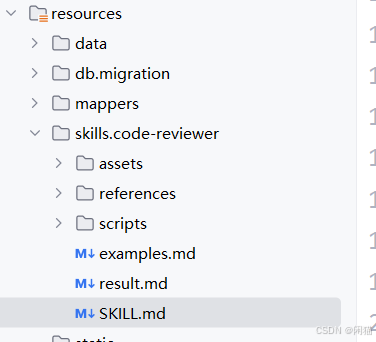
java
---
name: team-java-standards
description: Review code against team Java coding standards.
  Use for all code review tasks.
---

# Team Java Coding Standards Review

## Instructions

审查代码时,检查以下团队规范:

### 强制规范(违反必须指出)
1. 禁止 @Autowired 字段注入,使用构造器注入
2. Controller 方法必须有 @Operation 注解(Springdoc OpenAPI)
3. 不允许在 Controller 中直接处理异常,使用 @RestControllerAdvice

### 建议规范(违反给出建议)
4. Service 方法建议添加 @Transactional(readOnly=true)
5. DTO 和 Entity 之间必须使用 MapStruct 转换
6. 日志使用 Slf4j,禁止 System.out.println

## Output Format

输出格式:
- 🔴 强制规范违反:(行号) 说明 + 问题代码 + 修正代码
- 🟡 建议规范违反:(行号) 说明 + 问题代码 + 修正代码
- ✅ 通过项:简要说明
- 不同问题之间使用 ================================== 隔离
官网
Charles 是一个 HTTP 代理 / HTTP 监控器 / 反向代理,它使开发者能够查看其机器与互联网之间所有的 HTTP 和 SSL / HTTPS 流量。这包括请求、响应以及 HTTP 头信息(其中包含 cookie 和缓存信息)。
安装和注册
注册:首次打开的Charles需要注册
点击Help ------ Register Charles进入注册界面
填入Registered Name和生成的license key,点击 Register
注册成功后,Charles会提示是否关闭,同意关闭后再手动打开
在线破解链接:https://www.zzzmode.com/mytools/charles/
在链接中输入Registered Name,点击生成,即可生成激活码license key
安装电脑端的证书
如果不配置证书的话,无法抓取Https请求,Https请求会是Unknown
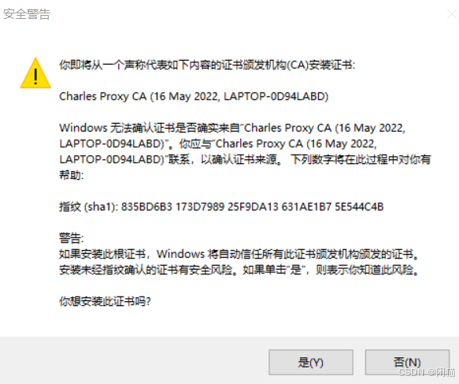
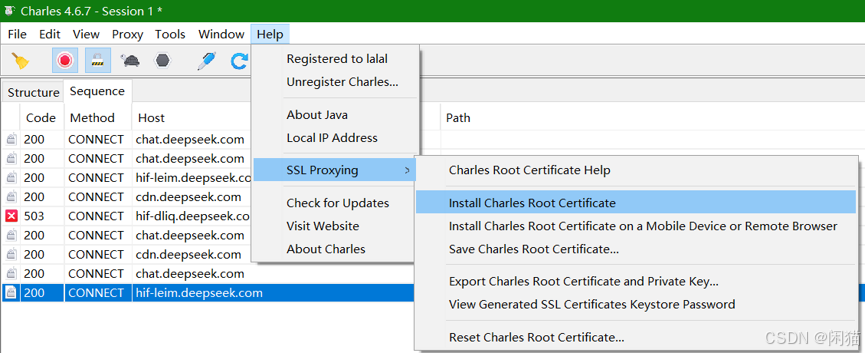
点击Help ---> SSL Proxying---> install charles Root Certificate
注意:证书信息中的文字,需要安装到【收信人的证书颁发结构】存储区域,不能使用默认
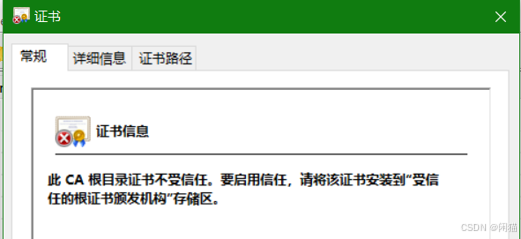
注意:如果按照默认安装路径,则会按照到【中间正式办法机构】中,是不受信任的,如下
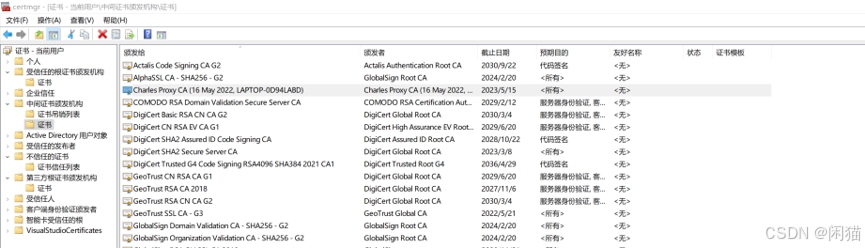
这里就需要选证书存储类型了,如下:
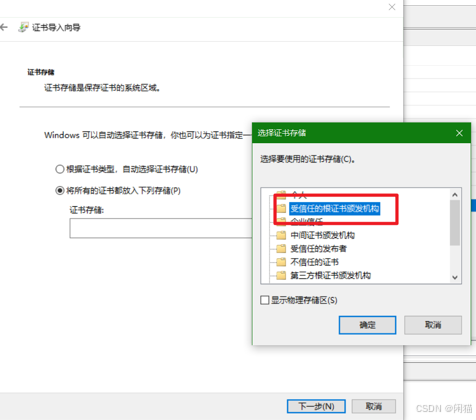
最后【下一步】点击是,即可成功。
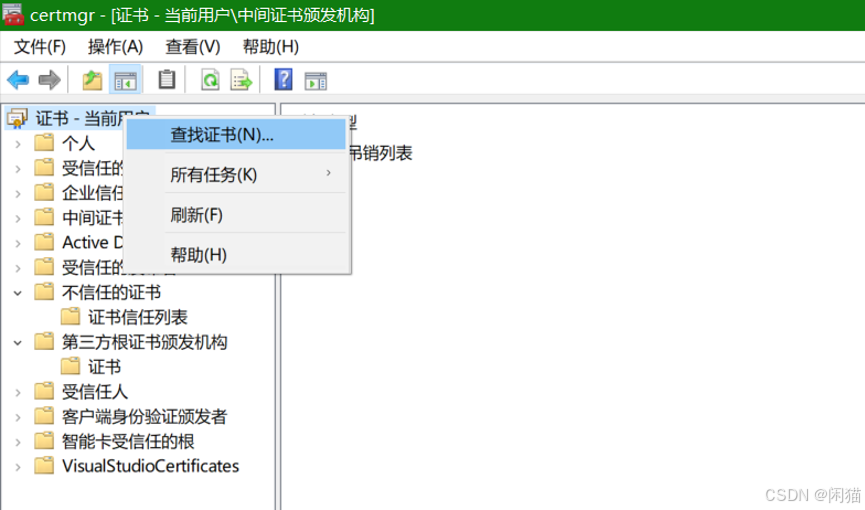
核查&查找证书
打开证书页面:按 Win + R,输入 certmgr.msc 并回车
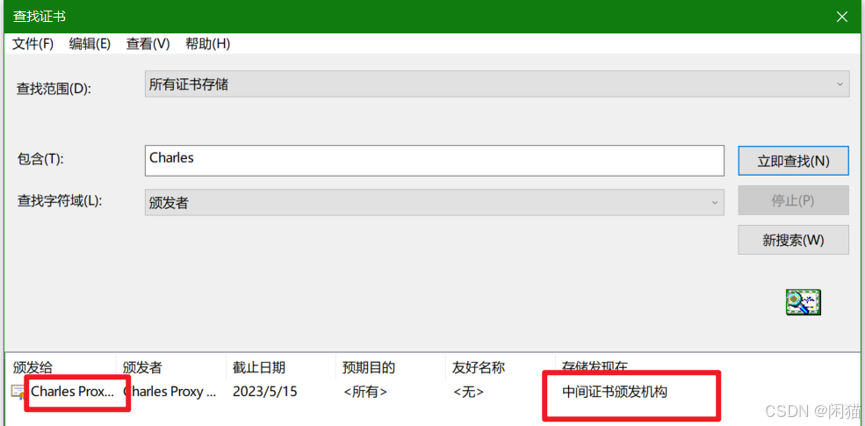
输入Charles,点击【立即查找】
双击打开:
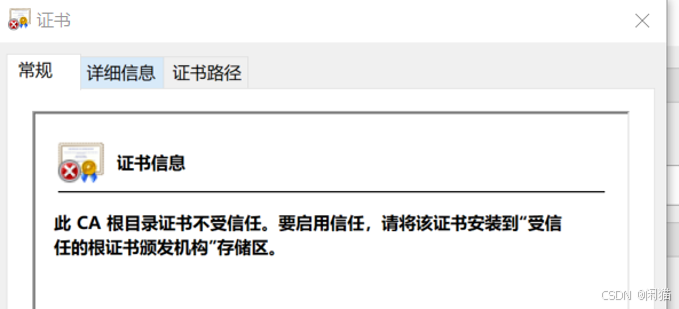
重新安装:点击help -> SSL Proxying -> Install Charles Root Certificate 安装证书
多次安装的目录:
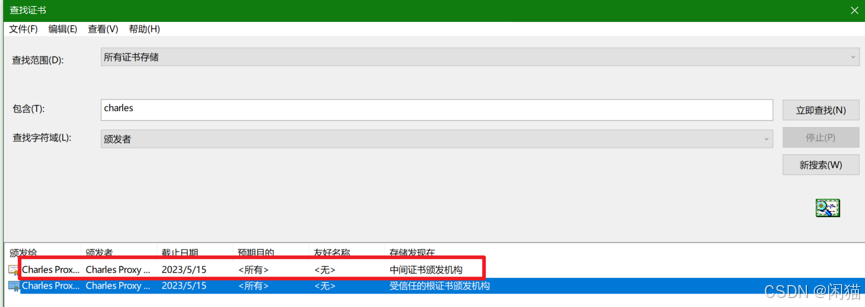
两个问题:
- 路径不对,没有安装到【受信任的***】
- 截止时间不对
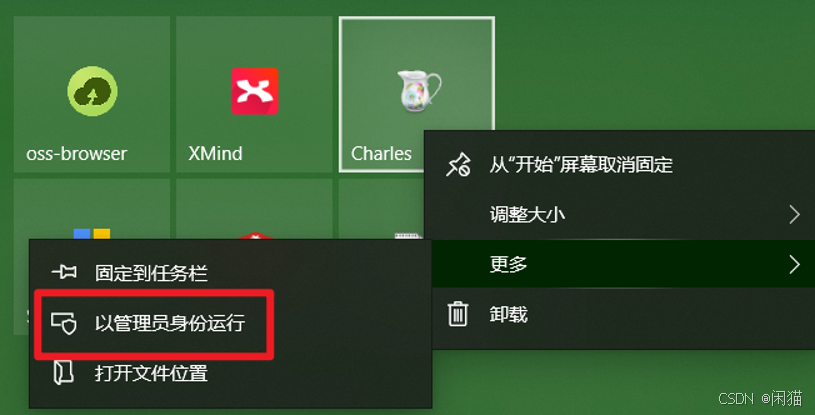
全部删除,重新安装
以管理员身份重新运行Charles:
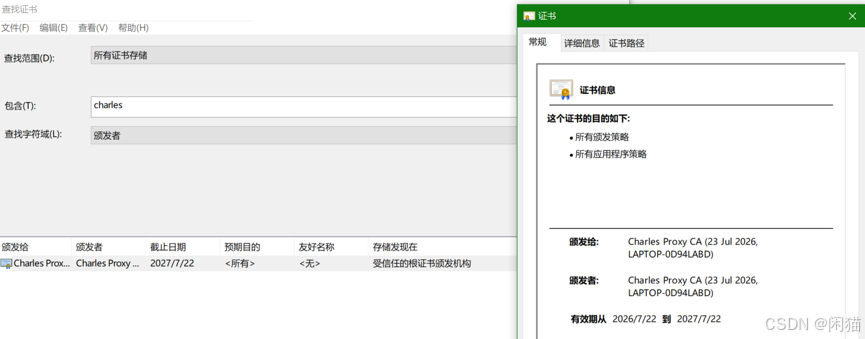
重新安装后时间就对了:
配置SSL Proxy代理
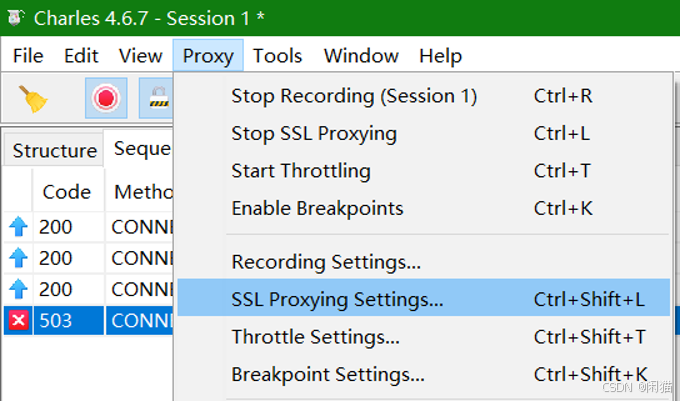
添加SSL Proxying Setting:
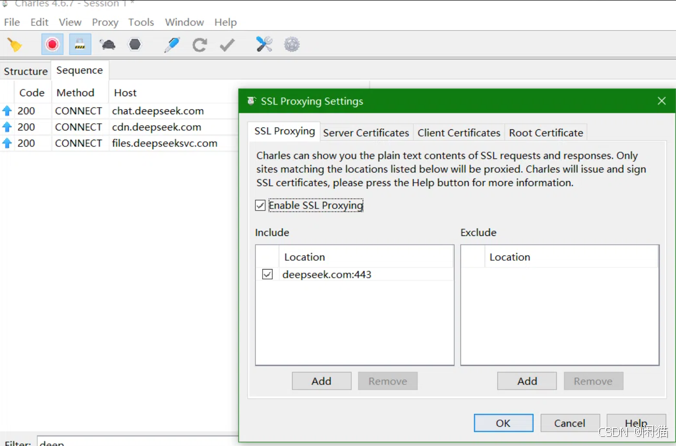
这样配置后依然有问题:
Charles 安装的root cat,并且已经配置了ssl proxy。 为什么 使用spring ai对接Deepseekapi时,访问成功了,但charles没有拦截到
IDEA本地启动VM添加代理
点击顶部工具栏的 "Edit Configurations..."(或从 Run -> Edit Configurations)
在左侧选择你的Spring Boot启动类
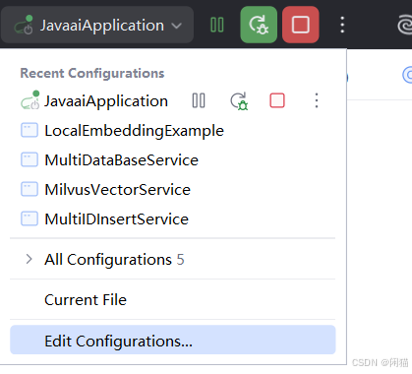
在右侧找到 "VM options" 输入框,粘贴以下内容:
-Dhttp.proxyHost=127.0.0.1 -Dhttp.proxyPort=8888 -Dhttps.proxyHost=127.0.0.1 -Dhttps.proxyPort=8888
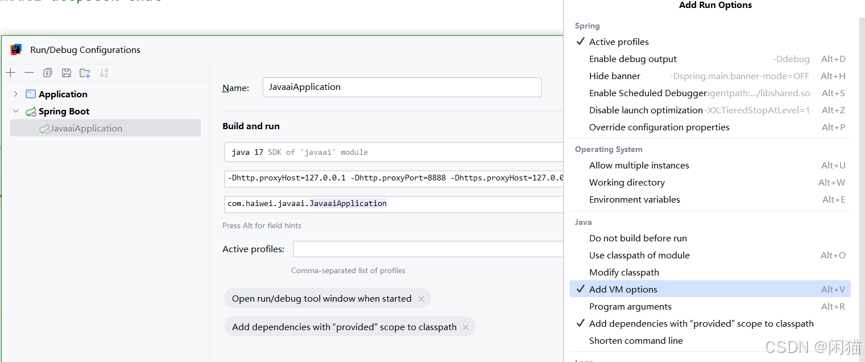
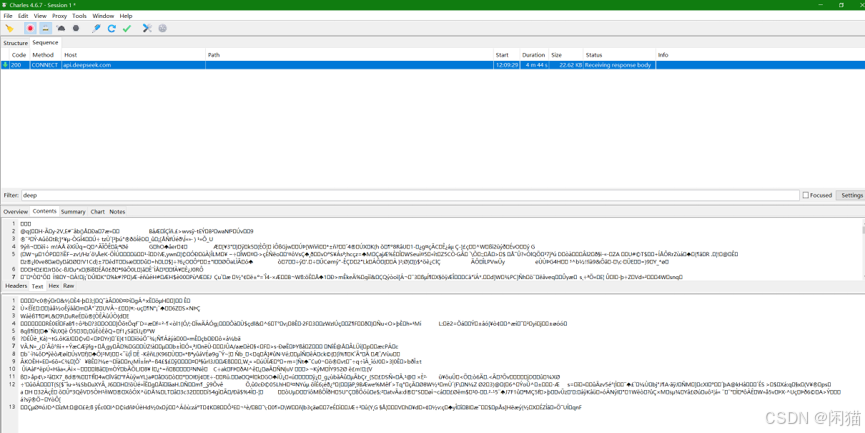
重新启动:访问,可以看到已经抓到了,但是乱码
修改代理为:api.deepseek.com则java代码报错:
un.security.provider.certpath.SunCertPathBuilderException: unable to find valid certification path to requested target
这个错误说明Java不信任Charles的根证书。虽然你在Charles中导入了根证书到系统信任库,但Java有自己独立的信任库(cacerts),需要单独导入。
解决方案:将Charles证书导入Java信任库
Java导入证书
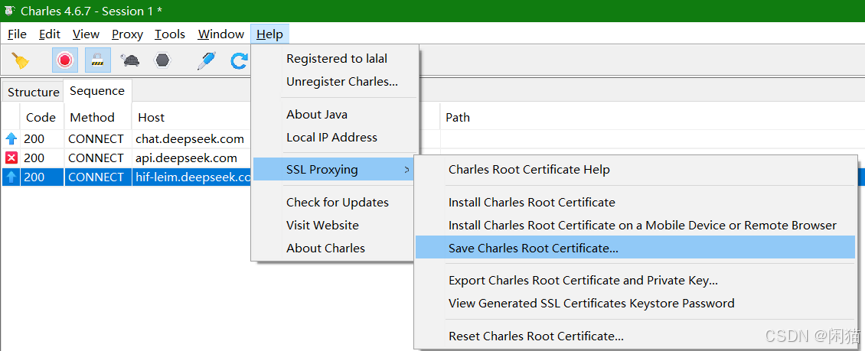
保存证书:
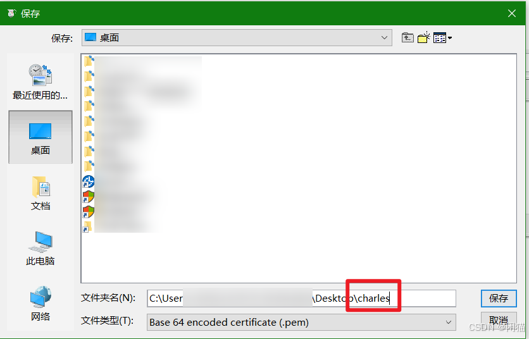
添加pem文件名称,并将charles.pem复制到C:/下
导入:Windows(以管理员身份运行CMD),执行命令:
keytool -import -alias charles -file C:\charles.pem -keystore "%JAVA_HOME%\lib\security\cacerts" -storepass changeit -noprompt

验证是否成功:
keytool -list -keystore "%JAVA_HOME%\lib\security\cacerts" -storepass changeit | findstr charles

如果看到类似 charles, 日期, trustedCertEntry,说明导入成功。
测试验证
可以抓包,并是明文了
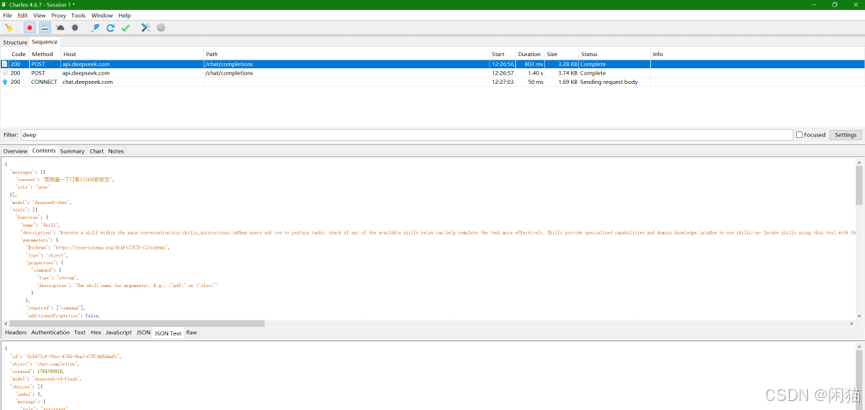
报文参考:
第一次请求:
request:
{
	"messages": [{
		"content": "帮我查一下订单123456的状态",
		"role": "user"
	}],
	"model": "deepseek-chat",
	"tools": [{
		"function": {
			"name": "Skill",
			"description": "Execute a skill within the main conversation\n\n<skills_instructions>\nWhen users ask you to perform tasks, check if any of the available skills below can help complete the task more effectively. Skills provide specialized capabilities and domain knowledge.\n\nHow to use skills:\n- Invoke skills using this tool with the skill name only (no arguments)\n- When you invoke a skill, you will see <command-message>The \"{name}\" skill is loading</command-message>\n- The skill's prompt will expand and provide detailed instructions on how to complete the task\n\nNOTE: Response always starts start with the base directory of the skill execution environment. You can use this to retrieve additional files of call shell commands.\nSkill description follows after the base directory line.\n\nImportant:\n- Only use skills listed in <available_skills> below\n- Do not invoke a skill that is already running\n</skills_instructions>\n\n<available_skills>\n<skill>\n  <name>team-java-standards</name>\n  <description>Review code against team Java coding standards.</description>\n</skill>\n</available_skills>\n",
			"parameters": {
				"$schema": "https://json-schema.org/draft/2020-12/schema",
				"type": "object",
				"properties": {
					"command": {
						"type": "string",
						"description": "The skill name (no arguments). E.g., \"pdf\" or \"xlsx\""
					}
				},
				"required": ["command"],
				"additionalProperties": false,
				"strict": true
			}
		},
		"type": "function"
	}, {
		"function": {
			"name": "getTodayOrderCount",
			"description": "查询今日新增订单数量",
			"parameters": {
				"$schema": "https://json-schema.org/draft/2020-12/schema",
				"type": "object",
				"properties": {},
				"required": [],
				"additionalProperties": false,
				"strict": true
			}
		},
		"type": "function"
	}, {
		"function": {
			"name": "getOrderById",
			"description": "根据订单ID查询订单详情,返回订单状态、金额、创建时间等信息",
			"parameters": {
				"$schema": "https://json-schema.org/draft/2020-12/schema",
				"type": "object",
				"properties": {
					"orderId": {
						"type": "integer",
						"description": "订单ID"
					}
				},
				"required": ["orderId"],
				"additionalProperties": false,
				"strict": true
			}
		},
		"type": "function"
	}, {
		"function": {
			"name": "cancelOrder",
			"description": "取消指定订单,需要订单ID",
			"parameters": {
				"$schema": "https://json-schema.org/draft/2020-12/schema",
				"type": "object",
				"properties": {
					"orderId": {
						"type": "integer",
						"description": "要取消的订单ID"
					}
				},
				"required": ["orderId"],
				"additionalProperties": false,
				"strict": true
			}
		},
		"type": "function"
	}]
}


response:
{
	"id": "0c6472cf-59ec-476d-9ba2-f287dd6ddafb",
	"object": "chat.completion",
	"created": 1784780816,
	"model": "deepseek-v4-flash",
	"choices": [{
		"index": 0,
		"message": {
			"role": "assistant",
			"content": "好的,我来查询订单123456的详细信息。",
			"tool_calls": [{
				"index": 0,
				"id": "call_00_1KTYLj2phdBZEQjwsLbF3305",
				"type": "function",
				"function": {
					"name": "getOrderById",
					"arguments": "{\"orderId\": 123456}"
				}
			}]
		},
		"logprobs": null,
		"finish_reason": "tool_calls"
	}],
	"usage": {
		"prompt_tokens": 805,
		"completion_tokens": 56,
		"total_tokens": 861,
		"prompt_tokens_details": {
			"cached_tokens": 768
		},
		"prompt_cache_hit_tokens": 768,
		"prompt_cache_miss_tokens": 37
	},
	"system_fingerprint": "fp_8b330d02d0_prod0820_fp8_kvcache_20260402"
}


第二次请求:
request:
{
	"messages": [{
		"content": "帮我查一下订单123456的状态",
		"role": "user"
	}, {
		"role": "assistant",
		"content": "好的,我来查询订单123456的详细信息。",
		"tool_calls": [{
			"id": "call_00_1KTYLj2phdBZEQjwsLbF3305",
			"function": {
				"arguments": "{\"orderId\": 123456}",
				"name": "getOrderById"
			},
			"type": "function",
			"index": 0
		}]
	}, {
		"content": "{\"orderId\":123456,\"price\":\"2000\",\"state\":\"待发货\"}",
		"role": "tool",
		"tool_call_id": "call_00_1KTYLj2phdBZEQjwsLbF3305"
	}],
	"model": "deepseek-chat",
	"tools": [{
		"function": {
			"name": "Skill",
			"description": "Execute a skill within the main conversation\n\n<skills_instructions>\nWhen users ask you to perform tasks, check if any of the available skills below can help complete the task more effectively. Skills provide specialized capabilities and domain knowledge.\n\nHow to use skills:\n- Invoke skills using this tool with the skill name only (no arguments)\n- When you invoke a skill, you will see <command-message>The \"{name}\" skill is loading</command-message>\n- The skill's prompt will expand and provide detailed instructions on how to complete the task\n\nNOTE: Response always starts start with the base directory of the skill execution environment. You can use this to retrieve additional files of call shell commands.\nSkill description follows after the base directory line.\n\nImportant:\n- Only use skills listed in <available_skills> below\n- Do not invoke a skill that is already running\n</skills_instructions>\n\n<available_skills>\n<skill>\n  <name>team-java-standards</name>\n  <description>Review code against team Java coding standards.</description>\n</skill>\n</available_skills>\n",
			"parameters": {
				"$schema": "https://json-schema.org/draft/2020-12/schema",
				"type": "object",
				"properties": {
					"command": {
						"type": "string",
						"description": "The skill name (no arguments). E.g., \"pdf\" or \"xlsx\""
					}
				},
				"required": ["command"],
				"additionalProperties": false,
				"strict": true
			}
		},
		"type": "function"
	}, {
		"function": {
			"name": "getTodayOrderCount",
			"description": "查询今日新增订单数量",
			"parameters": {
				"$schema": "https://json-schema.org/draft/2020-12/schema",
				"type": "object",
				"properties": {},
				"required": [],
				"additionalProperties": false,
				"strict": true
			}
		},
		"type": "function"
	}, {
		"function": {
			"name": "getOrderById",
			"description": "根据订单ID查询订单详情,返回订单状态、金额、创建时间等信息",
			"parameters": {
				"$schema": "https://json-schema.org/draft/2020-12/schema",
				"type": "object",
				"properties": {
					"orderId": {
						"type": "integer",
						"description": "订单ID"
					}
				},
				"required": ["orderId"],
				"additionalProperties": false,
				"strict": true
			}
		},
		"type": "function"
	}, {
		"function": {
			"name": "cancelOrder",
			"description": "取消指定订单,需要订单ID",
			"parameters": {
				"$schema": "https://json-schema.org/draft/2020-12/schema",
				"type": "object",
				"properties": {
					"orderId": {
						"type": "integer",
						"description": "要取消的订单ID"
					}
				},
				"required": ["orderId"],
				"additionalProperties": false,
				"strict": true
			}
		},
		"type": "function"
	}]
}


response:
{
	"id": "bd07b4f8-1398-4cb0-b800-278024fc3c14",
	"object": "chat.completion",
	"created": 1784780817,
	"model": "deepseek-v4-flash",
	"choices": [{
		"index": 0,
		"message": {
			"role": "assistant",
			"content": "订单 **123456** 的详细信息如下:\n\n| 字段 | 内容 |\n|------|------|\n| **订单编号** | 123456 |\n| **订单金额** | ¥2,000.00 |\n| **订单状态** | ⏳ **待发货** |\n\n目前该订单处于 **待发货** 状态,尚未发货。请问还有其他需要帮忙的吗?"
		},
		"logprobs": null,
		"finish_reason": "stop"
	}],
	"usage": {
		"prompt_tokens": 889,
		"completion_tokens": 79,
		"total_tokens": 968,
		"prompt_tokens_details": {
			"cached_tokens": 768
		},
		"prompt_cache_hit_tokens": 768,
		"prompt_cache_miss_tokens": 121
	},
	"system_fingerprint": "fp_8b330d02d0_prod0820_fp8_kvcache_20260402"
}