<!DOCTYPE html>
<html lang="zh-CN">
<head>
  <meta charset="UTF-8">
  <meta name="viewport" content="width=device-width, initial-scale=1.0">
  <title>拖拽排序列表</title>
  <link rel="stylesheet" href="static/css/拖拽排序列表.css">
</head>
<body>

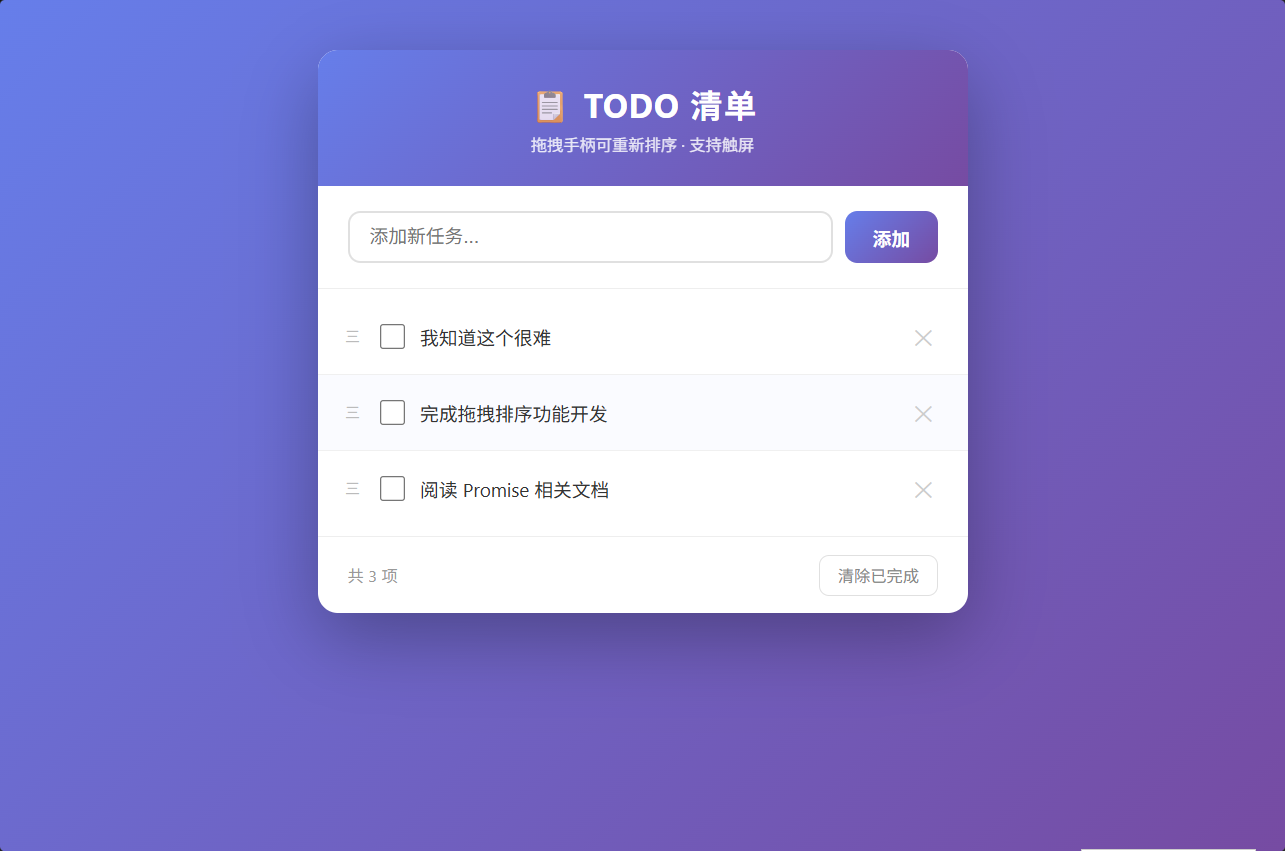
<div class="todo-container">
  <!-- 头部 -->
  <div class="todo-header">
    <h1>📋 TODO 清单</h1>
    <p>拖拽手柄可重新排序 · 支持触屏</p>
  </div>

  <!-- 输入区域 -->
  <div class="todo-input-area">
    <input type="text" id="todoInput" placeholder="添加新任务..." maxlength="60">
    <button id="btnAdd">添加</button>
  </div>

  <!-- 列表区域 -->
  <ul class="todo-list" id="todoList">
    <!-- JS 动态渲染 -->
  </ul>

  <!-- 底部工具栏 -->
  <div class="todo-footer">
    <span id="todoCount">共 0 项</span>
    <button id="btnClearCompleted">清除已完成</button>
  </div>
</div>

<script>
// ==================== 拖拽排序列表 ====================

// ---------- 默认数据 ----------
const defaultTodos = [
  { id: 1, text: '学习 JavaScript 事件机制',    completed: false },
  { id: 2, text: '完成拖拽排序功能开发',          completed: false },
  { id: 3, text: '复习 CSS transform 和过渡动画', completed: true  },
  { id: 4, text: '练习解构赋值与箭头函数',        completed: false },
  { id: 5, text: '阅读 Promise 相关文档',         completed: false },
];

// ---------- localStorage ----------
const STORAGE_KEY = 'drag_sort_todos';
let todos = JSON.parse(localStorage.getItem(STORAGE_KEY)) || defaultTodos;

// ---------- DOM 引用 ----------
const todoList   = document.getElementById('todoList');
const todoInput  = document.getElementById('todoInput');
const btnAdd     = document.getElementById('btnAdd');
const todoCount  = document.getElementById('todoCount');
const btnClear   = document.getElementById('btnClearCompleted');

// ---------- 拖拽状态 ----------
let dragState = {
  active:    false,       // 是否正在拖拽
  startY:    0,           // 按下时的鼠标 Y
  startX:    0,           // 按下时的鼠标 X
  item:      null,        // 被拖拽的 DOM 元素
  index:     -1,          // 被拖拽项的原始索引
  offsetY:   0,           // 鼠标相对于元素顶部的偏移
  clone:     null,        // 拖拽时的浮动克隆元素
};

// ==================== 工具函数 ====================
const saveToStorage = () => {
  localStorage.setItem(STORAGE_KEY, JSON.stringify(todos));
};

const nextId = () => {
  if (todos.length === 0) return 1;
  return Math.max(...todos.map(t => t.id)) + 1;
};

// ==================== 渲染 ====================
const render = () => {
  if (todos.length === 0) {
    todoList.innerHTML = '<li class="todo-empty">✨ 暂无任务,添加一个吧</li>';
  } else {
    todoList.innerHTML = todos
      .map(({ id, text, completed }) => `
        <li class="todo-item${completed ? ' completed' : ''}" data-id="${id}">
          <span class="drag-handle" title="拖拽排序">三</span>
          <input type="checkbox" class="todo-check" ${completed ? 'checked' : ''}>
          <span class="todo-text">${text}</span>
          <button class="todo-delete" title="删除">✕</button>
        </li>
      `)
      .join('');
  }
  todoCount.textContent = `共 ${todos.length} 项`;
  saveToStorage();
};

// ==================== 列表事件委托 ====================
todoList.addEventListener('click', (e) => {
  const target = e.target;
  const li = target.closest('.todo-item');
  if (!li) return;
  const id = +li.dataset.id;

  // --- 删除按钮 ---
  if (target.classList.contains('todo-delete')) {
    todos = todos.filter(t => t.id !== id);
    render();
  }

  // --- 复选框 ---
  if (target.classList.contains('todo-check')) {
    const item = todos.find(t => t.id === id);
    if (item) {
      item.completed = target.checked;
      // 同步 class
      target.checked
        ? li.classList.add('completed')
        : li.classList.remove('completed');
      saveToStorage();
    }
  }
});

// ==================== 添加任务 ====================
const addTodo = () => {
  const text = todoInput.value.trim();
  if (!text) return;
  todos.push({ id: nextId(), text, completed: false });
  todoInput.value = '';
  render();
};

btnAdd.addEventListener('click', addTodo);
todoInput.addEventListener('keydown', (e) => {
  if (e.key === 'Enter') addTodo();
});

// ==================== 清除已完成 ====================
btnClear.addEventListener('click', () => {
  todos = todos.filter(t => !t.completed);
  render();
});

// ==================== 拖拽核心逻辑 ====================

/**
 * 获取触摸或鼠标事件的坐标
 */
const getEventPos = (e) => {
  // 触屏事件
  if (e.touches && e.touches.length > 0) {
    return { x: e.touches[0].clientX, y: e.touches[0].clientY };
  }
  if (e.changedTouches && e.changedTouches.length > 0) {
    return { x: e.changedTouches[0].clientX, y: e.changedTouches[0].clientY };
  }
  // 鼠标事件
  return { x: e.clientX, y: e.clientY };
};

/**
 * 找到离当前 Y 坐标最近的列表项索引(用于计算插入位置)
 */
const getClosestIndex = (y) => {
  const items = [...todoList.querySelectorAll('.todo-item:not(.dragging)')];
  let closest = -1;
  let minDist = Infinity;

  items.forEach((item, idx) => {
    const { top, bottom } = item.getBoundingClientRect();
    const mid = (top + bottom) / 2;
    const dist = Math.abs(y - mid);
    if (dist < minDist) {
      minDist = dist;
      // 在原始数组中还原真实索引:跳过被拖拽项
      const realIdx = idx >= dragState.index ? idx + 1 : idx;
      closest = realIdx;
    }
  });

  return closest;
};

/**
 * 开始拖拽 --- mousedown / touchstart
 */
const onDragStart = (e) => {
  // 只响应拖拽手柄
  const handle = e.target.closest('.drag-handle');
  if (!handle) return;

  const li = handle.closest('.todo-item');
  if (!li) return;

  e.preventDefault();

  const { x, y } = getEventPos(e);
  const { top, left, width } = li.getBoundingClientRect();

  // 解构赋值记录状态
  dragState = {
    active:  true,
    startY:  y,
    startX:  x,
    item:    li,
    index:   [...todoList.children].indexOf(li),
    offsetY: y - top,
    offsetX: x - left,
    clone:   null,
  };

  // 视觉反馈:被拖拽项半透明 + 放大阴影
  li.classList.add('dragging');

  // 创建浮动克隆元素(跟随鼠标)
  const clone = li.cloneNode(true);
  clone.classList.add('dragging');
  clone.style.position       = 'fixed';
  clone.style.top            = `${top}px`;
  clone.style.left           = `${left}px`;
  clone.style.width          = `${width}px`;
  clone.style.pointerEvents  = 'none';
  clone.style.zIndex         = '999';
  clone.style.margin         = '0';
  document.body.appendChild(clone);

  dragState.clone = clone;
};

/**
 * 移动中 --- mousemove / touchmove
 */
const onDragMove = (e) => {
  if (!dragState.active) return;
  e.preventDefault();

  const { y } = getEventPos(e);
  const { clone, offsetY } = dragState;

  // 克隆元素跟随鼠标移动(transform 实现流畅跟随)
  if (clone) {
    clone.style.transform = `translateY(${y - dragState.startY}px)`;
  }

  // 计算最近插入位置,视觉上让其他项让位
  const targetIndex = getClosestIndex(y);

  // 清除之前的占位样式
  todoList.querySelectorAll('.todo-item.drag-placeholder').forEach(el => {
    el.classList.remove('drag-placeholder');
  });

  // 给目标位置项加占位样式
  if (targetIndex >= 0 && targetIndex < todos.length && targetIndex !== dragState.index) {
    const items = todoList.querySelectorAll('.todo-item');
    // 在未拖拽的项中找目标
    const visibleItems = [...items].filter(el => !el.classList.contains('dragging'));
    let placeholderIdx = targetIndex;
    if (targetIndex > dragState.index) placeholderIdx = targetIndex - 1;
    if (placeholderIdx >= 0 && placeholderIdx < visibleItems.length) {
      visibleItems[placeholderIdx].classList.add('drag-placeholder');
    }
  }
};

/**
 * 放下 --- mouseup / touchend
 */
const onDragEnd = (e) => {
  if (!dragState.active) return;
  e.preventDefault();

  const { item, index: fromIdx, clone } = dragState;
  const { y } = getEventPos(e);
  const targetIdx = getClosestIndex(y);

  // 移除克隆元素
  if (clone) {
    clone.remove();
  }

  // 清除所有样式
  item.classList.remove('dragging');
  todoList.querySelectorAll('.todo-item.drag-placeholder').forEach(el => {
    el.classList.remove('drag-placeholder');
  });

  // 如果有有效目标且与原始位置不同 → 重排数组 + 重新渲染
  if (targetIdx >= 0 && targetIdx !== fromIdx && targetIdx < todos.length) {
    const [moved] = todos.splice(fromIdx, 1);
    todos.splice(targetIdx, 0, moved);
    render();
  }

  // 重置拖拽状态
  dragState = {
    active: false,
    startY: 0,
    startX: 0,
    item: null,
    index: -1,
    offsetY: 0,
    clone: null,
  };
};

// ==================== 绑定事件 ====================

// ------ 鼠标事件 ------
todoList.addEventListener('mousedown', onDragStart);
document.addEventListener('mousemove', onDragMove);
document.addEventListener('mouseup',   onDragEnd);

// ------ 触屏事件(进阶要求) ------
todoList.addEventListener('touchstart', onDragStart, { passive: false });
document.addEventListener('touchmove',  onDragMove,  { passive: false });
document.addEventListener('touchend',   onDragEnd);

// 防止移动端拖拽时页面滚动
document.addEventListener('touchmove', (e) => {
  if (dragState.active) e.preventDefault();
}, { passive: false });

// ==================== 初始化 ====================
render();
</script>

</body>
</html>
/* ==================== 拖拽排序列表样式 ==================== */

* {
  margin: 0;
  padding: 0;
  box-sizing: border-box;
}

body {
  font-family: 'Segoe UI', Tahoma, Geneva, Verdana, sans-serif;
  background: linear-gradient(135deg, #667eea 0%, #764ba2 100%);
  min-height: 100vh;
  display: flex;
  justify-content: center;
  align-items: flex-start;
  padding: 40px 20px;
}

/* ---------- 主容器 ---------- */
.todo-container {
  width: 100%;
  max-width: 520px;
  background: #fff;
  border-radius: 16px;
  box-shadow: 0 20px 60px rgba(0, 0, 0, 0.3);
  overflow: hidden;
}

/* ---------- 头部 ---------- */
.todo-header {
  background: linear-gradient(135deg, #667eea 0%, #764ba2 100%);
  color: #fff;
  padding: 24px 28px;
  text-align: center;
}

.todo-header h1 {
  font-size: 26px;
  font-weight: 700;
  letter-spacing: 1px;
}

.todo-header p {
  font-size: 13px;
  opacity: 0.85;
  margin-top: 4px;
}

/* ---------- 输入区域 ---------- */
.todo-input-area {
  display: flex;
  gap: 10px;
  padding: 20px 24px;
  border-bottom: 1px solid #eee;
}

.todo-input-area input {
  flex: 1;
  padding: 10px 16px;
  border: 2px solid #e0e0e0;
  border-radius: 10px;
  font-size: 15px;
  outline: none;
  transition: border-color 0.25s, box-shadow 0.25s;
}

.todo-input-area input:focus {
  border-color: #667eea;
  box-shadow: 0 0 0 3px rgba(102, 126, 234, 0.15);
}

.todo-input-area button {
  padding: 10px 22px;
  background: linear-gradient(135deg, #667eea 0%, #764ba2 100%);
  color: #fff;
  border: none;
  border-radius: 10px;
  font-size: 15px;
  font-weight: 600;
  cursor: pointer;
  transition: opacity 0.2s, transform 0.15s;
}

.todo-input-area button:hover {
  opacity: 0.9;
}

.todo-input-area button:active {
  transform: scale(0.96);
}

/* ---------- 列表 ---------- */
.todo-list {
  list-style: none;
  padding: 8px 0;
  min-height: 60px;
  position: relative;
}

/* ---------- 空状态 ---------- */
.todo-empty {
  text-align: center;
  padding: 48px 20px;
  color: #bbb;
  font-size: 15px;
}

/* ---------- 单项 ---------- */
.todo-item {
  display: flex;
  align-items: center;
  gap: 12px;
  padding: 14px 20px;
  background: #fff;
  border-bottom: 1px solid #f0f0f0;
  transition: background 0.2s, transform 0.15s ease;
  position: relative;
  user-select: none;
}

.todo-item:last-child {
  border-bottom: none;
}

.todo-item:hover {
  background: #fafbff;
}

/* ---------- 拖拽手柄 ---------- */
.drag-handle {
  display: flex;
  flex-direction: column;
  gap: 3px;
  padding: 4px 2px;
  cursor: grab;
  color: #bbb;
  font-size: 12px;
  letter-spacing: 2px;
  line-height: 1;
  transition: color 0.2s, transform 0.1s;
  flex-shrink: 0;
}

.drag-handle:hover {
  color: #667eea;
}

.drag-handle:active {
  cursor: grabbing;
}

/* ---------- 复选框 ---------- */
.todo-item input[type="checkbox"] {
  width: 20px;
  height: 20px;
  cursor: pointer;
  accent-color: #667eea;
  flex-shrink: 0;
}

/* ---------- 文本 ---------- */
.todo-text {
  flex: 1;
  font-size: 15px;
  color: #333;
  transition: color 0.2s, text-decoration 0.2s;
  word-break: break-word;
}

.todo-item.completed .todo-text {
  text-decoration: line-through;
  color: #bbb;
}

/* ---------- 删除按钮 ---------- */
.todo-delete {
  background: none;
  border: none;
  color: #ccc;
  font-size: 18px;
  cursor: pointer;
  padding: 4px 8px;
  border-radius: 6px;
  transition: color 0.2s, background 0.2s;
  flex-shrink: 0;
}

.todo-delete:hover {
  color: #e74c3c;
  background: #fff0f0;
}

/* ==================== 拖拽状态样式 ==================== */

/* 被拖拽的项 --- 半透明 + 放大阴影 */
.todo-item.dragging {
  opacity: 0.5;
  background: #f0f4ff;
  box-shadow: 0 12px 32px rgba(102, 126, 234, 0.35),
              0 4px 8px rgba(0, 0, 0, 0.1);
  transform: scale(1.03);
  z-index: 100;
  border-radius: 10px;
  border-bottom: none;
}

/* 拖拽中的手柄样式 */
.todo-item.dragging .drag-handle {
  cursor: grabbing;
  color: #667eea;
}

/* 占位项(其他项给拖拽项让位时的占位) */
.todo-item.drag-placeholder {
  opacity: 0.3;
  background: #f0f4ff;
  border: 2px dashed #667eea;
  border-radius: 10px;
}

/* ---------- 底部工具栏 ---------- */
.todo-footer {
  display: flex;
  justify-content: space-between;
  align-items: center;
  padding: 14px 24px;
  border-top: 1px solid #eee;
  font-size: 13px;
  color: #999;
}

.todo-footer button {
  background: none;
  border: 1px solid #e0e0e0;
  color: #888;
  padding: 6px 14px;
  border-radius: 8px;
  cursor: pointer;
  font-size: 13px;
  transition: all 0.2s;
}

.todo-footer button:hover {
  background: #f5f5f5;
  color: #667eea;
  border-color: #667eea;
}