「09- 3D 建筑编辑器 Pascal Editor THreeJS」
/~03f63ZoDPC~:/
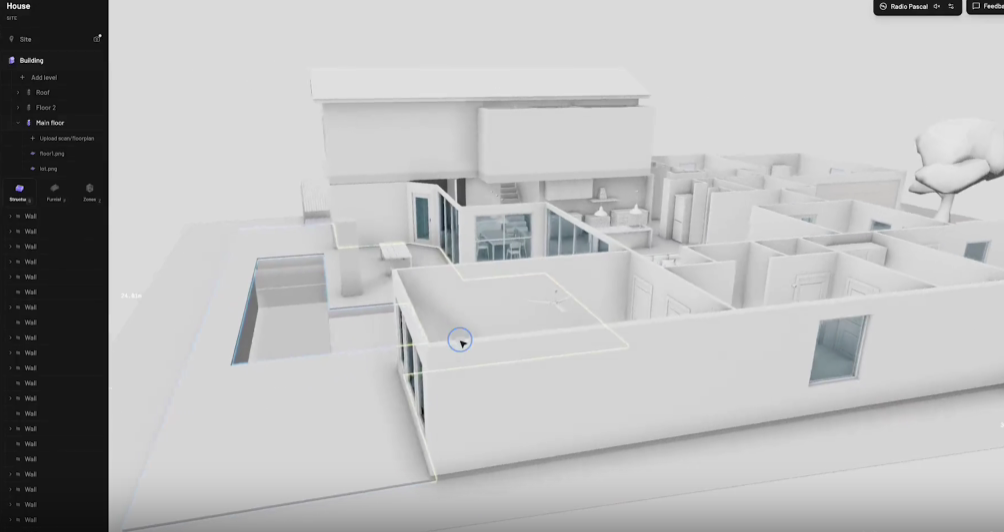
Pascal Editor
一款基于 React Three Fiber 与 WebGPU 构建的 3D 建筑编辑器。
https://img.shields.io/badge/license-MIT-blue.svg
https://img.shields.io/npm/v/@pascal-app/core.svg
https://img.shields.io/npm/v/@pascal-app/viewer.svg
https://img.shields.io/discord/your-discord-id?label=Discord\&logo=discord
https://img.shields.io/twitter/follow/your-handle?style=social
./pascal_editor.mp4
📦 使用已发布的 NPM 包
查看器运行时与内置节点定义已拆分为独立包。安装完整的内置查看器集合,并在挂载
<Viewer>之前加载一次内置插件:
npm install @pascal-app/core @pascal-app/viewer @pascal-app/editor @pascal-app/nodes

import { loadPlugin } from '@pascal-app/core'
import { builtinPlugin } from '@pascal-app/nodes'

await loadPlugin(builtinPlugin)
更多 React 集成示例,请参阅
@pascal-app/viewer的快速入门文档。
🏗️ 仓库架构
这是一个基于 Turborepo 的 Monorepo,包含四个核心运行时包:
editor/
├── apps/
│   └── editor/          # Next.js 应用(编辑器宿主)
├── packages/
│   ├── core/            # 数据模式、场景状态、注册表契约
│   ├── viewer/          # 3D 渲染运行时与共享系统
│   ├── editor/          # 编辑工具与 UI 组件
│   ├── nodes/           # 内置节点定义、渲染器与系统
│   └── ui/              # 共享 UI 组件
关注点分离
包名 职责 @pascal-app/core节点 Schema、场景状态(Zustand)、注册表契约、空间查询、事件总线 @pascal-app/viewerReact Three Fiber 3D 渲染、共享渲染系统、默认相机/控制器、后处理 @pascal-app/editor编辑工具、面板、选择管理、直接操作 UI @pascal-app/nodes内置注册表插件:节点定义、渲染器、几何体生成、系统逻辑 apps/editor独立的 Next.js 宿主应用 查看器负责以合理的默认值渲染场景;编辑器在此基础上扩展,提供交互工具、选择管理与编辑能力。
🗄️ 状态管理(Zustand Stores)
每个包都拥有自己的 Zustand Store 来管理状态:
Store 所属包 职责 useScene@pascal-app/core场景数据:节点、根节点 ID、脏节点标记、CRUD 操作。持久化至 IndexedDB,并通过 Zundo 支持撤销/重做 useViewer@pascal-app/viewer查看器状态:当前选中对象(建筑/楼层/区域 ID)、楼层显示模式(堆叠/爆炸/独显)、相机模式 useEditorapps/editor编辑器状态:激活工具、结构层可见性、面板状态、编辑器偏好设置 访问方式
// 在 React 组件中订阅状态变化
const nodes = useScene((state) => state.nodes)
const levelId = useViewer((state) => state.selection.levelId)
const activeTool = useEditor((state) => state.tool)

// 在 React 外部访问状态(回调函数、系统中)
const node = useScene.getState().nodes[id]
useViewer.getState().setSelection({ levelId: 'level_123' })
🧩 核心概念
节点(Nodes)
节点是描述 3D 场景的数据基元。所有节点均继承自
BaseNode:
BaseNode {
  id: string              // 自动生成,带类型前缀(如 "wall_abc123")
  type: string            // 类型标识,用于类型安全处理
  parentId: string | null // 父节点引用
  visible: boolean
  camera?: Camera         // 可选的保存视角
  metadata?: JSON         // 任意元数据(如 { isTransient: true })
}
节点层级结构
Site
└── Building
    └── Level
        ├── Wall → Item (门、窗)
        ├── Slab (楼板)
        ├── Ceiling → Item (灯具)
        ├── Roof (屋顶)
        ├── Zone (区域)
        ├── Scan (3D 扫描参考)
        └── Guide (2D 参考图)
⚠️ 注意 :节点以扁平字典(
Record<id, Node>)存储,而非嵌套树结构。父子关系通过parentId和children数组维护。场景状态(Scene State)
场景由
@pascal-app/core中的 Zustand Store 管理:
useScene.getState() = {
  nodes: Record<id, AnyNode>,  // 所有节点
  rootNodeIds: string[],       // 顶层节点(Site)
  dirtyNodes: Set<string>,     // 等待系统更新的节点

  createNode(node, parentId),
  updateNode(id, updates),
  deleteNode(id),
}
中间件:
Persist:持久化到 IndexedDB(排除瞬时节点)
Temporal (Zundo):50 步撤销/重做历史
场景注册表(Scene Registry)
注册表将节点 ID 映射到对应的 Three.js 对象,实现快速查找:
sceneRegistry = {
  nodes: Map<id, Object3D>,    // ID → 3D 对象
  byType: {
    wall: Set<id>,
    item: Set<id>,
    zone: Set<id>,
    // ...
  }
}
渲染器通过
useRegistryHook 注册引用:
const ref = useRef<Mesh>(null!)
useRegistry(node.id, 'wall', ref)
这使得系统可以直接访问 3D 对象,无需遍历场景图。
节点渲染器(Node Renderers)
渲染器是 React 组件,为每种节点类型创建 Three.js 对象:
SceneRenderer
└── NodeRenderer (按类型分发)
    ├── BuildingRenderer
    ├── LevelRenderer
    ├── WallRenderer
    ├── SlabRenderer
    ├── ZoneRenderer
    ├── ItemRenderer
    └── ...
典型模式:
渲染器创建占位 Mesh / Group
通过
useRegistry注册系统在每一帧根据节点数据更新几何体
const WallRenderer = ({ node }) => {
const ref = useRef(null!)
useRegistry(node.id, 'wall', ref)return (
<boxGeometry args={[0, 0, 0]} /> {/* 由 WallSystem 替换 */}
{node.children.map(id =>)}
)
}系统(Systems)
系统是运行在渲染循环(
useFrame)中的 React 组件,负责更新几何体和变换。它们只处理 Store 中标记为"脏"的节点。核心系统(
@pascal-app/core)
系统 职责 WallSystem生成墙体几何体,支持斜接与门窗 CSG 开洞 SlabSystem根据多边形生成楼板几何体 CeilingSystem生成天花板几何体 RoofSystem生成屋顶几何体 ItemSystem将物品(家具、灯具)吸附到墙、顶棚或楼板 查看器系统(
@pascal-app/viewer)
系统 职责 LevelSystem控制楼层可见性与垂直位置(堆叠/爆炸/独显模式) ScanSystem控制 3D 扫描模型的可见性 GuideSystem控制参考图片的可见性 处理流程:
useFrame(() => {
  for (const id of dirtyNodes) {
    const obj = sceneRegistry.nodes.get(id)
    const node = useScene.getState().nodes[id]

    // 更新几何体、变换等
    updateGeometry(obj, node)

    dirtyNodes.delete(id)
  }
})
脏节点机制(Dirty Nodes)
当节点发生变化时,会被加入
useScene.getState().dirtyNodes。系统在每一帧检查该集合,仅重新计算受影响的几何体。
// 自动标记:createNode / updateNode / deleteNode 会自动标记脏节点
useScene.getState().updateNode(wallId, { thickness: 0.2 })
// → wallId 加入 dirtyNodes
// → WallSystem 在下一帧重建几何体
// → wallId 从 dirtyNodes 移除
手动标记:
useScene.getState().dirtyNodes.add(wallId)事件总线(Event Bus)
跨组件通信使用类型化的事件发射器(mitt):
// 节点事件
emitter.on('wall:click', (event) => { ... })
emitter.on('item:enter', (event) => { ... })
emitter.on('zone:context-menu', (event) => { ... })

// 网格事件(背景)
emitter.on('grid:click', (event) => { ... })
事件载荷:
NodeEvent {
  node: AnyNode
  position: [x, y, z]
  localPosition: [x, y, z]
  normal?: [x, y, z]
  stopPropagation: () => void
}
空间网格管理器(Spatial Grid Manager)
负责碰撞检测与放置校验:
spatialGridManager.canPlaceOnFloor(levelId, position, dimensions, rotation)
spatialGridManager.canPlaceOnWall(wallId, t, height, dimensions)
spatialGridManager.getSlabElevationAt(levelId, x, z)
被物品放置工具用于验证位置并计算楼板高度。
🖥️ 编辑器架构
编辑器在查看器基础上扩展了以下功能:
工具(Tools)
通过工具栏激活,处理特定操作的用户输入:
SelectTool-- 选择与变换
WallTool-- 绘制墙体
ZoneTool-- 创建区域
ItemTool-- 放置家具/设施
SlabTool-- 创建楼板选择管理器(Selection Manager)
采用自定义选择管理器,支持层级导航:
Site → Building → Level → Zone → Items每一层级都有独立的悬停/点击策略。
编辑器专用系统
ZoneSystem-- 根据楼层模式控制区域可见性支持节点聚焦的自定义相机控制
数据流
用户操作(点击、拖拽)
       ↓
工具处理器(Tool Handler)
       ↓
useScene.createNode() / updateNode()
       ↓
节点更新 + 标记为脏
       ↓
React 重新渲染 NodeRenderer
useRegistry() 注册 3D 对象
       ↓
系统检测到脏节点(useFrame)
通过 sceneRegistry 更新几何体
清除脏标记
🔌 插件开发
编辑器具有良好的可扩展性:插件通过统一的 Plugin Manifest 接口提供节点类型(Schema、3D/2D 渲染、放置工具、参数面板)和左侧边栏面板------没有私有内部 API。
开发者指南 ------ 创建插件:Plugin 数据结构、面板贡献、发现机制、生命周期,以及 v1 版本的功能边界。
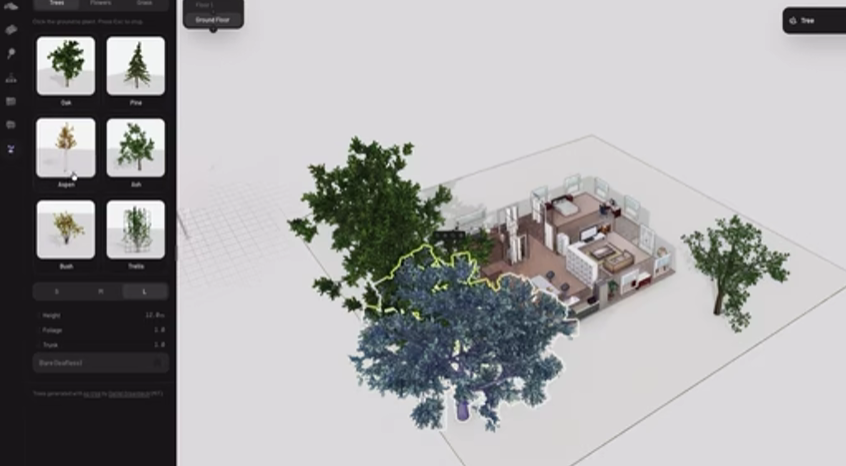
实战示例 ------
pascalorg/plugin-trees:一个独立的插件,包含程序化树木、花草以及一个预设面板。推荐 Fork 此仓库作为起点。
🛠️ 技术栈
React 19 + Next.js 16
Three.js(WebGPU 渲染器)
React Three Fiber + Drei
Zustand(状态管理)
Zod(Schema 校验)
Zundo(撤销/重做)
three-bvh-csg(布尔几何运算)
Turborepo(Monorepo 管理)
Bun(包管理器)
🚀 快速开始
开发环境
在根目录运行开发服务器,开启所有包的实时热重载:
# 安装依赖
bun install

# 启动开发服务器(构建包 + 启动编辑器监听模式)
bun dev
该命令会:
构建
@pascal-app/core和@pascal-app/viewer监听两个包的变更
启动 Next.js 编辑器开发服务器
打开浏览器访问 http://localhost:3002
⚠️ 重要 :务必在根目录运行
bun dev,以确保包监听器正常工作,编辑packages/core/src/或packages/viewer/src/时能触发热重载。生产构建
# 构建所有包
turbo build

# 构建指定包
turbo build --filter=@pascal-app/core
发布 NPM 包
# 构建包
turbo build --filter=@pascal-app/core --filter=@pascal-app/viewer

# 发布到 npm
npm publish --workspace=@pascal-app/core --access public
npm publish --workspace=@pascal-app/viewer --access public
📂 关键文件索引
路径 说明 packages/core/src/schema/节点类型定义(Zod Schema) packages/core/src/store/use-scene.ts场景状态 Store packages/core/src/hooks/scene-registry/3D 对象注册表 packages/core/src/systems/几何体生成系统 packages/viewer/src/components/renderers/节点渲染器 packages/viewer/src/components/viewer/主 Viewer 组件 apps/editor/components/tools/编辑器工具 apps/editor/store/编辑器专用状态
📄 许可证
MIT License © Pascal App