在信也科技移动应用团队进行ANC 全流程的业务研发过程中,设计稿还原一直是页面交付中的高频环节。过去我们更多依赖人工对照设计稿写页面;这次实践则尝试把 MasterGo 的 DSL 数据、HTML 生成能力和 AI 辅助修复串成一条工程链路,用来提升设计稿到业务页面的还原效率和稳定性。
这条链路的最终目标,不只是生成一份"看起来像截图"的 HTML,而是产出一份可维护页面。这里的"可维护",指的是页面结构能进入正常研发流程:主体布局使用文档流或 Flex/Grid 承载,组件边界清晰,文本、图片、渐变等资源能追溯到设计节点,视觉差异可以被报告定位,后续也能继续改成 Vue、React、iOS、Android 等业务代码。
最初目标很直接:从 MasterGo 拉 DSL,生成 HTML,再整理成业务代码。
跑完一轮以后,真正需要解决的问题变得很明确:
-
DSL 记录的是视觉节点,不会天然形成业务组件;
-
baseline 能打开,不代表视觉信息完整;
-
absolute 页面能复刻截图,但不能直接进入长期维护;
-
AI 可以参与还原,但必须被工程门禁约束;
-
页面还原的质量,需要用报告、节点映射和组件切片来收口。
这次我把链路整理成一个可以复用的工程流程:
MasterGo DSL
  → baseline HTML
  → baseline audit
  → baseline AI review
  → relative-plan
  → Flex reconstruction
  → engineering gate
  → visual gate
  → component slices
  → AI repair loop
这篇文章重点讲几个更偏技术的问题:
1. baseline 怎么证明自己可信
2. absolute 到 Flex 怎么做结构推断
3. 组件边界怎么确定
4. 工程门禁和视觉门禁怎么设计
5. 大模型 loop 怎么接入到修复链路
案例页面:一个看起来简单的结果页
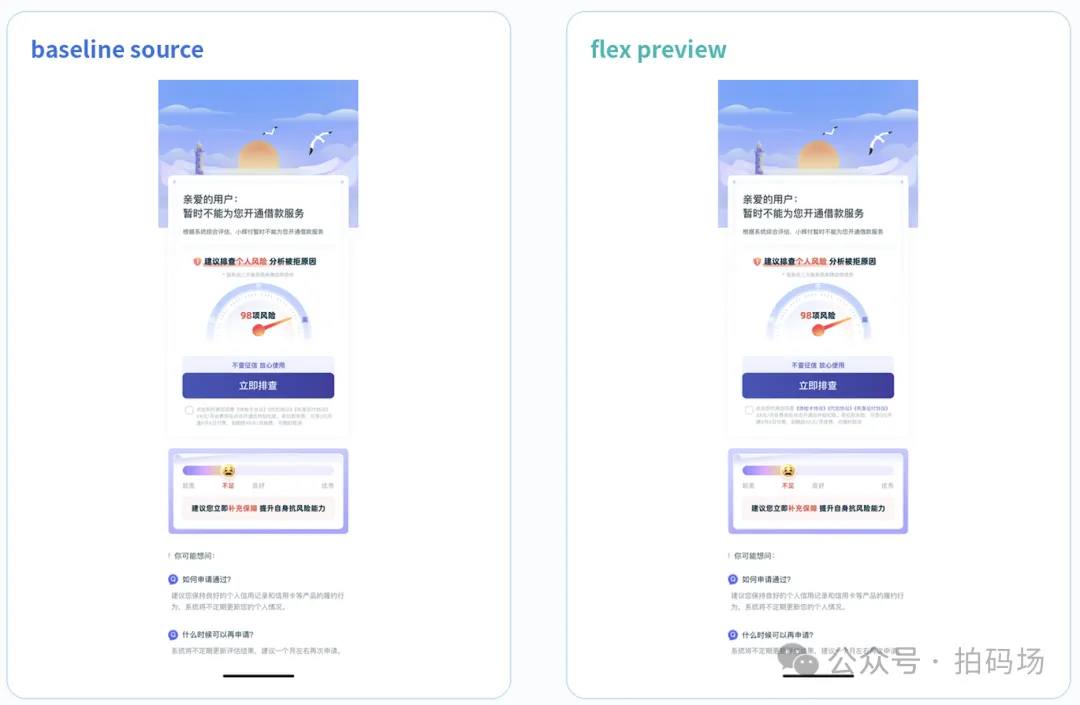
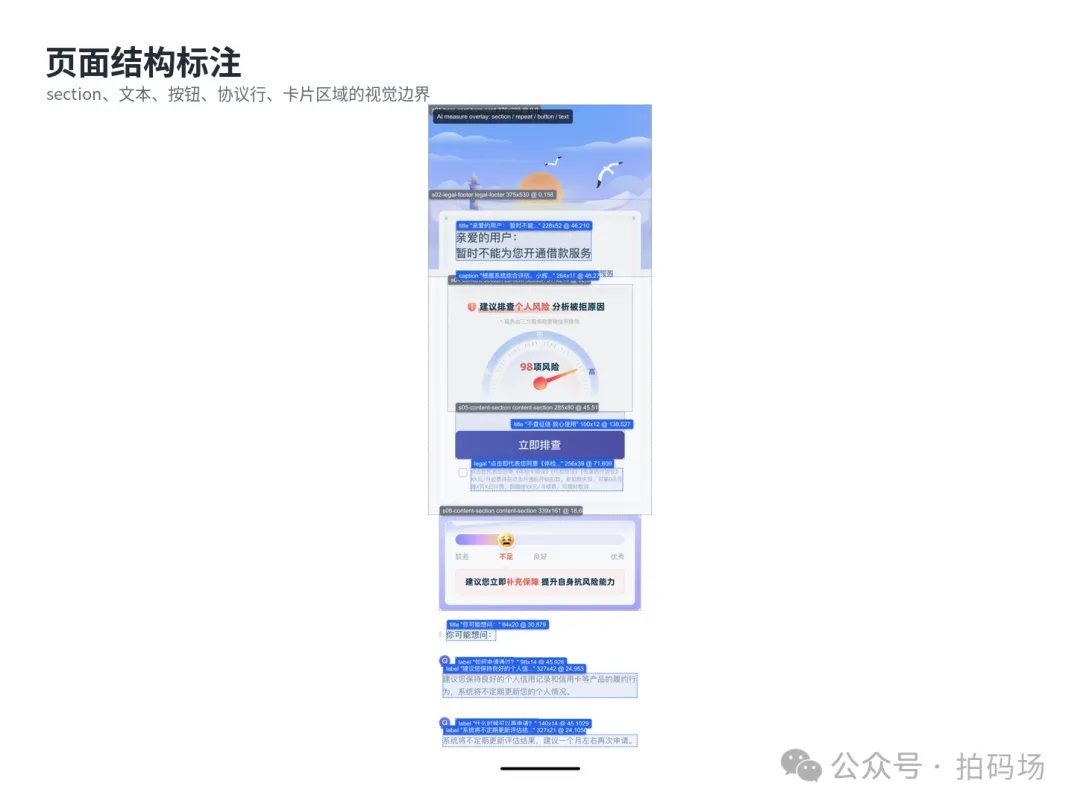
这次页面是一个移动端结果页,画布尺寸是 375 x 1125。页面结构包括顶部插画、主结果卡、风险排查入口、协议勾选行、风险保障卡、FAQ 和 home indicator。
MasterGo DSL 的基础信息如下:
Root node: 2:3262
Name: 戳额结果页-体检卡+保险
Type: FRAME
Size: 375 x 1125
Visible direct children: 19
Text nodes: 9
Image-backed layer nodes: 9
Gradient decoration nodes: 1
这个页面的特点是:视觉上像一张完整截图,DSL 里实际拆成了多类节点。
页面容器
  ├─ 顶部背景资源
  ├─ 主结果卡
  │   ├─ 标题
  │   ├─ 说明文案
  │   ├─ 风险排查入口
  │   └─ 协议勾选行
  ├─ 风险保障卡
  │   ├─ 背景装饰
  │   ├─ 渐变进度
  │   ├─ 状态文案
  │   └─ 提示文案
  ├─ FAQ 区
  └─ home indicator
工程还原的重点不在"截图能不能像",而在这些节点能不能稳定映射到代码结构里。
工程链路:每一层都有产物

这套链路只保留一次总览,后文不再重复罗列。核心产物如下:
这类中间产物很重要。
页面偏了、颜色错了、资源丢了、组件边界不清晰,都可以回到对应文件定位。
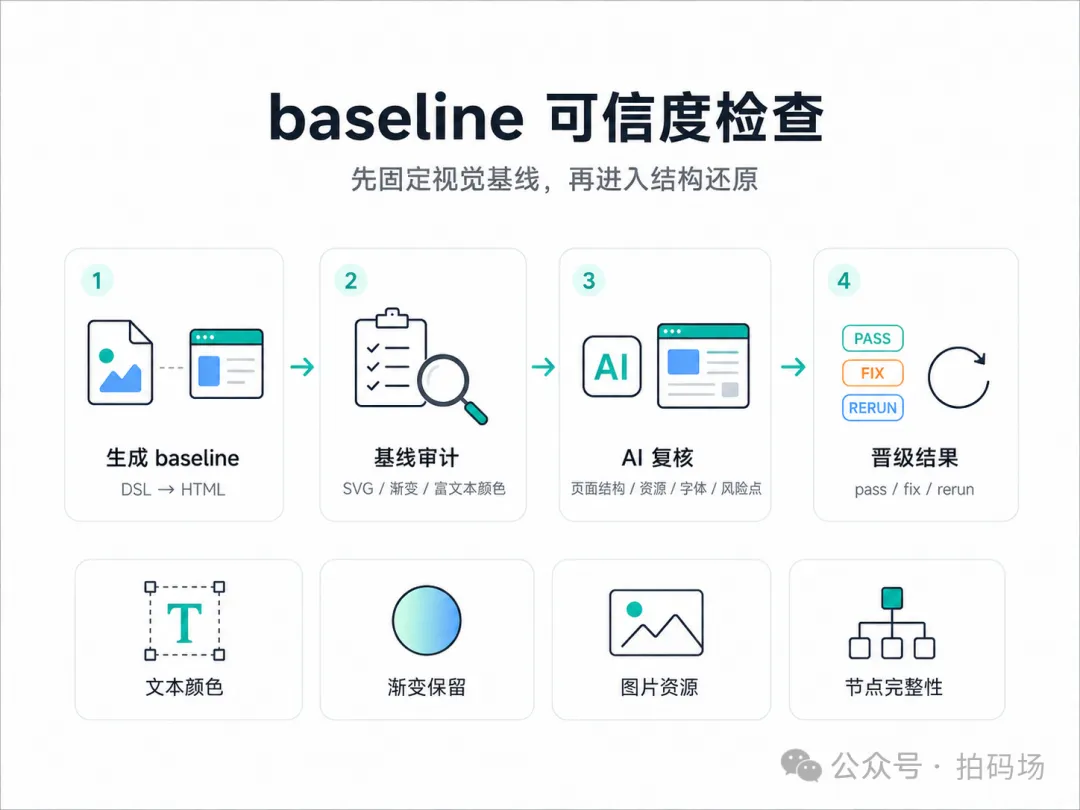
baseline:先固定一份可信视觉源
baseline 是后续所有还原动作的视觉源。
它要先通过确定性规则审计,再进入结构推断和 Flex 重构。
baseline 生成
DSL 到 baseline HTML 的命令可以封装成一个入口:
node scripts/run-mastergo-dsl-to-html.js \
  --url "<MasterGo 文件链接>" \
  --token "<MasterGo Token>" \
  --node-id "2:3262" \
  --out outputs/result-page
生成产物:
2026-06-10-09-34-06.dsl.json
2026-06-10-09-34-06.html
baseline 阶段优先保留视觉信息,暂时不追求业务语义。
它可以保留绝对定位、原始图层、原始资源映射。Flex 阶段再处理结构化和组件化。
baseline 审计
审计脚本负责把一些容易被肉眼忽略的问题提前暴露出来:
node scripts/audit-baseline-html.js \
  2026-06-10-09-34-06.html \
  --dsl 2026-06-10-09-34-06.dsl.json \
  --report 2026-06-10-09-34-06.baseline-audit.json
本次审计结果:
{
  "svgTagCount": 0,
  "pathTagCount": 0,
  "zeroSizePathSvgCount": 0,
  "dslGradientCount": 1,
  "dslGradientUsageCount": 1,
  "missingGradientStopCount": 0,
  "missingNodeGradientStopCount": 0,
  "dslRichTextColorNodeCount": 1,
  "missingRichTextColorCount": 0,
  "failures": []
}
这里主要关注三类问题。
SVG / path 可见性
设计稿里的线条、icon、装饰层经常以 SVG 或 path 形式存在。
节点存在于 DOM 里,不代表浏览器里可见。常见异常包括:
width = 0
height = 0
viewBox 异常
transform 丢失
path 被过滤
审计指标:
{
  "zeroSizePathSvgCount": 0,
  "transformedPathSvgCount": 0
}
渐变 stop 完整性
DSL 里有渐变节点时,HTML 中必须保留对应 stop。
{
  "dslGradientCount": 1,
  "dslGradientUsageCount": 1,
  "missingGradientStopCount": 0
}
这类检查可以覆盖卡片背景、进度条、营销标签这类区域。
富文本颜色完整性
协议行通常包含灰色说明和蓝色链接。
如果转换时把整段文字拍成同一种颜色,整页截图里不一定明显,局部切片会直接暴露。
审计逻辑可以简化成:
const fragment = extractHtmlNodeFragment(html, usage.htmlId);
const fragmentColors = collectColors(fragment);

const missingColors = usage.expectedColors.filter(
  (color) => !fragmentColors.has(color)
);

if (!fragment || missingColors.length) {
  missingRichTextColors.push({
    nodeId: usage.nodeId,
    htmlId: usage.htmlId,
    text: usage.text,
    expectedColors: usage.expectedColors,
    missingColors
  });
}
本次结果:
{
  "dslRichTextColorNodeCount": 1,
  "missingRichTextColorCount": 0
}
baseline AI review:补足规则审计覆盖不到的部分
脚本审计适合做确定性检查。
AI 复核适合处理结构理解、截图视口、字体异常、资源风险这类半结构化问题。
输入给 AI 的材料包括:
- DSL JSON
- baseline HTML
- baseline-audit.json
- baseline preview
- 节点统计信息
- 字体、颜色、渐变、图片资源信息
输出报告:
baseline-ai-review.md本次 AI review 中有几条关键信息:
页面尺寸:375 x 1125
主要结构:顶部海边背景、拒绝结果卡、风险排查按钮、协议行、保险风险卡、FAQ、home indicator
字体:PingFang SC / PingFangSC variants,字号范围 9px 到 19px
资源:hero、主卡片、CTA block、FAQ icon、保险卡、checkbox、home indicator 依赖 MasterGo 图片资源
结论:Promotion Decision = pass
这里记录了两个后续容易踩坑的点:
1. DSL 中存在 lineHeight: -1,需要在 Flex 阶段修正为正常行高
2. 375px viewport 截图可能裁掉居中页面,视觉复核使用更宽 viewport
baseline 审计和 AI review 分工如下:
absolute 到 Flex:中间要有 relative-plan
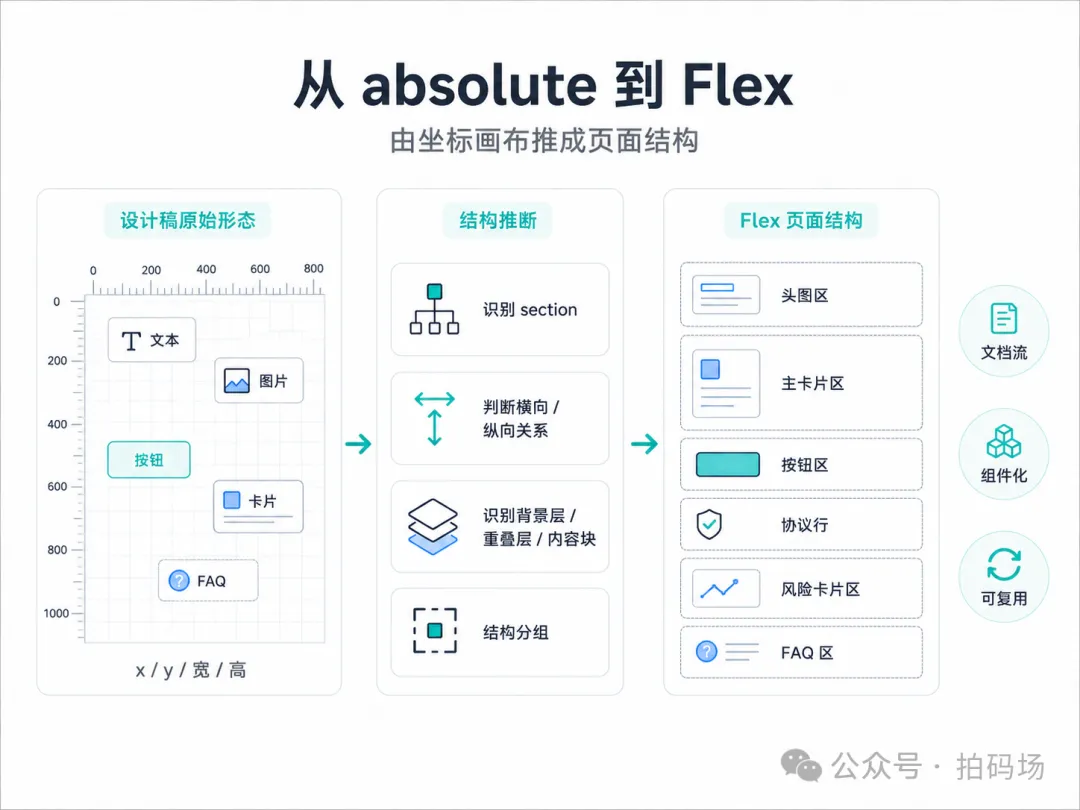
baseline 中的节点更接近画布复刻:
<div
  class="node"
  style="position:absolute; left:24px; top:120px; width:327px; height:160px;"
></div>
业务代码需要的是稳定结构:
<main class="result-page">
  <section class="page-hero"></section>

  <section class="result-card">
    <header class="result-card__header"></header>
    <div class="result-card__body"></div>
    <div class="result-card__action"></div>
    <div class="result-card__agreement"></div>
  </section>

  <section class="risk-card"></section>
  <section class="faq-section"></section>
</main>
中间这一层不能完全交给大模型自由发挥。
更稳的方式是先生成布局 IR:relative-plan.json。
生成命令:
node scripts/absolute-to-relative-plan.js \
  2026-06-10-09-34-06.html \
  --dsl 2026-06-10-09-34-06.dsl.json \
  --report 2026-06-10-09-34-06.relative-plan.json
它分析的核心信息:
1. bounds:x / y / width / height
2. 层级:父子关系、兄弟关系
3. 空间:上下排列、左右排列、包含关系
4. 间距:gap、padding、margin 候选值
5. 重叠:前景层、背景层、装饰层
6. 语义:标题、说明、按钮、图标、卡片
本次 plan 中记录的页面基础信息:
{
  "page": {
    "id": "n_2_3262",
    "bounds": {
      "x": 0,
      "y": 0,
      "w": 375,
      "h": 1125
    },
    "background": "#FFFFFF"
  }
}
同时发现两个结构风险:
foreground children overlap
negative main-axis gaps detected
这说明页面中存在视觉层叠,不能简单按 y 坐标做一维排序。
section 推断:从坐标关系到结构关系
section 推断主要看三类信号。
空间聚合
坐标接近、间距稳定、共享背景的节点,更容易归为同一块。
标题 + 说明 + 按钮 + 协议行
→ ResultCard
视觉容器
大尺寸圆角背景、卡片底图、浅色容器,通常是结构边界。
白色圆角卡片
  ├─ 标题
  ├─ 说明
  ├─ 风险排查入口
  └─ 协议行
业务稳定性
FAQ、协议行、按钮、风险卡这种区域,后续会接交互、埋点、状态和接口,必须保留独立边界。
结构推断之后,页面可以落成下面这种结构:
<main class="result-page">
  <!-- COMPONENT: PageHero -->
  <section class="page-hero"></section>

  <!-- COMPONENT: ResultCard -->
  <section class="result-card"></section>

  <!-- COMPONENT: RiskCard -->
  <section class="risk-card"></section>

  <!-- COMPONENT: FaqSection -->
  <section class="faq-section"></section>
</main>
Flex 重构规则:减少自由生成,增加结构约束
Flex 重构时,核心是控制定位的使用范围,并把页面主体收敛到文档流。
页面主体使用文档流:
.result-page {
  width: 375px;
  min-height: 1125px;
  display: flex;
  flex-direction: column;
  background: #fff;
}
大区域按 section 排列:
<main class="result-page">
  <section class="page-hero"></section>
  <section class="result-card"></section>
  <section class="risk-card"></section>
  <section class="faq-section"></section>
</main>
容器内部使用 flex 组织:
.result-card {
  display: flex;
  flex-direction: column;
  padding: 24px 16px 18px;
  border-radius: 16px;
}

.result-card__action {
  display: flex;
  align-items: center;
  justify-content: center;
}
背景层和内容层分开:
<section class="risk-card">
  <img class="risk-card__bg" src="./assets/risk-bg.png" alt="" />
  <div class="risk-card__content">
    <div class="risk-card__score"></div>
    <p class="risk-card__desc"></p>
  </div>
</section>

.risk-card {
  position: relative;
}

.risk-card__bg {
  width: 100%;
  display: block;
}

.risk-card__content {
  position: relative;
  z-index: 1;
}
局部 position: relative 可以保留。
门禁限制的是页面主体继续使用大量 position:absolute 复刻画布。角标、浮层、装饰层可以在组件内部受控使用。
组件拆分:按变化频率定边界
组件拆分不只看视觉大小,还要看变化频率和业务职责。
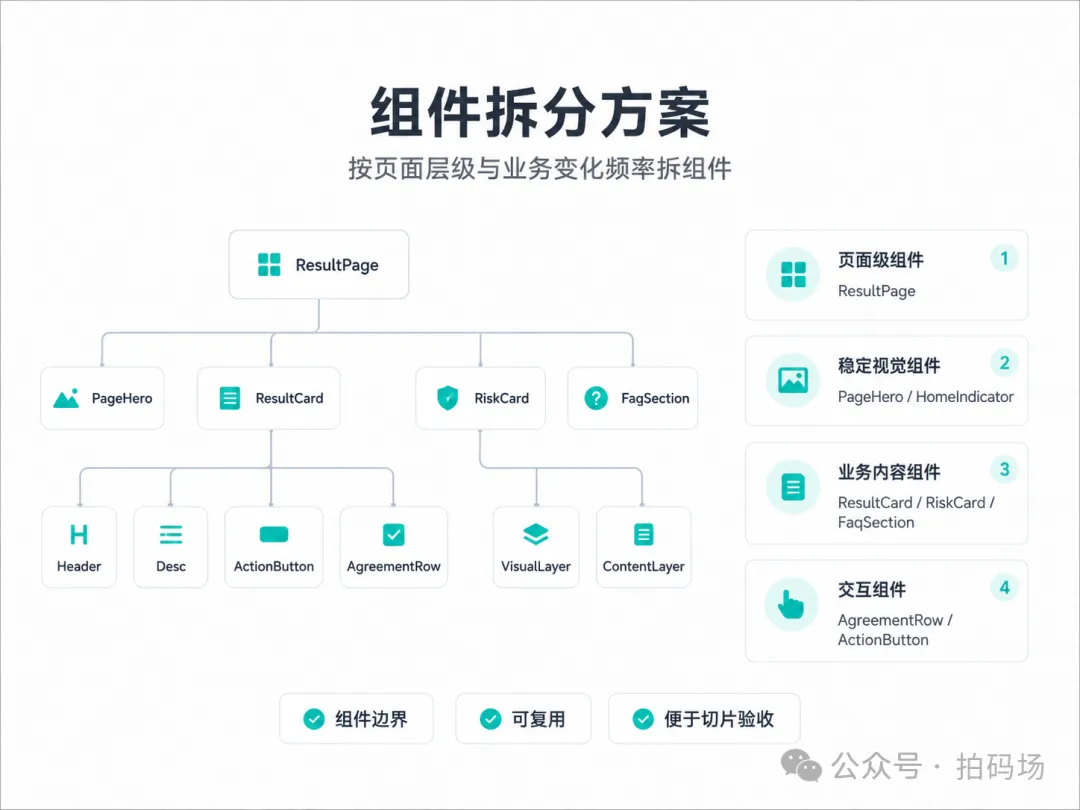
页面级组件
ResultPage负责页面布局、背景和 section 顺序。
<main class="result-page">
  <PageHero />
  <ResultCard />
  <RiskCard />
  <FaqSection />
</main>
稳定视觉组件
PageHero
HomeIndicator
这类区域视觉稳定、交互少,可以保留图片资源或静态结构。
业务内容组件
ResultCard
RiskCard
FaqSection
这类区域后续会接状态、接口、策略和文案,需要 DOM 化。
交互组件
AgreementRow
ActionButton
协议行和按钮需要独立拆。它们会涉及点击区域、埋点、状态、合规协议和 loading/disabled 等逻辑。
验收切片组件
AgreementRow
RiskCard
ResultCard
FaqSection
这类组件既是代码边界,也是切片验收边界。
COMPONENT 注释和 data-source-id 都要尽量保留。
协议行:小组件也要 DOM 化
协议行容易出现四类问题:
checkbox 尺寸变化
链接色丢失
文案换行异常
点击区域不稳定
独立组件结构:
<label class="agreement-row" data-source-id="node_agreement">
  <span class="agreement-row__checkbox"></span>
  <span class="agreement-row__text">
    我已阅读并同意
    <a href="#">《体检卡协议》</a>
    <a href="#">《代扣协议》</a>
    <a href="#">《先享后付协议》</a>
  </span>
</label>
样式示例:
.agreement-row {
  display: flex;
  align-items: flex-start;
  gap: 6px;
  font-size: 12px;
  line-height: 18px;
  color: #8a8f99;
}

.agreement-row__checkbox {
  flex: 0 0 auto;
  width: 14px;
  height: 14px;
}

.agreement-row a {
  color: #2f7cf6;
  text-decoration: none;
}
协议文案、链接点击、合规审查、埋点都依赖 DOM 结构,适合独立维护。
风险卡:装饰层资源化,业务层 DOM 化
风险卡内部有背景装饰,也有业务状态。
RiskCard
  ├─ VisualLayer
  │   ├─ 背景卡片
  │   ├─ 渐变进度
  │   └─ 表情 icon
  └─ ContentLayer
      ├─ 状态文案
      ├─ 建议文案
      └─ 提示文案
对应结构:
<section class="risk-card" data-source-id="node_risk_card">
  <div class="risk-card__visual">
    <img src="./assets/risk-card-bg.png" alt="" />
  </div>

  <div class="risk-card__content">
    <div class="risk-card__level">不足</div>
    <p class="risk-card__desc">建议您立即补充保障</p>
  </div>
</section>
处理原则:
视觉稳定的装饰层 → 资源化
业务变化的文案层 → DOM 化
状态驱动的样式层 → class / token 化
工程门禁:检查代码是否能进工程
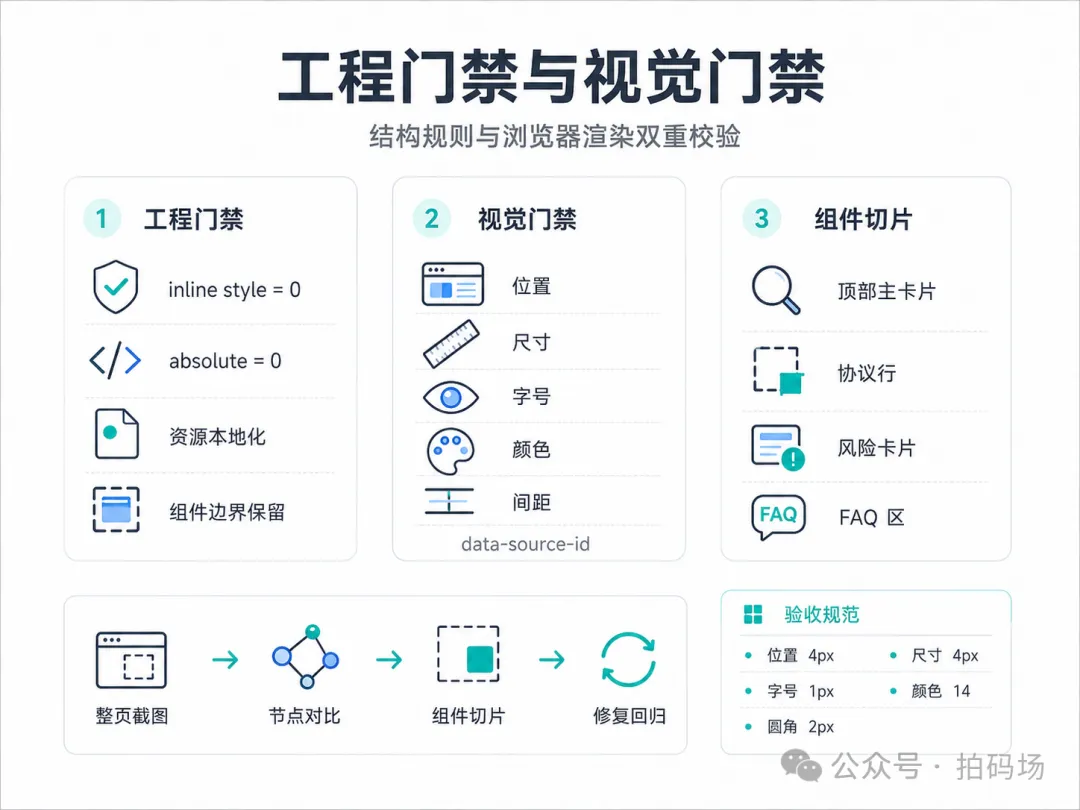
Flex HTML 生成后,先跑工程门禁。
node scripts/validate-flex-html.js \
  2026-06-10-09-34-06.flex.html \
  --relative-plan 2026-06-10-09-34-06.relative-plan.json \
  --report 2026-06-10-09-34-06.flex.report.json
门禁项:
inline style
absolute position
grid declaration
flex declaration
remote MasterGo asset
missing local asset
data-source-bounds
component boundary
component comment
overlay marker
separator marker
本次结果:
{
  "inlineStyleCount": 0,
  "absolutePositionCount": 0,
  "gridDeclarationCount": 0,
  "flexDeclarationCount": 10,
  "svgTagCount": 0,
  "dataSourceBoundsCount": 0,
  "sectionCount": 3,
  "componentBoundaryCount": 6,
  "componentCommentCount": 9,
  "remoteMasterGoAssetCount": 0,
  "missingLocalAssetCount": 0,
  "failures": [],
  "warnings": []
}
这份报告主要回答四个问题:
1. 有没有残留行内样式
2. 有没有继续使用 absolute 复刻画布
3. 图片资源是否完成本地化
4. 组件边界是否还能被识别
门禁通过标准可以抽象成:
const gate = {
  inlineStyleCount: 0,
  absolutePositionCount: 0,
  remoteMasterGoAssetCount: 0,
  missingLocalAssetCount: 0,
  failures: []
};
视觉门禁:用浏览器真实渲染值对比
工程门禁看代码结构,视觉门禁看最终渲染。
命令:
node scripts/compare-flex-baseline-rects.js \
  --source 2026-06-10-09-34-06.html \
  --flex 2026-06-10-09-34-06.flex.html \
  --report 2026-06-10-09-34-06.flex.visual-gate.report.json
浏览器端读取:
const rect = el.getBoundingClientRect();
const style = getComputedStyle(el);

return {
  x: rect.x,
  y: rect.y,
  width: rect.width,
  height: rect.height,
  fontSize: style.fontSize,
  lineHeight: style.lineHeight,
  fontWeight: style.fontWeight,
  color: style.color,
  borderRadius: style.borderRadius
};
本次结果:
{
  "baselineNodeCount": 20,
  "markedFlexCount": 19,
  "sourceMarkerCount": 19,
  "checkCount": 19,
  "failureCount": 0,
  "geometryFailureCount": 0,
  "styleFailureCount": 0,
  "gapFailureCount": 0,
  "markerGateFailureCount": 0,
  "missingBaselineCount": 0
}
阈值:
{
  "positionTolerance": 4,
  "sizeTolerance": 4,
  "fontSizeTolerance": 1,
  "lineHeightTolerance": 1.5,
  "fontWeightTolerance": 150,
  "colorTolerance": 14,
  "radiusTolerance": 2,
  "borderWidthTolerance": 0.3,
  "separatorThicknessTolerance": 0.15,
  "gapTolerance": 4
}
这里的关键是:不要对比 CSS 字符串,要对比浏览器真实计算值。
字体 fallback、继承、默认 line-height、抗锯齿都会影响最终表现,只有浏览器渲染值能反映真实结果。
data-source-id:把视觉差异落到节点
视觉门禁依赖节点映射。
Flex HTML 中的关键节点需要保留 data-source-id。
<section class="result-card" data-source-id="node_result_card">
  <h1 class="result-card__title" data-source-id="node_title">
    暂时不能为您开通借款服务
  </h1>
  <p class="result-card__desc" data-source-id="node_desc">
    您可以完善资料后再试
  </p>
</section>
节点级报告可以长这样:
{
  "nodeId": "node_title",
  "geometry": {
    "deltaX": 2,
    "deltaY": 1,
    "deltaWidth": 0,
    "deltaHeight": 1
  },
  "style": {
    "fontSize": "pass",
    "color": "pass",
    "lineHeight": "pass"
  }
}
有了节点映射,修复目标可以从"页面有点偏"变成"某个节点的 y 偏差 6px"。
这对人工修复和 AI 修复都更友好。
组件切片:把长页面拆成局部验收单元
切片命令:
node scripts/capture-component-slices.js \
  --source 2026-06-10-09-34-06.html \
  --flex 2026-06-10-09-34-06.flex.html \
  --out component-slices
切片单元:
ResultCard
AgreementRow
RiskCard
FaqSection
切片价值:
整页图:看页面层级
节点报告:看数值差异
组件切片:看局部细节
长页面中 2px 到 4px 的偏差很容易被整页缩略图吞掉。
切片后,checkbox、链接色、渐变条、卡片内边距、FAQ 间距都会更明显。
工具链分工
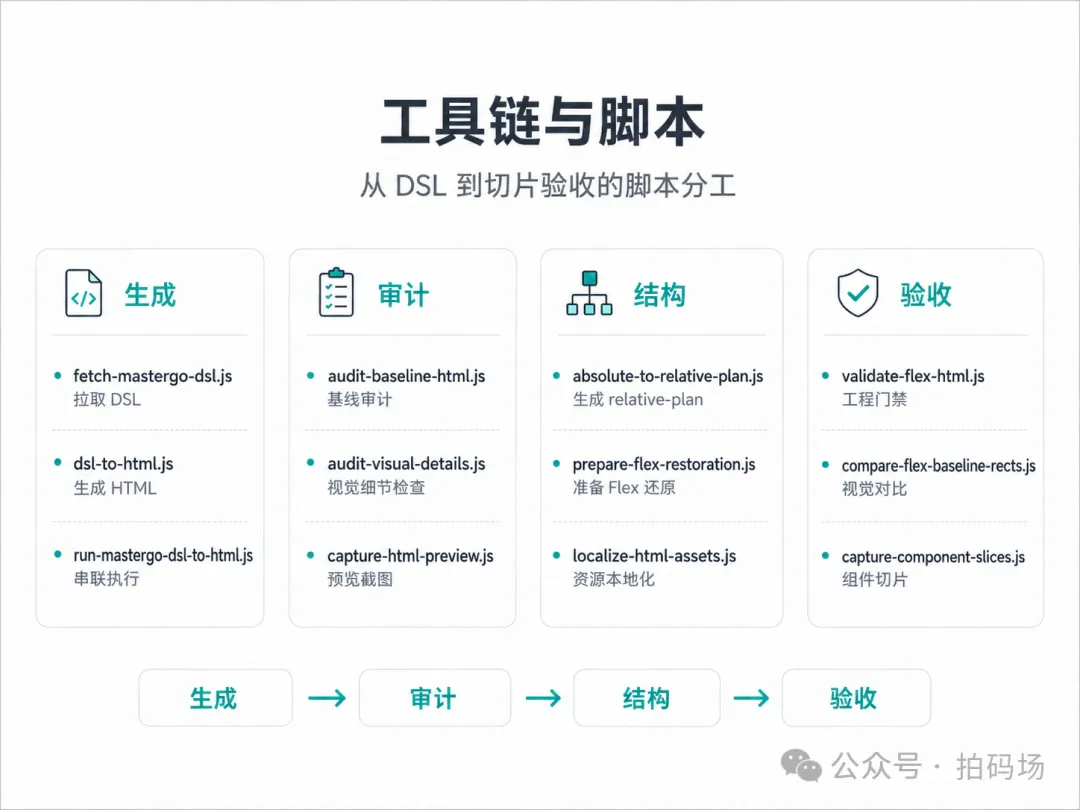
工具链可以按四类组织。
生成
  ├─ fetch-mastergo-dsl.js
  ├─ dsl-to-html.js
  └─ run-mastergo-dsl-to-html.js

审计
  ├─ audit-baseline-html.js
  ├─ audit-visual-details.js
  └─ capture-html-preview.js

结构
  ├─ absolute-to-relative-plan.js
  ├─ prepare-flex-restoration.js
  └─ localize-html-assets.js

验收
  ├─ validate-flex-html.js
  ├─ compare-flex-baseline-rects.js
  └─ capture-component-slices.js
对应执行顺序:
# 1. 生成 DSL 和 baseline
node scripts/run-mastergo-dsl-to-html.js ...

# 2. baseline 审计
node scripts/audit-baseline-html.js ...

# 3. 生成结构计划
node scripts/absolute-to-relative-plan.js ...

# 4. 资源本地化
node scripts/localize-html-assets.js ...

# 5. 工程门禁
node scripts/validate-flex-html.js ...

# 6. 浏览器视觉门禁
node scripts/compare-flex-baseline-rects.js ...

# 7. 组件切片
node scripts/capture-component-slices.js ...
大模型 Loop:多轮小步修复
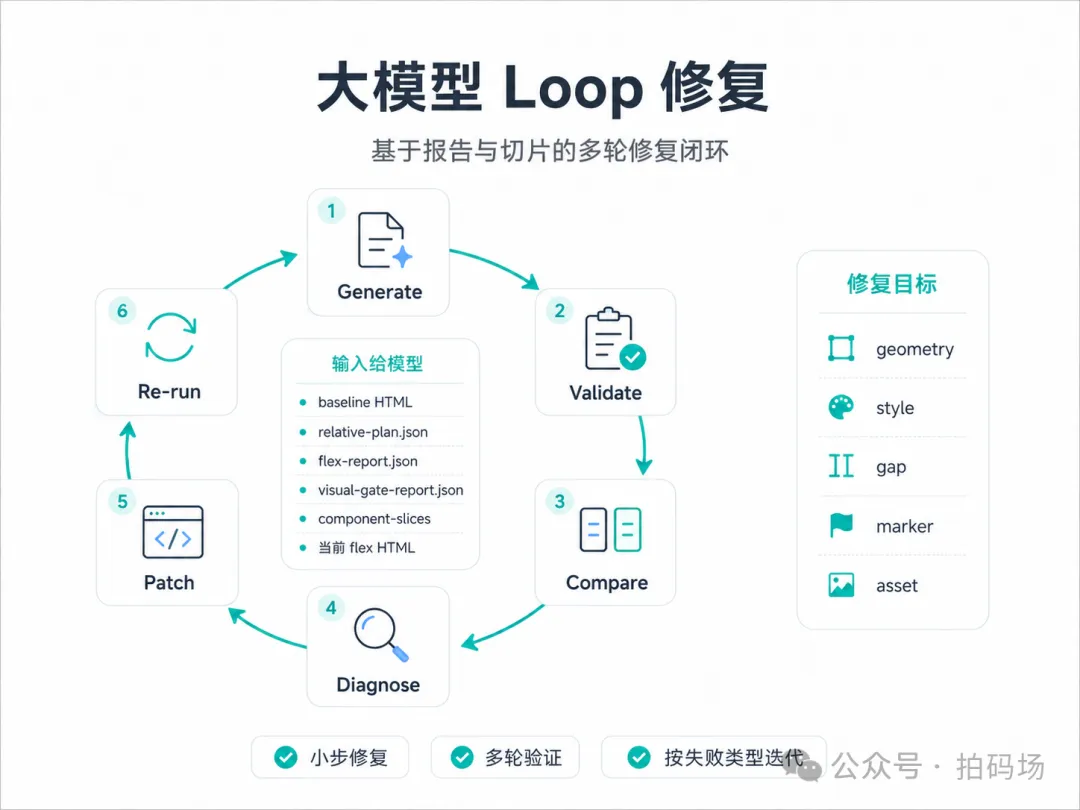
大模型适合参与修复,但不适合每次重写整页。
更稳的方式是把它放进一个报告驱动的 loop。
Generate
  → Validate
  → Compare
  → Diagnose
  → Patch
  → Re-run
每一轮给模型的输入:
1. baseline HTML
2. relative-plan.json
3. flex-report.json
4. flex-visual-gate-report.json
5. component-slices
6. 当前 flex HTML
7. 失败节点列表
按失败类型分发修复任务:
geometryFailure      → 调位置、尺寸、padding、gap
styleFailure         → 调字号、颜色、行高、字重、圆角
gapFailure           → 调 flex gap、margin、section 间距
markerGateFailure    → 补 data-source-id
missingLocalAsset    → 修资源路径
absolutePositionCount > 0 → 替换主体 absolute
给模型的 prompt 可以限制得更具体:
你是 Flex 页面还原修复助手。

输入:
- 当前 flex HTML
- flex-report.json
- flex-visual-gate-report.json
- component-slices 观察结果

要求:
1. 只修复报告中失败的节点
2. 不重写 HTML 主结构
3. 不删除 data-source-id
4. 不引入 inline style
5. 修复后 validate-flex-html.js 必须通过
6. 修复后 compare-flex-baseline-rects.js 必须通过
Loop 的关键是让模型在门禁报告约束下小步迭代。
工程规则沉淀
这次实践沉淀了几条可以继续复用的规则。
baseline 晋级规则
baseline 必须先通过:
- SVG/path 可见性检查
- 渐变 stop 检查
- 富文本颜色检查
- 文本可见性检查
- 资源可用性检查
- AI review
Flex 结构规则
- 页面主体使用文档流
- 大模块按 section 拆
- 卡片内部使用 flex
- 背景层和内容层分离
- 业务文案 DOM 化
- 稳定装饰资源化
组件边界规则
- ResultPage 管页面
- PageHero 管稳定视觉
- ResultCard 管主业务卡片
- AgreementRow 管协议交互
- RiskCard 管风险状态
- FaqSection 管问答内容
门禁规则
- inline style = 0
- absolutePositionCount = 0
- remoteMasterGoAssetCount = 0
- missingLocalAssetCount = 0
- sourceMarkerCount 达到要求
- failureCount = 0
最终落地方式
这条链路最终沉淀成一套设计稿还原的工程协议。
输入层:MasterGo DSL
基线层:baseline HTML + audit
结构层:relative-plan
实现层:Flex HTML
校验层:engineering gate + visual gate
验收层:component slices
修复层:AI loop
每一层都有输入、输出和失败处理方式。
这样还原质量可以被追踪,问题可以被定位,经验可以沉淀成脚本和规则。
这套方式后续可以继续扩展到 Vue、React、iOS、Android 多端还原。
只要 baseline、结构计划、节点映射和门禁报告保持稳定,目标端代码就有持续优化的基础。
作者简介