windows中 nginx流媒体下载地址
通过网盘分享的文件:nginx-1.17-rtmp.rar
链接: https://pan.baidu.com/s/1_QbdfNsMz_fwc2xnlAUxkg 提取码: 5jqf
1、摄像头中配置流媒体转发
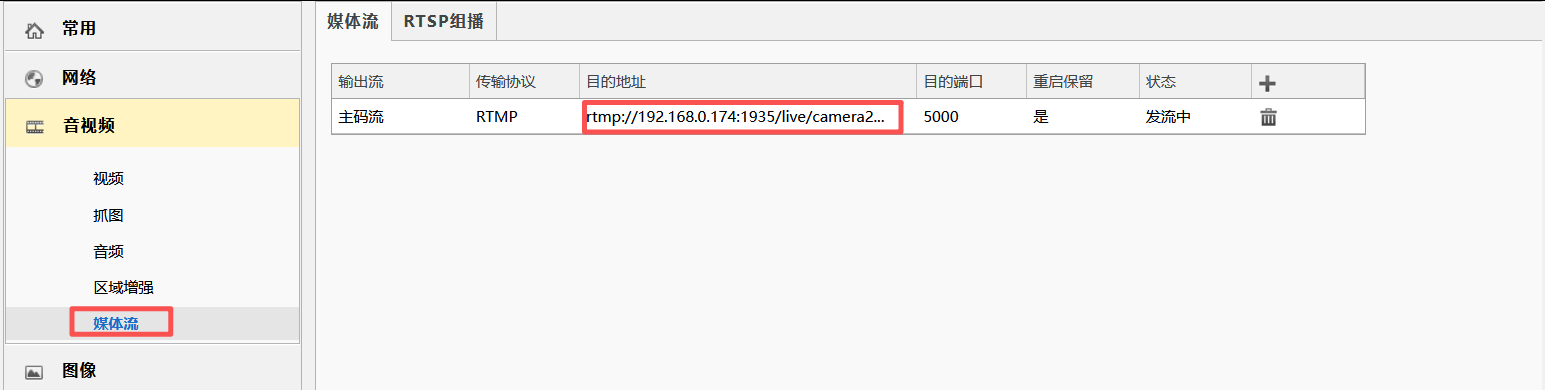
2、前端代码中播放流媒体vue2
html
<template>
  <div class="stream-page">
    <div class="stream-toolbar">
      <div>
        <div class="stream-title">流媒体预览</div>
        <div class="stream-url">{{ streamUrl }}</div>
      </div>
      <el-button
        size="mini"
        type="primary"
        icon="el-icon-refresh"
        @click="reloadStream"
      >
        重新加载
      </el-button>
    </div>

    <div class="player-shell">
      <video
        ref="videoPlayer"
        class="stream-video"
        controls
        autoplay
        muted
        playsinline
      ></video>
      <div v-if="errorMessage" class="stream-error">
        {{ errorMessage }}
      </div>
    </div>
  </div>
</template>

<script>
import Hls from 'hls.js'

const STREAM_URL = 'http://192.168.0.174:8080/hls/camera231.m3u8'

export default {
  name: 'StreamMedia',
  data() {
    return {
      streamUrl: STREAM_URL,
      hls: null,
      errorMessage: ''
    }
  },
  mounted() {
    this.initPlayer()
  },
  beforeDestroy() {
    this.destroyPlayer()
  },
  methods: {
    initPlayer() {
      const video = this.$refs.videoPlayer
      if (!video) {
        return
      }

      this.errorMessage = ''
      this.destroyPlayer()
      video.pause()
      video.removeAttribute('src')
      video.load()

      if (Hls.isSupported()) {
        const hls = new Hls({
          liveSyncDurationCount: 3,
          maxLiveSyncPlaybackRate: 1.5
        })

        this.hls = hls
        hls.loadSource(this.streamUrl)
        hls.attachMedia(video)
        hls.on(Hls.Events.MANIFEST_PARSED, () => {
          video.play().catch(() => {})
        })
        hls.on(Hls.Events.ERROR, (event, data) => {
          if (!data.fatal) {
            return
          }

          if (data.type === Hls.ErrorTypes.NETWORK_ERROR) {
            hls.startLoad()
            return
          }

          if (data.type === Hls.ErrorTypes.MEDIA_ERROR) {
            hls.recoverMediaError()
            return
          }

          this.errorMessage = '视频流播放失败,请确认推流和 HLS 地址是否正常。'
          this.destroyPlayer()
        })
        return
      }

      if (video.canPlayType('application/vnd.apple.mpegurl')) {
        video.src = this.streamUrl
        video.play().catch(() => {})
        return
      }

      this.errorMessage = '当前浏览器不支持 HLS 播放。'
    },
    reloadStream() {
      this.initPlayer()
    },
    destroyPlayer() {
      if (this.hls) {
        this.hls.destroy()
        this.hls = null
      }
    }
  }
}
</script>

<style scoped lang="scss">
.stream-page {
  min-height: calc(100vh - 84px);
  padding: 16px;
  background: #f3f6f8;
}

.stream-toolbar {
  display: flex;
  align-items: center;
  justify-content: space-between;
  gap: 16px;
  margin-bottom: 12px;
}

.stream-title {
  color: #1f2d3d;
  font-size: 18px;
  font-weight: 600;
  line-height: 28px;
}

.stream-url {
  color: #606266;
  font-size: 13px;
  line-height: 20px;
  word-break: break-all;
}

.player-shell {
  position: relative;
  width: 100%;
  height: calc(100vh - 160px);
  min-height: 420px;
  overflow: hidden;
  background: #111820;
  border: 1px solid #dcdfe6;
  border-radius: 4px;
}

.stream-video {
  display: block;
  width: 100%;
  height: 100%;
  background: #111820;
}

.stream-error {
  position: absolute;
  right: 16px;
  bottom: 16px;
  max-width: calc(100% - 32px);
  padding: 8px 12px;
  color: #f56c6c;
  font-size: 13px;
  line-height: 20px;
  background: rgba(0, 0, 0, 0.72);
  border-radius: 4px;
}
</style>