阅读时长:约 19 分钟 | 难度:★★★★☆ | 篇章:第 6 篇 · 命理八字模块
对应源码:
entry/src/main/ets/pages/mingli/FortuneTimelinePage.ets
前言
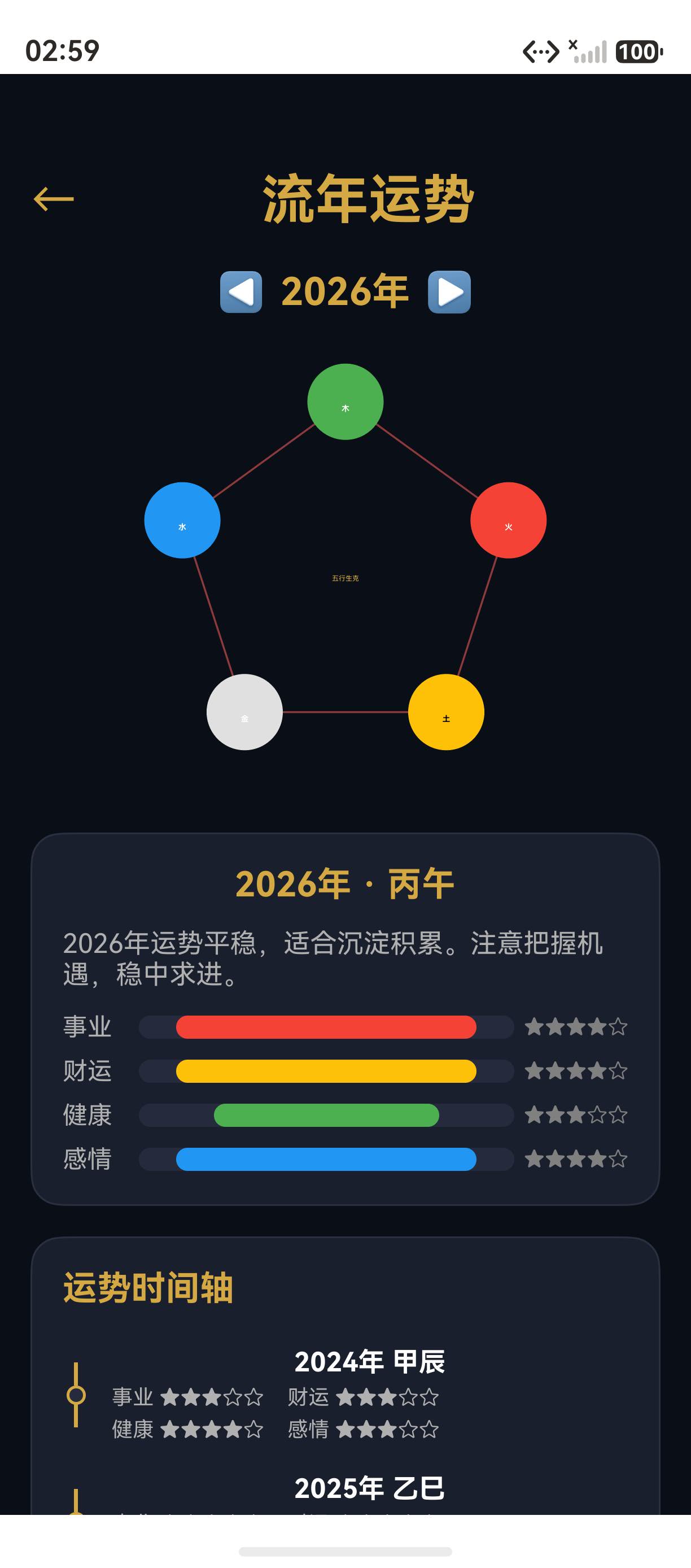
流年运势时间线是玄象项目命理模块的"预测"界面。用户可选择年份查看该年的整体运势评分(事业/财运/健康/爱情),并通过左右箭头导航切换年份。本篇将深入剖析玄象项目运势时间线的实现:从 FortuneItem 数据结构、FortuneBar 运势评分条、Canvas 五行生克图绘制,到年份选择器交互。掌握这套运势时间线实现方法论,您就能为任何 HarmonyOS 应用构建年份级运势展示。
提示:玄象项目运势时间线包含事业、财运、健康、爱情四维评分,以及五行生克图与流年干支展示。
一、FortuneItem 数据结构
1.1 接口定义
typescript
interface FortuneItem {
  year: number;       // 年份
  ganzhi: string;     // 干支
  career: number;     // 事业评分 0-100
  wealth: number;     // 财运评分 0-100
  health: number;     // 健康评分 0-100
  love: number;       // 爱情评分 0-100
  summary: string;    // 整体运势简述
}
二、年份选择器
2.1 左右箭头导航
typescript
Row({ space: 8 }) {
  Text('◀')
    .fontSize(20)
    .fontColor(Colors.PRIMARY_GOLD)
    .onClick(() => { this.selectedYear--; this.updateSelection(); })
  Text(`${this.selectedYear}年`)
    .fontSize(20)
    .fontWeight(FontWeight.Bold)
    .fontColor(Colors.PRIMARY_GOLD)
  Text('▶')
    .fontSize(20)
    .fontColor(Colors.PRIMARY_GOLD)
    .onClick(() => { this.selectedYear++; this.updateSelection(); })
}
.justifyContent(FlexAlign.Center)
三、五行生克图
3.1 Canvas 绘制
typescript
private drawWuxingChart(canvas: CanvasRenderingContext2D, w: number, h: number): void {
  const cx = w / 2, cy = h / 2;
  const r = Math.min(w, h) / 2 - 20;
  const wuxingOrder = ['木', '火', '土', '金', '水'];
  const wuxingColors = ['#4CAF50', '#F44336', '#FFC107', '#E0E0E0', '#2196F3'];

  // 生克箭头
  for (let i = 0; i < 5; i++) {
    const angle = (i * 72 - 90) * Math.PI / 180;
    // 五行文字
    canvas.fillStyle = wuxingColors[i];
    canvas.font = 'bold 16px sans-serif';
    canvas.fillText(wuxingOrder[i], cx + r * Math.cos(angle), cy + r * Math.sin(angle));
  }
}
四、运势评分条
4.1 FortuneBar Builder
typescript
@Builder
FortuneBar(label: string, value: number, color: string) {
  Row({ space: 8 }) {
    Text(label)
      .fontSize(14)
      .fontColor(Colors.TEXT_PRIMARY)
      .width(50)
    Progress({ value, total: 100, type: ProgressType.Linear })
      .width(200)
      .color(color)
      .backgroundColor('#333333')
    Text(`${value}分`)
      .fontSize(12)
      .fontColor(Colors.TEXT_SECONDARY)
  }
}
五、运势时间线设计总结
5.1 页面结构
| 区域 | 组件 | 内容 |
|---|---|---|
| 年份选择 | Row | ◀ 2026年 ▶ |
| 五行生克图 | Canvas | 五行相生相克 |
| 运势总览 | Column | 干支 + 描述 |
| 评分条 | 4 × FortuneBar | 事业/财运/健康/爱情 |
总结
本篇以玄象项目运势时间线页为蓝本,深入剖析了 ArkUI 年份级运势展示的实现:从 FortuneItem 数据结构、FortuneBar 运势评分条、Canvas 五行生克图绘制,到年份选择器交互。掌握这套运势时间线实现方法论,您就能为任何 HarmonyOS 应用构建年份级运势展示。
如果这篇文章对你有帮助,欢迎点赞👍、收藏⭐、关注🔔,你的支持是我持续创作的动力!
相关资源:
- HarmonyOS 官方文档:Progress 组件
- 五行生克:wikipedia.org/wiki/五行
- 开源鸿蒙跨平台社区:https://openharmonycrossplatform.csdn.net