环境说明
银河麒麟v10 arm64架构
docker-ce 25.x
PolarDB PG版本 15
harbor版本2.11
部署PolarDB PG版数据库
bash
version: '3.3'

services:
  polardb:
    image: registry.cn-hangzhou.aliyuncs.com/polardb_pg/polardb_pg_local_instance:15
    container_name: polardb-pg
    environment:
      POLARDB_USER: postgres
      POLARDB_PASSWORD: 123456
      TZ: Asia/Shanghai
    ports:
      - "5432:5432"
    volumes:
      - ./data:/var/polardb
    privileged: true
    cap_add:
      - SYS_PTRACE
    restart: unless-stopped
检查版本和创建harbor数据库
bash
# 检查版本
docker exec -it polardb-pg psql -U postgres -c "SELECT version();"

# 设置密码
# docker exec -it polardb-pg psql -U postgres -c "ALTER USER postgres WITH PASSWORD '123456';"

# 创建数据库,后面会使用到
docker exec -it polardb-pg psql -U postgres -c "CREATE DATABASE harbor_db;"
部署harbor
- 解压harbor压缩包
bash
tar -zxf harbor-offline-installer-v2.11.0-aarch64.tgz

cd harbor- 拷贝配置文件模板
bash
cp harbor.yml.tmpl harbor.yml- 修改配置文件
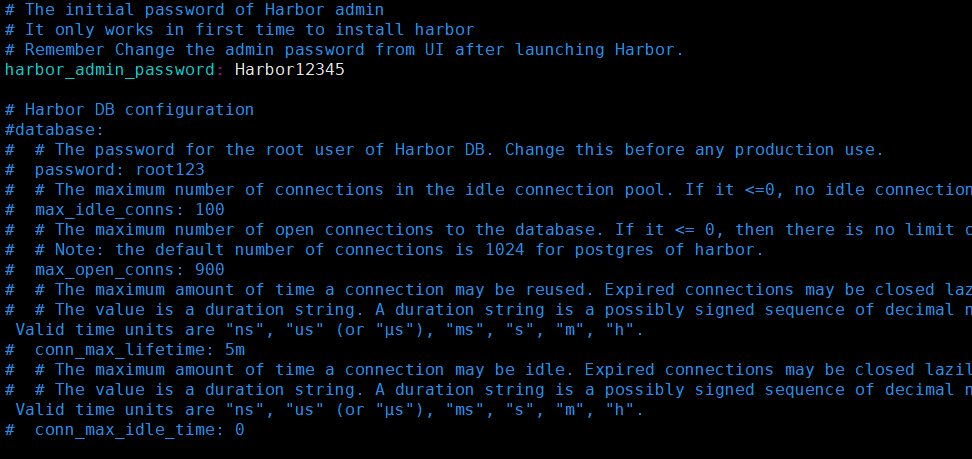
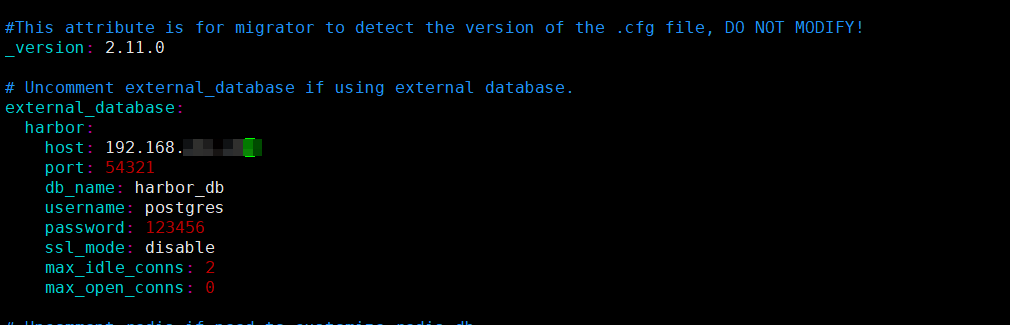
- 生成配置
bash
./prepare- 安装harbor
bash
./install.sh- 检查状态
bash
docker-compose ps验证测试
- 访问web界面
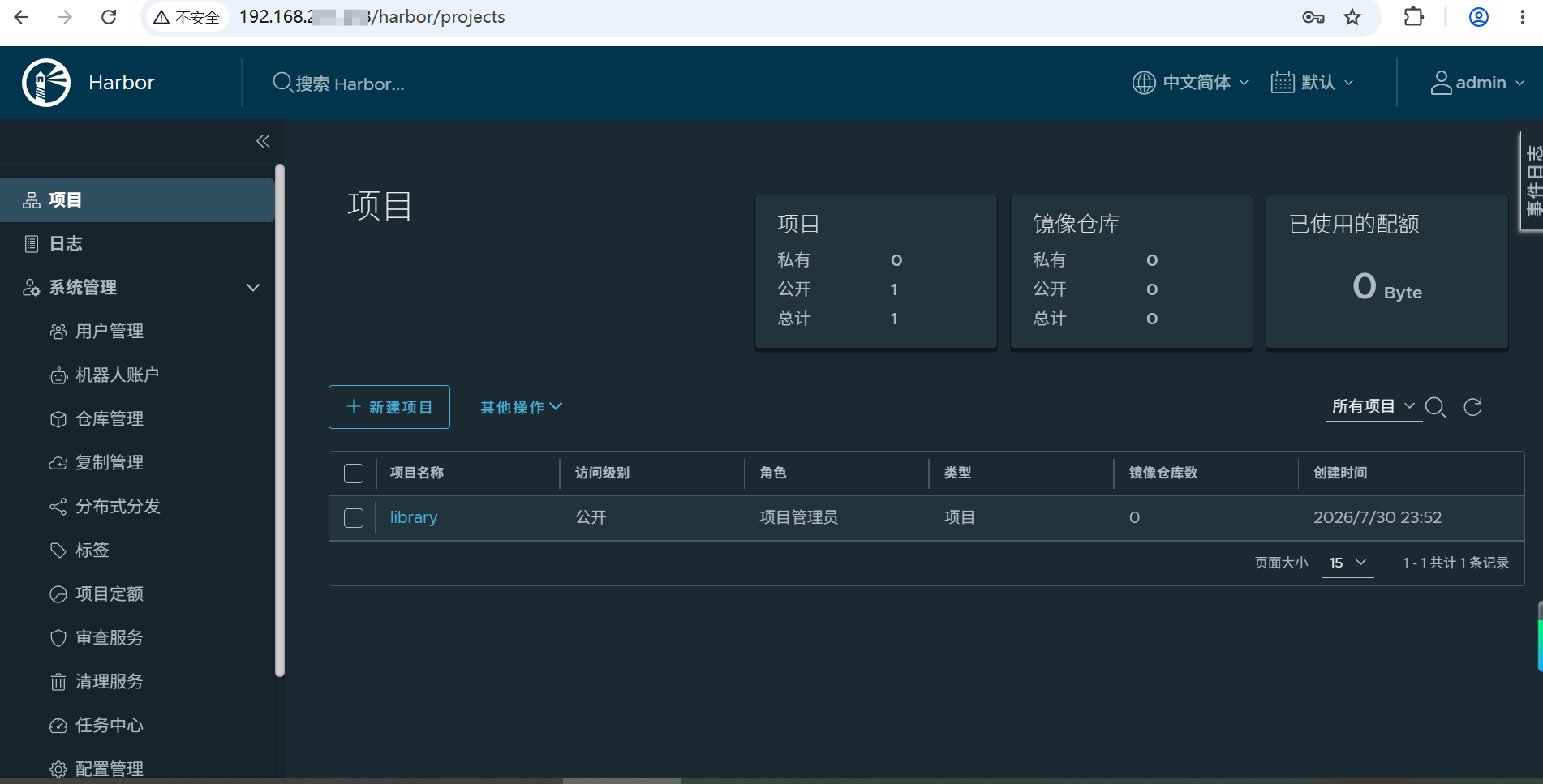
点击看看各功能是否正常
- 推送拉取镜像测试
bash
docker pull nginx:1.30.4-alpine-slim

docker tag nginx:1.30.4-alpine-slim 192.168.xxx.xxx/baseapp/nginx:1.30.4-alpine-slim

docker push 192.168.xxx.xxx/baseapp/nginx:1.30.4-alpine-slim

docker pull 192.168.xxx.xxx/baseapp/nginx:1.30.4-alpine-slim- 检查数据库
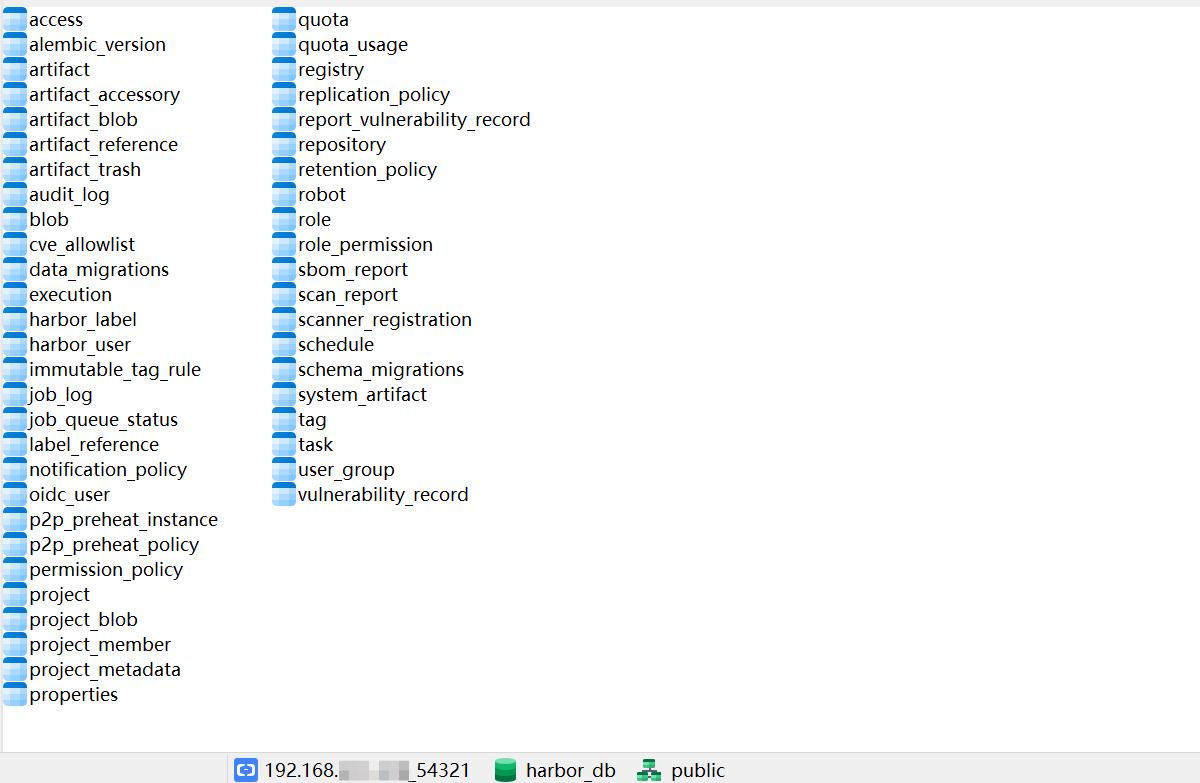
参考资料
Harbor 官方版本 PostgreSQL 对应关系
|---------------|------|-------------------|---------------|----------------------------------|
| Harbor版本 | 发布时间 | 官方内置 PostgreSQL版本 | PostgreSQL主版本 | 国产数据库建议 |
| Harbor 1.10.x | 2020 | PostgreSQL 9.6.x | PG 9.6 | openGauss 2.x / PolarDB PG 11 |
| Harbor 2.0.x | 2020 | PostgreSQL 9.6.x | PG 9.6 | openGauss 2.x |
| Harbor 2.1.x | 2020 | PostgreSQL 9.6.10 | PG 9.6 | openGauss 2.x / PolarDB PG 11 |
| Harbor 2.2.x | 2021 | PostgreSQL 12.x | PG 12 | openGauss 3.x / PolarDB PG 11 |
| Harbor 2.3.x | 2021 | PostgreSQL 12.x | PG 12 | openGauss 3.x / PolarDB PG 11 |
| Harbor 2.4.x | 2022 | PostgreSQL 13.x | PG 13 | openGauss 3.x/5.x |
| Harbor 2.5.x | 2022 | PostgreSQL 13.x | PG 13 | openGauss 5.x / PolarDB PG 14 |
| Harbor 2.6.x | 2022 | PostgreSQL 13.3 | PG 13 | openGauss 5.x / PolarDB PG 14 |
| Harbor 2.7.x | 2023 | PostgreSQL 14.x | PG 14 | openGauss 5.x / PolarDB PG 14 |
| Harbor 2.8.x | 2023 | PostgreSQL 14.x | PG 14 | openGauss 5.x / PolarDB PG 14 |
| Harbor 2.9.x | 2023 | PostgreSQL 14.x | PG 14 | openGauss 5.x / PolarDB PG 14 |
| Harbor 2.10.x | 2024 | PostgreSQL 14.x | PG 14 | openGauss 5.x/6.x / PolarDB PG14 |
| Harbor 2.11.x | 2024 | PostgreSQL 14.x | PG14 | openGauss 6.x / PolarDB PG14/15 |
| Harbor 2.12.x | 2024 | PostgreSQL 14.x | PG14 | openGauss 6.x / PolarDB PG14/15 |
| Harbor 2.13.x | 2025 | PostgreSQL 14.10 | PG14 | openGauss 6.x / PolarDB PG14/15 |
| Harbor 最新版本 | 当前 | PostgreSQL 15.x | PG15 | openGauss 6.x / PolarDB PG15 |
Harbor 与 PostgreSQL / PolarDB / openGauss 兼容矩阵
|------------------|----------|----------------------|-------------------|-------|
| Harbor版本 | 官方PG版本 | PolarDB PostgreSQL推荐 | openGauss推荐 | 兼容等级 |
| Harbor 2.0-2.3 | PG9.6/12 | PolarDB PG11 | openGauss 2.x/3.x | ★★★★ |
| Harbor 2.4-2.6 | PG13 | PolarDB PG14 | openGauss 5.x | ★★★★★ |
| Harbor 2.7-2.10 | PG14 | PolarDB PG14 | openGauss 5.x | ★★★★★ |
| Harbor 2.11-2.13 | PG14 | PolarDB PG14/15 | openGauss 6.x | ★★★★★ |
| Harbor 新版本 | PG15 | PolarDB PG15 | openGauss 6.x | ★★★★ |
PolarDB PG 、openGauss 两款开源免费的国产数据库兼容性相对较好,推荐使用这两款。