这是一个我方便工作的小工具,分享给大家作为一点借鉴。
一.入口
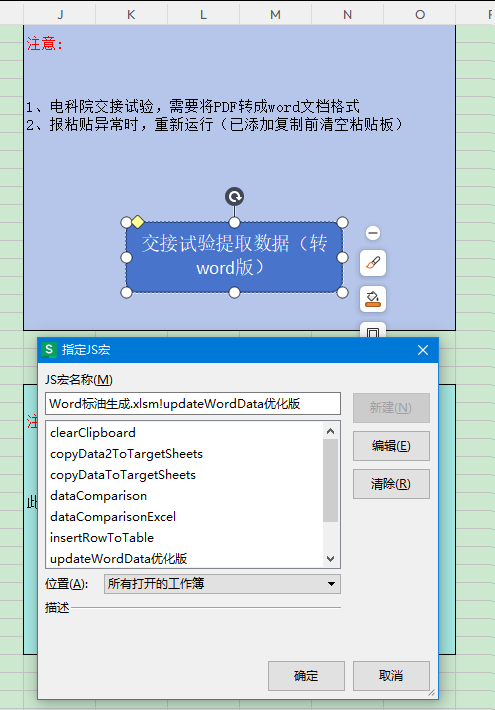
在空表格搞个按钮链接Js宏,每次使用点击按钮
二.准备一些通用函数
1.文件选择器
function Folder_selectFolder(title) {
	    // 示例调用:
	    // const savePath = Folder_selectFolder("选择存储文件夹");
	    try {
	        // 创建文件夹选择对话框对象(4表示msoFileDialogFolderPicker类型,即文件夹选择器)
	        const fd = Application.FileDialog(4);

	        // 设置对话框标题,提示用户当前需要选择的文件夹用途
	        fd.Title = title;

	        // 禁用多选功能,只允许选择单个文件夹
	        fd.AllowMultiSelect = false;

	        // 显示对话框,若用户点击"确定"(返回值为-1)则返回选中的文件夹路径,否则返回null
	        return fd.Show() === -1 ? fd.SelectedItems(1) : null;

	    } catch (e) {
	        // 捕获并包装错误信息,明确提示文件夹选择失败
	        throw new Error(`文件夹选择失败:${e.message}`);
	    }
    }
2.返回目标文件夹下所有的文件路径
	function Folder_getAllFiles(folderPath) {
	    // 检查根路径是否存在
	    if (Dir(folderPath, 16) === "") {
	        console.error("根路径不存在:", folderPath);
	        return []; // 返回空数组而非undefined
	    }

	    const fileArray = [];
	    walk(folderPath, fileArray);
	    return fileArray;

	    // 递归遍历文件夹
	    function walk(path, array) {
	        try {
	            // 规范化路径(确保以\结尾)
	            if (!path.endsWith('\\')) {
	                path += '\\';
	            }

	            let fileName = Dir(path, 16); // 先查找子文件夹
	            const subFolders = [];

	            // 遍历当前层级的所有项
	            while (fileName) {
	                if (fileName !== '.' && fileName !== '..') {
	                    const fullPath = path + fileName;
	                    const attributes = GetAttr(fullPath);

	                    // 正确判断文件夹:使用位运算检查属性是否包含文件夹标志(16)
	                    if ((attributes & 16) === 16) {
	                        subFolders.push(fullPath);
	                        //console.log("找到子文件夹:", fullPath);
	                    } else {
	                        array.push(fullPath);
	                        //console.log("找到文件:", fullPath);
	                    }
	                }
	                fileName = Dir(); // 获取下一项
	            }

	            // 递归处理子文件夹
	            for (const folder of subFolders) {
	                walk(folder + '\\', array);
	            }

	        } catch (error) {
	            console.error("遍历出错:", error.message, "路径:", path);
	            // 继续执行而非中断整个遍历
	        }
	    }
	}
3.获取表格最后一行或最后一列
function Excel_getRealLastRowAndCol(ws1, number) {
	    if (!ws1) {
	        throw new Error("未传入有效的工作表对象");
	    }

	    //UsedRange属性:快速定位工作表中 "有实际数据的范围"
	    //这个属性有个缺点,就算是空表lastRow和lastCol不会是0,而是1
	    const usedRange = ws1.UsedRange;
	    const maxColInUsed = usedRange.Columns.Count;
	    const maxRowInUsed = usedRange.Rows.Count;

	    let lastRow = 0;
	    let lastCol = 0;

	    // 计算最后一行
	    for (let col = 1; col <= maxColInUsed; col++) {
	        const colLastRow = ws1.Cells(ws1.Rows.Count, col).End(xlUp).Row;
	        if (colLastRow > lastRow) {
	            lastRow = colLastRow;
	        }
	    }
	    // 计算最后一列
	    for (let row = 1; row <= maxRowInUsed; row++) {
	        const rowLastCol = ws1.Cells(row, ws1.Columns.Count).End(xlToLeft).Column;
	        if (rowLastCol > lastCol) {
	            lastCol = rowLastCol;
	        }
	    }

	     return number === 1 ? lastRow : lastCol;
	}
4.清空粘贴板,避免残留
function clearClipboard() {
    try {
        // 方法1:通过空字符串覆盖剪贴板(简单通用)
        const tempData = "";
        // 创建临时文本范围(利用Office的剪贴板接口)
        const tempRange = Application.ActiveSheet.Range("HC1");
        tempRange.Value2 = tempData;
        tempRange.Copy(); // 复制空内容,覆盖剪贴板
        tempRange.ClearContents(); // 清除临时单元格内容

        //console.log("剪贴板已清空");
        return true;
    } catch (e) {
        console.log("清空剪贴板失败(不影响后续操作):", e.message);
        return false;
    }
}
5.预处理地点信息,分割为所属地市、变电站、装置名称
function splitLocationInfo(location) {
    // 初始化结果对象,空值置空更符合业务实际
    const locationInfo = {
        所属地市: "",
        变电站: "",
        装置名称: "",
        运维班组: ""
    };

    if (!location) {
        console.log("地点信息为空,返回空值");
        return locationInfo;
    }

    // 定义城市和特高压变电站类型数组(按你的业务需求维护即可)
    const cityTypes = ["泰州", "南通", "镇江", "徐州", "苏州", "无锡", "盐城", "常州", "连云港", "南京", "扬州", "淮安", "宿迁"];
    const UHVTypes = ["东吴", "盱眙", "±圌山", "少游", "政平", "姑苏", "泰州", "淮安", "苏州"];

    try {
        // 1. 特高压处理(含站字,匹配特高压类型)
        if (location.includes('站')) {
            const matchedUHV = UHVTypes.find(uhv => location.includes(uhv));
            if (matchedUHV) {
                const parts = location.split('站');
                locationInfo.所属地市 = "超高压分公司";
                locationInfo.运维班组 = "特高压交直流运检中心";
                locationInfo.变电站 = parts[0] + '站';
                // 合并所有后续部分,保留完整装置名
                const equipment = parts.slice(1).join('站').trim();
                locationInfo.装置名称 = equipment || locationInfo.变电站;
            } else {
                console.log(`未匹配特高压类型:${location},所有字段赋值原始值`);
                Object.keys(locationInfo).forEach(key => locationInfo[key] = location);
            }
        }
        // 2. 500/220kV地市变电站处理(无站字,匹配地市)
        else {
            const matchedCity = cityTypes.find(city => location.includes(city));
            if (matchedCity) {
                const parts = location.split('变');
                locationInfo.所属地市 = `国网${matchedCity}供电公司`;
                locationInfo.运维班组 = "设备管理部";
                locationInfo.变电站 = parts[0] + '变';
                // 合并所有后续部分,保留完整装置名
                const equipment = parts.slice(1).join('变').trim();
                locationInfo.装置名称 = equipment || locationInfo.变电站;
            } else {
                console.log(`未匹配地市:${location},所有字段赋值原始值`);
                Object.keys(locationInfo).forEach(key => locationInfo[key] = location);
            }
        }

        return locationInfo;
    } catch (error) {
        console.log("分割地点信息出错:", error.message);
        Object.keys(locationInfo).forEach(key => locationInfo[key] = location);
        return locationInfo;
    }
}
三.批量处理word文档,提取数据至表格
function updateWordData优化版() {
    const savePath = Folder_selectFolder("选择存储文件夹");
    if (!savePath) return;

    let wordApp = CreateObject("kwps.application") || CreateObject("ket.application");
    wordApp.Visible = false;

    const fileArray = Folder_getAllFiles(savePath);
    if (fileArray.length === 0) {
        throw new Error("目标文件夹中未找到任何文件");
    }

    const newWork = Workbooks.Add();
    const ws = newWork.Worksheets;
    const ws1 = ws.Add();
    ws1.Name = "标油数据";

    // 设计首行字段
    ws1.Range("A1:V1").Value2 = [
        "所属地市", "运维班组", "变电站", "装置名称", "环境温度",
        "相对湿度", "大气压力", "浓度", "日期", "数据组数",
        "离线在线数据", "氢气 H2", "一氧化碳 CO", "二氧化碳 CO2",
        "甲烷 CH4", "乙烯 C2H4", "乙烷 C2H6", "乙炔 C2H2", "总烃TVOC", "试验类型", "装置厂家", "装置型号"
    ];

    // 辅助函数:将 Word 表格转为二维数组(自动展开合并单元格)
    function readWordTableAsArray(table) {
        var rows = table.Rows.Count;
        var cols = table.Columns.Count;
        var arr = Array(rows);
        for (var r = 0; r < rows; r++) {
            arr[r] = Array(cols);
            for (var c = 0; c < cols; c++) arr[r][c] = "";
        }
        var cells = table.Range.Cells;
        for (var i = 1; i <= cells.Count; i++) {
            var cell = cells.Item(i);
            var rowIdx = cell.RowIndex;
            var colIdx = cell.ColumnIndex;
            var text = cell.Range.Text.replace(/\u0007/g, '').trim();
            if (cell.MergeCells) {
                var mergeArea = cell.MergeArea;
                var minRow = rowIdx, maxRow = rowIdx + mergeArea.Rows.Count - 1;
                var minCol = colIdx, maxCol = colIdx + mergeArea.Columns.Count - 1;
                for (var r = minRow; r <= maxRow; r++) {
                    for (var c = minCol; c <= maxCol; c++) {
                        if (r - 1 < rows && c - 1 < cols) arr[r - 1][c - 1] = text;
                    }
                }
            } else {
                if (rowIdx - 1 < rows && colIdx - 1 < cols) arr[rowIdx - 1][colIdx - 1] = text;
            }
        }
        return arr;
    }

    for (let i = 0; i < fileArray.length; i++) {
        const filePath = fileArray[i];
        const doc = wordApp.Documents.Open(filePath);

        // 检查表格是否存在
        if (doc.Tables.Count === 0) {
            console.log(`警告:第 ${i + 1} 个文件:${filePath} 中没有表格,已跳过`);
            //doc.Close(false);
            continue;
        }

		// 动态查找符合条件的表格
		let table1 = null;
		let table2 = null;

		// 先查找浓度表格(第二个表格)
		for (let t = 1; t <= doc.Tables.Count; t++) {
		    let tbl = doc.Tables.Item(t);
		    let tblData = readWordTableAsArray(tbl);
		    let hasLow = false, hasMidLow = false, hasMid = false;
		    for (let r = 0; r < tblData.length; r++) {
		        for (let c = 0; c < tblData[r].length; c++) {
		            let val = tblData[r][c];
		            if (val === "低 浓 度") hasLow = true;
		            if (val === "中 低 浓 度") hasMidLow = true;
		            if (val === "中 浓 度") hasMid = true;
		        }
		    }
		    if (hasLow && hasMidLow && hasMid) {
		        table2 = tbl;
		        break;
		    }
		}

		// 再查找元数据表格(包含地点、日期、供应商)
		for (let t = 1; t <= doc.Tables.Count; t++) {
		    // 跳过已经确定为 table2 的表格
		    if (table2 && doc.Tables.Item(t) === table2) continue;
		    let tbl = doc.Tables.Item(t);
		    let tblData = readWordTableAsArray(tbl);
		    let hasLocation = false, hasDate = false, hasSupplier = false;
		    for (let r = 0; r < tblData.length; r++) {
		        for (let c = 0; c < tblData[r].length; c++) {
		            let val = tblData[r][c];
		            if (val.includes("地点")) hasLocation = true;
		            if (val.includes("日期")) hasDate = true;
		            if (val.includes("供应商")) hasSupplier = true;
		        }
		    }
		    if (hasLocation && hasDate && hasSupplier) {
		        table1 = tbl;
		        break;
		    }
		}

		// 检查是否找到所需表格
		if (!table1) {
		    console.log(`警告:第 ${i+1} 个文件:${filePath} 未找到包含地点、日期、供应商的表格,已跳过`);
		    //doc.Close(false);
		    continue;
		}
		if (!table2) {
		    console.log(`警告:第 ${i+1} 个文件:${filePath} 未找到包含三个浓度级别的表格,已跳过`);
		    //doc.Close(false);
		    continue;
		}


        // ----- 处理第一个表格(元数据) -----
        let bYLastRow = Excel_getRealLastRowAndCol(ws1, 1);
        let bYLastCol = Excel_getRealLastRowAndCol(ws1, 2);
        let levStartRow = bYLastRow + 1;
        let levEndRow = bYLastRow + 9;
        let levRange = ws1.Range(ws1.Cells(levStartRow, 1), ws1.Cells(levEndRow, bYLastCol));

        // 合并单元格及样式设置
        try {
            const columnsToMerge = [1, 2, 3, 4, 5, 6, 7, 20, 21, 22];
            for (let j = 0; j < columnsToMerge.length; j++) {
                const col = columnsToMerge[j];
                const colRange = ws1.Range(ws1.Cells(levStartRow, col), ws1.Cells(levEndRow, col));
                colRange.Merge();
            }
            const hCol = 8;
            ws1.Range(ws1.Cells(levStartRow, hCol), ws1.Cells(levStartRow + 2, hCol)).Merge();
            ws1.Range(ws1.Cells(levStartRow + 3, hCol), ws1.Cells(levStartRow + 5, hCol)).Merge();
            ws1.Range(ws1.Cells(levStartRow + 6, hCol), ws1.Cells(levEndRow, hCol)).Merge();
        } catch (e) {
            console.log("单元格合并失败");
        }
        levRange.HorizontalAlignment = -4108;
        levRange.VerticalAlignment = -4108;
        levRange.Borders.LineStyle = 1;
        levRange.Borders.Weight = 2;

        // 读取 table1 内容并提取信息
        const result = {
            日期: null, 地点: null, 环境温度: null,
            相对湿度: null, 大气压力: null, 供应商: null, 规格型号: null
        };
        var data1 = readWordTableAsArray(table1);
        var rows1 = data1.length;
        var cols1 = rows1 > 0 ? data1[0].length : 0;
        for (var row = 0; row < rows1; row++) {
            for (var col = 0; col < cols1; col++) {
                var cellValue = data1[row][col];
                // 提取日期、地点、供应商
                if (cellValue.includes("日期") || cellValue.includes("地点") || cellValue.includes("供应商")|| cellValue.includes("规格型号")) {
                    let key = "";
                    if (cellValue.includes("日期")) key = "日期";
                    else if (cellValue.includes("地点")) key = "地点";
                    else if (cellValue.includes("供应商")) key = "供应商";
                    else if (cellValue.includes("规格型号")) key = "规格型号";
                    const rightCellValue = (col + 1 < cols1) ? data1[row][col + 1] : "";
                    if (result[key] === null) result[key] = rightCellValue;
                }
                // 提取环境温度、相对湿度、大气压力
                if (cellValue.includes("环境温度") || cellValue.includes("相对湿度") || cellValue.includes("大气压力")) {
                    const tempMatch = cellValue.match(/环境温度:(\d+\.?\d*)/);
                    if (tempMatch && result.环境温度 === null) result.环境温度 = Number(tempMatch[1]);
                    const humidityMatch = cellValue.match(/相对湿度:(\d+\.?\d*)/);
                    if (humidityMatch && result.相对湿度 === null) result.相对湿度 = Number(humidityMatch[1]);
                    const pressureMatch = cellValue.match(/大气压力:(\d+\.?\d*)/);
                    if (pressureMatch && result.大气压力 === null) result.大气压力 = Number(pressureMatch[1]);
                }
            }
        }

        // 写入基本信息
        const locationDetails = splitLocationInfo(result.地点);
        levRange.Cells(1, 1).Value2 = locationDetails.所属地市;
        levRange.Cells(1, 2).Value2 = locationDetails.运维班组;
        levRange.Cells(1, 3).Value2 = locationDetails.变电站;
        levRange.Cells(1, 4).Value2 = locationDetails.装置名称;
        levRange.Cells(1, 5).Value2 = result.环境温度;
        levRange.Cells(1, 6).Value2 = result.相对湿度;
        levRange.Cells(1, 7).Value2 = result.大气压力;
        levRange.Cells(1, 8).Value2 = "低浓度";
        levRange.Cells(4, 8).Value2 = "中低浓度";
        levRange.Cells(7, 8).Value2 = "中浓度";
        levRange.Cells(1, 20).Value2 = "交接试验";
        levRange.Cells(1, 21).Value2 = result.供应商;
        levRange.Cells(1, 22).Value2 = result.规格型号;
        levRange.Cells(3, 10).Value2 = 1;
        levRange.Cells(6, 10).Value2 = 1;
        levRange.Cells(9, 10).Value2 = 1;
        levRange.Cells(1, 11).Value2 = "离线数据-标定前";
        levRange.Cells(2, 11).Value2 = "离线数据-标定后";
        levRange.Cells(3, 11).Value2 = "在线数据";
        levRange.Cells(4, 11).Value2 = "离线数据-标定前";
        levRange.Cells(5, 11).Value2 = "离线数据-标定后";
        levRange.Cells(6, 11).Value2 = "在线数据";
        levRange.Cells(7, 11).Value2 = "离线数据-标定前";
        levRange.Cells(8, 11).Value2 = "离线数据-标定后";
        levRange.Cells(9, 11).Value2 = "在线数据";

        // 格式化日期
        let dateVal = result.日期;
        if (dateVal && dateVal.includes("-")) {
            const dateValArr = dateVal.split('-');
            levRange.Cells(3, 9).Value2 = (dateValArr[0] || dateVal).trim() + " 9:00:00";
            levRange.Cells(6, 9).Value2 = (dateValArr[0] || dateVal).trim() + " 11:00:00";
            levRange.Cells(9, 9).Value2 = (dateValArr[1] || dateVal).trim() + " 9:00:00";
        } else if (dateVal) {
            levRange.Cells(3, 9).Value2 = dateVal.trim() + " 9:00:00";
            levRange.Cells(6, 9).Value2 = dateVal.trim() + " 11:00:00";
            levRange.Cells(9, 9).Value2 = dateVal.trim() + " 14:00:00";
        }

        // ----- 处理第二个表格(浓度数据) -----
        var data2 = readWordTableAsArray(table2);
        var rows2 = data2.length;
        var cols2 = rows2 > 0 ? data2[0].length : 0;
        var arrayAll = [];
        var levels = ["低 浓 度", "中 低 浓 度", "中 浓 度"];

        for (var l = 0; l < levels.length; l++) {
            var levelName = levels[l];
            var foundRow = -1;
            for (var r = 0; r < data2.length; r++) {
                if (data2[r][1] === levelName) {
                    foundRow = r;
                    break;
                }
            }
            if (foundRow === -1) {
                console.log("未找到浓度级别:" + levelName);
                arrayAll.push([], []);
                continue;
            }
            var offlineValues = [];
            var onlineValues = [];
            var startCol = 3;
            var numCols = 8;
            for (var c = 0; c < numCols; c++) {
                var colIdx = startCol + c;
                offlineValues.push(colIdx < data2[foundRow].length ? data2[foundRow][colIdx] : "");
                onlineValues.push((foundRow + 1 < data2.length && colIdx < data2[foundRow + 1].length) ? data2[foundRow + 1][colIdx] : "");
            }
            arrayAll.push(offlineValues, onlineValues);
        }

        // 填充气体数据到 levRange
        try {
            var fillMapping = [
                { arrIdx: 0, rows: [1, 2] },
                { arrIdx: 1, rows: [3] },
                { arrIdx: 2, rows: [4, 5] },
                { arrIdx: 3, rows: [6] },
                { arrIdx: 4, rows: [7, 8] },
                { arrIdx: 5, rows: [9] }
            ];
            for (var m = 0; m < fillMapping.length; m++) {
                var arr = arrayAll[fillMapping[m].arrIdx];
                var rows = fillMapping[m].rows;
                for (var rIdx = 0; rIdx < rows.length; rIdx++) {
                    var rowNum = rows[rIdx];
                    for (var col = 0; col < 8; col++) {
                        levRange.Cells(rowNum, 12 + col).Value2 = arr[col];
                    }
                }
            }
        } catch (e) {
            console.log(`警告:第 ${i + 1} 个文件:${filePath} 数据缺失,已跳过`);
            //doc.Close(false);
            continue;
        }

        //doc.Close(false);
    }

    //wordApp.Quit();
}