Icevue:为 Apache Iceberg REST Catalog 打造一个轻量、只读的可视化入口
Apache Iceberg 已经成为数据湖和 Lakehouse 场景中广泛使用的开放表格式。它提供了 Schema Evolution、Hidden Partitioning、Snapshot、Time Travel、分支与标签等丰富能力,但这些能力背后的元数据信息通常散落在 Catalog、metadata JSON、manifest 和对象存储中。
当我们只是想回答一些很基础的问题时,往往仍然需要打开 SQL 引擎、执行命令,甚至直接阅读元数据文件:
- 当前 Catalog 中有哪些 Namespace 和 Iceberg 表?
- 一张表现在使用什么 Schema,历史上发生过哪些变化?
- 表采用了什么分区规则,当前有哪些分区?
- 最近一次 Snapshot 是 Append、Delete、Overwrite,还是文件合并产生的 Replace?
- 一次 Compaction 重写了多少输入文件,又生成了多少输出文件?
- 表上配置了哪些 Iceberg Properties、Sort Order、Branch 和 Tag?
这正是 Icevue 出现的原因。
Icevue 是一个面向 Apache Iceberg REST Catalog 的开源、轻量、只读 Web UI。它直接使用 PyIceberg 访问 Catalog 和 Iceberg 元数据,不依赖 Spark、Flink、Trino 等计算引擎,目标是为平台工程师、数据工程师和数据湖运维人员提供一个简单、统一、低风险的元数据查看入口。
当前版本:
v0.1.0
为什么要做 Icevue
1. Iceberg 元数据丰富,但缺少一个聚合视图
Iceberg 表并不只是一个 Schema 和一组数据文件。它还包含 Snapshot 历史、Partition Spec、Sort Order、Properties、References、Manifest 等大量元数据。
这些信息可以通过不同 API、系统表或元数据文件获取,但日常排查时,用户真正需要的是一个可以快速浏览、比较和定位问题的统一界面。
2. 查看元数据不应该依赖重型计算引擎
如果只是为了确认表的分区规则或查看最近几次 Snapshot,启动一个 Spark Session 或连接一套 SQL 引擎显得过于沉重。它增加了部署、权限、资源和运维成本,也让一个原本简单的元数据查看动作变得复杂。
Icevue 直接通过 PyIceberg 和 REST Catalog 工作,不负责执行 SQL,也不会扫描表数据。
3. REST Catalog 的使用体验仍然偏 API 化
Iceberg REST Catalog 提供了标准化的 Catalog 访问协议,但用户通常仍然需要通过代码、CLI 或其他引擎与其交互。随着 Amazon S3 Tables、AWS Glue Data Catalog 等服务提供 Iceberg REST 接口,一个能够管理多个连接并快速切换的 UI 会更有价值。
4. 元数据排查需要一个明确的只读边界
生产环境中的 Iceberg 表往往非常重要。为了避免误操作,Icevue 第一版有意不提供建表、改表、写数据、回滚 Snapshot 或修改 Properties 的能力。
Icevue 对 Iceberg Catalog 和表始终只读。页面中唯一会被写入的是 Icevue 自己的本地 Catalog 连接配置文件。
Icevue 是什么
Icevue 是一个单机部署的 Web 应用,由 React 前端和 FastAPI 后端组成。后端通过 PyIceberg 创建 Catalog Client,将 Iceberg 元数据转换为稳定的 JSON API,再由前端以适合浏览和排查的方式展示。
它当前提供以下能力:
- 管理和切换多个 Iceberg REST Catalog
- 浏览 Namespace、Database 和 Table
- 搜索 Namespace 与表名
- 查看表的 Overview 和当前状态
- 查看当前及历史 Schema
- 查看 Partition Spec 和分区列表
- 查看 Snapshot 历史及文件、记录变化
- 查看 Sort Order、Branch、Tag 和 Table Properties
- 支持通用 Iceberg REST Catalog
- 支持 Amazon S3 Tables REST Catalog
- 支持 AWS Glue Data Catalog 的 Iceberg REST Endpoint
- 提供内置 Demo Catalog,便于快速体验
- 支持 Docker 和 Docker Compose 单机部署
功能体验
1. Overview:快速理解一张表
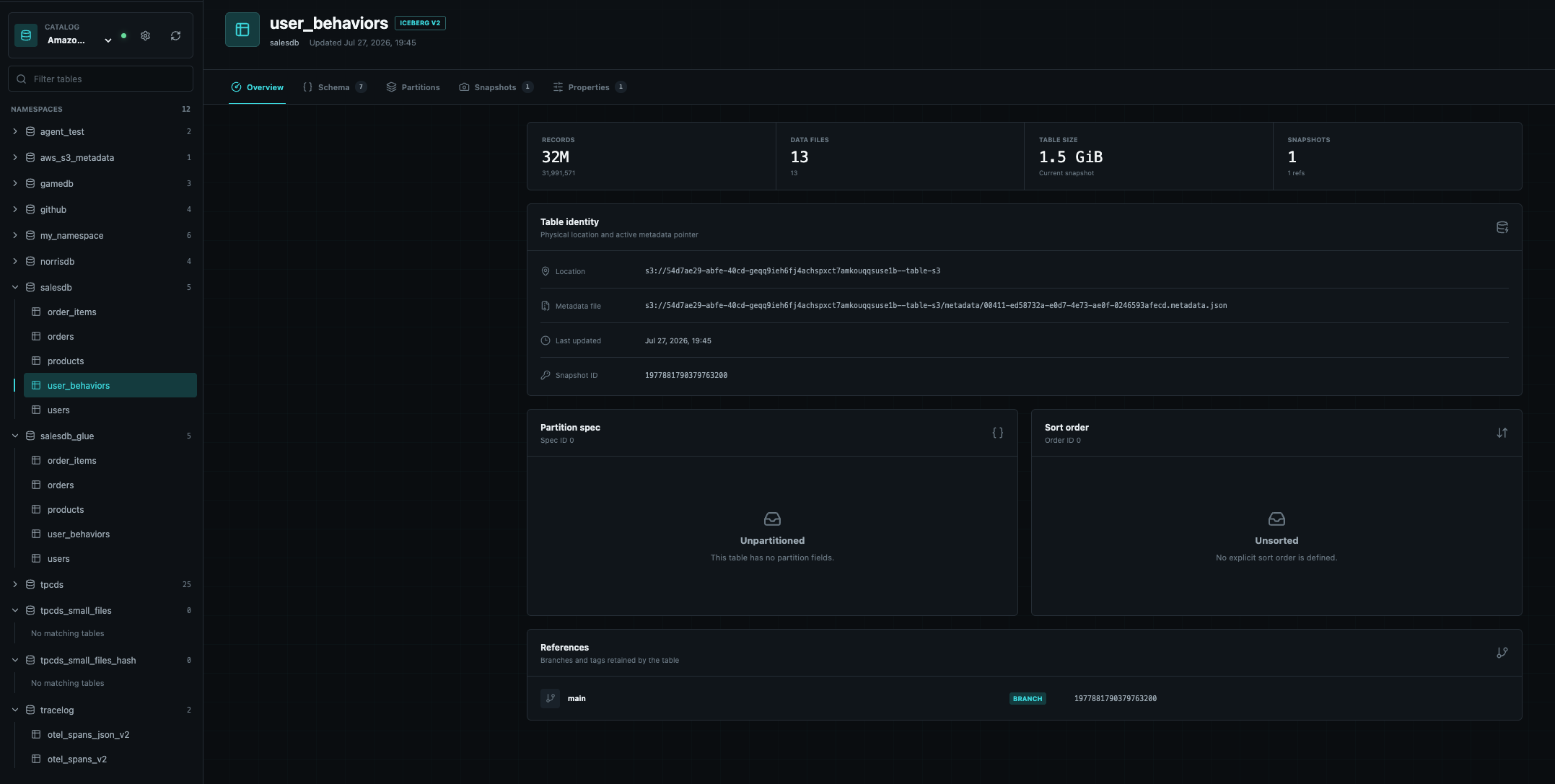
进入一张表后,Overview 页面集中展示当前记录数、数据文件数量、表大小、Snapshot 数量、物理位置、metadata 文件、当前 Snapshot ID、Partition Spec、Sort Order 和 References。
这个页面适合作为排查入口:用户不需要先理解 Iceberg 元数据文件的结构,就能快速建立对当前表状态的整体认识。
2. 多 Catalog 连接管理
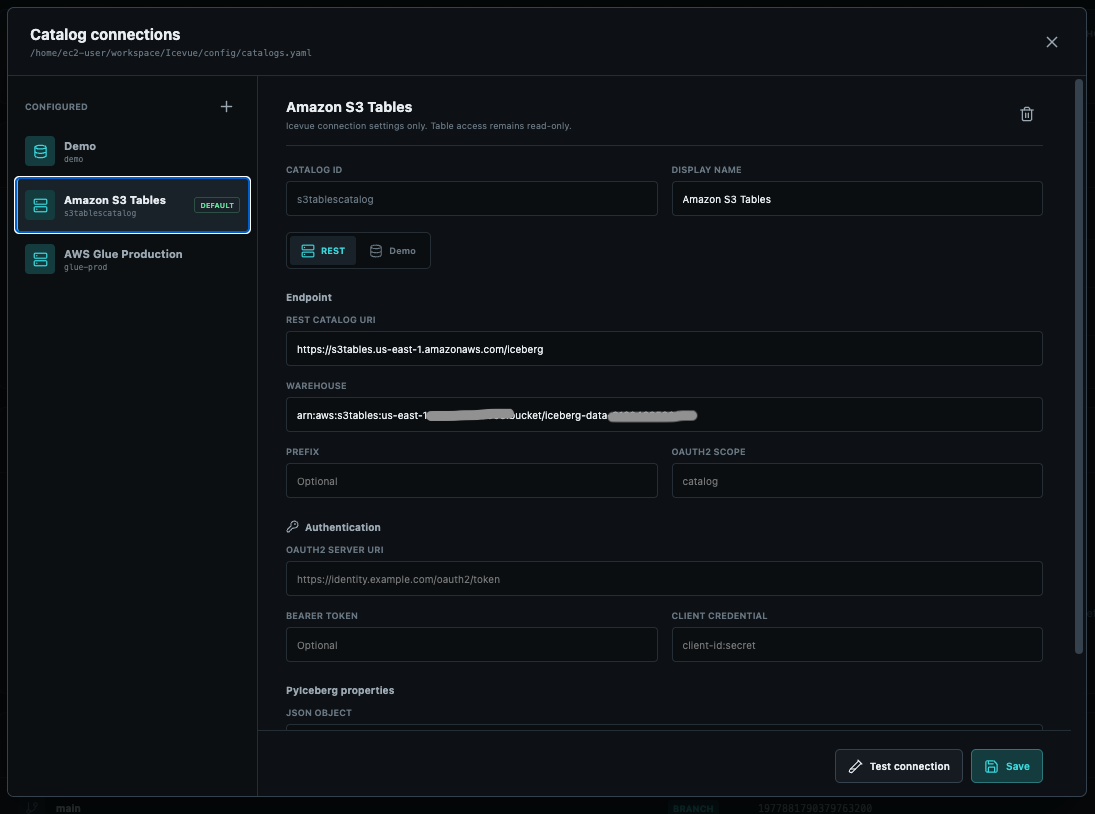
Icevue 支持在同一个实例中保存多个 Catalog 连接。用户可以在页面中新增、编辑、测试、删除和切换 Catalog,也可以指定默认连接。
配置最终保存在本地 YAML 文件中。Token 和 Client Credential 不会通过配置查询 API 返回;在 AWS 环境中,更推荐使用 EC2 Instance Profile、ECS Task Role 或 EKS Workload Identity,而不是长期 Access Key。
3. Schema:查看当前结构和历史版本
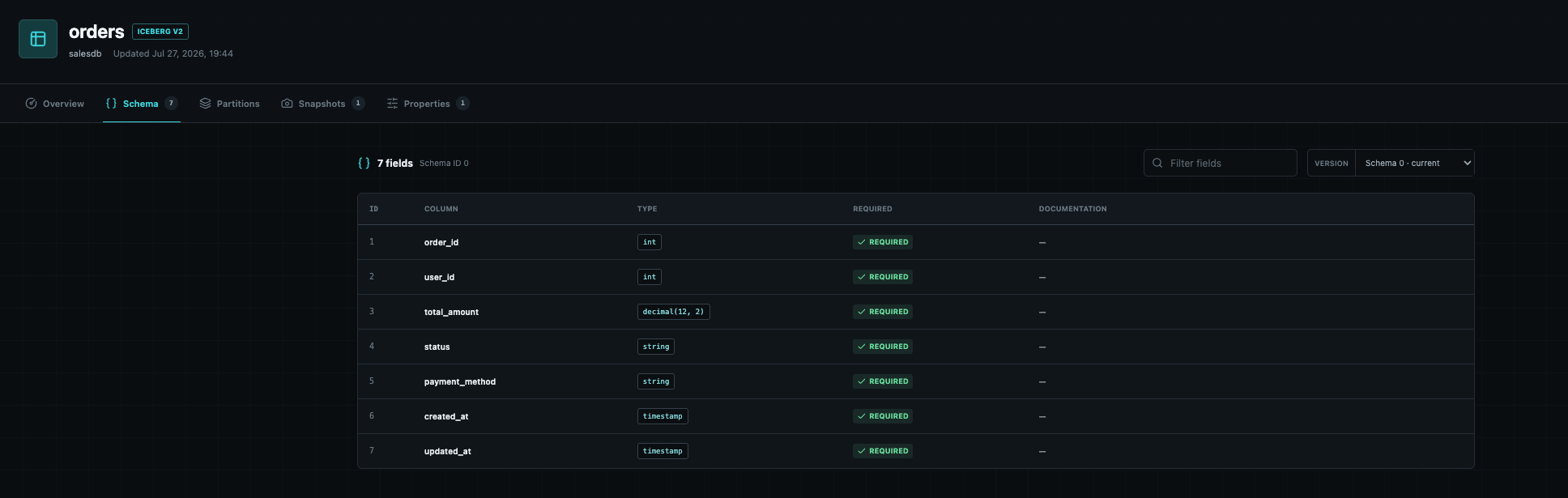
Schema 页面展示字段 ID、字段名、数据类型、是否必填以及字段说明,并保留 Iceberg Schema 的历史版本。
字段 ID 对 Iceberg 很重要。即使列发生重命名,Iceberg 仍然通过字段 ID 识别列。相比只查看 SQL DDL,这个页面能够更准确地帮助用户理解 Schema Evolution。
4. Partitions:不扫描表数据也能查看分区
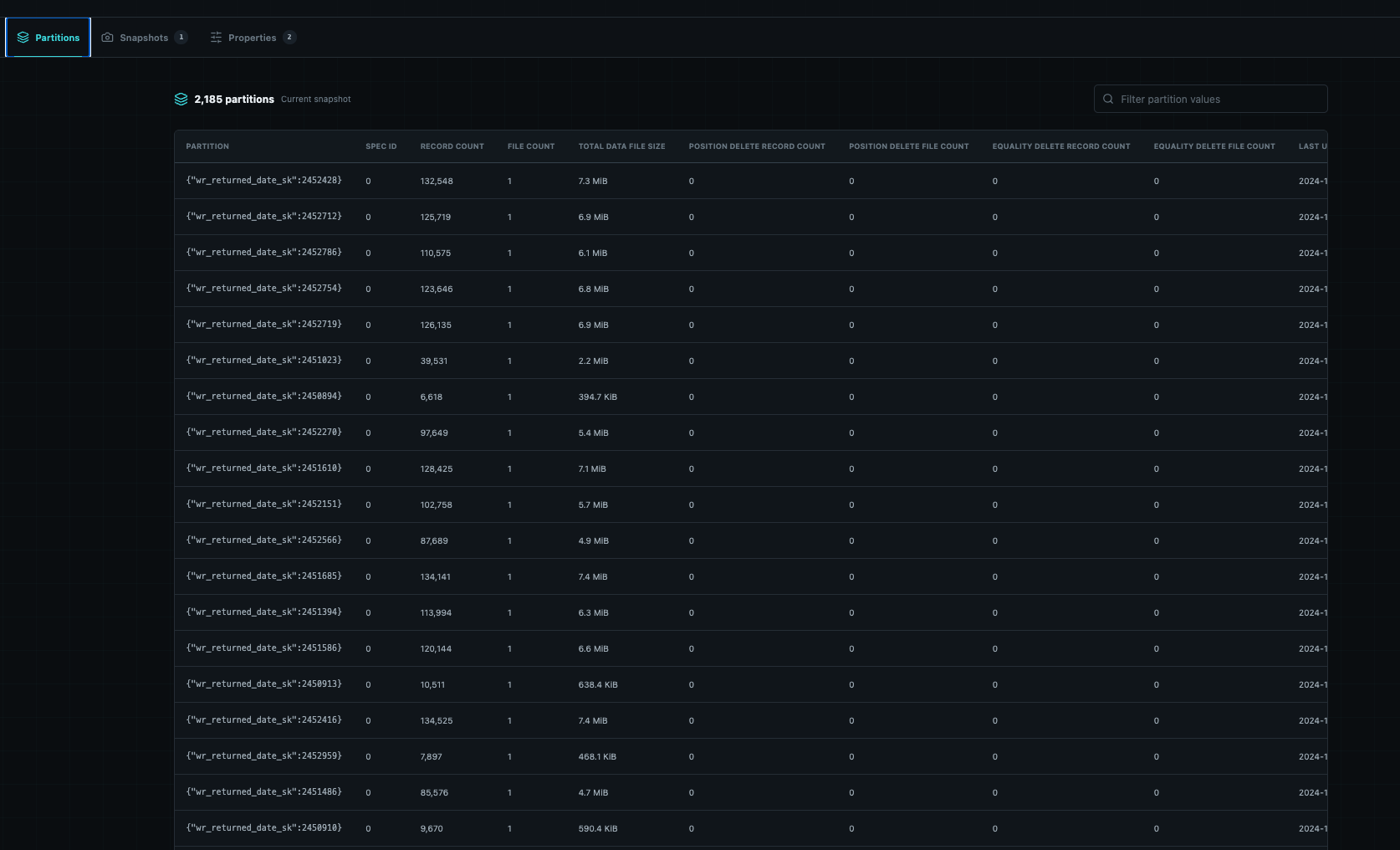
Partitions 页面通过 PyIceberg 的 table.inspect.partitions() 获取分区信息。这个过程读取 Iceberg metadata 和 manifest,而不是扫描业务数据文件。
页面支持分区搜索和分页,并展示每个分区对应的记录数、文件数、数据大小等可用统计信息。这对以下场景很有帮助:
- 确认新分区是否已经写入
- 检查分区值是否符合预期
- 发现文件数异常多的分区
- 初步判断是否存在小文件问题
- 检查 Hidden Partitioning 的实际结果
需要注意的是,当前版本会先读取完整的 Partition Inspection 结果,再在 API 层进行搜索和分页。对于拥有海量分区或 Manifest 的表,首次加载仍然可能产生一定的元数据读取开销。后续版本可以进一步加入缓存和流式处理。
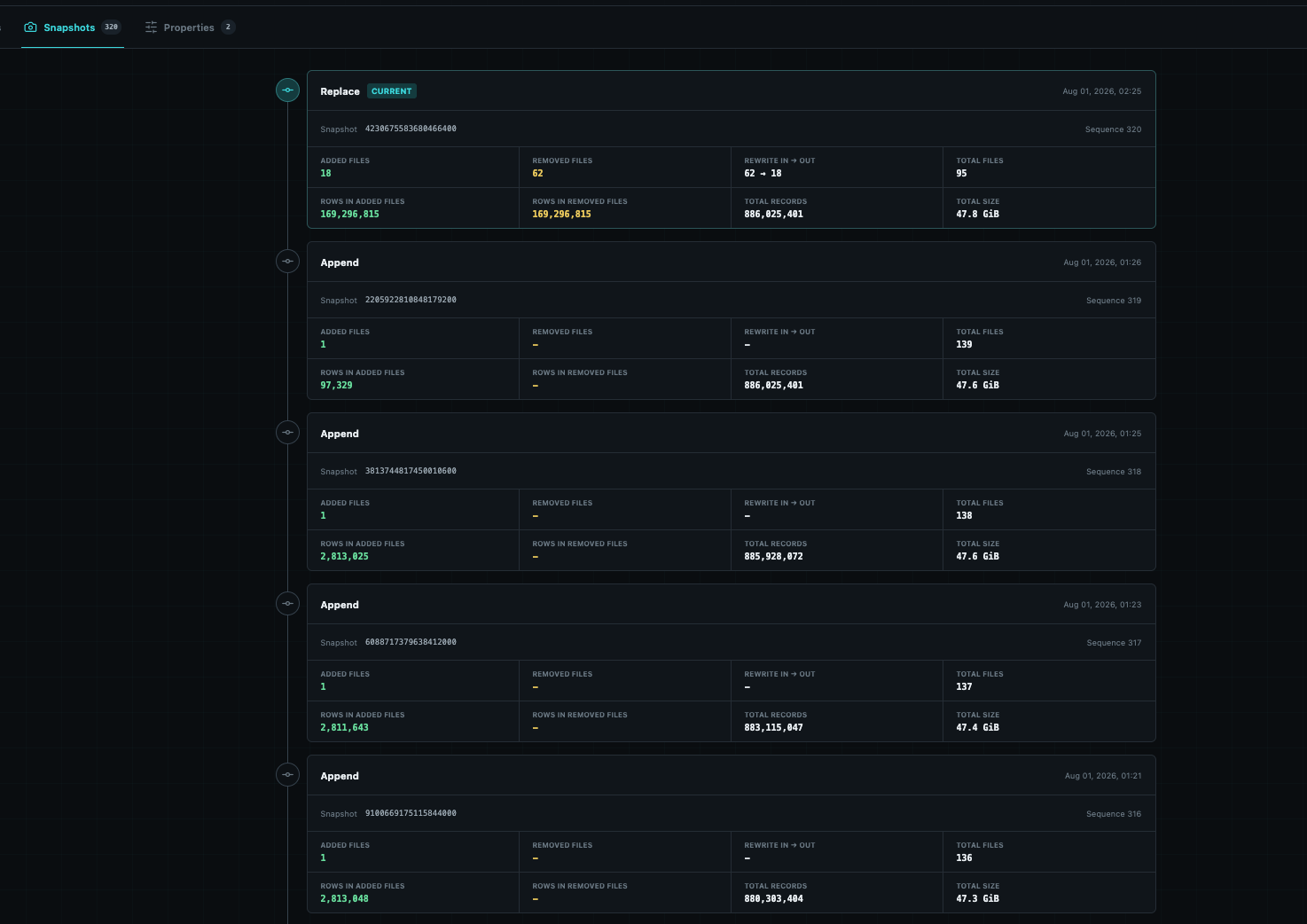
5. Snapshots:看懂一次写入或 Compaction 做了什么
Snapshots 页面按时间展示表的提交历史,并显示 Operation、Snapshot ID、Sequence Number、当前 Snapshot 状态,以及每次提交带来的文件和记录变化。
当前页面重点展示:
Added files:本次 Snapshot 新增的数据文件Removed files:本次 Snapshot 从表中移除的数据文件Rewrite in → out:对于replace操作,展示重写输入文件数和输出文件数Total files:提交完成后的数据文件总数Rows in added files:新增数据文件中包含的记录数Rows in removed files:被移除数据文件中包含的记录数Total records:提交后的记录总数Total size:提交后的文件总大小
这里有一个容易误解的细节:added-records 和 deleted-records 并不一定代表业务层面的新增行和删除行。对于 Compaction,旧文件中的记录会被完整重写到新文件,因此 Rows in added files 和 Rows in removed files 可能是两个完全相同的非零值。此时 57 → 8 表示 57 个输入文件被合并为 8 个输出文件,但表中的逻辑数据并没有因此增加或减少。
6. Properties:查看影响表行为的配置
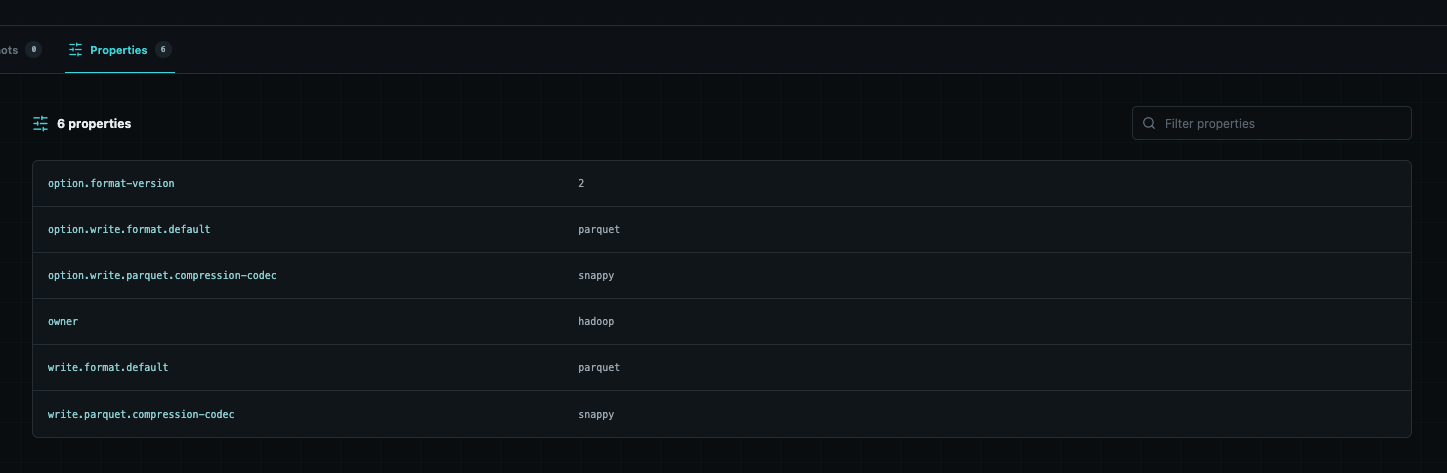
Iceberg Table Properties 会影响文件格式、压缩算法、目标文件大小、Snapshot 保留策略等行为。Properties 页面将这些键值集中展示,并提供搜索能力。
相比直接打开 metadata JSON,这种方式更适合快速确认某项配置是否已经生效。
技术架构
Icevue 有意保持简单,不引入数据库或分布式计算引擎。
#mermaid-svg-glwLwRb7FA21nDh6{font-family:"trebuchet ms",verdana,arial,sans-serif;font-size:16px;fill:#333;}@keyframes edge-animation-frame{from{stroke-dashoffset:0;}}@keyframes dash{to{stroke-dashoffset:0;}}#mermaid-svg-glwLwRb7FA21nDh6 .edge-animation-slow{stroke-dasharray:9,5!important;stroke-dashoffset:900;animation:dash 50s linear infinite;stroke-linecap:round;}#mermaid-svg-glwLwRb7FA21nDh6 .edge-animation-fast{stroke-dasharray:9,5!important;stroke-dashoffset:900;animation:dash 20s linear infinite;stroke-linecap:round;}#mermaid-svg-glwLwRb7FA21nDh6 .error-icon{fill:#552222;}#mermaid-svg-glwLwRb7FA21nDh6 .error-text{fill:#552222;stroke:#552222;}#mermaid-svg-glwLwRb7FA21nDh6 .edge-thickness-normal{stroke-width:1px;}#mermaid-svg-glwLwRb7FA21nDh6 .edge-thickness-thick{stroke-width:3.5px;}#mermaid-svg-glwLwRb7FA21nDh6 .edge-pattern-solid{stroke-dasharray:0;}#mermaid-svg-glwLwRb7FA21nDh6 .edge-thickness-invisible{stroke-width:0;fill:none;}#mermaid-svg-glwLwRb7FA21nDh6 .edge-pattern-dashed{stroke-dasharray:3;}#mermaid-svg-glwLwRb7FA21nDh6 .edge-pattern-dotted{stroke-dasharray:2;}#mermaid-svg-glwLwRb7FA21nDh6 .marker{fill:#333333;stroke:#333333;}#mermaid-svg-glwLwRb7FA21nDh6 .marker.cross{stroke:#333333;}#mermaid-svg-glwLwRb7FA21nDh6 svg{font-family:"trebuchet ms",verdana,arial,sans-serif;font-size:16px;}#mermaid-svg-glwLwRb7FA21nDh6 p{margin:0;}#mermaid-svg-glwLwRb7FA21nDh6 .label{font-family:"trebuchet ms",verdana,arial,sans-serif;color:#333;}#mermaid-svg-glwLwRb7FA21nDh6 .cluster-label text{fill:#333;}#mermaid-svg-glwLwRb7FA21nDh6 .cluster-label span{color:#333;}#mermaid-svg-glwLwRb7FA21nDh6 .cluster-label span p{background-color:transparent;}#mermaid-svg-glwLwRb7FA21nDh6 .label text,#mermaid-svg-glwLwRb7FA21nDh6 span{fill:#333;color:#333;}#mermaid-svg-glwLwRb7FA21nDh6 .node rect,#mermaid-svg-glwLwRb7FA21nDh6 .node circle,#mermaid-svg-glwLwRb7FA21nDh6 .node ellipse,#mermaid-svg-glwLwRb7FA21nDh6 .node polygon,#mermaid-svg-glwLwRb7FA21nDh6 .node path{fill:#ECECFF;stroke:#9370DB;stroke-width:1px;}#mermaid-svg-glwLwRb7FA21nDh6 .rough-node .label text,#mermaid-svg-glwLwRb7FA21nDh6 .node .label text,#mermaid-svg-glwLwRb7FA21nDh6 .image-shape .label,#mermaid-svg-glwLwRb7FA21nDh6 .icon-shape .label{text-anchor:middle;}#mermaid-svg-glwLwRb7FA21nDh6 .node .katex path{fill:#000;stroke:#000;stroke-width:1px;}#mermaid-svg-glwLwRb7FA21nDh6 .rough-node .label,#mermaid-svg-glwLwRb7FA21nDh6 .node .label,#mermaid-svg-glwLwRb7FA21nDh6 .image-shape .label,#mermaid-svg-glwLwRb7FA21nDh6 .icon-shape .label{text-align:center;}#mermaid-svg-glwLwRb7FA21nDh6 .node.clickable{cursor:pointer;}#mermaid-svg-glwLwRb7FA21nDh6 .root .anchor path{fill:#333333!important;stroke-width:0;stroke:#333333;}#mermaid-svg-glwLwRb7FA21nDh6 .arrowheadPath{fill:#333333;}#mermaid-svg-glwLwRb7FA21nDh6 .edgePath .path{stroke:#333333;stroke-width:2.0px;}#mermaid-svg-glwLwRb7FA21nDh6 .flowchart-link{stroke:#333333;fill:none;}#mermaid-svg-glwLwRb7FA21nDh6 .edgeLabel{background-color:rgba(232,232,232, 0.8);text-align:center;}#mermaid-svg-glwLwRb7FA21nDh6 .edgeLabel p{background-color:rgba(232,232,232, 0.8);}#mermaid-svg-glwLwRb7FA21nDh6 .edgeLabel rect{opacity:0.5;background-color:rgba(232,232,232, 0.8);fill:rgba(232,232,232, 0.8);}#mermaid-svg-glwLwRb7FA21nDh6 .labelBkg{background-color:rgba(232, 232, 232, 0.5);}#mermaid-svg-glwLwRb7FA21nDh6 .cluster rect{fill:#ffffde;stroke:#aaaa33;stroke-width:1px;}#mermaid-svg-glwLwRb7FA21nDh6 .cluster text{fill:#333;}#mermaid-svg-glwLwRb7FA21nDh6 .cluster span{color:#333;}#mermaid-svg-glwLwRb7FA21nDh6 div.mermaidTooltip{position:absolute;text-align:center;max-width:200px;padding:2px;font-family:"trebuchet ms",verdana,arial,sans-serif;font-size:12px;background:hsl(80, 100%, 96.2745098039%);border:1px solid #aaaa33;border-radius:2px;pointer-events:none;z-index:100;}#mermaid-svg-glwLwRb7FA21nDh6 .flowchartTitleText{text-anchor:middle;font-size:18px;fill:#333;}#mermaid-svg-glwLwRb7FA21nDh6 rect.text{fill:none;stroke-width:0;}#mermaid-svg-glwLwRb7FA21nDh6 .icon-shape,#mermaid-svg-glwLwRb7FA21nDh6 .image-shape{background-color:rgba(232,232,232, 0.8);text-align:center;}#mermaid-svg-glwLwRb7FA21nDh6 .icon-shape p,#mermaid-svg-glwLwRb7FA21nDh6 .image-shape p{background-color:rgba(232,232,232, 0.8);padding:2px;}#mermaid-svg-glwLwRb7FA21nDh6 .icon-shape .label rect,#mermaid-svg-glwLwRb7FA21nDh6 .image-shape .label rect{opacity:0.5;background-color:rgba(232,232,232, 0.8);fill:rgba(232,232,232, 0.8);}#mermaid-svg-glwLwRb7FA21nDh6 .label-icon{display:inline-block;height:1em;overflow:visible;vertical-align:-0.125em;}#mermaid-svg-glwLwRb7FA21nDh6 .node .label-icon path{fill:currentColor;stroke:revert;stroke-width:revert;}#mermaid-svg-glwLwRb7FA21nDh6 :root{--mermaid-font-family:"trebuchet ms",verdana,arial,sans-serif;} HTTP / JSON
Manage connections
REST Catalog protocol
Read metadata
Browser / React UI
FastAPI
Local catalogs.yaml
PyIceberg
Iceberg REST Catalog
Object Storage / Metadata / Manifests
前端
前端使用 React、TypeScript 和 Vite 构建,提供 Catalog 导航、表级 Tab、搜索、分页和响应式布局。生产构建产物由 FastAPI 直接提供,因此部署时只需要一个容器。
后端
FastAPI 后端负责:
- 读取和保存
catalogs.yaml - 创建并缓存 PyIceberg Catalog Client
- 隐藏 Token 和 Credential
- 将 PyIceberg 对象转换为稳定的 API Model
- 提供 Namespace、Table、Partition 等只读 API
- 托管前端静态资源和 OpenAPI 文档
为什么选择 PyIceberg
PyIceberg 足够轻量,并且能够直接理解 Iceberg 的 Schema、Snapshot、Manifest、Partition 和 Table Metadata。对于一个只读元数据浏览器,它比引入 Spark 或其他查询引擎更符合需求。
Icevue 不执行 SQL,也不读取业务数据内容。它只读取完成页面展示所需的 Catalog 和 Iceberg 元数据。
多种 REST Catalog
通用 Iceberg REST Catalog
通用 REST Catalog 只需要提供 URI、Warehouse,以及 Catalog 所要求的 Token、OAuth2 或其他 PyIceberg Properties。
Amazon S3 Tables
Amazon S3 Tables 使用 AWS SigV4:
yaml
id: s3tables
name: Amazon S3 Tables
type: rest
uri: https://s3tables.us-east-1.amazonaws.com/iceberg
warehouse: arn:aws:s3tables:us-east-1:123456789012:bucket/my-table-bucket
properties:
  rest.sigv4-enabled: "true"
  rest.signing-name: s3tables
  rest.signing-region: us-east-1
AWS Glue Data Catalog
AWS Glue Data Catalog 同样可以通过 Iceberg REST Endpoint 接入:
yaml
id: glue-prod
name: AWS Glue Production
type: rest
uri: https://glue.us-east-1.amazonaws.com/iceberg
warehouse: "123456789012"
properties:
  rest.sigv4-enabled: "true"
  rest.signing-name: glue
  rest.signing-region: us-east-1
Glue Data Catalog 中可能同时存在 Parquet、Delta、Hudi 和 Iceberg 表。Icevue 会保留 Database 视图,但只展示 Glue Metadata 能够识别为 Iceberg 的表,避免非 Iceberg 表在加载时影响整个 Catalog。
只读不是限制,而是第一版的安全边界
Icevue 的"管理"对象是 Catalog 连接,而不是 Iceberg 表本身。
当前版本不会提供以下操作:
- 创建或删除 Iceberg 表
- 修改 Schema、Partition Spec 或 Properties
- Append、Update、Delete 或 Merge 数据
- 回滚、过期或删除 Snapshot
- 执行 Compaction
这样的边界让 Icevue 可以使用最小化的只读权限部署到生产环境。即使 UI 暴露在更多用户面前,也不会因为一个按钮误操作而改变表状态。
需要注意的是,Icevue 当前不内置用户登录系统。生产部署时,应当将它放在带身份认证的 HTTPS Reverse Proxy、Ingress 或企业网关之后,同时为 Catalog Principal 配置最小只读权限。
快速开始
最简单的体验方式是使用内置 Demo Catalog:
bash
git clone https://github.com/norrishuang/Icevue.git
cd Icevue
docker compose up --build -d
打开:
text
http://localhost:8000OpenAPI 文档位于:
text
http://localhost:8000/api/docsCatalog 配置会保存在 Docker Volume 中。也可以通过 UI 新增连接并执行 Test connection,连接成功后再保存。
当前限制与后续方向
Icevue 的第一版聚焦于"把 Iceberg 元数据看清楚",因此仍有一些可以继续演进的方向:
- 为超大 Catalog 增加 Namespace 和 Table 分页
- 为 Partition 和 Manifest Inspection 增加缓存
- 支持流式读取和增量加载超大分区列表
- 增加 Snapshot 对比视图
- 展示 Manifest、Data File 和 Delete File 的更细粒度信息
- 增加可选的用户认证和授权集成
- 增加更多 REST Catalog 的兼容性测试
- 提供可观测性指标和审计日志
这些能力仍然会遵守一个核心原则:默认只读,不把查看工具变成新的生产变更入口。
总结
Icevue 解决的不是如何执行更复杂的 Iceberg 计算,而是如何更简单地理解一张 Iceberg 表。
它希望把原本分散在 REST API、metadata JSON、manifest、命令行和 SQL 系统表中的信息,整理成一个轻量、直观、可以随时打开的工作界面。
如果你正在使用 Apache Iceberg、Amazon S3 Tables 或 AWS Glue Data Catalog,并且也遇到过"只是想看一下表的元数据,却要先启动一套引擎"的问题,欢迎试用 Icevue,也欢迎通过 Issue 和 Pull Request 提供反馈。