背景
在Windows桌面环境下,我们通过右键属性可以打开属性窗口查看文件或者文件夹的一些信息,甚至有些应用程序,还会增加自己的标签页,例如Winrar:
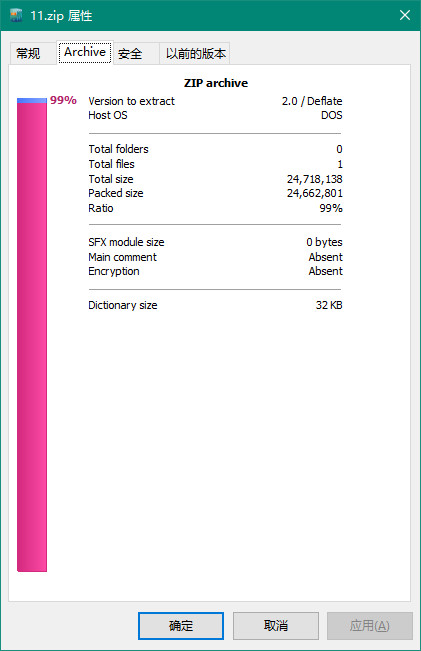
这个标签页说明Windows肯定是支持用户(或者程序员)自定义添加的,如何实现我们的自定义属性标签呢?
原理
这一技术的本质原理就是Windows Shell 扩展。在 Windows 操作系统中,资源管理器(Explorer.exe)的右键菜单和"属性"对话框并非一成不变。微软提供了 Shell Extensions(外壳扩展) 机制,允许第三方开发者通过编写 COM (Component Object Model) 组件 来注入自定义的功能。具体原理如下:
触发机制:当用户在资源管理器中右键点击特定扩展名文件(例如*.zip)并选择"属性"时,Windows 会查询注册表,寻找与扩展名关联的 COM 组件。
接口调用:Windows 加载我们的 DLL,并通过 COM 接口调用 IShellPropSheetExt 的相关方法,询问是否需要添加新的标签页。
UI 渲染:如果返回需要添加,Windows 会在属性对话框中开辟一个区域,交由我们的自定义 WinForms 控件进行 UI 渲染。
实现
知道原理以后,我们就可以自己来实现了,不过在实现过程中还要考虑工具的问题。首先使用C/ C++或者其他语言肯定能实现,但是编写原生 COM 组件极其繁琐,如果有现成的轮子,直接用就好,这里选择C#语言,结合开源框架 SharpShell。它完美封装了底层的 COM 接口,让我们能够用纯 C# 和 WinForms 技术来开发 Shell 扩展。
这里以一个查看.cs源码文件属性为例,论述详细的技术步骤。
一、 环境准备与项目创建
创建项目:打开 Visual Studio,新建一个项目,选择 "类库 (.NET Framework)"(建议 .NET Framework 4.7.2 或更高版本),命名为 CsThumbnailExt。
安装 SharpShell:在"解决方案资源管理器"中右键点击项目 -> "管理 NuGet 程序包" -> 搜索并安装 SharpShell(本项目基于 2.7.2 版本)。
配置目标平台:右键点击项目 -> "属性" -> "生成"选项卡 -> 将"目标平台"修改为 x64(现代 Windows 资源管理器均为 64 位,否则扩展无法加载)。
二、 编写核心代码
在项目中创建两个 C# 类文件:
创建 UI 控件 (CodePreviewControl.cs)
创建一个继承自 SharpPropertyPage 的类。
在构造函数中接收文件路径,初始化 Panel(开启 AutoScroll)和 PictureBox(设置 SizeMode.Normal)。
编写 RenderCodeToImage() 方法,使用 File.ReadLines().Take(50) 读取前 50 行代码。
编写 DrawHighlightedLine() 方法,利用正则表达式匹配 C# 关键字、字符串和注释,并使用 System.Drawing.Graphics 在内存中绘制带 VS 深色主题配色的图片。
详细代码如下:
cs
using System;
using System.Collections.Generic;
using System.Drawing;
using System.Drawing.Drawing2D;
using System.Drawing.Imaging;
using System.Drawing.Text;
using System.IO;
using System.Linq;
using System.Text.RegularExpressions;
using System.Windows.Forms;
using SharpShell.SharpPropertySheet;

namespace CsThumbnailExt
{
    public partial class CodePreviewControl : SharpPropertyPage
    {
        private Panel scrollPanel;
        private PictureBox pictureBox;
        private string _filePath;

        // C# 关键字列表
        private readonly HashSet<string> _csharpKeywords = new HashSet<string>(StringComparer.Ordinal)
        {
            "abstract", "as", "base", "bool", "break", "byte", "case", "catch", "char", "checked",
            "class", "const", "continue", "decimal", "default", "delegate", "do", "double", "else",
            "enum", "event", "explicit", "extern", "false", "finally", "fixed", "float", "for",
            "foreach", "goto", "if", "implicit", "in", "int", "interface", "internal", "is", "lock",
            "long", "namespace", "new", "null", "object", "operator", "out", "override", "params",
            "private", "protected", "public", "readonly", "ref", "return", "sbyte", "sealed", "short",
            "sizeof", "stackalloc", "static", "string", "struct", "switch", "this", "throw", "true",
            "try", "typeof", "uint", "ulong", "unchecked", "unsafe", "ushort", "using", "virtual",
            "void", "volatile", "while"
        };

        public CodePreviewControl(string filePath)
        {
            _filePath = filePath;
            this.PageTitle = "缩略图";
            // 1. 初始化外层滚动面板
            scrollPanel = new Panel
            {
                Dock = DockStyle.Fill,
                BackColor = Color.FromArgb(30, 30, 30),
                AutoScroll = true // 【关键】开启自动滚动条
            };
            // 2. 初始化 PictureBox
            pictureBox = new PictureBox
            {
                BackColor = Color.FromArgb(30, 30, 30),
                SizeMode = PictureBoxSizeMode.Normal // 【关键】改为 Normal,让图片保持原始大小
            };
            // 3. 将 PictureBox 放入 Panel
            scrollPanel.Controls.Add(pictureBox);
            this.Controls.Add(scrollPanel);
            // 渲染代码图片
            RenderCodeToImage();
        }

        private void RenderCodeToImage()
        {
            try
            {
                if (string.IsNullOrEmpty(_filePath) || !File.Exists(_filePath))
                {
                    pictureBox.Image = GenerateErrorImage("File not found.");
                    return;
                }

                // 读取前 50 行
                var lines = File.ReadLines(_filePath).Take(50).ToList();
                if (lines.Count == 0) return;

                // 字体与颜色配置
                Font codeFont = new Font("Consolas", 10f, FontStyle.Regular, GraphicsUnit.Pixel);
                Color keywordColor = Color.FromArgb(86, 156, 214);
                Color stringColor = Color.FromArgb(214, 157, 133);
                Color commentColor = Color.FromArgb(106, 153, 85);
                Color textColor = Color.FromArgb(212, 212, 212);
                Color lineNumberColor = Color.FromArgb(100, 100, 100);

                int lineHeight = 16;
                int lineNumberWidth = 40;
                int padding = 15;

                // 动态计算图片宽度
                int maxLineWidth = 0;
                using (Graphics tempG = Graphics.FromHwnd(IntPtr.Zero))
                {
                    foreach (var line in lines)
                    {
                        SizeF size = tempG.MeasureString(line, codeFont);
                        if (size.Width > maxLineWidth) maxLineWidth = (int)size.Width;
                    }
                }

                int imgWidth = lineNumberWidth + maxLineWidth + padding * 2;
                int imgHeight = lines.Count * lineHeight + padding * 2;

                // 创建位图
                Bitmap bmp = new Bitmap(imgWidth, imgHeight, PixelFormat.Format32bppArgb);
                using (Graphics g = Graphics.FromImage(bmp))
                {
                    g.SmoothingMode = SmoothingMode.AntiAlias;
                    g.TextRenderingHint = TextRenderingHint.ClearTypeGridFit;
                    g.Clear(Color.FromArgb(30, 30, 30));

                    for (int i = 0; i < lines.Count; i++)
                    {
                        int y = padding + i * lineHeight;

                        // 绘制行号
                        string lineNum = (i + 1).ToString();
                        g.DrawString(lineNum, codeFont, new SolidBrush(lineNumberColor), padding, y);

                        // 传入原始行,保留缩进
                        DrawHighlightedLine(g, lines[i], codeFont, padding + lineNumberWidth, y,
                            keywordColor, stringColor, commentColor, textColor);
                    }
                }

                // 【关键】将图片赋值后,同步设置 PictureBox 的大小,这样 Panel 才能正确触发水平滚动条
                pictureBox.Image = bmp;
                pictureBox.Size = bmp.Size;
            }
            catch (Exception ex)
            {
                pictureBox.Image = GenerateErrorImage($"Render Error:\n{ex.Message}");
            }
        }

        /// <summary>
        /// 核心:逐词解析并绘制带颜色的文本,完美保留缩进
        /// </summary>
        private void DrawHighlightedLine(Graphics g, string line, Font font, float x, float y,
            Color kwColor, Color strColor, Color cmtColor, Color txtColor)
        {
            // 如果整行是注释,直接绘制并返回
            if (line.TrimStart().StartsWith("//"))
            {
                g.DrawString(line, font, new SolidBrush(cmtColor), x, y);
                return;
            }

            // 使用正则分词
            string pattern = @"(\b(" + string.Join("|", _csharpKeywords) + @")\b)|(""[^""]*"")|(//.*)|([^""\w]+|\w+)";
            var matches = Regex.Matches(line, pattern);

            float currentX = x;
            foreach (Match match in matches)
            {
                Color color = txtColor;
                if (match.Groups[1].Success) color = kwColor;
                else if (match.Groups[3].Success) color = strColor;
                else if (match.Groups[4].Success) color = cmtColor;

                SizeF size = g.MeasureString(match.Value, font);
                g.DrawString(match.Value, font, new SolidBrush(color), currentX, y);
                currentX += size.Width;
            }
        }

        private Image GenerateErrorImage(string message)
        {
            Bitmap bmp = new Bitmap(400, 100);
            using (Graphics g = Graphics.FromImage(bmp))
            {
                g.Clear(Color.White);
                g.DrawString(message, new Font("Arial", 10), Brushes.Red, 10, 10);
            }
            return bmp;
        }
    }
}
创建主扩展类 (CsPropertySheet.cs)
创建一个继承自 SharpPropertySheet 的类。
添加 ComVisible(true)、Guid("你的唯一GUID") 和 COMServerAssociation(AssociationType.ClassOfExtension, ".cs") 属性。
重写 CanShowSheet():判断 SelectedItemPaths 是否包含且仅包含一个 .cs 文件。
重写 CreatePages():获取选中文件的路径,实例化 CodePreviewControl,并将其作为 SharpPropertyPage 返回。
详细代码如下:
cs
using SharpShell.Attributes;
using SharpShell.SharpPropertySheet;
using System;
using System.Collections.Generic;
using System.Linq;
using System.Runtime.InteropServices;

namespace CsThumbnailExt
{
    [ComVisible(true)]
    // VS 工具 -> 创建 GUID 中生成一个新的 GUID
    [Guid("3B993A80-68CB-4A58-8A1F-33E4FB45026B")]
    [ClassInterface(ClassInterfaceType.None)]
    [COMServerAssociation(AssociationType.ClassOfExtension, ".cs")]
    public class CsPropertySheet : SharpPropertySheet
    {
        protected override bool CanShowSheet()
        {
            if(SelectedItemPaths == null || SelectedItemPaths.Count() == 0)
                return false;
            if (!SelectedItemPaths.First().EndsWith(".cs", StringComparison.OrdinalIgnoreCase))
                return false;
            return true;
        }

        protected override IEnumerable<SharpPropertyPage> CreatePages()
        {
            var pages = new List<SharpPropertyPage>();
            //在这里获取文件路径,并传给 CodePreviewControl
            string filePath = SelectedItemPaths.First();
            var previewPage = new CodePreviewControl(filePath);
            pages.Add(previewPage);
            return pages;
        }
    }
}
三、 编写自动化部署脚本
在项目根目录下创建两个纯 CMD 批处理文件,用于一键注册和注销:
Register.bat(注册脚本)
包含 VBS 自动提权逻辑(通过 net session 判断并请求管理员权限)。
调用 C:\Windows\Microsoft.NET\Framework64\v4.0.30319\regasm.exe /codebase 注册编译生成的 DLL。
注册成功后,自动执行 taskkill /f /im explorer.exe 和 start explorer.exe 重启资源管理器。
详细代码如下:
bash
@echo off
::  Actual DLL file name
set DLL_NAME=CSPropertySheetExt.dll

:: 1. Check if running as Administrator. If not, elevate privileges via VBS
net session >nul 2>&1
if %errorLevel% neq 0 (
    echo Requesting Administrator privileges...
    echo Set UAC = CreateObject^("Shell.Application"^) > "%temp%\getadmin.vbs"
    echo UAC.ShellExecute "%~f0", "", "", "runas", 1 >> "%temp%\getadmin.vbs"
    "%temp%\getadmin.vbs"
    del "%temp%\getadmin.vbs"
    exit /b
)

echo ==========================================
echo    Registering SharpShell Extension...
echo ==========================================

:: 2. Get the current script directory
set CURRENT_DIR=%~dp0

:: 3. Register using the 64-bit regasm (Modern Windows Explorer is 64-bit)
"C:\Windows\Microsoft.NET\Framework64\v4.0.30319\regasm.exe" /codebase "%CURRENT_DIR%%DLL_NAME%"

if %errorLevel% equ 0 (
    echo.
    echo [SUCCESS] DLL registered successfully!
    echo Restarting Windows Explorer to apply changes...
    taskkill /f /im explorer.exe >nul 2>&1
    timeout /t 2 /nobreak >nul
    start explorer.exe
    echo [DONE] Explorer has restarted. Please right-click a .cs file to check the result.
) else (
    echo.
    echo [FAILED] Registration failed! Please check if the DLL is locked or if the GUID is correct.
)

echo ==========================================
pause
Unregister.bat(注销脚本)
同样包含 VBS 提权逻辑。
调用 regasm.exe /unregister 卸载 DLL。
自动重启资源管理器。
详细代码如下:
bash
@echo off
:: antual dll
set DLL_NAME=CSPropertySheetExt.dll

set CURRENT_DIR=%~dp0

:: Check if running as Administrator. If not, elevate privileges via VBS
net session >nul 2>&1
if %errorLevel% neq 0 (
    echo Requesting Administrator privileges...
    echo Set UAC = CreateObject^("Shell.Application"^) > "%temp%\getadmin.vbs"
    echo UAC.ShellExecute "%~f0", "", "", "runas", 1 >> "%temp%\getadmin.vbs"
    "%temp%\getadmin.vbs"
    del "%temp%\getadmin.vbs"
    exit /b
)

echo ==========================================
echo    Unregistering SharpShell Extension...
echo ==========================================

:: Unregister the assembly
"C:\Windows\Microsoft.NET\Framework64\v4.0.30319\regasm.exe" /unregister "%CURRENT_DIR%%DLL_NAME%"

if %errorLevel% equ 0 (
    echo.
    echo [SUCCESS] DLL unregistered successfully!
    echo Restarting Windows Explorer...
    taskkill /f /im explorer.exe >nul 2>&1
    timeout /t 2 /nobreak >nul
    start explorer.exe
    echo [DONE] Explorer has restarted.
) else (
    echo.
    echo [FAILED] Unregistration failed!
)

echo ==========================================
pause
四、 编译、测试与部署
生成 DLL:在 Visual Studio 生成解决方案,确保输出目录下有 CSPropertySheetExt.dll。
执行注册:将第三步的注册和取消注册的批处理文件放到dll相同目录下,右键点击 Register.bat,选择 "以管理员身份运行"。
验证效果:随便找一个 .cs 文件,右键点击 -> "属性",在弹出的窗口中切换到 "代码缩略图" 标签页,查看代码预览、语法高亮及超长代码的水平滚动条是否正常。
消除警告(可选):如果注册时出现 RA0000 警告,可在项目属性的"签名"选项卡中勾选"为程序集签名",生成 .snk 密钥文件后重新编译注册。
五、分析及运行效果
当用户右键点击 .cs 文件并打开属性时,效果如下:
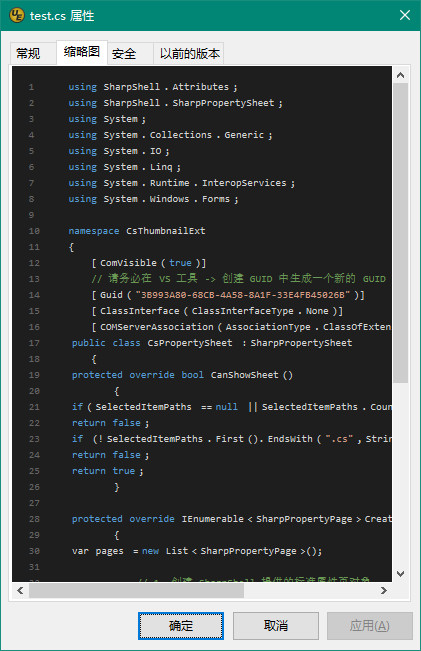
那么这套操作背后程序都经历了什么呢?程序会经历以下生命周期:
第一步:系统拦截与实例化
Windows 发现文件是 .cs 后缀,加载我们的 DLL。SharpShell 实例化 CsPropertySheet 类。
第二步:权限与可见性判断 (CanShowSheet)
系统调用 CanShowSheet()。程序检查 SelectedItemPaths 集合,确认当前只选中了一个文件,且后缀为 .cs。如果条件满足,返回 true,允许创建页面。
第三步:创建页面与数据注入 (CreatePages)
系统调用 CreatePages()。程序从 SelectedItemPaths.First() 获取文件的绝对路径,将其作为参数传入 new CodePreviewControl(filePath),然后将这个控件包装成 SharpPropertyPage 返回给 Windows。
第四步:UI 初始化与图片渲染 (RenderCodeToImage)
在 CodePreviewControl 的构造函数中,程序开始执行核心渲染逻辑:
读取文件:使用 File.ReadLines().Take(50) 安全地读取前 50 行代码,防止大文件导致资源管理器卡死。
动态计算尺寸:遍历读取到的代码行,利用 Graphics.MeasureString 找出最宽的一行,动态计算出图片的精确宽度,确保超长代码不会被截断。
内存绘制 (GDI+):创建一个 Bitmap,利用 Graphics 对象在内存中逐行绘制。通过正则表达式 (Regex.Matches) 将代码分词,识别出关键字、字符串、注释,并赋予不同的颜色(VS 深色主题配色)。同时保留前导空格,完美还原代码缩进。
滚动条适配:将绘制好的 Bitmap 赋值给 PictureBox(设置为 SizeMode.Normal),并将其放入开启了 AutoScroll = true 的 Panel 中。当图片宽度超过面板时,水平滚动条自动出现。
六、注意事项
修改代码后必须重启 Explorer:Windows 会缓存已加载的 Shell 扩展 DLL,如果不重启资源管理器,修改后的代码不会生效。
性能红线:永远不要在 Shell 扩展中读取整个大文件。限制预览行数(如 50 行)是防止 explorer.exe 假死或崩溃的最佳实践。
异常捕获:所有文件 IO 和 GDI+ 绘图操作必须包裹在 try-catch 中,防止未处理的异常导致整个桌面环境崩溃。