Qt 实现魔法导航菜单源码分享
- 一、效果展示
- 二、源码分享
- 三、实现原理
-
- [1、Qt6 事件系统概述](#1、Qt6 事件系统概述)
- [2、 截图工具中的关键事件详解](#2、 截图工具中的关键事件详解)
-
- [2.1 、paintEvent - 绘图事件](#2.1 、paintEvent - 绘图事件)
- [2.2、 鼠标事件三部曲](#2.2、 鼠标事件三部曲)
-
- [mousePressEvent - 鼠标按下](#mousePressEvent - 鼠标按下)
- [mouseMoveEvent - 鼠标移动](#mouseMoveEvent - 鼠标移动)
- [mouseReleaseEvent - 鼠标释放](#mouseReleaseEvent - 鼠标释放)
- 3、事件与信号槽的协同
-
- [3.1、 事件处理流程](#3.1、 事件处理流程)
- [3.2 、关键技术点](#3.2 、关键技术点)
-
- [3.2.1 、全屏遮罩窗口](#3.2.1 、全屏遮罩窗口)
- [3.2.2 、屏幕捕获](#3.2.2 、屏幕捕获)
- [3.2.3、 图像处理](#3.2.3、 图像处理)
- [4、Qt6 事件系统的新特性](#4、Qt6 事件系统的新特性)
-
- [4.1、 改进的事件过滤器](#4.1、 改进的事件过滤器)
- [4.2、 手势事件支持](#4.2、 手势事件支持)
- [4.3、 输入法事件优化](#4.3、 输入法事件优化)
- 5、性能优化建议
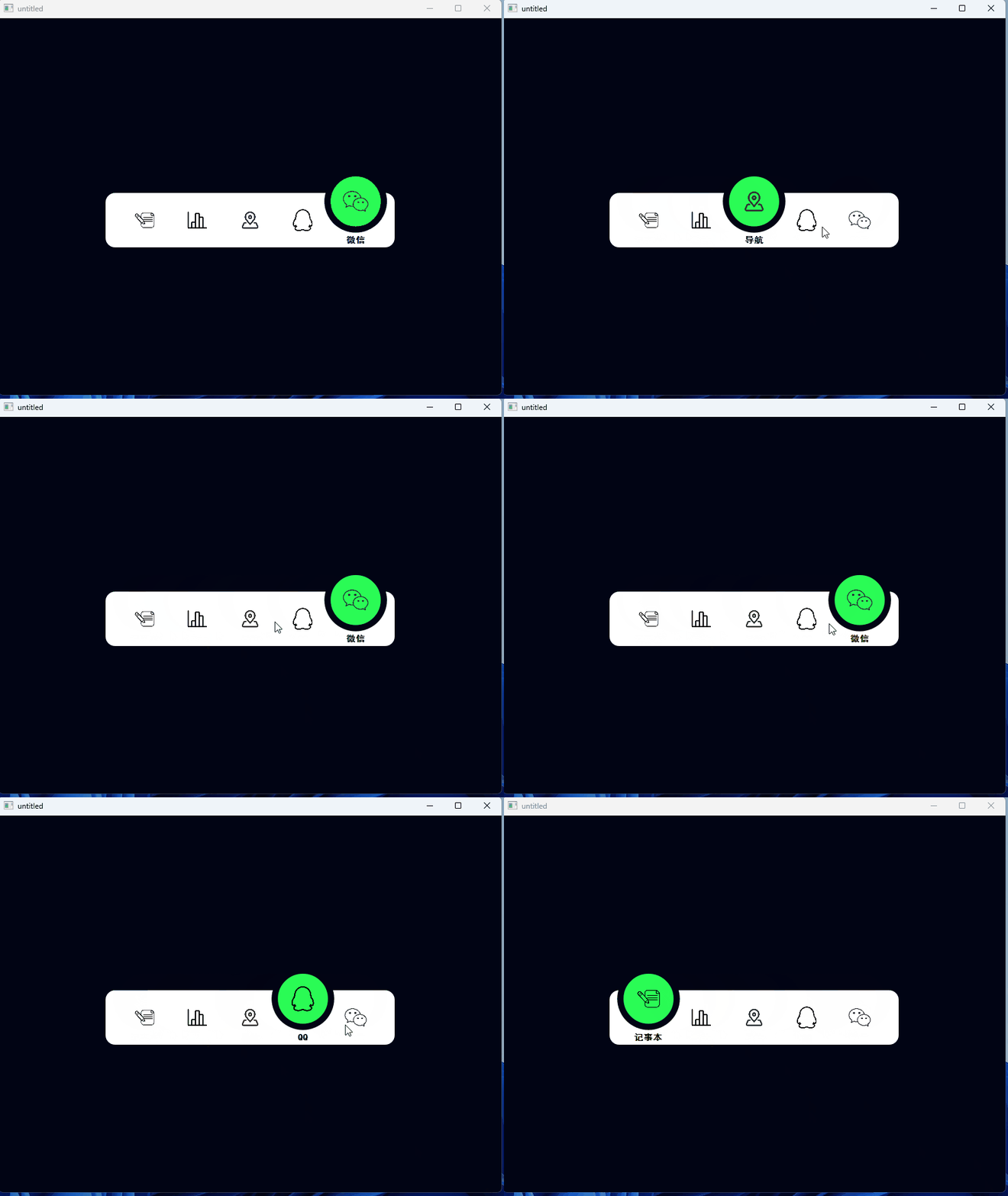
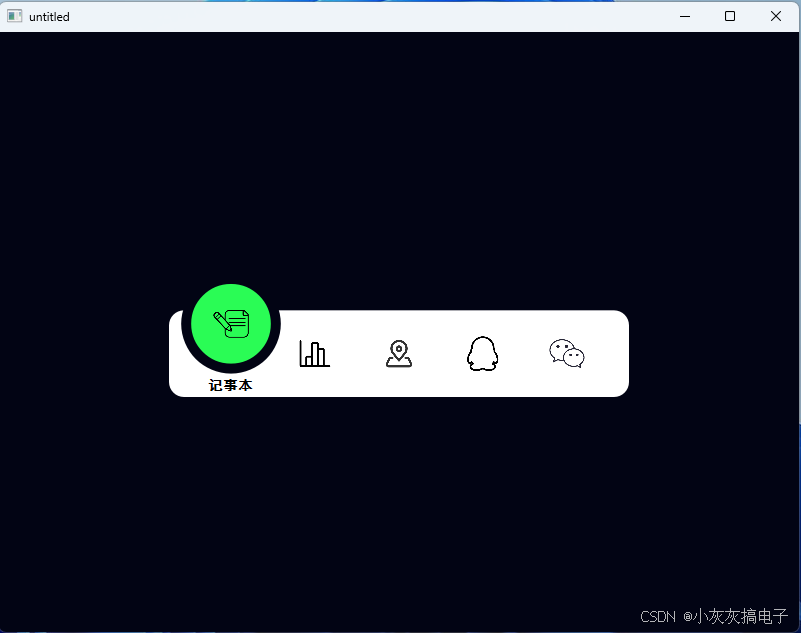
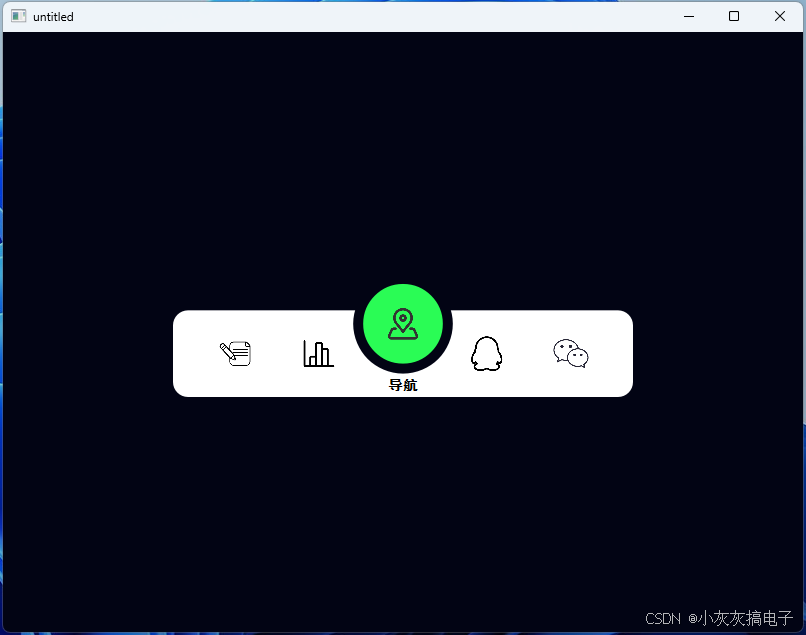
一、效果展示
二、源码分享
1、bottomnavwidget.h
cpp
#ifndef BOTTOMNAVWIDGET_H
#define BOTTOMNAVWIDGET_H

#include <QWidget>
#include <QPainter>
#include <QTimer>
#include <QPixmap>
#include <QFont>

struct NavItem
{
    QString iconPath;
    QString text;
};

class BottomNavWidget : public QWidget
{
    Q_OBJECT
public:
    explicit BottomNavWidget(QWidget *parent = nullptr);

protected:
    void paintEvent(QPaintEvent *event) override;
    void mousePressEvent(QMouseEvent *event) override;

private slots:
    void _anim_tick();

private:
    void _calc_layout();
    double get_progress() const;
    double lerp(double a, double b, double t) const;

    // 配色
    QColor root_bg;
    QColor bar_bg;
    int bar_radius;
    QColor indicator_inner_color;
    QColor font_color;

    // 动画参数
    const int anim_duration = 200;
    const int frame_interval = 8;
    const int step_total = anim_duration / frame_interval;

    // 导航数据
    QVector<NavItem> nav_data;
    int count = 0;
    QVector<QPixmap> icon_pixmaps;

    // 选中索引
    int index = 2;
    int target_index = 2;
    int anim_frame = 0;
    bool is_animating = false;

    // 布局常量
    int bar_side_margin = 20;
    double bar_h = 0.0;
    double bar_y = 0.0;
    double item_w = 0.0;
    double indicator_diameter = 0.0;
    double icon_up_offset = 0.0;
    double text_h = 0.0;
    double text_hidden_y = 0.0;
    double text_show_y = 0.0;

    // 动画定时器
    QTimer* anim_timer;
};

#endif // BOTTOMNAVWIDGET_H
2、bottomnavwidget.cpp
cpp
#include <QApplication>
#include <QMainWindow>
#include <QVBoxLayout>
#include <QMouseEvent>
#include "BottomNavWidget.h"

BottomNavWidget::BottomNavWidget(QWidget *parent)
    : QWidget(parent), anim_timer(new QTimer(this))
{
    setFixedSize(460, 130);
    setMouseTracking(true);

    // 配色初始化
    root_bg = QColor("#020414");
    bar_bg = QColor("#ffffff");
    bar_radius = 15;
    indicator_inner_color = QColor("#2AFC55");
    font_color = QColor("#000000");

    // 导航数据
    nav_data = {
                 {":/image/image/11.svg", "记事本"},
                 {":/image/image/22.svg", "统计"},
                 {":/image/image/33.svg", "导航"},
                 {":/image/image/44.svg", "QQ"},
                 {":/image/image/55.svg", "微信"},
                 };
    count = nav_data.size();

    // 加载图标
    for (const auto& item : nav_data)
    {
        QPixmap pix(item.iconPath);
        icon_pixmaps.append(pix);
    }

    // 默认选中第三个导航
    index = 2;
    target_index = 2;
    anim_frame = 0;
    is_animating = false;

    bar_side_margin = 20;

    // 定时器配置
    anim_timer->setInterval(frame_interval);
    connect(anim_timer, &QTimer::timeout, this, &BottomNavWidget::_anim_tick);

    _calc_layout();
}

void BottomNavWidget::_calc_layout()
{
    double w = width();
    double h = height();
    // 底部白色栏高度
    bar_h = h / 3 * 2;
    bar_y = h - bar_h;
    item_w = (w - bar_side_margin * 2) / count;
    // 绿色大圆尺寸
    indicator_diameter = bar_h * 1.15 - 10;
    // 图标上浮高度
    icon_up_offset = h / 3.5;
    // 文字尺寸
    text_h = h / 8;
    // 文字初始位置:控件底部外面,完全看不见
    text_hidden_y = h;
    // 文字弹出目标位置:白色栏下方、绿色大圆底部
    text_show_y = h - 20;
}

void BottomNavWidget::_anim_tick()
{
    anim_frame++;
    if (anim_frame >= step_total)
    {
        index = target_index;
        is_animating = false;
        anim_timer->stop();
        anim_frame = 0;
    }
    update();
}

void BottomNavWidget::mousePressEvent(QMouseEvent *event)
{
    double x = event->position().x() - bar_side_margin;
    int click_idx = static_cast<int>(x / item_w);
    if (click_idx >= 0 && click_idx < count && !is_animating)
    {
        if (target_index != click_idx)
        {
            target_index = click_idx;
            is_animating = true;
            anim_frame = 0;
            anim_timer->start();
        }
    }
    QWidget::mousePressEvent(event);
}

double BottomNavWidget::get_progress() const
{
    if (!is_animating)
        return 1.0;
    return static_cast<double>(anim_frame) / step_total;
}

double BottomNavWidget::lerp(double a, double b, double t) const
{
    return a + (b - a) * t;
}

void BottomNavWidget::paintEvent(QPaintEvent *event)
{
    Q_UNUSED(event);
    QPainter painter(this);
    // 抗锯齿渲染
    painter.setRenderHints(QPainter::Antialiasing
                           | QPainter::TextAntialiasing
                           | QPainter::SmoothPixmapTransform);

    double w = width();
    double h = height();
    painter.setPen(Qt::NoPen);

    // 1. 全局黑色背景
    painter.setBrush(root_bg);
    painter.drawRect(rect());

    // 2. 底部白色圆角导航栏
    QRectF bar_rect(0, bar_y, w, bar_h);
    painter.setBrush(bar_bg);
    painter.drawRoundedRect(bar_rect, bar_radius, bar_radius);

    double t = get_progress();
    int curr_idx = index;
    int target_idx = target_index;

    double icon_size = item_w * 0.42;
    // 绘制所有图标
    for (int i = 0; i < count; i++)
    {
        double left_x = i * item_w;
        double base_icon_y = bar_y + (bar_h - icon_size) / 2.0;
        double up_icon_y = base_icon_y - icon_up_offset;
        double draw_icon_y;

        // 图标上浮插值逻辑
        if (i == curr_idx && is_animating)
        {
            draw_icon_y = lerp(up_icon_y, base_icon_y, t);
        }
        else if (i == target_idx && is_animating)
        {
            draw_icon_y = lerp(base_icon_y, up_icon_y, t);
        }
        else if (i == index && !is_animating)
        {
            draw_icon_y = up_icon_y;
        }
        else
        {
            draw_icon_y = base_icon_y;
        }

        QRectF icon_rect(
            left_x + (item_w - icon_size) / 2.0 + bar_side_margin,
            draw_icon_y,
            icon_size,
            icon_size
            );
        // 修复:补充源rect
        painter.drawPixmap(icon_rect, icon_pixmaps[i], icon_pixmaps[i].rect());
    }

    // 3. 绘制绿色悬浮大圆指示器
    double curr_ind_x = curr_idx * item_w + (item_w - indicator_diameter) / 2.0;
    double target_ind_x = target_idx * item_w + (item_w - indicator_diameter) / 2.0;
    double ind_x = lerp(curr_ind_x, target_ind_x, t);
    double ind_y = bar_y - indicator_diameter * 0.35;

    QRectF ind_circle(ind_x + bar_side_margin, ind_y, indicator_diameter, indicator_diameter);
    painter.setBrush(indicator_inner_color);
    QPen pen;
    pen.setColor(root_bg);
    pen.setWidth(10);
    painter.setPen(pen);
    painter.drawEllipse(ind_circle);

    // 大圆内部图标
    double sel_icon_size = indicator_diameter * 0.45;
    int sel_idx = qRound(lerp(curr_idx, target_idx, t));
    QRectF sel_icon_rect(
        ind_x + (indicator_diameter - sel_icon_size) / 2.0 + bar_side_margin,
        ind_y + (indicator_diameter - sel_icon_size) / 2.0,
        sel_icon_size,
        sel_icon_size
        );
    // 修复:补充源rect
    painter.drawPixmap(sel_icon_rect, icon_pixmaps[sel_idx], icon_pixmaps[sel_idx].rect());

    // 绘制底部文字(顶层)
    QFont font;
    font.setPixelSize(14);
    font.setFamily("SimHei");
    font.setBold(true);
    painter.setFont(font);
    painter.setPen(font_color);

    for (int i = 0; i < count; i++)
    {
        double left_x = i * item_w;
        double text_y;
        // 文字Y插值逻辑
        if (i == curr_idx && is_animating)
        {
            text_y = lerp(text_show_y, text_hidden_y, t);
        }
        else if (i == target_idx && is_animating)
        {
            text_y = lerp(text_hidden_y, text_show_y, t);
        }
        else if (i == index && !is_animating)
        {
            text_y = text_show_y;
        }
        else
        {
            text_y = text_hidden_y;
        }

        QRectF text_rect(left_x + bar_side_margin, text_y, item_w, text_h);
        painter.drawText(text_rect, Qt::AlignHCenter | Qt::AlignVCenter, nav_data[i].text);
    }
}
3、mainWindow.cpp
cpp
#include "mainwindow.h"
#include <QCoreApplication>
#include <QMetaObject>
#include <QMetaProperty>
#include <QMetaMethod>
#include <QDebug>
#include "bottomnavwidget.h"


MainWindow::MainWindow(QWidget *parent)
    : QMainWindow(parent)
{
    this->resize(800,600);
    QWidget* centralWidget = new QWidget(this);
    setCentralWidget(centralWidget);
    centralWidget->setStyleSheet("background-color: #020414;");

    QVBoxLayout* layout = new QVBoxLayout(centralWidget);
    layout->setAlignment(Qt::AlignCenter);
    layout->setContentsMargins(0, 0, 0, 0);
    layout->addWidget(new BottomNavWidget());
}

MainWindow::~MainWindow()
{

}
三、实现原理
本截图工具的核心实现依赖于 Qt6 的事件系统(Event System)和绘图系统(Painting System)。下面详细解析关键事件的工作原理:
1、Qt6 事件系统概述
Qt 采用事件驱动的编程模型,所有用户交互(鼠标点击、键盘输入、窗口重绘等)都通过事件(Event)来传递和处理。事件处理流程如下:
- 事件产生:由操作系统或 Qt 内部产生
- 事件派发 :通过
QApplication::notify()派发到目标对象 - 事件过滤 :可通过
installEventFilter()进行预处理 - 事件处理 :目标对象的
event()方法接收并分发给特定事件处理器
2、 截图工具中的关键事件详解
2.1 、paintEvent - 绘图事件
cpp
void CaptureMask::paintEvent(QPaintEvent *)
{
    QPainter painter(this);
    painter.setRenderHint(QPainter::Antialiasing);

    // 1. 绘制完整屏幕截图作为背景
    painter.drawPixmap(rect(), m_screenBg);

    // 2. 全局半透明黑色遮罩(实现变暗效果)
    QColor darkColor(0, 0, 0, 150);  // RGBA: 黑色,透明度150/255
    painter.fillRect(rect(), darkColor);

    if (m_isDragging)
    {
        QRect selectRect = QRect(m_startPos, m_endPos).normalized();

        // 3. 选区区域重新绘制原图(挖空效果)
        painter.drawPixmap(selectRect, m_screenBg, selectRect);

        // 4. 绘制选区边框和半透明填充
        painter.setPen(QPen(QColor(0, 180, 255), 2));      // 蓝色边框
        painter.setBrush(QColor(0, 160, 255, 60));        // 浅蓝色半透明填充
        painter.drawRect(selectRect);
    }
}原理说明:
paintEvent在以下情况自动触发:- 窗口首次显示
- 窗口被其他窗口遮挡后重新显示
- 调用
update()或repaint()方法 - 窗口大小改变
- 本工具中,每次鼠标移动(
mouseMoveEvent)都会调用update(),从而触发重绘 - 通过分层绘制 实现选区高亮效果:
- 底层:完整屏幕截图
- 中层:全局半透明黑色遮罩(变暗效果)
- 上层:选区区域的原图(挖空效果)+ 蓝色边框
2.2、 鼠标事件三部曲
mousePressEvent - 鼠标按下
cpp
void CaptureMask::mousePressEvent(QMouseEvent *event)
{
    m_isDragging = true;                    // 开始拖拽状态
    m_startPos = event->pos();              // 记录起始位置
    m_endPos = m_startPos;                  // 初始结束位置=起始位置
    update();                               // 触发重绘(绘制起始点)
}
mouseMoveEvent - 鼠标移动
cpp
void CaptureMask::mouseMoveEvent(QMouseEvent *event)
{
    if (!m_isDragging) return;              // 非拖拽状态不处理
    m_endPos = event->pos();                // 更新结束位置
    update();                               // 触发重绘(更新选区矩形)
}
mouseReleaseEvent - 鼠标释放
cpp
void CaptureMask::mouseReleaseEvent(QMouseEvent *)
{
    m_isDragging = false;                   // 结束拖拽状态

    // 计算标准化矩形(确保左上角到右下角)
    QRect rect = QRect(m_startPos, m_endPos).normalized();

    // 从原图中截取选区
    QPixmap result = m_screenBg.copy(rect);

    // 发射信号通知截图完成
    emit captureFinished(result);

    // 关闭遮罩窗口
    this->close();
}事件传递机制:
- Qt 使用
QMouseEvent封装鼠标事件信息 event->pos()返回相对于当前窗口的坐标normalized()确保矩形坐标是标准化的(左上角到右下角)
3、事件与信号槽的协同
3.1、 事件处理流程
用户按下鼠标 → mousePressEvent
      ↓
用户拖动鼠标 → mouseMoveEvent → update() → paintEvent
      ↓
用户释放鼠标 → mouseReleaseEvent
      ↓
发射 captureFinished 信号 → MainWindow::slotOnCaptureDone
3.2 、关键技术点
3.2.1 、全屏遮罩窗口
cpp
// 窗口标志设置
Qt::Window |                    // 作为独立窗口
Qt::FramelessWindowHint |       // 无边框
Qt::WindowStaysOnTopHint        // 始终置顶

// 窗口属性
setAttribute(Qt::WA_DeleteOnClose);         // 关闭时自动删除
setAttribute(Qt::WA_TranslucentBackground, false); // 不透明背景
3.2.2 、屏幕捕获
cpp
// 获取主屏幕
QScreen *screen = QApplication::primaryScreen();

// 捕获整个屏幕(包括所有窗口)
QPixmap fullPix = screen->grabWindow(0);  // 0表示整个屏幕
3.2.3、 图像处理
QPixmap::copy(const QRect &):截取指定区域QPixmap::save():保存到文件QClipboard::setPixmap():复制到剪贴板
4、Qt6 事件系统的新特性
4.1、 改进的事件过滤器
Qt6 增强了事件过滤器的性能,支持更精细的事件拦截和处理。
4.2、 手势事件支持
新增对触摸屏和手势的更好支持,虽然本工具未使用,但在移动端开发中很重要。
4.3、 输入法事件优化
对多语言输入法的支持更加完善。
5、性能优化建议
-
减少不必要的重绘:
- 只在选区变化时调用
update() - 使用
update(QRect)只重绘脏区域
- 只在选区变化时调用
-
内存管理:
- 大尺寸截图及时释放
- 使用
QPixmapCache缓存常用图像
-
响应式设计:
- 在高DPI屏幕上使用
devicePixelRatio适配 - 支持多屏幕截图
- 在高DPI屏幕上使用